Please REGISTER or RENEW your account on RAPiDGATOR.net and support us by doing through all RAPiDGATOR working download links on main posts...
July 22

MusConv Lifetime 4.10.472

Description: More than 125+ music services supported. MusConv- the easiest way to transfer your music data! MusConv transfers playlists, albums, followed artists and liked songs across various services – Spotify, Apple Music, Amazon Music, YouTube, YouTube Music, iTunes, Deezer, Tidal, SoundCloud, Pandora and 125+ music services! Continuously working to bring you new updates and features.

MusConv Features
MusConv transfers playlists, albums, followed artists and liked songs across various services – Spotify, Apple Music, Amazon Music, YouTube, YouTube Music, iTunes, Deezer, Tidal, SoundCloud, Pandora and 125+ music services!
Manage playlists, albums, and artists across more than 125 popular music services
See your most-played songs, artists and albums on Spotify, Apple Music, YouTube Music and other
Browse the most popular songs, artists, and albums on your favorite services
Automatically synchronize playlists and albums between your platforms
Rematch incorrect and failed song matches
Syncing song order

Release Name: MusConv Lifetime 4.10.472
Size: 107.9 MB
Links: HOMEPAGE – NFO – Torrent Search

Download: RAPiDGATOR

4 Comments
July 22

WnSoft PTE AV Studio Pro 12.0.2 Build 1

Description: A Powerful Slideshow Software for PC. Add photos, video clips and music. Apply slide styles. Use keyframe animations. Edit audio clips in the Timeline view. Create HD and 4K videos or Executable files.

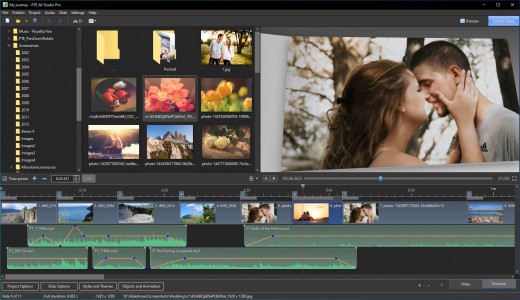
Create a Slideshow or Movie
PTE AV Studio 11 offers you full creative control for your projects. Use the timeline view for perfect synchronization of slides with audio clips on multiple tracks. Powerful keyframe animations with effects. More than 130 templates/styles of animations will help you to easily create your slideshow.

Pan, Zoom, Rotate, 3D
Adjust pan, zoom, rotate, 3D transformations.
Control opacity, blur, unsharp mask, and color effects.

Nested Animation
Create complex parent-child animation of objects.

Images and Video Clips
Mix images and video clips together on the screen.

Slide Styles and Transitions
130+ customizable slide styles, themes and transition effects. Each slide style allows you to easily adjust several parameters of animation. Create new slide styles, themes and transitions and share with other users.

Text Captions
Add text captions with animation. Create text macros from EXIF metadata and apply to all or selected images.

Timeline View
Add and view multiple audio tracks which may be played simultaneously. Synchronize slides with audio clips on the timeline using time points. Link audio clips with slides.

Audio Editor
Envelope tool (keypoint control of sound volume). Edit audio clips: fade in/out, start time, duration, cross-fading.

Objects (Layers)
Add images, video clips, text captions, masks, interactive buttons and more.

Keyframe Animations
Keyframes work like waypoints. Add first keyframe and adjust position and size of an object. Add last keyframe and adjust the final position of an object and its parameters. PTE AV Studio will animate the object between these keyframes using pan, zoom, rotate etc.

Color Adjustments
Adjust the brightness, contrast, levels, hue, saturation of an image/video. Apply a sepia effect and other color filters. Support of color profiles.

Image Adjustments
Crop images and videos, add beautiful white frame and drop shadow. Apply dynamic blur effect. Use zoom in a frame. Apply masking effect.

Motion Blur Effect
This option simulates a shutter effect in a camera and adds a cinematographic look for your show. Parts of objects with a fast motion will be blurred automatically. This feature is available when you create a video.

Audiovisual Shows
PTE AV Studio allows the creation of not only simple slideshows, but also produces high-quality Audiovisual shows containing images, video clips and complex soundtracks. PTE AV Studio is widely used by photographers, camera clubs and AV groups for local, national and international competitions and festivals. Shows created in PTE AV Studio frequently are awarded first place and other prizes in the many events held in the UK, France, Belgium, Italy and other countries around the world.

Release Name: WnSoft PTE AV Studio Pro 12.0.2 Build 1
Size: 112.5 MB
Links: HOMEPAGE – NFO – Torrent Search

Download: RAPiDGATOR
5 Comments
July 22

CoolUtils PDF Combine 8.1.0.77/14

Description: PDF Combine Pro is a life saver for those who need to combine PDF, DOC, TXT, DOCX, HTML, XLS files, images (TIFF, JPEG, PNG) and emails into one PDF. Now you do not have to use several programs and converters to get one PDF. PDF Combine Pro does it in one go. Supported input formats include DOC, DOCX, RTF, TXT, XLS, XLSX, HTML, HTM, MHT, PS, EPS, PRN, PDF, TIFF, JPEG, PNG, PST, EML, MSG.

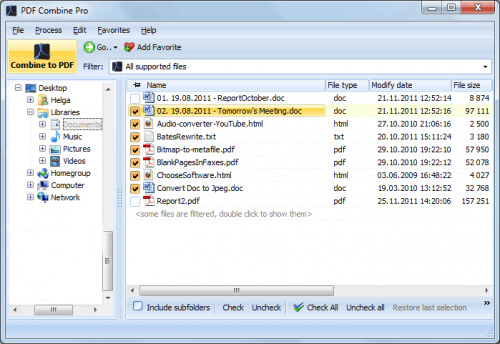
PDF Combine Pro can combine files within folders. For example, you have 3 folders with different file types inside each. The app can produce three combined PDF files.
It can easily create bookmarks that can be used as table of contents.
Users can add custom Cover pages to the combined PDF.
Legal users will appreciate the flexible bates stamping option.
Transparent user interface and full command line support.

Unique options of PDF Combine Pro
With PDF Combine Pro you can combine PDF files as well as DOC, TXT, XLS, HTML, TIFF, JPEG, PNG into one PDF. A unique all-in-one tool!
Combine PDF, Doc, TXT, TIFF files within folders. If you have 10 folders with multiple files in each, you can get 10 PDF files in one process.
Combine PDF files by common name part. The app can analyze the whole file name or any range of characters you set (i.e. analyzing the first 2 characters PEdouglas.pdf, PEmike.pdf, PEhelen.pdf will be combined into one file).
Want more order? Add pagination. Just tick the box, no additional steps are required.
It's easy to change the order of the docs you want to combine; just drag and drop them up or down.
PDF Combine Pro will also offer you to add your digital signature to the combined PDF file.
The interface is very clear. The wizard helps you to make all the settings.
You can also add bookmarks. Use file names, document titles or external file to create your table of contents.
When you combine files of different formatting, some files may not fit. Use fit-to-page option to properly locate all the files in the output PDF.
Use a duplex printer? PDF Combine solves the problem of printing PDF files double sided with an odd number of pages. It adds a blank page if the file has an odd number of pages, so the next file is not printed on the back side of the previous one.
The built-in Preview panel helps you to view each file either scaled or in actual size.
Our app can also function as PDF encrypter, setting user permissions or password protection.
We also offer a special server PDF Combine Pro (SDK). It has no GUI, no interrupting messages.
PDF Combine Pro can be run via command line (get the ready-to-use command line from GUI settings).

Release Name: CoolUtils PDF Combine 8.1.0.77/14
Size: 315.4 MB
Links: HOMEPAGE – NFO – Torrent Search

Download: RAPiDGATOR
4 Comments
July 22

EaseUS Key Finder Pro 4.1.6

Description: EaseUS Key Finder. Restore Windows & Windows Server product keys. Retrieve product licenses when system or hard disk crash. Find product serials for over 10000+ most popular programs.

Lost Product Key? Recover and Backup All Your Product Keys Instantly
When you replace your PC's hard drive, you will have to reinstall and reactivate Windows or Office on your new system. Finding activation keys is time-consuming! Is there any effective way to grab those product keys? Here is a powerful key finder software - EaseUS Key Finder. EaseUS Key Finder is a smart utility that displays ProductIDs, and CD-Keys of Windows and SQL Server, Microsoft Office, Adobe, etc., installed on your computer. Find WiFi codes, browser accounts and passwords.

Retrieve Windows System Product Keys
Whether you want to perform a new install or transfer your Windows license to a new computer, your product key is an important asset you need to have. EaseUS Key Finder allows you to find product key for Windows (Windows 11/10/8/7 and Windows Server) and SQL Server. No specific requirements.

Recover Office, Adobe Product Keys
The loss of product keys also happens occasionally. EaseUS Key Finder regains access to your Windows products key. It allows you to find and store serial numbers of Adobe and Office applications. You can export or copy a number to a secure location with a single click.

Recover Saved Passwords from Web Browser: Chrome, Edge, Firefox, and IE
This smart utility reveals the accounts and passwords stored in the following Web browsers: Internet Explorer, Mozilla Firefox, Google Chrome, and Edge.

Find WiFi Passwords
As laptops automatically log in to the WiFi network, most of us may forget our WiFi passwords without backup. EaseUS Key Finder enables you to unveil your wireless network password on a Windows computer instantly.

Get 10000+ Software Serials
Besides finding Microsoft Office and Adobe product keys, you can also apply EaseUS Key Finder to recover serial numbers of 10000+ most popular software.

Recover Windows Credentials
It can back up your account credentials and related app settings. You can then use it to recover your information on a new device, potentially avoiding being locked out or having to recreate accounts.

Backup Activation Keys
Finding product keys can consume time and money. You can copy your product keys into a Text file or save them to a PDF document.

Recover Key from Dead OS/Disks
EaseUS Key Finder can scan product keys from another dead Windows operating system or unbootable hard disc drive (HDD/SSD).

Release Name: EaseUS Key Finder Pro 4.1.6
Size: 67.6 MB
Links: HOMEPAGE – NFO – Torrent Search

Download: RAPiDGATOR
6 Comments
July 22

Coolmuster Android Assistant 6.1.60

Description: Back up and restore everything on Android device with 1 click. Selectively export and import contacts, SMS, call logs, music, videos, photos, books and etc. Add, transfer, delete and edit contacts on the computer. Send, resend, forward, delete and copy text messages directly on your computer. Manage music and video files on Android. Install and uninstall apps.

Why Should You Choose Coolmuster Android Assistant?

Want A Perfect Contacts & SMS & Call Logs Assistant? Here It Is.
Just end your life of group text messaging or adding contacts one by one manually on your Android phone with Coolmuster Android Assistant. Experience a new texting way here and better manage your contacts, SMS and call logs.
This Android managing tool enables you to send SMS on computer, perform group texting at once, back up SMS, import SMS from computer and delete messages from phone.
Import and export contacts from computer, add new contacts, delete contacts, back up and edit exsiting contacts on computer.
Back up Android call logs to computer, import call logs from computer to phone and delete unwanted call logs on computer smoothly.

Are You An App & Media Fancier? You Can Not Miss It.
If you are an app enthusiast and media fancier, Android Assistant will be your must-have tool because it features with all powerful functions that make you fully enjoy entertainment on the go.
Import installed apps from computer to your Android device with a click. Back up apps from Android to computer and uninstall useless apps on Android quickly from computer.
Android Assistant helps you transfer your wanted music, photos and videos from Android device to computer, add media files from computer and delete unwanted media files without any hassle. You can even manage albums, and move photos from one album to another.
Android Assistant allows you to take screenshot of your phone anytime as you like.

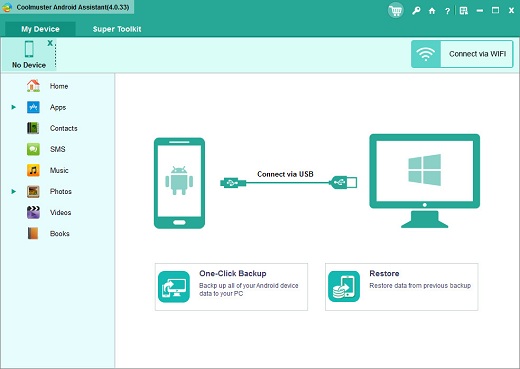
How to Back Up and Restore Android? 1 Click is Enough.
Hate to transfer data from your Android device to computer, or restore from your computer to the Android device one by one? The new features from Android Assistant allow you to back up and restore your Android phone/tablet with just 1 mouse click. Of course, you can also selectively back up and restore the data you want.
1-click to back up contacts, SMS, call logs, photos, videos, music, apps, etc. from Android phone or tablet to computer instantly.
1-click to restore Android data from the backup files to your Android phone without any data loss.
You can connect your Android device to the program via USB cable or WiFi. If you want to connect via WiFi, you need to install Android Assistant (Android version) on your Android device first.

Read-only and Compatible with All Android Brands. 100% Green.
After many times of testing, Android Assistant can be proved 100% secure and works well on almost all popular Android phones and tablets.
A wide range of Android brands are supported by this Android managing tool, including Samsung, Xiaomi, OPPO, Oneplus, TECNO, Infinix, Itel, vivo, Motorola, Honor and many more.
100% Safe application. Performs READ-ONLY operations to avoid causing any damage to the Android data and your computer.
Android Assistant is able to manage more than one Android device simultaneously at the same time.

Release Name: Coolmuster Android Assistant 6.1.60
Size: 24.4 MB
Links: HOMEPAGE – NFO – Torrent Search

Download: RAPiDGATOR

6 Comments
July 22

Blackmagic Design Fusion Studio 21.0.3

Description: The world’s most advanced visual effects, 3D, VR and motion graphics solution! Fusion is the world’s most advanced compositing software for visual effects artists, broadcast and motion graphic designers, and 3D animators. Over the last 30 years, Fusion has been used on thousands of Hollywood blockbuster movies and television shows.

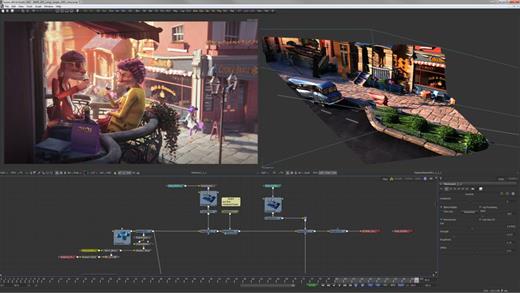
Fusion features a powerful node based interface that lets you quickly and easily create sophisticated effects by connecting different types of image processing tools together! You get a massive range of tools, incredible VR and 3D support, GPU accelerated performance, unlimited network rendering and more! Fusion gives you everything you need to create exciting broadcast graphics, dramatic titles, and even major feature film visual effects!

What’s New in Fusion 20:
Compositions you create on the Fusion page can now be saved as a template and used on the edit or cut page! New animation curve modifiers can be used to automatically retime animations when you change their duration in an edit. Audio playback with waveform display makes it easier to create precisely timed animations, there are shared markers with the edit page and more. In addition, 27 GPU accelerated Resolve FX have been added to the Fusion page, including the noise reduction and sharpening tools from the color page! New node view bookmarks make it easy to navigate large comps, the toolbar can be customized with your favorite tools, and vertical layouts are supported in the node editor.

Build Your Own Effects with Customizable Templates
Fusion effect templates let you create any effect imaginable and apply them to clips on the edit and cut pages! Simply build a composition, save it as a macro, define the parameters you want to make visible, and save it in the correct location. Just drag Fusion effect from the library onto any clip!

Automatically Retime Animations
Animation curve modifiers let you easily stretch or squish keyframes and add bounce, mirror or loop animations that automatically change when the duration of the composition changes. When you drop Fusion titles or effects onto the timeline and change its duration, the animation adjusts accordingly!

Sync Audio. Animations
The Fusion page can now playback audio from the edit or cut page timeline. You can choose a mix down from the timeline, or you can listen to the source clip’s audio. Waveforms are displayed in the keyframe editor, allowing you to create precisely timed animations that are in sync with the audio!

Custom Vector Shapes
Vector shape tools make it easier to create motion graphics! You get ellipsis, rectangles, polygons and stars, along with boolean operators for combining shapes to create intricate designs. Grid, jitter, offset and transform, let you customize animations. Shapes can also be used as particle sources!

GPU Accelerated Resolve FX
The Fusion page has 27 new GPU accelerated Resolve FX. This includes the color page’s noise reduction and sharpening tools, along with lens blur, light effects, color effects, revival image restoration tools and more. You also get texture and stylize, temporal effects, warping and beauty tools.

Personalize Your Workflow
Node tree bookmarks let you quickly navigate to any part of the node tree in a large composition. Customizable toolbars let you quickly switch toolbars based on the current task. Vertical node tree layouts give you more room to view the spline and keyframe editors when creating animations, and more.

Hollywood’s Biggest Blockbusters
Thousands of Hollywood’s biggest blockbusters and hit television shows use Fusion to create their groundbreaking visual effects. Fusion has been used on feature films like Ant-Man, Red Sparrow and London Has Fallen, as well as hit television shows like Empire, NCIS and Emergence. Fusion also plays a major role in the development of cinematics for major video games such as Dawn of War III, Halo 5 and more!

Nodes are a Much Faster Way to Work!
Nodes are incredibly easy to use, especially as scenes become more complex. Fusion’s nodes are small icons that represent effects, filters and other image processing operations. Nodes can be easily connected together to build larger and more complex visual effects. Tools, images, and objects can be combined in any order to create unlimited visual effects. Simply click on a node to quickly adjust any single part of your project. That’s much faster than a timeline based tool because you don’t need to hunt through nested stacks of confusing layers and filters!

Get the most Powerful VFX Software Available!
Whether you need to pull a key, track objects, retouch images, animate titles, or create amazing particle effects, Fusion has a massive toolset that lets you tackle the most demanding jobs. You get a true 3D workspace along with tools for compositing, keying, painting, animation, virtual reality, stereoscopic 3D and more. Fusion combines effects and motion graphics, along with 3D modeling and rendering into a single toolset. That means you can import and render 3D models and scenes with the rest of your composite in Fusion. You don’t have to pre‑render assets or transfer between multiple applications!

And more…

Minimum System Requirements for Windows
Windows 10 Creators Update.
16 GB of system memory or 32 GB when using Fusion.
For monitoring, Blackmagic Design Desktop Video 12.9 or later.
Integrated GPU or discrete GPU with at least 4 GB of VRAM.
GPU which supports OpenCL 1.2 or CUDA 12.8.
AMD/Intel official drivers from your GPU manufacturer.
NVIDIA Studio driver 570.65 or newer.

Release Name: Blackmagic Design Fusion Studio 21.0.3
Size: 6.2 GB
Links: HOMEPAGE – NFO – Torrent Search

Download: RAPiDGATOR

1 Comments
July 22

MiniMeters 1.0.30.358

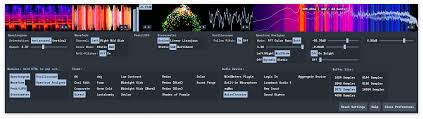
Description: MiniMeters is a simple audio metering Application & Plug-In suite for Windows, macOS, and Linux. In the Standalone app, monitor any stereo Input, Output*, or use the included Audio Server plug-in to send audio into the MiniMeters app. New in v1.0: MiniMeters now includes plug-in versions of each meter and the new Quad Layout. Customize the layout of meters in a Horizontal bar, pop out meters to create a custom layout, or swap to the new Quad Layout for a simple display to cover most needs.

Features
7 modules to choose from to build your perfect metering setup: Spectrogram, Waveform, Loudness, Stereometer, Oscilloscope, VU, and Spectrum.
Arrange each module in any order in a Horizontal bar, pop them out to separate windows to create a custom layout.
Capture your default audio device on Windows, macOS 14.2+, or Linux.
Use the Audio Server plug-in to send audio to MiniMeters directly from your DAW or plug-in host.
Clip the last 10 or 60 seconds of audio received by MiniMeters or start a recording and capture audio from your whole system.
Dive deep and create your own color scheme to set the mood.
No copy protection, just download and install.

Includes VST3 / Audio Unit / CLAP Plug-Ins:
MiniMeters: Standalone
Audio Server (Formally MiniMetersServer) Plug-In: For sending audio from a DAW or host to the MiniMeters Standalone Application
Oscilloscope Plug-In
Spectrogram Plug-In
Spectrum Plug-In
Stereometer Plug-In
VU Plug-In
Waveform Plug-In

Modules
Spectrogram:
Analyze the frequency content of your audio over time.
Choose between Horizontal or Vertical display.
Waveform *Available In Demo*:
Analyze the Volume of your audio over time.
Select "Multi-Band" to see a DJ-style colored Waveform.
Adjust the speed of the Waveform.
Compare the volume of the Low, Mid, and High frequencies using the "History" setting.
Peak/LUFS *Available In Demo*:
View the immediate Peak and LUFS volume in this simple Module.
Stereometer:
Analyze the stereo width and balance with 3 modes:
"Scaled" zooms in on the lower volume audio to show detail you might be missing.
"Linear" shows a unipolar view of your audio.
"Lissajous" shows an unadulterated Lissajous function.
Switch the color to "RGB" or "Multi-band" to see stereo width and frequency content at the same time.
Oscilloscope:
See a detailed waveform view of your audio immediately. With "Pitch Tracking" mode you can easily see the shape of your waveform.
Spectrum Analyzer:
View the frequency content of your audio in "Left/Right" or "Mid/Side" mode.
"Frequency Readout" shows the loudest frequency in your audio. Great for finding that note or tricking your friends into thinking you have perfect pitch.
Adjust the "Slope" to create a flat target to reference your mix against.
…and more

System Requirements:
Windows 10+
x64 (Intel or AMD) processor required
macOS 10.15 or newer
Intel & Apple Silicon Macs supported
Linux Kernel 5.4.0-174 or newer
x86_64 or arm64 processor required
Tested to work on Ubuntu 20.04+
Built on Ubuntu 22.04 using glibc v2.31
Stick Mode:
wlr-layer-shell is required on Wayland.
_NET_WM_WINDOW_TYPE_DOCK is required on X11.

Release Name: MiniMeters 1.0.30.358
Size: 230.5 MB
Links: HOMEPAGE – NFO – Torrent Search

Download: RAPiDGATOR
4 Comments
July 22

Wondershare Recoverit 14.0.32.12

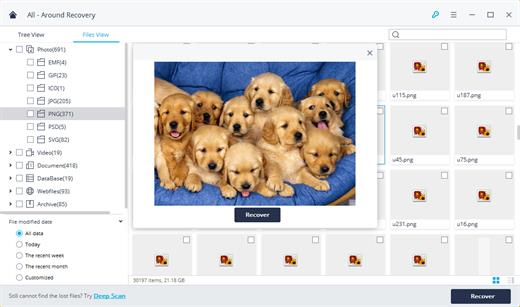
Description: Recover Files in Minutes, No Tech Skills Needed. 2000+ storage devices supported. Recover 1000+ file types. Success recovery rate of 99.5%. 3 simple steps to recover unlimited data.

2000+ Storage Devices Supported
The high-tech data recovery tool can easily recover lost data from almost any devices or storage media.

Laptops, PCs & NAS
Recyle bin, internal drives, partitions; NAS (Network Attached Storage)

Memory Cards
SD/CF card, microSD, miniSD, Sandisk, memory card/stick, TF memory card…

Internal Hard Drive
Hard Drive (Basic & Dynamic), SSD (Solid State Drive)

External Hard Drive
We Support Nearly All External Hard Drive That You Use

Flash Drives
USB Drives, Jump Drives, Pen Drives, Thumb Drives…

Other Storage Media
Camera (Canon, Sony, Nikon, Fuji), Music/Video Player, Camera Drones (GoPro, DJI)

Recoverit Support 1000+ File Types and Formats
We support recovery of all types of files and file systems, e.g. NTFS, FAT, HFS+, APF.

Document
DOC, DOCX, RTF, XLS, XLSX, XLSB, PPT, PPTX, PPS, PDF, DOT, DOTX, XLSB, XLT, XLTX, POT, PPSX, etc.

Photo
CRW, JPEG, JPG, PNG, PSD, RAW, RGB, 3DM, 3DMF, 3FR, ABM, AFX, ANI, ART, ARW, BIZ, BLD, etc.

Video
AVI, FLA, FLV, M4V, MOV, MP4, WMV, 3G2, 3GP, 3GP2, 3GPP, AMV, ANM, ASF, ASX, etc.

Audio
AAC, AIFF, ALAC, FLAC, MP3, OGG, PCM, WAV, WMA, A52, AA, AA3, AAC, AC3, ACC,AFC, AIF, etc.

Archive
7Z, WAR, ZIP, exe, 7zip, etc.

Other Files
MSG, PST, OST, EML, EMLX, MBOX, EPUB, JIS, KEY, LOG, MPS, 3DA, 3DS, 3TF, 3WS, ABD, etc.

Release Name: Wondershare Recoverit 14.0.32.12
Size: 258.4 MB
Links: HOMEPAGE – NFO – Torrent Search

Download: RAPiDGATOR

5 Comments
July 22

IDimager Photo Supreme 2026.3.1.9405

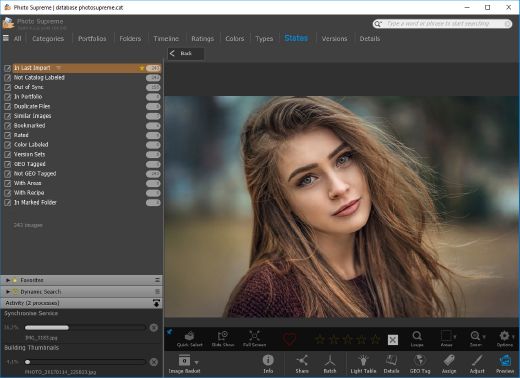
Description: Photo Supreme v2026 is a thoughtful and forward-looking release. This update has focused on smarter discovery, faster performance, and modern workflow expectations, especially around large catalogs, mobile integration, searches, and team environments.

Import and Select
One of the standout additions in Photo Supreme v2026 is the new multi-pass Import and Select workflow. This allows users to review and refine image selections in multiple stages instead of making all decisions in one pass. It’s especially useful for large shoots, letting photographers cull images more deliberately and with less pressure. In addition, the Import and Select feature now loads images faster than ever. Mac users will also appreciate direct iOS device importing, which makes it possible to bring photos straight from an iPhone or iPad into the catalog without relying on intermediary software. This significantly streamlines mobile-first workflows.

Powerful Searches
Photo Supreme now supports natural language searching, allowing users to find images using plain, conversational phrases rather than rigid metadata queries. This feature is powered by AI services such as OpenAI, Google Gemini, or local models with Ollama. This gives users flexibility in how advanced features are enabled. In addition, a new classification system enhances search accuracy by grouping images into meaningful categories upon import, making it easier to surface relevant results in large or complex catalogs.

Video & Media Handling
For users working with video, Photo Supreme v2026 introduces hover-based video previews. Simply hovering over a video thumbnail now reveals a short animated preview, making it much faster to identify clips without opening them individually. Support for modern formats has also been expanded, ensuring the software keeps pace with current media standards.

Sharing with ZIP
Exporting images is more flexible in v2026 thanks to ZIP output support in transfer profiles. This makes it easy to bundle images into a single archive for delivery, backup, or client sharing, all directly from within Photo Supreme. These enhancements simplify distribution workflows and reduce the need for external tools.

GEO Maps
GEOgraphic-Mapping features can now generate maps using not only Google Maps, but also OpenFreeMap with OpenStreetMaps. This removes the need for API keys while still delivering rich, interactive map displays. This update makes location-based browsing easier to configure and more accessible for all users.

Performance and Refinements
Photo Supreme v2026 delivers notable performance enhancements, resulting in faster browsing and a more responsive overall experience. Response times are improved by up to 10%, with especially noticeable gains for large libraries containing many catalog labels.
Catalogs with numerous stacks also see significant performance improvements, particularly when displayed in stacked views.
v2026 includes a wide range of refinements, such as: "Visually similar" stack detection, numerous stability fixes and workflow enhancements, polished UI behavior in collections, searches, and metadata handling

Wait, there's more, a lot more…
New "RAW Files" and "Video Files" catalog states
Added support for Google Gemini as an AI service
Added support for OpenAI GPT-5.2 as an AI Service
Added support for Ministral3 model with Ollama
Added file management support for ACR sidecar files
Update HTTP Server with Photo Supreme Online (Server Edition)
Faster face recognition
Added "AI-Estimated GEO Location" to the AI Panel
Faster result display in the Collection Viewer
"Cascade Metadata" from image to Stack or Version Set is now a background process
A highlighted stroke has been added to the active tabs, improving navigation
Now you can display metadata charts and graphs across multiple tabs
Added support for Ctrl/Cmd+Z functionality in text and memo fields
Defined the new Affinity v3 .AF and .AVIF file format as a supported "other file format"
Switching the collection viewer's view style is faster (eg from Basic to Grid to Clean to Custom Thumb Info)
Advanced Search now has an option to search by "File Size" and "File Size MB"
Finetuned the check for "need to compact" on PostgreSQL (Server Edition)
Bookmark keyboard shortcuts are now a "toggle", similar to ratings and color labels
Expanding nodes in the Catalog Tree is ~25% faster
When using the "Dump Full to Catalog File" feature, there's now the option to create either a "catalog dump" file, or a "catalog with thumbs" dump files
Added a XMP Storage Location for "original file AND non-standard sidecar file"
In "Stacked View", you can now select a specific item from the stack to show
Support for PostgreSQL 18.
And more…

Highlights for v2026
Multi-Pass "Import and Select": Seamlessly transition through passes with a fast-culling system that optimizes your workflow.
Direct iOS Image Import on macOS: Import images directly from your iOS devices with ease.
Video Thumbnail Preview: Hover over a video thumbnail or open the Quick View to view a live video preview.
Natural Language Search Powered by AI: Search your content using plain language, with smart integration through OpenAI, Google Gemini, or Ollama models.
Transfer Profiles can now create ZIP output files: Copy or send sets of images as a single ZIP file for easier sharing.
Maps with OpenFreeMap: Display images on interactive maps using OpenFreeMap/OpenStreetMaps with no API key needed.
Server Edition Thumbnail Caching: Enjoy faster performance with local thumbnail caching, automatic cleanup, and customizable settings for retention and cache size.
Classifications: Enhance search accuracy with an automatic image classification mechanism on import.

Release Name: IDimager Photo Supreme 2026.3.1.9405
Size: 162.7 MB
Links: HOMEPAGE – NFO – Torrent Search

Download: RAPiDGATOR
5 Comments
July 22

Movavi Video Editor 26.20.0

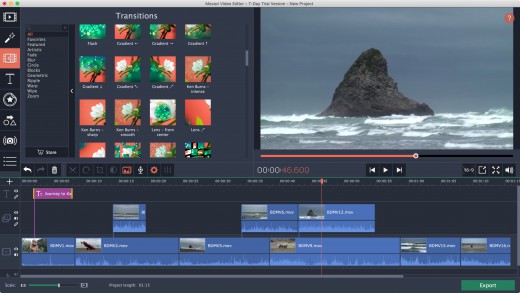
Description: Movavi Video Editor 2026 - create awesome videos easily. Auto subtitles with one click, ready-made templates. Easy editing: cut, crop, adjust colors, change speed, and more. Hundreds of drag-and-drop filters, transitions, titles, and overlays.

What’s New in Movavi Video Editor

One-click automatic subtitles
Let AI quickly turn your speech into text and automatically create captions for your videos in almost any language. Just choose the font, text color, position – and you’re all set!

Mouse-over effects preview
Picking titles, transitions, and filters has never been easier! Simply hover your mouse over any effect to see it in action. You can also view your project files in the same way.

Movie-like effects for your videos
Pack a ton of action into your videos in a flash! Add fire, lightning, or other ready-to-use animated overlays – capture your audience’s attention right from the start.

Blending modes for any content
Overlay your videos, photos, and even frames effortlessly to produce different looks. Create stylish vlogs, cinematic highlight reels, or vibrant clips in just a couple of clicks.

Revamped timeline for easier editing
The new timeline is now clearer and more streamlined. Get your projects done faster and have more fun with anything – from short vids for socials to longer family movies.

Frame-precise cuts in a click
Give your videos a sharper look with the new video-cutting tool. Easily make precise cuts and create eye-catching montages like your favorite bloggers.

AI motion tracking
Enhance reality in your videos with additional moving graphics. Just click, and AI will quickly attach any photos, videos, emojis, or memes to objects in your footage.

AI background removal
The built-in AI will quickly remove a background from your video, even without a green screen. Change it to anything – from a solid color to outer space – and stun your viewers with out-of-this-world videos.

AI noise removal
Automatically remove car, wind, and other uncool sounds from your clips with our AI-driven audio denoiser. Create videos with crisp sound that viewers are sure to appreciate.

Pro-quality color correction
Get next-level color correction with the same simplicity. Boost colors in a snap and make more viewers fall in love with your videos.

Perfect-match overlay effects
Now each overlay effect has 13 blending modes to choose from. Try each of them with the press of a button and pick the one that fits your video perfectly.

Our best effects – at your fingertips
Create awesome videos in any style with our huge collection of professionally designed effects. Now you can try them all right in the video editor.

System Requirements
- Microsoft® Windows® 7/8/10/11 64-bit with up-to-date patches and service packs installed
- Processor : Intel®, AMD®, or compatible dual-core processor, 1.5 GHz
- Graphics card: Intel® HD Graphics 2000, NVIDIA® GeForce® series 8 and 8M, Quadro FX 4800, Quadro FX 5600, AMD Radeon™ R600, Mobility Radeon™ HD 4330, Mobility FirePro™ series, Radeon™ R5 M230 or higher graphics card with up-to-date drivers
- Display: 1280 × 768 screen resolution, 32-bit color
- RAM: 2 GB

Release Name: Movavi Video Editor 26.20.0
Size: 117.4 MB
Links: HOMEPAGE – NFO – Torrent Search

Download: RAPiDGATOR

5 Comments