Please REGISTER or RENEW your account on RAPiDGATOR.net and support us by doing through all RAPiDGATOR working download links on main posts...
July 21

MiniTool Power Data Recovery 13.0

Description: Best data recovery software for Windows PC, Server. Recover any lost files from laptop, HDD, SSD, USB drive, memory card and more. Quick data recovery from Desktop, Recycle Bin and specific folder. For various data loss situations due to deletions, formatting errors, OS crashes, virus attacks, etc.

For Windows Users
MiniTool Power Data Recovery is the professional data recovery software for Windows users. You can use it to recover any deleted/lost files under various data loss situations. Supported devices include Windows computer, external drive like HDD, SSD, USB, SD card, memory card, and more. You can choose free edition or paid edition based on your own needs.

Operating System: Windows 7/8/10/11 and Windows Server OS

Release Name: MiniTool Power Data Recovery 13.0
Size: 698.2 MB
Links: HOMEPAGE – NFO – Torrent Search

Download: RAPiDGATOR

5 Comments
July 21

Remo Recover Windows 6.1.0.1

Description: Data Recovery Made Simple. All new Remo Recover 6 for Windows helps you recover deleted or lost data under any severe data loss scenarios from hard drives, SSD, USB, SD card or any storage devices without any hassle. Built to make your data recovery experience effortless and engaging, recover more than any usual data recovery software - make Remo Recover your data recovery software now.

Remo Recover - Where the World Recovers Data
An expert choice to recover any type of file under simple to complex data loss scenarios on any storage devices. Remo Recover Windows is your go to data recovery software. Recover more with Remo Recover now!

Recover from Where You Lost it with Preferred Location Recovery Support
Specify from where you want to recover your data, be it from an external storage device or from any specific location like Recycle Bin or any folder of your choice, with Remo Recover you can recover data from anywhere. With Preferred location recovery support you will be able to easily restore the data you are looking for without having to search everywhere. Whether you are novice user or a tech geek, data recovery experience with Remo Recover remains simple and engaging.

Recover as you Scan with Dynamic Data Recovery
No more waiting hours for the scanning process to complete! With Dynamic data recovery, you can start recovering your files as soon as you start the scanning process. With the help of Dynamic data recovery view you can look for the files you want to recover while the scan is in progress and even save it without interrupting the process. Be it formatted partiton recovery or simple deleted file recovery, data recovery process is quick and engaging as the user can actively recover data without waiting for the scan to complete.

Accurately Locate Files with Smart A-I
Built with smart AI filters, you can find the file you are looking for quickly and smartly. Either you can simply use the search bar and type the file you are looking for and right click and locate the file which is buried deep inside or you can smartly use the folders created according to file type or property to find your way to the file. For example, You can locate an MP3 file not only from its name but also with the help of its other file properties like name, genre, singer, etc. and this applies to any file type.

Release Name: Remo Recover Windows 6.1.0.1
Size: 125.7 MB
Links: HOMEPAGE – NFO – Torrent Search

Download: RAPiDGATOR

5 Comments
July 21

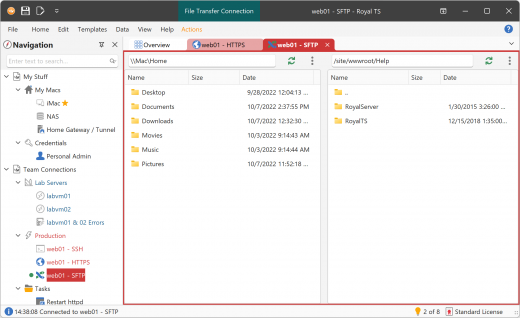
Royal TS 7.4.50721

Description: Powerful Connection Management. Compatible with a variety of connection types. Using RDP, VNC, SSH based terminals, S/FTP or web-based interfaces? No worries, Royal TS got you covered!

Built-in credential management. Safe team-sharing features. Share a list of connections, without sharing your personal credentials. Command Tasks and Key Sequence Tasks make it easy to quickly automate repetitive tasks. SSH-based tunneling (Secure Gateway) support is tightly integrated in Royal TS. Dynamic Folders allow you to dynamically import data from external sources.

Remote Desktop
Based on the Microsoft RDP ActiveX control

Terminal
Rebex.net and PuTTY based SSH and Telnet

VNC
Based on TightVNC and UltraVNC

Web
Internet Explorer and Chrome based

File Transfer
Transfer files using FTP, SFTP and SCP

Release Name: Royal TS 7.4.50721
Size: 292.6 MB
Links: HOMEPAGE – NFO – Torrent Search

Download: RAPiDGATOR

6 Comments
July 21

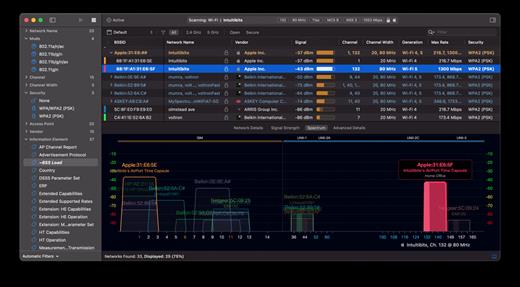
WiFi Explorer Pro 1.2.4

Description: WiFi Explorer Pro is a Wi-Fi scanner and analyzer for Windows built to assist WLAN and IT professionals in designing, validating, and troubleshooting wireless networks. Its clear, crisp visualizations and in-depth data help you diagnose and optimize your network for faster and better Wi-Fi.

A powerful Wi-Fi scanner
Traditional Wi-Fi scanners give you just the necessary information about nearby Wi-Fi networks. WiFi Explorer Pro for Windows goes beyond providing you with expert features to help you analyze and assess home, small office, and enterprise Wi-Fi networks.

In-depth analysis
WiFi Explorer Pro for Windows offers in-depth information that lets you inspect, diagnose, and validate the capabilities and configuration of wireless networks. Each field can be converted into a column to analyze, sort, and filter networks quickly.

Lightweight and fast
We have developed WiFi Explorer Pro for Windows to be fast and clean. With WiFi Explorer Pro, you can focus on important information as you navigate the scan results and hide or show network information depending on your needs, including labels, device names, or annotations.

Always up-to-date
Whether you’re a tech enthusiast, a professional, or a casual user, WiFi Explorer Pro for Windows ensures you’re always at the forefront of wireless innovation, offering support for the latest Wi-Fi standards, including Wi-Fi 6, Wi-Fi 6E, and Wi-Fi 7.

Latest Standards Support
Discover and analyze networks using the latest Wi-Fi standards.

Custom Columns
Create custom columns from more than 850 available fields.

Custom Filters
Create custom filters for specific troubleshooting tasks.

Remote Scan Support
Scan for Wi-Fi networks remotely by using a supported remote sensor.

Capture File Support
Import captures files to visualize the networks found on them.

External Adapter Support
Scan for Wi-Fi networks by using external adapters.

Release Name: WiFi Explorer Pro 1.2.4
Size: 180.7 MB
Links: HOMEPAGE – NFO – Torrent Search

Download: RAPiDGATOR

6 Comments
July 21

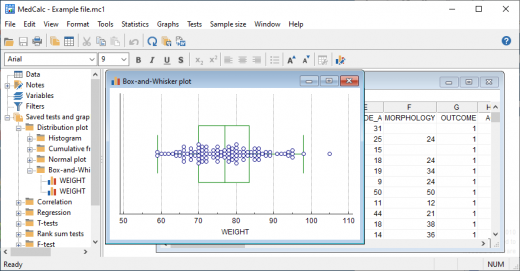
MedCalc 23.6.3

Description: MedCalc is a statistical software package for biomedical research. Includes more than 220 statistical tests, procedures and graphs. ROC curve analysis, method comparison and quality control tools. Minimal learning curve. Developed since 1993.

Easy to learn, fast and reliable
MedCalc includes more than 220 statistical tests, procedures and graphs
save graphs in SVG, PNG, JPG, high resolution TIF, or other file formats, or as PowerPoint slides (*.pptx).
free updates
available with an English, Chinese (simplified and traditional), French, German, Italian, Japanese, Korean, Polish, Portuguese (Brazilian), Russian and Spanish user-interface (help file and documentation in English)
one edition includes all features (do not pay extra for the functions you really need).
compatible with all contemporary Windows desktop editions

Data management
Integrated spreadsheet with 1 048 576 rows and 16 384 columns.
Correct handling of missing data.
Outliers can easily be excluded.
Built-in WYSIWYG text editor.
Imports Excel, Excel 2007, SPSS, DBase and Lotus files, and files in SYLK, DIF or plain text format.
Easy selection of subgroups for statistical analysis.

MedCalc Documentation
Complete HTML manual on MedCalc web site.
Comprehensive context-sensitive help.
Context help in dialog boxes.

ROC curve analysis
MedCalc is the reference software for ROC curve analysis. Our ROC curve analysis module includes:
Area Under the Curve (AUC) with standard error, 95% confidence interval, P-value. Offers choice between methodology of DeLong et al. (1988) and Hanley & McNeil (1982, 1983).
List of sensitivity, specificity, likelihood ratios, and positive and negative predictive values for all possible threshold values.
ROC curve graph with 95% Confidence Bounds.
Threshold values can be selected in an interactive dot diagram with automatic calculation of corresponding sensitivity and specificity.
Plot of sensitivity and specificity, or cost, versus criterion values.
Plot of predictive values versus prevalence.
Interval likelihood ratios.
Comparison of up to 6 ROC curves: difference between the areas under the ROC curves, with standard error, 95% confidence interval and P-value.
Sample size calculation for area under ROC curve and comparison of ROC curves.
Go to the ROC curve analysis section of the MedCalc manual for more information on ROC curve analysis in MedCalc.

Graphs
Lots of graphs, see Graph gallery.
Data point identification in graphs.
Draw text boxes, lines, arrows and connectors.
Name, save and recall graphs and statistics.
Statistical info in graph windows.
Save graphs as SVG, PNG, JPG, GIF, BMP, PCX, or high resolution TIF files, or as PowerPoint slides (*.pptx).

Release Name: MedCalc 23.6.3
Size: 119.1 MB
Links: HOMEPAGE – NFO – Torrent Search

Download: RAPiDGATOR

5 Comments
July 21

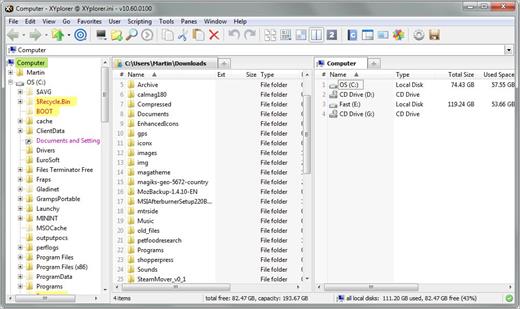
XYplorer 27.20.1500

Description: XYplorer is a file manager for Windows. It features tabbed browsing, a powerful file search, a versatile preview, a highly customizable interface, optional dual pane, and a large array of unique ways to efficiently automate frequently recurring tasks.

It's Tabbed
Tabs let you switch between folders most easily. Drag them around, hide them, lock them, name them, or drop files onto them. The tabs remember their configuration individually and across sessions. On top of this you get tabsets and dual pane.

t's Functional
XYplorer has been designed to make you faster. Numerous usability enhancements in an attractive interface help to streamline your workflow and increase your efficiency. You will definitely save a lot of time.

It's Scriptable
Yes, you can program this app. Individual solutions for individual tasks. No plugins needed, scripts run out-of-the-box. Even beginners can benefit from this feature since many ready-to-use scripts are available in the forum.

It's Fast
Speed has always been a major design goal with XYplorer. The code is constantly optimized for performance, zero tolerance for slowness. On top of that the app uses very little RAM, the executable is light (7 MB), and it loads almost instantly.

It's Reliable and Robust
You can trust XYplorer. It works as intended and expected, and is very hard to destroy. Any issues are immediately attended and usually fixed within hours. A large community is closely watching the development and permanently testing the frequent beta versions.

It's Customizable
You can fine-tune the app to look and behave exactly as you want it. This ranges from fonts and colors to custom toolbar buttons and even file icons and program associations. And every bit of it is fully portable. Even the dark mode.

It's Responsive
Your customer voice is listened to and taken seriously, most of the time you get instant feedback, and your wish might actually get implemented sooner than you'd think.

Operating System:
Windows 11, Windows 10, Server 2019, Server 2016, 8.1, 8, Server 2012, 7, Server 2008, Vista, XP, Server 2003; 32-bit and 64-bit versions.

Release Name: XYplorer 27.20.1500
Size: 7.3 MB
Links: HOMEPAGE – NFO – Torrent Search

Download: RAPiDGATOR

5 Comments
July 21

Ashampoo Snap Pro 26.0.3

Description: With Ashampoo Snap Pro 26, creating screenshots and videos is easier than ever! Everything that appears on your screen can be captured in seconds. In the image editor, you can edit, annotate, save, and share your captures instantly. New: With Live Edit, you can even mark content directly on your Desktop before the screenshot is taken. Snap Pro 26 also enhances your screenshots with graphical elements such as automatic numbering, comments, stickers, and more. Whether you're working from home, explaining something quickly, or creating detailed tutorials, Snap Pro 26 lets you get the job done faster.
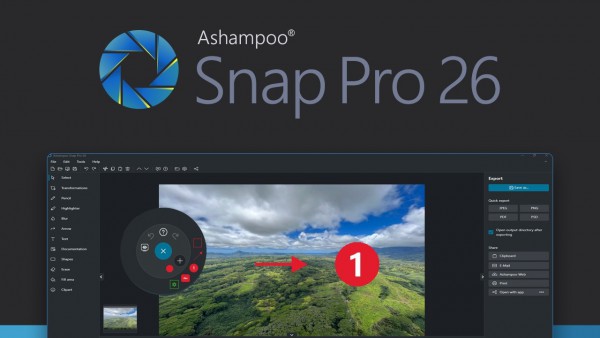
Screenshots and video recordings with scrolling function, sound option and quick access via hotkeys
Direct editing with text, highlighting, numbering, blur tools and a handy screenshot library
Ideal for instructions, tutorials and documentation with flexible export as PNG, JPG, PDF and cloud upload

Live Edit–Mark directly on your desktop
Live Edit places a transparent layer like a sheet of glass over your screen. On this layer, you can draw arrows, add text, or highlight areas directly on top of the content you want to explain. Unlike traditional screenshot tools, your screen does not freeze during this process. You can switch back to your Desktop at any time to move windows, adjust content, or let a video continue playing, and then continue working on your annotations. This way, the final screenshot evolves step by step without having to restart the process.

Prepare and create screenshots faster
With Live Edit, multiple screenshots can be prepared and created within a single workflow. Annotations remain visible while you continue working on your Desktop and can be adjusted at any time. Especially with large workspaces or multi-monitor setups, Live Edit provides plenty of screen estate to organize content clearly. The final screenshot is then created directly from the Live Edit view–What you see is always what you get!

Better performance, stability and resource efficiency
The new Ashampoo Snap is built on a fully modernized technical foundation: The program starts faster, responds more quickly, and operates more smoothly overall. At the same time, memory usage and background process activity has been significantly reduced so Snap remains responsive and stable even during longer sessions. This new foundation improves everyday performance while also preparing Snap for future enhancements and new features.

Enhanced workflow and modernized interface
We have also improved many details for everyday work with Snap. The image editor's toolbar is smarter and supports your workflow even better. The properties bar has been restructured to provide a clearer and more consistent user experience. The updated color scheme improves readability and makes longer working sessions less strainful. With Quick Scroll, you also get a smart thumbnail preview that automatically appears when needed and helps you navigate large captures more easily.

More practical improvements
Many already useful features have been further refined: Cliparts now support drag & drop and image imports are more convenient, tools like the arrow tool offer better precision, and additional output formats are available for emailing images. The print dialog has also been updated and now supports margin settings in centimeters. In addition, video exports now support a quality settings to save storage space or speed up exports.

Smart desktop capturing and sharing
Once active, Snap's magic eye auto-detects elements below your mouse pointer (browser windows, program menus, images, etc.) and offers instant 1-click capturing with pixel precision. But it doesn't stop there: Snap can also capture custom rectangular or freehand regions and even supports scrolling content! Naturally, the program supports all possible kinds of sharing options, including email and Ashampoo Web!

Optical character recognition (OCR) for your screenshots
As of now, Snap no longer recognizes just 7 but over 180 languages! Our new text recognition utilizes Windows' own language packs and produces better results faster. Chances are you won't be needing over 180 languages straight away so, in the interest of simplicity, we've limited the number of initially available languages to the system languages currently installed on your machine. You can easily add additional languages via the "Add language" menu item.

Fast and easy video cutting
Not every video recording is an instant success. Ads, extra steps or pauses are a frequent bother. The same applies to screen captures. Keep the important bits and get rid of the rest with Ashampoo Snap! Remove ads, glitches or superfluous scenes or split your video into individual episodes. It doesn't matter whether you're casually pointing and capturing, creating an extensive webinar or producing a high-quality presentation: With Ashampoo Snap, every video capture comes out a success!

Create videos for any purpose
Creating instructional videos or documentaries is a breeze with Ashampoo Snap. Recordings are live-annotable with texts, drawings and voice narration. Clear things up with visualized mouse clicks and key strokes and add watermarks to protect your intellectual property. Take it to the next level and add live feeds from your webcam in a single click. Here's your ticket to create engaging tutorials, prepare instructive webinars and to point the way to the things that matter most to you–literally!

Perfect for different screen resolutions and multi-display environments
Ashampoo Snap fully supports multi-display setups, even with different resolution and DPI combinations, e.g. mixed Full HD and 4K environments. Each display is captured at its individual resolution for maximum crispness and results are instantly editable. And once you're in the editor, it's smooth sailing for beginners and professionals alike!

Create GIFs from any video
What would the internet be without those charming GIF animations? But GIFs can also be used in tutorials or demonstrations to great effect. Ashampoo Snap can turn any video segment into GIFs. Just set the start and end positions, fire up the built-in converter and you're done!

More than a snipping tool: extensive comfort features
Ashampoo Snap does most of the heavy lifting for you. Automatic numbering or time-delayed captures will help you make the most of your shots. Freely annotate your captures with texts and drawings or use flood fills. Put the spotlight on individual portions, blur sensitive data and use the highlighter to direct attention in style!

Capture desktop contents and save videos or images from the internet
The internet is brimming with fascinating images, texts and videos. Ashampoo Snap makes it easy to capture what you like! Save image and videos and edit them on the fly and to your liking! Anything you see on your screen, or hear through your sound card, Snap can capture!

Release Name: Ashampoo Snap Pro 26.0.3
Size: 257.2 MB
Links: HOMEPAGE – NFO – Torrent Search

Download: RAPiDGATOR

7 Comments
July 20

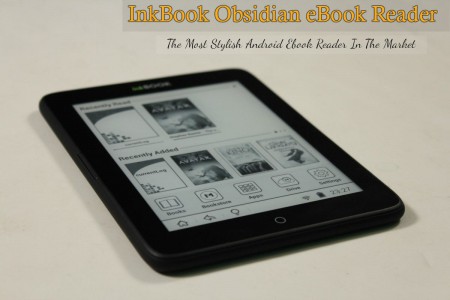
Obsidian Ebook Reader Premium v2.1.2 Pre-Cracked

Description: Your books, beautifully organized. Obsidian Reader allows you to read EPUBs and PDFs with no ads, no online connection, and complete privacy. Manage your library with folder synchronization, editable metadata, and enjoy a modern, customizable interface for the best reading experience.

Everything you need for a great read.
Designed with simplicity and speed in mind, allowing you to focus purely on your content.

Private & Offline
Fully private and 100% offline. Read your EPUB and PDF books locally with absolutely no ads to distract you.

Manage Your Library
View all your books in an organized grid or list. Sync your book folders and edit titles, authors, and cover images.

Highly Customizable
Change font, text size, padding, line space, and word spacing. Choose from themes including true black mode.

Sleek Interface
A sleek, modern interface free from distractions, giving you the best environment to focus purely on reading.

Save Bookmarks
Easily save bookmarks in your books so you can always pick right back up exactly where you left off.

Blazing Fast
Built to be lightweight and fast. Massive EPUBs and PDFs load instantly so you never have to wait.

Release Name: Obsidian Ebook Reader Premium v2.1.2 Pre-Cracked
Size: 143 MB
Links: HOMEPAGE – NFO – Torrent Search

Download: RAPiDGATOR

3 Comments
July 20

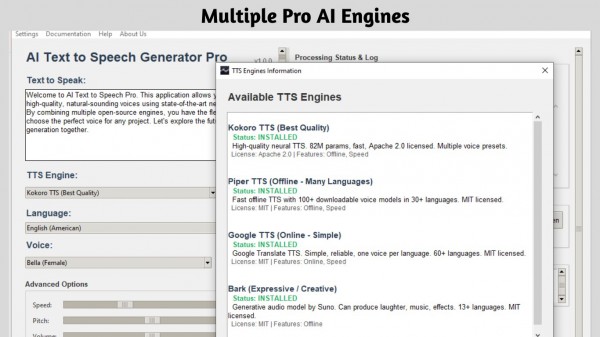
AI Text to Speech v1.0.15 Pre-Cracked

Description: Transform your written words into ultra-realistic, human-like audio with AI Text To Speech Generator Pro. Whether you are a content creator making video voiceovers, a student listening to study notes, or an author creating audiobooks, this powerful desktop utility provides professional-grade speech synthesis without the expensive monthly subscriptions.

Unlike cloud-based alternatives, AI Text To Speech Generator Pro runs state-of-the-art neural network models directly on your PC. This guarantees 100% privacy, zero data collection, and the ability to generate unlimited audio completely offline!

REVOLUTIONARY AI ENGINES INCLUDED
- Kokoro TTS: The industry-leading model for broadcast-quality, ultra-realistic human voices.
- Piper TTS: Fast, offline speech generation supporting over 30+ languages and dozens of distinct accents.
- Bark (by Suno): A highly expressive and creative AI that can generate natural voice inflections, hesitations, sighs, and even laughs.
- Google TTS (gTTS): A lightweight, reliable online fallback for simple translation reading.

CORE FEATURES
- Total Control: Fine-tune the speed (-50% to +100%), adjust voice pitch, and boost output volume to get the perfect take.
- Long-Form Audio: Paste entire articles or book chapters. The app automatically chunks long text to prevent memory crashes and seamlessly stitches the final audio together.
- Export Options: Save your generated speech locally as high-quality WAV or MP3 files.
- Built-In Studio: Preview voices using the Voice Browser and listen to your generated tracks instantly with the built-in media player.
- Complete Privacy: Your text is never uploaded to the cloud (when using offline models). Keep your proprietary scripts and personal documents safe.

Stop paying per-character for AI voiceovers. Unlock the power of local AI and generate unlimited, natural-sounding speech today with AI Text To Speech Generator Pro!

System Requirements
- OS: Windows 10 version 17763.0 or higher
- Memory: 4 GB (Minimum), 8 GB (Recommended)
- Processor: x64 Dual-Core Processor (Minimum), Quad-Core Processor or better (Recommended)

Release Name: AI Text to Speech v1.0.15 Pre-Cracked
Size: 686 MB
Links: HOMEPAGE – NFO – Torrent Search

Download: RAPiDGATOR
3 Comments
July 20

Adobe Photoshop 2026 v27.8.0.13 (x64) Portable Cracked

Description: Reimagine reality with Photoshop. Millions of designers, photographers, and artists around the world use Photoshop to make the impossible possible. From posters to packaging, basic banners to beautiful websites, unforgettable logos to eye-catching icons, Photoshop keeps the creative world moving. With intuitive tools and easy-to-use templates, even beginners can make something amazing.

The creative world runs on Photoshop.
Millions of designers, photographers, and artists around the world use Photoshop to make the impossible possible.

Designed for anyone to design anything.
From posters to packaging, basic banners to beautiful websites, unforgettable logos to eye-catching icons, Photoshop keeps the creative world moving. With intuitive tools and easy-to-use templates, even beginners can make something amazing.

Not just photo taking. Breathtaking.
Whether you are looking for everyday edits or total transformations, our graphic design software offers a complete set of professional photography tools to turn your snapshots into works of art. Adjust, crop, remove objects, retouch, and repair old photos. Play with color, effects, and more to turn the ordinary into something extraordinary.

Power to the paintbrush.
Draw and paint whatever you dream up with tools designed especially for illustrators. Paint in perfectly symmetrical patterns. Get polished looks with stroke smoothing. And create with pencils, pens, markers, and brushes that feel real including more than 1,000 from celebrated illustrator Kyle T. Webster.

Symmetry mode
Paint in perfect symmetry with a new mode that lets you define your axes and choose from preset patterns like circular, radial, spiral, and mandala.

New Content-Aware Fill experience
A dedicated workspace lets you select the exact pixels to use for fills, and Adobe Sensei makes it easy to rotate, scale, and mirror them.

Frame tool
Create shape or text frames to use as placeholders on your canvas. Drag and drop images to fill the frames and they all scale to fit.

Release Name: Adobe Photoshop 2026 v27.8.0.13 (x64) Portable Cracked
Size: 9 GB
Links: HOMEPAGE – NFO – Torrent Search

Download: RAPiDGATOR
2 Comments