Please REGISTER or RENEW your account on RAPiDGATOR.net and support us by doing through all RAPiDGATOR working download links on main posts...
June 4

Directory Opus 13.23.6 Beta

Description: Are you frustrated by the limitations of Windows Explorer? Directory Opus is a complete replacement for Explorer, with far more functionality than any other file manager available today.

You're in control.
Not just a simple file manager; Directory Opus lets you make your computer yours.
With a flexible user interface and unbelievable configurability, you can tailor Opus to streamline your workflow.
Dual panes, dual trees, multiple tabs.
Filter, sort, group your folders. Label and rate your files.
Queued file copies. Powerful batch renaming. Full archive support.
Find your files. Locate duplicates. Synchronize backups.
Assign tags and descriptions. Convert images. Edit metadata.
Fully multi-threaded, native 64 bit high performance code.
Whatever you want to do - Opus can probably do it. And if it's not built-in, you can take advantage of the unrivalled configurability to extend Opus using external tools.

What makes Opus unique?

Built for speed
Opus is written in native C++ multi-threaded code; compiled for the latest 64 bit CPUs, with high performance our number one design principle.

Fully configurable
Change the colors. Change the fonts. Change the toolbars and menus. Set up hotkeys. Opus adapts to how you want to use it.

Makes file management a breeze
Powerful searching, sorting, grouping, labelling and tagging features let you take control of your files like never before.

Endlessly extensible
Work with third-party tools as easily as with the built-in features. A full scripting interface, including scriptable dialogs, means your imagination is really the only limit.

Replace Windows Explorer and don't look back
Our unique Explorer Replacement mode provides a full replacement for Windows Explorer.
Single or dual pane file display and folder trees
Tabbed interface let you keep multiple folders open and switch quickly between them
Integrated viewer, metadata editor and utility panel
Built-in tools including synchronize and duplicate file finder
Leverage indexed search engines like Windows Search and Everything

High performance file management features
Copy, move, rename, duplicate, archive, view, backup and delete your files with ease
Queue multiple file copies for improved performance
Batch renaming including easy-to-use keyboard macros
Support for FTP and archive formats like Zip, 7Zip and RAR
Quickly filter, sort, group and search your folders
Color-code your files, assign status icons, star ratings, tags and descriptions
View images, documents and more. Image marking lets you sort your photos quickly and easily
Calculate folder sizes and print or export folder listings

Unrivalled configurability
Why let the programmers decide for you? You can tailor Opus to look how you want it to look, and to work how you want it to work.
Choose from light mode, dark mode, or design your own theme
Over 600 configurable colors and fonts
All toolbars and menus can be edited, plus you can add your own
Floating toolbars can act as program launchers
Configure your own hotkeys that work everywhere or just in Opus
Full scripting interface lets you design your own dialogs and add your own commands

Release Name: Directory Opus 13.23.6 Beta
Size: 29.6 MB
Links: HOMEPAGE – NFO – Torrent Search

Download: RAPiDGATOR

4 Comments
June 4

Smart File Renamer 1.6.9

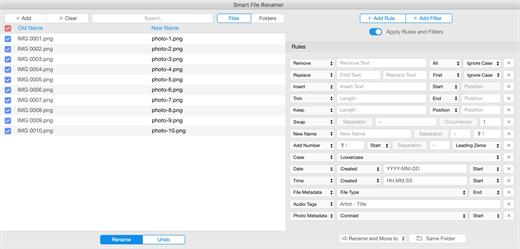
Description: Smart File Renamer - Rename multiple files easily! Supports hundreds of renaming scenarios! Loved by happy users from 14 to 80 years old. Renaming 1000 files takes less than a second!

Extremely Flexible
Supports hundreds of renaming scenarios!

Easy to Use
Loved by happy users from 14 to 80 years old.

Blazingly Fast
Renaming 1000 files takes less than a second!

Batch Renaming
Rename multiple files in one click!

Photos Renaming
Rename photos by country, date or EXIF tags!

Audio Renaming
Rename audio files by music tags easily!

Content Renaming
Rename your documents by content!

Folders Renaming
Rename not only files but folders as well!

RegEx Rename
Create flexible rename patterns with RegEx

File Tags Renaming
Rename files by file tags in a click!

Metadata Renaming
Rename files by its metadata.

Custom Rules
Easily rename groups of files with custom rules!

Smart Filters
Rename preselected categories of files in a click.

Dark Mode
Supports Dark and Light themes!

Live Preview
Review your files before and after renaming.

Rename Logs
Be aware of how you renamed.

External Drives
Rename files on external USB drives easily!

System Requirements
Windows 11, 10, 8.1, 7

Release Name: Smart File Renamer 1.6.9
Size: 86.7 MB
Links: HOMEPAGE – NFO – Torrent Search

Download: RAPiDGATOR
6 Comments
June 4

Filmographer 1.2.6

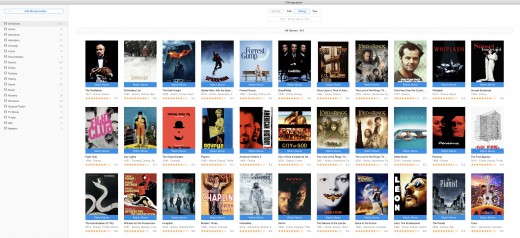
Description: Watch all of your movies in a simple click! Watch all of your movies with a simple click! Keep your movie collection under control! Get info about actors, directors, taglines, plots, ratings and more.

Watch Movies
Watch all of your movies with a simple click!

Organize Movies
Keep your movie collection under control!

Movies Info
Get info about actors, directors, taglines, plots, ratings and more.

Blazingly Fast
1000 movies analyzing takes less than a minute

Intuitively Simple
- It is so simple as 1 2 3.
- For all ages and for all users.

Watch Movies
Watch all of your movies with a simple click!

Organize Movies
Keep your movie collection under control!

Movies Info
Get info about actors, directors, taglines, plots, ratings and more.

Smart Search
Search and import new movies in a click!

Powerful Filters
Filter movies easily by genres, ratings, titles or years.

Multi-Language
Get movie info on your native language.

Simple Categories
Categories movies by genres, ratings and years.

Smart Notifications
Get notified when your favorite actor or director appears in new movie.

System Requirements
Windows 11, 10, 8.1, 7

Release Name: Filmographer 1.2.6
Size: 72.5 MB
Links: HOMEPAGE – NFO – Torrent Search

Download: RAPiDGATOR

5 Comments
June 4

Easy File Organizer 3.5.0

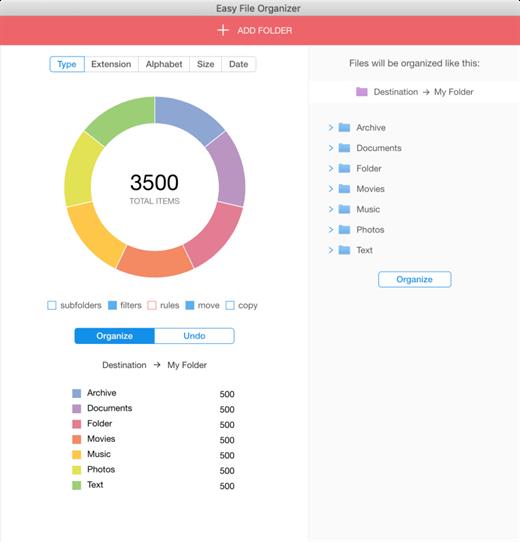
Description: Easy File Organizer - organize files and folders in one click. Supports hundreds of organizing scenarios! Loved by happy users from 14 to 80 years old. Organizing 1000 files takes less than a second!

Extremely Flexible
Supports hundreds of organizing scenarios!

Easy to Use
Loved by happy users from 14 to 80 years old.

Blazingly Fast
Organizing 1000 files takes less than a second!

Files Organizing
Organize any of your files in one click!

Photos Organizing
Organize photos by country or date taken!

Auto Organizing
Organize files automatically easily!

Music Organizing
Organize files by music tags.

Content Organizing
Organize your documents by content!

Subfolders Organizing
Organize files from all subfolders with a simple click!

Custom Rules
Easily organize groups of files with custom rules!

Flexible Templates
Organize files into folders generated from file names.

Dark Mode
Supports Dark and Light themes!

Smart Filters
Organize preselected categories of files in a click.

Live Preview
Review your files before and after organizing.

External Drives
Organize files on external USB drives easily!

Tags Support
Organize files by tags!

Multi Level Subfolders
Auto-create multi-level subfolders with type, extension or date!

Batch Organizing
Organize thousands of files to smaller chunks.

Metadata Organizing
Organize files by EXIF metadata.

Organizing History
Be aware of how you organized all files in the past.

Always Reversible
You can undo your organized files to previous state anytime!

Easy to Use
Loved by happy users from 14 to 80 years old!

System Requirements
Windows 11, 10, 8.1, 7

Release Name: Easy File Organizer 3.5.0
Size: 84.4 MB
Links: HOMEPAGE – NFO – Torrent Search

Download: RAPiDGATOR
6 Comments
June 4

Speedy Duplicate Finder 1.5.9

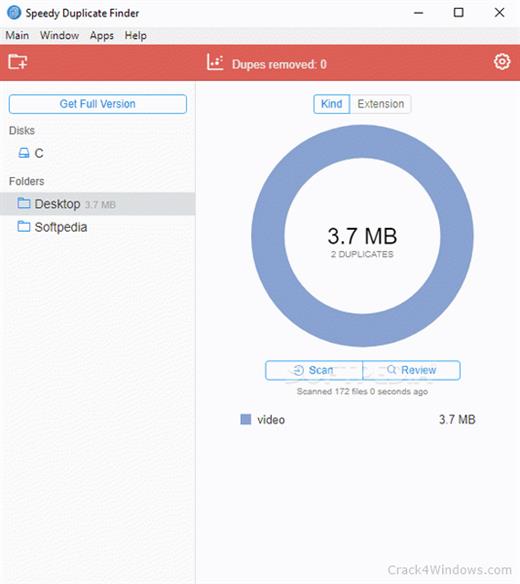
Description: Extremely fast duplicate file finder! Scanning 1000 files takes less than a second! Loved by happy users from 14 to 80 years old. Easily filter group of duplicates by Kind, by Extension or by Size.

Blazingly Fast
Scanning 1000 files takes less than a second!

Easy & Flexible
Loved by happy users from 14 to 80 years old.

Smart Filters
Easily filter group of duplicates by Kind, by Extension or by Size.

Blazingly Fast
Scanning 1000 files takes less than a second!

Disk Support
You can search for duplicates not only in folders but on entire disk!

Intuitively Simple
It is so simple as 1 2 3. For all ages and for all users!

Multiple Folders
You can find duplicates in many folders at the same time!

Smart Filters
Easily filter group of duplicates by Kind, by Extension or by Size.

Easy Review
Review your duplicates easily.

Smart Search
Search for duplicates faster!

System Requirements
Windows 11, 10, 8.1, 7

Release Name: Speedy Duplicate Finder 1.5.9
Size: 71.1 MB
Links: HOMEPAGE – NFO – Torrent Search

Download: RAPiDGATOR

6 Comments
June 4

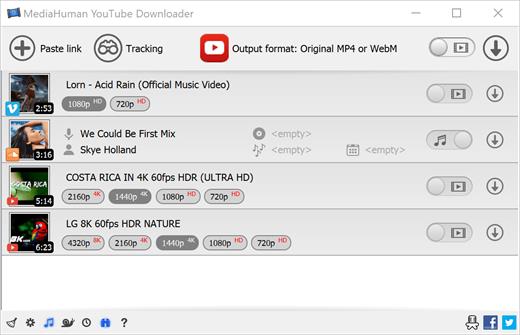
MediaHuman YouTube Downloader 3.9.20 (0106)

Description: There are so many interesting things to be found on YouTube, but you can't download the videos or save them as audio files by default. That's why we developed YouTube Video Downloader. This app will help you to accomplish video downloads quickly and without hangups. With our program you can simply download the whole playlist or YouTube channel at once and watch it whenever and wherever you want.

The application has many other convenient and practical functions for you to explore and enjoy.

Downloads entire playlists and channels
Supports Ultra High resolutions including 4K & 8K (with audio)
Downloads several videos simultaneously
YouTube, Facebook, Vimeo, Dailymotion, and many others
Extracts audio track and saves it as MP3
Supports exporting to iTunes/Music.app

Main Features:
Playlists and channels
The program supports downloading all the videos in a playlist or channel. In addition, you can monitor the selected channel or playlist and download new clips as they are uploaded.

Adds directly to iTunes/Music.app
You can configure the program to automatically add downloaded movies to your iTunes library. You can also pick a playlist where the downloaded video should be added.

HQ, HD, 4K or 8K
The program supports all available resolutions, be that 720p, 1080p, 4K or 8K, 30 or 60 fps. The choice is up to you. Unlike online video downloaders, the app downloads any resolution with sound.

Quality of the original
You can choose to save the video in its original quality and format, such as MP4 or WebM, without any modifications. In this case, the clip you get will be exactly the same as the one uploaded by its author.

Monitors the clipboard
The program keeps an eye on the clipboard and as soon as it spots a supported link there, it automatically adds this video into the download queue.

Simple tag editor
For audio downloads, the app automatically detects the artist and song name, which will be written in ID3 tags. These can be easily changed before the video is downloaded.

Not just YouTube
The program supports Twitch, Vevo.com, Vimeo, Dailymotion, Facebook, UOL, VKontakte, SoundCloud, TikTok, Likee, Brandnewtube, Odysee, Brighteon, Rumble and a lot of other sites. So you can download video from these websites as easy as you do from YouTube.

Drag & Drop
The app features a 100% drag&drop support. Just drag the link to a video with your mouse and drop it to the main window of the program, or to its dock icon on Mac.

Multi-language interface
The app is translated into: Arabic, Armenian, Azerbaijani, Bulgarian, Catalan, Chinese (Hong Kong SAR China), Chinese (Simplified), Chinese (Taiwan), Croatian, Czech, Danish, Dutch, English, Esperanto, French, German, Greek, Hebrew (Israel), Hungarian, Indonesian, Italian, Japanese, Korean, Latvian, Lithuanian, Malay, Norwegian Bokmål, Polish, Portuguese, Portuguese (Brazil), Romanian, Russian, Serbian, Slovenian, Spanish, Swedish, Turkish, Vietnamese.

Release Name: MediaHuman YouTube Downloader 3.9.20 (0106)
Size: 92.4 MB
Links: HOMEPAGE – NFO – Torrent Search

Download: RAPiDGATOR
5 Comments
June 4

Cotypist 2026.1.1

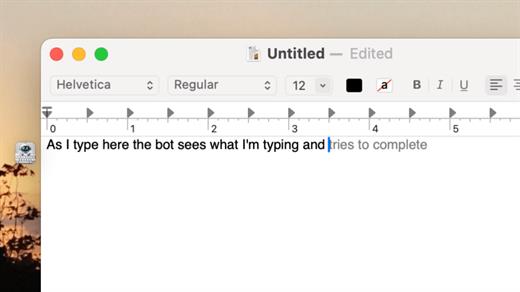
Cotypist is an innovative, AI-powered writing assistant designed to speed up your typing and enhance your writing flow across all your favorite macOS applications. Unlike traditional AI tools that force you to copy-paste prompts into a separate chatbot, Cotypist works seamlessly in the background, predicting your next words inline as fast as you can think them.

Key Features


  • Works Everywhere: It integrates perfectly into Apple Mail, Slack, Notion, Obsidian, Safari, Chrome, and most other Mac text fields with zero per-app configuration required.
  • Learns Your Voice: Rather than replacing your creativity with a robotic wall of text, Cotypist learns your unique vocabulary, phrasing style, and names over time.
  • Inline Typo & Emoji Fixes: It automatically spots typos as you write and offers instant corrections. You can also type a colon (:) to get smart emoji suggestions without opening a separate picker.
  • Highly Inclusive: It is an excellent accessibility tool for non-native English speakers, dyslexic typists, and anyone looking to reduce wrist strain or carpal tunnel risks.
What’s New

Version 2026.1.1:


  • Release notes were unavailable when this listing was updated.
Compatibility

macOS 14.0 or later


Release Name: Cotypist 2026.1.1
Size: 12.3 MB
Links: HOMEPAGE – NFO – Torrent Search

Download: RAPiDGATOR

5 Comments
June 4

Expenses 4.0.8

Expenses is a clean, intuitive spending tracker designed for speed, clarity, and control. It allows you to effortlessly monitor your money across the entire Apple ecosystem, including Mac, iPhone, iPad, and Apple Vision.

Key Features


  • Quick Input: Easily log your transactions on the go with just a few taps.
  • Complete Privacy: No registration required. The app prioritizes your data privacy and does not collect personal information.
  • Multi-Currency Support: Track your spending in any major currency with customizable exchange rates for seamless international transactions.
  • Stats & Trends: Visualize your spending patterns with actionable insights to help you build better financial habits.
  • Apple Ecosystem Integration: Full support for system features like Widgets and Siri Shortcuts to streamline your tracking.
  • Accessibility Built-In: Features an accessible design crafted to accommodate users with special needs.
What’s New

Version 4.0.8:


  • Release notes were unavailable when this listing was updated.
Compatibility

macOS 13.0 or later


Release Name: Expenses 4.0.8
Size: 10 MB
Links: HOMEPAGE – NFO – Torrent Search

Download: RAPiDGATOR
5 Comments
June 4

Multi-List Timer 11.3

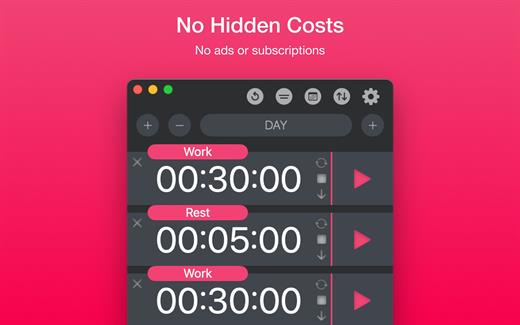
Study, Focus & Workout Timer. Create multiple timer lists for study, work, and workouts.


  • No Hidden Costs: No ads or subscriptions.
  • Private: No sign-ups or data collection.
  • Works Offline: No internet connection needed.
What’s New

Version 11.3:


  • Release notes were unavailable when this listing was updated.
Compatibility

macOS 11.0 or later


Release Name: Multi-List Timer 11.3
Size: 5.9 MB
Links: HOMEPAGE – NFO – Torrent Search

Download: RAPiDGATOR

5 Comments
June 4

Text Workflow 2.7.0

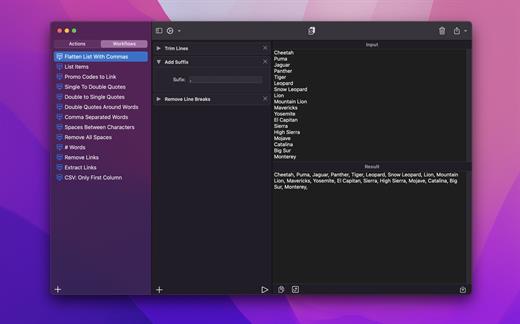
A powerful and easy to use tool that will help you transform your text. Text Workflow removes the need to perform repetitive tasks manually on your text.

Combine transformation actions to create powerful automations for your text. Save your transformation workflows to use them any time you want.

Available text transformation actions

• Add prefix
• Add suffix
• Replace text
• Sort lines


  • alphabetically
  • reverse
  • shuffle
  • by length
    • Trim Lines
    • Add line number
    • Break lines
  • after every word
  • after every sentence
  • after text
  • before text
    • Convert Case
  • uppercase
  • lowercase
  • title case
  • camel case
  • pascal case
    • Delete Characters
  • selected characters
  • non-alphanumeric
  • numeric characters
  • non numeric
  • tabs
  • spaces
  • characters after position
  • characters before position
  • last characters
  • emojis
  • characters after text
  • characters before text
    • Insert Text
  • at first line
  • at last line
  • every line (position)
  • before every word
  • after every word
  • before text
  • after text
  • after every character
    • Delete Lines
  • containing text
  • starting with text
  • not containing text
  • not starting with text
    • Remove line breaks
    • Remove multiple spaces
    • Remove duplicates lines
    • Remove duplicates words
    • Remove empty lines
    • Delete/Filter words
  • containing text
  • starting with text
  • not containing text
  • not starting with text
    • Spell out lines
    • Get Statistics
  • count characters
  • count words
  • count lines
    • Encode/Decode
  • Base64
  • URL
    • Encrypt/Decrypt Text with password
    • Beautify JSON
    • Beautify XML

You can combine all these actions to create your custom transformation workflows!
Export your workflows to file and share them easily with other users!

What’s New

Version 2.7.0:


  • Release notes were unavailable when this listing was updated.
Compatibility

macOS 11.2 or later

Release Name: Text Workflow 2.7.0
Size: 17.2 MB
Links: HOMEPAGE – NFO – Torrent Search

Download: RAPiDGATOR
4 Comments