Please REGISTER or RENEW your account on RAPiDGATOR.net and support us by doing through all RAPiDGATOR working download links on main posts...
June 4

Nitro PDF Pro 14.43.7

Editions: Enterprise / Retail

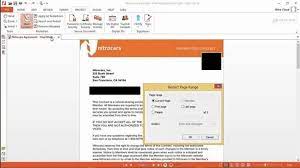
Description: The PDF & eSign solution designed for on-the-go professionals. Effortlessly create, edit, share and sign your essential documents on any device, wherever you are - all with your Nitro Pro.
Keep your work moving with rapid support
Whether you run a small business or support a large enterprise, Nitro’s 24/7 global support team is here to answer questions and resolve issues. Get prompt, personalized agent support with 2 or more licenses.

Sign and share with unlimited eSignatures
Experience the convenience of unlimited eSignatures for access and signing from any device — no downloads or sign-ups needed. Share PDFs for signature across multiple people and devices with ease.

Safeguard confidential documents with confidence
Keep your critical data and documents safe with Nitro Pro's robust security features. Add password protection, customize permissions, and securely share files — all while streamlining your workflows.

Easily convert your documents into editable PDFs
With Nitro Pro, you can effortlessly convert Excel spreadsheets, PowerPoint presentations and Word documents into searchable, editable PDFs. Our intuitive platform recognizes text in multiple languages, ensuring seamless conversion. Need extra guidance? Just chat with Nitro Assistant, our chat tool, to get started.

Make your work stand out with simplified PDF editing
Whether you’re redacting personal customer information or annotating your document with highlights or notes, perform all your essential PDF edits with ease. You can also insert hyperlinks, logos, bookmarks, watermarks, page numbers and much more for a professional touch.

Sign and share documents with integrated eSign
Complete forms and send documents for signatures in seconds with Nitro's integrated eSign solution. Enhance credibility with customizable ‘sign here’ stamps and send for signing directly from Outlook and Word. Need more signature, security and integration options?

Track performance in one place
Use Nitro’s analytics dashboard to gain valuable insights into user adoption, product usage and areas for optimizing workflows. Customize the dashboard to track your organization's most important KPI and start driving success like never before.

Now do it all on the go with Nitro Workspace
Seamlessly access installers, web-based PDF tools, quick eSigning, and more in one place. From inviting collaborators to extracting data and requesting signatures, the Workspace hub empowers you to save time and effort with one-click tools.

Discover User-Friendly Features

Redact and Protect
Protect sensitive personal and customer data with batch redaction.

Form Creation
Design forms for quick autofill to minimize repetitive tasks.

Sign Documents
Get unlimited documents signed by multiple people, on any device.

Batch Editing
OCR and combine multiple documents at once for quick searchability.

Integrations
Use Nitro seamlessly with Microsoft 365, Sharepoint, iManage and AIP.

Compress and Share
Optimize PDF files for easy sharing and minimal storage space usage.

Release Name: Nitro PDF Pro 14.43.7
Size: 821.1 MB
Links: HOMEPAGE – NFO – Torrent Search

Download: RAPiDGATOR
5 Comments
June 4

Dup Scout 18.2.14

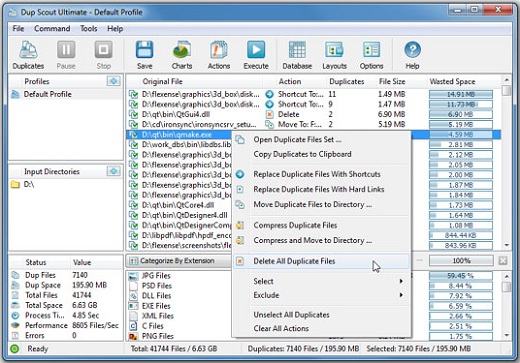
Description: Dup Scout is a duplicate files finder allowing one to search and cleanup duplicate files in local disks, network shares, NAS storage devices and enterprise storage systems. Users are provided with the ability to search duplicate files, save reports, replace duplicates with links, delete duplicate files or move duplicate files to another location.

DupScout allows one to save HTML, PDF, Excel, text, CSV and XML reports. Advanced users are provided with the ability to export reports from multiple servers to a centralized SQL database and perform history trend analysis operations.

Searching Duplicate Files in Network Servers and NAS Storage Devices
DupScout allows one to scan the network, discover network servers and NAS storage devices, automatically detect all accessible network shares and search duplicate files in hundreds of network servers and NAS storage devices. In addition, the user is provided with the ability to export the list of detected servers and NAS storage devices (including lists of network shares for each server) into HTML, PDF, text and CSV reports.

In order to search duplicate files in one or more servers or NAS storage devices, press the 'Network' button located on the main toolbar and wait while DupScout will scan the network and show a list of detected network servers and NAS storage devices. On the network servers and NAS storage devices dialog, select the required servers and press the 'Duplicates' button.

DupScout will show all network shares hosted on the selected servers and NAS storage devices allowing one to search duplicate files and save various types of charts and reports. In addition, DupScout provides a large number of advanced duplicate files search options allowing one to tune and customize duplicate files search operations for user specific needs and hardware configurations.

DupScout Command Line Utility
In addition to the desktop application, DupScout Pro and DupScout Server provide a command line utility allowing one to perform automated duplicate files search and removal operations or control one or more DupScout Servers via the network. The DupScout command line utility provides a large number of command line options allowing one to search duplicate files, save HTML, PDF, Excel, text, CSV and XML reports, export duplicate files to an SQL database and execute duplicate files removal actions.

The DupScout command line utility may be used to execute duplicate file search profiles pre-configured in the DupScout GUI application. Power computer users and IT professionals are provided with the ability to fully-automate duplicate files search and removal operations by integrating the DupScout command line utility into custom shell scripts and batch files.

DupScout Server
In addition, to the desktop product versions, enterprises and IT professionals are provided with two server-based product versions, DupScout Server and DupScout Enterprise, which run in the background as a service and allow one to search duplicate files in servers and NAS storage devices over the network. Server-based product versions are especially optimized for multi-core and multi-CPU servers and can search duplicate files in tens of servers and/or NAS storage devices simultaneously.

The server product versions provide advanced duplicate files search, removal, reporting and history trend analysis capabilities and may be controlled using a full-scale client GUI application and the DupScout command line utility locally or via the network.

The DupScout Server client GUI application provides a full set of features available in the desktop product version and additional capabilities allowing one to perform multiple, parallel duplicate files search operations, schedule periodic duplicate files search operations and perform history trend analysis operations.

Finally, DupScout Enterprise provides a web-based management interface allowing one to control one or more servers using a regular web browser through the network and provides the ability to perform duplicate files search operations, save various types of reports, perform history trend analysis, remove duplicate files, schedule periodic duplicate files search operations, etc.

Batch Duplicate Files Search Operations
DupScout Server and DupScout Enterprise provide the ability to scan the network, detect all network servers and NAS storage devices, execute one or more pre-configured duplicate files search commands on hundreds of network servers and NAS storage devices and generate an individual duplicate files report for each server, NAS storage device or network share.

In the simplest case, just press the 'Network' button located on the main toolbar, search all network servers and NAS storage devices on the network, select one or more servers, press the right mouse button and select the 'Batch Duplicate Files Search' menu item. DupScout will show a list of pre-configured duplicate files search commands allowing one to select one or more commands to be executed on all selected network servers and NAS storage devices.

Depending on the selected configuration, DupScout will save in the built-in reports database an individual duplicate files report for each network server, NAS storage device or network share. Once the batch duplicate files search operation is completed, the user will be provided with the ability to open saved duplicate files reports, review results, generate various types of pie charts and export reports to a number of standard formats including HTML, PDF, Excel, text, CSV and XML.

Release Name: Dup Scout 18.2.14
Size: 83.7 MB
Links: HOMEPAGE – NFO – Torrent Search

Download: RAPiDGATOR
5 Comments
June 4

Large Files Finder 2.0.6

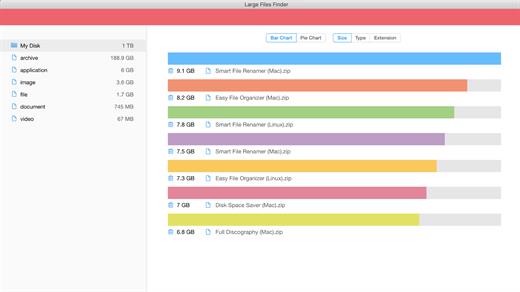
Description: Find and delete large files easily! Instantly find and delete large files that occupy your hard drive. Remove 5 largest files and save 30% of disk space. Multiple graphs for better large files representation.

Large Files Deleting
Instantly find and delete large files that occupy your hard drive.

Save Disk Space
Remove 5 largest files and save 30% of disk space.

Multiple Charts
Multiple graphs for better large files representation.

Blazingly Fast
Scanning 1,000,000 files takes less than a minute!

Intuitively Simple
It is so simple as 1 2 3. For all ages and for all users. Large Files Deleting.
Discover all missing releases in your music collection

Smart Filters
Easily filter large files by Kind, Extension, Date or Size.

Multiple Charts
Supports multiple charts for better large files representation.

Large Groups Deleting
Find and delete large group of files in a click!

Simple Categories
You can search for specific category of large files.

System Requirements
Windows 11, 10, 8.1, 7

Release Name: Large Files Finder 2.0.6
Size: 134.7 MB
Links: HOMEPAGE – NFO – Torrent Search

Download: RAPiDGATOR

6 Comments
June 4

TickTick Premium 8.0.9

Description: Stay Organized, Stay Creative. Join millions of people to capture ideas, organize life, and do something creative. Organize everything in your life, Whether it's work projects, personal tasks, or study plans, TickTick helps you organize and confidently tackle everything in your life.

Easily plan your schedule
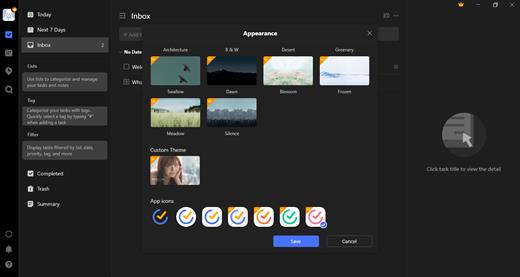
Different calendar views like monthly, weekly, daily, and agenda offer diverse choices for planning your time more efficiently.

Track time and stay focused
Adopt the popular "Pomodoro Technique"—break tasks into 25-minute intervals to stay focused and achieve a productive flow.

Develop and maintain good habits
A rich habit library, flexible tracking options, and thoughtful data review help you build good habits effortlessly and lead a fulfilling life.

Efficient Calendar Views
Monthly View gives a clear overall layout.
Weekly View clarifies busy and free intervals.
Agenda View ensures tasks are executed in order.
Multi-Day View enables dynamic adjustments.
Multi-Week View lets you shift weeks for changes.

Constant Reminder
With constant reminder, notifications will keep ringing until you handle them.

Repeat Reminder
With recurring rules like weekly, monthly, yearly and custom ones at your service, you'll never forget a thing.

NLP
Smart time recognition from your input when adding tasks, with automatic reminders set.

Filter
Easily customize filters like "high-priority tasks for this week" to view quickly.

Keyboard Shortcuts
Use shortcuts and command menus to perform quick operations.

Collaboration
Share lists with friends and colleagues, assign tasks, and improve collaboration.

Integration
Subscribe calendar and integrate with other apps. Manage all matters in TickTick.

Statistics
Track tasks, focus duration, and habit logs to get a comprehensive view of your progress.

Theme
Choose from 40+ themes to customize your personalized productivity tool.

Release Name: TickTick Premium 8.0.9
Size: 42.8 MB
Links: HOMEPAGE – NFO – Torrent Search

Download: RAPiDGATOR
5 Comments
June 4

Directory Opus 13.23.6 Beta

Description: Are you frustrated by the limitations of Windows Explorer? Directory Opus is a complete replacement for Explorer, with far more functionality than any other file manager available today.

You're in control.
Not just a simple file manager; Directory Opus lets you make your computer yours.
With a flexible user interface and unbelievable configurability, you can tailor Opus to streamline your workflow.
Dual panes, dual trees, multiple tabs.
Filter, sort, group your folders. Label and rate your files.
Queued file copies. Powerful batch renaming. Full archive support.
Find your files. Locate duplicates. Synchronize backups.
Assign tags and descriptions. Convert images. Edit metadata.
Fully multi-threaded, native 64 bit high performance code.
Whatever you want to do - Opus can probably do it. And if it's not built-in, you can take advantage of the unrivalled configurability to extend Opus using external tools.

What makes Opus unique?

Built for speed
Opus is written in native C++ multi-threaded code; compiled for the latest 64 bit CPUs, with high performance our number one design principle.

Fully configurable
Change the colors. Change the fonts. Change the toolbars and menus. Set up hotkeys. Opus adapts to how you want to use it.

Makes file management a breeze
Powerful searching, sorting, grouping, labelling and tagging features let you take control of your files like never before.

Endlessly extensible
Work with third-party tools as easily as with the built-in features. A full scripting interface, including scriptable dialogs, means your imagination is really the only limit.

Replace Windows Explorer and don't look back
Our unique Explorer Replacement mode provides a full replacement for Windows Explorer.
Single or dual pane file display and folder trees
Tabbed interface let you keep multiple folders open and switch quickly between them
Integrated viewer, metadata editor and utility panel
Built-in tools including synchronize and duplicate file finder
Leverage indexed search engines like Windows Search and Everything

High performance file management features
Copy, move, rename, duplicate, archive, view, backup and delete your files with ease
Queue multiple file copies for improved performance
Batch renaming including easy-to-use keyboard macros
Support for FTP and archive formats like Zip, 7Zip and RAR
Quickly filter, sort, group and search your folders
Color-code your files, assign status icons, star ratings, tags and descriptions
View images, documents and more. Image marking lets you sort your photos quickly and easily
Calculate folder sizes and print or export folder listings

Unrivalled configurability
Why let the programmers decide for you? You can tailor Opus to look how you want it to look, and to work how you want it to work.
Choose from light mode, dark mode, or design your own theme
Over 600 configurable colors and fonts
All toolbars and menus can be edited, plus you can add your own
Floating toolbars can act as program launchers
Configure your own hotkeys that work everywhere or just in Opus
Full scripting interface lets you design your own dialogs and add your own commands

Release Name: Directory Opus 13.23.6 Beta
Size: 29.6 MB
Links: HOMEPAGE – NFO – Torrent Search

Download: RAPiDGATOR

4 Comments
June 4

Smart File Renamer 1.6.9

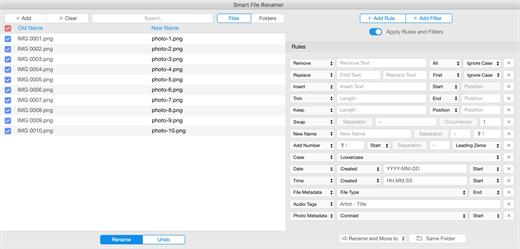
Description: Smart File Renamer - Rename multiple files easily! Supports hundreds of renaming scenarios! Loved by happy users from 14 to 80 years old. Renaming 1000 files takes less than a second!

Extremely Flexible
Supports hundreds of renaming scenarios!

Easy to Use
Loved by happy users from 14 to 80 years old.

Blazingly Fast
Renaming 1000 files takes less than a second!

Batch Renaming
Rename multiple files in one click!

Photos Renaming
Rename photos by country, date or EXIF tags!

Audio Renaming
Rename audio files by music tags easily!

Content Renaming
Rename your documents by content!

Folders Renaming
Rename not only files but folders as well!

RegEx Rename
Create flexible rename patterns with RegEx

File Tags Renaming
Rename files by file tags in a click!

Metadata Renaming
Rename files by its metadata.

Custom Rules
Easily rename groups of files with custom rules!

Smart Filters
Rename preselected categories of files in a click.

Dark Mode
Supports Dark and Light themes!

Live Preview
Review your files before and after renaming.

Rename Logs
Be aware of how you renamed.

External Drives
Rename files on external USB drives easily!

System Requirements
Windows 11, 10, 8.1, 7

Release Name: Smart File Renamer 1.6.9
Size: 86.7 MB
Links: HOMEPAGE – NFO – Torrent Search

Download: RAPiDGATOR
6 Comments
June 4

Filmographer 1.2.6

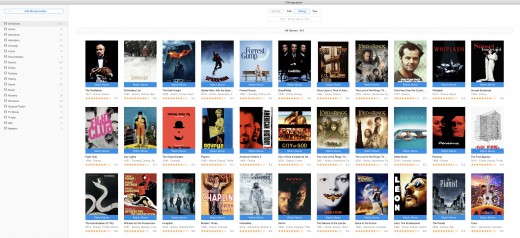
Description: Watch all of your movies in a simple click! Watch all of your movies with a simple click! Keep your movie collection under control! Get info about actors, directors, taglines, plots, ratings and more.

Watch Movies
Watch all of your movies with a simple click!

Organize Movies
Keep your movie collection under control!

Movies Info
Get info about actors, directors, taglines, plots, ratings and more.

Blazingly Fast
1000 movies analyzing takes less than a minute

Intuitively Simple
- It is so simple as 1 2 3.
- For all ages and for all users.

Watch Movies
Watch all of your movies with a simple click!

Organize Movies
Keep your movie collection under control!

Movies Info
Get info about actors, directors, taglines, plots, ratings and more.

Smart Search
Search and import new movies in a click!

Powerful Filters
Filter movies easily by genres, ratings, titles or years.

Multi-Language
Get movie info on your native language.

Simple Categories
Categories movies by genres, ratings and years.

Smart Notifications
Get notified when your favorite actor or director appears in new movie.

System Requirements
Windows 11, 10, 8.1, 7

Release Name: Filmographer 1.2.6
Size: 72.5 MB
Links: HOMEPAGE – NFO – Torrent Search

Download: RAPiDGATOR

5 Comments
June 4

Easy File Organizer 3.5.0

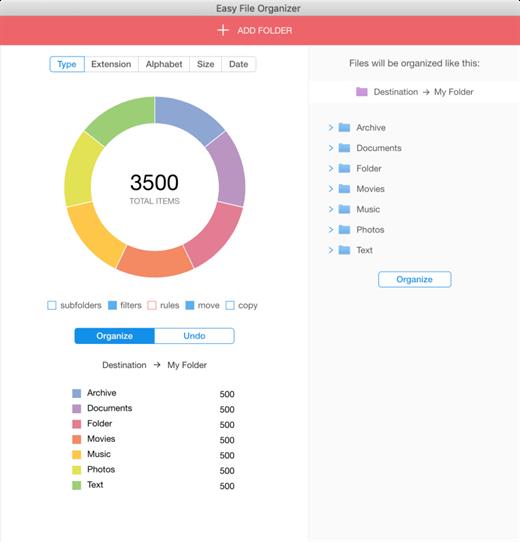
Description: Easy File Organizer - organize files and folders in one click. Supports hundreds of organizing scenarios! Loved by happy users from 14 to 80 years old. Organizing 1000 files takes less than a second!

Extremely Flexible
Supports hundreds of organizing scenarios!

Easy to Use
Loved by happy users from 14 to 80 years old.

Blazingly Fast
Organizing 1000 files takes less than a second!

Files Organizing
Organize any of your files in one click!

Photos Organizing
Organize photos by country or date taken!

Auto Organizing
Organize files automatically easily!

Music Organizing
Organize files by music tags.

Content Organizing
Organize your documents by content!

Subfolders Organizing
Organize files from all subfolders with a simple click!

Custom Rules
Easily organize groups of files with custom rules!

Flexible Templates
Organize files into folders generated from file names.

Dark Mode
Supports Dark and Light themes!

Smart Filters
Organize preselected categories of files in a click.

Live Preview
Review your files before and after organizing.

External Drives
Organize files on external USB drives easily!

Tags Support
Organize files by tags!

Multi Level Subfolders
Auto-create multi-level subfolders with type, extension or date!

Batch Organizing
Organize thousands of files to smaller chunks.

Metadata Organizing
Organize files by EXIF metadata.

Organizing History
Be aware of how you organized all files in the past.

Always Reversible
You can undo your organized files to previous state anytime!

Easy to Use
Loved by happy users from 14 to 80 years old!

System Requirements
Windows 11, 10, 8.1, 7

Release Name: Easy File Organizer 3.5.0
Size: 84.4 MB
Links: HOMEPAGE – NFO – Torrent Search

Download: RAPiDGATOR

6 Comments
June 4

Speedy Duplicate Finder 1.5.9

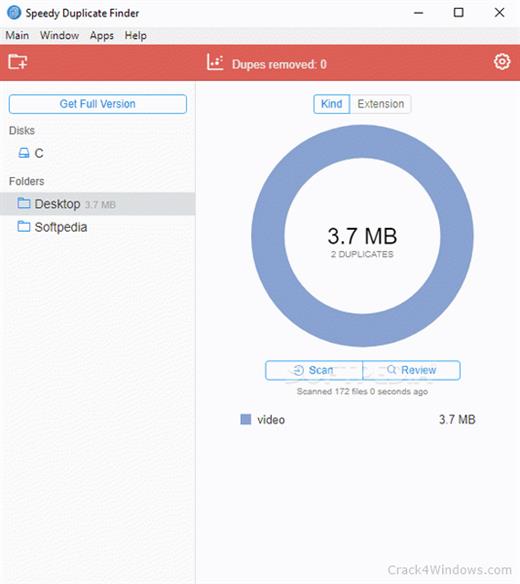
Description: Extremely fast duplicate file finder! Scanning 1000 files takes less than a second! Loved by happy users from 14 to 80 years old. Easily filter group of duplicates by Kind, by Extension or by Size.

Blazingly Fast
Scanning 1000 files takes less than a second!

Easy & Flexible
Loved by happy users from 14 to 80 years old.

Smart Filters
Easily filter group of duplicates by Kind, by Extension or by Size.

Blazingly Fast
Scanning 1000 files takes less than a second!

Disk Support
You can search for duplicates not only in folders but on entire disk!

Intuitively Simple
It is so simple as 1 2 3. For all ages and for all users!

Multiple Folders
You can find duplicates in many folders at the same time!

Smart Filters
Easily filter group of duplicates by Kind, by Extension or by Size.

Easy Review
Review your duplicates easily.

Smart Search
Search for duplicates faster!

System Requirements
Windows 11, 10, 8.1, 7

Release Name: Speedy Duplicate Finder 1.5.9
Size: 71.1 MB
Links: HOMEPAGE – NFO – Torrent Search

Download: RAPiDGATOR

6 Comments
June 4

MediaHuman YouTube Downloader 3.9.20 (0106)

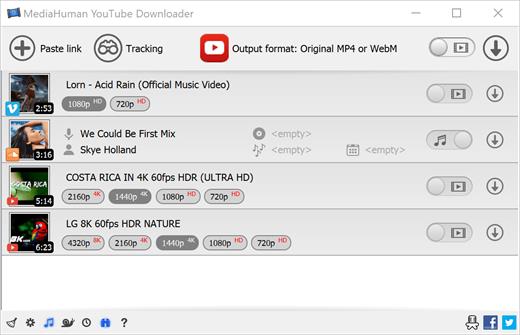
Description: There are so many interesting things to be found on YouTube, but you can't download the videos or save them as audio files by default. That's why we developed YouTube Video Downloader. This app will help you to accomplish video downloads quickly and without hangups. With our program you can simply download the whole playlist or YouTube channel at once and watch it whenever and wherever you want.

The application has many other convenient and practical functions for you to explore and enjoy.

Downloads entire playlists and channels
Supports Ultra High resolutions including 4K & 8K (with audio)
Downloads several videos simultaneously
YouTube, Facebook, Vimeo, Dailymotion, and many others
Extracts audio track and saves it as MP3
Supports exporting to iTunes/Music.app

Main Features:
Playlists and channels
The program supports downloading all the videos in a playlist or channel. In addition, you can monitor the selected channel or playlist and download new clips as they are uploaded.

Adds directly to iTunes/Music.app
You can configure the program to automatically add downloaded movies to your iTunes library. You can also pick a playlist where the downloaded video should be added.

HQ, HD, 4K or 8K
The program supports all available resolutions, be that 720p, 1080p, 4K or 8K, 30 or 60 fps. The choice is up to you. Unlike online video downloaders, the app downloads any resolution with sound.

Quality of the original
You can choose to save the video in its original quality and format, such as MP4 or WebM, without any modifications. In this case, the clip you get will be exactly the same as the one uploaded by its author.

Monitors the clipboard
The program keeps an eye on the clipboard and as soon as it spots a supported link there, it automatically adds this video into the download queue.

Simple tag editor
For audio downloads, the app automatically detects the artist and song name, which will be written in ID3 tags. These can be easily changed before the video is downloaded.

Not just YouTube
The program supports Twitch, Vevo.com, Vimeo, Dailymotion, Facebook, UOL, VKontakte, SoundCloud, TikTok, Likee, Brandnewtube, Odysee, Brighteon, Rumble and a lot of other sites. So you can download video from these websites as easy as you do from YouTube.

Drag & Drop
The app features a 100% drag&drop support. Just drag the link to a video with your mouse and drop it to the main window of the program, or to its dock icon on Mac.

Multi-language interface
The app is translated into: Arabic, Armenian, Azerbaijani, Bulgarian, Catalan, Chinese (Hong Kong SAR China), Chinese (Simplified), Chinese (Taiwan), Croatian, Czech, Danish, Dutch, English, Esperanto, French, German, Greek, Hebrew (Israel), Hungarian, Indonesian, Italian, Japanese, Korean, Latvian, Lithuanian, Malay, Norwegian Bokmål, Polish, Portuguese, Portuguese (Brazil), Romanian, Russian, Serbian, Slovenian, Spanish, Swedish, Turkish, Vietnamese.

Release Name: MediaHuman YouTube Downloader 3.9.20 (0106)
Size: 92.4 MB
Links: HOMEPAGE – NFO – Torrent Search

Download: RAPiDGATOR
5 Comments