Please REGISTER or RENEW your account on RAPiDGATOR.net and support us by doing through all RAPiDGATOR working download links on main posts...
June 4

Davinci Resolve Studio 21.0

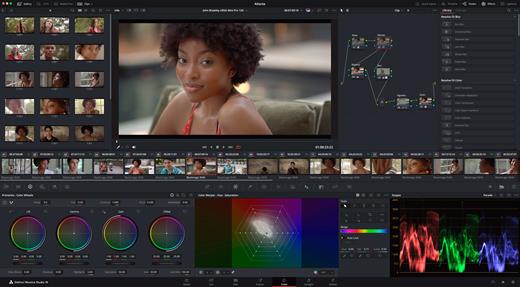
DaVinci Resolve Studio is the world’s only solution that combines professional 8K editing, color correction, visual effects and audio post production all in one software tool! You can instantly move between editing, color, effects, and audio with a single click. DaVinci Resolve Studio is also the only solution designed for multi user collaboration so editors, assistants, colorists, VFX artists and sound designers can all work live on the same project at the same time! Whether you’re an individual artist, or part of a large collaborative team, it’s easy to see why DaVinci Resolve is the standard for high end post production and finishing on more Hollywood feature films, television shows and commercials than any other software.

DaVinci Resolve 20 features powerful new DaVinci Neural Engine AI tools and over 100 feature upgrades! New AI tools include text based timeline editing, music remixing, dialogue separation and UltraNR noise reduction. IntelliTrack AI lets you use video to track the Fairlight audio panner. ColorSlice vector grading and film look creator offer richer grading vibrance and color density. Plus there are new features for live TV production and broadcast. DaVinci Resolve now supports realtime selection of live camera recordings for instant replay to air with slow motion and stingers. Multi Source is the fastest way to see your cameras and edit to the timeline while the cameras are still recording!

What’s New

Version 21.0:


  • Release notes were unavailable when this listing was updated.
Compatibility

macOS 13.0 or later

Release Name: Davinci Resolve Studio 21.0
Size: 8 GB
Links: HOMEPAGE – NFO – Torrent Search

Download: RAPiDGATOR

4 Comments
June 4

Permute 4.0.2

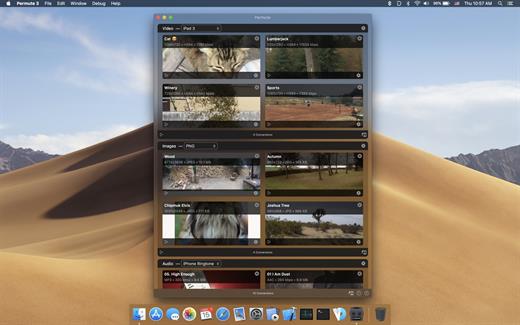
Permute offers easy-to-use drag-and-drop video conversion.

Features:


  • Easy to Use – built from the ground up, Permute is a perfect example of what a Mac app should be. With a gorgeous interface and drag & drop simplicity no need for complicated options.
  • Insanely Fast – Permute was engineered to be incredibly fast. Let us take care of the hard stuff. Just select the video format you want and it’ll be done faster than you can say “hardware acceleration” – MP4 and HEVC presets now take advantage of your machine’s hardware acceleration capabitlities, speeding up HEVC conversions more than 3 times over previous versions of Permute!
  • PDF Support – Permute 3 now includes support for stitching multiple images into a single PDF.
  • Everything Included – It doesn’t matter if you’re converting home movies or processing images. Permute can do it all. We support nearly every format and have plenty of device presets to choose from.
  • Looks Amazing – Whether you use dark mode or not, Permute will look amazing. Taking advantage of the modern technologies, Permute will even change its icon in dark mode.
  • Keep the Schedule – Video re-encoding is quite demanding on computer resources. This is why you can now schedule Permute to convert videos e.g. at night when you’re not using your computer.
  • And so much more! – There are so many other great features in Permute – adjust volume of an audio file or an audio track in a video. Batch-resize, rotate and flip images and videos. And more!
What’s New

Version 3.14.6 -
Rapidgator | Nitroflare

Version 3.14.1 -
Rapidgator | Nitroflare

Version 3.14.0 -
Rapidgator | Nitroflare

Version 3.13.6 -
Rapidgator | Nitroflare

Version 3.13.5 -
Rapidgator | Nitroflare

Version 3.13.4 -
Rapidgator | Nitroflare

Version 3.13.0 -
Rapidgator | Nitroflare

Version 3.12.6 -
Rapidgator | Nitroflare

Version 3.12.1 -
Rapidgator | Nitroflare

Version 3.12.0 -
Rapidgator | Nitroflare

Version 3.11.19 -
Rapidgator | Nitroflare

Version 3.11.17 -
Rapidgator | Nitroflare

Version 3.11.16 -
Rapidgator | Nitroflare

Version 3.11.15 -
Rapidgator | Nitroflare

Version 3.11.13 -
Rapidgator | Nitroflare

Version 3.11.12 -
Rapidgator | Nitroflare

Version 3.11.11 -
Rapidgator | Nitroflare

Version 3.11.10 -
rapidgator |nitroflare

Compatibility

macOS 10.12.0 or later

Release Name: Permute 4.0.2
Size: 51 MB
Links: HOMEPAGE – NFO – Torrent Search

Download: RAPiDGATOR

4 Comments
June 4

Folx Pro 5.34

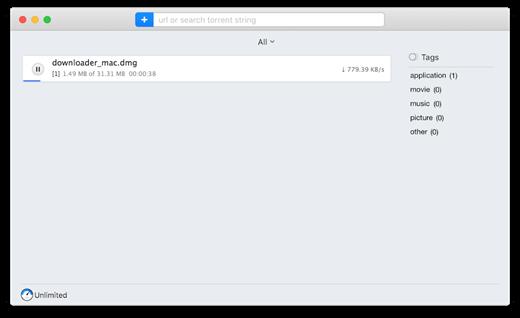
Folx combines two functionalities – of download manager and torrent client. It makes downloading extremely easy: just open the page with the file to be downloaded, click the link in your browser, and Folx will start the download for you. Its auto-resume option comes handy when the downloading gets interrupted. You can also assign a tag or a few to the downloaded content for accurate and easy search through the downloaded files.

There are many basic features included in the free trial. However, the Pro version brings such handy features as splitting the downloads in up to 20 threads which speeds up the download process; scheduling the download tasks according to your convenience; smart speed adjustment option (download speed will be adjusted automatically whenever you need to use Internet traffic to run other applications), iTunes integration, searching the web for torrents directly from Folx and password manager.

What’s New

Version 5.34:


  • Improved: compatibility with macOS 11
  • Fixed: an issue with CPU load when using the Folx extension for Chrome and Firefox
  • Fixed: an issue with the Folx extension work when opening multiple windows in Chrome
  • Note: for the fixed issues to come into force, you need to update Folx extensions.
Compatibility

macOS 10.9 or later
Apple Silicon or Intel Core processor


Release Name: Folx Pro 5.34
Size: 30.1 MB
Links: HOMEPAGE – NFO – Torrent Search

Download: RAPiDGATOR

4 Comments
June 3

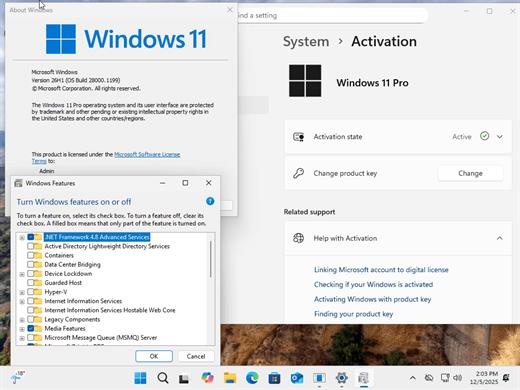
Windows 11 Pro 25H2 Build 26200.8524 TPM Bypassed & Pre-Activated June 2026

Description: On August 29, 2025, Microsoft released the first official preview of Windows 11 version 25H2 (2025 Update) in the Release Preview Channel of the Windows Insider Program. The update is rolling out as an enablement package for devices already running version 24H2.
Windows 11 versions 24H2 and 25H2 use the same underlying system files and architecture. That means there’s no need to reinstall or replace the core operating system to move between them. Instead of delivering a large, full-featured update, the software giant simply “flips the switch” with a small enablement package that activates the 25H2 features already present in 24H2. This makes the update faster, less risky, and easier to roll back.

What’s New


  • Some of the features that you can expect to find on Windows 11 25H2 include
  • Start menu redesign: Wider layout, more pinned apps, a new “All” apps section, and optional removal of “Recommended.”
  • File Explorer dark mode: More dialogs now match the theme, including copy and delete prompts.
  • Notification Center: Now shows full clock (with seconds) on secondary monitors.
  • Android app resume: Continue mobile app activity directly from the Taskbar.
  • Start menu sidebar: Expanded access to messages, calls, and photos from your phone with a new interface.
  • Click to Do: New “Describe Image” action, selection modes (Freeform, Rectangle, Ctrl + Click), and touch gestures.
  • Admin Protection: Prompts for elevation on untrusted apps—adds a visual warning layer.
  • Passkeys with 1Password: Native support for plugin-based passkey managers.
  • Text & image AI activity log: Track recent AI usage from third-party apps.
Release Name: Windows 11 Pro 25H2 Build 26200.8524 TPM Bypassed & Pre-Activated June 2026
Size: 6.7 GB
Links: HOMEPAGE – NFO – Torrent Search

Download: RAPiDGATOR

5 Comments
June 3

Starry Night Pro Plus v8.1.1.2104 + Fix

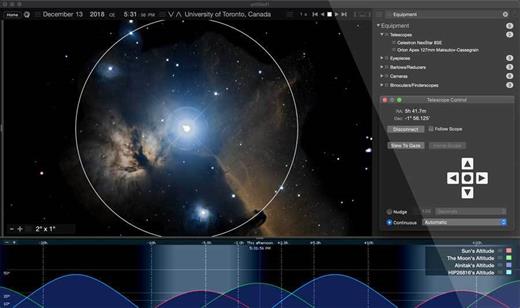
Description: Starry Night 8 - professional Astronomy Telescope Control Software for PC. Starry Night Pro Plus 8 is our fully featured flagship program, tailored for the astronomer who wants the very best in-class astronomy software and telescope control experience.

Key features include
- Apollo 11 Mission Data
- Data Backup and Cloud Sync
- Improved DeepSky Database
- Improved Telescope Control
- New Dark Theme
- New Audio Descriptions
- Stars and Exoplanets in 3D
- Simple, fast, user-optimized interface
- All-Sky CCD Mosaic
- 5 multi-wavelength full sky surveys
- Fully featured with a complete object database
- Redesigned Live SkyGuide
- Maxim DL Plugin

What's New in Starry Night 8

Improved DeepSky Database
Explore a new, up-to-date, 36,000 object, cross-referenced database, built from various source catalogs.

Improved Telescope Control
Telescope control has been redesigned to offer a modern, sleek looking, user experience,

Open Astronomy Log
With the international standard for astronomical logging now export your data to Open Astronomy Log (OAL) format.

Sky Calendar
Explore a hand picked list of the most interesting celestial objects to observe each evening.

Audio Descriptions
Hours of descriptive audio for over 400 of the most interesting night sky objects. Click and listen!

Maps & Location Services
Auto-detect your home location and choose additional observing sites quickly and accurately.

Interactive Live SkyGuide
Web-delivered multimedia reveals the science of the solar system, stars, galaxies, and the known universe.

Binary Star Systems
3D models of eight beautiful and accurately rendered binary stars!

Features
We put the rocket in space science software

Universal Search
New dynamic user-optimized interface, with "Universal Search" for objects, Starry Night files, SkyGuide references, options, events, and more.

High Performance Graphics
The incredibly rich and detailed Starry Night software OpenGL graphics that have set the industry standard for excellence in astronomy software.

Extragalactic 3D Database
New & Exclusive - The Starry Night Extragalactic 3D Database includes over 200,000 galaxies encompassing over 1 billion lights years of space.

Space Missions
New and updating space missions with 30 detailed and accurate 3D models of spacecraft & trajectories for a real flight time experiences.

3D Suns
Every star is now accurately rendered as a 3D body with classification-appropriate color, texture and relative radii.

Updated Messier Catalog
An updated Messier catalog with new breathtaking high resolution images of your favourite star clusters, nebulae, and galaxies.

Analemma Simulations
The Sun's analemma can now be drawn accurately on any planet's surface.

3D Exoplanets
Exoplanets as 3D bodies with proper location, size, orbit and planetary texture. Land on the surface, see a sunset from the surface of Kepler-62e!

Scientific Precision
The most precise planetary positions available (using JPL ephemerides) plus an expanded asteroid catalog with highlighted families and groups.

H-R Diagrams
Hertzsprung-Russell diagrams tell about star age and mass, plotting star luminosity on a vertical axis vs. star temperature on a horizontal axis.

Horizon Panoramas
54 streamable photorealistic horizon panoramas, from Antarctica, to Stonehenge to the Egyptian Pyramids, and much more!

Ephemeris Generator
Ephemeris values are handy for knowing where an object will be in the sky at a particular time. You can export and print it out.

Graph Tool
The Graph offers a way of examining changes in an object’s qualities over time. It is possible to plot more than one object on the Graph at one time.

Updated Surface Maps
We've got new maps of many planets and moons including Vesta, Ceres, and, of course, our favorite dwarf planet Pluto!

System Requirements
- 32-bit or 64-bit operating system
- Windows 10
- 1 GHz or higher processor
- 1 GB RAM
- 12 GB of hard disk space
- Minimum recommended monitor resolution of 1024 x 768 pixels.

* 128 MB OpenGL 1.4 capable graphics card required.

Release Name: Starry Night Pro Plus v8.1.1.2104 + Fix
Size: 2.4 GB
Links: HOMEPAGE – NFO – Torrent Search

Download: RAPiDGATOR

2 Comments
June 3

WinToHDD v7.0.2.2 (All Editions) + Fix

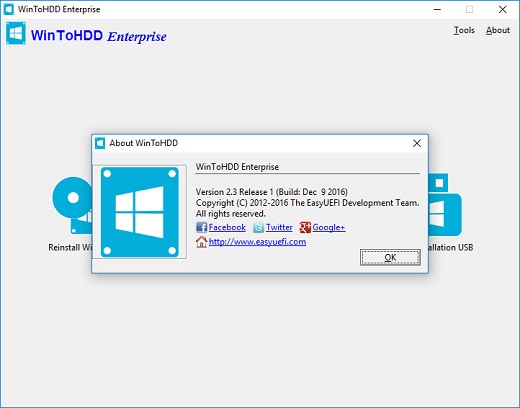
Description: WinToHDD is a handy and useful software which allows you to install or reinstall Windows (Vista/2008 or later) without using a CD/DVD/USB drive. With this All-in-One Microsoft Windows deployment tool, you can easily reinstall Windows, install Windows onto disks other than the one where your Windows is installed, or clone existing Windows installation to other disk. Furthermore, you can use it to create a Windows installation USB containing all your Windows installation ISO files, then you can install Windows (Vista/2008 or later) from the same USB drive on both BIOS and UEFI computers.

Install/reinstall Windows from ISO, WIM, ESD without using CD/DVD/USB.
Clone Windows to another disk without reinstalling Windows, apps.
Easily bypass Windows 11 system requirements (TPM 2.0, RAM, internet connection, etc).
Encrypt Windows partition with BitLocker when installing or cloning.
Install any version of Windows 11/10/8/7/Vista, Server 2008 or later (64 & 32 bits) from same USB drive on both BIOS and UEFI computers.
Fully compatible with GPT/UEFI and Windows UEFI CA 2023.

Reinstall Windows Without Using CD/DVD/USB Drive
The reinstall Windows feature allows you to reinstall Windows 11/10/8.1/8/7/Vista & Windows Server 2008 or later directly from an ISO, WIM, ESD, SWM, VHD or VHDX file without using a CD/DVD or USB drive. With this feature, even if you don't know anything about computer technology, you can easily reinstall Windows with just a few clicks, and it can help you bypass Windows 11 system requirements such as TPM 2.0 requirement, RAM requirement, internet connection requirement, etc.

Install Windows Without Using CD/DVD/USB Drive
With this feature, you can easily install Windows 11/10/8.1/8/7/Vista & Windows Server 2008 or later onto disks other than the one where your Microsoft Windows operating system is installed, using an ISO, WIM, ESD, SWM, VHD, VHDX image file or a CD/DVD drive as the source of installation. This feature can help you bypass Windows 11 system requirements such as TPM 2.0 requirement, RAM requirement, internet connection requirement, etc.

Migrate Windows to SSD or New Hard Disk
The system clone feature allows you to clone existing Windows OS installation (Windows 11/10/8.1/8/7/Vista & Windows Server 2008 or later) from the old disk to a new disk (HDD/SSD), with this feature you can generat an exact copy of the existing Windows system to another disk.

Create Multi-Installation USB to Install or Clone Windows
You can create a Windows installation USB flash drive to install any version of Windows (Vista/2008 or later, both 64 & 32 bits) from the same USB drive on both BIOS and UEFI computers. The bootable USB flash drive also contains the system clone feature, so you can use it to clone Windows OS installation from one disk to another.

Release Name: WinToHDD v7.0.2.2 (All Editions) + Fix
Size: 36 MB
Links: HOMEPAGE – NFO – Torrent Search

Download: RAPiDGATOR

3 Comments
June 3

QR-Code Creator 7.6.3

Description: Create QR codes in no time on your PC. The best part is that the codes are generated without an internet connection. The software calculates the codes directly on your local computer, so you don't have to worry about your data being read by third parties.

You can easily paste the generated QR codes into almost any application using the clipboard.

The software is constantly being developed and now includes a built-in prompt generator in addition to numerous canvases for visual enhancement.

Release Name: QR-Code Creator 7.6.3
Size: 34.3 MB
Links: HOMEPAGE – NFO – Torrent Search

Download: RAPiDGATOR

6 Comments
June 3

Camiael Movie Studio 1.0.1.11

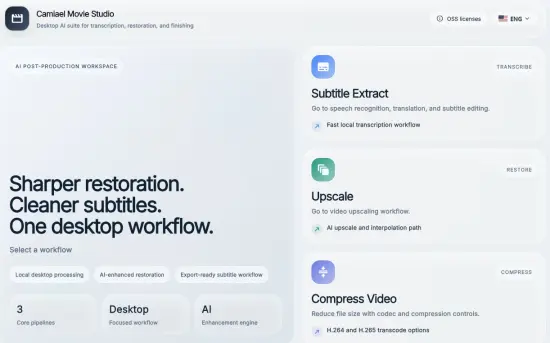
Description: Camiael Movie Studio - Create subtitles, translate, upscale, and smooth video locally. Camiael Movie Studio is a Windows desktop tool for creators who need subtitles and video cleanup in one workflow. Drop in a video or audio file, generate subtitles with a local AI engine, translate and edit the result, compress video when you need smaller files, then export subtitle files or burn captions directly into an MP4.

The app is built for hands-on post-production: review subtitle timing, edit text segment by segment, preview captions on the video, and save SRT, VTT, or SBV files for publishing. The video compression workflow supports H.264, H.265, and AV1 output with quality, audio, metadata, and resolution controls. For video restoration work, Camiael Movie Studio also includes AI upscaling, frame interpolation, batch processing, and GPU acceleration on supported NVIDIA systems.

Core Features
- AI subtitle generation for 20+ languages
- Subtitle translation with a bundled local model
- Timing edits and SRT/VTT/SBV export
- Burn subtitles into MP4 with font, color, and position controls
- Upscale low-resolution video by 2x or 4x
- Frame interpolation for smoother 24fps-to-60fps motion
- Batch processing for multiple videos

Key Features
- AI subtitle generation from video and audio
- Local speech recognition engine
- Subtitle editing with timing control
- SRT, VTT, and SBV export
- Burn subtitles into MP4 video
- Local subtitle translation
- Video compression with H.264, H.265, and AV1
- Quality, audio, metadata, and resolution controls
- AI video upscaling
- RIFE frame interpolation
- Batch upscaling workflow
- NVIDIA GPU and NVENC acceleration
- Local-first desktop processing
- Korean, English, Japanese, and Chinese UI
- Common video, audio, and subtitle formats
- Preview captions while editing
- Segment-by-segment subtitle review
- Export-ready MP4 workflow
- Designed for creators and editors

System Requirements
- OS: Windows 10 version 17763.0 or higher
- DirectX: Version 11 (Minimum), DirectX 12 API, Hardware Feature Level 12 (Recommended)
- Memory: 4 GB (Minimum), 16 GB (Recommended)
- Processor: Intel Core i5 or AMD Ryzen 5 (Minimum), Intel Core i7 or AMD Ryzen 7 (Recommended)
- Graphics Processor: Intel UHD Graphics or better (Minimum), NVIDIA GeForce RTX 3060 or better (Recommended)

Release Name: Camiael Movie Studio 1.0.1.11
Size: 2.5 GB
Links: HOMEPAGE – NFO – Torrent Search

Download: RAPiDGATOR

3 Comments
June 3

Camiael Audio Studio 1.2.0.9

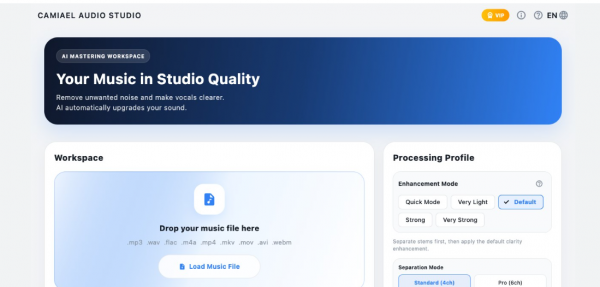
Description: Camiael Audio Studio - Separate tracks, mix stems, and restore clearer 48 kHz audio locally. Camiael Audio Studio is a local AI audio studio for splitting music into vocals, drums, bass, guitar, piano, and backing tracks, then shaping the result into the sound you want.

Use it for vocal removal, backing track creation, voice isolation, stem extraction, remastering, and 48 kHz AI HD restoration in one workflow. It is built for creators who work with covers, remixes, practice tracks, long mixes, podcasts, and batches of music files.

Your audio is processed on your PC and your working files are not uploaded to an external server. On systems with an NVIDIA GPU, AI HD restoration and accelerated processing can be used more effectively.

Dial in the result with genre presets such as Ballad, Rock, Pop/EDM, Hip-Hop, and Lo-Fi, plus space effects like Concert Hall and Lo-Fi Space, detailed EQ, and master level controls.

Core Features
- Auto stem split: vocals/drums/bass/guitar/piano
- AudioSR AI HD 48 kHz restoration
- Easy multi-track mixer
- EQ and spatial preset tuning
- Flexible export: mix/stems/BGM
- Queue processing for multiple files

Key Features
- AI audio separation: extract vocals, drums, bass, guitar, piano, and backing tracks
- Vocal remover and backing track maker for covers, practice, and remix workflows
- Local processing and privacy: working files are not uploaded to an external server
- Batch processing for multiple audio files
- Long audio support for mixes, live recordings, and podcasts
- AI HD restoration with 48 kHz output on supported NVIDIA GPU systems
- Genre presets for Ballad, Rock, Pop/EDM, Hip-Hop, Lo-Fi, and more
- Space effects and EQ, including Concert Hall, Lo-Fi Space, and detailed tone shaping
- Individual stem export for separated tracks or backing-only output
- Clean studio UI designed for creator workflows
- Ultimate Audio Enhancement: Flawlessly restores muffled AI audio and low-quality recordings into studio-grade Hi-Fi sound.
- Korean, English, Japanese, and Chinese UI

System Requirements
- OS: Windows 10 version 17763.0 or higher
- DirectX: Version 11 (Minimum), DirectX 12 API, Hardware Feature Level 12 (Recommended)
- Memory: 4 GB (Minimum), 16 GB (Recommended)
- Processor: Intel Core i5 or AMD Ryzen 5 (Minimum), Intel Core i7 or AMD Ryzen 7 (Recommended)
- Graphics Processor: Intel UHD Graphics or better (Minimum), NVIDIA GeForce RTX 3060 or better (Recommended)

Release Name: Camiael Audio Studio 1.2.0.9
Size: 7.7 GB
Links: HOMEPAGE – NFO – Torrent Search

Download: RAPiDGATOR

1 Comments
June 3

Blackmagic Design DaVinci Resolve Studio 21.0

Description: DaVinci Resolve is the world’s only solution that combines editing, color correction, visual effects, motion graphics and audio post production all in one software tool! Its elegant, modern interface is fast to learn and easy for new users, yet powerful for professionals. DaVinci Resolve lets you work faster and at a higher quality because you don’t have to learn multiple apps or switch software for different tasks.
That means you can work with camera original quality images throughout the entire process. It’s like having your own post production studio in a single app! Best of all, by learning DaVinci Resolve, you’re learning how to use the exact same tools used by Hollywood professionals!

Hollywood's #1 Post Solution
High end professionals working on feature films and television shows use DaVinci Resolve more than any other solution! That’s because it’s known for incredible quality and creative tools that are light years beyond the competition. You get DaVinci’s Emmy™ award winning image technology with 32-bit float processing, patented YRGB color science and a massive wide gamut color space for the latest HDR workflows. You also get the legendary quality of Fairlight audio processing for the best sound in the industry! With DaVinci Resolve, you get the same tools professional colorists, editors, VFX artists and sound engineers use every day to finish your favorite films and streaming television shows!

What’s New in DaVinci Resolve 20
DaVinci Resolve 20 introduces more than 100 new features including powerful AI tools designed to assist you with all stages of your workflow. Use AI IntelliScript to create timelines based on a text script, AI Animated Subtitles to animate words as they are spoken, and AI Multicam SmartSwitch to assemble a timeline with camera angles based on speaker detection. The cut and edit pages introduce a dedicated keyframe editor and voiceover palettes, and AI Audio Assistant analyzes your audio and intelligently creates a professional audio mix. In Fusion, explore advanced multi layer compositing workflows. The Color Warper now includes Chroma Warp, plus Magic Mask and Depth Map have huge updates.

Multi User Collaboration
DaVinci Resolve is the only solution that lets you grow and build your own multi user post production studio! The project libraries are built for real time local and remote collaboration. While the Blackmagic Cloud website lets you host and access your projects and media from anywhere in the world. Now you can collaborate with editors, colorists, visual effects artists, and sound engineers all working together at the same time. Best of all, you no longer have to import and export files, translate projects, lose work, or conform and manage changes. DaVinci Resolve is the only application in the world that lets everyone work together in parallel on the same project and at the same time!

All In One Solution for Post Production
DaVinci Resolve is divided into "pages," each of which gives you a dedicated workspace and tools for a specific task. Editing is done on the cut and edit pages, visual effects and motion graphics on the Fusion page, color correction on the color page, audio on the Fairlight page, and media organization and output on the media and deliver pages. All it takes is a single click to switch between tasks!

Edit
The world's fastest and most advanced professional NLE
The edit page is the world’s most advanced professional non-linear editor. The familiar track layout, dual monitor design and traditional workflow makes it easy for new users to learn while still being powerful enough for professional editors. It’s perfect for larger projects such as feature films, television shows, streaming, commercials, documentaries and more. The edit page features drag and drop editing, context sensitive automatic trimming tools, fully customizable keyboard shortcuts so you can work faster, and a library full of hundreds of titles, transitions, and effects that you can add and animate. You also get complete media management, organization and timeline management tools.

Cut
Designed for editors to turn around work fast!
The cut page is perfect for projects with tight deadlines that you have to turn around quickly. The cut page has a streamlined interface that’s fast to learn and designed for speed. Features such as source tape, dual timelines, fast review, and smart editing tools help you work faster than ever. The sync bin and source overwrite tools let you quickly edit multicam programs. It’s also great for documentaries and now live broadcast editing and replay. Multi Source is the fastest way to see your cameras and edit to the timeline while the cameras are still recording! Everything on the cut page is action based so every click does something. That means you’ll spend more time editing and less time hunting for commands.

Color
Hollywood’s favorite color corrector!
The DaVinci Resolve color page is Hollywood’s most advanced color corrector and has been used to color and finish more high end feature films and television shows than any other system! It’s also approachable with features designed to make it easier for new users to get great results while they continue to learn the advanced tools. For example, primary control sliders will be familiar to anyone who’s used image editing software, making it easy to adjust contrast, temperature, midtone detail, saturation and more. The color page has an incredible range of primary and secondary color grading features including PowerWindows™, qualifiers, tracking, advanced HDR grading tools and more!

Fusion
Cinematic quality visual effects and motion graphics!
The Fusion page lets you create cinematic visual effects and broadcast quality motion graphics right inside of DaVinci Resolve! Fusion features a node based workflow that makes it faster and easier to create sophisticated effects and animations than you could ever create using a layer based approach. You get hundreds of 2D and 3D tools for visual effects and motion graphics, along with advanced animation curve and keyframe editors that allow you to create incredibly organic and realistic animations. Fusion has everything from point, planar and 3D camera tracking to rotoscope and keying tools for creating photorealistic composites, stunning animated titles, 3D particle systems and more!

Fairlight
Professional tools designed for audio post production
The Fairlight page features hundreds of pro tools for audio post production. It’s like having a professional digital audio workstation (DAW) built into your editing and color system! The Fairlight Audio Core lets you work with up to 2,000 tracks at a time with realtime effects, EQ, and dynamics processing! You get sample accurate editing tools, advanced ADR and Foley, and Fairlight FX such as reverb, de-esser, and hum remover, plus AI effects like Voice Isolation and Music Remixer and more. IntelliTrack AI tracking lets you use video to track the Fairlight audio panner and you can mix and master stereo, 5.1, 7.1, and even immersive 3D audio formats including 5th order ambisonics!

Media and Delivery
Incredibly wide format support, finishing and mastering!
The media and delivery pages have everything you need to import, manage and deliver final projects. The media page is a dedicated full screen workspace that lets you prepare footage, sync clips, organize media into bins and add metadata before you start editing. Use the clone palette to ensure every bit of data in the camera media cards is copied during backup. During edit or grading, stream video outputs to a remote client monitor via DeckLink. You can output and upload files to YouTube, Vimeo and X from anywhere page using the quick export tool. The deliver page gives you total control over all encoding options and formats, along with a render queue for exporting multiple jobs!

Resolve FX
DaVinci Resolve Studio 20 features over 100 GPU and CPU accelerated Resolve FX such as blurs, light effects, noise, image restoration, lens flair, stylize and more! Version 19 adds even more plugins such as background defocus for portrait shots and film look creator. Film look creator alters color shading, vibrance, hue and the luminance of an image so you can easily apply many film looks. You can even add film grain! There are improvements to the face refinement box and profile handling, additional controls for skin refinements, smoother sub pixel animation and finer control for directional blur. All Resolve FX effects can be applied and animated in the cut, edit, Fusion and color pages!

Release Name: Blackmagic Design DaVinci Resolve Studio 21.0
Size: 9.5 GB
Links: HOMEPAGE – NFO – Torrent Search

Download: RAPiDGATOR

2 Comments