Please REGISTER or RENEW your account on RAPiDGATOR.net and support us by doing through all RAPiDGATOR working download links on main posts...
June 2

Zoom Player MAX 22.5 RC1

Description: Zoom Player, the most Flexible & Sophisticated Media Player for Windows PCs / Tablets. Based on our specially crafted 'Smart Play' technology, more media files and formats play with less hassle, improved stability and greater performance.

Zoom Player's customizable and polished full-screen navigation system makes browsing your content as easily accessible when using a Mouse, a Keyboard, a Remote Control or using a Touch input device such as a Tablet or Phone. Our powerful media library JukeBox features take your Movie & TV collections to a new level by enriching them with posters, backdrops and meta-data information (overview, cast, genre and more).

Zoom Player's fullscreen navigation system includes intuitive interfaces such as the Media Library, File Browser, Playlist, Color Control, Audio Equalizer, Bookmarks, Play History, Subtitle & Audio Stream Selection and many more. Zoom Player's media center simplicity makes it ideal for users with little previous computer experience.

In fact, with Zoom Player, you can instantly Convert any PC into a Home Entertainment Center (HTPC) with no specialized hardware or operating system requirement. Zoom Player runs on every version of Windows and every type of modern PC hardware, including Touch screens and Tablets.

Utilizing Zoom Player's modular design and flexibility, you can easily design a safe viewing environment, limiting or extending functionality, making it ideal for both newbies and professionals.

Supported Video Formats
DVD, BluRay (decrypted main-movie playback), Matroska (MKV), MPEG2 Transport (TS/TP/TSP/TRP/M2T/M2TS/MTS/PVA/TOD), AOMedia Video 1 (AV1), H.264 & AVCHD (MPEG4 AVC), H.265 & HEVC, WebM, XVID, DIVX, AVI, Flash Video (FLV), Windows Media (WMV/ASF), QuickTime (MOV/HDMOV), Ogg Movie (OGM), Theora (OGV), Real Media (RM/RMVB), VideoCD (VCD), Super VideoCD (SVCD), MPEG (MPG), MPEG2 Program (M2V/VOB/MOD), MPEG4 (SP/ASP), MPEG4 ISO (MP4), General Exchange Format (GXF), Material Exchange Format (MXF), Media Center DVR (DVR-MS), CamCorder (MOD/TOD), Digital Video (DV), DVCPRO, VP3, VP6, VP7, VP8, VP9, Motion JPEG (MJPEG), Motion JPEG 2000 (MJPEG2000), Flash (SWF), Cellphone 3GPP (3GP/3G2), FLIC (FLI/FLC) and more . . .

Supported Audio Formats
MP3, Free Lossless Audio CODEC (FLAC), Advanced Audio Coding (AAC), Windows Media (WMA), OGG Vorbis (OGG), OPUS (OPUS), CD-Audio (CDA), Dolby Digital (AC3), Digital Theatre Surround (DTS), Matroska (MKA), Wave Audio (WAV), SHOUTcast (Streaming), Cell Phone (AMR), Monkey Audio (APE), Real Media (RA), MusePack (MPC), OptimFROG (OFR), Shorten (SHN), True Audio (TTA), WavPack (WV), Apple Lossless Audio Coding (ALAC), LPCM, MIDI, AIFF, MO3, IT, XM, S3M, MTM, UMX and more . . .

Supported Interactive Formats
DVD, Hypertext Markup Language (HTML), Flash (SWF).

Supported Image Formats
JPEG (JPG), PNG, GIF, BMP, ICO, WMF, EMF, JFIF, RLE, WIN, VST, VDA, TGA, ICB, TIFF, FAX, EPS, PCX, PCC, SCR, RPF, RLA, SGI, BW, PSD, PDD, PPM, PGM, PBM, CEL, PIC, PCD, CUT, PSP, PN and more . . .

Zoom Player Versions
There are multiple versions of Zoom Player available for download, this table outlines the feature-set of each version.

Release Name: Zoom Player MAX 22.5 RC1
Size: 95.7 MB
Links: HOMEPAGE – NFO – Torrent Search

Download: RAPiDGATOR

5 Comments
June 2

macOS Tahoe 26.5.1 (25F80)

macOS Tahoe 26 is the next major version of the macOS operating system, unveiled by Apple on June 9, 2025 at WWDC.

Named after Lake Tahoe, located on the California-Nevada border, it continues the tradition of naming macOS after iconic California locations.

The focus of macOS Tahoe is on a new design, improved integration with other Apple devices, and enhanced Apple Intelligence capabilities.

Key features of macOS Tahoe:

Liquid Glass design:


  • A completely redesigned interface using the new Liquid Glass visual language inspired by visionOS (Apple’s Vision Pro operating system). Interface elements such as menus, toolbars, and the dock have become translucent, creating the effect of glass reflecting and refracting light.
  • Fully transparent menu bar that visually expands the workspace.
  • Updated app icons unified with iOS and iPadOS, with support for light, dark, and color options, as well as a new transparent style.

Apple Intelligence:


  • Advanced artificial intelligence features, including Live Translation to automatically translate messages and subtitles in FaceTime.
  • Genmoji and Image Playground updates: Users can create new emoji by combining existing ones, and generate images in styles such as oil painting or vector graphics.
  • Improved reminders: Apple Intelligence analyzes emails, notes, and web pages, automatically categorizing tasks.

Improved Continuity integration:


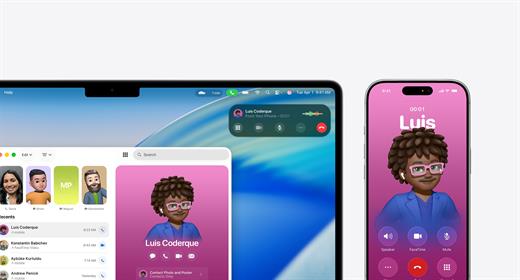
  • The Phone app is now available on Mac, allowing you to take calls, view contacts, view voicemail, and use features like Call Screening and Hold Assist.
  • Live Activities support with iPhone: notifications such as shipping or travel status are displayed in the Mac menu bar.
    iPhone Mirroring lets you launch iPhone apps directly on your Mac via Spotlight.

Updated Spotlight:


  • Significantly improved search engine that now not only searches for files and apps, but also performs actions such as creating events, starting podcasts, or sending messages.
  • Support for customizable quick commands (like “sm” to send a message or “ar” to add a reminder).
    Integration with cloud services and the ability to search PDFs and other documents.

New apps and features:


  • Games app with a catalog of installed games, support for chat, invitations, and an overlay for settings while playing.
  • The Journal app is now available on Mac.
  • Safari improvements: updated tab design and song lyrics translation in Apple Music.
  • Removal of Launchpad, replaced by an “Apps” feature integrated into Spotlight, similar to App Library in iOS.

Accessibility:


  • New features such as Magnifier (using the iPhone camera to zoom in), Braille support, and Vehicle Motion Cues to reduce motion sickness.
  • Accessibility Nutrition Labels in the App Store that display information about supported accessibility features.

New numbering:


  • Apple switched to a unified numbering system where all operating systems (iOS, iPadOS, macOS, etc.) got version 26, which corresponds to the year after the announcement (2025-2026). macOS still retains its unique name, Tahoe.
What’s New

Version 26.5.1:


  • Release notes were unavailable when this listing was updated.
Compatibility

macOS 14.0 or later


Release Name: macOS Tahoe 26.5.1 (25F80)
Size: 17.1 GB
Links: HOMEPAGE – NFO – Torrent Search

Download: RAPiDGATOR
2 Comments
June 2

RightFont 10.0.0

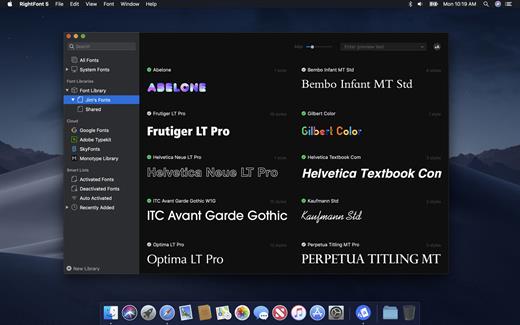
RightFont is a lightweight font manager with a clean, beautiful interface. It offers many features which help you manage all your local fonts with ease.


  • Font-management access anytime directly from your menubar
  • Mark any font as starred with a click
  • Create and manage font lists
  • Access fonts directly in Adobe Creative Cloud (Photoshop, Illustrator, InDesign, Flash, AfterEffect), Sketch, etc.
  • Instant search results as you type
  • Change font preview and font size in real-time
  • Find the right font faster
  • Easily filter fonts by classifications (sans serif, serif, script, etc.), font width and font weight. Even Google fonts and Adobe TypeKit fonts are listed separately for you.
  • Effortless integrations – You can use RightFont with design software. With a simple double-click, the font used in your text layer can be changed.
What’s New

Version 10.0.0:


  • Release notes were unavailable when this listing was updated.
Compatibility

macOS 10.13 or later
Apple Silicon or Intel Core processor


Release Name: RightFont 10.0.0
Size: 18.7 MB
Links: HOMEPAGE – NFO – Torrent Search

Download: RAPiDGATOR

6 Comments
June 2

Beauty Box Video 6.0.5

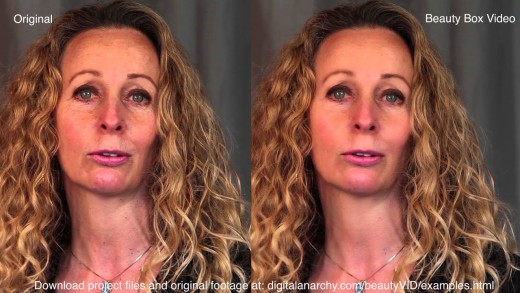
Description: Beauty Box Video is simple and automatic to use. This skin retouching and digital makeup plugin automatically identifies skin tones and creates a mask that limits the smoothing effect to the skin areas. Just apply the video filter, let it analyze the footage, set a few smoothing options, and let the plugin render to make skin retouching incredibly easy.

Digital Makeup for Video Post Production. Easy Retouching for You
The Beauty Box Video skin retouching plugin acts as digital makeup in post-production by incorporating state-of-the-art face and skin detection and smoothing algorithms. It takes the edge off of skin and makeup problems that can be visible with HD and 4K video. Realistically and quickly applying digital makeup that makes your talent look great, without making them look airbrushed or blurry. Making for happy talent and producers.

Powerful, Easy, Realtime skin retouching for video
Beauty Box Video takes the best selling and most awarded skin smoothing technology available and gives it realtime rendering (on some GPUs). Beauty Box already had the best automatic masking and skin retouching capabilities of any plugin and now it has incredibly fast rendering as well! We used CUDA and OpenGL to give Beauty Box Video realtime or near realtime rendering. Your talent will be just as beautiful as ever, but now you won't have to wait to smooth wrinkles and blemishes!

Used Worldwide for Feature Films, Music Videos, Commercials and More
Video editors and artists no longer have to manually create skin smoothing masks or retouch video frame by frame. Beauty Box automatically identifies the skin tones and removes imperfections, like digital makeup, while leaving important facial details sharp. It's used by such companies as Park Road Post Production, NBC, and Universal Music. Beauty Box is a powerful tool for any production that requires people to look their best.

Release Name: Beauty Box Video 6.0.5
Size: 503.9 MB
Links: HOMEPAGE – NFO – Torrent Search

Download: RAPiDGATOR
6 Comments
June 2

CleverGet 26.0.0.1

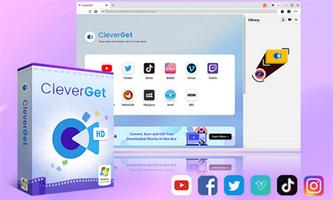
Description: Download Up to 8K Videos, Live Stream and even paid streaming videos in batch or individually from 1000+ websites like YouTube, Facebook, Twitter, Twitch.tv, Max, Netflix, Amazon, Disney+, Hulu, Apple TV+, Paramount+, Discovery+, etc. Record online video at up to 4K resolution and 5X recording speed from various streaming services to MP4/MKV files without ads.

Coverall Online Video Downloader for 1000+ Sites
As all-inclusive online video downloader toolkit pack, CleverGet has multiple modules, including: Video Downloader, Netflix Downloader, Amazon Prime Downloader, HBO Max Downloader, Disney+ Downloader, Apple TV Plus Downloader, Hulu Downloader, Discovery+ Downloader, Twitch Downloader, Video Recorder, etc. With multiple downloader modules, CleverGet could download online videos, one-demand movies and TV shows, and live streams from 1000+ websites like Twitch, YouTube, Vimeo, Twitter, Facebook, TikTok, Netflix, Amazon, Max, Disney+, Hulu, etc. With the internal Streaming Video Recorder module, CleverGet could record and save videos from those video sites that are not downloadable via its downloader modules, as long as the target video could be played back within CleverGet. Besides these existing modules, more online video downloader modules are on the way out.

Lossless 8K Video and 320 kbps Audio Downloading
CleverGet could download 8K videos with 320 kbps audio as long as they are available in source videos. Compared to various online video downloaders and video downloader software tools, CleverGet is almost the sole tool that can download 8K video and audio at 320 kbps without quality loss. This HD video downloader tool helps you easily and freely watch HD videos with your own home theatre system.

Download TV Series Episodes of All/Certain Seasons
With powerful online video parsing function, this online TV show downloader could smartly parse a TV show episode and then detect full season or even all seasons of current TV episode. After parsing a single TV show episode, this online TV series downloader could list all episodes from the same season or even all seasons to you. With this online stream video downloader, you could download current episode, selected episodes from various seasons, entire season or even all seasons in batch.

Download Online Videos to MP4/MKV/WEBM
While most portable media players and devices accept MP4 files, CleverGet won't let you down. Offering different downloading options, CleverGet enables you to download online videos to MP4, MKV, WEBM or other available popular formats for diverse uses. You could even download online videos and save in audio formats. Watching online movies, TV shows and other videos offline on various MP4 compatible devices is a simple run with CleverGet.

Record Streaming Video to MP4/MKV at Up to 4K Resolution and 5X Speed
CleverGet Streaming Video Recorder could record online streaming videos to MP4/MKV files at up to 4K resolution from almost all sites. You could record online on-demand video and live streaming video without quality loss and at up to 5X speed, schedule recording by presetting recording length, skip ads upon preset ad filter for recording, etc. With CleverGet Video Recorder, you could even record DRM protected video for unlimited offline viewing.

Save Online Video with Selected Subtitle and Audio Track
No matter you are using the internal video downloader modules or the streaming video recorder module, CleverGet enables you to download or record online videos with selected subtitle and audio track. The streaming video downloader modules could download multiple subtitles and audio tracks upon your choice, and save subtitles as independent SRT/SUP file as external subtitle or pack into output videos as internal subtitle.

Convenient Built-in Browser
CleverGet is firstly a browser that enables you to open target streaming platform directly, and then search, play back and download online video easily. Theoretically, CleverGet could download online videos, live streams and even paid content during playback. This stream video downloader could analyze target video page and list all available download options to you. You don't need to get the M3U8 links of live streaming videos for downloading, and neither will you be blocked by the video protections for downloading. CleverGet does all these for you.

Release Name: CleverGet 26.0.0.1
Size: 379.3 MB
Links: HOMEPAGE – NFO – Torrent Search

Download: RAPiDGATOR

4 Comments
June 2

Cheat Engine 7.7.0

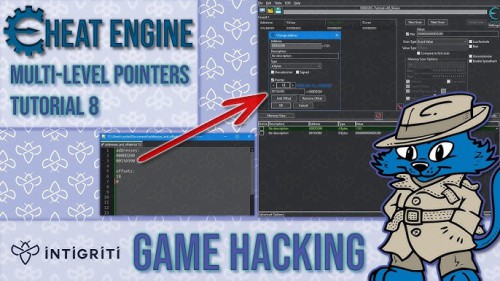
Description: Cheat Engine is a tool designed to help you with modifying single player games without internet connection so you can make them harder or easier depending on your preference(e.g: Find that 100hp is too easy, try playing a game with a max of 1 HP), but also contains other usefull tools to help debugging games and even normal applications, and helps you protect your system by letting you inspect memory modifications by backdoors and even contains some ways to unhide them from conventional means.

It comes with a memory scanner to quickly scan for variables used within a game and allow you to change them, but it also comes with a debugger, disassembler, assembler, speedhack, trainer maker, direct 3D manipulation tools, system inspection tools and more which are also useful for normal programmers and software analysts.

Besides these tools it also comes with extensive scripting support which will allow experienced developers to create their own applications with ease and share them with other people.

Release Name: Cheat Engine 7.7.0
Size: 16.7 MB
Links: HOMEPAGE – NFO – Torrent Search

Download: RAPiDGATOR
4 Comments
June 2

Davinci Resolve Studio 21.0 b4

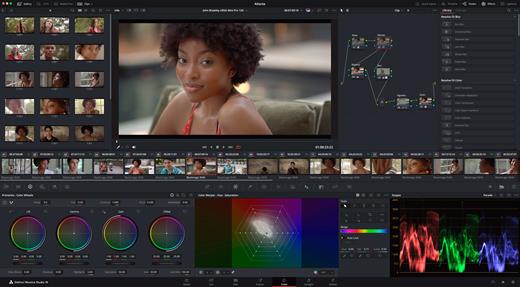
DaVinci Resolve Studio is the world’s only solution that combines professional 8K editing, color correction, visual effects and audio post production all in one software tool! You can instantly move between editing, color, effects, and audio with a single click. DaVinci Resolve Studio is also the only solution designed for multi user collaboration so editors, assistants, colorists, VFX artists and sound designers can all work live on the same project at the same time! Whether you’re an individual artist, or part of a large collaborative team, it’s easy to see why DaVinci Resolve is the standard for high end post production and finishing on more Hollywood feature films, television shows and commercials than any other software.

DaVinci Resolve 20 features powerful new DaVinci Neural Engine AI tools and over 100 feature upgrades! New AI tools include text based timeline editing, music remixing, dialogue separation and UltraNR noise reduction. IntelliTrack AI lets you use video to track the Fairlight audio panner. ColorSlice vector grading and film look creator offer richer grading vibrance and color density. Plus there are new features for live TV production and broadcast. DaVinci Resolve now supports realtime selection of live camera recordings for instant replay to air with slow motion and stingers. Multi Source is the fastest way to see your cameras and edit to the timeline while the cameras are still recording!

What’s New

Version 21.0 b3:


  • Release notes were unavailable when this listing was updated.
Compatibility

macOS 13.0 or later


Release Name: Davinci Resolve Studio 21.0 b4
Size: 8 GB
Links: HOMEPAGE – NFO – Torrent Search

Download: RAPiDGATOR

2 Comments
June 2

HyperSnap 10.0.0

Description: HyperSnap 10 is the fastest and easiest way to take screenshots from Windows. HyperSnap combines the power of a first-class screen capture application with an advanced image editing utility, and editable text capture through OCR - wrapped into one easy-to-use tool. Windows 10 and 11 only.

HyperSnap is perfect for capturing images and texts that you want to include in your Help system, online tutorials, manuals, training handouts, presentations, marketing materials, Web pages, emails and more. Use HyperSnap to quickly share a picture-perfect representation of anything on your screen.

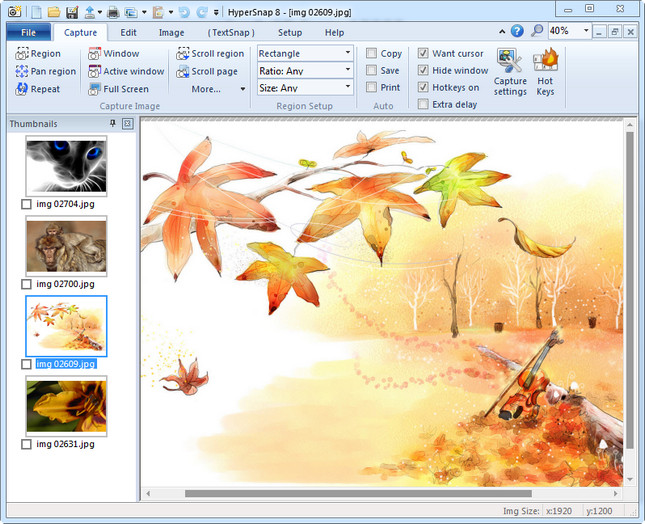
HyperSnap is versatile and extremely easy-to-use. You can switch between modern "ribbon" interface shown on the image above, or tranditional menu and toolbars.

Top Features
Image captures from any where on the screen or multiple monitors, in any shape or size.
New & powerful image capture, editing, annotation and  manipulation tools. Objects drawn over images can now be selected, edited, shown and hidden, moved, deleted any time. A new native file format saves the objects drawn for further editing later, or save a standard image and have the object "imprinted" permanently on them.
Unlimited undo/redo.
Capture dropdown menus and lists with hotkey feature or delayed capture.
Image stamps, frames, drop shadow, free-hand capture, FTP server uploads, more.
Automatic color substitution.
Non-rectangular window capture.
Button Capture  - perfect for professional technical writers who need to snap and document dozens of buttons!
Auto-scrolls and concurrently captures long web pages and other. documents, enabling it to grab more than is visible on the screen.
Tightly integrates with the MS Windows clipboard to automate repetitive tasks - will even automatically PASTE capture images where needed!
Automatically saves your captures to graphics files.
Doubles as effective image viewer, format converter (over 20 image formats supported).
Fully customizable user interface. Rearrange menus and toolbars any way you want, assign any keyboard shortcuts you like, tear off menus to create instant toolbars, even control HyperSnap with voice commands!

Release Name: HyperSnap 10.0.0
Size: 17 MB
Links: HOMEPAGE – NFO – Torrent Search

Download: RAPiDGATOR
6 Comments
June 2

CoolUtils PDF Combine Pro 4.2.0.168/120

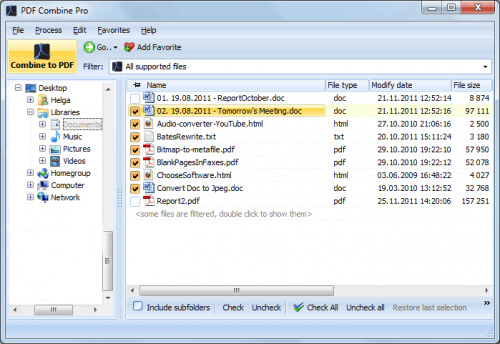
Description: PDF Combine Pro is a life saver for those who need to combine PDF, DOC, TXT, DOCX, HTML, XLS files, images (TIFF, JPEG, PNG) and emails into one PDF. Now you do not have to use several programs and converters to get one PDF. PDF Combine Pro does it in one go. Supported input formats include DOC, DOCX, RTF, TXT, XLS, XLSX, HTML, HTM, MHT, PS, EPS, PRN, PDF, TIFF, JPEG, PNG, PST, EML, MSG.

PDF Combine Pro can combine files within folders. For example, you have 3 folders with different file types inside each. The app can produce three combined PDF files.
It can easily create bookmarks that can be used as table of contents.
Users can add custom Cover pages to the combined PDF.
Legal users will appreciate the flexible bates stamping option.
Transparent user interface and full command line support.

Unique options of PDF Combine Pro
With PDF Combine Pro you can combine PDF files as well as DOC, TXT, XLS, HTML, TIFF, JPEG, PNG into one PDF. A unique all-in-one tool!
Combine PDF, Doc, TXT, TIFF files within folders. If you have 10 folders with multiple files in each, you can get 10 PDF files in one process.
Combine PDF files by common name part. The app can analyze the whole file name or any range of characters you set (i.e. analyzing the first 2 characters PEdouglas.pdf, PEmike.pdf, PEhelen.pdf will be combined into one file).
Want more order? Add pagination. Just tick the box, no additional steps are required.
It's easy to change the order of the docs you want to combine; just drag and drop them up or down.
PDF Combine Pro will also offer you to add your digital signature to the combined PDF file.
The interface is very clear. The wizard helps you to make all the settings.
You can also add bookmarks. Use file names, document titles or external file to create your table of contents.
When you combine files of different formatting, some files may not fit. Use fit-to-page option to properly locate all the files in the output PDF.
Use a duplex printer? PDF Combine solves the problem of printing PDF files double sided with an odd number of pages. It adds a blank page if the file has an odd number of pages, so the next file is not printed on the back side of the previous one.
The built-in Preview panel helps you to view each file either scaled or in actual size.
Our app can also function as PDF encrypter, setting user permissions or password protection.
We also offer a special server PDF Combine Pro (SDK). It has no GUI, no interrupting messages.
PDF Combine Pro can be run via command line (get the ready-to-use command line from GUI settings).

Release Name: CoolUtils PDF Combine Pro 4.2.0.168/120
Size: 411.5 MB
Links: HOMEPAGE – NFO – Torrent Search

Download: RAPiDGATOR

5 Comments
June 2

eDocPrinter PDF Pro 11.16 Build 11168

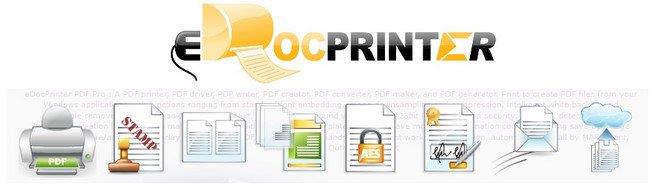
Description: eDocPrinter PDF Pro is working as a printer driver supporting multiple printer instances with different profile settings. Users can print to the PDF printers to create PDF files from applications. It creates PDF files with image compression and downsampling, Opentype/Truetype font embeddding, as well as optional functions like encyrption, watermark, email or upload by FTP/SFTP after print, and etc. to simplify the enterprise paperless workflow.

PDF Stamp watermarks
Print to create PDF files with stamping text, image, or compound watermarks. Administrators can define global watermarks or enforce a mandatory watermark on all PDF files created for all users.

PDF N-up or booklet
As a PDF printer, users can define custom paper size as well as print in N-up or booklet form by a simple selection. Multiple copies, collating, and fixed paper source are provided for emulating physical printing effects.

PDF Overlay PDF Merge
Print to create PDF files with merging to existing PDF files by Append, Insert before, or Overlay. In addition, users can overlay with existing template PDF files with flexible options like repeating in user defined interval (e.g. even-odd templates), optional trailer or header pages, foreground/background overlay, and etc. When creating PDF files, users can turn on the option to automatically remove opaque white background rectangle before overlaying.

PDF Encrypt (AES)
Applying PDF security permission on PDF files created with standard 40/128bit encryption or optional 256 bit AES encryption.

PDF Digital Signature
Digitally signing PDF files with your certificates by PDFSealer (Ent. pack feature). PDFSealer supports signing in PPKMS, PPKMS with SHA-256, SHA-384, or SHA-512. Integrated within the PDF creation flow by embedded commands automation.

PDF Email(Outlook/SMTP)
Send PDF files by defautl email client, Extended MAPI, Outlook automation, SMTP, or optional Ent. pack feature SMTP TLS/SMTP SSL. Capture the email addresses, subject, or content fields by the embedded commands automatically.

PDF Upload(FTP/SFTP)
Archive or share your PDF documents by uploading (Ent. pack feature: FTP/SFTP) to the cloud. Users can also call custom actions for postprocessing PDF files after creation.

Release Name: eDocPrinter PDF Pro 11.16 Build 11168
Size: 17.5 MB
Links: HOMEPAGE – NFO – Torrent Search

Download: RAPiDGATOR
3 Comments