Please REGISTER or RENEW your account on RAPiDGATOR.net and support us by doing through all RAPiDGATOR working download links on main posts...
May 30

GiliSoft USB Lock 11.1
Description: What Does Gilisoft USB Lock Do? How often has your data been stolen because someone connected an unauthorized USB to your computer and copied your files? Well, you don’t need to worry because the solution to disable or enable USB Ports is pretty simple.
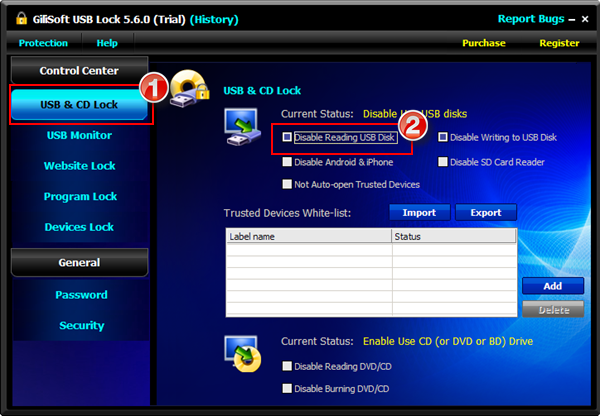
GiliSoft USB Lock is a data leak prevention tool that prevents leakage and copy of your data to USB Drives (android /iPhone), prevent the PC from using the hotspot feature of an android /iPhone for internet access via USB, External Drives, CDs/DVDs or other such portable devices. Once installed, USB Lock lets you block all such drives and devices that do not belong to you. USB Lock can stop stealing or hacking and you can share your PC with anyone without fear of data theft. This is an easy USB Secure Software and powerful Endpoint DLP Suite that helps you to lock usb port,make dvd/cd burner read-only, block some websites, forbid some programs and disable more devices. Gilisoft USB Lock offers a unique Computer Forensic Mode, designed specifically for digital forensics. For the convenience of enterprise users to deploy, or secondary development, we also provide the command-line version, please contact us if you need.

Exclusive Features of USB Lock

Block USB/SD Drives
Disable reading from USB/SD disks, disable writing to USB/SD disks,Block non-system partition(s). It doesn’t allow any type of USB/SD drive to access your computer unless you authorize it or it has been in trusted devices White-list.

CD Lock,Block Media & Blu-ray Discs
Disable reading from DVD/CD discs or making DVD/CD burner read-only. This application also blocks any disc that uses the disk hub, bay, combo or CD/DVD drive and allots a drive letter.

Restrict USB data access on Android / iPhone
By disabling USB data access, you can prevent unauthorized users from accessing your device's data when connecting it via USB. This can help protect your privacy and prevent data breaches.

Restrict connect Android / iPhone mobile hotspot via USB
Block mobile devices from tethering connections through USB will help you disable USB tethering, you will prevent the PC from using the mobile phone's hotspot feature for internet access via USB.

Trusted Devices White List
You can create a whitelist to allow 'certain approved' USB pen drives. Then it will block all USB drives except the ones in the white-list.

Reports & Logs
USB Lock provide full reports and logs: (1) USB Activity - Monitor all file operation (like create delete files ) on all USB disks that connected to your computer. (2) Deny & Allow Access History. (3) Activity White List.

Website Lock
Block accessing some websites. This utility allows you to block unwanted websites from display in Internet Explorer. If a website is blocked the user is forwarded to a blank page or to a "blocked page" and the contents of the original page are not loaded on your PC.

Devices Lock
The program can be used to restrict read or write access to removable media devices such as CD, DVD, floppy, SD Card Readers, flash and USB drives. It also can be used to disable iPhone, Android phone, printer,modem, com lpt ports,infrared, blue-tooth, 1394 ports.

Programs Lock
Block running any programs, including IE, Outlook, AOL, AIM, Dropbox, and more. You can even lock your control panel with one button click.

Powerful Self-protection Mode
Nobody can uninstall this software without password and you can hide this program in Invisible Mode. When someone enters wrong password more than 5 times, it will send alarm notifications to your pre-defined e-mail and the unknown login will be temporarily banned.

Copy Protection
The program uses an advanced level of data leak prevention technology that does not permit duplication of your important files and copyright material to any USB drive or other such storage devices without your permission.

Data Leak Prevention
It prevents your data from getting leaked out to USB drives and other such storage devices by letting you control which device can access your computer while blocking all other unauthorized devices that do not belong to you.

Release Name: GiliSoft USB Lock 11.1
Size: 10.8 MB
Links: HOMEPAGE – NFO – Torrent Search

Download: RAPiDGATOR

6 Comments
May 30

Adobe Substance 3D Designer 16.0.3

Description: 3D Assets Creation. Limitless. Create, iterate. Substance Designer is the Ultimate 3D Material Authoring and Scan Processing Tool. It has become the standard in the entertainment industry for PBR material authoring.

Discover the power of procedural creation.
With Substance 3D Designer, create seamless materials and patterns, image filters, environment lights, or even 3D models. Each asset can output infinite variations.

The industry standard for material authoring.
Substance 3D Designer is used across many industries and is at the center of most video game and visual effects material pipelines. Substance parametric materials are supported in most 3D creation tools and will integrate seamlessly into any workflow. Send your materials directly to Substance 3D Painter and Stager.

The industry standard for material authoring.
Substance 3D Designer is used across many industries and is at the center of most video game and visual effects material pipelines. Substance parametric materials are supported in most 3D creation tools and will integrate seamlessly into any workflow. Send your materials directly to Substance 3D Painter and Stager.

Nondestructive, nonlinear.
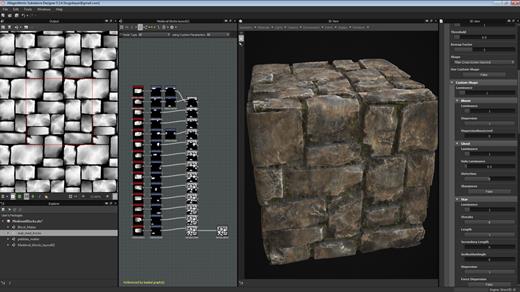
The node-based workflow allows you to use a wide range of approaches. Any step of the process can always be modified later. Try everything, adjust anytime.

Endless possibilities, infinite combinations.
Designer comes with a rich node library to create your assets from scratch. Build upon and learn from thousands of materials from Substance 3D Assets and Substance 3D Community Assets.

Go beyond materials.
Generate dynamic 3D models, or combine existing elements like curves and kitbash models. Create parametric environment lights to use in any app supported by Substance 3D.

Integrates into any workflow.
Designer comes with an extensive scripting API so you can tailor the app to your needs. Build and share powerful plugins with the integrated Python scripting interface. Create tools and utility graphs to supercharge your pipeline.

An ever-growing library of content
Access hundreds of nodes and filters. Create any surface with unique and randomizable noises and patterns.

HDR lighting creation
Create parametric lighting stages using procedural lights or 360° photos.

Color management
Take advantage of Pantone and OpenColorIO support.

MDL support
Create MDL materials with the dedicated shader graph.

Send-to
Send materials and filters to other Substance 3D applications, allowing you to iterate in context with Designer.

Parametric modeling (beta)
This graph lets you generate customizable and dynamic 3D models.

Release Name: Adobe Substance 3D Designer 16.0.3
Size: 1.7 GB
Links: HOMEPAGE – NFO – Torrent Search

Download: RAPiDGATOR
4 Comments
May 30

Perfectly Clear WorkBench 5.1.0.3227

Description: Perfectly Clear is the program's latest version, which also comes as a plugin for Photoshop & Lightroom. The essence of this development is simple; you have a picture, you do not like it, the skin is dull, pimples, in short, there are defects, now you can not bother with editing; a couple of clicks and here is a corrected photo, perfect, as it should be, not ashamed of social networks to pour. You can use the pens to adjust all correction parameters; many use automatic mode.

The program has 20 indicators for them that reconciliation and adjustment take place, and as a result, the picture is beautiful without any difficulties. The cameras have limitations; they can add noise to the picture, light a photo, make the skin tone terrible, etc. This plugin knows all these restrictions and will detect, eliminate, and provide; you only have to save the result.

The application will find and eliminate irregularities and other skin defects, work with dark circles under the eyes, remove excess shine in the picture, add shine, enlarge the eyes, whiten teeth, and tonify the skin. In short, now you can safely wake up and be immediately photographed; the program will process everything and be like candy, do not spend a couple of hours standing in front of a mirror.

What's New in Perfectly Clear WorkBench
Beautiful new interface
New image correction tools:
Preprocessing section for Input Looks and "Image Ambulance" for manual exposure corrections
"Face Aware" exposure for more accurate auto-exposure corrections in portraits and group photos
Black Point tool to deepen blacks
New Color Vibrancy tool to complement our previous "Vibrancy" control (now renamed to Color Restoration)
Sky and Foliage enhancements
Existing tools have been improved:
Added strength sliders to Light Diffusion and Vibrancy for better control
Better 'color pickers' for Skin Tone and Blush adjustments
Manually identify faces that are not detected automatically
One-click to zoom into individual faces
Modify facial regions to provide the best corrections
Histogram
Much improved preset management

Release Name: Perfectly Clear WorkBench 5.1.0.3227
Size: 277 MB
Links: HOMEPAGE – NFO – Torrent Search

Download: RAPiDGATOR

8 Comments
May 30

Chaos Enscape 4.18.1.1579

Description: The real-time technology visualizes your project as a fully rendered 3D walkthrough that can be navigated and explored from every angle. You can follow every update to your plan instantly thanks to the bi-directional geometry exchange between your CAD or BIM program and the renderer. Use NVIDIA Deep Learning Super Sampling support to improve performance in walkthroughs.

Virtual reality
Explore your design in the compelling realism of virtual reality. Connect a VR headset like the Meta Quest 3 or HTC Vive Pro 2, and get ready to walk or fly through your project. You won’t believe the extraordinary experience it will evoke.

NVIDIA Denoiser
Boost the quality of your walkthroughs and capture exports with the advanced denoising solution powered by NVIDIA ReLAX denoiser. Enjoy sharpness and clarity in enclosed interior spaces with minimal direct light, particularly on glossy or metallic surfaces.

V-Ray scene exporter
Transfer key data from Enscape to V-Ray and other design applications, including 3ds Max and Cinema 4D with .vrscene files. From early design to final production, avoid duplication of work and collaborate better with project stakeholders.

Chaos AI Enhancer
This functionality leverages AI to improve Enscape assets, specifically people and vegetation assets. Simply focus on designing and let AI elevate your visuals. Easily upload, enhance, and share images via Chaos Cloud while continuing to work in Enscape, saving time and maintaining productivity.
Get professional-level quality images without interruptions or performance loss to your Enscape workflow.
Share elevated visualizations to get your design intent across faster.

Integrated Graphics Support
Enscape can now be used on Windows computers with Intel and AMD iGPUs (integrated graphics processing units), as it is accessible to more than just computers with separate physical GPUs. This is great if you’re budget-constrained or can’t purchase a machine without a dedicated GPU.
Use Enscape while working on-site or while traveling
Enjoy a more flexible and cost-effective way of visualizing

Chaos Cloud
This integration lets you perform every step of the design review process on Chaos Cloud. Upload panoramas and renders, and make annotations directly on your visualizations with markup tools. You can also assign floor plans and use a mini-map to assist with tour navigation.
Easily collaborate with your team and peers in one place
Let clients explore designs with advanced virtual tours

Site context
Eliminate the lengthy processes of modeling topography and importing geometry with the Site Context mode. See what your building will look like on-site and make better decisions with real-world context added.

Material library
Access more than 425 predefined high-quality materials in the Enscape Material Library. Communicate your design aesthetic and improve the realism of any scene with little effort.

Asset library
Our ever-expanding Asset Library will help you to fill your scene with life and make it even more realistic. Browse through just a small selection of our collection, so you can get a feel for the available models. We’re always adding more.

Clouds
Get wind of Enscape’s cloud settings: adjust the cloud density and variety to perfect the ambiance and feel of your scene. Depending on your defined parameters, the rendering will appear brighter or darker, and the clouds thicker or thinner. Adjust the time of day to see the clouds travel across the dynamic Enscape sky.

White mode
Start with a clean slate: if you want your audience to focus on the architecture rather than materials or colors, switch on White Mode. All colors are set to white, while other parameters like glossiness and bump are maintained to preserve the natural appearance of the scene.

The Enscape plug-in is provided for the following host applications:
Revit 2022, 2023, 2024, and 2025
SketchUp 2022, 2023 and 2024
Rhino 7.0 and 8.3 (or later)
Archicad 25, 26, 27 and 28
Vectorworks 2022, 2023 (Service Pack 1 or later), 2024 and 2025

System Requirements:
Operating system: Windows 10 or higher
Graphics card: NVIDIA or AMD dedicated GPU with 4GB VRAM that supports Vulkan 1.1
NVIDIA GeForce GTX 900 series / Quadro M series and newer
AMD Radeon RX 400 series / equivalent Radeon Pro series and newer
VRAM: 4GB VRAM
Unsupported hardware: Radeon 6000 mobile GPU’s
Intel Integrated Graphics onboard GPU’s SLI

Release Name: Chaos Enscape 4.18.1.1579
Size: 767.9 MB
Links: HOMEPAGE – NFO – Torrent Search

Download: RAPiDGATOR

9 Comments
May 30

EasyUEFI Enterprise 6.4.0.2 WinPE

Description: Hasleo EasyUEFI is a handy and useful software that allows you to manage the (U)EFI boot options and the EFI System Partitions (ESP), it can help you repair (U)EFI boot issues caused by corrupted or missing (U)EFI boot option or EFI System Partition.

Features:
Comprehensive EFI/UEFI boot option management functions, such as create, delete, edit EFI/UEFI boot options, change EFI/UEFI boot sequence, etc.
Backup, restore, rebuild, delete, explore, read and write EFI System Partition (ESP) or move EFI System Partition (ESP) to another drive.
Creation of Windows PE emergency disk.
Command line support.
Supported OS: (U)EFI-based Windows 11/10/8/7/Vista/2022/2019/2016/2012/2008.

Release Name: EasyUEFI Enterprise 6.4.0.2 WinPE
Size: 756.8 MB
Links: HOMEPAGE – NFO – Torrent Search

Download: RAPiDGATOR

8 Comments
May 30

Chaos Envision 1.6.0

Description: Immersive architectural experiences. Real-time 3D assembly, photorealism, and animations.

Let your design speak for itself with Chaos Envision.
For architects and archviz specialists who want to elevate their design effortlessly.

Scene scaling
As a standalone tool, Envision goes beyond the common CAD limitations and makes it possible to create detail-heavy scenes without compromising on performance or quality.

Robust assembly
Combine scene elements from various 3D creation tools with no data prep or loss.

Real-time realism
Dive into intricate, high-complexity designs with fast performance and visual fidelity.

Creative flexibility
Adjust any aspect of your project without needing to pre-separate objects — data is imported at the object level of granularity.

Cinematic storytelling
Communicate architectural intent and captivate stakeholders with interactive, cinematic, and emotionally compelling visual stories that are intuitive, easy and fast to create.

Advanced animations
From moving objects on paths to showing construction phasing, design variations and cinematic flyovers.

Immersive environments
Adjusting time of day, cloud appearance and haze sets the mood, while animated vegetation and wind effects create a lively feel of the environment.

4D humans and crowds
Bring designs to life with crowds of animated humans - thanks to the direct integration of the Anima engine.

High-end visual realism
Powered by a high-fidelity ray tracing engine, Envision supports trillions of polygons in real-time, allowing users to populate their scenes with high-quality assets.

100% ray-tracing
High-end visual fidelity in both real-time and offline output.

Cosmos library
Render-ready assets, recognized for their rich geometry, advanced materials, dynamic lighting, and lifelike entourage.

AI enhancements
Enhance vegetation and human figures with AI-driven textures, lighting, and clarity.

Design exploration
Research lighting scenarios, materials, and entourage options and see them demonstrated through animated transitions between design variations.

Unlimited variations
Create variations of any adjustable object, material, light, or asset of your scene and explore design options.

Interactive walkthroughs
Seamlessly animate between variations to create immersive walkthroughs and over-the-shoulder presentations.

Intuitive visual presets
One-click effects like rounded corners, translucency, strands, and displacement elevate realism and enhance the natural look of your scenes.

Ecosystem
Seamlessly integrated with the Chaos ecosystem, Envision works with Enscape and V-Ray, offering a natural continuation to their workflows for fluid data exchange and streamlined collaboration.

Easy coordination (.vrscene)
Leveraging the .vrscene format, Envision loads scene data instantly and supports all assets and materials coming from the creation tools.

Non-destructive workflow
Design iterations do not restart the visualization process and minimize repetitive artist work.

Continuous design
Visualization stays up to date even as design evolves thanks to advanced file linking.

Release Name: Chaos Envision 1.6.0
Size: 1.4 GB
Links: HOMEPAGE – NFO – Torrent Search

Download: RAPiDGATOR

7 Comments
May 30

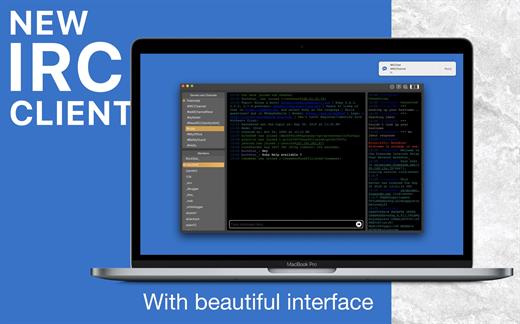
getIRC – Best IRC Client 1.7

Internet Relay Chat (IRC) chatrooms on macOS:


  • Featured IRC Client
  • Powerful
  • Beautiful interface

IRC provides a way of communicating in real-time with people from all over the world. It consists of various separate networks (or “nets”) of IRC servers, machines that allow users to connect to IRC.

Features:

  • One window for multiple servers
  • Modern and beautiful user interface
  • Multi-channel search and selection
  • Auto-Completion for nicknames, commands, and channels
  • Rich keyboard shortcuts for your comfortable operations
  • Powerful yet simple IRC Client ever for the power user.
  • The Custom server adding/removing option
  • Dark/light mode support
  • Text resize.
  • And much more.
What’s New

Version 1.7:


  • Release notes were unavailable when this listing was updated.
Compatibility

macOS v10.10 or later
Apple Silicon or Intel Core processor


Release Name: getIRC – Best IRC Client 1.7
Size: 11.7 MB
Links: HOMEPAGE – NFO – Torrent Search

Download: RAPiDGATOR

6 Comments
May 30

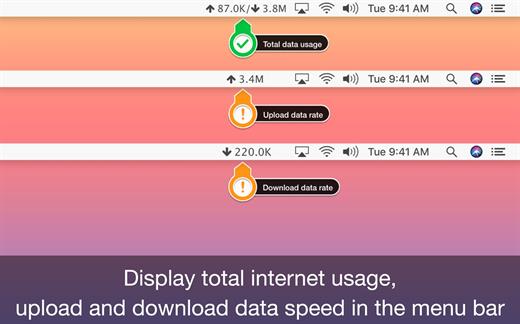
TransData – Internet Data Speed 3.4

TransData is the perfect solution to control and supervise your network usage.

≈ Features: ≈

◉ Shows network data transfer rate in Kbps/Mbps with up/down speed on your menu bar.
◉ Display the total data used by Mac from the start of the session.
◉ Monitor and reset Internet data usage.
◉ Displays connected WiFi network in the menu.
◉ A Beautiful widget or graph that shows upload & download internet speed per second.
◉ Display refresh rate can be set in preferences.
◉ Internet data can be displayed in two formats either KB/s(Bytes) or kb/s(bits).
◉ Dark/Light mode for all macOS versions.

TransData works with MacBook Air(M1), MacBook Pro(M1), iMac, MacBook, MacPro, Mac Mini.

≈ Basics: ≈

◎ Up/Down Speed: Upload/Download internet transfer rate per second (Kbps/Mbps)
◎ Up/Down Data: Total Upload & Download internet date used over a period of time.
◎ Micro View: Floating widget on the desktop with Up/Down internet data transfer rate.
◎ Macro View: Graph which shows internet data transfer rate in detail.

≈ Menubar Preferences: ≈

◎ Total Internet data used: Display total of data sent and received.
◎ Upload speed: Display only upload internet speed.
◎ Download Speed: Display only download internet speed.
◎ Up & Down Speed: Show both upload and download speed.
◎ Active Speed: Shows upload or download, whichever is highest.

What’s New

Version 3.4:


  • Release notes were unavailable when this listing was updated.
Compatibility

macOS 10.10 or later


Release Name: TransData – Internet Data Speed 3.4
Size: 6.1 MB
Links: HOMEPAGE – NFO – Torrent Search

Download: RAPiDGATOR

6 Comments
May 30

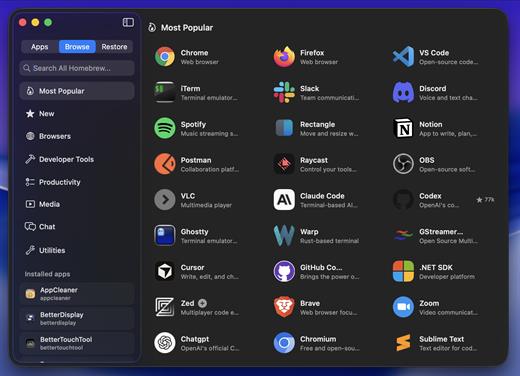
BrewStation 2.0.4

Skip the terminal and get all the benefits of using Homebrew with full app and formulae management with a simple to use GUI application. Manage and view all your Homebrew apps in one place. Search all of Homebrew directly in the app. Homebrewing made simple!

Uscases:

Can be used as a Homebrew viewer and manager.
Can be used as a App restore tool that backs up and saves app states (full snapshot) to be viewed and managed with the built-in snapshot library.
Can be used as a New Mac setup tool, save app snapshots from one Mac and install and restore them (Fully!) with one click on another Mac.

Homebrew:

brew tap hreinssondev/brewstation

brew install –cask hreinssondev/brewstation/brewstation

What’s New

Version 2.0.4:


  • Release notes were unavailable when this listing was updated.
Compatibility

macOS 13 or later


Release Name: BrewStation 2.0.4
Size: 8.4 MB
Links: HOMEPAGE – NFO – Torrent Search

Download: RAPiDGATOR

7 Comments
May 30

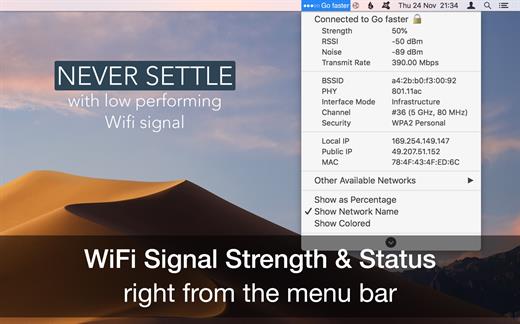
WiFi Signal Strength Explorer 2.8

WiFi Wireless Signal Strength Explorer (was WiFi Signal Strength Status) allows you to see wireless signal strength right on the menu bar. See the status of your wifi signal strength right from the menu bar. This utility adds network name, signal strength with “neat icon”, “percentage” on the menu bar. It also which lets you know the strength of the signal and other stats like your IP address, mac address, other available networks, open or secured, channels, BSSID, RSSI, noise, transmit rate, PHY, interface mode, security type, etc. So, never settle for low performing wireless signals with Wi-Fi status app.

Features


  • See the strength, IP address, and speed of the connected network via wireless signal
  • Get the public and local IP address of your computer
  • Connected wireless network name(optional)
  • Get strength of other available networks
  • Join any available network with higher signal strength
  • Get complete details of other detected network with channel detials
  • Retina display-enabled values
  • Copy IP / MAC address from the menu
  • Set refresh rate of signal strength value
  • Transmit rate of connected Wi-Fi network
  • See your local and public IP addresses
What’s New

Version 2.8:


  • Release notes were unavailable when this listing was updated.
Compatibility

macOS 10.10 or later


Release Name: WiFi Signal Strength Explorer 2.8
Size: 6.5 MB
Links: HOMEPAGE – NFO – Torrent Search

Download: RAPiDGATOR

6 Comments