Please REGISTER or RENEW your account on RAPiDGATOR.net and support us by doing through all RAPiDGATOR working download links on main posts...
July 25

Tab Launcher 3.0.1

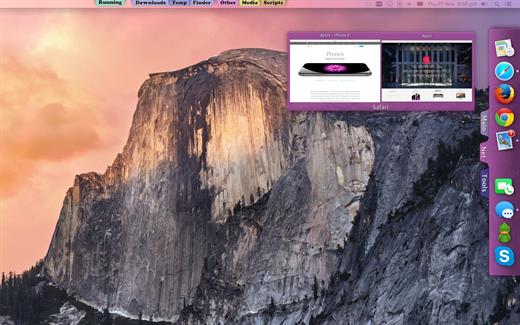
The idea of TabLauncher is not to replace the system’s dock, but to help keep it clean, with only the applications that are currently running.

By removing all the application from the dock and organizing them on tabs, you can quickly find and run any application you want.

Apart from that, you can create as many tabs as you like, and personalize them by setting the background color, title color, and font. Just drag your favorite applications to your tabs and it’s done! You can also rearrange the tabs by dragging them. And even rearrange the whole TabLauncher. Just drag it where ever you like along the sides or the bottom of the screen.

Now it takes less than 2 seconds to find and launch any app. (It’s true, according to our statistics)

What’s New

Version 3.0.1:


  • Release notes were unavailable when this listing was updated.
Compatibility

macOS 10.13 or later


Release Name: Tab Launcher 3.0.1
Size: 9.3 MB
Links: HOMEPAGE – NFO – Torrent Search

Download: RAPiDGATOR

5 Comments
July 25

Ghost Buster Pro 6.0.0

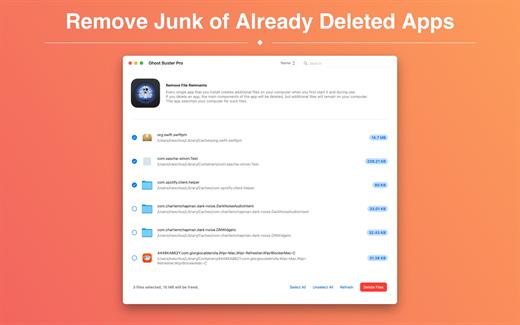
Ghost Buster Pro finds and deletes files from apps you’ve already uninstalled. The app is lightning fast and frees memory in no time.

Many apps are installed on a computer, but they usually only stay on your computer for a short time. Each app creates files, but deleting the app does not remove them.
This leads to a large number of files accumulating over time, which take up valuable storage space.
Ghost Buster Pro searches your computer for exactly such files and can also delete them directly if you wish.

Ghost Buster Pro offers the following features:

Fast Search

Ghost Buster Pro quickly scans your computer for data from previously deleted apps. You can have them deleted with one click.

Extremely easy handling

Ghost Buster Pro couldn’t be simpler. The search is started immediately after the app is started. You can now delete files with just one click.

No automatic deletion

Ghost Buster Pro does not delete any data without your consent. Choose for yourself which data is deleted and which you want to keep.

What’s New

Version 6.0.0:


  • Release notes were unavailable when this listing was updated.
Compatibility

macOS 11.5 or later
Apple Silicon or Intel Core processor

Release Name: Ghost Buster Pro 6.0.0
Size: 7.4 MB
Links: HOMEPAGE – NFO – Torrent Search

Download: RAPiDGATOR

5 Comments
July 25

PhotoFoundry 1.3.3

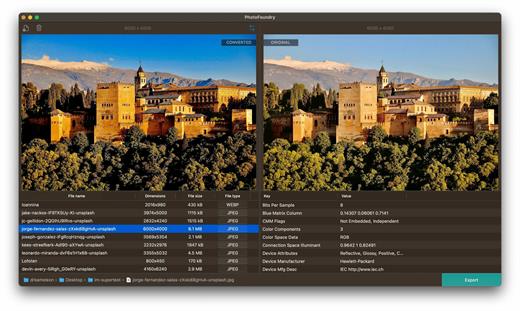
Professional batch photo-editing. Filters, photo effects, resizing, watermarks, …anything you’ve been looking for in a photo-editing app.

Features

Easy-to-use

Just open or drag’n’drop your photos and PhotoFoundry will take care of the rest.

Fast

All the speed of the Mac at your fingertips. With highly-optimized algorithms for image processing, our topmost goal has been performance.

Versatile

Reads pretty much all the image formats you’ll need. Want to export? Great! PhotoFoundry currently supports PNG, JPEG, BMP, TIFF and GIF.

Extremely configurable

With close to 200 available – and parametrizable – actions, we’ve got you covered: Blends? Color adjustments? Ready-to-use photo effects? Everything at your fingertips!

Live preview

Preview your changes live, as-you-make-them, or side-by-side – so that you’re always sure what the resulting images are going to look like!

Smart Export

Ready to export? Awesome! Just click the Export button and PhotoFoundry will take care of the rest for you.

What’s New

Version 1.3.3:


  • Release notes were unavailable when this listing was updated.
Compatibility

macOS 11.0 or later.
Apple Silicon or Intel Core processor


Release Name: PhotoFoundry 1.3.3
Size: 36 MB
Links: HOMEPAGE – NFO – Torrent Search

Download: RAPiDGATOR

5 Comments
July 25

Autodesk Flame 2027.1

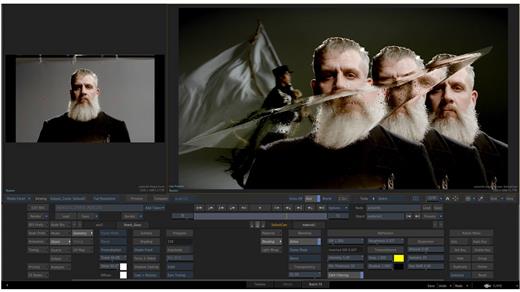
Advanced 3D visual effects software – Flame® software offers tools for fast, interactive 3D visual effects, finishing, compositing, advanced graphics, color grading, conform, editorial, and look development. 3D compositing (Action) Combines the interactive speed of traditional 2D compositing and powerful 3D visual effects. Includes WYSIWYG preview for artists in session.

Node-based compositing (Batch)
Batch, a node-based procedural compositing environment, integrates with the timeline and desktop to combine 2D and 3D elements.

Editorial timeline
Oversee projects, create consistent looks, and correctly match graded and 3D VFX shots. Includes scene detection.

Matchbox API
Lightbox, Matchbox, and PBR shaders let you use GPU-accelerated GLSL shaders to solve challenges in Action’s 3D compositing environment.

Action projection tracking
Turn a projection into a UV set for the geometry.

Connected Conform smart merge
Merge new editorial cuts dynamically with work-in-progress shots late in a project.

Python API
Drive the Batch environment via scriptable commands.

Pybox
Use a scriptable handler to process your images via external renderers.

What’s New

Version 2027.1:


  • Release notes were unavailable when this listing was updated.
Compatibility

macOS 11 or later


Release Name: Autodesk Flame 2027.1
Size: 8.5 GB
Links: HOMEPAGE – NFO – Torrent Search

Download: RAPiDGATOR

1 Comments
July 25

Meta 2.5.0

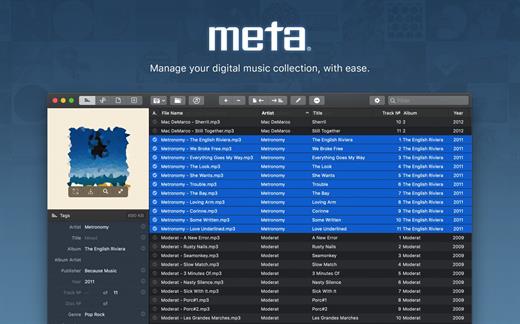
Meta helps you manage your ever-growing digital music collection. Use it to easily edit information such as a song’s artist, title, album, album cover, etc. It supports editing of most audio formats such as MP3, MP4, M4A, FLAC, Ogg, OGA, SPX, WAV, AIFF, and a variety of metadata formats including ID3v1, ID3v2.3, ID3v2.4, iTunes MP4, Vorbis comments, and APE tags.

Features


  • A polished, intuitive user interface that adopts OS X’s standards
  • Write metadata to multiple files at once (Batch Tag Editing)
  • Remove all metadata from files (Strip Tags)
  • Change typecase (capitalise, upper/lowercase, titlecase), strip underscores
  • Rename files based on their metadata or instead, convert filenames to metadata
  • Find and Replace characters, words, or strings in metadata, with support for regular expressions (patterns)
  • Add selected tracks to iTunes, or refresh their metadata using a simple keyboard shortcut
  • Automatically generate track numbers
  • Benefit from built in file management operations (Move, Delete, Reveal in Finder)
  • Interface is compatible with Retina displays

Album covers can easily be set or exported via drag-and-drop, and it is possible to configure Meta so that it scales, crops, and compresses images each time a new image is set, so as to keep your audio files’ size to a minimum.

What’s New

Version 2.5.0:


  • Release notes were unavailable when this listing was updated.
Compatibility

macOS 10.11 or later.


Release Name: Meta 2.5.0
Size: 13.7 MB
Links: HOMEPAGE – NFO – Torrent Search

Download: RAPiDGATOR

5 Comments
July 25

Maya 2027.2 macOS U2B (x64)

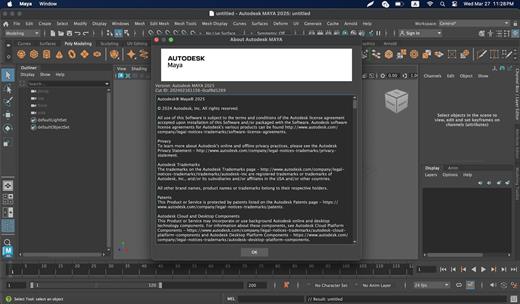
Maya 3D animation software offers a comprehensive creative feature set for 3D computer animation, modeling, simulation, rendering, and compositing on a highly extensible production platform. Maya has next-generation display technology, accelerated modeling workflows, and tools for handling complex data.

Facilities and software features of Autodesk Maya


  • -Advanced design three-dimensional models
  • -simulate a variety of natural and environmental elements such as climate change, water and liquids, fire, plants and …
  • -having a variety of tools for modeling and data management
  • -the possibility of transferring the properties of one object to another object
  • -Design Clothes, hair and sex and different scenarios
  • -Coordination with other software modeling and animating
  • -Supports mathematical model NURBS (short for Non-uniform rational B-spline)
  • -ability to combine elements of two-dimensional and three-dimensional models
  • -Ability to use scripting programming language and MEL (stands for Maya embedded language) and ++ C and Python in the development of software
What’s New

Version 2027.2:


  • Release notes were unavailable when this listing was updated.
Compatibility

macOS 11.0 or later


Release Name: Maya 2027.2 macOS U2B (x64)
Size: 5.3 GB
Links: HOMEPAGE – NFO – Torrent Search

Download: RAPiDGATOR

1 Comments
July 24

Directory Opus 13.24.5 Beta

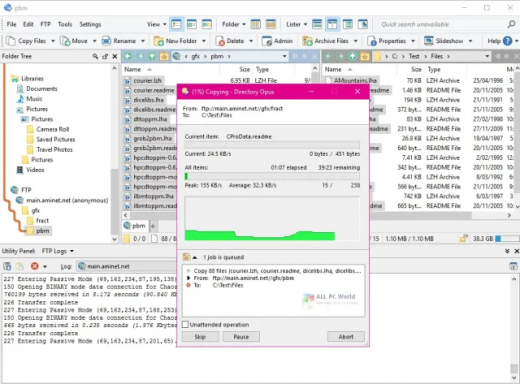
Description: Are you frustrated by the limitations of Windows Explorer? Directory Opus is a complete replacement for Explorer, with far more functionality than any other file manager available today.

You're in control.
Not just a simple file manager; Directory Opus lets you make your computer yours.
With a flexible user interface and unbelievable configurability, you can tailor Opus to streamline your workflow.
Dual panes, dual trees, multiple tabs.
Filter, sort, group your folders. Label and rate your files.
Queued file copies. Powerful batch renaming. Full archive support.
Find your files. Locate duplicates. Synchronize backups.
Assign tags and descriptions. Convert images. Edit metadata.
Fully multi-threaded, native 64 bit high performance code.
Whatever you want to do - Opus can probably do it. And if it's not built-in, you can take advantage of the unrivalled configurability to extend Opus using external tools.

What makes Opus unique?

Built for speed
Opus is written in native C++ multi-threaded code; compiled for the latest 64 bit CPUs, with high performance our number one design principle.

Fully configurable
Change the colors. Change the fonts. Change the toolbars and menus. Set up hotkeys. Opus adapts to how you want to use it.

Makes file management a breeze
Powerful searching, sorting, grouping, labelling and tagging features let you take control of your files like never before.

Endlessly extensible
Work with third-party tools as easily as with the built-in features. A full scripting interface, including scriptable dialogs, means your imagination is really the only limit.

Replace Windows Explorer and don't look back
Our unique Explorer Replacement mode provides a full replacement for Windows Explorer.
Single or dual pane file display and folder trees
Tabbed interface let you keep multiple folders open and switch quickly between them
Integrated viewer, metadata editor and utility panel
Built-in tools including synchronize and duplicate file finder
Leverage indexed search engines like Windows Search and Everything

High performance file management features
Copy, move, rename, duplicate, archive, view, backup and delete your files with ease
Queue multiple file copies for improved performance
Batch renaming including easy-to-use keyboard macros
Support for FTP and archive formats like Zip, 7Zip and RAR
Quickly filter, sort, group and search your folders
Color-code your files, assign status icons, star ratings, tags and descriptions
View images, documents and more. Image marking lets you sort your photos quickly and easily
Calculate folder sizes and print or export folder listings

Unrivalled configurability
Why let the programmers decide for you? You can tailor Opus to look how you want it to look, and to work how you want it to work.
Choose from light mode, dark mode, or design your own theme
Over 600 configurable colors and fonts
All toolbars and menus can be edited, plus you can add your own
Floating toolbars can act as program launchers
Configure your own hotkeys that work everywhere or just in Opus
Full scripting interface lets you design your own dialogs and add your own commands

Release Name: Directory Opus 13.24.5 Beta
Size: 29.7 MB
Links: HOMEPAGE – NFO – Torrent Search

Download: RAPiDGATOR

5 Comments
July 24

Auslogics Video Grabber 1.0.0.13

Description: Download individual videos or entire playlists, then convert formats and video resolution with Auslogics Video Grabber.

Why choose Auslogics Video Grabber?
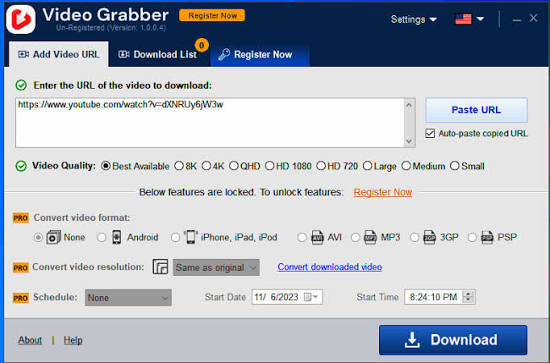
Video Grabber is a quick and easy tool that lets you download videos from YouTube, Dailymotion, Vimeo, Metacafe, Facebook, Bing and many other video sites, then convert them to a format compatible with iPhone, iPad, iPod, Android, or PSP devices. Note that downloading from some sites may require software activation. You can even schedule Video Grabber to start your downloads at a time that’s convenient to you.

What you get with Auslogics Video Grabber
The program has all the features you need to add tons of new videos to your collection and enjoy hours of quality video content offline. Save HD video, run multiple downloads at the same time or set a convenient download schedule.

Multiple sources
Download videos from YouTube, Dailymotion, Vimeo, Metacafe, Facebook, Bing & many other sites.

Simultaneous downloads
Download several videos simultaneously to save time. You can keep adding links to the download list without having to wait for previous downloads to complete.

Download video in HD
The app easily handles high resolution, Full HD (1080p), or HD (720p) videos from YouTube and other video sites, as long as the site supports High Definition Video.

Schedule downloads
Set a convenient time in the app’s scheduler, and Video Grabber will start your downloads at the time you specify.

Auto-paste video links
Video Grabber is smart enough to recognize that you have copied a link, and to automatically paste it into the ‘Add URL’ field, so you will make fewer clicks.

Convert video format
Convert your downloaded videos to 3GP, AVI or a format you can use on your iPhone, iPad, iPod, Android, or PSP devices.

Convert Video Resolution
You can easily change your downloaded video’s resolution without changing its format. Make your videos perfectly fit the screen you will watch them on.

Fast speed
Unlike some other downloaders, Video Grabber will not restrict download speed, so you can get your videos onto your device in less time.

Use a proxy
If you use a proxy for connecting to the Internet, you can specify that proxy in Video Grabber and use it to download videos.

Release Name: Auslogics Video Grabber 1.0.0.13
Size: 75 MB
Links: HOMEPAGE – NFO – Torrent Search

Download: RAPiDGATOR

6 Comments
July 24

Fender Studio Pro 8.1.1

Description: Fender Studio Pro is the next evolution of modern music creation. Built on PreSonus’ award-winning Studio One platform, it combines celebrated features and trusted performance with a modernized interface, Fender’s renowned amps and effects, and intuitive new workflows that make creating music faster, more inspiring, and more connected than ever.

From the first riff to the final mix, Fender Studio Pro empowers musicians, producers, and creators to bring ideas to life effortlessly. Its drag-and-drop workflow, Channel and Arrangement Overviews, and integrated Fender Mustang Guitar and Rumble Bass plug-ins make recording, producing, and performing more intuitive and inspiring than ever. Additional tools like AI-powered Audio-to-Note conversion, Chord Assistant, updated samplers, Studio Verb, and Show Page video playback give creators the precision, flexibility, and sonic depth to produce professional-quality music in any genre.

Fender Mustang Native Guitar & Fender Rumble Native Bass Plug-ins
Fender sounds right in the box. Classic tones, pro presets, and powerful FX — exclusively in Fender Studio Pro. Choose from 39 guitar amps, 39 bass amps, 73 fx pedals, and hundreds of presets.

Channel Overviews
Fender sounds right in the box. Classic tones, pro presets, and powerful FX — exclusively in Fender Studio Pro. Choose from 39 guitar amps, 39 bass amps, 73 fx pedals, and hundreds of presets.

Powerful Production Tools
Create without limits using intelligent songwriting and editing tools like Chord Assistant, AI-powered Audio-to-Note conversion, advanced sampling, and immersive Studio Verb—designed to keep ideas flowing from first take to final mix.

Fender Studio® Pro
Channel & Arrangement Overviews – Full session visibility for quick navigation and control.
Fender Mustang Guitar & Rumble Bass Plug-ins – Classic Fender tones, amps, cabs, pedals, and presets.
Redesigned User Interface – Modern, streamlined workflow for faster creativity.
AI-Powered Audio-to-Note Conversion – Transform audio recordings into editable MIDI instantly.
Chord Assistant – Intelligent chord suggestions to inspire songwriting.
Updated Sample One & Impact Samplers – Advanced sampling and sound-shaping tools.
Studio Verb Plug-in – Create immersive, realistic reverb with intuitive controls.
Video Support on Show Page – Play and edit video within your performance setup.
Seamless Fender Studio Integration – Capture ideas on mobile, continue on desktop.
Drum Metronome & Jam Tracks – Realistic patterns and multi-track songs for practice and recording.

Release Name: Fender Studio Pro 8.1.1
Size: 432.2 MB
Links: HOMEPAGE – NFO – Torrent Search

Download: RAPiDGATOR

5 Comments
July 24

Wolfram Mathematica 15.0.1

Description: For over three decades, Mathematica has defined the state of the art in technical computing—and provided the principal computation environment for millions of innovators, educators, students and others around the world.
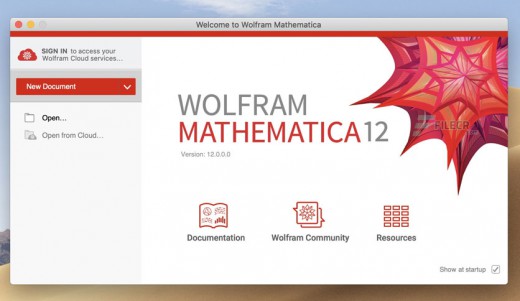
Widely admired for both its technical prowess and elegant ease of use, Mathematica provides a single integrated, continually expanding system that covers the breadth and depth of technical computing—and is seamlessly available in the cloud through any web browser, as well as natively on all modern desktop systems.

For Modern Technical Computing, There's No Other Choice
With energetic development and consistent vision for three decades, Mathematica stands alone in a huge range of dimensions, unique in its support for today's technical computing environments and workflows.

A Vast System, All Integrated
Mathematica has over 6,000 built-in functions covering all areas of technical computing—all carefully integrated so they work perfectly together, and all included in the fully integrated Mathematica system.

Not Just Numbers, Not Just Math—But Everything
Building on three decades of development, Mathematica excels across all areas of technical computing—including neural networks, machine learning, image processing, geometry, data science, visualizations and much more.

Unimaginable Algorithm Power
Mathematica builds in unprecedentedly powerful algorithms across all areas—many of them created at Wolfram using unique development methodologies and the unique capabilities of Wolfram Language.

Higher Level Than Ever Before
Superfunctions, meta-algorithms... Mathematica provides a progressively higher-level environment in which as much as possible is automated—so you can work as efficiently as possible.

Everything Is Industrial Strength
Mathematica is built to provide industrial-strength capabilities—with robust, efficient algorithms across all areas, capable of handling large-scale problems, with parallelism, GPU computing and more.

Powerful Ease of Use
Mathematica draws on its algorithmic power—as well as the careful design of Wolfram Language—to create a system that's uniquely easy to use, with predictive suggestions, natural language input and more.

Documents as well as Code
Mathematica uses the Wolfram Notebook Interface, which allows you to organize everything you do in rich documents that include text, runnable code, dynamic graphics, user interfaces and more.

The Code Makes Sense
With its intuitive English-like function names and coherent design, Wolfram Language is uniquely easy to read, write and learn.

Make Your Results Look Their Best
With sophisticated computational aesthetics and award-winning design, Mathematica presents your results beautifully—instantly creating top-of-the-line interactive visualizations and publication-quality documents.

Instant Real-World Data
Mathematica has access to the vast Wolfram Knowledgebase, which includes up-to-the-minute real-world data across thousands of domains.

Seamless Cloud Integration
Mathematica is now seamlessly integrated with the cloud—allowing sharing, cloud computing and more in a unique and powerful hybrid cloud/desktop environment.

Connected to Everything
Mathematica is built to be connected to everything: file formats (250+), other languages, Wolfram Data Drop, APIs, databases, programs, the Internet of Things, devices—and even distributed instances of itself.

150,000+ Examples
Get started with almost any project with help from 150,000+ examples in the Documentation Center, over 13,000 open-code Demonstrations in the Wolfram Demonstrations Project—and a host of other resources.

Release Name: Wolfram Mathematica 15.0.1
Size: 9.2 GB
Links: HOMEPAGE – NFO – Torrent Search

Download: RAPiDGATOR

1 Comments