Please REGISTER or RENEW your account on RAPiDGATOR.net and support us by doing through all RAPiDGATOR working download links on main posts...
May 28

Pano2VR Pro 8.0

Description: Pano2VR is a powerful virtual tour software that converts your panoramic or 360° photos and videos into interactive experiences.
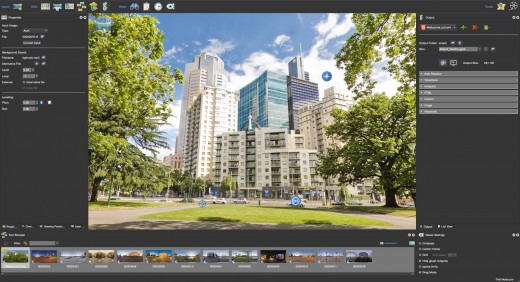
Whether you’re working on a single gigapixel panorama or a virtual tour with thousands of scenes, Pano2VR can help you create an immersive experience for any modern browser. Finished projects can be seamlessly integrated with existing websites and viewed on desktops and mobile or VR devices.

Build a Virtual Tour
From homes and real estate to museums and landmarks, virtual tours allow users to explore real places from around the world. In Pano2VR, link panoramic photo scenes, or nodes, using your choice of transitions and let the user navigate from scene to scene with just a click or tap. Provide greater location context to the scene by using our built-in Tour Map or by easily integrating floor plans or Google Maps.

Improve Your Images
Remove tripods and other image imperfections using Pano2VR’s Patch mode. With this invaluable tool, you can extract a defined patch area from the panorama without distortion, making it easier to retouch. Define and extract the image patch in Pano2VR. Then, edit it in your favorite editor. Once it’s saved, the modified patch will be automatically applied non-destructively to the panorama. Or never leave Pano2VR and instead use AI to correct the image for you.

Enhance the Experience
Add interactive elements like informational popups, photo hotspots, directional sound, and video to your panoramas. Use the included user interface overlays, called skins, or dive into the powerful Skin Editor to design custom buttons and controllers in your own unique interface design – all of which can be made responsive so that the design fits any screen. Create your skins or connect with the third-party designers here to help you achieve your goals.

Reveal the Highlights
Highlight significant scenes in your tours by creating animation paths that automatically navigate through each tour node. At any time, the viewer can choose to pause the animation to interact and explore further. You can even export this walk-through as a video file.

Zoom In
Pano2VR supports gigapixel images and multi-resolution so viewers can zoom deep in to the image to see amazing details. Load in the largest panorama you can find! Pano2VR can not only handle it but processing the panoramas is fast and the output is pixel perfect.

Show Your Work
Export panoramas in HTML5 format and upload to your web server. We even offer a handy plugin that lets you post your finished projects directly to your WordPress site.

Want to share your work in virtual reality? The program supports WebXR, which allows you to create a fully immersive VR experience directly from a web page so you can view projects on Apple Vision Pro and Meta Quest. Alternatively, use the  VRTourviewer  app integration for offline VR tours.

Google Street View
Pano2VR is a Street View ready application that gives you the ability to edit and publish tours to Google Street View.

Projections
Easily change projections during viewing or fly in from little planet view.

Directional Sound
Use Pano2VR's Sound Mode to add directional sound to your projects.

Droplets
If you need to create many projects on a regular basis, droplets let you do this with minimal effort.

Integrated Web Server
Pano2VR has a built-in web server so that once you create your tour, you can immediately see the results of an HTML5 output.

Video Panoramas
In addition to flat, cylindrical, and spherical panoramic images, Pano2VR also supports 360° videos.

Live Update
When Live Update is active, every change to the project is updated live in the browser after saving.

WordPress Plugin
Embed panoramas, VR tours, and object VRs in your WordPress site.

Release Name: Pano2VR Pro 8.0
Size: 267.3 MB
Links: HOMEPAGE – NFO – Torrent Search

Download: RAPiDGATOR

3 Comments
May 28

Abelssoft BankingBrowser 2026 v8.03.73128

Description: Specially designed banking mode blocks unknown and insecure websites. Take your banking without risk. Quickly scans websites for phishing. Password, username and TAN are bombproof. Select a financial institution from a monitored assortment or add a missing bank by click.

Secure online banking
Specially designed banking mode blocks unknown and insecure websites. Take your banking without risk.

Integrated phishing check
Quickly scans websites for phishing. Password, username and TAN are bombproof.

Practical selection of secure bank pages
Select a financial institution from a monitored assortment or add a missing bank by click.

Secured banking mode
The banking mode protects all your online transactions with just one click. Online criminals have no chance here!

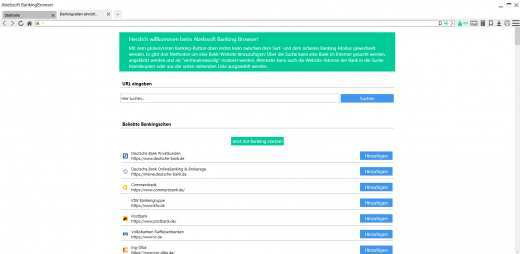
Overview of the most common banks
At a glance, you can find your bank's website in a preconfigured and checked list of numerous financial institutions.

Virtual protection keyboard
The BankingBrowser protects with a screen keyboard against nasty spies, spy out all your inputs.

Reliable phishing check
This security feature prevents attacks by fake websites that steal your personal information and passwords.

Release Name: Abelssoft BankingBrowser 2026 v8.03.73128
Size: 139.3 MB
Links: HOMEPAGE – NFO – Torrent Search

Download: RAPiDGATOR

4 Comments
May 28

Directory Opus 13.23.4 Beta

Description: Are you frustrated by the limitations of Windows Explorer? Directory Opus is a complete replacement for Explorer, with far more functionality than any other file manager available today.

You're in control.
Not just a simple file manager; Directory Opus lets you make your computer yours.
With a flexible user interface and unbelievable configurability, you can tailor Opus to streamline your workflow.
Dual panes, dual trees, multiple tabs.
Filter, sort, group your folders. Label and rate your files.
Queued file copies. Powerful batch renaming. Full archive support.
Find your files. Locate duplicates. Synchronize backups.
Assign tags and descriptions. Convert images. Edit metadata.
Fully multi-threaded, native 64 bit high performance code.
Whatever you want to do - Opus can probably do it. And if it's not built-in, you can take advantage of the unrivalled configurability to extend Opus using external tools.

What makes Opus unique?

Built for speed
Opus is written in native C++ multi-threaded code; compiled for the latest 64 bit CPUs, with high performance our number one design principle.

Fully configurable
Change the colors. Change the fonts. Change the toolbars and menus. Set up hotkeys. Opus adapts to how you want to use it.

Makes file management a breeze
Powerful searching, sorting, grouping, labelling and tagging features let you take control of your files like never before.

Endlessly extensible
Work with third-party tools as easily as with the built-in features. A full scripting interface, including scriptable dialogs, means your imagination is really the only limit.

Replace Windows Explorer and don't look back
Our unique Explorer Replacement mode provides a full replacement for Windows Explorer.
Single or dual pane file display and folder trees
Tabbed interface let you keep multiple folders open and switch quickly between them
Integrated viewer, metadata editor and utility panel
Built-in tools including synchronize and duplicate file finder
Leverage indexed search engines like Windows Search and Everything

High performance file management features
Copy, move, rename, duplicate, archive, view, backup and delete your files with ease
Queue multiple file copies for improved performance
Batch renaming including easy-to-use keyboard macros
Support for FTP and archive formats like Zip, 7Zip and RAR
Quickly filter, sort, group and search your folders
Color-code your files, assign status icons, star ratings, tags and descriptions
View images, documents and more. Image marking lets you sort your photos quickly and easily
Calculate folder sizes and print or export folder listings

Unrivalled configurability
Why let the programmers decide for you? You can tailor Opus to look how you want it to look, and to work how you want it to work.
Choose from light mode, dark mode, or design your own theme
Over 600 configurable colors and fonts
All toolbars and menus can be edited, plus you can add your own
Floating toolbars can act as program launchers
Configure your own hotkeys that work everywhere or just in Opus
Full scripting interface lets you design your own dialogs and add your own commands

Release Name: Directory Opus 13.23.4 Beta
Size: 29.6 MB
Links: HOMEPAGE – NFO – Torrent Search

Download: RAPiDGATOR
4 Comments
May 28

Ant Download Manager Pro 2.17.3.95883

Description: Ant Download Manager (AntDM) is a quick download manager for any Internet file, that fully integrates with all popular browsers. AntDM allows to download free streaming video and audio from numerous web sites, supports P2P peer-to-peer protocol. AntDM supports downloading files from the most popular Premium Link Generators (Debrids).

Ant Download Manager (AntDM) - is a tool that allows you to repeatedly increase the speed of file downloads due to multiple download streams, resume, schedule downloads, capture and download audio and video streams.

Automatically processes download errors, recovers from temporary network errors, reconnects in case of server response delays, has the ability to resume interrupted downloads due to loss of connection, network problems, computer shutdown, or unexpected power outages.

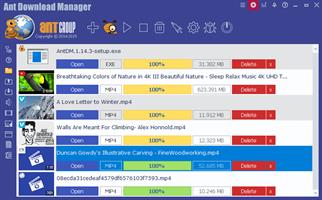
The standard GUI for softwares of this class makes AntDM friendly and easy to use. It has two screens - the first is more common for regular downloads and the second is using video preview for easy tracking of video downloads.

Has download queues, which allows you to accumulate download links at a convenient or scheduled time for the user.

Supports proxy-servers, HTTP and FTP file protocols and their protected versions of HTTPS and FTPS, as well as the main streaming protocols for audio and video content M3U8, MPEG-DASH, VIMEO-STREAM, firewalls, redirects, cookies, authorization, processing of audio and video content.

Supports BitTottrent a P2P (peer-to-peer) file sharing protocol.

Can be easily integrated into the main popular browsers Microsoft EDGE (Chromium-based), Google Chrome, Mozilla Firefox and their numerous clones: 360Chrome, Brave, CCleaner, Chedot, CocCoc, Comodo Dragon, Comodo IceDragon, Maxthon6, Opera, Slimjet, SRWare Iron, Torch, UC Browser, Vivaldi, Yandex, Waterfox, etc. The integration of extension into browsers is used to automatically capture file or media links and download them. Also you can not integrate AntDM extensions into your browsers, but use AntDM autonomously. For example, drag and drop download links from a browser into AntDM, download any single links manually, in a list or in batch mode from a file.

Allows not only downloading audio files, but also extracting audio tracks from video files, converting them to the popular MP3 format and adding basic accompanying information to them.

Supports most popular Generators Premium Links (Debrids): alldebrid.com, cocoleech.com, debrid-link.fr, ffdownloader.com, linksnappy.com, mega-debrid.eu, real-debrid.com, premium.rpnet.biz, simply-debrid.com, premiumize.me, etc.

Other features include multilingual support, download categories, download log, priorities and changes of download speed, task scheduler, sounds of various events, CHM User Guide, virus protection when download completion and many more.

Release Name: Ant Download Manager Pro 2.17.3.95883
Size: 61.3 MB
Links: HOMEPAGE – NFO – Torrent Search

Download: RAPiDGATOR

5 Comments
May 28

IDimager Photo Supreme 2026.3.0.9229

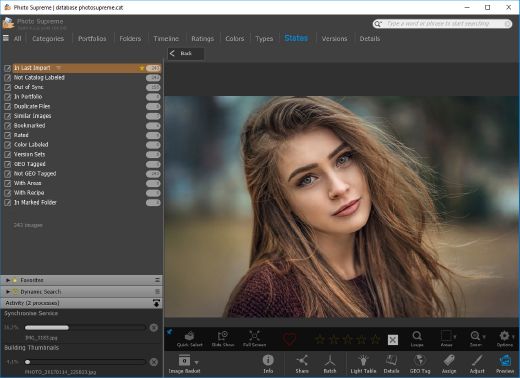
Description: Photo Supreme v2026 is a thoughtful and forward-looking release. This update has focused on smarter discovery, faster performance, and modern workflow expectations, especially around large catalogs, mobile integration, searches, and team environments.

Import and Select
One of the standout additions in Photo Supreme v2026 is the new multi-pass Import and Select workflow. This allows users to review and refine image selections in multiple stages instead of making all decisions in one pass. It’s especially useful for large shoots, letting photographers cull images more deliberately and with less pressure. In addition, the Import and Select feature now loads images faster than ever. Mac users will also appreciate direct iOS device importing, which makes it possible to bring photos straight from an iPhone or iPad into the catalog without relying on intermediary software. This significantly streamlines mobile-first workflows.

Powerful Searches
Photo Supreme now supports natural language searching, allowing users to find images using plain, conversational phrases rather than rigid metadata queries. This feature is powered by AI services such as OpenAI, Google Gemini, or local models with Ollama. This gives users flexibility in how advanced features are enabled. In addition, a new classification system enhances search accuracy by grouping images into meaningful categories upon import, making it easier to surface relevant results in large or complex catalogs.

Video & Media Handling
For users working with video, Photo Supreme v2026 introduces hover-based video previews. Simply hovering over a video thumbnail now reveals a short animated preview, making it much faster to identify clips without opening them individually. Support for modern formats has also been expanded, ensuring the software keeps pace with current media standards.

Sharing with ZIP
Exporting images is more flexible in v2026 thanks to ZIP output support in transfer profiles. This makes it easy to bundle images into a single archive for delivery, backup, or client sharing, all directly from within Photo Supreme. These enhancements simplify distribution workflows and reduce the need for external tools.

GEO Maps
GEOgraphic-Mapping features can now generate maps using not only Google Maps, but also OpenFreeMap with OpenStreetMaps. This removes the need for API keys while still delivering rich, interactive map displays. This update makes location-based browsing easier to configure and more accessible for all users.

Performance and Refinements
Photo Supreme v2026 delivers notable performance enhancements, resulting in faster browsing and a more responsive overall experience. Response times are improved by up to 10%, with especially noticeable gains for large libraries containing many catalog labels.
Catalogs with numerous stacks also see significant performance improvements, particularly when displayed in stacked views.
v2026 includes a wide range of refinements, such as: "Visually similar" stack detection, numerous stability fixes and workflow enhancements, polished UI behavior in collections, searches, and metadata handling

Wait, there's more, a lot more…
New "RAW Files" and "Video Files" catalog states
Added support for Google Gemini as an AI service
Added support for OpenAI GPT-5.2 as an AI Service
Added support for Ministral3 model with Ollama
Added file management support for ACR sidecar files
Update HTTP Server with Photo Supreme Online (Server Edition)
Faster face recognition
Added "AI-Estimated GEO Location" to the AI Panel
Faster result display in the Collection Viewer
"Cascade Metadata" from image to Stack or Version Set is now a background process
A highlighted stroke has been added to the active tabs, improving navigation
Now you can display metadata charts and graphs across multiple tabs
Added support for Ctrl/Cmd+Z functionality in text and memo fields
Defined the new Affinity v3 .AF and .AVIF file format as a supported "other file format"
Switching the collection viewer's view style is faster (eg from Basic to Grid to Clean to Custom Thumb Info)
Advanced Search now has an option to search by "File Size" and "File Size MB"
Finetuned the check for "need to compact" on PostgreSQL (Server Edition)
Bookmark keyboard shortcuts are now a "toggle", similar to ratings and color labels
Expanding nodes in the Catalog Tree is ~25% faster
When using the "Dump Full to Catalog File" feature, there's now the option to create either a "catalog dump" file, or a "catalog with thumbs" dump files
Added a XMP Storage Location for "original file AND non-standard sidecar file"
In "Stacked View", you can now select a specific item from the stack to show
Support for PostgreSQL 18.
And more…

Highlights for v2026
Multi-Pass "Import and Select": Seamlessly transition through passes with a fast-culling system that optimizes your workflow.
Direct iOS Image Import on macOS: Import images directly from your iOS devices with ease.
Video Thumbnail Preview: Hover over a video thumbnail or open the Quick View to view a live video preview.
Natural Language Search Powered by AI: Search your content using plain language, with smart integration through OpenAI, Google Gemini, or Ollama models.
Transfer Profiles can now create ZIP output files: Copy or send sets of images as a single ZIP file for easier sharing.
Maps with OpenFreeMap: Display images on interactive maps using OpenFreeMap/OpenStreetMaps with no API key needed.
Server Edition Thumbnail Caching: Enjoy faster performance with local thumbnail caching, automatic cleanup, and customizable settings for retention and cache size.
Classifications: Enhance search accuracy with an automatic image classification mechanism on import.

Release Name: IDimager Photo Supreme 2026.3.0.9229
Size: 162.2 MB
Links: HOMEPAGE – NFO – Torrent Search

Download: RAPiDGATOR

8 Comments
May 28

PVS-Studio 7.42.106747.2229

Description: PVS-Studio is a static analyzer on guard of code quality, security (SAST), and code safety. PVS-Studio detects various errors – typos, dead code, and potential vulnerabilities (Static Application Security Testing, SAST). The analyzer matches warnings to the Common Weakness Enumeration, SEI CERT Coding Standards, and supports the MISRA standard.

When it is time to use the PVS-Studio analyzer

For a developer
You make occasional mistakes during development
Debugging when searching for errors is time consuming
Errors get into the version control system
Once an error is found by QA specialists, it’s difficult to debug that code

For a manager
Frequent returns to old tasks due to bugs
Users report errors in your products
You hire more developers but notice a code quality decline
With the increasing amount of code, it is difficult to assess its quality and reliability

For a security professional
Difficulties with external code audit
Potential customers require the use of such tools
Clients require to use security and safety standards in development

For a security professional
Difficulties with external code audit
Potential customers require the use of such tools
Clients require to use security and safety standards in development

Supported languages and compilers

Windows
Visual Studio, C, C++, C++/CLI, C++/CX (WinRT)
MinGW C, C++
Texas Instruments Code Composer Studio, C6000-CGT, C, C++

Windows/Linux
IAR Embedded Workbench, C/C++ Compiler for ARM C, C++
QNX Momentics, QCC C, C++
Keil µVision, DS-MDK, ARM Compiler 5/6 C, C++
Texas Instruments Code Composer Studio, ARM Code
Generation Tools C, C++
MPLAB XC8 C

Windows/Linux/macOS
GNU Arm Embedded Toolchain, Arm Embedded
GCC compiler, C, C++
GNU toolchain for RISC-V, C, C++
CLion, Qt Creator, Eclipse, GCC, Clang, C, C++
IntelliJ IDEA, Android Studio, Java
Visual Studio, JetBrains Rider, C#, .NET Framework, .NET

Release Name: PVS-Studio 7.42.106747.2229
Size: 189.2 MB
Links: HOMEPAGE – NFO – Torrent Search

Download: RAPiDGATOR

5 Comments
May 27

Filezo 6.0.17

Description: Filezo instantly finds any file, folder or app on your Windows PC at a lightning speed. Type few keystrokes and launch! That's it! Filezo's smart search ensures meaningful & clutter-free results. This app makes your computing life joyful by stealing away tedious clicks. Saves enormous time and effort!

- Quickly access any document, folder, or program on Windows in less than 5 seconds! May it be on your local hard drive, cloud drive or a network drive.
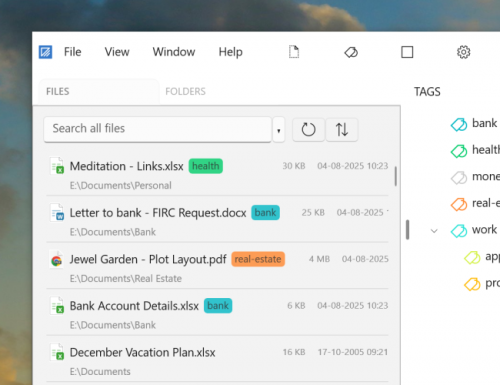
- Tag files and folders to group them logically and access them even faster. Supports hierarchical tags and color coding.

Avoid every day's unnoticed stress resulting from
- Finding scattered files
- Navigating through deep folders
- Accessing slow network paths
- Searching cluttered Windows desktop
- Filezo integrates with the Windows File open/save window, allowing you to directly pick any file/folder from Filezo.
- Filezo has an inbuilt file previewer to quickly take a glance at the document, picture, audio or video file.
- Filezo automatically tracks your recently accessed and recently downloaded files. It makes launching even faster.
- And there is a lot more.

Saves a lot of time
Instantly launch any doc, folder or app with very few keystrokes.

Avoids outdated ways of accessing folders
Filezo avoids tedious navigation of folders. No need to access deep folder trees & menus to launch any document, folder or program. Just type & go!

Made even easier
Assign tags to files & folders. Group them based on projects. Access them in a single click. Assign tags directly from within Windows File Explorer.

Transfer or share tags with others
Tagged files can be copied to other locations, network drives. Plus, you can share your tagged files with other Filezo users.

There is nothing to learn
Filezo is simple & works out of the box. You don't need to configure your favorite files or folders. Just install & see the magic.

Best on top
Automatically tracks the files and folders that are more important to you. Recently downloaded and recently accessed files are listed first. It makes launching easier.

Bypass your file manager
Perform frequent file operations such as copying, deleting, renaming files without launching your file manager app.

Add a personal note to any file or folder
Add a text note to any file or folder. Locate them quickly by searching inside the notes.

Access remote folders like local
Automatically lists the network folders that you access. Launching a network folder any level deep takes less than 3 seconds.

Does more than just launching
Pick and attach a file to email using drag & drop, use inbuilt previewer to quickly compare documents, pictures, audio or video files.

Best Features
- Automatically knows your favorite files & folders
- Tag files and folders
- Annotate files and folders
- Preview several file types
- Select files faster in File open/save window
- Innovative ways of copying files
- Effortlessly launch any file or folder

System Requirements
Filezo runs on Windows 11 & Windows 10 (32-bit and 64-bit)

Release Name: Filezo 6.0.17
Size: 151.6 MB
Links: HOMEPAGE – NFO – Torrent Search

Download: RAPiDGATOR
7 Comments
May 27

By Click Downloader 2.4.31

Description: Backup your videos from any platform! Backup videos from: YouTube, Dailymotion, Vimeo, Facebook and +40 sites.. in HD, MP3, MP4, AVI and all other formats using our software.

Support all sites
Download from YouTube, Facebook, Instagram, Twitter, Vimeo, Dailymotion, YouKu and many more!

Download YouTube Playlists
Download entire YouTube Playlists and channels. Download entire Instagram pages. All at once within 1 click!

HD & 4K quality
Download videos in 720p, 1080p, 4K and 8K. Convert to MP3, MP4, AVI, FLV, WMV, 3GP, WEBM, MKV, WAV, AAC and M4A.

Release Name: By Click Downloader 2.4.31
Size: 46.4 MB
Links: HOMEPAGE – NFO – Torrent Search

Download: RAPiDGATOR

5 Comments
May 27

Yamicsoft Windows Manager 2.3.8

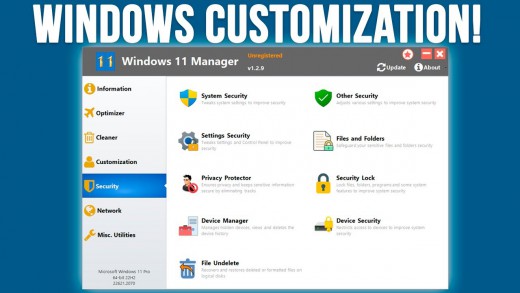
Description: The complete solution to optimize, tweak, repair and clean up Windows 10/11. Windows Manager is an all-in-one utility for Microsoft Windows 10/11 specially, it includes over forty different utilities to optimize, tweak, clean up, speed up and repair your Windows 10/11, helps make your system perform faster, eliminate system fault, increase stability and security, personalize your copy of Windows 10/11, and meet all of your expectations.

Information
Creates the system restore point manually; Gets detailed information about your system and hardware, helps you find out the Microsoft product key such as Microsoft Windows and Microsoft Office; Shows and manages all running processes and threads; Repair Center helps to diagnose and fix the various system problems; Cleans up your system just one clicking; Optimization Wizard is useful to the user who is unfamiliar with computers.

Optimizer
Tweaks your system to improve performance and increase speed; Manages and configures the Windows boot menu to your preference; Startup Manager controls all the started programs with Windows start, checks and repairs the advanced startup items to restore the malicious change by viruses; Manages and optimizes system services and drivers to improve performance; Manages and optimizes the scheduled tasks to speed up your system.

Cleaner
Disk Analyzer can analyze and view the disk space usage of all programs, files and folders find out which engross your disk space and shown with a chart; Cleans up WinSxS folder securely to reduce the component store size; Smart Uninstaller can fully delete programs from your system without residual files and Registry entries; Desktop Cleaner can analyze and move unused shortcuts, files and folders on desktop to specified folders; Searches and deletes junk files to save disk space and improve performance; Searches and deletes the duplicated files to save your disk space; Registry Cleaner searches Registry to find out and delete the invalid items; Registry Defrag rebuilds and re-indexes your Registry to reduce registry access time and therefore improve application responsiveness and eliminate mistakes and corruption in Registry.

Customization
Customizes system parameters according to your preferences by tweaking File Explorer, Desktop, Start, Taskbar and Notification area; Adds files, folders and system items to This PC, and Desktop; Pins the files or folders to your Desktop, Taskbar or Start; Creates the quick startup items for jumplist on Taskbar; Manages the context menu when right click the file, folder, etc; Edits the shortcut menu that right-click Start button (Win + X shortcut); Customizes the look of your system; Edits and adds the shortcuts that executed on Run dialog box; Tweaks the Windows Apps and Microsoft Modern UI settings.

Security
Tweaks system, components, UAC, Sign in settings, adjusts various settings and restricts access to drives and programs to improve system security; Safeguard your sensitive files and folders security, encrypt files, move system folders to safe locations; Privacy Protector ensures privacy and keeps sensitive information secure by eliminating tracks; File Undelete recovers and restores deleted or formatted files on logical disks; Locks some system features to improve security.

Network
Optimizes and tweaks your internet connection and network settings; Manages your URLs and IPs; IP Switcher can switch between different network settings easily; Edits the Hosts file to speed up system surfing internet; Wi-Fi Manager can view and manage all your wireless network; Network tools contains some commonly used network utilities; Network Monitor can display traffic data transmitted by the network.

Misc. Utilities
Creates scheduled tasks or the monitorings that trigger tasks; Shows and run the useful collection of utility that built-in your Windows; Splits a file into several smaller files or merges back to the original file; Super Copy is the powerful tool to copy files or backup automatically; Operates your Registry easily using the Registry Tools.

Release Name: Yamicsoft Windows Manager 2.3.8
Size: 36.5 MB
Links: HOMEPAGE – NFO – Torrent Search

Download: RAPiDGATOR
5 Comments
May 27

Abelssoft Recordify 2026 v11.02

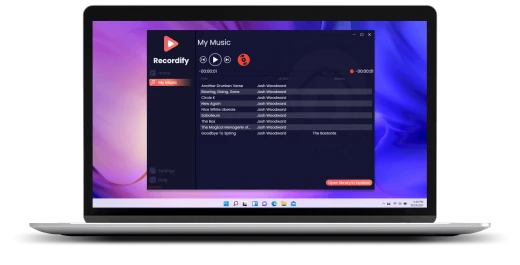
Description: The Windows program Recordify is able to record everything that comes out of the PC speakers. Thus, it is no problem to record music tracks from streaming services such as Spotify or Amazon Music in order to save them permanently as MP3 files. Audio plays from online media libraries or sound files from YouTube videos can also be recorded.

Download music
Whether it's a single song, or an entire playlist, Recordify can permanently record and download all songs.

RECognition© technique
Simply run through a playlist while Recordify recognizes each song, names the ID3 tags, and saves them individually.

Save songs to hard disk
Download your favorite songs directly to your hard drive and conveniently copy them back and forth.

Many file formats
The recorded music can be saved as MP3, WAV or high-quality FLAC file.

Integrated music player
With the built-in music player, you can play your music directly in Recordify without being connected to the Internet.

Usable with many providers
With Recordify you can easily record and store music from Spotify, Apple Music or even Amazon.

High quality
The music quality depends on the source. Recordify supports high quality audio up to 320 kbps.

Downloaded music in the library
Your downloaded music files are automatically stored in the library. There you can access them at any time and play them even without internet access.

Music library with ID3 tags
Recordify cuts the individual songs from the stream and tries to collect the ID3 tags to match. In the end, you get perfect music files that can be transferred to your own collection as MP3. As with the owner of a cassette recorder, the PC user automatically pays a flat copyright fee, which is already added to the hardware costs, to legalize this type of recording and make it financially viable for musicians. The music tracks are saved to the hard disk by Recordify in MP3, WAV or FLAC formats.

Record music from streaming services
Recordify is particularly well prepared for recording streaming services. Like a radio, they play one music track after another. With the difference that the user can determine his own program. The problem with this is that an Internet connection is always required, because the music tracks are not stored on the hard drive in the streaming process. Many users therefore ask themselves: How can the music be downloaded and permanently stored? Recordify was developed precisely for this purpose. It works like a cassette recorder - only much more modern.

Cassette recorder for the PC
Recordify is a cassette recorder for the Windows PC. Everything that is played on the computer can also be recorded. With a mouse click, the user starts the recording function - and also cancels it again. This stereo mix recording function can be used to record and save the music track of YouTube videos. However, audio plays from an online media library can also be recorded.

Endless audio books for your Toniebox
Tonieboxes are small music players that are specially designed for the needs of children. When a Tonifigure is placed on the Toniebox, the box plays a radio play or music from that figure. Should you be in possession of a creative tonie that can be played on yourself, Recordify is an unimaginable help. Because the tool lets you record audio books, music and more with Recordify. Afterwards, your creative toonie can easily be recorded with it. This way, you can also listen to audio plays and music with the Toniebox, for which there are no purchasable figures yet. And it's also free of charge.

Release Name: Abelssoft Recordify 2026 v11.02
Size: 40.6 MB
Links: HOMEPAGE – NFO – Torrent Search

Download: RAPiDGATOR

6 Comments