Please REGISTER or RENEW your account on RAPiDGATOR.net and support us by doing through all RAPiDGATOR working download links on main posts...
Mar 6

Logoist 5.2.2

With Logoist you can create impressive images and vector graphics – from simple layouts to sophisticated designs. Logoist offers everything you’ll need to make your creative ideas come to life or to spark new inspiration. Developed for both professional designers and graphic artists as well as beginners, Logoist provides not only a plethora of templates – ensuring an easy start for users without any prior experience with vector applications – but also offers powerful tools for professional users not found in other software.

The app’s large variety of comprehensive shape, style, preset, clip art and effects galleries are easy to appreciate. With a clean interface and powerful tools, including pre-made design elements that can be combined as desired, Logoist offers incredible ease of use – even including versatile path editors useable to create any shape you want.

Logoist is equipped with functionalities not available even in high priced suites. The Vectorizer converts any graphic element into a resolution-independent vector format for further editing, while preserving paths and even gradients. Logoist utilizes Artificial Intelligence and Machine Learning, allowing users not only to remove JPEG artifacts, image noise, and other image errors, but to also transform even the smallest and most pixelated graphics into high quality images.

Need to view a graphic or logo draft in multiple variations? Then use Artboards to create multiple workspaces within one document. Not sure whether to go for the blue or the red version of a graphic? Logoist helps to compare them side by side. You can also align graphics for different purposes – create reduced versions for use in a letterhead, larger ones for posters, and detailed graphics for magazine covers.

Need to create a quick draft? Simply use one of the template wizards which place you just a few steps away from finished cards, business cards, collages, and logos, which can then be further refined and edited. The “1-2-3 Logo” feature is another convenient tool, as it allows you to create completely different logo ideas for further editing or direct export with a single click.

Logoist in a Nutshell:


  • Clean user interface (including Dark Mode)
  • Dozens of combinable styles, effects and filters
  • Thousands of clip art and hundreds of fully customizable style templates
  • Non-destructive boolean operations while preserving all vector information
  • Suitable for pixel graphics, web, and resolution-independent print products
  • X-ray mode for editing complex object and layer structures
  • Pixel mode to create pixel-accurate designs
  • Flexible group management and innovative layer management features
  • All filters and effects are non-destructive and can be modified anytime
  • Vectorizer: Converts any graphic element into a resolution-independent vector format
  • Vector export file formats: PDF, SVG, EPS, PNG, JPG, HEIF, layered Photoshop PSDs, layers as separate PNG files
  • Batch export: Export multiple formats and resolutions simultaneously
Top new features of Logoist:

  • Vastly improved User Interface
  • Enhanced Dark Mode
  • Vectorizer: Turn bitmaps into vector graphics – assisted by Machine Learning
  • Enhance Images: Remove noise and compression artifacts – also ML-assisted
  • Improved image cropping and background removal
  • Complete new rendering pipeline based on Apple Metal for smooth zooming and editing
  • Dramatically increased performance – edit thousands of objects in a single design at 60fps
  • New Focus Mode: Edit a specific set of objects while hiding everything else
  • Multiple Artboards: Keep drafts or different designs in a single document
  • Multipoint Gradients: Create smooth gradients along arbitrary points, lines and curves
  • Align text to any path or object
  • Many new filters, generators, style presets and card presets
  • Improved printing including support for multiple artboards
What’s New

Version 5.2.2:


  • Release notes were unavailable when this listing was updated.
Compatibility

macOS 15.0 or later


Release Name: Logoist 5.2.2
Size: 249.3 MB
Links: HOMEPAGE – NFO – Torrent Search

Download: RAPiDGATOR

7 Comments
Mar 6

Apeaksoft Data Recovery 1.6.26

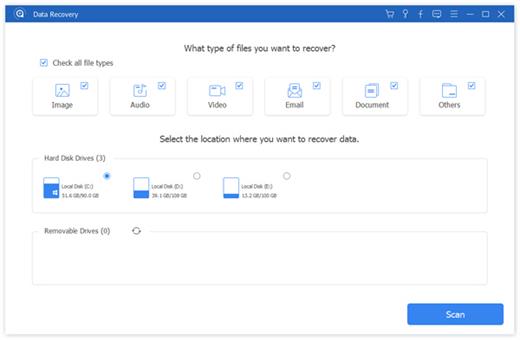
Apeaksoft Data Recovery can recover files from Mac computer or external devices with all major file systems

Whether you mistakenly deleted some important files, or lost data due to hard drive formatted or a system crash, data loss will no longer be your biggest nightmare. Apeaksoft Data Recovery offers professional solutions to handle various data loss issues. It can help you recover all types of data from your Mac or external devices

Key features:


  • Fast scanning speed & Reliable data recovery – the app has the capability to scan the deleted files with faster speed. When you restore lost files from your computer, Data Recovery won’t store any. It will 100% guarantee your privacy safety. Moreover, you are allowed to directly recover the scanned data while its scanning
  • Support various devices – It can help you recover all types of data from computers or external devices
What’s New

Version 1.6.26:


  • Release notes were unavailable when this listing was updated.
Compatibility

macOS 10.10 or later


Release Name: Apeaksoft Data Recovery 1.6.26
Size: 25.6 MB
Links: HOMEPAGE – NFO – Torrent Search

Download: RAPiDGATOR

9 Comments
Mar 6

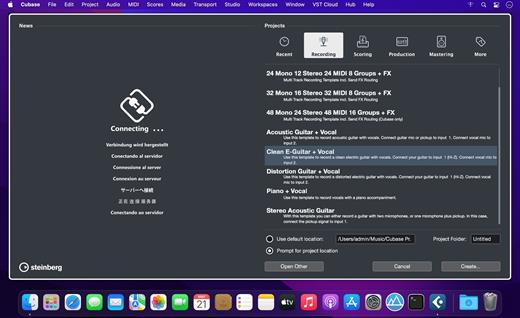
Steinberg Cubase Pro 15.0.10

Do you want to start creating your own music, bring your production up to a professional level, or streamline your workflow for short deadlines? Whatever you need, Cubase helps you to reach your full creative potential. From Hollywood blockbuster composers and Billboard Hot 100 producers right through to keen beginners, the world of music production trusts the comprehensive feature set, straightforward tools and unrivaled sound of our acclaimed music production software.

Cubase Elements welcomes you to the world of Cubase, offering a streamlined music production environment with plenty of features that help seize the moment when musical creativity strikes. Sharing the same pristine audio quality as its larger siblings in the Cubase family, Cubase Elements provides the perfect starting point for intuitive song writing, studio-grade recordings and finalizing your mix. Do you want to elevate your sound to a new level? Cubase Elements is your next step.

Follow the flow

Cubase Elements can keep up with the pace with which your ideas flow. Whether you want to record your instruments and vocals or program cutting-edge beats, you will find all the creative tools and features in Cubase Elements that will guarantee an efficient and rewarding workflow. Improve your tracks with professional and precise editing and mixing capabilities and polish you productions with the top-notch channel strip in the integrated MixConsole — just exactly to the standards you expect from a Cubase-line product.

Get your private assistants

Composing music consists of finding an idea that you can elaborate into a full music composition. Cubase Elements makes it easy to harmonize and arrange your music with the innovative and unique Chord Pads and Arranger Track. Regardless whether you’re looking for further inspiration, a quick and easy way to play chords or try out different arrangements, Cubase Elements offers you maximum flexibility combined with a lightweight user interface to refine your ideas and get the best out of your music.

Your sound of music

Stay a step ahead of the rest with powerful instruments and awesome sounds. HALion Sonic SE, Groove Agent SE and Prologue — Cubase Elements provide a vast array of high-end sampled instruments, uplifting acoustic and electronic drums and grooves, state-of-the-art synths and experimental sound design tools. With the acclaimed VST Amp Rack tone suite all the amps you need stand right by your side to give your music that very individual tone.


  • The reference standard for music production software
  • Produce tracks from start to finish
  • Suitable for all genres, levels and budgets
  • Fast, flexible and intuitive workflows
What’s New

Version 15.0.10:


  • Release notes were unavailable when this listing was updated.
Compatibility

macOS 10.15 or later


Release Name: Steinberg Cubase Pro 15.0.10
Size: 2 GB
Links: HOMEPAGE – NFO – Torrent Search

Download: RAPiDGATOR
9 Comments
Mar 6

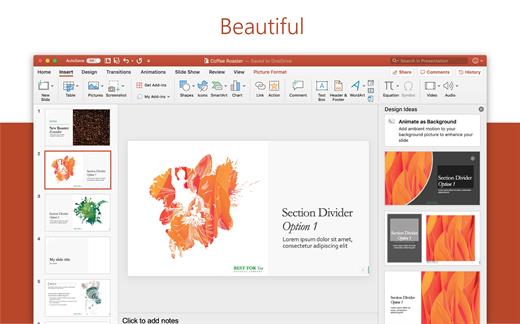
Microsoft Office 2024 v16.106.3

Note: If it doesn’t work, uninstall the old version of Office completely and reinstall it. For uninstallation method, please use Google search.

What’s New

Version 16.106.3:


  • Release notes were unavailable when this listing was updated.
Compatibility

macOS 12.0 or later


Release Name: Microsoft Office 2024 v16.106.3
Size: 2.6 GB
Links: HOMEPAGE – NFO – Torrent Search

Download: RAPiDGATOR

8 Comments
Mar 6

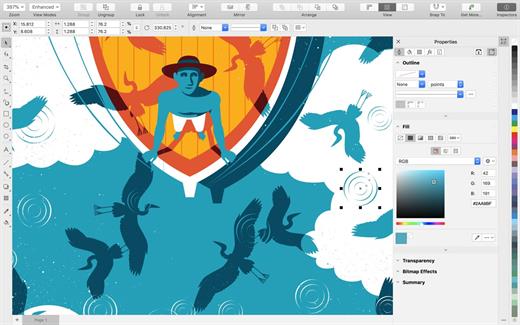
CorelDRAW Graphics Suite 27.0.0.121

CORELDRAW CAPABILITIES


  • BRANDING AND MARKETING | Our product allows you to develop the brand assets and marketing tools that advertising and printing professionals and small businesses often need to create their own marketing and communication materials.
  • Outdoor Advertising & Wide Format Printing | Print industry professionals rely on CorelDRAW’s high-quality prepress tools and powerful color management module.
  • Apparel and Textiles | Applied design professionals favor CorelDRAW for the tools they need to produce fashion-related products.
  • Retail and eCommerce | Commerce professionals can rely on CorelDRAW Graphics Suite’s specialized web design and print tools for projects ranging from promotional materials to online store assets.
  • FIGURATIVE ART | Artists can boldly combine traditional painting techniques with advanced technology to create stunning works of art.
  • AND MUCH MORE!

What’s New

Version 27.0.0.121:


  • Release notes were unavailable when this listing was updated.
Compatibility

macOS 10.15 or later
Apple Silicon or Intel Core processor


Release Name: CorelDRAW Graphics Suite 27.0.0.121
Size: 2.2 GB
Links: HOMEPAGE – NFO – Torrent Search

Download: RAPiDGATOR
8 Comments
Mar 6

App Cleaner & Uninstaller Pro 9.1.1

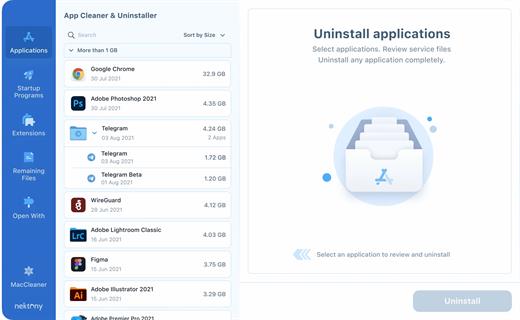
App Cleaner & Uninstaller (was App Cleaner) can remove applications and their service files on macOS. Make sure they aren’t eating up precious space on your drive with this helpful app that does the legwork for you.

Features


  • Scan the system and preview installed applications
  • Remove all types of service files
  • Remove remains of previously uninstalled apps
  • Reset application to a first-launch state
  • Easy-to-use shortcuts
  • Any file or app quick preview
  • Specific app-associated file formats preview
  • In-app help assistance
  • Show unused applications
  • Skip list option
What’s New

Version 9.1.1:


  • Release notes were unavailable when this listing was updated.
Compatibility

macOS 10.13 or later


Release Name: App Cleaner & Uninstaller Pro 9.1.1
Size: 36.3 MB
Links: HOMEPAGE – NFO – Torrent Search

Download: RAPiDGATOR

8 Comments
Mar 5

Downie 4.11.14

A simple download manager that offers you the possibility to quickly save videos from different websites to your own disk drive.

If you are using a poor internet connection, trying to visualize videos streamlined online might not work properly since the content is loaded too slowly. Downie is a simple Mac app that can help you download those videos to your computer, and then watch them by using your default media player.

User friendly video downloader featuring support for drag and drop actions

Working with Downie is extremely straightforward: simply drop the video URL on top of the app’s main window or on the Dock icon. Downie adds the video to your downloads list, so all you have to do next is start the process by pressing the appropriate button. Of course, you can also remove items from the list.

By default, Downie downloads MP4 files and places them in your default Downloads folder, but you can easily change this via the Preferences window. The same area allows you to setup notifications, or post processing actions (convert to MP4 if necessary, or extract audio only).

Effortlessly download videos from a wide collection of hosting websites

Downie provides support for more than 400 different websites that host video content, among which there are the most popular choices, such as YouTube, Apple, LiveLeak, Vimeo, BBC, and so on. If a certain website is not included, within the app you can send a request email to the Downie developers.
Moreover, Downie also provides matching extensions for various popular web browsers, such as Firefox, Safari, Google Chrome or Chromium. The add-ons are not installed by default: open the Preferences window and install only the ones you plan to use.

Straightforward solution for downloading video content hosted online

Downie is a great tool for saving videos posted on various websites to your Mac for offline playback. The application is extremely useful especially if you have a slow internet connection.

What’s New

Downie 4.11.14:


  • Improved: kaltura.com, radio-canada.ca, youtube.com
Compatibility

macOS 10.12 or later
Apple Silicon or Intel Core processor


Release Name: Downie 4.11.14
Size: 42.5 MB
Links: HOMEPAGE – NFO – Torrent Search

Download: RAPiDGATOR
9 Comments
Mar 5

Monologue 1.0.65

Monologue is an app that automatically converts your speech into text. It helps you write faster by simply speaking into a microphone, saving you time compared to typing manually.

The program understands over 100 languages ​​and adapts to your speaking style and vocabulary so that your text sounds natural and matches what you mean.

Monologue works as a standalone application, allowing you to dictate text in any program without any unnecessary complications.

It can automatically format text and make it neater, eliminating unnecessary repetitions and errors.

This is useful if you want to quickly translate spoken language into written text—for example, for notes, letters, messages, or preparing documents.

What’s New

Version 1.0.65:


  • Release notes were unavailable when this listing was updated.
Compatibility

macOS 14 and later


Release Name: Monologue 1.0.65
Size: 58.9 MB
Links: HOMEPAGE – NFO – Torrent Search

Download: RAPiDGATOR

7 Comments
Mar 5

A Better Finder Attributes 7.43

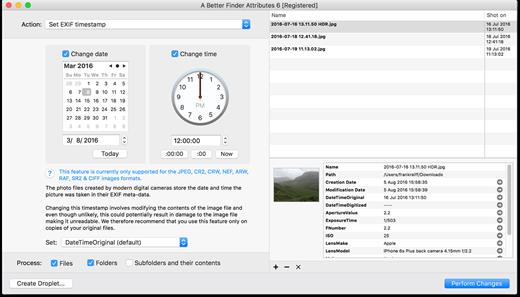
A Better Finder Attributes 7 allows you to change JPEG & RAW shooting dates, JPEG EXIF meta-data tags, file creation & modification dates, file flags and deal with invisible files.

Correct EXIF Digital Photo Shooting Timestamps

A Better Finder Attributes 7 allows you to manipulate JPEG, CR2, NEF, ARF, RAF, SR2, CRW & CIFF EXIF timestamps at will by setting them to specific times or batch adjusting them by adding and removing time (useful for correcting the timestamps of images taken with a digital camera with a incorrectly set clock and to compensate for timezone changes).

Correct Finder Sorting for Digital Photos

A Better Finder Attributes 7 also allows you to synchronize the file creation and modification dates with the shooting dates of JPEG EXIF as well as a wide variety of RAW formats, so that files sort properly in the Finder and other systems.

Change, Add & Remove JPEG EXIF Meta-Data

A Better Finder Attributes 7 allows the most commonly used JPEG EXIF meta-data tags, such as copyright & owner information, camera & lens specifactions, some exposure information and much else besides to be directly manipulated.

You can strip JPEG EXIF information from a file altogether, strip GPS and IPTC location data or edit individual tags.

Total File Creation & Modification Date Control

A Better Finder Attributes 7 gives you total control over file creation and modification dates, setting them to specific times and dates, adding or removing time or simply removing them altogether.

Setting Mac File Flags

A Better Finder Attributes 7 supports setting all common Mac file system flags. You can set whether or not file extensions appear in the Finder, batch lock or unlock files, set or remove legacy creation & type codes, remove invisible files, restart the Finder in a special mode that shows invisible files, batch set Finder labels and force Finder updates.

Showing & Deleting Invisible Files

A Better Finder Attributes 7 can delete invisible files, such as .DS_Store, that can lead to problems when delivering files to non-Mac systems and play havoc with Unix tools such as version control and archiving tools.

On top of this A Better Finder Attributes has a special “Show Invisible Files” feature hidden in the “Tools” menu that switches the Finder to a special mode in which invisible files become visible

Other Noteworthy Features


  • Batch operation
  • Create Droplets for automated processing
  • Drag-and-drop into the file list or onto the application icon
  • Select files in the Finder and activate A Better Finder Attributes 5 via the Finder context menu or via a hot key
  • Automatically deals with file date consistency rules
  • Separate processing for files and folders, batch processing of sub-folders
  • Additionally, A Better Finder Attributes 5 gives you control over:
  • Whether or not file extensions appear in the Finder
  • Batch locking or unlocking of files
  • Setting or removing legacy creator and type codes
  • Removing invisible files
  • Seeing invisible files in the Finder
  • Batch setting of Finder labels
  • Forcing the Finder to update its information about files and folders
What’s New

Version 7.43:


  • Release notes were unavailable when this listing was updated.
Compatibility

macOS 10.11 or later


Release Name: A Better Finder Attributes 7.43
Size: 13.8 MB
Links: HOMEPAGE – NFO – Torrent Search

Download: RAPiDGATOR
7 Comments
Mar 5

Modern CSV 2.3.1

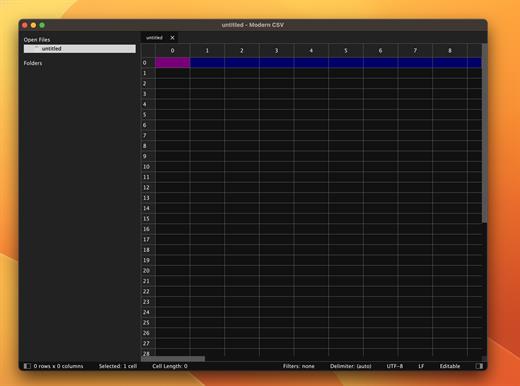
Modern CSV is an ultimate CSV file editor.


  • Easy CSV editing
  • Find and arrange CSV data
  • Open large files quickly
  • Customize the interface
  • And much more

What’s New

Version 2.3.1:


  • Release notes were unavailable when this listing was updated.
Compatibility

macOS 10.14 or later.
Apple Silicon or Intel Core processor


Release Name: Modern CSV 2.3.1
Size: 28.3 MB
Links: HOMEPAGE – NFO – Torrent Search

Download: RAPiDGATOR

6 Comments