Please REGISTER or RENEW your account on RAPiDGATOR.net and support us by doing through all RAPiDGATOR working download links on main posts...
Mar 4

Cardhop 2.4.6

Cardhop lets you search, add, edit, and interact with your contacts in a fun and interactive way. Just type what you want and Cardhop will figure it out.

Features


  • Search: Instantly find what you’re looking for by typing the name or details and let Cardhop handle the rest.
  • Add or edit: Add new contacts or edit existing contacts with unparalleled ease and simplicity. Just enter the name of the contact along with their details and then observe the smile on your face.
  • Act: The old way of interacting with your contacts takes multiple steps to accomplish the actions you want. This all changes with Cardhop. After you try Cardhop, you’ll wonder how you ever did it the old way.
What’s New

Version 2.4.6:


  • Release notes were unavailable when this listing was updated.
Compatibility

macOS 10.13 or later
Apple Silicon or Intel Core processor


Release Name: Cardhop 2.4.6
Size: 31 MB
Links: HOMEPAGE – NFO – Torrent Search

Download: RAPiDGATOR

7 Comments
Mar 4

Alcove 1.6.12

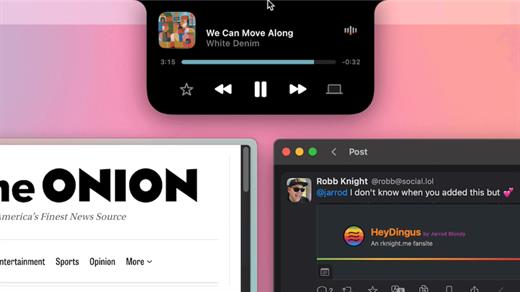
Alcove brings the elegant Dynamic Island experience to your Mac, transforming how you interact with notifications, live activities, and system events. Designed to feel native, it’s a polished way to stay informed without being interrupted.

Key Features


  • Fluid Transitions — Smooth animations and transitions that make alerts and interactions feel natural and integrated.
  • Instant Notifications — Alerts appear quickly and gracefully so you never miss important updates.
  • Live Activities Support — Keep track of ongoing tasks directly from the Dynamic Island interface.
  • Swipe Gestures — Use intuitive gestures to clear, interact with, or dismiss alerts.
  • Customizable HUDs — Tailor the look and feel of the heads-up displays to fit your style or workflow.
  • Lock Screen Presence — Alcove can show notifications or status even when your Mac is locked, ensuring you stay informed at a glance.
  • Lightweight, Native App — Built to run smoothly, Alcove is fast and performs well without draining resources.
What’s New

Version 1.6.10:


  • Release notes were unavailable when this listing was updated.
Compatibility

macOS 12.0 or later


Release Name: Alcove 1.6.12
Size: 11.6 MB
Links: HOMEPAGE – NFO – Torrent Search

Download: RAPiDGATOR

10 Comments
Mar 4

Ableton Live Suite 12.3.6

Ableton Live lets you create and record music on your Mac. Use digital instruments, pre-recorded sounds, and sampled loops to arrange, produce, and perform your music like never before. Ableton Live is an all-in-one production suite.

Find your sound


  • Start in Arrangement View. Create and edit multitrack recordings in a straightforward linear view.
  • Go further in Session View. Switch to this one-of-a-kind interface to improvise and experiment with countless sounds and loops.
  • Access an endless palette of sounds. With 5 built-in synths, 3 samplers, 390 drum kits, and 4000 loops, the possibilities are endless.
What’s New

Version 12.3.6


  • Release notes were unavailable when this listing was updated.
Compatibility

macOS 10.14 or later
Apple Silicon or Intel Core processor

Release Name: Ableton Live Suite 12.3.6
Size: 5.1 GB
Links: HOMEPAGE – NFO – Torrent Search

Download: RAPiDGATOR

1 Comments
Mar 4

PullTube 1.8.6.25

Sharing videos via online hosting services, such as YouTube or Vimeo is a common practice, yet streaming the content might not work as expected if you have a slow internet connection.

PullTube offers you the possibility to download videos from both sources (YouTube and Vimeo), while other platforms might be added at a later time. The app can handle playlists, allows you to select the output quality, and can even extract only the audio.

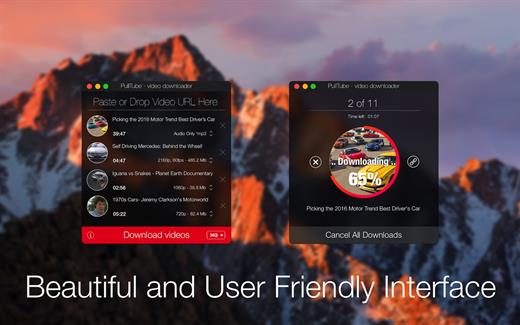
Video downloader that can import links with drag and drop and can detect playlists

The PullTube user interface is represented by a small window where you get to quickly paste the video URL. Note that you can also add a video by dropping the link on top of the PullTube window.

Worth mentioning is that, if PullTube detects that the video is part of a playlist, will offer to download the entire collection: will fetch the data for each entry and handle the downloads consecutively.

Download videos hosted on YouTube or Vimeo to different output sizes and formats

PullTube will start fetching the video data right away so you can see the video name, duration, and a small thumbnail. When configuring a download, you get to select the output quality (highest, 4K, HD or regular with different resolutions) or choose to export only the audio to an M4A or MP3 file.

Via the PullTube Settings panel, you can change the default download location and the default MP3 bitrate (320Kbps, 256Kbps, 128Kbps, 64Kbps). You can also add the quality info to the video’s name and choose to quit the app when all downloads are completed.

Get offline access to videos hosted online in just a few steps

PullTube proposes a streamlined workflow for quickly downloading videos from YouTube or Vimeo, provides control over the output quality, and enables you to extract the audio to MP3 or M4A files.

However, during our tests, we have noticed that PullTube has trouble completing the download when handling videos that are longer that 2 minutes. The process stops without any explanation, and you can eventually complete the task, but you need to add the link to download tool multiple times.

What’s New

Version 1.8.6.25:


  • Release notes were unavailable when this listing was updated.
Compatibility

macOS 10.12 or later


Release Name: PullTube 1.8.6.25
Size: 231.8 MB
Links: HOMEPAGE – NFO – Torrent Search

Download: RAPiDGATOR

9 Comments
Mar 4

Fission 2.9.4

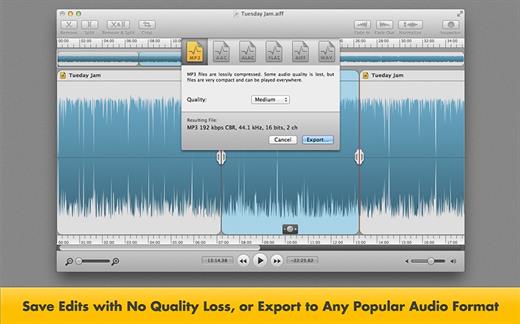
Fission can crop and trim audio, paste in or join files, or just rapidly split one long file into many. It’s streamlined for fast editing. Plus, it works without the quality loss caused by other editors, so you can get perfect quality audio even when editing MP3 and AAC files.

If you need to convert formats, Fission can do that too! You can rapidly export or batch convert files to the MP3, AAC, Apple Lossless, FLAC, AIFF, and WAV formats.

Key Features:


  • Edit MP3, AAC, Apple Lossless, and AIFF files with no quality loss
  • Quickly split a long audio file into smaller files
  • Remove unwanted content, such as commercials, from your audio file
  • Re-arrange audio in a single file, copy audio from one file to another, or merge with a quick drag and drop
  • Create great-sounding MP3 or AAC ringtones for your cell phone.
What’s New

Version 2.9.4:


  • Release notes were unavailable when this listing was updated.
Compatibility

macOS 10.14 or later


Release Name: Fission 2.9.4
Size: 16.9 MB
Links: HOMEPAGE – NFO – Torrent Search

Download: RAPiDGATOR

8 Comments
Mar 4

Stats 2.12.1

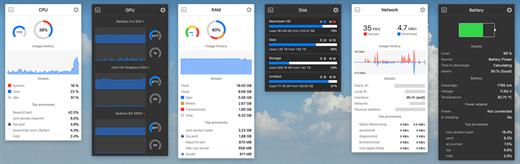
Stats is a application which allows you to monitor your macOS system.


  • CPU Usage
  • Memory Usage
  • Disk utilization
  • Sensors information (Temperature/Voltage/Power)
  • Battery level
  • Network usage

What’s New

Version 2.12.1:
Bug fixes


  • fix: cherry-pick changes from #2983 to fix the automatic fan mode after sleep
  • fix: removed menu item position control when showing widget in the menu bar
New features

  • feat: added flag emoji instead of country code in the popup view, and countryCode and flag options to the Text widget
Localization

  • lang: updated Taiwan Traditional Chinese Localization
Compatibility

macOS 10.14 or later, 64-bit processor


Release Name: Stats 2.12.1
Size: 6.7 MB
Links: HOMEPAGE – NFO – Torrent Search

Download: RAPiDGATOR

9 Comments
Mar 4

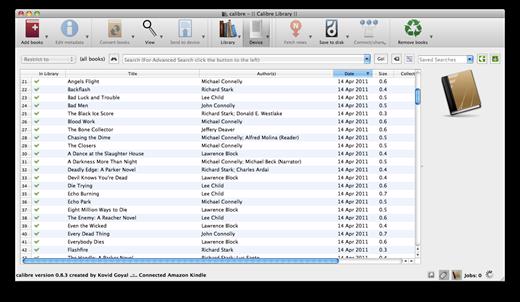
calibre 9.4.0

Calibre is a complete e-book library manager. Organize your collection, convert your books to multiple formats, and sync with all of your devices. Let Calibre be your multi-tasking digital librarian.

Manage, convert, sync, and more


  • Library management. Calibre keeps things orderly by creating single entries for books that contains multiple formats. Add tags and comments for better searchability.
  • Format conversion. Calibre’s robust conversion options support
What’s New

Version 9.4.0:


  • Release notes were unavailable when this listing was updated.
Compatibility

macOS 10.14 or later


Release Name: calibre 9.4.0
Size: 323.4 MB
Links: HOMEPAGE – NFO – Torrent Search

Download: RAPiDGATOR

6 Comments
Mar 4

LosslessSwitcher 2.0

Apple Music listeners have access to hi-res lossless audio, with sample rates of up to 192 kHz. However, Macs have a big issue when it comes to playing songs with high sample rates — the macOS Music app doesn’t seem to be able to switch the device’s sample rate automatically depending on the song that’s being played.
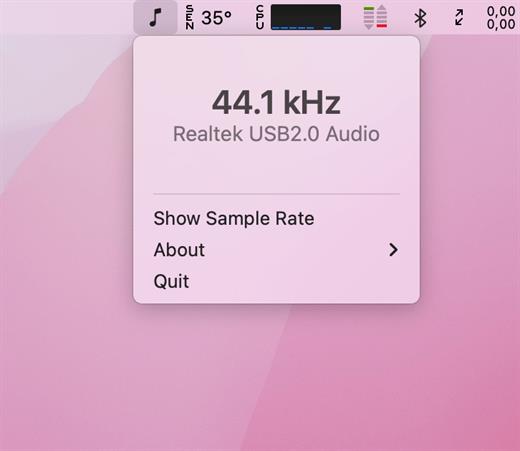
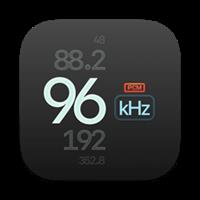
LosslessSwitcher is a free, open-source app designed to address this issue. It runs in the menu bar and checks the sample rate of music being played, then adjusts the output device’s sample rate in the Audio MIDI Setup app.

Automatic sample rate switching for your Mac

Normally, you would have to select a preferred audio format setting from the MIDI Setup utility, and songs played in the Music app would either play normally or be upsampled or downsampled to the specified sample rate. This can lead to data loss in both scenarios, which is why it is better avoided.

LosslessSwitcher gets around this by checking the sample rate of songs being played in the Music app at all times, and then changing the audio output format in the Audio MIDI Setup app automatically. The current sample rate will also be displayed in the menu bar for you to check.

It’s worth remembering that you need to enable lossless audio from the macOS Music app’s preferences in order to take advantage of this feature.

Brief audio interruption when switching sample rate

At the moment, there is an issue that may be a dealbreaker for a lot of users. When a new song starts playing, and it has a different sample rate than the previously played track, there will be a small interruption a couple of seconds after playback starts, when the app switches to the required sample rate.

The interruption is very brief, barely noticeable for some, but audiophiles are nothing if not perceptive. If your music library uses several different sample rates, these small interruptions will likely become annoying.

There may also be a non-negligible impact on your device’s battery life, since the app needs to query the current sample rate very frequently in order to make the switch when necessary.

Great idea, but may need more work

LosslessSwitcher is an interesting app for audiophiles who want to get the best possible quality out of Apple Music on macOS. It’s great in theory, but the brief interruptions experienced when switching sample rates may make it unusable for some. Best to try it out for yourself to see if it’s a worthwhile tradeoff.

What’s New

Version 2.0:


  • Release notes were unavailable when this listing was updated.
Compatibility

macOS 11.4 or later


Release Name: LosslessSwitcher 2.0
Size: 810.9 KB
Links: HOMEPAGE – NFO – Torrent Search

Download: RAPiDGATOR

5 Comments
Mar 4

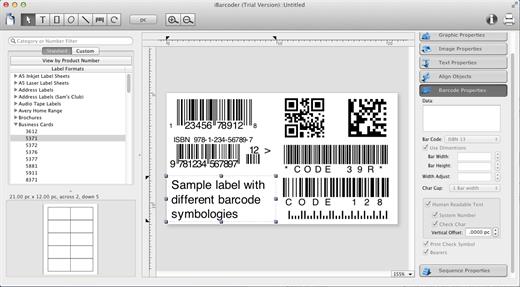
iBarcoder 3.17.6

iBarcoder allows you to design and print your own barcoded labels, stickers, and tags. Create barcode graphics for retail packages, books, stickers, and more. Mac QR code and Datamatrix generator. Add text boxes, image boxes, rectangles, ovals and lines to your labels. Type in the necessary text, insert the desired images, to create the professional barcode labels for commercial use. Create sequential barcodes for catalogs and retail operations. Specify the sequence in which barcodes are printed or exported.

Smart, Intuitive Barcode Software


  • Create professional barcoded labels with a few mouse clicks
  • Live preview feature
  • Modify your Mac barcodes by changing types, sizes, and other attributes intrinsic to a certain barcode type. Advanced tools make customizing your barcode easy
  • Print barcodes directly to your printer using standard Avery formats provided
  • Create and save your own custom label formats
  • Export barcodes as a high-resolution image files, or vector graphics:

    • PDF (vector)
    • EPS (vector)
    • BMP
    • TIFF
    • JPEG
    • PNG
    • PNTG
    • Photoshop
    • …and more…!
  • Make the desired font and color settings
  • Copy, then paste finished graphics right to Adobe Illustrator, InDesign, Photoshop, or other software from Mac clipboard
Supports the following barcode types:

  • Postnet
  • Japanpost customer barcode
  • FIM Codes
  • Horizontal bars
  • UPC A
  • UPCE
  • EAN 13
  • EAN 8
  • ISBN
  • ISSN
  • Code 128
  • Codabar
  • ITF14
  • Code 39
  • Code 11
  • Code 93
  • MSI
  • Interleaved 2 of 5
  • Datamatrix
  • Intelligent Mail Barcode
  • Pharmacode
  • QR Code
What’s New

Version 3.17.6:


  • Release notes were unavailable when this listing was updated.
Compatibility

macOS 10.10 or later


Release Name: iBarcoder 3.17.6
Size: 16.6 MB
Links: HOMEPAGE – NFO – Torrent Search

Download: RAPiDGATOR

7 Comments
Mar 4

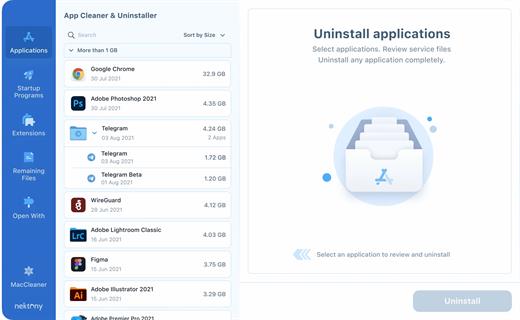
App Cleaner & Uninstaller Pro 9.1.0 (2089)

App Cleaner & Uninstaller (was App Cleaner) can remove applications and their service files on macOS. Make sure they aren’t eating up precious space on your drive with this helpful app that does the legwork for you.

Features


  • Scan the system and preview installed applications
  • Remove all types of service files
  • Remove remains of previously uninstalled apps
  • Reset application to a first-launch state
  • Easy-to-use shortcuts
  • Any file or app quick preview
  • Specific app-associated file formats preview
  • In-app help assistance
  • Show unused applications
  • Skip list option
What’s New

Version 9.1:


  • Release notes were unavailable when this listing was updated.
Compatibility

macOS 10.13 or later


Release Name: App Cleaner & Uninstaller Pro 9.1.0 (2089)
Size: 36.6 MB
Links: HOMEPAGE – NFO – Torrent Search

Download: RAPiDGATOR

9 Comments