Please REGISTER or RENEW your account on RAPiDGATOR.net and support us by doing through all RAPiDGATOR working download links on main posts...
Feb 19

System Dashboard Pro 3.1.1
System Dashboard Pro offers the following features
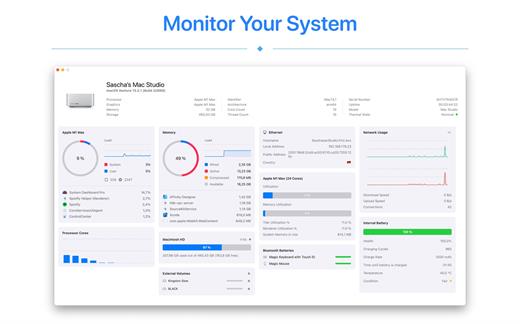
• General System Information
Get an overview of the most important parameters of your system. This includes, for example, the macOS version used or details about your computer.

• Processor Usage
The processor panel shows important details about processor usage. The current load is displayed as well as that of the last few seconds. A list of processes that have the highest processor utilization is also displayed.

• Memory Usage
The Memory panel shows data related to memory. The current load is displayed as well as that of the last few seconds. A list of processes using the most memory is also displayed.

• Network Information
Basic network information such as the local and external IP address or the transfer rate of the WLAN connection is displayed on this panel.

• Network Usage
The network category shows the current download and upload speed and the number of open connections.

• Internal Battery
This panel is available if the app is running on a MacBook and displays basic battery parameters. Among others information, it displays the number of charging cycles and the health of the battery.

• Hard Disk
The computer’s hard drive can be kept under control with this panel. It shows how much space is used and how much is free. The current speed is also displayed.

• External Drives
SD cards and USB sticks are displayed here. The devices can also be ejected – either individually or all at once.

What’s New

Version 3.1.1:


  • Release notes were unavailable when this listing was updated.
Compatibility

macOS 13.0 or later


Release Name: System Dashboard Pro 3.1.1
Size: 7.3 MB
Links: HOMEPAGE – NFO – Torrent Search

Download: RAPiDGATOR

7 Comments
Feb 19

SiteSucker Pro 6.1.5

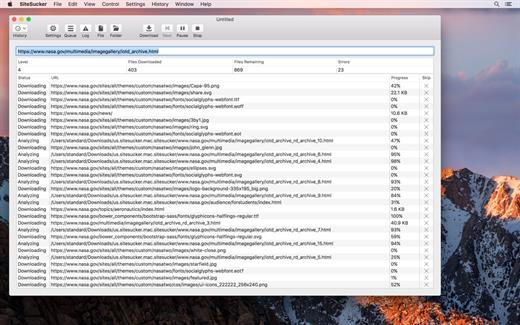
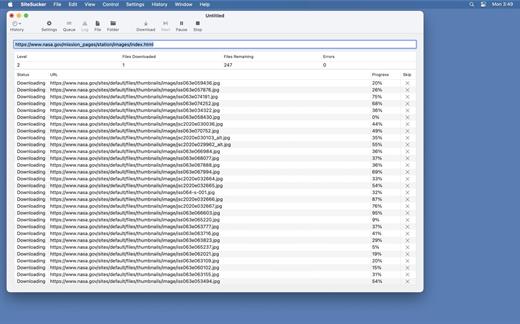
SiteSucker Pro is an application that automatically downloads Web sites from the Internet. It does this by copying the site’s HTML documents, images, backgrounds, movies, and other files to your local hard drive. Just enter a URL and click a button and SiteSucker can download the entire site.

SiteSucker can be used to make local copies of your Web sites for easy maintenance. SiteSucker can download files unmodified, or it can “localize” the files it downloads, allowing you to browse a site off-line.

What’s New

Version 6.1.5:


  • Release notes were unavailable when this listing was updated.
Compatibility

macOS 11.0 or later.


Release Name: SiteSucker Pro 6.1.5
Size: 7.7 MB
Links: HOMEPAGE – NFO – Torrent Search

Download: RAPiDGATOR
8 Comments
Feb 19

Alcove 1.6.3

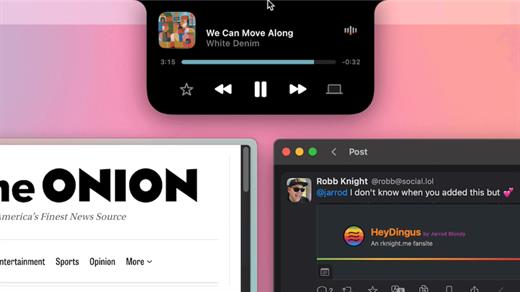
Alcove brings the elegant Dynamic Island experience to your Mac, transforming how you interact with notifications, live activities, and system events. Designed to feel native, it’s a polished way to stay informed without being interrupted.

Key Features


  • Fluid Transitions — Smooth animations and transitions that make alerts and interactions feel natural and integrated.
  • Instant Notifications — Alerts appear quickly and gracefully so you never miss important updates.
  • Live Activities Support — Keep track of ongoing tasks directly from the Dynamic Island interface.
  • Swipe Gestures — Use intuitive gestures to clear, interact with, or dismiss alerts.
  • Customizable HUDs — Tailor the look and feel of the heads-up displays to fit your style or workflow.
  • Lock Screen Presence — Alcove can show notifications or status even when your Mac is locked, ensuring you stay informed at a glance.
  • Lightweight, Native App — Built to run smoothly, Alcove is fast and performs well without draining resources.
What’s New

Version 1.6.3:


  • Release notes were unavailable when this listing was updated.
Compatibility

macOS 12.0 or later


Release Name: Alcove 1.6.3
Size: 11 MB
Links: HOMEPAGE – NFO – Torrent Search

Download: RAPiDGATOR

8 Comments
Feb 19

Disk Map 2.81

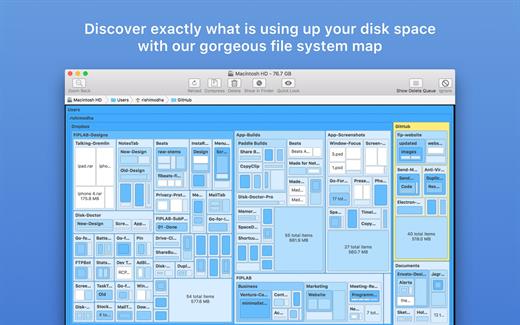
Disk Map makes it easy to visualize the files and folders that are cluttering up your storage drives. It enables you to quickly locate, delete or compress large files and folders on your hard drive and reclaim valuable space. The app quickly scans your drives to build a stunning treemap visual display of files and folders on your computer, allowing you to easily navigate through your file system and find out what is taking up the most space.

Key Features:


  • A gorgeous retina-optimised UI design
  • Support for scanning both internal and external hard drives (including selected folders within these drives)
  • Zoom in/out of folders
  • Open files/folders in Finder
  • Quick Look support
  • Five beautiful and pleasing treemap colour schemes to choose from
  • Ignore specified file formats and folders
  • Specify a minimum file size to scan for
  • Compress files at the click of a button
  • Delete items to Trash Can or permanently according to your requirements
  • Hide/Show system and hidden files via the app’s preferences
  • Hit the Reload button to refresh folders without the need to perform a new scan
We’ve worked hard to make Disk Map as simple and efficient as possible for you to use. We would love to hear your thoughts via email and make any improvements to future versions of this app. We intend to have an active development cycle powered by your feedback, love and support!

What’s New

Version 2.81:


  • Release notes were unavailable when this listing was updated.
Compatibility

macOS 10.13 or later


Release Name: Disk Map 2.81
Size: 11.2 MB
Links: HOMEPAGE – NFO – Torrent Search

Download: RAPiDGATOR
10 Comments
Feb 19

Swinsian 3.0.7

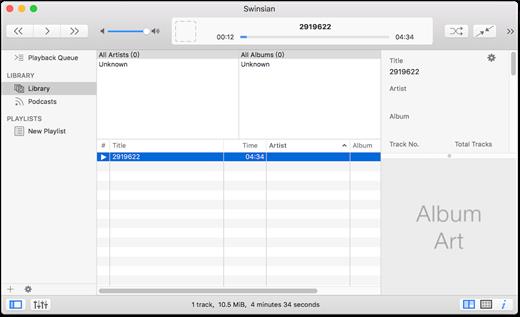
Swinsian is a music manager and player for macOS.

Features


  • Supports FLAC/Ogg Vorbis as well as MP3, AAC, WAV, APE, AC3, WavPack, WMA, and cue files
  • Copies tracks from iPods and iPhones
  • Watches folders for new files
  • Fetches album art
  • Quick control window
  • Imports iTunes libraries
  • Playback over AirTunes
  • Duplicate finding
  • Bulk tag editing with regex support
What’s New

Version 3.0.7:


  • Release notes were unavailable when this listing was updated.
Compatibility

macOS 10.11 or later


Release Name: Swinsian 3.0.7
Size: 24.7 MB
Links: HOMEPAGE – NFO – Torrent Search

Download: RAPiDGATOR
9 Comments
Feb 19

Cookie 8.4.1

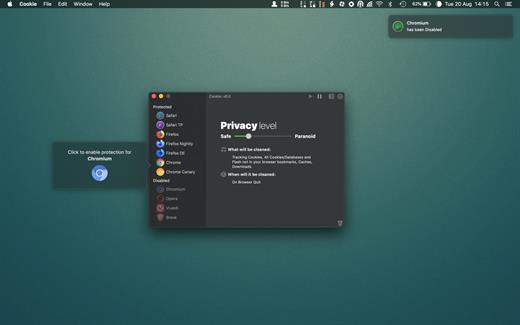
Cookie prevents third parties from hijacking your browsing experience. The sites you visit store “cookies” in your browser without your knowledge or consent. Some are helpful, but others are frustrating and invasive. Cookie can help.

Features:


  • Consolidate all your browser privacy settings
  • Simplified View that takes care of all the technical details for you
  • Advanced View which puts you in total control of all your privacy settings
  • Combined cookie view displaying all cookie/flash/localStorage data in one easy to manage view
  • Cookie’s can be favorited on a per domain, or per cookie basis. You decide
  • Individual Browser settings. It is possible to configure different automatic removal options for each browser. In the case of Chrome/Chromium/Canary/Brave you can even configure settings per user!
  • A number of removal schedules are possible: When quitting Cookie, when a Browser is Quit, on computer login, On computer waking from sleep, on a customizable time schedule, or entirely manually
  • Hotkey support, so you can remove all unwanted data quickly and easily
  • Customizable tracking cookie definitions
  • Whitelist individual tracking cookies
  • Clean, modern and Intuitive User Interface
  • Helpful setup window
  • Browser extension protection
  • Full Screen support
  • iCloud support
  • Dark/Regular theme
What’s New

Version 8.4.1:


  • Release notes were unavailable when this listing was updated.
Compatibility

macOS 10.14 or later, 64-bit processor


Release Name: Cookie 8.4.1
Size: 8.2 MB
Links: HOMEPAGE – NFO – Torrent Search

Download: RAPiDGATOR
10 Comments
Feb 19

SiteSucker 6.1.5

SiteSucker is an application that automatically downloads Web sites from the Internet. It does this by copying the site’s HTML documents, images, backgrounds, movies, and other files to your local hard drive. Just enter a URL and click a button and SiteSucker can download the entire site.

SiteSucker can be used to make local copies of your Web sites for easy maintenance. SiteSucker can download files unmodified, or it can “localize” the files it downloads, allowing you to browse a site off-line.

What’s New

Version 6.1.5:


  • Release notes were unavailable when this listing was updated.
Compatibility

macOS 11.0 or later


Release Name: SiteSucker 6.1.5
Size: 7 MB
Links: HOMEPAGE – NFO – Torrent Search

Download: RAPiDGATOR

8 Comments
Feb 19

Codepoint 1.22

Features
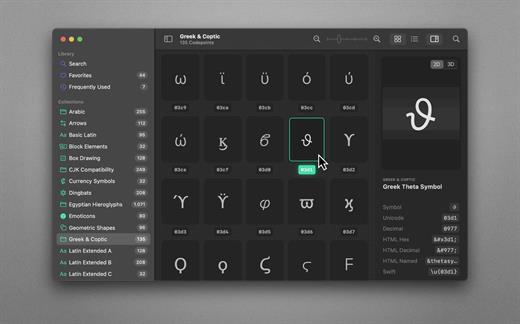
• Explore, search and share Unicodes
• Search Engine: Lightning fast, surprisingly smart
• Find Unicodes, Hex, Decimals, HTML and Swift entities
• Favourites synced across all your devices
• Typography Advice for selected characters
• 3D Glyph Preview
• Supports SF Symbol names
• Works offline
• Looks brilliant in dark and light
• Optimised for Macs with Apple Silicon (M1, M2)
• Works great on macOS 13 Ventura

What’s New

Version 1.22:


  • Release notes were unavailable when this listing was updated.
Compatibility

macOS 13.1 or later
Apple Silicon or Intel Core processor


Release Name: Codepoint 1.22
Size: 63.6 MB
Links: HOMEPAGE – NFO – Torrent Search

Download: RAPiDGATOR
9 Comments
Feb 19

Animated Wallpapers 1.0.16

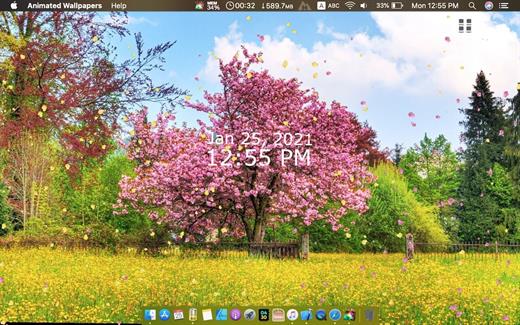
Feel the breeze of your desktop, your desktop is not boring anymore!


  • Select from 14 themes: Nature, Space and more.
  • Show/Hide Desktop Icons : it can be used as a curtain to hide desktop icons, Just in case you are having a work presentation and you want to hide all the mess on the desktop.
  • Big desktop clock.
What’s New

Version 1.0.16:


  • New Wallpapers
Compatibility

macOS 10.11 or later.


Release Name: Animated Wallpapers 1.0.16
Size: 264.5 MB
Links: HOMEPAGE – NFO – Torrent Search

Download: RAPiDGATOR

10 Comments
Feb 18

Infuse Pro 8.3.8

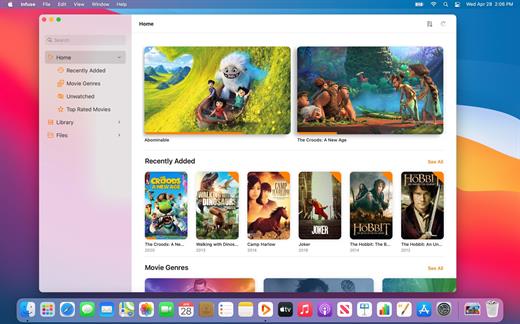
Ignite your video content with Infuse – the beautiful way to watch almost any video format on your iPhone, iPad, Apple TV, and Mac. No need to convert files! Infuse is optimized for macOS 12, with powerful streaming options, Trakt sync, and unmatched AirPlay & subtitle support. Gorgeous interface. Precise controls. And silky-smooth playback.

Play more video types

A powerful video player that plays just about anything, including the standard MP4, M4V and MOV – plus MKV, AVI, WMV, MTS, ISO, VIDEO_TS, FLV, OGM, OGV, ASF, 3GP, DVR-MS, WebM, and WTV. Includes fully certified Dolby® Digital Plus (AC3/E-AC3), DTS® and DTS-HD® audio.

Stream from other devices

Browse and play videos stored on your Mac, PC, NAS, Wi-Fi hard drive, apps like Plex, Emby, and Jellyfin, or from cloud services like Dropbox, Google Drive, OneDrive, Box, pCloud, Yandex.Disk, and Mega.nz – no syncing required!

Trakt 2-way sync

Connect with Trakt to sync watched history, submit ratings and post comments.

Optimized subtitles powered by opensubtitles

Bring your own subtitles, or download them on the fly (for free) in virtually any language.

The basics:


  • Silky-smooth video player (plays full 4K w/ HDR & Dolby Vision)
  • Stream from a Mac, PC, NAS or Wi-Fi enabled hard drive
  • Connect with Plex, Emby, Jellyfin, Kodi (XBMC), WMC and other media servers
  • Beautiful layout with quick access to video info
  • Artwork and metadata added automatically
  • Picture-in-Picture
  • Spatial audio
Supported formats:

  • Video: 3GP, AVI, ASF, BDMV, DIVX, DVDMEDIA, DVR-MS, FLV, ISO, M4V, MKV, MOV, MP4, M2TS, MTS, OGM, OGV, TP, TS, VIDEO_TS, WEBM, WMV, WTV
  • Audio: AAC, AC3/E-AC3, DOLBY TRUEHD, DTS, DTS-HD MA, FLAC, MP3, OGG, PCM, WMA
  • Subtitles: DVB, DVDSUB, MICRODVD, MPL2, PGS, SMI, SSA/ASS, SRT, SUB, TIMED TEXT, TMP, TXT, VOBSUB, VTT, XSUB
Player features:

  • Multiple audio tracks
  • Chapters
  • Gesture controls
  • 8 video zoom options
  • Continuous playback
  • Deinterlacing
Extras:

  • Library organization
  • Folders
  • One-click subtitle downloads from OpenSubtitles
  • Scrobble plays to Trakt
  • Download videos from networked devices
  • Drag and drop uploads via web browser
  • Get extra onboard storage by adding USB drives
Get more with infuse pro!

  • Play even more video formats
  • Enjoy Dolby® Digital Plus (AC3/E-AC3), DTS® and DTS-HD® mobile surround sound
  • Stream a wide variety of video types over AirPlay and Google Cast
  • Access videos stored in cloud services like Dropbox, Google Drive, Box, OneDrive, pCloud, Yandex.Disk, and Mega.nz
  • Sync libraries, settings, watched history, and playback progress between devices
What’s New

Version 8.3.8:


  • Release notes were unavailable when this listing was updated.
Compatibility

macOS 11.0 or later.
Apple Silicon or Intel Core processor


Release Name: Infuse Pro 8.3.8
Size: 85.9 MB
Links: HOMEPAGE – NFO – Torrent Search

Download: RAPiDGATOR
10 Comments