Please REGISTER or RENEW your account on RAPiDGATOR.net and support us by doing through all RAPiDGATOR working download links on main posts...
Feb 12

Cardhop 2.4.5

Cardhop lets you search, add, edit, and interact with your contacts in a fun and interactive way. Just type what you want and Cardhop will figure it out.

Features


  • Search: Instantly find what you’re looking for by typing the name or details and let Cardhop handle the rest.
  • Add or edit: Add new contacts or edit existing contacts with unparalleled ease and simplicity. Just enter the name of the contact along with their details and then observe the smile on your face.
  • Act: The old way of interacting with your contacts takes multiple steps to accomplish the actions you want. This all changes with Cardhop. After you try Cardhop, you’ll wonder how you ever did it the old way.
What’s New

Version 2.4.5:


  • Release notes were unavailable when this listing was updated.
Compatibility

macOS 10.13 or later
Apple Silicon or Intel Core processor


Release Name: Cardhop 2.4.5
Size: 31 MB
Links: HOMEPAGE – NFO – Torrent Search

Download: RAPiDGATOR

10 Comments
Feb 12

A Better Finder Attributes 7.42

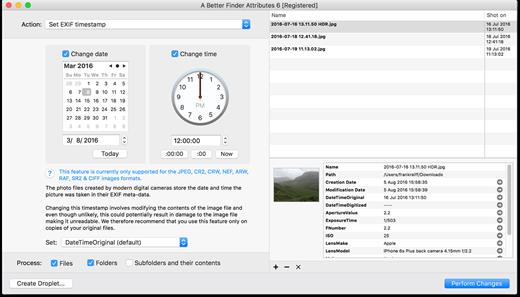
A Better Finder Attributes 7 allows you to change JPEG & RAW shooting dates, JPEG EXIF meta-data tags, file creation & modification dates, file flags and deal with invisible files.

Correct EXIF Digital Photo Shooting Timestamps

A Better Finder Attributes 7 allows you to manipulate JPEG, CR2, NEF, ARF, RAF, SR2, CRW & CIFF EXIF timestamps at will by setting them to specific times or batch adjusting them by adding and removing time (useful for correcting the timestamps of images taken with a digital camera with a incorrectly set clock and to compensate for timezone changes).

Correct Finder Sorting for Digital Photos

A Better Finder Attributes 7 also allows you to synchronize the file creation and modification dates with the shooting dates of JPEG EXIF as well as a wide variety of RAW formats, so that files sort properly in the Finder and other systems.

Change, Add & Remove JPEG EXIF Meta-Data

A Better Finder Attributes 7 allows the most commonly used JPEG EXIF meta-data tags, such as copyright & owner information, camera & lens specifactions, some exposure information and much else besides to be directly manipulated.

You can strip JPEG EXIF information from a file altogether, strip GPS and IPTC location data or edit individual tags.

Total File Creation & Modification Date Control

A Better Finder Attributes 7 gives you total control over file creation and modification dates, setting them to specific times and dates, adding or removing time or simply removing them altogether.

Setting Mac File Flags

A Better Finder Attributes 7 supports setting all common Mac file system flags. You can set whether or not file extensions appear in the Finder, batch lock or unlock files, set or remove legacy creation & type codes, remove invisible files, restart the Finder in a special mode that shows invisible files, batch set Finder labels and force Finder updates.

Showing & Deleting Invisible Files

A Better Finder Attributes 7 can delete invisible files, such as .DS_Store, that can lead to problems when delivering files to non-Mac systems and play havoc with Unix tools such as version control and archiving tools.

On top of this A Better Finder Attributes has a special “Show Invisible Files” feature hidden in the “Tools” menu that switches the Finder to a special mode in which invisible files become visible

Other Noteworthy Features


  • Batch operation
  • Create Droplets for automated processing
  • Drag-and-drop into the file list or onto the application icon
  • Select files in the Finder and activate A Better Finder Attributes 5 via the Finder context menu or via a hot key
  • Automatically deals with file date consistency rules
  • Separate processing for files and folders, batch processing of sub-folders
  • Additionally, A Better Finder Attributes 5 gives you control over:
  • Whether or not file extensions appear in the Finder
  • Batch locking or unlocking of files
  • Setting or removing legacy creator and type codes
  • Removing invisible files
  • Seeing invisible files in the Finder
  • Batch setting of Finder labels
  • Forcing the Finder to update its information about files and folders
What’s New

Version 7.42:


  • Release notes were unavailable when this listing was updated.
Compatibility

macOS 10.11 or later


Release Name: A Better Finder Attributes 7.42
Size: 11.6 MB
Links: HOMEPAGE – NFO – Torrent Search

Download: RAPiDGATOR

11 Comments
Feb 12

Microsoft Office 2024 v16.106

Note: If it doesn’t work, uninstall the old version of Office completely and reinstall it. For uninstallation method, please use Google search.

What’s New

Version 16.106:


  • Release notes were unavailable when this listing was updated.
Compatibility

macOS 12.0 or later


Release Name: Microsoft Office 2024 v16.106
Size: 2.9 GB
Links: HOMEPAGE – NFO – Torrent Search

Download: RAPiDGATOR

8 Comments
Feb 12

Bartender 6.4.1

Bartender lets you organize your menu bar apps.

Features


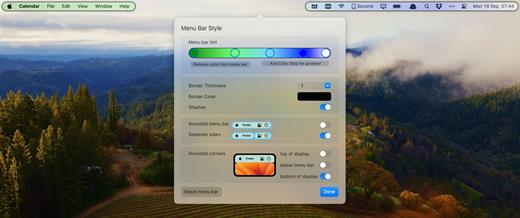
  • Take control of your menu bar – With Bartender you can choose which apps stay in the menu bar, are displayed in the Bartender Bar or are hidden completely.
  • The Bartender Bar – The Bartender Bar can be displayed and hidden as you want, by clicking on the Bartender Icon or via a hot key.
  • Menu bar apps still work the same – Apps still work the same when they are in the Bartender Bar allowing you quick access to them when needed, but keeping them out of sight when not.
  • Show an app in the menu bar when it updates – Set up your apps to be displayed in the menu bar for a period of time when they update.
  • Order your menu bar items – With Bartender you can set the order of the menu bar items, both in the menu bar and in the Bartender Bar, simply by ⌘+dragging the items. The order you set is maintained after restarts. So your menu bar items are always in the order you want.
  • Minimalism – If you want a really clean look and privacy, Bartender can also be hidden.
  • The Bartender Bar can be placed where you want – The Bartender Bar can be moved at any time to any horizontal position immediately under the menu bar. Or it can open under the Bartender icon.
  • Keyboard Navigate your menu bar items – Keyboard navigate all menu items both in the menu bar and the Bartender Bar; simply arrow through them and press return to select.
  • Search menu bar items – You can search the Bartender Bar for menu items, allowing you quick access to a menu item without looking for it. Simply display the Bartender Bar and start typing, then press enter to select the menu item.
Bartender lets you organize your menu bar apps by hiding them, rearranging them, or moving them to Bartender’s Bar. You can display the full menu bar, set options to have menu bar items show in the menu bar when they have updated, or have them always visible in Bartender’s Bar.

What’s New

Version 6.4.1:


  • Release notes were unavailable when this listing was updated.
Compatibility

macOS 14.0 or later


Release Name: Bartender 6.4.1
Size: 29.8 MB
Links: HOMEPAGE – NFO – Torrent Search

Download: RAPiDGATOR

7 Comments
Feb 11

Topaz Gigapixel 1.1.1

Topaz Gigapixel knocks traditional upscaling tools off their pedestals.

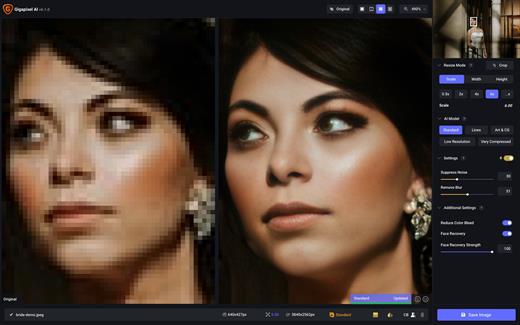
Enlarging your image without losing detail has always been impossible… until now. Upscale your photos by up to 600% while perfectly preserving image quality.

Breathtakingly sharp prints. High-resolution cropping in post-production. iPhone photos that look like they came out of a DSLR.

No matter why you’re enlarging your photos, you always want the best possible quality for your results. Gigapixel AI is currently the only photo enlargement product available that can actually add detail back to your upscaled photo.

What’s New

Version 1.1.1:


  • Release notes were unavailable when this listing was updated.
Compatibility

macOS 12 Monterrey,ARM only.


Release Name: Topaz Gigapixel 1.1.1
Size: 369.5 MB
Links: HOMEPAGE – NFO – Torrent Search

Download: RAPiDGATOR

10 Comments
Feb 11

Bartender 6.4.1

Bartender lets you organize your menu bar apps.

Features


  • Take control of your menu bar – With Bartender you can choose which apps stay in the menu bar, are displayed in the Bartender Bar or are hidden completely.
  • The Bartender Bar – The Bartender Bar can be displayed and hidden as you want, by clicking on the Bartender Icon or via a hot key.
  • Menu bar apps still work the same – Apps still work the same when they are in the Bartender Bar allowing you quick access to them when needed, but keeping them out of sight when not.
  • Show an app in the menu bar when it updates – Set up your apps to be displayed in the menu bar for a period of time when they update.
  • Order your menu bar items – With Bartender you can set the order of the menu bar items, both in the menu bar and in the Bartender Bar, simply by ⌘+dragging the items. The order you set is maintained after restarts. So your menu bar items are always in the order you want.
  • Minimalism – If you want a really clean look and privacy, Bartender can also be hidden.
  • The Bartender Bar can be placed where you want – The Bartender Bar can be moved at any time to any horizontal position immediately under the menu bar. Or it can open under the Bartender icon.
  • Keyboard Navigate your menu bar items – Keyboard navigate all menu items both in the menu bar and the Bartender Bar; simply arrow through them and press return to select.
  • Search menu bar items – You can search the Bartender Bar for menu items, allowing you quick access to a menu item without looking for it. Simply display the Bartender Bar and start typing, then press enter to select the menu item.
Bartender lets you organize your menu bar apps by hiding them, rearranging them, or moving them to Bartender’s Bar. You can display the full menu bar, set options to have menu bar items show in the menu bar when they have updated, or have them always visible in Bartender’s Bar.

What’s New

Version 6.4.1:


  • Release notes were unavailable when this listing was updated.
Compatibility

macOS 14.0 or later


Release Name: Bartender 6.4.1
Size: 29.8 MB
Links: HOMEPAGE – NFO – Torrent Search

Download: RAPiDGATOR

10 Comments
Feb 11

WiFi Explorer 3.6.4

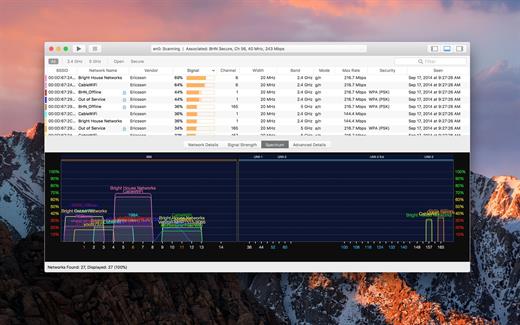
WiFi Explorer will scan, find, and troubleshoot wireless networks.

Quickly identify channel conflicts, signal overlapping, or configuration problems that may be affecting the connectivity and performance of your home or office wireless network.

Get an insight into the network details: name (SSID), MAC address (BSSID), device manufacturer, signal strength (RSSI), noise, channel, band, security configuration, supported data rates, and much more.


  • Suitable for home, small office, or enterprise networks
  • Easy-to-use, intuitive user interface
  • Graphical visualization of the Wi-Fi environment
  • Supports 2.4 GHz and 5 GHz frequency bands as well as 20, 40, 80 and 160 MHz channels
  • Works with IEEE 802.11a/b/g/n/ac networks
Also:

  • Comprehensive app’s help
  • Signal quality ratings based on signal-to-noise ratio (SNR)
  • Accurate conversion from dBm to percentage (%) for easier analysis and optimization
  • Detailed description of information elements (IE) advertised by the access point for advanced troubleshooting
  • Export metrics and network details to CSV file format
  • Save results for later review and analysis
  • Access point name discovery (if supported)
  • Editable column for labels or annotations
  • Selectable and sortable columns
  • Adjustable graph timescales
  • Quick filtering
  • Customizable colors for easily tracking particular networks
  • Full screen mode
What’s New

Version 3.6.4:


  • Release notes were unavailable when this listing was updated.
Compatibility

macOS 10.13.0 or later


Release Name: WiFi Explorer 3.6.4
Size: 10.8 MB
Links: HOMEPAGE – NFO – Torrent Search

Download: RAPiDGATOR

10 Comments
Feb 11

Wondershare PDFelement Pro 12.1.7 (OCR)

Wondershare PDFelement is a self-explanatory OS X application that makes it easier for your to preview, edit, join, split and convert PDF documents using a Mac.
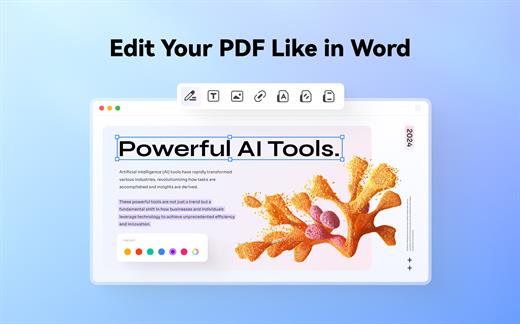
The Wondershare PDFelement also features a simple, clean and intuitive interface that provide instantaneous access to all the tools and features you might need to complete your daily tasks.

Powerful and user-friendly PDF editor for everyday use

Moreover, with Wondershare PDFelement’s help, you can effortlessly edit PDF documents created using text files, web pages or scanned documents.

Consequently, you can add, remove or edit text, move and rearrange pages, insert or remove images and more.

Wondershare PDFelement’s top toolbar helps you hide, show and customize the sidebar in order to display the items and information you are interested in. In addition, you can browse through the loaded document, zoom in or out, print it or email it with just a couple of mouse clicks.

Advanced OCR capabilities make text editing a breeze

Furthermore, you can choose between the “Hand”, “Select” and “Edit” tool, use the advanced OCR feature and convert your source file into plain text or RTF document, ePUB, HTML, as well as file formats compatible with Microsoft Word, Excel, and PowerPoint.

The context menu also helps you switch between the “Move”, “Select” and “Touchup” tool, change the display mode and open the Inspector window to view detailed information about the loaded document.

As an added bonus, by accessing the Document menu, you have the option to add, update or remove an watermark, extract, insert and delete pages, split, merge or convert your document and crop or rotate a page with ease.

Full-featured tool designed to help you stamp, watermark, encrypt and decrypt PDF documents on a Mac

The complete list of all available editing tools, bookmark features, annotation tools and stamp options can be found under the Tools menu.

From here you can easily insert text boxes, add sticky notes, highlight, strike-through and underline text, insert various shapes and use the handy pencil or erase.

On the whole, Wondershare PDFelement comes with the right set of features to help you edit and annotate PDF documents using a Mac, as well as effortlessly add password protect and convert them other formats for easier sharing with your friends and colleagues.

What’s New

Version 12.1.7:


  • Release notes were unavailable when this listing was updated.
Compatibility

macOS 11.0 or later
Apple Silicon or Intel Core processor


Release Name: Wondershare PDFelement Pro 12.1.7 (OCR)
Size: 827.2 MB
Links: HOMEPAGE – NFO – Torrent Search

Download: RAPiDGATOR

12 Comments
Feb 11

FSNotes 7.1.1

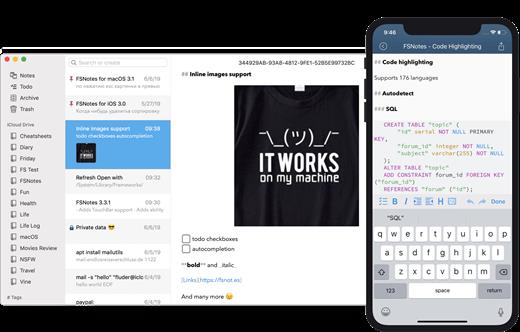
FSNotes is a plain-text note manager for macOS, and is modern reinvention of notational velocity (nvALT) on steroids. Our application respects the following open formats: plain/text, Markdown, and RTF, and stores data in the file system. You can view, edit, and copy data in your favourite external editor, and see live results in FSNotes.

Features:


  • ICloud synchronization
  • Keyboard centric
  • Global shortcuts (clipboard save / search field)
  • Markdown and RTF markup (files stored on disk as plain/text and rich text)
  • Markdown preview mode
  • Elastic two pane view (vertical and horizontal layout)
  • Blazing fast and lightweight
  • Open files in finder / works with external editors (changes seamless live sync with UI)
  • Pin/unpin important notes in top
  • Multi folder storage
  • Markdown live highlighting with over 170 languages in code blocks
What’s New

Version 7.1.1:


  • Release notes were unavailable when this listing was updated.
Compatibility

macOS 10.14 or later


Release Name: FSNotes 7.1.1
Size: 19.7 MB
Links: HOMEPAGE – NFO – Torrent Search

Download: RAPiDGATOR

9 Comments
Feb 11

SiteSucker Pro 6.1.4

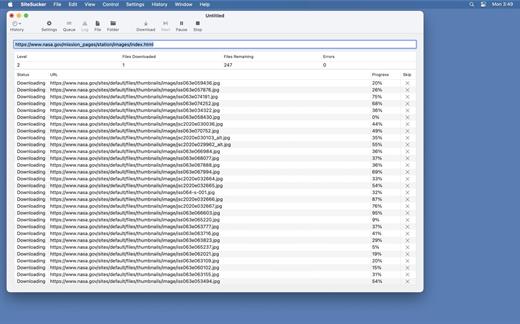
SiteSucker Pro is an application that automatically downloads Web sites from the Internet. It does this by copying the site’s HTML documents, images, backgrounds, movies, and other files to your local hard drive. Just enter a URL and click a button and SiteSucker can download the entire site.

SiteSucker can be used to make local copies of your Web sites for easy maintenance. SiteSucker can download files unmodified, or it can “localize” the files it downloads, allowing you to browse a site off-line.

What’s New

Version 6.1.4:


  • Release notes were unavailable when this listing was updated.
Compatibility

macOS 11.0 or later.


Release Name: SiteSucker Pro 6.1.4
Size: 7.7 MB
Links: HOMEPAGE – NFO – Torrent Search

Download: RAPiDGATOR

9 Comments