Please REGISTER or RENEW your account on RAPiDGATOR.net and support us by doing through all RAPiDGATOR working download links on main posts...
Feb 6

Infuse Pro 8.3.7

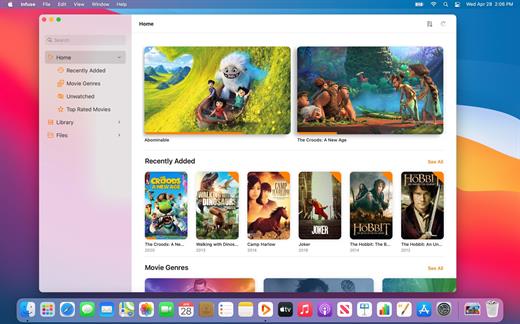
Ignite your video content with Infuse – the beautiful way to watch almost any video format on your iPhone, iPad, Apple TV, and Mac. No need to convert files! Infuse is optimized for macOS 12, with powerful streaming options, Trakt sync, and unmatched AirPlay & subtitle support. Gorgeous interface. Precise controls. And silky-smooth playback.
Play more video types

A powerful video player that plays just about anything, including the standard MP4, M4V and MOV – plus MKV, AVI, WMV, MTS, ISO, VIDEO_TS, FLV, OGM, OGV, ASF, 3GP, DVR-MS, WebM, and WTV. Includes fully certified Dolby® Digital Plus (AC3/E-AC3), DTS® and DTS-HD® audio.

Stream from other devices

Browse and play videos stored on your Mac, PC, NAS, Wi-Fi hard drive, apps like Plex, Emby, and Jellyfin, or from cloud services like Dropbox, Google Drive, OneDrive, Box, pCloud, Yandex.Disk, and Mega.nz – no syncing required!

Trakt 2-way sync

Connect with Trakt to sync watched history, submit ratings and post comments.

Optimized subtitles powered by opensubtitles

Bring your own subtitles, or download them on the fly (for free) in virtually any language.

The basics:


  • Silky-smooth video player (plays full 4K w/ HDR & Dolby Vision)
  • Stream from a Mac, PC, NAS or Wi-Fi enabled hard drive
  • Connect with Plex, Emby, Jellyfin, Kodi (XBMC), WMC and other media servers
  • Beautiful layout with quick access to video info
  • Artwork and metadata added automatically
  • Picture-in-Picture
  • Spatial audio
Supported formats:

  • Video: 3GP, AVI, ASF, BDMV, DIVX, DVDMEDIA, DVR-MS, FLV, ISO, M4V, MKV, MOV, MP4, M2TS, MTS, OGM, OGV, TP, TS, VIDEO_TS, WEBM, WMV, WTV
  • Audio: AAC, AC3/E-AC3, DOLBY TRUEHD, DTS, DTS-HD MA, FLAC, MP3, OGG, PCM, WMA
  • Subtitles: DVB, DVDSUB, MICRODVD, MPL2, PGS, SMI, SSA/ASS, SRT, SUB, TIMED TEXT, TMP, TXT, VOBSUB, VTT, XSUB
Player features:

  • Multiple audio tracks
  • Chapters
  • Gesture controls
  • 8 video zoom options
  • Continuous playback
  • Deinterlacing
Extras:

  • Library organization
  • Folders
  • One-click subtitle downloads from OpenSubtitles
  • Scrobble plays to Trakt
  • Download videos from networked devices
  • Drag and drop uploads via web browser
  • Get extra onboard storage by adding USB drives
Get more with infuse pro!

  • Play even more video formats
  • Enjoy Dolby® Digital Plus (AC3/E-AC3), DTS® and DTS-HD® mobile surround sound
  • Stream a wide variety of video types over AirPlay and Google Cast
  • Access videos stored in cloud services like Dropbox, Google Drive, Box, OneDrive, pCloud, Yandex.Disk, and Mega.nz
  • Sync libraries, settings, watched history, and playback progress between devices
What’s New

Version 8.3.7:


  • Release notes were unavailable when this listing was updated.
Compatibility

macOS 11.0 or later.
Apple Silicon or Intel Core processor


Release Name: Infuse Pro 8.3.7
Size: 85.8 MB
Links: HOMEPAGE – NFO – Torrent Search

Download: RAPiDGATOR

9 Comments
Feb 6

Transmit 5.11.4

Transmit is a powerful and versatile Mac OS X application that makes it easy for you to manage and organize large files on various servers on clouds.

User-oriented interface with support for multiple tabs

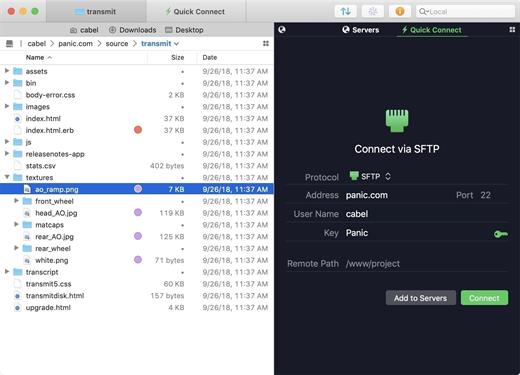
With Transmit’s help you can quickly and effortlessly transfer files to SFTP or FTP server, as well as Amazon S3 or WevDAV from within a user-oriented interface.

Transmit comes a simple and reliable solution for users that need to maintain websites, upload numerous photos or perform backups.

Transmit comes with a “Twin-Turbo Engine”, multi-connection transfer and FXP support fact that makes it a fast, smooth-running and dependable client for most Mac users.

On top of that, Transmit enables you to limit the bandwidth, synchronize or compare files with ease.

Choose between a single or dual pane window

From Transmit’s two-panel window you can view the files stored locally and the ones saved on the server. At the same time, Transmit helps you create a list with favorite servers add a new FTP, SFTP, Amazon S3 or WebDAV server.

The top toolbar allows you to switch between the thumbnail, list, column and Cover Flow view mode and change from the a dual pane to a single pane window. In addition, Transmit seamlessly integrates Mac OS X’s Quick Look feature, a fact that helps you preview files before transferring them.

Handy synchronization features

By accessing the Action drop-down menu, you can open the Info window, copy the file path or URL address, move items to Trash or the desired location, create duplicates, compress or label files. On top of that, you have the option to create new folders or files, refresh the list and open a folder in a new tab or new window.

Thanks to the built-in search form, you can quickly and effortlessly filter the displayed items as soon as you start typing. The Preferences window enables you to change the default FTP client and configure Transmit to synchronize your favorite items via iCloud or Dropbox.

What’s New

Version 5.11.4:


  • Release notes were unavailable when this listing was updated.
Compatibility

macOS 12.0 or later
Apple Silicon or Intel Core processor


Release Name: Transmit 5.11.4
Size: 32.4 MB
Links: HOMEPAGE – NFO – Torrent Search

Download: RAPiDGATOR
10 Comments
Feb 6

Capture One Enterprise 16.7.3

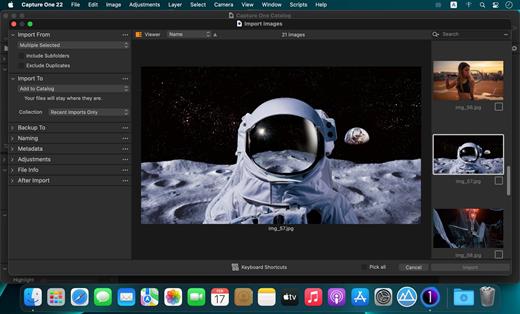
Capture One Enterprise – the photo editing solution for image production studios and e-commerce platforms. Its authentic true-to-life color processing, seamless editing experience, and fastest tethering in the industry gives you total creative control, making it a household name in studios across the world. Based in Copenhagen, Denmark, Capture One empowers photographers with cutting-edge features to keep your photography one step ahead

With an updated processing engine, market-leading performance, and powerful new features, Capture One is the professional choice in imaging software. You get the highly responsive precision tools you need to create stunning images from your camera’s RAW files in a time-saving workflow that can be customized to fit your needs.

What’s New

Version 16.7.3:


  • Release notes were unavailable when this listing was updated.
Compatibility

macOS 10.13 or later
Apple Silicon or Intel Core processor


Release Name: Capture One Enterprise 16.7.3
Size: 1.2 GB
Links: HOMEPAGE – NFO – Torrent Search

Download: RAPiDGATOR

5 Comments
Feb 6

Capture One Studio 16.7.3.31

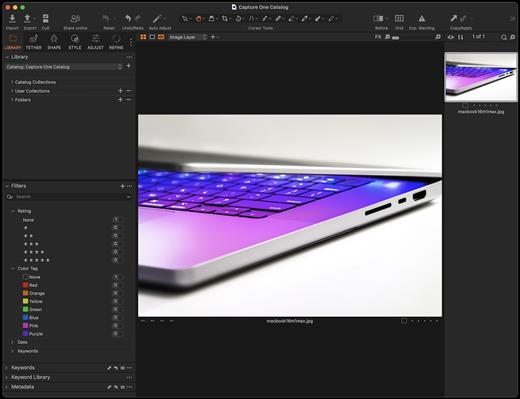
Capture One is a professional RAW converter offering you ultimate image quality with accurate colors and incredible detail from more than 400 high-end cameras – straight out of the box. It offers state-of-the-art tethered capture, powerful digital asset management, extensive adjustment tools, and a flexible workflow.

With an updated processing engine, market-leading performance, and powerful new features, Capture One is the professional choice in imaging software. You get the highly responsive precision tools you need to create stunning images from your camera’s RAW files in a time-saving workflow that can be customized to fit your needs.

What’s New

Version 16.7.3.31:


  • Release notes were unavailable when this listing was updated.
Compatibility

macOS 10.15.0 or later

Apple Silicon or Intel Core processor


Release Name: Capture One Studio 16.7.3.31
Size: 1.2 GB
Links: HOMEPAGE – NFO – Torrent Search

Download: RAPiDGATOR
6 Comments
Feb 6

PullTube 1.8.6.23

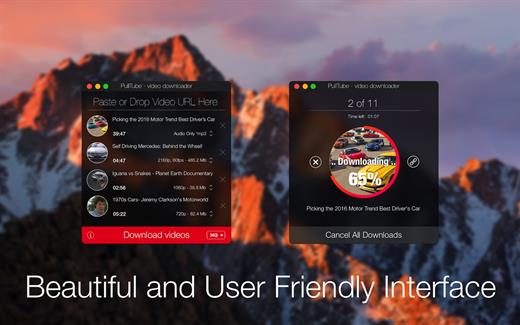
Sharing videos via online hosting services, such as YouTube or Vimeo is a common practice, yet streaming the content might not work as expected if you have a slow internet connection.

PullTube offers you the possibility to download videos from both sources (YouTube and Vimeo), while other platforms might be added at a later time. The app can handle playlists, allows you to select the output quality, and can even extract only the audio.

Video downloader that can import links with drag and drop and can detect playlists

The PullTube user interface is represented by a small window where you get to quickly paste the video URL. Note that you can also add a video by dropping the link on top of the PullTube window.

Worth mentioning is that, if PullTube detects that the video is part of a playlist, will offer to download the entire collection: will fetch the data for each entry and handle the downloads consecutively.

Download videos hosted on YouTube or Vimeo to different output sizes and formats

PullTube will start fetching the video data right away so you can see the video name, duration, and a small thumbnail. When configuring a download, you get to select the output quality (highest, 4K, HD or regular with different resolutions) or choose to export only the audio to an M4A or MP3 file.

Via the PullTube Settings panel, you can change the default download location and the default MP3 bitrate (320Kbps, 256Kbps, 128Kbps, 64Kbps). You can also add the quality info to the video’s name and choose to quit the app when all downloads are completed.

Get offline access to videos hosted online in just a few steps

PullTube proposes a streamlined workflow for quickly downloading videos from YouTube or Vimeo, provides control over the output quality, and enables you to extract the audio to MP3 or M4A files.

However, during our tests, we have noticed that PullTube has trouble completing the download when handling videos that are longer that 2 minutes. The process stops without any explanation, and you can eventually complete the task, but you need to add the link to download tool multiple times.

What’s New

Version 1.8.6.23:


  • Release notes were unavailable when this listing was updated.
Compatibility

macOS 10.12 or later


Release Name: PullTube 1.8.6.23
Size: 232.1 MB
Links: HOMEPAGE – NFO – Torrent Search

Download: RAPiDGATOR

9 Comments
Feb 6

4K YouTube to MP3 Pro 26.0.2

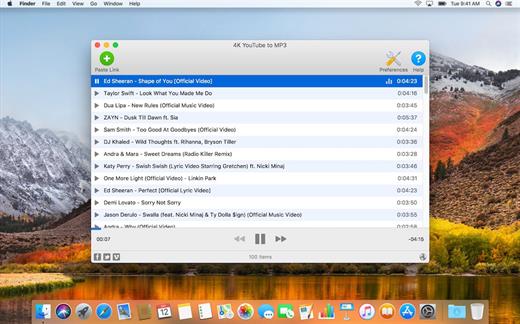
4K YouTube to MP3 was specifically created to extract audio from YouTube, Vimeo or Facebook and save it in MP3, M4A, OGG. No annoying and complicated settings to deal with, just a clean, friendly and functional interface. Downloading is simple and straightforward: just copy the link from your browser and click ‘Paste Url’. Done!

Features


  • Extract audio from YouTube videos and save it in MP3, M4A or OGG in high quality.
  • Download full YouTube playlists or channels and generate m3u files.
  • Transfer downloaded tracks automatically into iTunes and upload them on your iPhone or iPod.
  • Listen music via native built-in music player.
  • Download and extract audio tracks from SoundCloud, Vimeo, Flickr and DailyMotion videos.
  • Download audio books from YouTube.
  • Extract audio tracks even from embedded in HTML page videos.
  • Use 4K YouTube to MP3 on your PC, Mac or Linux, doesn’t matter what OS you prefer.
What’s New

Version 26.0.2:


  • Release notes were unavailable when this listing was updated.
Compatibility

macOS 10.10 or later


Release Name: 4K YouTube to MP3 Pro 26.0.2
Size: 404.8 MB
Links: HOMEPAGE – NFO – Torrent Search

Download: RAPiDGATOR
8 Comments
Feb 5

beaTunes 5.2.36

beaTunes is a full-featured music player and organizational tool for music collections.

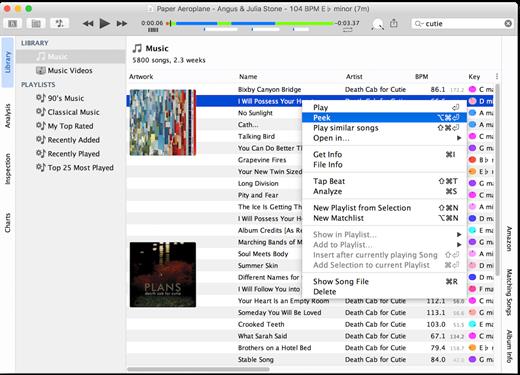
How well organized is your music library? Are your artists always spelled the same way? Any R.E.M. vs REM? beaTunes can easily fix this and other problems with its unique inspection feature (license required for applying one-click solutions). Could your last mix CD’s song order use some improvement? Let beaTunes re-arrange your playlist for you! Always wondered how you could take advantage of the BPM (beats per minute) field? Let beaTunes fill in the blanks and help you while DJ’ing at your next party.

Here are some more examples of what you can do with beaTunes:


  • Navigate in songs semantically (i.e., segment to segment)
  • Automatically determine BPM (beats per minute)
  • Automatically determine the musical key your songs are in
  • Sort existing playlists so that matching songs succeed each other
  • Create matchlists (i.e., playlists based on one or more sample songs)
  • Browse songs from your music collection that match the currently selected song
  • Find all songs iTunes marks with an exclamation mark and remove them from the library
  • Find duplicates via acoustic fingerprinting
What’s New

Version 5.2.36:


  • Fixed synchronization abortion due to infinite volume normalization change.
  • Updated to Java 11.0.16.1+1.
  • Updated japlscript.
  • Updated built-in Discogs database.
Compatibility

OS X 10.11.6 or later


Release Name: beaTunes 5.2.36
Size: 370.5 MB
Links: HOMEPAGE – NFO – Torrent Search

Download: RAPiDGATOR

10 Comments
Feb 5

Snagit 2026.0.1

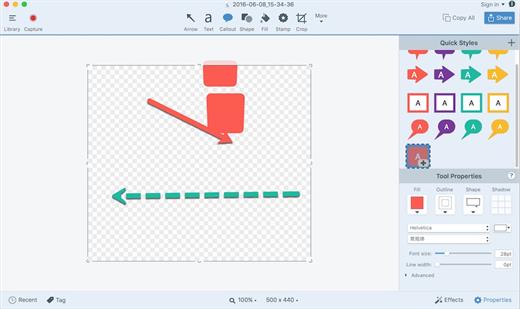
Snagit lets you create an image of what you see on your computer monitor.

Features

Flexible options that let you capture only what you want.

Annotation varieties like arrows, speech bubbles, and more make it easy to customize your capture.

Versatility in what you do with your capture. Send it to your favorite app, share it online, or save it for later.

What’s New

Version 2026.0.1:


  • Release notes were unavailable when this listing was updated.
Compatibility

macOS 10.14 or later
Apple Silicon or Intel Core processor


Release Name: Snagit 2026.0.1
Size: 195.9 MB
Links: HOMEPAGE – NFO – Torrent Search

Download: RAPiDGATOR
10 Comments
Feb 5

Waves Ultimate 16 v04.02.2026

All 230+ Waves plugins.

Create with Total Freedom: Everything Always at Your Fingertips
Let nothing stand between the sound you hear in your head—and what comes out of the speakers. With Waves Ultimate—the biggest option in our Waves Creative Access subscription—you get all the plugins you need, when you need them. Anything you want to create—you’re covered.
All of Waves’ popular vocal production plugins. All analog models, from Abbey Road to SSL. All Waves mastering plugins. All the compressors, all the EQs, all the effects, instruments, saturation plugins, artist signature plugins, channel strips, AI-powered noise reduction. Waves Ultimate offers the most complete set of pro-quality audio plugins, anywhere.

Over 230 plugins

7-day free trial: no commitment
All future updates included
New plugins added regularly
The industry’s largest, most diverse catalog of pro plugins
Includes StudioVerse: Thousands of mixing chains with AI search
2 licenses for activation on 2 machines at a time
Cancel anytime (your subscription will stop at the end of your current period)
Personal technical support by phone and email
From Waves Audio, winner of the Technical Grammy® Award

What’s New

Version 04.02.2026:


  • Release notes were unavailable when this listing was updated.
Compatibility

macOS 10.15 or later


Release Name: Waves Ultimate 16 v04.02.2026
Size: 7.4 GB
Links: HOMEPAGE – NFO – Torrent Search

Download: RAPiDGATOR

2 Comments