Please REGISTER or RENEW your account on RAPiDGATOR.net and support us by doing through all RAPiDGATOR working download links on main posts...
Jan 20

Path Finder 2211

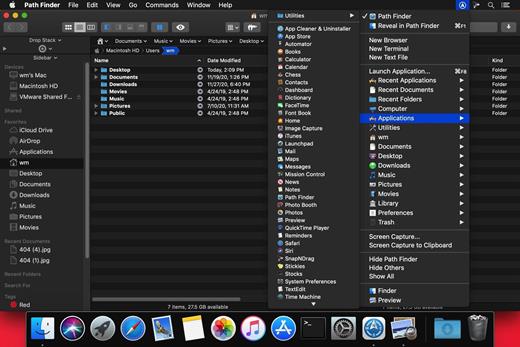
Path Finder makes you a master of file management. Take full control over your file system. Save your time: compare and synchronize folders, view hidden files, use Dual Pane and full keyboard navigation to browse your file system. Work how you want: extreme customization allows you to access most tools in many different ways to suit your workflow. Work seamlessly with other platforms: don’t leave any hidden .DS_Store files on non-Mac volumes, delete files securely and completely with the powerful delete feature from any volume type, search any network volume.
Features


  • View and manipulate hidden files
  • Dual Pane View
  • Full keyboard navigation
  • Folder comparison and synchronization
  • Folder merging
  • Batch renaming
  • Powerful file filtering
  • One-click dual-pane copy
  • Bookmarks and Tab Presets
  • ACL editor
  • File tagging
  • Editable Path Navigator
  • Powerful low-level search
  • Smart sorting
  • Advanced selection
  • Integrated terminal
  • Integrated text and image editors
What’s New

Version 2211:


  • Release notes were unavailable when this listing was updated.
Compatibility

macOS 10.12 or later
Apple Silicon or Intel Core processor


Release Name: Path Finder 2211
Size: 25.4 MB
Links: HOMEPAGE – NFO – Torrent Search

Download: RAPiDGATOR

7 Comments
Jan 20

Studies 1.8.11

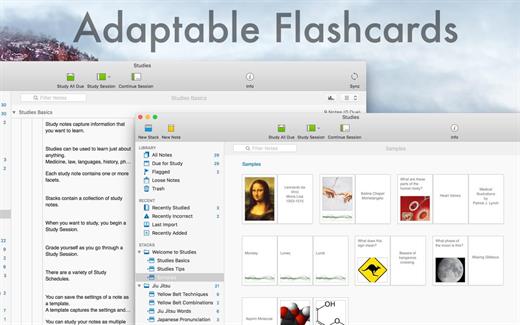
Studies (was Mental Case) is a flashcard app for the serious student, with editions for Mac, iPhone and iPad. It’s a tool to extend your knowledge, and it doesn’t matter what it is you want to learn – medicine, law, history, driving, aviation, fine art, music, or martial arts – from simple day-to-day tidbits, to knowledge of life changing importance. Studies is an app to help you achieve your learning goals.

Features


  • Study Notes – Studies allows you to turn the information you need to learn into study notes, similar to traditional flashcards, but much more powerful. Notes can include as many sides as you like, each of which can contain text, images, audio, and even video. You can create your own, or download shared sets from Quizlet.com.
  • Due for Study – Studies includes scientifically-based learning schedules designed to make the time you spend studying as efficient as possible. Set a schedule based on your goals, from long-term learning to cramming for an exam, and Studies will automatically make notes due for study each day.
  • Study Sessions – Once you have a set of notes prepared, you can study them in beautifully presented study sessions, which make studying less of a chore. Grade yourself as you go, and studies will ensure the ones you don’t know very well will reappear more often in future sessions.
  • Statistics – Everything you study is tracked by Studies. This information is used to schedule notes for future study, but also to provide statistics and predictions on how well you know the material. You can not only see how many notes you graded right or wrong, but you also have access to estimates of how long you will remember what you are studying.
  • Selective Sync with iCloud – Many of us now carry multiple Apple devices, and having your data silo-ed on one device is a drag. Studies includes iCloud sync using the latest CloudKit technology from Apple. Add notes on your desktop Mac, and they will appear on your iPhone or iPad when you come to study them later. Even your study sessions are synced, so you can start on one device, and finish on another. You can even choose what you want to sync.
  • Sharing – Studies has a multitude of different file formats to share your study notes with others. You can export an archive that can be imported into Studies (or Mental Case) on another device. You can also import and export standard text formats like CSV and TSV, which are supported by many flashcard web sites.
  • Mental Case Migration – Studies is the next generation of the app Mental Case. If you have been using Mental Case on your Mac or iOS device, you can migrate all of your data, including the study history and scheduling, to Studies when you first launch. You should even find your data takes up much less space in Studies than it did in Mental Case.
What’s New

Version 1.8.11:


  • Fixed bug with images in study session
Compatibility

macOS 10.12.0 or later
Apple Silicon or Intel Core processor


Release Name: Studies 1.8.11
Size: 28.5 MB
Links: HOMEPAGE – NFO – Torrent Search

Download: RAPiDGATOR
7 Comments
Jan 19

KCNcrew Pack 1.8 (01-15-26)

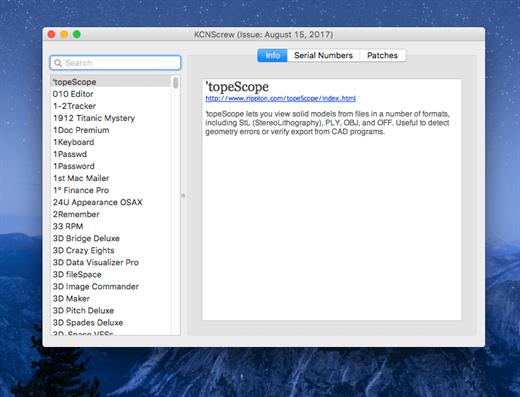
It’s like Serial Box, which has SN’s but KCN also has cracks and patches. It would be best to have both of these collections, as this often has serials you cannot find in Serial Box.

Unlike Serial Box, no readers are required. Just open the dmg file, drag and drop the application to where you like.

However, there is no way to view what serials, cracks and patches are new in this issue as compared to the previous like Serial Box.

Thanks to all contributors and supporters!

What’s New

Version 1.8 (12-15-25):


  • Release notes were unavailable when this listing was updated.
Compatibility

OS X 10.7 or later, 64-bit processor


Release Name: KCNcrew Pack 1.8 (01-15-26)
Size: 9.8 MB
Links: HOMEPAGE – NFO – Torrent Search

Download: RAPiDGATOR

3 Comments
Jan 19

EPUB Reader Pro 3.0.2

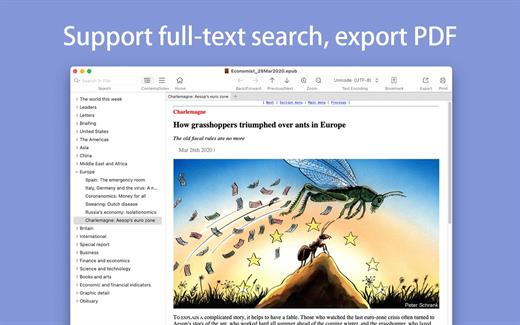
The GM EPUB Reader is a full-featured ebook reader with a simple and beautiful interface and a good reading experience.

※ EPUB Reader
– Support for reading EPUB and Mobi files.
– Support single page search and full text search, and highlight search results.
– Support the forward and backward browsing history.
– Support page turning, zooming, and sidebar shrinking.
– Support page printing.
– Support to view basic information of files.
– Support page number display and quick page switching.
– Support EPUB to PDF, Mobi to EPUB, Mobi to PDF.
– Support extracting images from EPUB and Mobi.

※ EPUB Bookshelf
– All the files you have read will be saved in the bookshelf for quick review next time.
– Support file(s) drag and drop addition.

※ Reading Experience
– It can remember the location of the last reading, so that it can continue reading next time.
– Photo adaptation, better layout.
– Support for page zooming using command+ or command- key combinations.
– Support for quick page turns and quick view of history pages using a combination of command and up and down left and right arrows.
– In the process of page reading, you can use the buttons J and K to quickly slide up and down the page.

What’s New

Version 3.0.2:


  • Release notes were unavailable when this listing was updated.
Compatibility

macOS 10.13 or later


Release Name: EPUB Reader Pro 3.0.2
Size: 20.3 MB
Links: HOMEPAGE – NFO – Torrent Search

Download: RAPiDGATOR
4 Comments
Jan 19

Default Folder X 6.2.5

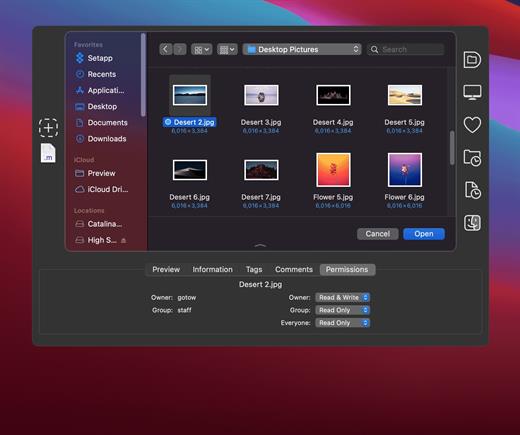
Default Folder X attaches a toolbar to the right side of the Open and Save dialogs in any OS X-native application. The toolbar gives you fast access to various folders and commands. You just click on the buttons to go to your favorite and recently used folders, manage the folders and files shown in the list, and make changes to your settings. It also fixes a number of problems in Open and Save dialogs, “rebounding” to the last selected file, putting the path listing back in the top menu, and correcting bugs in scrolling column views.

Features


  • Directory assistant: You can access the contents of your recent, favorite, and open folders right from Default Folder X’s toolbar.
  • Real time saving: If you’re constantly saving things inside the same folder, Default Folder X can remember that folder for you.
  • Finder management: Default Folder X lets you open up or save to any Finder window with a single click.
  • Instant Recall: To help you quickly return to folders you’ve recently used, Default Folder X remembers them for you.
  • Spotlight on the spot: Default Folder X lets you add Spotlight keywords, OpenMeta tags, and Finder labels on the spot, while you’re still in the Save dialog.
  • Information central: With Default Folder X you get previews below every Open dialog, expanded to fill the available space. Need to see more detail? Click on the image and it zooms up to full size.
  • Workflow without work: Rather than make you learn and set up a new application, Default Folder X blends into OS X.
What’s New

Version 6.2.5:


  • Release notes were unavailable when this listing was updated.
Compatibility

macOS 10.13 or later
Apple Silicon or Intel Core processor


Release Name: Default Folder X 6.2.5
Size: 31.9 MB
Links: HOMEPAGE – NFO – Torrent Search

Download: RAPiDGATOR

5 Comments
Jan 19

Alcove 1.5.1

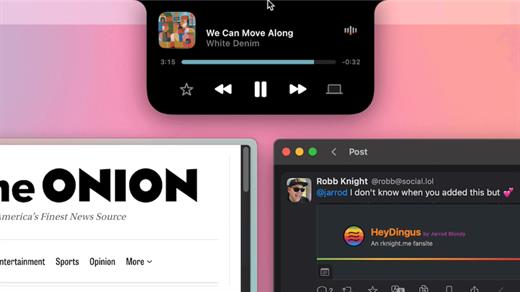
Alcove brings the elegant Dynamic Island experience to your Mac, transforming how you interact with notifications, live activities, and system events. Designed to feel native, it’s a polished way to stay informed without being interrupted.

Key Features


  • Fluid Transitions — Smooth animations and transitions that make alerts and interactions feel natural and integrated.
  • Instant Notifications — Alerts appear quickly and gracefully so you never miss important updates.
  • Live Activities Support — Keep track of ongoing tasks directly from the Dynamic Island interface.
  • Swipe Gestures — Use intuitive gestures to clear, interact with, or dismiss alerts.
  • Customizable HUDs — Tailor the look and feel of the heads-up displays to fit your style or workflow.
  • Lock Screen Presence — Alcove can show notifications or status even when your Mac is locked, ensuring you stay informed at a glance.
  • Lightweight, Native App — Built to run smoothly, Alcove is fast and performs well without draining resources.
What’s New

Version 1.5.1:


  • Release notes were unavailable when this listing was updated.
Compatibility

macOS 12.0or later


Release Name: Alcove 1.5.1
Size: 9.7 MB
Links: HOMEPAGE – NFO – Torrent Search

Download: RAPiDGATOR
5 Comments
Jan 19

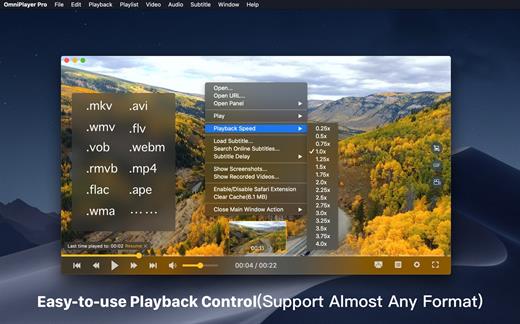
OmniPlayer Pro 2.1.15

OmniPlayer is a comprehensive media player for almost any video and audio format on macOS. It has powerful features with modern and clean design. You can use it to play various 4K/1080P/720P HD videos and normal/lossless audios easily with hardware decoding. You can also control and adjust the playback/playlist/video image/audio track/subtitles/screenshot etc. conveniently with the rich features.

Features


  • Support Multiple Media Types Play almost any format of the local and remote server(samba/FTP protocol) videos and audios. Support online videos and audios with Http/https protocol. Play Youtube and Vimeo videos with webpage URL directly without online ads.
  • Playlist Control Record media files to playlist automatically, and support clear all when exiting player automatically. Play/Search/Delete/Change repeat mode of media items in the playlist.
  • Playback Control Pause/Resume/Fast forward/Rewind/Jump to specified progress time. Record last progress time of playback when stopping automatically. Show preview images on progress bar when playing a local video. Hide controls automatically to display pure video view without any occlusion. Adjustment playback speed from 0.25x-4x
  • Video Image Adjustment Adjust window size and video image aspect ratio quickly. Adjust video image rotation in all directions. Adjust video image equalizer including brightness, contrast, and saturation.
  • Audio Control Change audio delay time to make audio and video synchronization. Choose different audio tracks in the video. Choose audio mode such as Stereo, Dolby Surround, Headphones, etc. Customize audio equalizer or choosing predefined equalizer such as Classic, Rock, Pop, etc.
  • Subtitle Control Load different formats of local subtitles in real-time. Search and load subtitles online with video name or hash, support most languages. Change subtitle color, size in real-time. Change the encoding of subtitles in different languages to fix the garbled problem.
  • Screenshot Take a screenshot with different formats. Generating gif image up to 60s. One-click exporting movie thumbnail
  • Wireless display DLNA protocol Chromecast protocol Roku channel
What’s New

Version 2.1.15:


  • Release notes were unavailable when this listing was updated.
Compatibility

macOS 10.13 or later.


Release Name: OmniPlayer Pro 2.1.15
Size: 77.9 MB
Links: HOMEPAGE – NFO – Torrent Search

Download: RAPiDGATOR

6 Comments
Jan 19

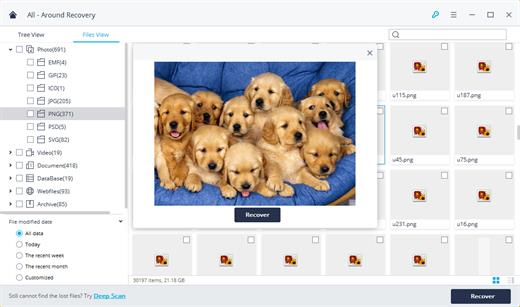
Wondershare Recoverit 14.0.10.5

Wondershare Recoverit is a comprehensive data recovery suite to recover Mac data lost due to accidental deleting, formatting, virus infection, improper operation, unexpected power failure, and other unknown reasons.

It can recover Mac data from lost, deleted, logical corrupted and formatted Mac hard drive, iPod, USB drive, SD card, digital camera, mobile phone, MP3, and MP4 player. Compatible with HFS+, FAT16/32, and NTFS file system volumes, this non-destructive Mac file recovery software ensures safe Mac file recovery without modifying the original data saved on your Mac machine or any other storage media. Versatile preview lets you enjoy Mac data recovery in advance.

Features


  • Safety First:

    • Read-only and risk-free Mac data recovery program. No any writing operation to your original data.
  • Versatile Preview Ability:

    • For images, real-time and direct scan results is displayed during the scan process to let users stop scanning once the target images are found.
    • For other Mac files such as videos, audio files, archives and documents, they are displayed as a text in a Hex mode for preview to let users enjoy file recovery on Mac in advance.
  • Precise File Recovery for Mac:

    • Before data recovery on Mac, you can choose the target file types to scan, which saves you much time especially when there are tons of files on your Mac machine.
    • Restore deleted files for Mac with original file names, shooting date, and storage paths.
    • Support file names search for scanning results to provide you precise Mac file recovery.
  • Easy-to-use and Clean Interface:

    • Complete wizard and easy-to-use interface let you perform Mac data recovery in a breeze.
What’s New

Version 14.0.8.16:


  • Release notes were unavailable when this listing was updated.
Compatibility

macOS 10.10 or later


Release Name: Wondershare Recoverit 14.0.10.5
Size: 211.4 MB
Links: HOMEPAGE – NFO – Torrent Search

Download: RAPiDGATOR
4 Comments
Jan 19

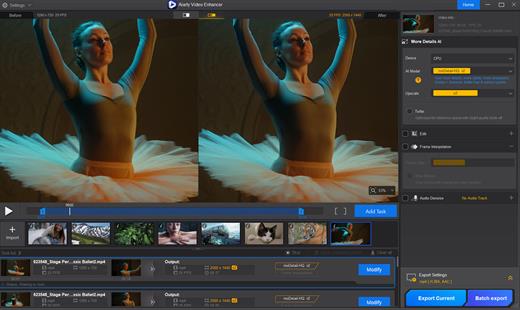
Aiarty Video Enhancer 3.4

The state-of-the-art AI video enhancer software to generate more details, super denoise, deblur, upscale, and restore flawed videos to 4K clarity. With specialized AI models, it delivers superior visual quality at turbo speed, empowering content creators and video enthusiasts.

Restore to Clear Audio

Audio Denoise module to analyze and refine your audio tracks. 1-click background noise removal and vocal clarity boost.

Enhance to 4K Clarity with Details

Tailored AI Models to transform low quality, stuttering, or grainy videos to 4K. Enjoy cinemat

Silky Smooth Slow Motion

The frame interpolation module uses AI to generate new, high-quality frames, ready for fluid and smooth 8X/16X slow-motion.

Industry-leading Video Upscaling and Enhancement with AI

Leveraging the proprietary video and image training dataset, the tailored AI models in Aiarty Video Enhancer deliver best quality at GPU-optimized processing speed, with dedicated roles to generate more details for visual sharpness, restore flawed and degraded videos, or tackle low-light challenging footage.

What’s New

Version 3.4:


  • Release notes were unavailable when this listing was updated.
Compatibility

macOS 10.15 or later


Release Name: Aiarty Video Enhancer 3.4
Size: 191.9 MB
Links: HOMEPAGE – NFO – Torrent Search

Download: RAPiDGATOR

4 Comments
Jan 19

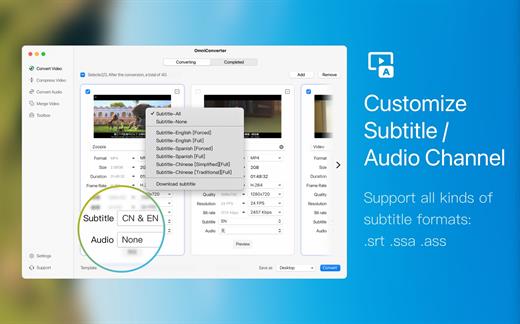
Video Converter X2 1.3.3

Video Converter X2 is a full-featured format conversion software that supports converting almost all multimedia file formats, including video MP4, AVI, 3GP, WMV, MKV, VOB, MOV, FLV; audio MP3, AC3, FLAC, AAC, M4A, AIFF, WAV, etc.

Video Converter X2 has built-in format templates optimized for different devices, such as Mac, iPhone, iPod, Android, Windows, TV, etc., so you don’t need to worry about what formats correspond to different devices, but just select the device type you need from the template list of Video Converter X2, and start converting easily.

Features


  • Support almost all types of multimedia formats and easily convert them to the format you want.
  • Support choose built-in subtitle or load from external SRT, SSA file.
  • Support choose from multiple audio tracks.
  • Video File Compression helps you to reduce your video file size, It saves space on your hard drive.
  • Support templates for Mac, iPhone, iPod, Android, Windows, TV and other devices in specified formats.
  • Support common website and application formats Built-in video format templates optimized for WeChat, Bilibili, Facebook, Instagram, Youtube, so the conversion operation can be done in one click.
  • Fast video merging support merging multiple video files. Even if the original formats are different, they can be perfectly combined into a new file.
What’s New

Version 1.3.3:


  • Release notes were unavailable when this listing was updated.
Compatibility

macOS 10.15 or later
Apple Silicon or Intel Core processor


Release Name: Video Converter X2 1.3.3
Size: 52.8 MB
Links: HOMEPAGE – NFO – Torrent Search

Download: RAPiDGATOR
3 Comments