Please REGISTER or RENEW your account on RAPiDGATOR.net and support us by doing through all RAPiDGATOR working download links on main posts...
Jan 11

ProFind 1.35 (13503)

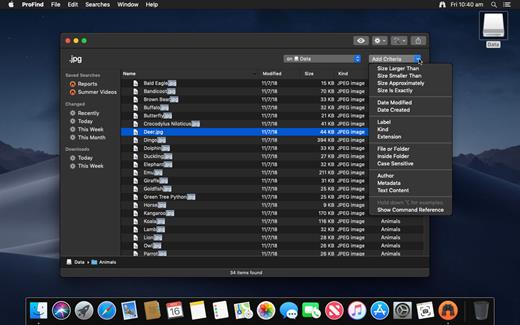
ProFind is advanced file search app for macOS.
With powerful features and great performance, ProFind delivers advanced file search for macOS. And with support for natural language queries, application launching, hidden location searches, scripting and more.
Search inside invisible folders and packages. Searches any disk type.
Uses kernel based searching (searchfs) when available. Uses metadata indexes (as used by Spotlight) when available to improve performance. Autocompletion for application names. Large icon view for one or two search results.
Under it’s elegant user interface, ProFind combines the power of macOS’s different search capabilities to make sure it finds all the files your looking for. And it’s been carefully tuned for performance and responsiveness.
What’s New

Version 1.35:


  • Release notes were unavailable when this listing was updated.
Compatibility

macOS 10.13.0 or later
Apple Silicon or Intel Core processor


Release Name: ProFind 1.35 (13503)
Size: 13 MB
Links: HOMEPAGE – NFO – Torrent Search

Download: RAPiDGATOR

8 Comments
Jan 11

DaisyDisk 4.33.2

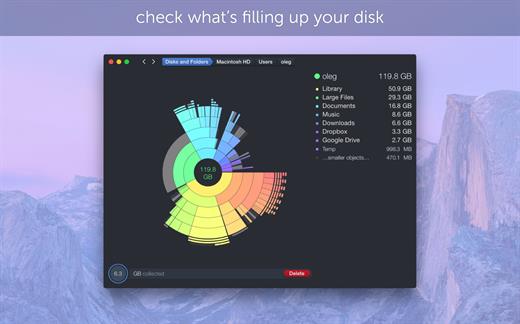
DaisyDisk allows you to visualize your disk usage and free up disk space by quickly finding and deleting big unused files.

The program scans your disk and displays its content as a sector diagram where the biggest files and folders at once become obvious. To drill down to a folder, just click on a segment. To bubble up, click in the center. Move the mouse over the diagram and see the name and path of each file, and enclosed files (if any). Hit Space to quickly preview file content, without launching another application. In this way, walk around your disk and drag-and-drop all unneeded files into the “collector”. Expand the collector to check its contents. When done, clean it up with a single click.

What’s New

Version 4.33.2:


  • Updated the application icon to match the newest macOS style.
Compatibility

macOS 10.13 or later
Apple Silicon or Intel Core processor


Release Name: DaisyDisk 4.33.2
Size: 9.8 MB
Links: HOMEPAGE – NFO – Torrent Search

Download: RAPiDGATOR
7 Comments
Jan 11

Ulysses 39.3

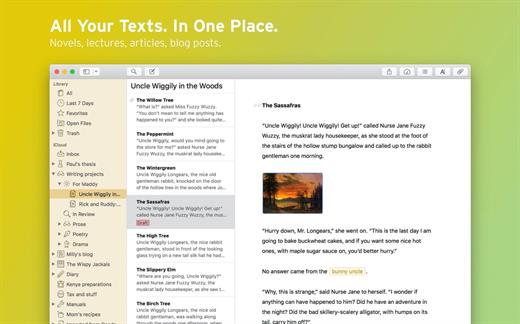
Ulysses lets you focus when you need to concentrate. It keeps all your texts neatly stuffed in its intuitive library. With a few clicks, Ulysses can create beautiful documents from your manuscripts: PDFs, web pages, even iBooks-ready ePubs. With its simple, clutter-free interface, it will turn work hours into fun time. And mere thoughts into powerful stories. If you love to write, and write a lot, Ulysses is made for you.

What’s New

Version 39.3:


  • Release notes were unavailable when this listing was updated.
Compatibility

macOS 11.0 or later
Apple Silicon or Intel Core processor


Release Name: Ulysses 39.3
Size: 66 MB
Links: HOMEPAGE – NFO – Torrent Search

Download: RAPiDGATOR

3 Comments
Jan 10

Ulysses 39.3

Ulysses lets you focus when you need to concentrate. It keeps all your texts neatly stuffed in its intuitive library. With a few clicks, Ulysses can create beautiful documents from your manuscripts: PDFs, web pages, even iBooks-ready ePubs. With its simple, clutter-free interface, it will turn work hours into fun time. And mere thoughts into powerful stories. If you love to write, and write a lot, Ulysses is made for you.

What’s New

Version 39.3:


  • Release notes were unavailable when this listing was updated.
Compatibility

macOS 11.0 or later
Apple Silicon or Intel Core processor


Release Name: Ulysses 39.3
Size: 66 MB
Links: HOMEPAGE – NFO – Torrent Search

Download: RAPiDGATOR
5 Comments
Jan 10

PhotoSweeper X 5.3.1

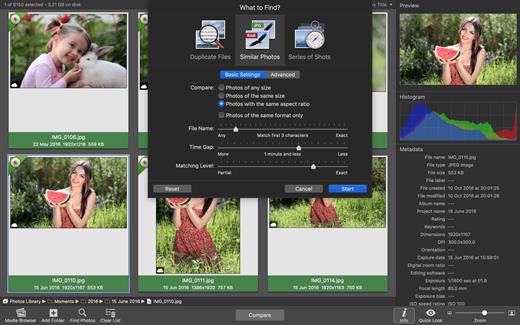
PhotoSweeper is a fast, precise & super efficient tool to eliminate similar or duplicate photos even in huge photo collections. It works with photos from iPhoto, Aperture and Adobe Lightroom libraries as well as photos from your hard drives and external storages.

PhotoSweeper will help you if:


  • You take a series of shots of the same scene trying to get the perfect one.
  • You edit photos with software like Photoshop, Pixelmator etc., and make backups just in case.
  • You have photos scattered on external hard drives and local disks, in iPhoto, Aperture or Lightroom libraries.
  • You have a mess in your photo collection or just want to free disk space by removing junk photos.
Features:

  • Easy search of photos – Just drag and drop folders from your Mac to allow PhotoSweeper to find all photos inside. Add more photos from your iPhoto, Aperture or Lightroom library via the Media Browser window.
  • Flexible comparison settings – Powerful multi-settings to easily find duplicates, similar photos, series of shots. The app finds duplicate photos, even those edited in external programs such Photoshop, regardless of image size or format.
  • High speed and quality – PhotoSweeper was developed as a tool for extremely fast comparison of a huge number of photos. Cutting-edge technologies and unique algorithms make searching duplicates incredibly fast and gives excellent comparison results.
  • Efficiency – You can regroup the results without re-comparing photos by changing matching level with a slider. Using caches makes the next comparison much faster.
  • Marking duplicates automatically – Mark photos you want to get rid of manually, or use the “Auto Mark” feature to mark duplicates automatically based on the list of rules you can adjust to your needs in the Preferences.
  • Comfortable viewing results – PhotoSweeper provides 3 modes for reviewing results: “One by One”, “Face-to-Face” – one or two large photos with an opportunity to mark a photo with just a click, “All in One” – all groups of duplicates in one list.
  • Great photo browsing – PhotoSweeper also serves as an up-to-date photo browser with a built-in search of photos by metadata, Quick Look preview, the “Info” panel with a detailed photo description, including histogram and image metadata (EXIF, IPTC etc.)
What’s New

Version 5.3.1:


  • Release notes were unavailable when this listing was updated.
Compatibility

macOS 10.12.2 or later.


Release Name: PhotoSweeper X 5.3.1
Size: 39.9 MB
Links: HOMEPAGE – NFO – Torrent Search

Download: RAPiDGATOR

6 Comments
Jan 10

PPTube Pro 10.11.1

Unlimited Download 1080p/4K Videos from 10,000+ Video/Music Streaming Websites. PPTube Video Downloader allows you to download HD videos with ease, ranging from 720p, 1080p, 2K, 4K and 8K.

Save Videos in Bulk
You can save multiple videos in one go. Just copy multiple video URLs from various sites, and paste them to PPTube Downloader, then you can download multiple videos in few seconds.

Support 10,000+ Sites
You can download HD videos from Instagram, TikTok, Facebook, Apple Music, Vimeo, adult sites, etc. and convert them into MP4, MP3, MOV, AAC, and other 20+ output formats.

Keep the Video Private
PPTube provides a private video mode so you can save your downloaded videos in a password-protected folder. Your videos are hidden with a private lock to keep safe from any prying eyes or miswatching by children.

More Features
You’ll find more powerful features in the PPTube Toolbox to enjoy more convenience for your video download
Video Websites YouTube, Facebook, Instagram, Dailymotion (Playlist), Vimeo, Twitch, TikTok (without watermark), Einthusan, NicoNico, Ok.ru, VK, Twitter, Fox, Lynda, YouKu, Yahoo Video, Bilibili, Coub, Vlive.TV, Liveleak, Reddit, Mgoon, Sportstadio, Media collections and various adults sites.
Audio Websites Spotify, SoundCloud, MixCloud, FreeSound, Bandcamp, VEVO, Last.fm, Hungama, 8tracks and more music-share sites

SUPPORTED INPUT FORMATS
Video MP4, M4V, 3GP, MPEG, DAT, AVI, ASF, WMV, VOB, MKV, FLV, 3GS, 3G2, F4V, WEBM, TS, RMVB, MOV
Audio MP3, AAC, AC3, FLAC, M4A, WAV, WMA, AMR, MKA, MP2, AIF, AU, AIFF, CAF, OGG, RAM, RA, M4B, M4R, APE, OPUS, WEBM

What’s New

Version 10.11.1:


  • Release notes were unavailable when this listing was updated.
Compatibility

macOS 10.10 or later


Release Name: PPTube Pro 10.11.1
Size: 118.8 MB
Links: HOMEPAGE – NFO – Torrent Search

Download: RAPiDGATOR
2 Comments
Jan 10

Alcove 1.5.0

Alcove brings the elegant Dynamic Island experience to your Mac, transforming how you interact with notifications, live activities, and system events. Designed to feel native, it’s a polished way to stay informed without being interrupted.

Key Features


  • Lightweight, Native App — Built to run smoothly, Alcove is fast and performs well without draining resources.
  • Fluid Transitions — Smooth animations and transitions that make alerts and interactions feel natural and integrated.
  • Instant Notifications — Alerts appear quickly and gracefully so you never miss important updates.
  • Live Activities Support — Keep track of ongoing tasks directly from the Dynamic Island interface.
  • Swipe Gestures — Use intuitive gestures to clear, interact with, or dismiss alerts.
  • Customizable HUDs — Tailor the look and feel of the heads-up displays to fit your style or workflow.
  • Lock Screen Presence — Alcove can show notifications or status even when your Mac is locked, ensuring you stay informed at a glance.
What’s New

Version 1.5.0:


  • Release notes were unavailable when this listing was updated.
Compatibility

macOS 12.0or later


Release Name: Alcove 1.5.0
Size: 11.5 MB
Links: HOMEPAGE – NFO – Torrent Search

Download: RAPiDGATOR

2 Comments
Jan 10

SiteSucker 6.1.2

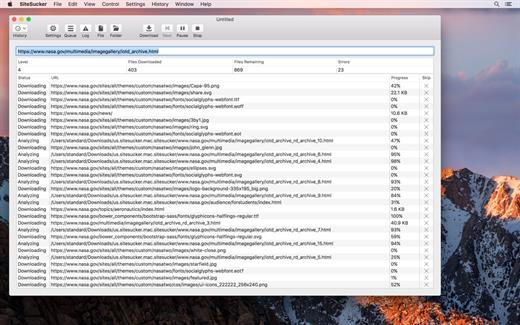
SiteSucker is an application that automatically downloads Web sites from the Internet. It does this by copying the site’s HTML documents, images, backgrounds, movies, and other files to your local hard drive. Just enter a URL and click a button and SiteSucker can download the entire site.

SiteSucker can be used to make local copies of your Web sites for easy maintenance. SiteSucker can download files unmodified, or it can “localize” the files it downloads, allowing you to browse a site off-line.

What’s New

Version 6.1.2:


  • Release notes were unavailable when this listing was updated.
Compatibility

macOS 11.0 or later


Release Name: SiteSucker 6.1.2
Size: 6.6 MB
Links: HOMEPAGE – NFO – Torrent Search

Download: RAPiDGATOR
3 Comments
Jan 10

Bigasoft Audio Converter 5.8.2

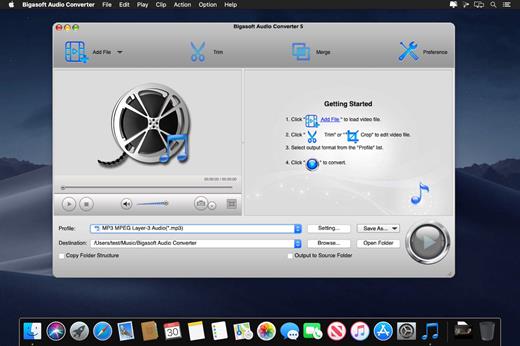
Bigasoft Audio Converter for Mac, an all-in-one Mac audio converter, provides an easy way to convert between all popular audio formats, including WMA, MP3, APE, M4A, AAC, AC3, WAV, OGG, AUD, AIFF, CAF, FLAC, and more.

Moreover, it can also act as Mac video audio converter. The powerful Mac video to audio decoder helps easily extract audio from video files like MP4, MOV, AVI, MPEG, MPG, 3GP, DivX, Xvid, ASF, VOB, MKV, WMV, H.264, 3G2, FLV, MOD, TOD, MTS, WTV, WebM, etc. and then convert to any audio format as you will, such as convert YouTube to MP3, convert MOV to MP3, and more.

What’s New

Version 5.8.2:


  • Release notes were unavailable when this listing was updated.
Compatibility

macOS 10.10 or later


Release Name: Bigasoft Audio Converter 5.8.2
Size: 51.9 MB
Links: HOMEPAGE – NFO – Torrent Search

Download: RAPiDGATOR

7 Comments