Please REGISTER or RENEW your account on RAPiDGATOR.net and support us by doing through all RAPiDGATOR working download links on main posts...
Dec 12

MacCleanse 14.1

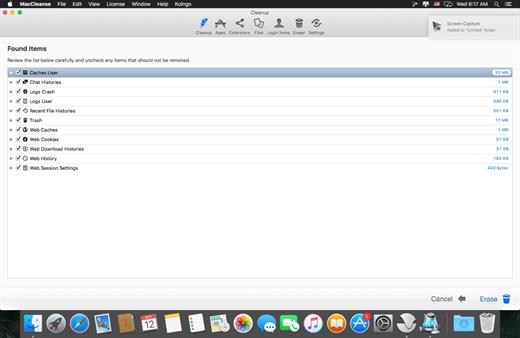
MacCleanse is the product of thousands of hours of intense research and development. It meticulously scans all of the nooks and crannies of a computer for unnecessary junk that can take up huge amounts of disk space! Because of this, Apps in MacCleanse are also uninstalled correctly, catching the numerous logs, caches, plugins, and other resources left behind versus simply dragging them to the Trash. Your privacy is protected and computer performance enhanced by MacCleanse as it wipes your web and app histories, and can toggle resource-hungry extensions!
What’s New

Version 14.1:


  • Release notes were unavailable when this listing was updated.
Compatibility

macOS 10.15 or later, 64-bit processor


Release Name: MacCleanse 14.1
Size: 102.1 MB
Links: HOMEPAGE – NFO – Torrent Search

Download: RAPiDGATOR

8 Comments
Dec 10

SketchUp Pro 2026 v26.1.184

SketchUp is an easy-to-learn 3D modeling program that enables you to explore the world in 3D. With just a few simple tools, you can create 3D models of houses, sheds, decks, home additions, woodworking projects – even space ships.

Programming, diagramming, design development, detailing, documentation, RFIs—wherever you need drawings, you need SketchUp Pro. A great mix of our classic desktop software, our shiny new SketchUp for Web modeler, and all sorts of things you’ve been asking for over the years — including the ability to publish, share, and store projects in the cloud with Trimble Connect.

Tools for your 3D modeling toolbox:

SketchUp Pro for Desktop

Fast, easy 3D modeling for anything you can imagine.

SketchUp for Web

Our powerful web modeler, with all the features you need to turn your designs into real things.

Unlimited cloud storage

Share, collaborate, and store your projects in the cloud. Gain flexibility and peace of mind.

2D design documentation

Create scaled drawing sets in 2D with LayOut.

VR model viewing

Wow your clients with a walkthrough of their project on Microsoft HoloLens, HTC Vive, or Oculus, on your phone or tablet.

Features that make your projects yours

Make your project look like only you can with custom Styles, Materials, and Outliner. And, make that work smooth and easy with Dynamic Components.

What’s New

Version 26.1.184:


  • Release notes were unavailable when this listing was updated.
Compatibility

macOS 10.13 or later


Release Name: SketchUp Pro 2026 v26.1.184
Size: 1.7 GB
Links: HOMEPAGE – NFO – Torrent Search

Download: RAPiDGATOR

12 Comments
Dec 10

Cookie 8.3

Cookie prevents third parties from hijacking your browsing experience. The sites you visit store “cookies” in your browser without your knowledge or consent. Some are helpful, but others are frustrating and invasive. Cookie can help.

Features:


  • Consolidate all your browser privacy settings
  • Simplified View that takes care of all the technical details for you
  • Advanced View which puts you in total control of all your privacy settings
  • Combined cookie view displaying all cookie/flash/localStorage data in one easy to manage view
  • Cookie’s can be favorited on a per domain, or per cookie basis. You decide
  • Individual Browser settings. It is possible to configure different automatic removal options for each browser. In the case of Chrome/Chromium/Canary/Brave you can even configure settings per user!
  • A number of removal schedules are possible: When quitting Cookie, when a Browser is Quit, on computer login, On computer waking from sleep, on a customizable time schedule, or entirely manually
  • Hotkey support, so you can remove all unwanted data quickly and easily
  • Customizable tracking cookie definitions
  • Whitelist individual tracking cookies
  • Clean, modern and Intuitive User Interface
  • Helpful setup window
  • Browser extension protection
  • Full Screen support
  • iCloud support
  • Dark/Regular theme
What’s New

Version 8.3:


  • Release notes were unavailable when this listing was updated.
Compatibility

macOS 10.14 or later, 64-bit processor


Release Name: Cookie 8.3
Size: 9.6 MB
Links: HOMEPAGE – NFO – Torrent Search

Download: RAPiDGATOR

9 Comments
Dec 10

Acorn 8.3.3

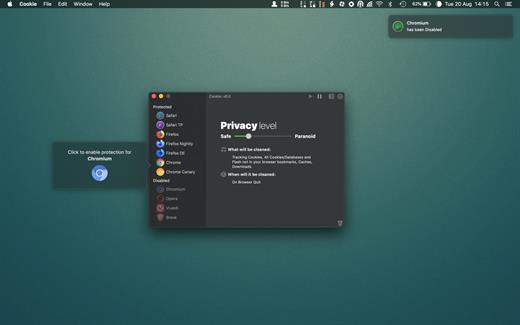
Acorn is a new image editor built with one goal in mind – simplicity. Fast, easy, and fluid, Acorn provides the options you’ll need without any overhead. Acorn feels right, and won’t drain your bank account.


  • Take screenshots using Acorn and edit them right away.
  • Chain together image filters to create stunning effects.
  • Layer based image editing, an industry standard.
  • Make new images and layers using your built-in iSight.
  • Easy image and canvas resizing, just by changing the size of your window.
  • Take advantage of every pixel of your monitor with full screen image editing.
  • Tablet sensitive for pressure strokes and using the tablet’s eraser.
  • Vector shape and text layers.
  • Freeform, elliptical, rectangular, and magic wand selections.
  • Gradients.
  • Create and apply custom text styles.
  • Control opacity and blending modes for each layer.
  • Write plugins using the Python scripting language, as well as in Objective-C.
  • GPU powered. The same graphics card that makes your gaming experience smooth, helps Acorn fly through the toughest of graphics operations.
What’s New

Version 8.3.3:


  • Release notes were unavailable when this listing was updated.
Compatibility

macOS 10.14.0 or later
Apple Silicon or Intel Core processor


Release Name: Acorn 8.3.3
Size: 83.8 MB
Links: HOMEPAGE – NFO – Torrent Search

Download: RAPiDGATOR
11 Comments
Dec 10

Camtasia 2026.0.3

Camtasia for remarkable screencasts made easy. Create eye-catching training, presentation, and demo videos…the easy way. Camtasia screen-recording software is streamlined, intuitive, and makes you look like a pro.

Easily record onscreen activity, Keynote slides, camera video, microphone, or system audio – all with sparkling clarity. Record in front of a live audience or at your desk. Edit to perfection. Turn it into a stunning, HD-quality video at the perfect size to share on popular video sites, Apple devices, your website, blog, or anywhere you like. Make them wonder how you did it.

What’s New

Version 2026.0.3:


  • Release notes were unavailable when this listing was updated.
Compatibility

macOS 13.0 or later
Apple Silicon or Intel Core processor


Release Name: Camtasia 2026.0.3
Size: 421.4 MB
Links: HOMEPAGE – NFO – Torrent Search

Download: RAPiDGATOR

9 Comments
Dec 10

File Cabinet Pro 8.7.2

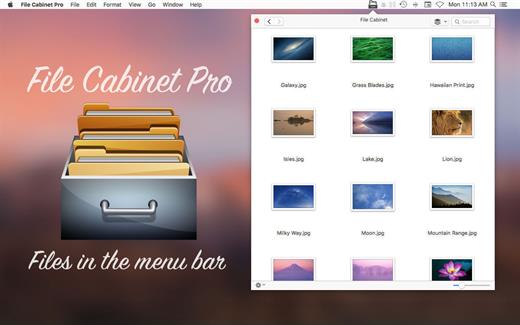
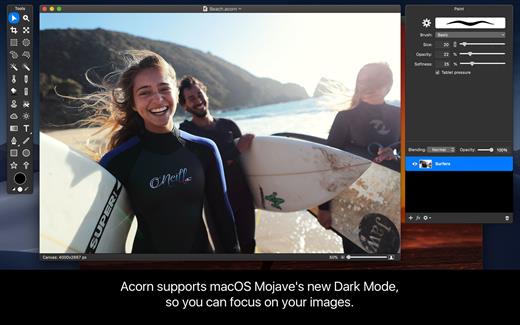
File Cabinet Pro is the file manager for the macOS menu bar. Quickly navigate to files without cluttering your desktop. Open, move, rename, compress, tag, trash, copy and paste files, all from the menu bar. You can open many file types natively in File Cabinet Pro or open files by launching other applications. It’s easy to click into directories in icon view, drill through directories in list view, or navigate the file tree in column view.

File Cabinet Pro is also a document-based application that ships with a built-in text editor, image viewer, pdf viewer, and media player. Some of the file types File Cabinet Pro can open for editing/viewing include::


  • Text documents: Plain text files (.txt), Rich Text Format (.rtf), Rich Text Format Directory (.rtfd), Portable Document Format (.pdf), Markdown (.md)
  • Image documents: Portable Network Graphics (.png), Joint Photographic Experts Group (.jpeg), Tagged Image File Format (.tiff, .tif), Bitmap image file (.bmp), Photoshop File Format (.psd) Import only., Scalable Vector Graphics (.svg) Import only
  • Video and audio documents: MOV, MP4, M4A, M4V, AVI, MP3, WAV, CAF, AIF
Features

  • Create subdirectories
  • Click into subdirectories and open documents
  • Set a “Primary” and “Secondary” directory button for the bottom bar to get an innovative drag and drop experience; drag files to these buttons in the bottom bar to bring up a popover window
  • Tag files easily. Select files in File Cabinet Pro, right click, and then simply add or remove file tags from the control in the context menu
  • Show selected files in Finder
  • Rename files
  • Copy and paste files
  • Compress files
  • Trash files
  • View items as icons, in a list, in columns, or in cover flow view
  • Launch the application at login. You can have File Cabinet Pro automatically launch when you login to your Mac (optional feature, disabled by default)
  • Create a list of all your favorite directories in the sidebar
  • Create and edit txt, rtf, and rtfd files using the built in lightweight text editor
  • Rotate images, crop images, and apply filters to images using the built in lightweight image editor
  • Watch video and play audio files using the built in media player
  • View PDF files using the built in PDF viewer
  • Revert document versions for supported editable document types
  • Set a Global Hotkey for showing and closing the File Cabinet Pro window (optional feature, disabled by default)
  • Preview selected files in Quicklook by pressing the spacebar
  • Share files in apps that support Sharing extensions like Mail and Messages
  • Create text documents from Finder using File Cabinet Pro’s Document Creator Finder extension (Note: To use this feature, you have to enable the Finder extension in System Preferences under the “Extensions” tab)
What’s New

Version 8.7.2:


  • Release notes were unavailable when this listing was updated.
Compatibility

macOS 10.13 or later


Release Name: File Cabinet Pro 8.7.2
Size: 21.1 MB
Links: HOMEPAGE – NFO – Torrent Search

Download: RAPiDGATOR
11 Comments
Dec 10

Jettison 1.9.5

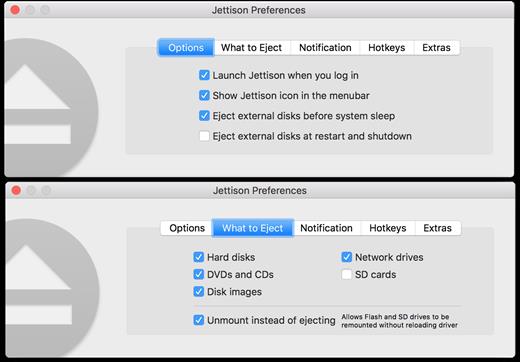
Jettison automatically ejects external disks from your Mac before your computer goes to sleep.

Simplify those last few seconds when you grab your MacBook and run out the door. Just close the lid and Jettison will automatically eject your backup drive, iPod, or whatever is connected so you can safely unplug it. Say goodbye to “disk was not ejected properly” errors and waking your computer back up because you forgot to eject everything.

Jettison even makes sure that Time Machine backups and file server volumes are properly shut down before they’re removed. Your backups and shared files are safe and sound.

And what if you decide not to leave, and open your MacBook back up? Jettison will check to see if your drives are still connected and will mount them back on the Desktop if they’re there.

What’s New

Version 1.9.5:


  • Release notes were unavailable when this listing was updated.
Compatibility

macOS 10.9 or late


Release Name: Jettison 1.9.5
Size: 7.1 MB
Links: HOMEPAGE – NFO – Torrent Search

Download: RAPiDGATOR

10 Comments
Dec 10

ColorWell 8.1.1

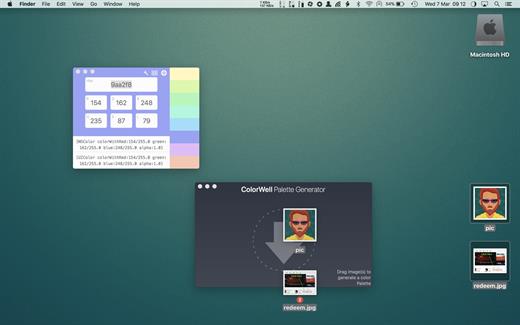
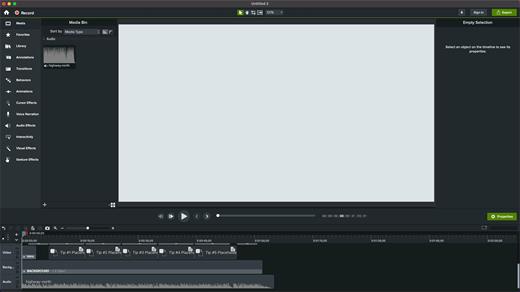
ColorWell is a professional color theme generator with full history support, and macOS palette synchronization


  •  System wide color palettes – ColorWell synchronize’s palettes with the macOS System color picker. So, all your carefully created color schemes are available for use in Pages, Affinity Photo, Final Cut Pro or any other first class macOS app! All the system palettes are also available to view and create custom palettes from
  •  Professional file support – ColorWell supports import and export to Adobe .ase, and Apple .clr file formats. This makes it easier than ever to share your color schemes. And with ColorWell’s universal palette database, any imported scheme’s will naturally be imported directly into the macOS color picker, ready for sytem wide use
  •  Full History support – Every color change you make is saved to History. So even if you can’t remember what color you were inspecting 3 days ago – ColorWell can! History support is not limited to single colors, the entire color state is saved on each change. So the current active color along with any saved swatches are right there when you need them
  •  Advanced palette generation – Use stored palettes as a starting point, fine-tune individual colors. Grab complementary, analagous, triadic, tetradic, or monochromatic colors from the palette generator. Rip colors from images, and finetune the color selection. You can create palette’s with unlimited number’s of swatches
What’s New

Version 8.1.1:


  • interim release to migrate update manifest
Compatibility

macOS 10.14 or later
Apple Silicon or Intel Core processor


Release Name: ColorWell 8.1.1
Size: 6.4 MB
Links: HOMEPAGE – NFO – Torrent Search

Download: RAPiDGATOR
10 Comments
Dec 9

Final Cut Pro Suite 2025 v4

Motion is designed for video editors, Motion 5 lets you customize Final Cut Pro titles, transitions, and effects. Or create your own dazzling animations in 2D or 3D space, with real-time feedback as you work.

What’s New

Version 2025 v4:


  • Release notes were unavailable when this listing was updated.
Compatibility

macOS 11.5.1 or later


Release Name: Final Cut Pro Suite 2025 v4
Size: 8.3 GB
Links: HOMEPAGE – NFO – Torrent Search

Download: RAPiDGATOR

2 Comments