Please REGISTER or RENEW your account on RAPiDGATOR.net and support us by doing through all RAPiDGATOR working download links on main posts...
Dec 8

Studies 1.8.10

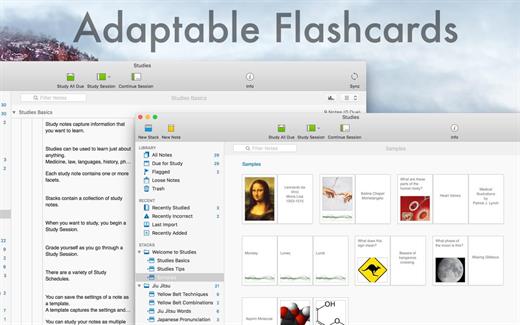
Studies (was Mental Case) is a flashcard app for the serious student, with editions for Mac, iPhone and iPad. It’s a tool to extend your knowledge, and it doesn’t matter what it is you want to learn – medicine, law, history, driving, aviation, fine art, music, or martial arts – from simple day-to-day tidbits, to knowledge of life changing importance. Studies is an app to help you achieve your learning goals.
Features


  • Study Notes – Studies allows you to turn the information you need to learn into study notes, similar to traditional flashcards, but much more powerful. Notes can include as many sides as you like, each of which can contain text, images, audio, and even video. You can create your own, or download shared sets from Quizlet.com.
  • Due for Study – Studies includes scientifically-based learning schedules designed to make the time you spend studying as efficient as possible. Set a schedule based on your goals, from long-term learning to cramming for an exam, and Studies will automatically make notes due for study each day.
  • Study Sessions – Once you have a set of notes prepared, you can study them in beautifully presented study sessions, which make studying less of a chore. Grade yourself as you go, and studies will ensure the ones you don’t know very well will reappear more often in future sessions.
  • Statistics – Everything you study is tracked by Studies. This information is used to schedule notes for future study, but also to provide statistics and predictions on how well you know the material. You can not only see how many notes you graded right or wrong, but you also have access to estimates of how long you will remember what you are studying.
  • Selective Sync with iCloud – Many of us now carry multiple Apple devices, and having your data silo-ed on one device is a drag. Studies includes iCloud sync using the latest CloudKit technology from Apple. Add notes on your desktop Mac, and they will appear on your iPhone or iPad when you come to study them later. Even your study sessions are synced, so you can start on one device, and finish on another. You can even choose what you want to sync.
  • Sharing – Studies has a multitude of different file formats to share your study notes with others. You can export an archive that can be imported into Studies (or Mental Case) on another device. You can also import and export standard text formats like CSV and TSV, which are supported by many flashcard web sites.
  • Mental Case Migration – Studies is the next generation of the app Mental Case. If you have been using Mental Case on your Mac or iOS device, you can migrate all of your data, including the study history and scheduling, to Studies when you first launch. You should even find your data takes up much less space in Studies than it did in Mental Case.
What’s New

Version 1.8.10:


  • Fixed bug with images in study session
Compatibility

macOS 10.12.0 or later
Apple Silicon or Intel Core processor


Release Name: Studies 1.8.10
Size: 28.5 MB
Links: HOMEPAGE – NFO – Torrent Search

Download: RAPiDGATOR

6 Comments
Dec 8

ToonTrack Superior Drummer 3.4.2

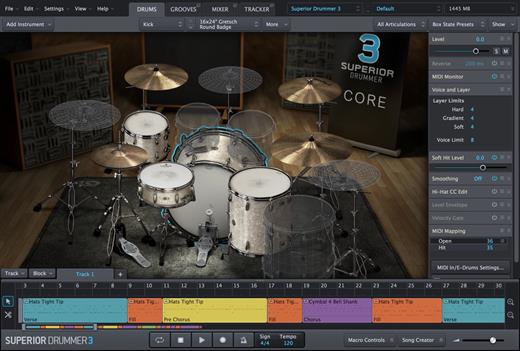
In addition to a massive library of raw sound material, Superior Drummer 3 introduces a unique design*, a streamlined workflow and countless features for powerful drum production in your computer. With Superior Drummer 3, you have control and creative power beyond the imaginable. Welcome to the future.

FEATURES – AT A GLANCE.

In excess of 230 GB of raw, unprocessed sounds in 44.1 kHz/24 bit
Recorded with an additional eleven separate room microphones set up in a surround configuration for a complete immersive experience
Playback in stereo or up to 11-channel surround systems
Approx. 350 vintage and classic drum machine sounds
New and improved scalable interface with detachable windows
Edit Play Style, Tap2Find, Song Creator and Song Track features as well as improved workflow and search functionality
Built-in MIDI grid editor
DAW automation for built-in macro controls
Support for keyboard shortcuts

What’s New

Version 3.4.2:


  • Release notes were unavailable when this listing was updated.
Compatibility

macOS 10.14 or later
Apple Silicon or Intel Core processor


Release Name: ToonTrack Superior Drummer 3.4.2
Size: 594.1 MB
Links: HOMEPAGE – NFO – Torrent Search

Download: RAPiDGATOR
8 Comments
Dec 8

USBclean 4.5.1

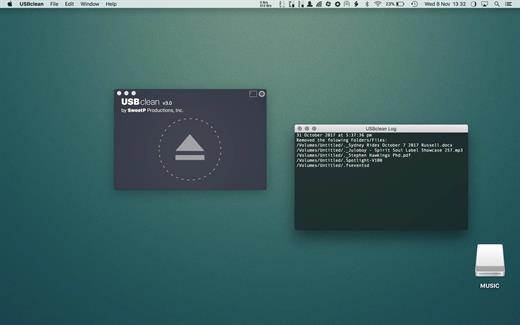
USBclean quickly and easily removes all those pesky junk and ghost files from your external Windows formatted USB drives. .DS_Store, Thumbs.db, .Spotlight, and trashes files take up precious space, and can cause issues on some devices. Remove them all quickly and easily with USBclean. Configure USBclean the way you want! Remove files by dragging your drive into the handy drop zone, from the system menubar, or by dropping straight onto the dock icon. You can easily configure USBclean to run only from the system menubar and open at login. It’s a snap to auto quit after dropping your drive onto the dock icon. USBclean always ejects your drive after cleaning for your convenience.

What’s New

Version 4.5.1:


  • Release notes were unavailable when this listing was updated.
Compatibility

macOS 10.11 or later


Release Name: USBclean 4.5.1
Size: 5.6 MB
Links: HOMEPAGE – NFO – Torrent Search

Download: RAPiDGATOR

6 Comments
Dec 8

PullTube 1.8.6.15

Sharing videos via online hosting services, such as YouTube or Vimeo is a common practice, yet streaming the content might not work as expected if you have a slow internet connection.

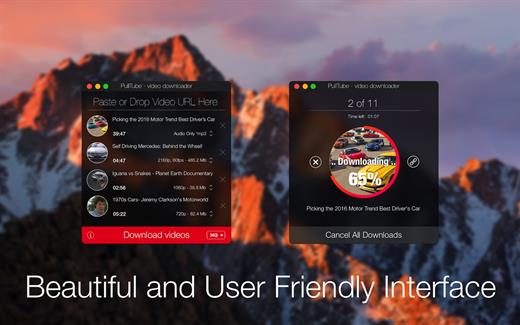
PullTube offers you the possibility to download videos from both sources (YouTube and Vimeo), while other platforms might be added at a later time. The app can handle playlists, allows you to select the output quality, and can even extract only the audio.

Video downloader that can import links with drag and drop and can detect playlists

The PullTube user interface is represented by a small window where you get to quickly paste the video URL. Note that you can also add a video by dropping the link on top of the PullTube window.

Worth mentioning is that, if PullTube detects that the video is part of a playlist, will offer to download the entire collection: will fetch the data for each entry and handle the downloads consecutively.

Download videos hosted on YouTube or Vimeo to different output sizes and formats

PullTube will start fetching the video data right away so you can see the video name, duration, and a small thumbnail. When configuring a download, you get to select the output quality (highest, 4K, HD or regular with different resolutions) or choose to export only the audio to an M4A or MP3 file.

Via the PullTube Settings panel, you can change the default download location and the default MP3 bitrate (320Kbps, 256Kbps, 128Kbps, 64Kbps). You can also add the quality info to the video’s name and choose to quit the app when all downloads are completed.

Get offline access to videos hosted online in just a few steps

PullTube proposes a streamlined workflow for quickly downloading videos from YouTube or Vimeo, provides control over the output quality, and enables you to extract the audio to MP3 or M4A files.

However, during our tests, we have noticed that PullTube has trouble completing the download when handling videos that are longer that 2 minutes. The process stops without any explanation, and you can eventually complete the task, but you need to add the link to download tool multiple times.

What’s New

Version 1.8.6.15:


  • Release notes were unavailable when this listing was updated.
Compatibility

macOS 10.12 or later


Release Name: PullTube 1.8.6.15
Size: 232.1 MB
Links: HOMEPAGE – NFO – Torrent Search

Download: RAPiDGATOR
8 Comments
Dec 8

NeoFinder 9.1

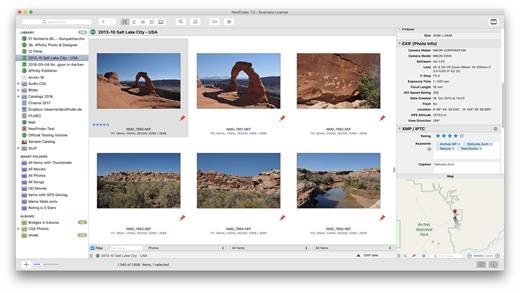
NeoFinder (formerly CDFinder) rapidly organizes your data, either on external or internal disks, or any other volumes. It catalogs all your data, so you stay in control of your data archive or disk library. With extensive metadata support, you can find your files quickly.

Feature Overview


  • Catalog: any hard disk, data folder, CD-ROM, DVD-ROM, BlueRay, HD-DVD, iPod, Server Volume, Audio-CD, USB-Stick, FTP-Server, and more
  • Power: Handle really large amounts of data
  • Photo Previews: Create beautiful thumbnails for many photo and image formats, such as JPG, TIFF, EPS, RAW, PDF, PSD, BMP, GIF, PNG, TGA, IFF (Maya)
  • Audio Meta Data: MP3, AAC (iTunes), FLAC (Lossless), ALAC (Apple Lossless), and AIFF meta data: author, album, title, composer, lyrics, cover art, track number, duration, bit rate, genre, year, comment. Even catalogs whole Audio-CDs, and Apple iPhone ringtone files!
  • Photo Meta Data: XMP (used by Adobe Bridge), EXIF and IPTC meta data (including GPS geotags), and JPG, TIFF, PICT and BMP photo details
  • Movie Meta Data: get thumbnails, the dimension, duration, codec and frame rate out of movie files, supporting AVI, MOV, MP4, FLV, MPG, MKV, M4V, and others
  • Geotagging GPS support: NeoFinder catalogs and displays GPS EXIF tags of photos, and has direct links to Google Earth, Flickr, Panoramio, Google Maps and MapQuest. NeoFinder can even search for photos that were taken near any location (GeoFinder), and export GPS data to KMZ files
  • Networkable: Share your NeoFinder database in your entire workgroup (requires a Business License)
  • Cross-platform: with abeMeda (was CDWinder), you can use one database for both worlds!
  • Workflow Integration: Automatically catalog all discs burned by Roxio Toast; Drag any image directly from NeoFinder into applications like Adobe InDesign, Quark XPress, Apple Pages, Microsoft Office; integrate NeoFinder into FileMaker Pro databases, and much more
  • Find it! Best Find functions, and of course offline browsing of all your volumes – even in multiple windows, if you want to
  • Spotlight Integration: Search your local disks with Spotlight and as well as your catalogs from inside NeoFinder
  • Import Catalogs: These twelve formats are supported: Disk Recall, DiskWizard, Iomega FindIt, Portents DiskTracker (both 1.x and 2.x!), Catalogue, CatFinder, “Neometric” Catalog, DiskLibrary, Broken Cross Disk Manager (Windows), and Advanced Disk Catalog (ADC for Windows) catalog or export files, and iView MediaPro and Microsoft Expression Media XML files
  • Fast and really easy to use, see screenshots
  • Export and print catalog data
  • Insight: Look inside archive files: ZIP, TAR, .rar, StuffIt (.sit and even .sitx), and others, including Disk Image contents
  • International: English, German, French, Italian, Swedish, Spanish and Dutch user interface, all in one application
  • Unicode compatible: Use NeoFinder to catalog file names of any language
  • AppleScript: Integrate NeoFinder with FileMaker Pro or any other application, or extend the abilities of NeoFinder
  • Extend your NeoFinder catalog database by using five custom fields for any content you need
  • FileCheck: Only NeoFinder can generate an industrial strength MD5 checksum for every file being cataloged
  • AutoMount: NeoFinder automatically mounts every server volume you have cataloged or updated for you, if needed! And you can of course also ask NeoFinder to mount the volume for you at any time, using the context menu
  • QuickLook: Open a QuickLook window for any selected online file(s) right from inside NeoFinder!
  • Cross-Grade: you already bought a different disk cataloger or media asset manager application, ask us for a good offer!
  • Free email support
  • Languages: User Interface in eight languages, all in one application: English, German, Japanese, French, Italian, Swedish, Spanish and Dutch
What’s New

Version 9.1:


  • Release notes were unavailable when this listing was updated.
Compatibility

macOS 10.13.6 or later


Release Name: NeoFinder 9.1
Size: 55.9 MB
Links: HOMEPAGE – NFO – Torrent Search

Download: RAPiDGATOR

7 Comments
Dec 8

Proxyman 6.2.0

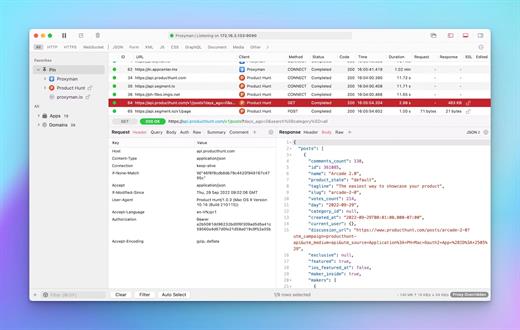
Proxyman is a high-performance macOS app, which enables developers to view HTTP/HTTPS requests from apps and domains.

Features


  • ? Native macOS app. Written by Swift, Objective-C. Powered by Apple SwiftNIO for the high-performance network application.
  • ? Fully support Apple Chip (e.g M1, M2, M1 Pro/Max).
  • ? Built for macOS Monterey & Ventura.
  • ✅ Hassle-free Intercept HTTP/HTTPS requests/response and WebSocket from Web Browsers, iOS, and Android devices.
  • ✅ Modern and intuitive UI
  • ? Multiple filters
  • Comprehensive Guideline to set up with iOS simulator and iOS and Android devices.
  • Basic debugging tools: Compose, Repeat, Wildcard/Regex Filter, Multiple Filters, Customize Columns, Toolbar…
  • Advanced Tools: Breakpoint, Map Local, Map Remote, Backlist, External Proxying, No Caching, Protobuf, Clear Cache, Custom Certificates, Scripting, Network Conditions, Reverse Proxy, Diff, Access Control etc
  • Automatic Setup for Backend Development: Auto capture HTTP(s) traffic from NodeJS, Ruby and Python.
  • macOS 10.15+
What’s New

Version 6.2.0:


  • Release notes were unavailable when this listing was updated.
Compatibility

macOS 10.15 or later


Release Name: Proxyman 6.2.0
Size: 32 MB
Links: HOMEPAGE – NFO – Torrent Search

Download: RAPiDGATOR
6 Comments
Dec 8

Clip Studio Paint 4.1.4

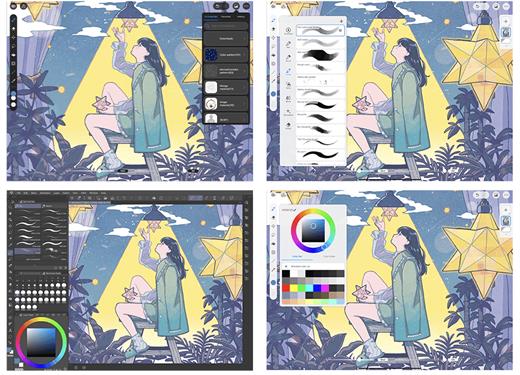
Clip Studio Paint is the world’s leading comic and manga creation software. It delivers powerful cutting edge drawing and coloring tools, making it essential for professional comic and manga artists.


  • Choose from over 3,000 screen tones or create your own.
  • Resize with no loss in quality by converting your bitmap drawings to resolution-independent vector images.
  • Export to a wide variety of formats such as BMP, JPEG, PNG, PSD, TGA, EPS (monochrome only), TIFF, PDF, and PICT (Mac only).
  • Draw naturally with a pen tablet and recreate the sensation of drawing on paper offering an incredibly natural drawing experience.
  • Simplify your layout and design process with easy to use features such as a variety of built-in rulers that save you time.
  • Color artwork using the integrated tool set enabling you to mix and blend for custom color work.
  • Convert 2D images to line and tone data by using the 2DLT Rendering function.
  • Import 3D objects and easily transform them into tone and line drawings by using the 3DLT rendering function.
  • Add speed line and focus line effects in seconds to express motion or moods.
  • Work with precision using unlimited layers.
  • Select from a suite of advanced filters to quickly apply distortions and special effects to your artwork.
What’s New

Version 4.1.4:


  • Release notes were unavailable when this listing was updated.
Compatibility

macOS 10.13 or later


Release Name: Clip Studio Paint 4.1.4
Size: 403.2 MB
Links: HOMEPAGE – NFO – Torrent Search

Download: RAPiDGATOR

9 Comments
Dec 8

Privatus 7.3.1

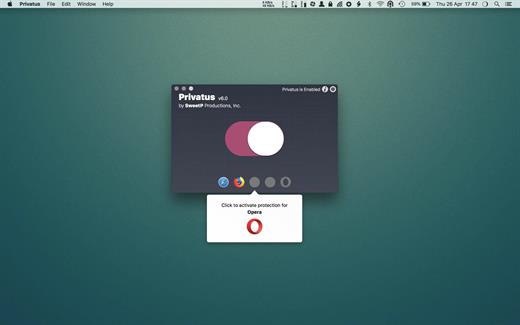
Privatus has been designed from the ground up with simplicity in mind. Built for ease of use, there is nothing to configure, no favourites, no whitelists, no blacklists,… no problems! Privatus just works!

Privatus securely removes all tracking cookies, unnecessary cookies, flash cookies, Silverlight, and databases from your Mac, automatically. You can run it from your system menu bar–you can even run it headless–Privatus will work silently and methodically in the background, clearing all unwanted data when you close your browser session.


  • All the major OS X browsers are supported: Safari, WebKit, Firefox, Chrome, Chromium, and even Camino.
  • All the power of our other popular ‘Cookie’ app, with none of the setup headaches!
Privatus is cookie management for the rest of us!

What’s New

Version 7.3.1:


  • Release notes were unavailable when this listing was updated.
Compatibility

macOS 10.14 or later
Apple Silicon or Intel Core processor


Release Name: Privatus 7.3.1
Size: 7.1 MB
Links: HOMEPAGE – NFO – Torrent Search

Download: RAPiDGATOR
7 Comments
Dec 4

EdgeView 5.6.7

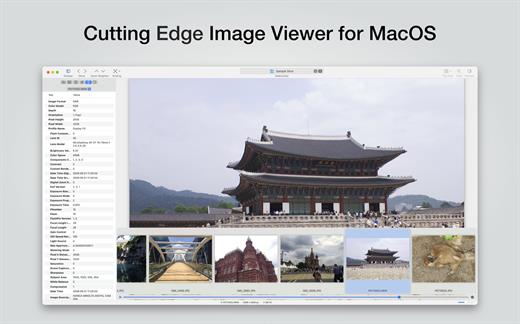
EdgeView 5 is fast image viewer has elegant user interface. EdgeView 5 is developed and designed for modern MacOS. It can open various image files such as JPEG, PNG, TIFF, BMP, and RAW file of DSLR, EPS and PDF, AI(Adobe Illustrator). Can open image files in archive directly without extraction.

User can open files, rename files, delete files from EdgeView’s file browser. Also can access to SMB/AFP/FTP network volume.

User can navigate images quickly by using keyboard shorcut, mouse wheel, trackpad gesture. EdgeVew show EXIF information, play animation GIF/PNG/WebP smoothly. Save last status to history, and restore when reopen file.

EdgeView 5 will be the best choice when viewing and managing image files.

What’s New

Version 5.6.0:


  • Release notes were unavailable when this listing was updated.
Compatibility


macOS 11.1 or later
Apple Silicon or Intel Core processor


Release Name: EdgeView 5.6.7
Size: 142.1 MB
Links: HOMEPAGE – NFO – Torrent Search

Download: RAPiDGATOR

8 Comments
Dec 4

Noir – Dark Mode for Safari 2025.2.7

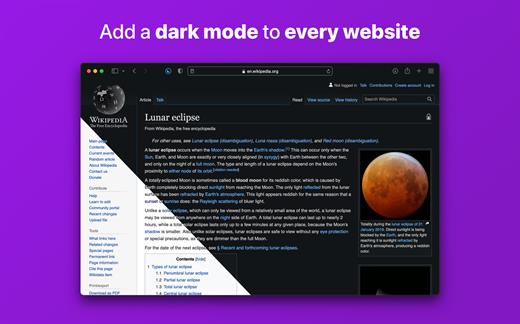
Noir is a Safari extension that automatically adds a dark mode to every website you visit.

It makes browsing the web at night so much better. With Noir, you won’t be blinded by bright websites ever again.

And the results look great too. Noir generates a custom dark style for each website you visit, based on the colors that are used on a page. You won’t even notice this happening in the background – that’s how fast it is – but you’ll certainly appreciate the end result: a beautiful dark mode tailored for each website, where contrast is preserved and highlights still pop.

Noir works with any website you visit in Safari, automatically. By default, Noir is linked to your device’s Dark Mode, so websites will only go dark when you want them to. But you can easily customize this to your liking, even per website. Only want to use Noir on just a few specific websites? Sure thing! Disable Noir on some websites? No problem!

The app feels right at home on your device. It is a Safari extension, which means there’s no need to manually activate it every time you load a new page. The app also tightly integrates with system features such as Shortcuts to fully integrate Noir in all your workflows. And your settings are automatically synced to all your devices using iCloud.

And just as importantly, Noir takes your privacy seriously: it doesn’t collect any of your browsing data. Period.

Noir is made by a solo developer. It does not include any subscriptions or ads. Buy Noir once, use it forever.

What’s New

Version 2025.2.6:


  • Release notes were unavailable when this listing was updated.
Compatibility


macOS 12.0 or later.


Release Name: Noir – Dark Mode for Safari 2025.2.7
Size: 12.3 MB
Links: HOMEPAGE – NFO – Torrent Search

Download: RAPiDGATOR
8 Comments