Please REGISTER or RENEW your account on RAPiDGATOR.net and support us by doing through all RAPiDGATOR working download links on main posts...
Nov 28

PhotoMill X 3.1.2

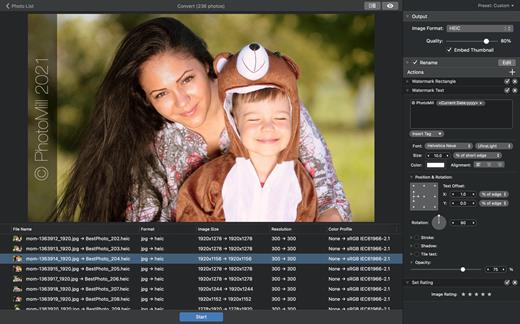
PhotoMill helps you convert a bulk of images into the most popular image formats, give your files meaningful names, watermark with text and image, adjust photos (brightness/saturation/exposure/grayscale/etc.), fit geometry (scale/crop/trim/etc.), remove private metadata, add your own copyrights etc. Also, PhotoMill is a great batch metadata editor, renamer and photo browser.
Features


  • Convert

    • Conversion to: BMP, GIF, JPEG, JPEG 2000, PDF, PNG, TIFF
  • Color models: RGB, Gray, CMYK Color depth: 8/16/32 bits; with or without alpha channel
  • Metadata editor

    • Correct EXIF/IPTC metadata tags in your photos: place GPS coordinates, remove private information from your photos, correct or set capture dates, add your own copyright, keywords or rating.
  • Photo browser

    • The app has a bunch of features for comfortable browsing and multi-criteria search of photos in the Browser. The Browser has 3 panels: Image Info – displays detailed information about a selected photo; Groups – splits photos into groups/subgroups based on a chosen criteria, for instance, by capture dates; Search – gives you an opportunity to search photos by different criteria.
  • Rename

    • You can give meaningful names to converted photos constructing file names in the “pro” way – using text and tags: index, capture date, original name, image width, “find & replace” etc. Also, you can rename photos without any conversion.
  • Resize

    • Fit image size with a bunch of geometry actions: scale, crop, add border, trim, trim color, rotate & flip, auto rotate (by EXIF orientation), change resolution.
  • Watermark

    • Text – you can use photo metadata information – tags: capture date, keywords, camera maker etc., as well as entered text. Font size can be either fixed or relative to an image width, height, long or short edge. Multiline text, stroke, shadow, rotation, tiling and other features.
    • Image – image size can be either fixed or relative to main image size. Image tiling is also available.
    • Rectangle – background for text; square or rounded. Fill and stroke color can be half-transparent.
  • Adjust colors

    • Available filters: auto contrast, auto white balance, gamma, contrast, exposure, sharpness, grayscale, sepia, colorize, temperature, HSL channels (Hue/Saturation/Lightness), HSV channels (Hue/Saturation/Value,Brightness), RGB channels, curves.
  • Working with transparency: alpha mask, color to alpha, alpha to color. Color matching: assign profile, convert to profile, proof with profile.
What’s New

Version 3.1.2:


  • Release notes were unavailable when this listing was updated.
Compatibility

macOS 10.12.2 or later
Apple Silicon or Intel Core processor


Release Name: PhotoMill X 3.1.2
Size: 82.4 MB
Links: HOMEPAGE – NFO – Torrent Search

Download: RAPiDGATOR

9 Comments
Nov 28

SimpleMind Pro 2.8.1

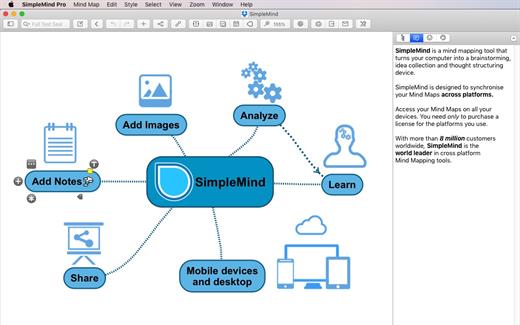
SimpleMind Desktop is a mind-mapping tool that turns your Mac into a brainstorming, idea-collecting, and thought-structuring device. It connects to the similar SimpleMind for iPhone/iPad app.

Features


  • Easy to use drag, arrange, and edit directly on the Mind Map page
  • Tap or drag Node Well to add new topics
  • Full Undo/Redo in the editor
  • Visual styles change colors, borders and lines for maximum presentation impact
  • Pick colors from style palette or custom colors
  • Cut/Copy/Paste – move or duplicate topics between mind maps
  • Create new mind map from selection or clipboard
  • Reconnect topics using drag-and-drop, aided by topic auto-layout
What’s New

Version 2.8.1:


  • Release notes were unavailable when this listing was updated.
Compatibility

macOS 10.12 or later
Apple Silicon or Intel Core processor


Release Name: SimpleMind Pro 2.8.1
Size: 13.1 MB
Links: HOMEPAGE – NFO – Torrent Search

Download: RAPiDGATOR

9 Comments
Nov 26

Ghost Buster Pro 4.0.4

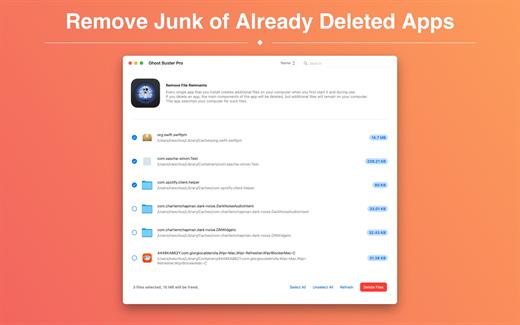
Ghost Buster Pro finds and deletes files from apps you’ve already uninstalled. The app is lightning fast and frees memory in no time.

Many apps are installed on a computer, but they usually only stay on your computer for a short time. Each app creates files, but deleting the app does not remove them.
This leads to a large number of files accumulating over time, which take up valuable storage space.
Ghost Buster Pro searches your computer for exactly such files and can also delete them directly if you wish.

Ghost Buster Pro offers the following features:

Fast Search

Ghost Buster Pro quickly scans your computer for data from previously deleted apps. You can have them deleted with one click.

Extremely easy handling

Ghost Buster Pro couldn’t be simpler. The search is started immediately after the app is started. You can now delete files with just one click.

No automatic deletion

Ghost Buster Pro does not delete any data without your consent. Choose for yourself which data is deleted and which you want to keep.

What’s New

Version 4.0.4:


  • Release notes were unavailable when this listing was updated.
Compatibility

macOS 11.5 or later
Apple Silicon or Intel Core processor


Release Name: Ghost Buster Pro 4.0.4
Size: 9.9 MB
Links: HOMEPAGE – NFO – Torrent Search

Download: RAPiDGATOR
10 Comments
Nov 26

System Dashboard Pro 3.0.5

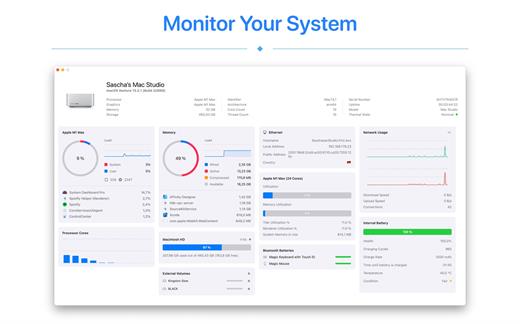
The System Dashboard Pro is a modern reinterpretation of the System Dashboard and offers more information than ever. The app has been completely redeveloped and optimized for the latest systems.

System Dashboard Pro offers the following features

• General System Information
Get an overview of the most important parameters of your system. This includes, for example, the macOS version used or details about your computer.

• Processor Usage
The processor panel shows important details about processor usage. The current load is displayed as well as that of the last few seconds. A list of processes that have the highest processor utilization is also displayed.

• Memory Usage
The Memory panel shows data related to memory. The current load is displayed as well as that of the last few seconds. A list of processes using the most memory is also displayed.

• Network Information
Basic network information such as the local and external IP address or the transfer rate of the WLAN connection is displayed on this panel.

• Network Usage
The network category shows the current download and upload speed and the number of open connections.

• Internal Battery
This panel is available if the app is running on a MacBook and displays basic battery parameters. Among others information, it displays the number of charging cycles and the health of the battery.

• Hard Disk
The computer’s hard drive can be kept under control with this panel. It shows how much space is used and how much is free. The current speed is also displayed.

• External Drives
SD cards and USB sticks are displayed here. The devices can also be ejected – either individually or all at once.

What’s New

Version 3.0.5:


  • Release notes were unavailable when this listing was updated.
Compatibility

macOS 13.0 or later


Release Name: System Dashboard Pro 3.0.5
Size: 7.7 MB
Links: HOMEPAGE – NFO – Torrent Search

Download: RAPiDGATOR

7 Comments
Nov 26

NetWorker Pro 11.0.4

NetWorker is a lightweight and easy-to-use tool that shows either the current download and upload speed or the session traffic of your network adapter. The information is shown in a small view in your menu bar.

Features


  • You can switch between three modes: speed, traffic, or speed/traffic
  • You can choose the network adapter to observe, so both wired and wireless adapters are supported
  • Adjustable refresh interval
  • Support for auto-start
What’s New

Version 11.0.4:


  • Release notes were unavailable when this listing was updated.
Compatibility

macOS 11.0 or later


Release Name: NetWorker Pro 11.0.4
Size: 7.7 MB
Links: HOMEPAGE – NFO – Torrent Search

Download: RAPiDGATOR
10 Comments
Nov 26

Magic Battery 9.2.2

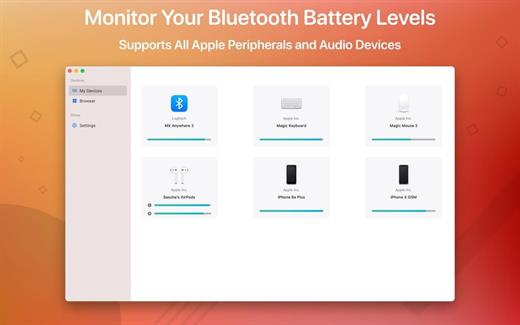
The App Magic Battery shows the battery level of supported input devices and headphones that are connected via Bluetooth in the menu bar. Internal batteries are also supported.

The following devices are supported:

Input devices:

• Apple Magic Mouse

• Apple Magic Mouse 2

• Apple Magic Trackpad 2

• Apple Wireless Keyboard

• Apple Wireless Trackpad

• Logitech mice like the MX3 Anywhere and Logitech Pebble

• Logitech keyboards (K series)

The app features:

• Modern GUI for displaying connected devices and their battery levels.

• You can choose between a detailed, a compact or an icon-only view. In the detailed view, the battery level is shown next to the device icon. In the icon-only view, the battery levels are shown once the menu of the app is opened. The compact view shows all the information in a way that very little space is used.

• Apple Silicon support.

• Connected or disconnected devices are detected automatically. The view is then adjusted accordingly.

• Support for auto-start: The app is started as soon as the user is logged in (optional).

What’s New

Version 9.2.2:


  • Release notes were unavailable when this listing was updated.
Compatibility

macOS 11.0 or later.


Release Name: Magic Battery 9.2.2
Size: 6.7 MB
Links: HOMEPAGE – NFO – Torrent Search

Download: RAPiDGATOR
7 Comments
Nov 26

Magic Disk Cleaner 4.1.2

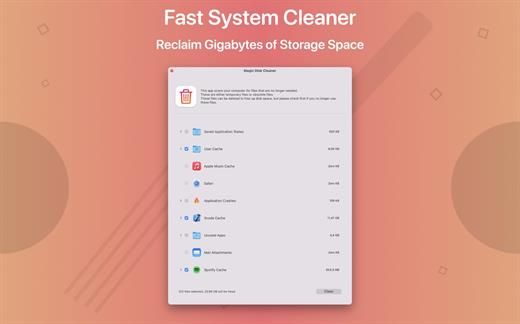
Magic Disk Cleaner finds and deletes files temporary files that waste lots of space. The app is lightning fast and frees disk space in no time.

Magic Disk Cleaner searches your computer for temporary files and can also delete them directly if you wish.

Magic Disk Cleaner offers the following features:

Fast Search

Magic Disk Cleaner quickly scans your computer for temporary data that can be removed. You can have them deleted with one click.

Extremely easy handling

Magic Disk Cleaner couldn’t be simpler. The search is started immediately after the app is started. You can now delete files with just one click.

No automatic deletion

Magic Disk Cleaner does not delete any data without your consent. Choose for yourself which data is deleted and which you want to keep.

What’s New

Version 4.1.2:


  • Release notes were unavailable when this listing was updated.
Compatibility

macOS 11.5 or later
Apple Silicon or Intel Core processor


Release Name: Magic Disk Cleaner 4.1.2
Size: 6.7 MB
Links: HOMEPAGE – NFO – Torrent Search

Download: RAPiDGATOR
8 Comments
Nov 26

Art Text 4.5.6

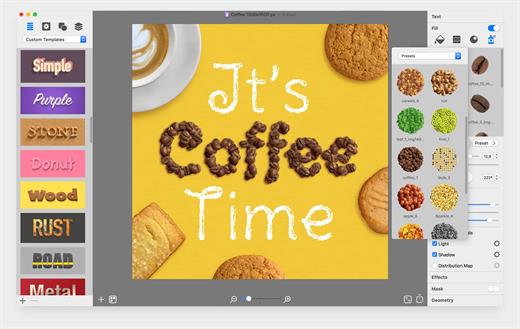
Art Text is graphic design software specifically tuned for lettering, typography, text mockups and various artistic text effects. Supplied with a great variety of ready to use styles and materials, selection of textures, icons, fonts and backgrounds, special designed effects and shape transformations, Art Text guarantees striking appearance of your badges, logos, cards, flyers and presentations.

Both professional designers and amateurs will be amazed by the exceptional ease of creating sophisticated effects such as realistic 3D text with any natural material on it – wood, rust, shatter glass, or even chocolate, soft shadow and glow, graphics painted by oil or watercolors, aged and grunge style, and many more.


  • Customizable Templates – Ready-made templates will help with logo design, produce beautiful word art, web elements and picture captions.
  • Fill Tools – Gradient presets, textures, and shading materials.
  • 2D Effects – Adjustable shadow and glow effects, over 30 masks.
  • Graphic Content – Vector icons, symbols and shapes; flash, flare, sparkle, and light trace objects; and backgrounds and textures.
  • 3D Materials – Customize 3D materials using textures, bump map surfaces, and environment map textures.
  • 3D Effects – Apply soft-edged shadow or glow to 3D objects. Use optical effect tools to make background objects out of focus.
  • Geometry Transformations – Apply transformation shapes to 2D or 3D texts to bend, warp, or give the text a wavy shape.
  • Sharing the Result – Share the art on Facebook, Twitter and Instagram with just one click, or export to an image file to use virtually anywhere.
What’s New

Version 4.5.6:


  • Release notes were unavailable when this listing was updated.
Compatibility

macOS 10.14 or later


Release Name: Art Text 4.5.6
Size: 755 MB
Links: HOMEPAGE – NFO – Torrent Search

Download: RAPiDGATOR

9 Comments
Nov 25

PullTube 1.8.6.14

Sharing videos via online hosting services, such as YouTube or Vimeo is a common practice, yet streaming the content might not work as expected if you have a slow internet connection.

PullTube offers you the possibility to download videos from both sources (YouTube and Vimeo), while other platforms might be added at a later time. The app can handle playlists, allows you to select the output quality, and can even extract only the audio.

Video downloader that can import links with drag and drop and can detect playlists

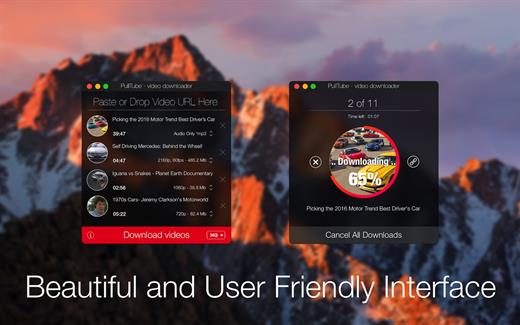
The PullTube user interface is represented by a small window where you get to quickly paste the video URL. Note that you can also add a video by dropping the link on top of the PullTube window.

Worth mentioning is that, if PullTube detects that the video is part of a playlist, will offer to download the entire collection: will fetch the data for each entry and handle the downloads consecutively.

Download videos hosted on YouTube or Vimeo to different output sizes and formats

PullTube will start fetching the video data right away so you can see the video name, duration, and a small thumbnail. When configuring a download, you get to select the output quality (highest, 4K, HD or regular with different resolutions) or choose to export only the audio to an M4A or MP3 file.

Via the PullTube Settings panel, you can change the default download location and the default MP3 bitrate (320Kbps, 256Kbps, 128Kbps, 64Kbps). You can also add the quality info to the video’s name and choose to quit the app when all downloads are completed.

Get offline access to videos hosted online in just a few steps

PullTube proposes a streamlined workflow for quickly downloading videos from YouTube or Vimeo, provides control over the output quality, and enables you to extract the audio to MP3 or M4A files.

However, during our tests, we have noticed that PullTube has trouble completing the download when handling videos that are longer that 2 minutes. The process stops without any explanation, and you can eventually complete the task, but you need to add the link to download tool multiple times.

What’s New

Version 1.8.6.14:


  • Release notes were unavailable when this listing was updated.
Compatibility

macOS 10.12 or later


Release Name: PullTube 1.8.6.14
Size: 232 MB
Links: HOMEPAGE – NFO – Torrent Search

Download: RAPiDGATOR

8 Comments
Nov 25

Default Folder X 6.2.3

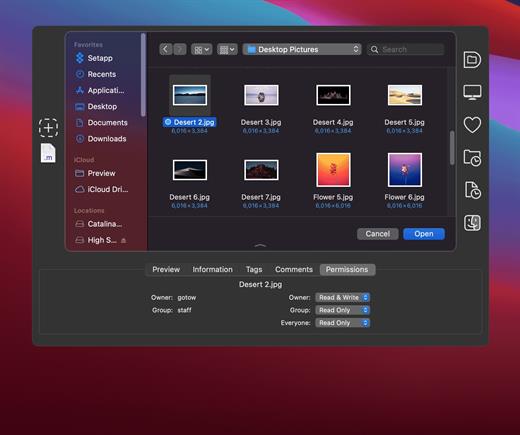
Default Folder X attaches a toolbar to the right side of the Open and Save dialogs in any OS X-native application. The toolbar gives you fast access to various folders and commands. You just click on the buttons to go to your favorite and recently used folders, manage the folders and files shown in the list, and make changes to your settings. It also fixes a number of problems in Open and Save dialogs, “rebounding” to the last selected file, putting the path listing back in the top menu, and correcting bugs in scrolling column views.

Features


  • Directory assistant: You can access the contents of your recent, favorite, and open folders right from Default Folder X’s toolbar.
  • Real time saving: If you’re constantly saving things inside the same folder, Default Folder X can remember that folder for you.
  • Finder management: Default Folder X lets you open up or save to any Finder window with a single click.
  • Instant Recall: To help you quickly return to folders you’ve recently used, Default Folder X remembers them for you.
  • Spotlight on the spot: Default Folder X lets you add Spotlight keywords, OpenMeta tags, and Finder labels on the spot, while you’re still in the Save dialog.
  • Information central: With Default Folder X you get previews below every Open dialog, expanded to fill the available space. Need to see more detail? Click on the image and it zooms up to full size.
  • Workflow without work: Rather than make you learn and set up a new application, Default Folder X blends into OS X.
What’s New

Version 6.2.3:


  • Release notes were unavailable when this listing was updated.
Compatibility

macOS 10.13 or later
Apple Silicon or Intel Core processor


Release Name: Default Folder X 6.2.3
Size: 31.9 MB
Links: HOMEPAGE – NFO – Torrent Search

Download: RAPiDGATOR

9 Comments