Please REGISTER or RENEW your account on RAPiDGATOR.net and support us by doing through all RAPiDGATOR working download links on main posts...
June 9

DockPops 4.3

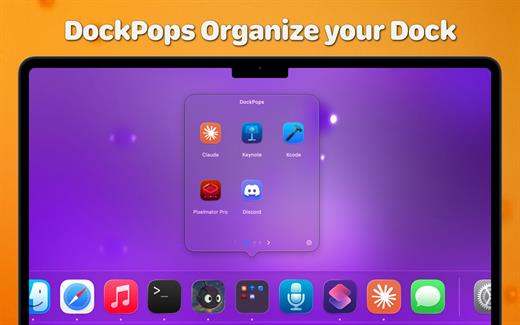
DockPops is a powerful productivity tool designed to streamline your macOS experience by bringing iPhone-style organization to your Dock. It allows you to declutter your workspace by grouping apps, files, and folders into “Pops”—interactive, customizable popover menus.
Key Features


  • iPhone-Style Folders: Organize your most-used items into clean folders that live directly in your Dock.
  • Launch with Speed: Click a Pop to instantly access a grid of apps or use the “Open All” feature to launch an entire project workflow with a single click.
  • File & Folder Support: Beyond just apps, you can add documents and directories, complete with QuickLook previews for easy identification.
  • SmartyPops (Premium): Leverage on-device AI to receive smart suggestions for items you might need based on your usage patterns.
  • MultiPops & Shortcuts: Create multiple independent Dock icons for different categories (e.g., “Work,” “Gaming,” or “Design”) and trigger them via Siri or Spotlight.
  • Private by Design: DockPops runs entirely locally. There is zero data collection, no tracking, and no network access required.
What’s New

Version 4.3:


  • Release notes were unavailable when this listing was updated.
Compatibility

macOS 14.0 or later.


Release Name: DockPops 4.3
Size: 14.5 MB
Links: HOMEPAGE – NFO – Torrent Search

Download: RAPiDGATOR

5 Comments
June 9

Bloom 1.5.34

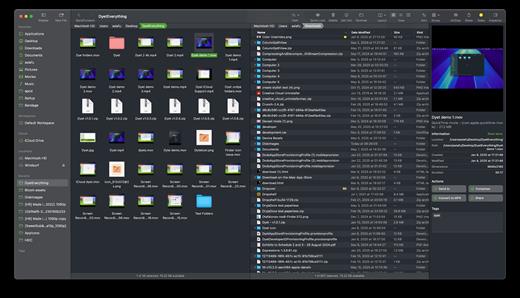
Bloom is a refined file management tool designed to enhance your search and navigation experience on macOS, offering a more intuitive and feature-rich alternative to Finder. With Bloom, you can instantly navigate to any location system-wide using the shortcut ⌘⇧⏎, making file access seamless and efficient .

Key Features


  • Enhanced Search Capabilities: Bloom allows you to search files by keyword within predefined locations, scanning tens of thousands of files in seconds for lightning-fast results. You can also search directly in any folder with ⌘F and refresh results with ⌘R .
  • Portal Mode: A compact window without sidebar or preview, Portal retains core functionalities and can be pinned on top of other windows or collapsed into the screen edge for convenience .
  • Archive Viewing: Browse contents of compressed files without extraction and preview text, images, or PDFs under 10MB by pressing Space or double-clicking .
  • Advanced File Management: Features like auto-resizing columns, advanced rename with regex support, workspace customization, iCloud Drive integration, and tag management elevate your file-browsing experience .
  • Media and Productivity Tools: Convert and optimize images, create various file types easily, paste images from the web, and organize files by kind or date. Additionally, Bloom records every operation for easy reversion and supports starting a terminal directly from a folder .
  • Disk Analysis and Task Management: Use Folder Scan to visualize disk usage through a treemap and manage file operations with a Task Scheduler to track progress .
What’s New

Version 1.5.34:


  • Release notes were unavailable when this listing was updated.
Compatibility

macOS 14.0 or later
Apple Silicon or Intel Core processor


Release Name: Bloom 1.5.34
Size: 15.3 MB
Links: HOMEPAGE – NFO – Torrent Search

Download: RAPiDGATOR

6 Comments
June 9

EdgeView 5.9.0

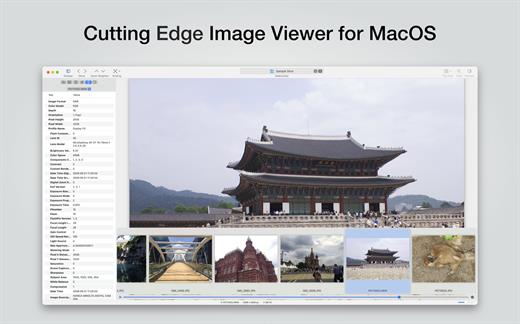
EdgeView 5 is fast image viewer has elegant user interface. EdgeView 5 is developed and designed for modern MacOS. It can open various image files such as JPEG, PNG, TIFF, BMP, and RAW file of DSLR, EPS and PDF, AI(Adobe Illustrator). Can open image files in archive directly without extraction.

User can open files, rename files, delete files from EdgeView’s file browser. Also can access to SMB/AFP/FTP network volume.

User can navigate images quickly by using keyboard shorcut, mouse wheel, trackpad gesture. EdgeVew show EXIF information, play animation GIF/PNG/WebP smoothly. Save last status to history, and restore when reopen file.

EdgeView 5 will be the best choice when viewing and managing image files.

What’s New

Version 5.9.0:


  • Release notes were unavailable when this listing was updated.
Compatibility

macOS 11.1 or later
Apple Silicon or Intel Core processor


Release Name: EdgeView 5.9.0
Size: 146.2 MB
Links: HOMEPAGE – NFO – Torrent Search

Download: RAPiDGATOR
6 Comments
June 9

Vezér 1.9.9

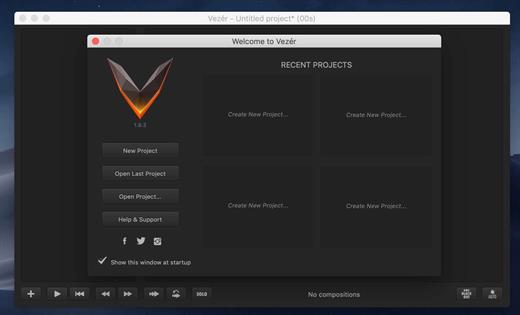
Vezér enables control of realtime video software, lighting setups, and any MIDI, OSC, or DMX-enabled environments, through the use of timeline based MIDI, OSC, and DMX automations.

What’s New

Version 1.9.9:


  • Release notes were unavailable when this listing was updated.
Compatibility

macOS 10.14 or later


Release Name: Vezér 1.9.9
Size: 7.2 MB
Links: HOMEPAGE – NFO – Torrent Search

Download: RAPiDGATOR

5 Comments
June 9

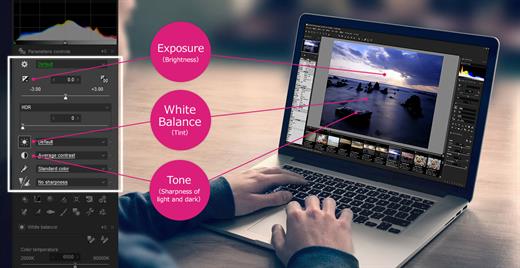
SILKYPIX Developer Studio Pro 11.0.18.0

SILKYPIX Developer Studio Pro is the latest version of the SILKYPIX series, and has been developed to pursue “Higher image quality” and “Much further fulfilling functions in order to finish the photo”. In this version by the improvement of RAW development engine “Color representation” and “Gradation” in highlight part have been improved significantly and “Natural sharp” which controls “Resolution and Blur” newly has been obtained. In addition, strongly requested from customer partial correction tool is equipped and it has become a digital developing software that strongly support customers’ photo work.

Features


  • From dark area to highlight, RAW development engine improves the gradation further – “Color representation” and “Gradation” in highlight part have been improved significantly. This achievement was bought by the improvement of RAW development engine and implemented by further deeply analyzing the information of RAW data, therefore it achieved the extension of the dynamic range in developing processing level.
  • Partial correction tool (Equipped with Circular / Gradual correction filter) – You can correct partial color in the specified circle area. For example, partially if you want to change the brightness and white balance, you can easily specify the intuitive area and correct it. You can obtain a correction that were not available in previous SILKYPIX series by designating separate areas in scenes with much overexposure or underexposure, or when light sources give off two or more different colors in the same image.
  • Completely new sharpness from superior outline detection (Natural sharp) – Generally, when sharpness is set strong, there is one side effect that the noise is emphasized in blurry outlines or out-of-focus part of the blur. A completely new focus plane and logic for detecting out-of-focus part have been developed for SILKYPIX Developer Studio Pro7 so that you can apply strong sharpness only on the focus point.
  • L-Tone Curve for vivid high-key expressions – By correcting brightness of the tone curve with the RGB Tone Curve, colors can be reproduced with a white tinge. This is due to colors connecting to brightness during RGB processing. You can maintain colors even when changing brightness with the “L Tone Curve” installed in SILKYPIX Developer Studio Pro7’s tone curve. “L” refers to “Luminance,” and it is possible to adjust only luminance information with the L curve. Therefore, even with high-key finishing, the subject’s tones and vividness remain. This is a convenient function for subjects who appreciate soft expressions such as in portraits.
  • Image Rating Compatibility – Some of photographers may have with a rating (typically a star mark) at the selection to OK cut to the camera side of the operation on the LCD monitor during shooting. SILKYPIX allows for linking and reflecting this “Rating” set on the camera. In addition, you can also edit the “Rating” on SILKYPIX Developer Studio Pro7.
What’s New

Version 11.0.18.0:


  • Release notes were unavailable when this listing was updated.
Compatibility

macOS 10.13.0 or later


Release Name: SILKYPIX Developer Studio Pro 11.0.18.0
Size: 1.8 GB
Links: HOMEPAGE – NFO – Torrent Search

Download: RAPiDGATOR
4 Comments
June 9

Wondershare PDFelement Pro 12.1.17 (OCR)

Wondershare PDFelement is a self-explanatory OS X application that makes it easier for your to preview, edit, join, split and convert PDF documents using a Mac.

The Wondershare PDFelement also features a simple, clean and intuitive interface that provide instantaneous access to all the tools and features you might need to complete your daily tasks.

Powerful and user-friendly PDF editor for everyday use

Moreover, with Wondershare PDFelement’s help, you can effortlessly edit PDF documents created using text files, web pages or scanned documents.

Consequently, you can add, remove or edit text, move and rearrange pages, insert or remove images and more.

Wondershare PDFelement’s top toolbar helps you hide, show and customize the sidebar in order to display the items and information you are interested in. In addition, you can browse through the loaded document, zoom in or out, print it or email it with just a couple of mouse clicks.

Advanced OCR capabilities make text editing a breeze

Furthermore, you can choose between the “Hand”, “Select” and “Edit” tool, use the advanced OCR feature and convert your source file into plain text or RTF document, ePUB, HTML, as well as file formats compatible with Microsoft Word, Excel, and PowerPoint.

The context menu also helps you switch between the “Move”, “Select” and “Touchup” tool, change the display mode and open the Inspector window to view detailed information about the loaded document.

As an added bonus, by accessing the Document menu, you have the option to add, update or remove an watermark, extract, insert and delete pages, split, merge or convert your document and crop or rotate a page with ease.

Full-featured tool designed to help you stamp, watermark, encrypt and decrypt PDF documents on a Mac

The complete list of all available editing tools, bookmark features, annotation tools and stamp options can be found under the Tools menu.

From here you can easily insert text boxes, add sticky notes, highlight, strike-through and underline text, insert various shapes and use the handy pencil or erase.

On the whole, Wondershare PDFelement comes with the right set of features to help you edit and annotate PDF documents using a Mac, as well as effortlessly add password protect and convert them other formats for easier sharing with your friends and colleagues.

What’s New

Version 12.1.17:


  • Release notes were unavailable when this listing was updated.
Compatibility

macOS 11.0 or later
Apple Silicon or Intel Core processor


Release Name: Wondershare PDFelement Pro 12.1.17 (OCR)
Size: 916.4 MB
Links: HOMEPAGE – NFO – Torrent Search

Download: RAPiDGATOR

6 Comments
June 9

Whisper Transcription 13.21.4

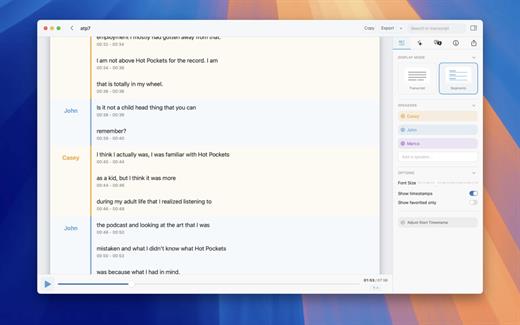
Whisper Transcription converts audio files into text using the Whisper machine learning model for speech recognition and transcription — making it easy to transcribe meetings, lectures, and other recordings.

Key Features


  • Easy Transcription: Drag and drop audio files for instant conversion.
  • On-Device Processing: 100% local transcription—no data leaves your machine.
  • Fast & Accurate: Get text multiple times faster than real-time with Metal & GPU acceleration (depending on the system).
  • Search & Edit: Highlight, edit, and delete transcript sections.
  • Audio Playback: Sync playback with the transcript for easy review.
  • Multi-Language Support: Transcribes in 100+ languages (fastest in English).
  • Subtitle Export: Save transcripts as .srt & .vtt files.
  • Batch Processing & System Audio Capture: Transcribe multiple files simultaneously and capture system audio (Zoom calls, podcasts, etc.).
  • Flexible Output: Export transcripts to Word, PDF, HTML, and subtitles.
  • Speaker Separation: Detect and split transcripts by speaker.
  • Reader Mode: Focused reading experience.
  • Advanced Model Support: Choose from various models for different accuracy and speed levels.
  • Supported Formats: Works with mp3, wav, m4a, mp4, mov, ogg, opus and more.
  • Pro Unlock: Upgrade for industry-leading transcription quality with Medium & Large models, batch processing, system audio recording, podcast transcription, and more.
What’s New

Version 13.21.4:


  • Release notes were unavailable when this listing was updated.
Compatibility

macOS 14.0 or later.


Release Name: Whisper Transcription 13.21.4
Size: 47.8 MB
Links: HOMEPAGE – NFO – Torrent Search

Download: RAPiDGATOR
5 Comments
June 8

PhotoMill X 3.4.0

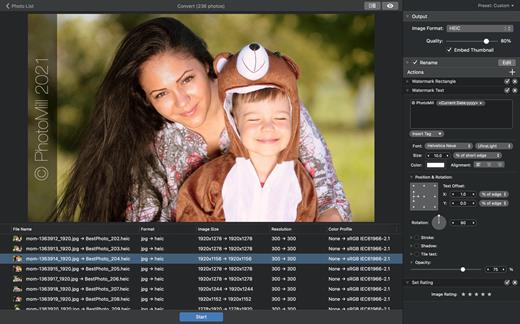
PhotoMill helps you convert a bulk of images into the most popular image formats, give your files meaningful names, watermark with text and image, adjust photos (brightness/saturation/exposure/grayscale/etc.), fit geometry (scale/crop/trim/etc.), remove private metadata, add your own copyrights etc. Also, PhotoMill is a great batch metadata editor, renamer and photo browser.

Features


  • Convert

    • Conversion to: BMP, GIF, JPEG, JPEG 2000, PDF, PNG, TIFF
  • Color models: RGB, Gray, CMYK Color depth: 8/16/32 bits; with or without alpha channel
  • Metadata editor

    • Correct EXIF/IPTC metadata tags in your photos: place GPS coordinates, remove private information from your photos, correct or set capture dates, add your own copyright, keywords or rating.
  • Photo browser

    • The app has a bunch of features for comfortable browsing and multi-criteria search of photos in the Browser. The Browser has 3 panels: Image Info – displays detailed information about a selected photo; Groups – splits photos into groups/subgroups based on a chosen criteria, for instance, by capture dates; Search – gives you an opportunity to search photos by different criteria.
  • Rename

    • You can give meaningful names to converted photos constructing file names in the “pro” way – using text and tags: index, capture date, original name, image width, “find & replace” etc. Also, you can rename photos without any conversion.
  • Resize

    • Fit image size with a bunch of geometry actions: scale, crop, add border, trim, trim color, rotate & flip, auto rotate (by EXIF orientation), change resolution.
  • Watermark

    • Text – you can use photo metadata information – tags: capture date, keywords, camera maker etc., as well as entered text. Font size can be either fixed or relative to an image width, height, long or short edge. Multiline text, stroke, shadow, rotation, tiling and other features.
    • Image – image size can be either fixed or relative to main image size. Image tiling is also available.
    • Rectangle – background for text; square or rounded. Fill and stroke color can be half-transparent.
  • Adjust colors

    • Available filters: auto contrast, auto white balance, gamma, contrast, exposure, sharpness, grayscale, sepia, colorize, temperature, HSL channels (Hue/Saturation/Lightness), HSV channels (Hue/Saturation/Value,Brightness), RGB channels, curves.
  • Working with transparency: alpha mask, color to alpha, alpha to color. Color matching: assign profile, convert to profile, proof with profile.
What’s New

Version 3.3.0:


  • Release notes were unavailable when this listing was updated.
Compatibility

macOS 10.12.2 or later
Apple Silicon or Intel Core processor


Release Name: PhotoMill X 3.4.0
Size: 87.1 MB
Links: HOMEPAGE – NFO – Torrent Search

Download: RAPiDGATOR

5 Comments
June 8

MacX DVD Ripper Pro 6.9.0

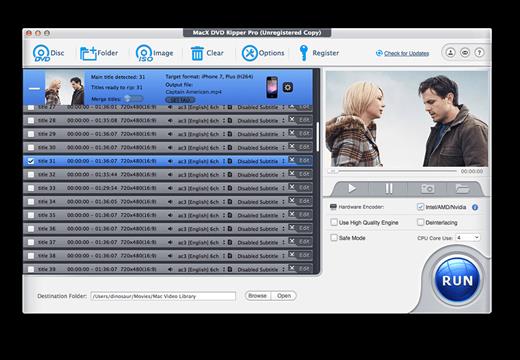
MacX DVD Ripper Pro is an ultimate Mac DVD ripper to backup & rip your DVDs on Mac with the final video and audio file in all sorts of formats, including DVD to MP4, H.264, MOV, M4V, FLV, MPEG4, AVI, QT, MP3, etc. With 350+ preset profiles, MacX DVD Ripper Pro makes it hassle-free to rip any DVDs including encrypted DVDs for Mac, iTunes, QuickTime, iPhone, iPad, Android, Apple TV, etc. bypass all copy protections (DVD CSS, region code, RCE, Sony ArccOS, UOPs, Disney X-project DRM, etc). The copy feature ensures you 1:1 DVD copy to ISO image, MKV, MPEG2 to protect them from scratches, damages, or loss. 36X faster and outstanding quality.

What’s New

Version 6.9.0:


  • Release notes were unavailable when this listing was updated.
Compatibility

macOS 10.9 or later


Release Name: MacX DVD Ripper Pro 6.9.0
Size: 100.2 MB
Links: HOMEPAGE – NFO – Torrent Search

Download: RAPiDGATOR
7 Comments
June 8

PhotoFoundry 1.3.2

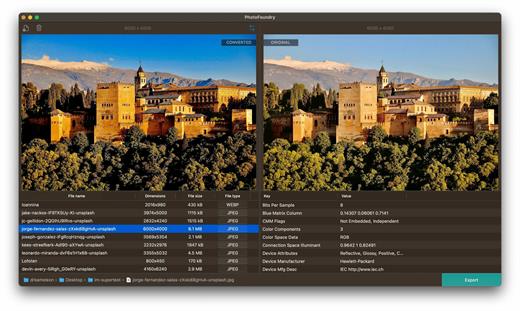
Professional batch photo-editing. Filters, photo effects, resizing, watermarks, …anything you’ve been looking for in a photo-editing app.

Features

Easy-to-use

Just open or drag’n’drop your photos and PhotoFoundry will take care of the rest.

Fast

All the speed of the Mac at your fingertips. With highly-optimized algorithms for image processing, our topmost goal has been performance.

Versatile

Reads pretty much all the image formats you’ll need. Want to export? Great! PhotoFoundry currently supports PNG, JPEG, BMP, TIFF and GIF.

Extremely configurable

With close to 200 available – and parametrizable – actions, we’ve got you covered: Blends? Color adjustments? Ready-to-use photo effects? Everything at your fingertips!

Live preview

Preview your changes live, as-you-make-them, or side-by-side – so that you’re always sure what the resulting images are going to look like!

Smart Export

Ready to export? Awesome! Just click the Export button and PhotoFoundry will take care of the rest for you.

What’s New

Version 1.3.2:


  • Release notes were unavailable when this listing was updated.
Compatibility

macOS 11.0 or later.
Apple Silicon or Intel Core processor


Release Name: PhotoFoundry 1.3.2
Size: 36 MB
Links: HOMEPAGE – NFO – Torrent Search

Download: RAPiDGATOR

7 Comments