Please REGISTER or RENEW your account on RAPiDGATOR.net and support us by doing through all RAPiDGATOR working download links on main posts...
July 7

Adobe Photoshop 2025 v26.8.0

Adobe Photoshop 2025, the industry standard for digital image processing and editing, delivers a comprehensive package of professional retouching tools, and is packed with powerful editing features designed to inspire.

Combine, retouch, and remix your pics. Add new color to your old black-and-whites. Make unwanted stuff disappear. Or turn a boring background into an exotic paradise. With Photoshop, everyone can.

Make creativity your business.

Chinzalée Sonami is a ceramic artist who sells her colorful pottery at her studio, through an online shop, and at small outlets around the country. She designs posters, flyers, brochures, ads, and more with Photoshop to promote her business.

Retouch and remix your pics.

Forrest Aguar and Michelle Norris, the duo behind Tropico Photo studio, use Photoshop techniques, inventive color combinations, and dimensions to bring their bright version of paradise to any location.

Your go-to for Instagram-gorgeous graphics.

Nice Day Chinese Takeout uses Photoshop to create mouthwatering social posts and scroll-stopping graphics for their popular New York takeout restaurant.

Build a following and a brand.

Meg Lewis designs virtual backgrounds and graphics with Photoshop to showcase her colorful style on social and build her personal brand.

Discover your own artistic style.

Designer and illustrator Aries Moross draws and paints with Photoshop brushes to transform letters into personal artistic expressions.

What’s New

Version 26.8.0:


  • Release notes were unavailable when this listing was updated.
Compatibility

macOS 11 or later
Apple Silicon or Intel Core processor


Release Name: Adobe Photoshop 2025 v26.8.0
Size: 8 GB
Links: HOMEPAGE – NFO – Torrent Search

Download: FiKPERNiTROFLARERAPiDGATOR

5 Comments
July 7

Adobe Premiere Pro 2025 v25.3.0

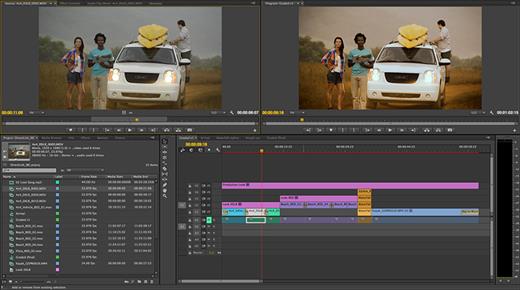
Adobe Premiere Pro is a professional non-linear video editing software. The application provides high-quality video editing of 4K resolution and above, with 32-bit color, both in RGB and YUV color space. Audio sample editing, support for VST audio plugins (plug-in) and 5.1 surround audio tracks. The Premiere Pro plug-in architecture allows you to import and export QuickTime or DirectShow container content, and supports a wide range of video and audio formats from MacOS and Windows.

Features


  • Ease of collaboration with group projects. Group projects allow multiple users to work on projects at the same time in the video editor in real time. Premiere Pro CC, After Effects CC, and Prelude CC support built-in version control, conflict resolution, and activity tracking so that project participants can collaborate no matter where they are. These features are now available in Creative Cloud for teams and organizations.
  • Improved subtitles. New subtitle capabilities allow you to quickly perform text manipulation, change the duration and position of text, and create visible and disabled subtitles.
  • Lumetri Color improvements. New color picker options let you instantly select HSL secondary colors, work with HDR10 files, and enjoy improved support for color space metadata.
  • Faster operation of the Dynamic Link function. Acceleration eliminates intermediate rendering and provides higher frame rates during playback.
  • Automatic recognition in virtual reality mode. Premiere Pro automatically recognizes the VR video format (monoscopic, left/right stereoscopic, or top/bottom stereoscopic) and applies the appropriate settings.
  • Publishing to Behance. Publish videos directly to your Behance portfolio – no more exporting or uploading videos separately.
  • Function Dynamic Link with support for Character Animator. This feature eliminates intermediate rendering and improves performance when working with the integrated Character Animator, After Effects, and Premiere Pro applications.
  • Improved interactive text templates. The new file format lets you share Live Text templates between Premiere Pro and After Effects. It does not require a separate After Effects license.
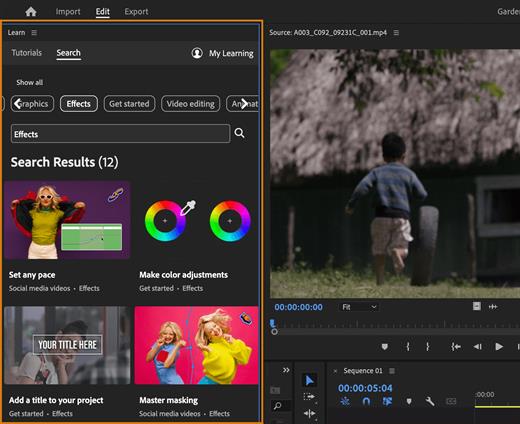
  • New start interface. In the new launch window, novice users will see an overview of the application’s features, a video processing example, and tutorials that allow you to quickly create a project based on a template.
  • Synchronization of Typekit fonts. You no longer have to manually add missing fonts when working with interactive text templates. Fonts are automatically synced and updated from Typekit.
  • Audition sound effects. New sound effects work in real time and provide high quality and fidelity of sound transmission.
  • Assigning keyboard shortcuts. Quick visual search, change and create keyboard shortcuts.
  • Simplified media addition. For easy file management, you can merge multiple recorded clips into one file.
  • Improved performance. With support for Apple Metal technology and other GPU features, including Offset, you can work even faster.
  • Import of additional native formats. Premiere Pro now supports even more formats, including native QT DNxHD/DNxHR and RED Helium exports.
What’s New

Version 25.3.0:


  • Release notes were unavailable when this listing was updated.
Compatibility

macOS 12 or later
Apple Silicon or Intel Core processor


Release Name: Adobe Premiere Pro 2025 v25.3.0
Size: 16.9 GB
Links: HOMEPAGE – NFO – Torrent Search

Download: FiKPERNiTROFLARERAPiDGATOR

3 Comments
July 7

Adobe Media Encoder 2025 v25.3.0

Adobe Media Encoder is an encoding program that allows you to encode audio and video files into various distribution formats for various applications and audiences. Such video and audio formats are characterized by a high degree of compression. Using this program, you can export videos to formats supported by various devices, from DVD players and websites to mobile phones, portable media players, and standard and high definition TVs.

Key Features


  • Support for 8K H.264 export
  • Export XAVC QFHD Long GOP 4:2:2 formats
  • Hardware-accelerated HEVC encoding on Windows 10 with 7th Generation (or later) Intel® Core™ processors and Intel Graphics enabled
  • Improved RED camera format decoding
  • Improved Sony RAW/X-OCN camera format decoding
  • Hardware-accelerated H.264 encoding on Windows 10 with 6th Generation (or later) Intel® Core™ processors and Intel Graphics enabled
  • Hardware-accelerated H.264 and HEVC encoding on Mac OS 10.13 systems with supported hardware
  • Support for importing Canon C200 camera formats
  • Support for importing Sony Venice camera formats
  • RED camera Image Processing Pipeline[IPP2] support
  • Destination Publishing support for new Twitter 280-character limit
  • Channel selection when publishing to YouTube and Vimeo
  • Playlist selection when publishing to YouTube
  • Page selection when publishing to Facebook
  • Add custom titles when publishing to YouTube, Facebook, or Vimeo
  • Add custom video thumbnails when publishing to YouTube
  • Notification for missing items in queue before encoding
  • H.264 adaptive bitrate presets automatically choose best output bitrate based on source frame size and frame rate
  • Animated GIF export on macOS and Windows
  • Time Tuner effect improvements
  • Newly optimized list of H.264 presets
  • Format support for RF64 WAV Decode/Encode, decode for Sony X-OCN, and QuickTime DNx Smart Rendering
  • Warning when importing non-native QuickTime sources
  • Timecode modification for 720p 59.94 media
  • Destination Publishing to Adobe Stock Contributor
  • Adobe Team Projects support
  • Support for Color Profiles from After Effects sources
  • Automatically relinked assets when importing a sequence
  • Option to maintain playback in Premiere Pro while rendering in Media Encoder
  • Streamlined bit depth and alpha channel settings (QuickTime only)
  • Export support for ambisonic audio (H.264 only)
  • Support for Hybrid LOG Gamma (HLG)
  • Support for HDR in HEVC (H.265) export Export support for Panasonic AVC-Long GOP Op1b
What’s New

Version 25.3.0:


  • Release notes were unavailable when this listing was updated.
Compatibility

macOS 12.0 or later.


Release Name: Adobe Media Encoder 2025 v25.3.0
Size: 2.6 GB
Links: HOMEPAGE – NFO – Torrent Search

Download: FiKPERNiTROFLARERAPiDGATOR

9 Comments
June 18

Luminar Neo 1.24.4

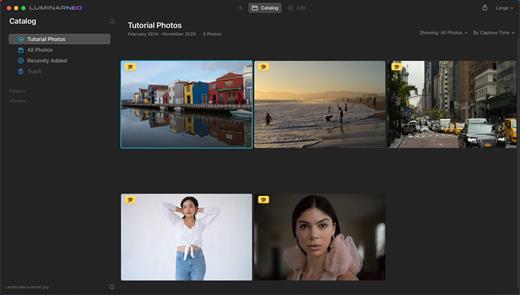
Luminar Neo is an AI-driven creative image editor. A creative image editor to bring your ideas to life. Have you ever wanted to achieve more with your images? Luminar Neo is an innovative image editor powered by AI technologies of the future that simplifies complex editing routines and enables creators to bring their boldest ideas to life. And enjoy it.

Control the light in 3D space with RelightAI
Relight backlit photos or darkened images in a click with the RelightAI feature. Luminar Neo calculates the depth of a photo and creates a 3D map, making it possible to spread light naturally in 3D space across a 2D image. You can also relight the background and foreground separately — meaning you can darken parts of the image as well. This opens up an opportunity for creative relighting in order to bring your artistic vision to life.

Remove messy powerlines with AI
Automatically remove distracting elements in your cityscapes, urban landscapes or travel photos. Get a clear sky with no cluttered phone or power lines.
Unleash your creativity with Layers and AI Masking
Use both MaskAI and Layers for limitless creativity. MaskAI automates the masking process by identifying objects in the image and creating precise masks.

You can always manually refine those masks with a brush if you choose to. Layers open up a whole new level of creative expression, with endless possibilities for adding objects, textures, watermarks, and any other graphics to your images.

Replace the sky in one click
Cutting-edge sky replacement technology with water reflections, sky positioning, and human-aware relighting to match the new sky.
Lightning-fast creative editing with an all-new image engine.
Designed as a module system its parts now can be optimized separately, for the best performance.

What’s New

Version 1.24.4:


  • Release notes were unavailable when this listing was updated.
Compatibility

macOS 11.0.0 or later
Apple Silicon or Intel Core processor


Release Name: Luminar Neo 1.24.4
Size: 4.9 GB
Links: HOMEPAGE – NFO – Torrent Search

Download: FiKPERNiTROFLARERAPiDGATOR

8 Comments
June 18

Noizio 2.1.3

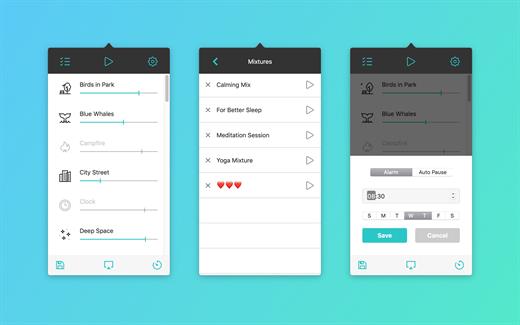
Noizio is an app that will drown out the noise of the street and allow you to concentrate on the work at hand, increasing your productivity. On the other hand, it can also set the mood for a romantic evening or lull you to sleep, ensuring that you will dream soundly all night long. An ambient sound equalizer app for creating a mixture of ambient sounds available for OS X.

Features


  • 15 enchanting ambient sounds;
  • Ease of choosing and blending the ambient sounds into a mixture that will perfectly fit your mood;
  • Minimalistic design;
  • Completely free of charge with no hidden ads;
  • Sounds are played in a seamless loop;
  • Develop for Yosemite;
  • Option to automatically launch the program after you turn on your Mac.
  • Ready for your MacBook Pro (support Retina display)
15 Ambient sounds:

  • October Rain, Coffee House, Thunderstorm, Campfire, Winter Wind, Sea Waves, River Stream, Summer Night, Sunny Day, Deep Space, Sailing Yacht, Inside Train, On The Farm, Wind Chimes, Blue Whales
What’s New

Version 2.1.3:


  • Updated to latest framework for better performance
  • Enhanced app stability and security improvements
Compatibility

macOS 10.13 or later


Release Name: Noizio 2.1.3
Size: 103.9 MB
Links: HOMEPAGE – NFO – Torrent Search

Download: FiKPERNiTROFLARERAPiDGATOR

6 Comments
June 18

Lyn 2.4.5

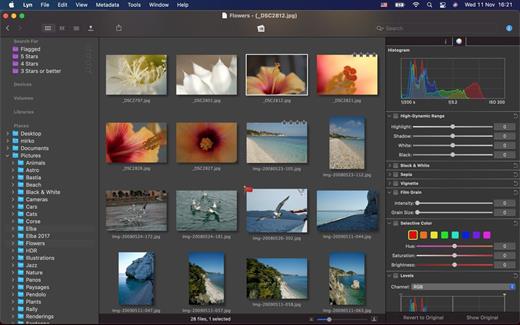
Lyn for macOS is a lightweight, and fast media browser and viewer for designed for Photographers, Graphic Artists and Web Designers.

Featuring an extremely versatile and aesthetically pleasing interface, Lyn delivers an easy to use geotagging technology, image editing and a complete solution for sharing your photographs.

Lyn natively supports all popular image formats from standard formats to HDR and RAW plus any other image format supported by macOS. It also integrates a movie player to watch camera recordings and a simple PDF viewer.

The new editing inspector gives you everything to turn your shots into great photos. Adjust exposure, color temperature, brightness, contrast or reveal image details with highlight and shadow. You change the individual curves and levels, or you can alter colors selectively. You can experiment and convert your color photos to black and white, try a classic sepia tone or add a vignette border or film grain.

Features:


  • Progressive display, on single- or multiple-monitor configurations, of images of virtually any size.
  • Multi-threading to take advantage of multicore CPUs.
  • Display color-corrected images and soft-proofing function.
  • Compatible with High Dynamic-Range images like TIFF float as well as Radiance and OpenEXR.
  • Common metadata parser: EXIF, Camera’s makernote, GPS, GeoTIFF, IPCT.
  • Image navigation with Apple Remote Control or Magic Trackpad.
  • User-switchable thumbnails cache.
  • Filtering by tags and metadata.
  • Fullscreen and slideshow with music.
  • Full IPTC editing with user-defined presets.
  • Batch operations: convert and rename.
  • User-defined places.
  • Non-destructive editing.
  • Editing inspector with filters and effects: temperature and tint, exposure, brightness, contrast, highlight, and shadow. Black and white, sepia tone, and vignette.
  • Easily browse your iPhoto, Aperture, and Lightroom libraries!
  • Facebook, Flickr, Dropbox, SmugMug, 500px, and Picasa Web Albums sharing!
  • Maps layout: geotag your photographs and edit locations with a simple drag and drop.
  • Integrated QuickTime video player
What’s New

Version 2.4.5:


  • Release notes were unavailable when this listing was updated.
Compatibility

macOS 10.11 or later


Release Name: Lyn 2.4.5
Size: 38.4 MB
Links: HOMEPAGE – NFO – Torrent Search

Download: FiKPERNiTROFLARERAPiDGATOR

6 Comments
June 18

Text Workflow 2.4.1

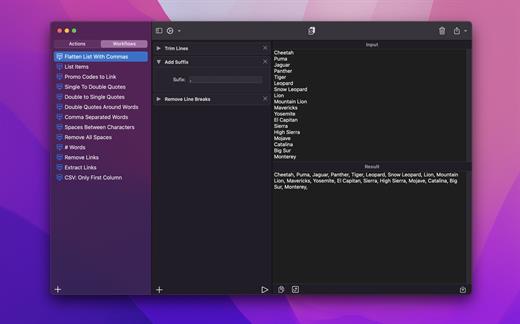
A powerful and easy to use tool that will help you transform your text. Text Workflow removes the need to perform repetitive tasks manually on your text.

Combine transformation actions to create powerful automations for your text. Save your transformation workflows to use them any time you want.

Available text transformation actions

• Add prefix
• Add suffix
• Replace text
• Sort lines


  • alphabetically
  • reverse
  • shuffle
  • by length
    • Trim Lines
    • Add line number
    • Break lines
  • after every word
  • after every sentence
  • after text
  • before text
    • Convert Case
  • uppercase
  • lowercase
  • title case
  • camel case
  • pascal case
    • Delete Characters
  • selected characters
  • non-alphanumeric
  • numeric characters
  • non numeric
  • tabs
  • spaces
  • characters after position
  • characters before position
  • last characters
  • emojis
  • characters after text
  • characters before text
    • Insert Text
  • at first line
  • at last line
  • every line (position)
  • before every word
  • after every word
  • before text
  • after text
  • after every character
    • Delete Lines
  • containing text
  • starting with text
  • not containing text
  • not starting with text
    • Remove line breaks
    • Remove multiple spaces
    • Remove duplicates lines
    • Remove duplicates words
    • Remove empty lines
    • Delete/Filter words
  • containing text
  • starting with text
  • not containing text
  • not starting with text
    • Spell out lines
    • Get Statistics
  • count characters
  • count words
  • count lines
    • Encode/Decode
  • Base64
  • URL
    • Encrypt/Decrypt Text with password
    • Beautify JSON
    • Beautify XML
You can combine all these actions to create your custom transformation workflows!
Export your workflows to file and share them easily with other users!

What’s New

Version 2.4.1:


  • Release notes were unavailable when this listing was updated.
Compatibility

macOS 11.2 or later


Release Name: Text Workflow 2.4.1
Size: 13.8 MB
Links: HOMEPAGE – NFO – Torrent Search

Download: FiKPERNiTROFLARERAPiDGATOR

7 Comments
June 18

Multitouch 1.29.0

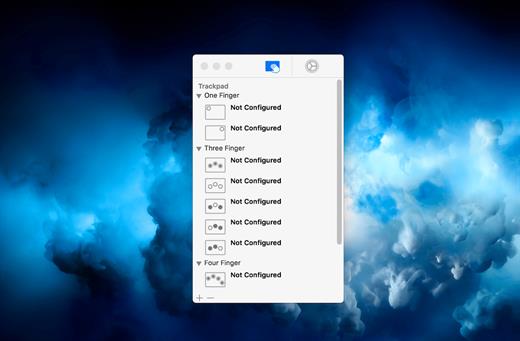
Multitouch (formerly TouchOven) ties a custom action to a specific magic trackpad or magic mouse gesture. For example, a three finger click can execute a paste. Improve your workflow by executing keyboard shortcuts, controlling your browser’s tabs, performing a middle mouse click, and much more.

Features


  • A growing list of gestures and actions.
  • Privacy. No user data is gathered from the app.
*** You need to disable the System Integrity Protection (SIP) to perform the selected Application.

What’s New

Version 1.29.0:


  • Release notes were unavailable when this listing was updated.
Compatibility

macOS 10.15 or later


Release Name: Multitouch 1.29.0
Size: 11.3 MB
Links: HOMEPAGE – NFO – Torrent Search

Download: FiKPERNiTROFLARERAPiDGATOR

6 Comments
June 18

Microsoft Word 16.98

Microsoft Word app lets you create, edit, view and share your files with others quickly and easily. It also lets you view and edit Office docs attached to emails. With Word, your Office moves with you. Whether you are a blogger, writer, journalist, columnist, student or a project manager working on documentation, it’s as handy as you want it to be

Highlights:


  • Unmistakably Office, designed for Mac – MacBook Pro Touch Bar is fully supported by Microsoft Word. Get the most relevant Word features at your fingertips. Need to focus on your writing and help eliminate distractions? Microsoft Word also supports macOS Mojave Dark Mode
  •  Create with confidence – jump-start your project, assignments, letter, blog, script, notes, write-ups or CV with beautifully designed modern templates. Use rich formatting and layout options to note down your ideas and express them in writing. Document format and layout stays pristine and looks great – whatever device you use
  •  Put your best words forward – write with confidence, knowing that intelligent technology can help with spelling, grammar and even stylistic writing suggestions. With tools at your fingertips, easily go from pen and paper to digital inking and edit intuitively
  •  Stay in the flow – get all of the information you need as you write without leaving Word, whether it’s cited research or information from LinkedIn to help you craft a compelling CV
  •  Work better together – wherever you are, collaborate in real time. Share your documents with the click of a button to invite others to edit in real time or add comments. Plus, regardless of your preferred full language or accessibility options, everyone can work together to do more
  •  Sharing is simplified – share your files with a few taps to quickly invite others to edit or view your documents. Easily manage permissions and see who’s working in a document. Copy the content of your Word files directly into the body of an email message with its format intact or attach your docs to an email and make sharing easier
What’s New

Version 16.98:


  • Bug fixes
Compatibility

macOS 10.15.0 or later
Apple Silicon or Intel Core processor


Release Name: Microsoft Word 16.98
Size: 1.2 GB
Links: HOMEPAGE – NFO – Torrent Search

Download: FiKPERNiTROFLARERAPiDGATOR

7 Comments
June 18

Downie 4.9.18

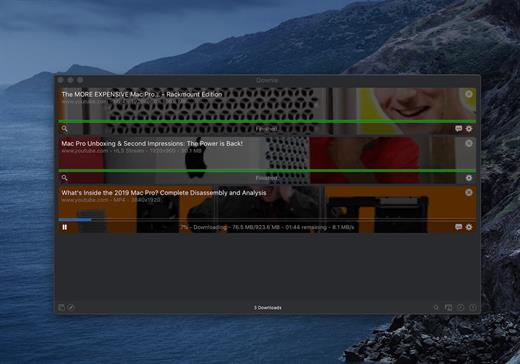
A simple download manager that offers you the possibility to quickly save videos from different websites to your own disk drive.

If you are using a poor internet connection, trying to visualize videos streamlined online might not work properly since the content is loaded too slowly. Downie is a simple Mac app that can help you download those videos to your computer, and then watch them by using your default media player.

User friendly video downloader featuring support for drag and drop actions

Working with Downie is extremely straightforward: simply drop the video URL on top of the app’s main window or on the Dock icon. Downie adds the video to your downloads list, so all you have to do next is start the process by pressing the appropriate button. Of course, you can also remove items from the list.

By default, Downie downloads MP4 files and places them in your default Downloads folder, but you can easily change this via the Preferences window. The same area allows you to setup notifications, or post processing actions (convert to MP4 if necessary, or extract audio only).

Effortlessly download videos from a wide collection of hosting websites

Downie provides support for more than 400 different websites that host video content, among which there are the most popular choices, such as YouTube, Apple, LiveLeak, Vimeo, BBC, and so on. If a certain website is not included, within the app you can send a request email to the Downie developers.
Moreover, Downie also provides matching extensions for various popular web browsers, such as Firefox, Safari, Google Chrome or Chromium. The add-ons are not installed by default: open the Preferences window and install only the ones you plan to use.

Straightforward solution for downloading video content hosted online

Downie is a great tool for saving videos posted on various websites to your Mac for offline playback. The application is extremely useful especially if you have a slow internet connection.

What’s New

Version 4.9.18:


  • Improved: raiplaysound.it, tv5unis.ca, vimeo.com, x.com.
Compatibility

macOS 10.12 or later
Apple Silicon or Intel Core processor


Release Name: Downie 4.9.18
Size: 51.1 MB
Links: HOMEPAGE – NFO – Torrent Search

Download: FiKPERNiTROFLARERAPiDGATOR

6 Comments