Please REGISTER or RENEW your account on RAPiDGATOR.net and support us by doing through all RAPiDGATOR working download links on main posts...
May 14

Snagit 2025.2.0

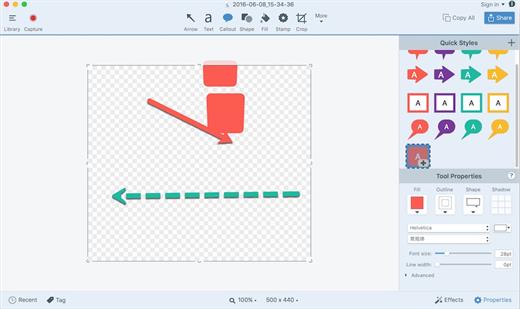
Snagit lets you create an image of what you see on your computer monitor.

Features

Flexible options that let you capture only what you want.

Annotation varieties like arrows, speech bubbles, and more make it easy to customize your capture.

Versatility in what you do with your capture. Send it to your favorite app, share it online, or save it for later.

What’s New

Version 2025.2.0:


  • Release notes were unavailable when this listing was updated.
Compatibility

macOS 10.14 or later
Apple Silicon or Intel Core processor


Release Name: Snagit 2025.2.0
Size: 203.6 MB
Links: HOMEPAGE – NFO – Torrent Search

Download: FiKPERNiTROFLARERAPiDGATOR

6 Comments
May 14

Hazel 6.0.4

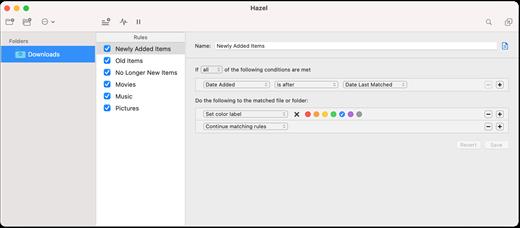
Hazel is your personal housekeeper, organizing and cleaning folders based on rules you define. Hazel can also manage your trash and uninstall your applications.

Organize your files using a familiar rule interface. Filter on the file’s name, type, date, the site or email address it came from and more. And do more than just file. You can set color labels, Spotlight keywords and comments and even archive files. Hazel also cleans, sporting options to clean out incomplete and duplicate downloads. All this is done automatically in the background allowing you to focus on your real work.

In addition, Hazel can manage your Trash for you, relieving you of having to empty it yourself.

What’s New

Version 6.0.4:


  • Release notes were unavailable when this listing was updated.
Compatibility

macOS 10.15 or later
Apple Silicon or Intel Core processor


Release Name: Hazel 6.0.4
Size: 26.9 MB
Links: HOMEPAGE – NFO – Torrent Search

Download: FiKPERNiTROFLARERAPiDGATOR

6 Comments
May 14

FlowVision 1.6.3

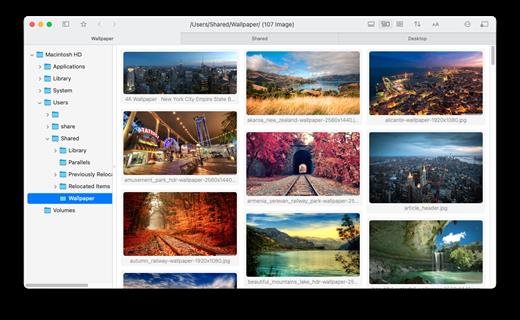
FlowVision is a waterfall-style image viewer, offering a smooth and immersive browsing experience.

Features:


  • Adaptive layout mode, light/dark mode
  • Convenient file management (similar to Finder)
  • Right-click gestures, quickly find the previous/next folder with images/videos
  • Performance optimizations for directories with a large number of images
  • High-quality scaling (reduces moiré and other issues)
  • Support for video thumbnails
What’s New

Version 1.6.3:
New Features


  • Directory tree sorting options
  • Support for WebP and PNG animations
Changes

  • Added shortcut: Press Z in image view to zoom to 100%, press X to fit image
  • Added shortcut: Alt + Enter to toggle fullscreen
  • Improved some operational details
Compatibility

macOS 11 or later


Release Name: FlowVision 1.6.3
Size: 18.6 MB
Links: HOMEPAGE – NFO – Torrent Search

Download: FiKPERNiTROFLARERAPiDGATOR

4 Comments
May 14

Topaz Photo AI 4.0.0

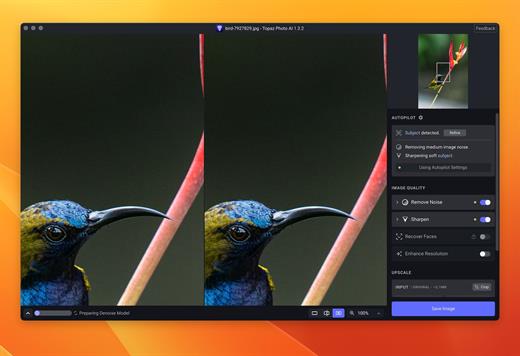
Sharpen, remove noise, and increase the resolution of your photos with tomorrow’s technology. Topaz Photo AI supercharges your image quality so you can focus on the creative part of photography.

Focus on your creativity rather than your tools.
AI is good at some things but bad at others. It can write sentences but can’t tell a story, and it can recommend songs but can’t compose music. But most importantly for us: AI is exceptionally good at improving image quality, but bad at knowing what to do with it.

We believe that stunning photography comes from artistic vision paired with world-class tools. AI will never replicate human creativity, so it’s still your job to provide the vision. But just like a sharper lens or better camera, Topaz Photo AI empowers you to create images that just aren’t possible with yesterday’s tools.

Your photos at their very sharpest.
You won’t always be able to retake a shot when your subject is blurry. Sometimes you won’t even know until you’re reviewing your photos on your computer.

In these cases, use Topaz Photo AI to ensure that your photos are the sharpest they can possibly be. Instead of artificially increasing edge contrast like traditional sharpening, the Sharpen AI module naturally reverses root causes of blurriness (camera shake, motion blur, misfocus) to create more natural results.

In the absence of blur, sharpness remains – crisp, clear detail that’s free of edge haloes or other artifacts.

What’s New

Version 4.0.0:


  • Release notes were unavailable when this listing was updated.
Compatibility

macOS 10.12 or later


Release Name: Topaz Photo AI 4.0.0
Size: 1.2 GB
Links: HOMEPAGE – NFO – Torrent Search

Download: FiKPERNiTROFLARERAPiDGATOR

6 Comments
May 14

Noir – Dark Mode for Safari 2025.1.4

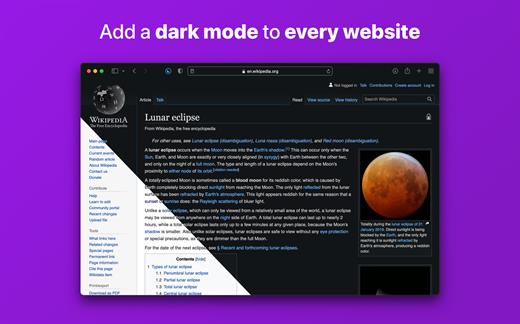
Noir is a Safari extension that automatically adds a dark mode to every website you visit.

It makes browsing the web at night so much better. With Noir, you won’t be blinded by bright websites ever again.

And the results look great too. Noir generates a custom dark style for each website you visit, based on the colors that are used on a page. You won’t even notice this happening in the background – that’s how fast it is – but you’ll certainly appreciate the end result: a beautiful dark mode tailored for each website, where contrast is preserved and highlights still pop.

Noir works with any website you visit in Safari, automatically. By default, Noir is linked to your device’s Dark Mode, so websites will only go dark when you want them to. But you can easily customize this to your liking, even per website. Only want to use Noir on just a few specific websites? Sure thing! Disable Noir on some websites? No problem!

The app feels right at home on your device. It is a Safari extension, which means there’s no need to manually activate it every time you load a new page. The app also tightly integrates with system features such as Shortcuts to fully integrate Noir in all your workflows. And your settings are automatically synced to all your devices using iCloud.

And just as importantly, Noir takes your privacy seriously: it doesn’t collect any of your browsing data. Period.

Noir is made by a solo developer. It does not include any subscriptions or ads. Buy Noir once, use it forever.

What’s New

Version 2025.1.4:


  • Release notes were unavailable when this listing was updated.
Compatibility

macOS 12.0 or later.


Release Name: Noir – Dark Mode for Safari 2025.1.4
Size: 11.8 MB
Links: HOMEPAGE – NFO – Torrent Search

Download: FiKPERNiTROFLARERAPiDGATOR

5 Comments
May 14

PPTube 10.0.0

Unlimited Download 1080p/4K Videos from 10,000+ Video/Music Streaming Websites. PPTube Video Downloader allows you to download HD videos with ease, ranging from 720p, 1080p, 2K, 4K and 8K.
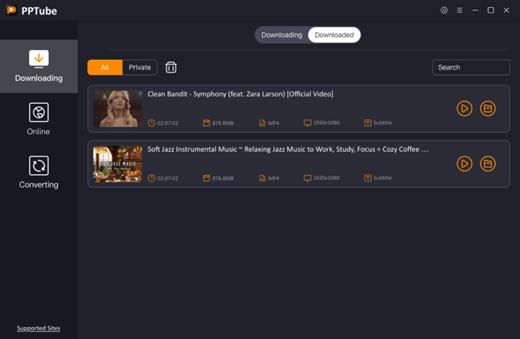
Save Videos in Bulk
You can save multiple videos in one go. Just copy multiple video URLs from various sites, and paste them to PPTube Downloader, then you can download multiple videos in few seconds.

Support 10,000+ Sites
You can download HD videos from Instagram, TikTok, Facebook, Apple Music, Vimeo, adult sites, etc. and convert them into MP4, MP3, MOV, AAC, and other 20+ output formats.

Keep the Video Private
PPTube provides a private video mode so you can save your downloaded videos in a password-protected folder. Your videos are hidden with a private lock to keep safe from any prying eyes or miswatching by children.

More Features
You’ll find more powerful features in the PPTube Toolbox to enjoy more convenience for your video download
Video Websites YouTube, Facebook, Instagram, Dailymotion (Playlist), Vimeo, Twitch, TikTok (without watermark), Einthusan, NicoNico, Ok.ru, VK, Twitter, Fox, Lynda, YouKu, Yahoo Video, Bilibili, Coub, Vlive.TV, Liveleak, Reddit, Mgoon, Sportstadio, Media collections and various adults sites.
Audio Websites Spotify, SoundCloud, MixCloud, FreeSound, Bandcamp, VEVO, Last.fm, Hungama, 8tracks and more music-share sites

SUPPORTED INPUT FORMATS
Video MP4, M4V, 3GP, MPEG, DAT, AVI, ASF, WMV, VOB, MKV, FLV, 3GS, 3G2, F4V, WEBM, TS, RMVB, MOV
Audio MP3, AAC, AC3, FLAC, M4A, WAV, WMA, AMR, MKA, MP2, AIF, AU, AIFF, CAF, OGG, RAM, RA, M4B, M4R, APE, OPUS, WEBM

What’s New

Version 10.0.0:


  • Release notes were unavailable when this listing was updated.
Compatibility

macOS 10.10 or later


Release Name: PPTube 10.0.0
Size: 81.2 MB
Links: HOMEPAGE – NFO – Torrent Search

Download: FiKPERNiTROFLARERAPiDGATOR

5 Comments
Apr 16

ChatGPT for macOS 1.2025.098

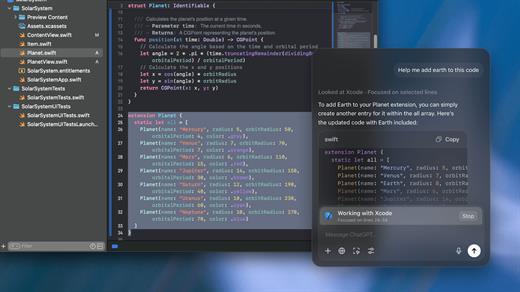
OpenAI released the native ChatGPT desktop app for macOS.

With a simple keyboard shortcut (Option + Space), you can instantly ask ChatGPT a question.

You can also take and discuss screenshots and directly in the app.

The app also enables you to start new conversations with photos from your computer, or new photos you take.

You can now have voice conversations with ChatGPT directly from your computer, starting with Voice Mode that has been available in ChatGPT at launch, with GPT-4o’s new audio and video capabilities coming in the future. Whether you want to brainstorm a new idea for your company, prepare for an interview or have a topic you’d like to discuss, tap the headphone icon in the bottom right corner of the desktop app to start a voice conversation.

With the release of ChatGPT for macOS, OpenAI has also unveiled the even more advanced GPT-4o model.

GPT-4o is OpenAI’s new flagship model that can reason across audio, vision, and text in real time.

GPT-4o will be available in ChatGPT and the API as a text and vision model (ChatGPT will continue to have support for voice via the pre-existing Voice Mode feature) initially. Specifically, GPT-4o will be available in ChatGPT Free, Plus, and Team (with Enterprise coming soon) and in the Chat Completions API, Assistants API, and Batch API.

ChatGPT for macOS is now available to everyone.

What’s New

Version 1.2025.098:


  • Release notes were unavailable when this listing was updated.
Compatibility

macOS 14.0 and Apple Silicon (M1 or better)


Release Name: ChatGPT for macOS 1.2025.098
Size: 53.3 MB
Links: HOMEPAGE – NFO – Torrent Search

Download: FiKPERNiTROFLARERAPiDGATOR

10 Comments
Apr 16

FlowVision 1.6.1

FlowVision is a waterfall-style image viewer, offering a smooth and immersive browsing experience.

Features:


  • Adaptive layout mode, light/dark mode
  • Convenient file management (similar to Finder)
  • Right-click gestures, quickly find the previous/next folder with images/videos
  • Performance optimizations for directories with a large number of images
  • High-quality scaling (reduces moiré and other issues)
  • Support for video thumbnails
What’s New

Version 1.6.1:
New Features


  • Quick Search (see description under Settings -> Actions)
  • Enter(⏎) key's function is now customizable
Compatibility

macOS 11 or later


Release Name: FlowVision 1.6.1
Size: 18 MB
Links: HOMEPAGE – NFO – Torrent Search

Download: FiKPERNiTROFLARERAPiDGATOR

8 Comments
Apr 16

PeaZip 10.4.0

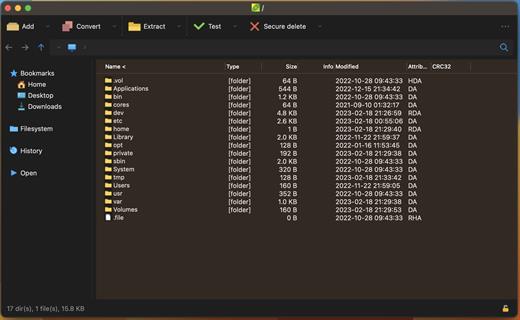
PeaZip for macOS is a cross-platform file compression app. Full support for 7Z, BR, BZ2, GZ, PAQ, ZPAQ, PEA, TAR, WIM, XZ, ZIP, ZST formats. Browse, extract RAR, CAB, DEB, DMG, ISO, JAR, LHA, LZH, RAR, UDF, ZIPX files and more, 200+ types. Create self extracting archives (sfx). Supports spanned archives (.001 files). Update and convert existing archives. Encrypt and decrypt archives, verify checksum / hash. Tabbed browsing, in-archive search.

What’s New

Version 10.4.0:


  • PeaZip 10.3.0 improves various archive managing functions, as handling archives containing errors, automatic browsing of compressed TAR archives, displaying task progress, saving reports, and context menu integration in Gnome and KDE.
    The new Style submenu allows to customize the look&feel of app's file/archive manager with a single click choosing between 4 pre-set layouts (Minimal, Classic, Modern, Postmodern).
Compatibility

macOS 10.11 or later
Apple Silicon or Intel Core processor


Release Name: PeaZip 10.4.0
Size: 36.2 MB
Links: HOMEPAGE – NFO – Torrent Search

Download: FiKPERNiTROFLARERAPiDGATOR

8 Comments
Apr 16

MarsEdit 5.3.4

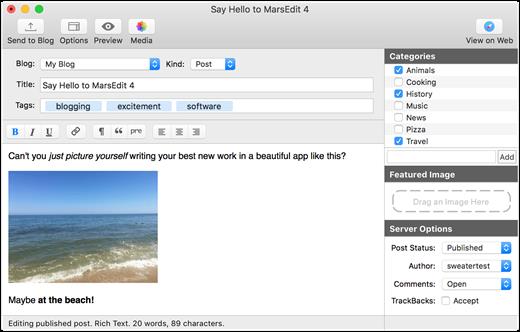
MarsEdit is a blog editor for macOS that makes editing your blog like writing email, with spell-checking, drafts, multiple windows, and even AppleScript support.

It works with with most blog services including WordPress, Blogger, Drupal, Movable Type, TypePad, and many others.

Blogging is a relaxing hobby for some, while, for others, it represents a steady source of income. Regardless of your blog’s role in your life, writing and publishing content using slow, clumsy web interfaces may not be the best solution, especially when a powerful desktop alternative is available.

MarsEdit allows you to do all your writing from a native Mac app, while also offering an impressive amount of helpful features.

Strong feature lineup and support for a wide range of blogging services
MarsEdit can be used to manage blogs being hosted on WordPress, Blogger, TypePad, Tumblr, Movable Type or any other service that supports the MetaWeblog or AtomPub interface.

It is possible to write using HTML, RTF or even Markdown, and the app displays a live preview to show you how the post will look after being published. Moreover, MarsEdit can be integrated with TextMate, WriteRoom, TextWrangler or BBEdit, as well as other text editors that support the ODBEditor suite.

Furthermore, the application allows you to search for content in your iPhoto, Lightroom, Flickr or Aperture libraries, and import images with a single mouse click.

Manage your blog from your desktop and save drafts locally
While you can certainly write blog posts in other editors and format them once you have access to the web service of your choice, this method takes more time and requires quite a bit more work.

With MarsEdit, you can write whenever you want, regardless of the availability of an Internet connection. Your posts are saved as drafts and can be uploaded as soon as you get back online.

Powerful blog editor that has all the right features, but could use a visual update
There is no denying that MarsEdit is a great app for the job it was designed for, but its interface has not changed a great deal for many years. Mind you, it is very easy to manage and has a simple, intuitive layout, but it is starting to show its age.

On the whole, however, MarsEdit is a great tool for any blogger who wants to get their work done more quickly and from any location, as it offers numerous helpful features and allows one to prepare blog posts even when no internet connection is available.

What’s New

Version 5.3.4:


  • Enabled the Excerpt field on Micro.blog blogs to edit “Summary” text
  • Fix a crash that could occur when editing long lines in the plain text editor
  • Fix a bug that prevented the JavaScript browser bookmarklet from working on some sites
  • Fix a bug that caused duplicated text when using dictation in rich text
  • Differentiate errors from Jetpack about IP address being flagged from regular login failures
  • Handle "Too Many Requests" responses more intelligently, retrying after the recommended delay if possible
  • Fix a bug that could cause the "New Blog" panel to get very tall and not shrink again
  • Fix a bug that prevented the non-Safari browser bookmarklet from working on some sites
  • Remove media assets from the list of "posts" returned by AppleScript
Compatibility

macOS 10.15.4 or later
Apple Silicon or Intel Core processor


Release Name: MarsEdit 5.3.4
Size: 24.3 MB
Links: HOMEPAGE – NFO – Torrent Search

Download: FiKPERNiTROFLARERAPiDGATOR

8 Comments