Please REGISTER or RENEW your account on RAPiDGATOR.net and support us by doing through all RAPiDGATOR working download links on main posts...
Jan 31

Wolfram 14.2.0

Wolfram|One is the world’s first fully cloud-desktop hybrid, integrated computation platform—the ideal entry point to using the full capabilities of the Wolfram technology stack.
From data analytics to modeling (with our curated data or yours), from publishing an API to live presenting your latest R&D, from instant scratchpad to rapidly programming your prototype, Wolfram|One is the culmination of over three decades of experience in one easy-to-use, get-started-now product from the world’s leading computation company.

If it’s computation, we do it…
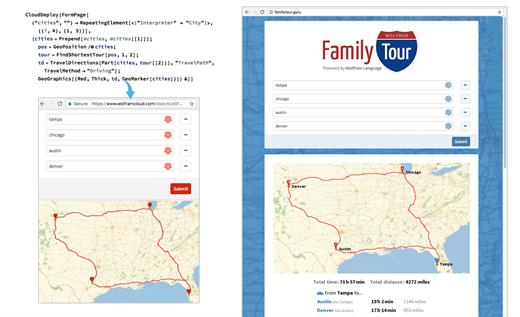
From basic web forms to large-scale data analytics, Wolfram technology includes the functionality for any kind of computational task.

Typical with Wolfram|One
With the broad set of plotting functions and custom styling options of Wolfram Language, we made a series of unique visuals showing all kinds of insights about this social network.

Why speak Wolfram Language…
Underlying everything we do is Wolfram Language. Designed for the new generation of programmers, Wolfram Language has a vast depth of built-in algorithms and knowledge, all automatically accessible through its elegant unified symbolic language.

Scalable for programs from tiny to huge, with immediate deployment locally and in the cloud, Wolfram Language builds on clear principles—and over three decades of development—to create what promises to be the world’s most productive programming language.

What’s New

Version 14.2.0:


  • Release notes were unavailable when this listing was updated.
Compatibility

macOS 10.15 or later
Apple Silicon or Intel Core processor


Release Name: Wolfram 14.2.0
Size: 2.8 GB
Links: HOMEPAGE – NFO – Torrent Search

Download: FiKPERNiTROFLARERAPiDGATOR

8 Comments
Jan 31

Capture One Studio 16.5.5.7

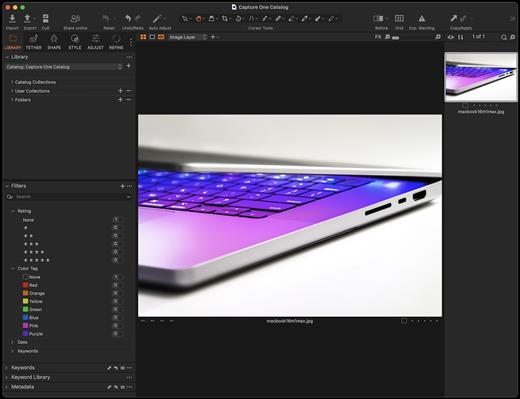
Capture One is a professional RAW converter offering you ultimate image quality with accurate colors and incredible detail from more than 400 high-end cameras – straight out of the box. It offers state-of-the-art tethered capture, powerful digital asset management, extensive adjustment tools, and a flexible workflow.

With an updated processing engine, market-leading performance, and powerful new features, Capture One is the professional choice in imaging software. You get the highly responsive precision tools you need to create stunning images from your camera’s RAW files in a time-saving workflow that can be customized to fit your needs.

What’s New

Version 16.5.5.7:


  • Release notes were unavailable when this listing was updated.
Compatibility

macOS 10.15.0 or later

Apple Silicon or Intel Core processor


Release Name: Capture One Studio 16.5.5.7
Size: 1.2 GB
Links: HOMEPAGE – NFO – Torrent Search

Download: FiKPERNiTROFLARERAPiDGATOR

9 Comments
Jan 31

Energiza Pro 1.3.2

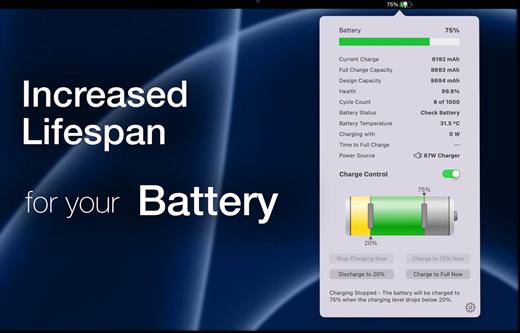
With Energiza, you can increase battery lifetime by taking control of charging. MacBook’s batteries wear out when fully charged for a long time. This happens naturally when using your MacBook as a desktop replacement and being plugged in continuously. With Energiza Pro, you can limit charging to the comfort zone and prevent battery wear. Apple does the same with its “Optimised Battery Charging” feature. But, this feature most of the time does not work reliably in case you don’t have a reoccurring usage pattern. With Energiza Pro, you are in control. Your battery will surely thank you!

In addition, Energiza will provide you with lots of other helpful features:


  • Individual Charging Limits
  • Battery Temperature Protection
  • Remaining Charging & Battery Time
  • Battery Health and Usage Information
  • Power Usage Information
  • Charging & Temperature Notifications
  • Highly Customizable
What’s New

Version 1.3.2:


  • Release notes were unavailable when this listing was updated.
Compatibility

macOS 10.13 or later.
Apple Silicon or Intel Core processor


Release Name: Energiza Pro 1.3.2
Size: 21.8 MB
Links: HOMEPAGE – NFO – Torrent Search

Download: FiKPERNiTROFLARERAPiDGATOR

7 Comments
Jan 31

Topaz Photo AI 3.4.4

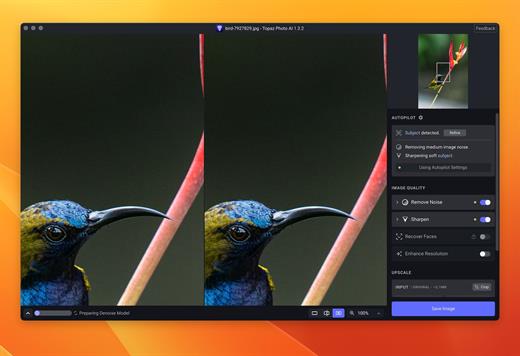
Sharpen, remove noise, and increase the resolution of your photos with tomorrow’s technology. Topaz Photo AI supercharges your image quality so you can focus on the creative part of photography.

Focus on your creativity rather than your tools.
AI is good at some things but bad at others. It can write sentences but can’t tell a story, and it can recommend songs but can’t compose music. But most importantly for us: AI is exceptionally good at improving image quality, but bad at knowing what to do with it.

We believe that stunning photography comes from artistic vision paired with world-class tools. AI will never replicate human creativity, so it’s still your job to provide the vision. But just like a sharper lens or better camera, Topaz Photo AI empowers you to create images that just aren’t possible with yesterday’s tools.

Your photos at their very sharpest.
You won’t always be able to retake a shot when your subject is blurry. Sometimes you won’t even know until you’re reviewing your photos on your computer.

In these cases, use Topaz Photo AI to ensure that your photos are the sharpest they can possibly be. Instead of artificially increasing edge contrast like traditional sharpening, the Sharpen AI module naturally reverses root causes of blurriness (camera shake, motion blur, misfocus) to create more natural results.

In the absence of blur, sharpness remains – crisp, clear detail that’s free of edge haloes or other artifacts.

What’s New

Version 3.4.4:


  • Release notes were unavailable when this listing was updated.
Compatibility

macOS 10.12 or later


Release Name: Topaz Photo AI 3.4.4
Size: 1.1 GB
Links: HOMEPAGE – NFO – Torrent Search

Download: FiKPERNiTROFLARERAPiDGATOR

9 Comments
Jan 31

WiFiRadar Pro 5.0

WiFi Radar Pro lets you monitor your area networks; identify and troubleshoot issues with your home, small office, or enterprise network; and gather useful information about your network performance. Are you simply in search of an elegant replacement of the default OS X wireless utility? You’ve just found your ideal tool!


  • Easy-to-use, intuitive UI
  • Suitable for home, small office, or enterprise networks
  • Live monitoring for all networks
  • Graphical charts for better visualization
  • Automatic signal/noise tracking
  • Status-item tool to replace the default OS X wireless tool
  • Option to export current networks report to CSV
  • Easily connect to any network (Open, WEP, or WPA/WPA2)
  • Ultra-secure password storage
  • Works with 802.11a/b/g/n/ac networks
  • Lots of useful information at your fingertips: SSID, BSSID, RSSI, noise, channel, AP mode, security, rates, channel flags, country
What’s New

Version 5.0:


  • Release notes were unavailable when this listing was updated.
Compatibility

macOS 10.10 or later


Release Name: WiFiRadar Pro 5.0
Size: 5.4 MB
Links: HOMEPAGE – NFO – Torrent Search

Download: FiKPERNiTROFLARERAPiDGATOR

8 Comments
Jan 31

Tuxera NTFS 2023.1

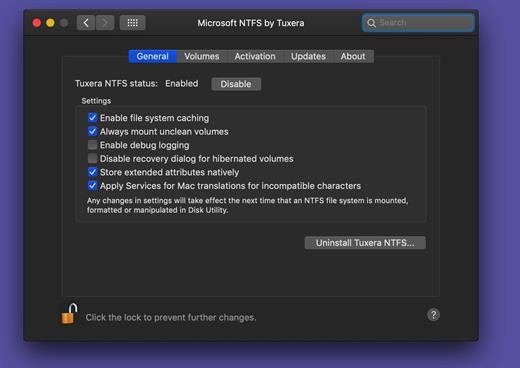
Tuxera NTFS is a commercial NTFS driver developed from the popular open-source NTFS-3G driver, which is a natural part of all major Linux distributions, and also has lots of users on macOS, FreeBSD, Solaris, and NetBSD.

It has been engineered to bring our customers maximum possible performance when accessing NTFS drives while keeping their data safe. It also offers some additional features to its open source counterpart, NTFS-3G, along with commercial support.

Full Interoperability

Apple’s macOS offers very limited support for Microsoft Windows NTFS formatted hard drives and other storage media out of the box. By default OS X can only read files from Windows-formatted hard drives leaving the users unable to edit, copy or delete anything. Tuxera NTFS for Mac solves this problem providing full read-write compatibility across platforms.

Fast Speeds & Full Data Protection

Tuxera NTFS for Mac delivers the fastest NTFS file transfer speeds on a Mac while protecting your data with it’s new, smart caching layer.

Feature-rich

The software fully supports all macOS versions starting from 10.4 (Tiger) including OS X El Capitan. Tuxera-only advanced features include support for NTFS extended attributes. Tuxera NTFS for Mac is compatible with popular virtualization and encryption solutions including Parallels Desktop® and VMware Fusion®.

General Features:


  • Works in both 32-bit and 64-bit kernel modes
  • All NTFS versions supported
  • Create NTFS partitions
  • Create NTFS disk image
  • Verify and repair NTFS volumes
Advanced Features:

  • Smart caching for high-performance read/write
  • Automatic translation of file names
  • Native extended attributes
Compatibility with other software:

  • Any third party software, including:
  • Parallels Desktop®
  • VMware Fusion®
  • TrueCrypt
What’s New

Version 2023.1:


  • Release notes were unavailable when this listing was updated.
Compatibility

macOS 10.9 or later
Apple Silicon or Intel Core processor


Release Name: Tuxera NTFS 2023.1
Size: 111.3 MB
Links: HOMEPAGE – NFO – Torrent Search

Download: FiKPERNiTROFLARERAPiDGATOR

5 Comments
Jan 31

ChatGPT for macOS 1.2025.021

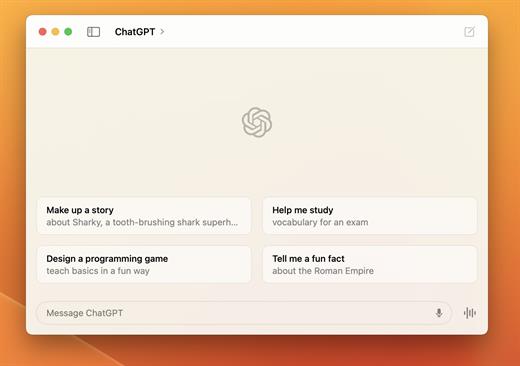
OpenAI released the native ChatGPT desktop app for macOS.

With a simple keyboard shortcut (Option + Space), you can instantly ask ChatGPT a question.

You can also take and discuss screenshots and directly in the app.

The app also enables you to start new conversations with photos from your computer, or new photos you take.

You can now have voice conversations with ChatGPT directly from your computer, starting with Voice Mode that has been available in ChatGPT at launch, with GPT-4o’s new audio and video capabilities coming in the future. Whether you want to brainstorm a new idea for your company, prepare for an interview or have a topic you’d like to discuss, tap the headphone icon in the bottom right corner of the desktop app to start a voice conversation.

With the release of ChatGPT for macOS, OpenAI has also unveiled the even more advanced GPT-4o model.

GPT-4o is OpenAI’s new flagship model that can reason across audio, vision, and text in real time.

GPT-4o will be available in ChatGPT and the API as a text and vision model (ChatGPT will continue to have support for voice via the pre-existing Voice Mode feature) initially. Specifically, GPT-4o will be available in ChatGPT Free, Plus, and Team (with Enterprise coming soon) and in the Chat Completions API, Assistants API, and Batch API.

ChatGPT for macOS is now available to everyone.

Note:
ChatGPT for macOS is currently undergoing gray testing.If you don’t have access to your account, you can use the following steps to skip verification.


1. Install ChatGPT client
2. Log in to your account
3. After successful login, there will be a loading process of about 3 seconds before the “unavailable” prompt appears.
4. At this point, quickly press “command + Q” to exit the verification process.
5. Re-open the ChatGPT client and you can use it!

What’s New

Version 1.2025.021:


  • Release notes were unavailable when this listing was updated.
Compatibility

macOS 14.0 and Apple Silicon (M1 or better)


Release Name: ChatGPT for macOS 1.2025.021
Size: 65 MB
Links: HOMEPAGE – NFO – Torrent Search

Download: FiKPERNiTROFLARERAPiDGATOR

8 Comments
Jan 31

Audio Hijack 4.4.6

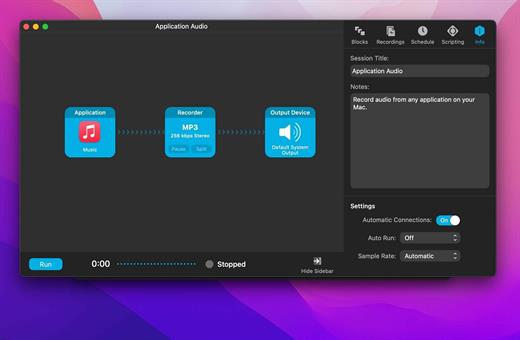
Audio Hijack (was Audio Hijack Pro) drastically changes the way you use audio on your computer, giving you the freedom to listen to audio when you want and how you want. Record and enhance any audio with Audio Hijack – it’s the cornerstone of your digital audio experience.

Audio Hijack will allow you to record any application’s audio, from Internet streams to DVD audio and everywhere in between. If your machine can play it, Audio Hijack can record it. And that’s not all – Audio Hijack will also enhance any audio, unsing industry-standard VST and AudioUnit audio effects to make your music sound incredible. Record. Enhance. Enjoy!

More Great Features

Record to All Major Formats
Record to the world’s most popular audio formats, including MP3 and AAC, or save in perfect-fidelity AIFF, WAV, ALAC or FLAC.

Reusable Sessions
Once you’ve configured a Session to your liking, you can re-use it over and over. With one click, you’ll be recording exactly as desired.

Easy File Organization
Find all of your recordings sorted by Session in the Recordings tab, where you can quickly pass files to an audio editor, add them to iTunes, or share them.

Timed Recordings
Use the Schedule tab to set up timed recordings for when you’re not around. Your audio will be waiting for you when you return.

Silence Monitoring
When silence is detected, Audio Hijack can automatically stop recording, split to a new file, or remove audio.

Bulletproof Recording
Bulletproof recording means that even if the power goes out or your computer crashes, you’ll never lose a recording.

A Thoughtful Interface
Audio Hijack’s intuitive audio grid provides a terrific pipeline-style view of exactly how your audio flows, so you can easily understand it.

Gorgeous Audio Effects
The included audio effects are easy to use and easy on the eyes. Their functionality is now accessible to all.

Time Shift Your Audio
Now you can pause, delay, and rewind live audio on your Mac. It’s perfect for transcribing audio and more!

What’s New

Version 4.4.6:


  • Release notes were unavailable when this listing was updated.
Compatibility

macOS 14.4 or later
Apple Silicon or Intel Core processor


Release Name: Audio Hijack 4.4.6
Size: 32.8 MB
Links: HOMEPAGE – NFO – Torrent Search

Download: FiKPERNiTROFLARERAPiDGATOR

8 Comments
Jan 31

IK Multimedia T-RackS 6 MAX 6.1.2

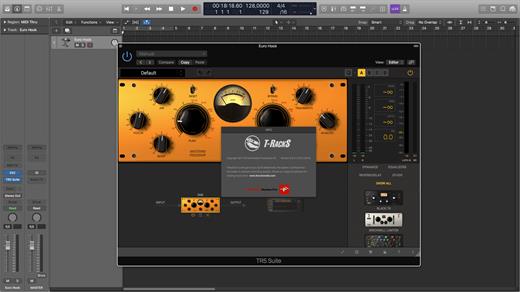
Close your eyes and imagine a store full of great teams and powerful processing including compressors, limiters, reverbs, de-essers, multiband processors and a shelf full of legendary vintage emulations gears. In short, a shop dream to record musicians, engineers and producers.

Features:


  • Free version of T-RackS including Custom Shop, Classic EQ and basic measurement functionality
  • standalone workstation, set of accessories and unique accessories for audio units, VST2 formats, VST3 and AAX
  • Functionality Custom Shop will It allows purchase additional modules from within the program
  • the T-RackS shell allows chaining up to 16 processors
  • autonomous integration with processing ARC System 2.5
  • All processors available as individual accessories
  • Native 64 – bit support
  • Oversampling high – fidelity audio processing high quality throughout the signal path
  • The SCC technology ™ together with exclusive DSM ™ technology provides IK emulation software more realistic vintage gear to date
  • Extremely easy to use, with presets based on style, full chain visualization, individual module with a single click or bypass chain function “comparison” and more.
What’s New

Version 6.1.2:


  • Release notes were unavailable when this listing was updated.
Compatibility

macOS 10.15.0 or later


Release Name: IK Multimedia T-RackS 6 MAX 6.1.2
Size: 2.3 GB
Links: HOMEPAGE – NFO – Torrent Search

Download: FiKPERNiTROFLARERAPiDGATOR

8 Comments
Jan 31

WiFi Scanner 3.3

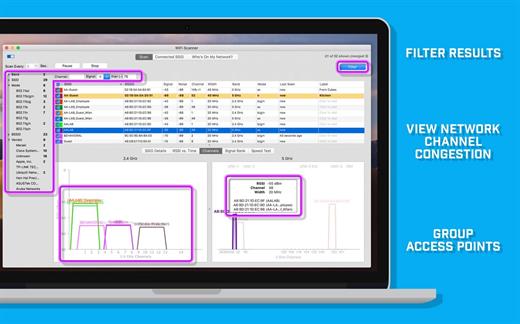
WiFi Scanner is a 802.11 wireless scanner and connection manager. This will detect access points and clients in ad-hoc mode if the SSID is being broadcast. It can be used for wireless site surveys, wireless discovery, and to connect to Wi-Fi networks. The tool reports signal strength in dBm and shows access point BSSID/MAC addresses.


  • Change column positions
  • Sort results
  • Resolve vendor OUI
  • Noise and signal/noise info
  • Autoscan/refresh
  • Latitude/longitude of discovered access points
  • Show access point on Google Maps
  • Show access point in Google Earth
  • Access-point finder using audio alert
What’s New

Version 3.3:


  • Bug fixes
Compatibility

macOS 11.5 or later.


Release Name: WiFi Scanner 3.3
Size: 15.6 MB
Links: HOMEPAGE – NFO – Torrent Search

Download: FiKPERNiTROFLARERAPiDGATOR

7 Comments