Please REGISTER or RENEW your account on RAPiDGATOR.net and support us by doing through all RAPiDGATOR working download links on main posts...
May 7

HazeOver 1.9.7

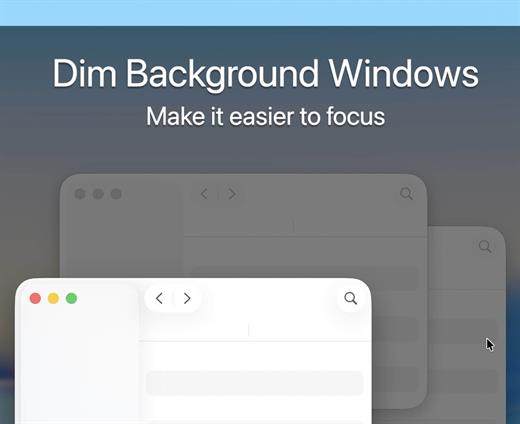
HazeOver helps you focus by emphasizing an active window by fading out inactive ones.


  • Heavy multi-tasking kills your concentration. All those tweets, emails, chat messages and lolcats staring back at you from the background. They strive for your attention. And you only have that much of it.
  • Don’t let yourself drown in scores of open windows. Hiding, switching, looking for the right one, more hiding, more switching. Calm down, breathe in, breathe out, launch HazeOver, and finally focus on what’s you’ve been up to.
  • HazeOver automatically highlights an active window or app when you switch windows. The less important things gently fade away in the background, improving your attention span.
  • Set the hazing intensity and speed to your liking. Be it a soft dimming, an undemanding hint of focus. Or a powerful dark background for outright dedication to your current task.
What’s New

Version 1.9.7:


  • Release notes were unavailable when this listing was updated.
Compatibility

macOS 12 or later


Release Name: HazeOver 1.9.7
Size: 4.5 MB
Links: HOMEPAGE – NFO – Torrent Search

Download: RAPiDGATOR

5 Comments
May 7

Mp3tag 1.12.1

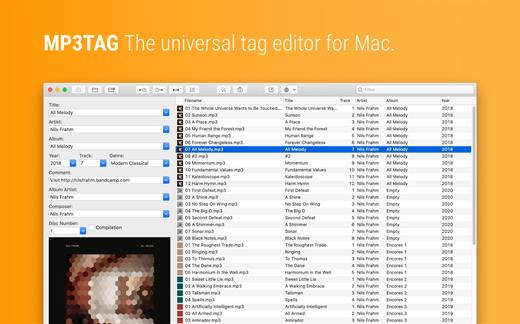
Mp3tag is a powerful and easy-to-use tool to edit metadata of audio files. Musicians, DJs, podcasters, and audio-enthusiasts use it for many different aspects of handling audio files.

It supports batch tag-editing for multiple files at once, covering many audio formats from MP3, over MP4, and M4V (yes, that’s video!) to FLAC, OGG, OPUS, AIF, DSF, MPC, and WAV.

Furthermore, it supports online database lookups from Discogs and MusicBrainz, allowing to gather proper tags and download cover art for music libraries.

It offers renaming files based on the tag information, replacing characters or words in tags and filenames, importing tag information, and adjusting the size and image format of embedded cover art.

Since some of the tasks in managing a digital library are repetitive, Mp3tag allows for combining tasks into action groups, which serve as workflows for keeping consistency and order. Examples are formatting tag fields, performing case conversion, removing unwanted fields, or adjusting embedded cover art to match required sizes.

Key Features


  • Bulk-Editing of Tags for multiple files at once.
  • Editing of cover-art.
  • Renaming files based on tags.
  • Importing metadata from filenames.
  • Assign track and disc numbers via the auto-numbering wizard.
  • Importing metadata from online Tag Sources.
  • Support for Flexible Tagging, allowing for user-defined tag fields in a standardized way.
  • Applying action groups with many tasks combined into reusable workflows.
  • Support for many file types under a universal user interface.
Supported File Formats

  • MP3 (ID3v1, ID3v2.3, ID3v2.4 with UTF-8)
  • MP4/M4A/M4B/M4V (iTunes and Nero)
  • FLAC (Vorbis Comments)
  • OGG (Vorbis Comments)
  • OPUS (Vorbis Comments)
  • AIF (RIFF INFO and RIFF ID3)
  • DSF (ID3v2)
  • MPC (APEv2)
  • WAV (RIFF INFO and RIFF ID3
What’s New

Version 1.12.1:


  • Release notes were unavailable when this listing was updated.
Compatibility

macOS 10.14 or later.


Release Name: Mp3tag 1.12.1
Size: 13.4 MB
Links: HOMEPAGE – NFO – Torrent Search

Download: RAPiDGATOR

6 Comments
May 7

VideoProc Converter AI 8.10 (2026050601)

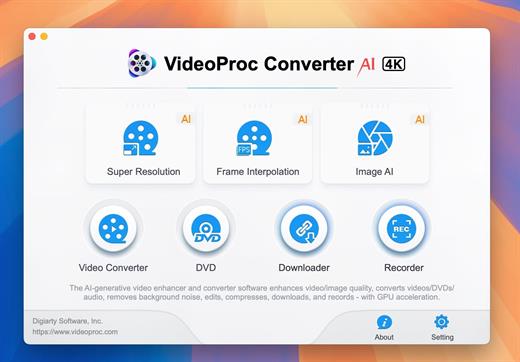
Built with AI tools for video/image/audio enhancement. Remaster, upscale, restore, colorize, convert, edit, compress, download, and record with GPU acceleration. The best video converter works with videos shot with GoPro, DJI, iPhone, Android, DSLR, mirrorless, camcorders, or other 4K cameras.

VideoProc peaks Level-3 Hardware Acceleration fully powered by Intel®, AMD®, NVIDIA® GPUs, and Apple M1/M2/M3/M4 (Pro/Max/Ultra), delivering buttery smooth (4K/8K) video processing and transcoding without compromising quality.

What’s New

Version 8.10:


  • Release notes were unavailable when this listing was updated.
Compatibility

macOS 10.15 or later


Release Name: VideoProc Converter AI 8.10 (2026050601)
Size: 256.4 MB
Links: HOMEPAGE – NFO – Torrent Search

Download: RAPiDGATOR

6 Comments
May 7

Polypane 29.0.0

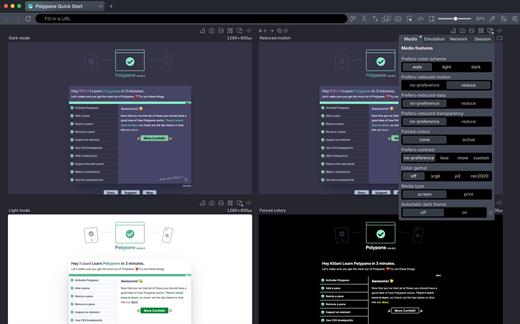
Polypane is the development browser for building responsive, fast, accessible, and SEO-friendly websites that work perfectly for everyone.
Use it alongside your editor to preview, debug and test sites across screens, devices, and user conditions. Every scroll, click, and edit is synchronized in all panes at once.

What’s New

Version 29.0.0:


  • Release notes were unavailable when this listing was updated.
Compatibility

macOS 10.15 or later


Release Name: Polypane 29.0.0
Size: 222.7 MB
Links: HOMEPAGE – NFO – Torrent Search

Download: RAPiDGATOR

6 Comments
May 7

Notepad.exe 1.4.1849

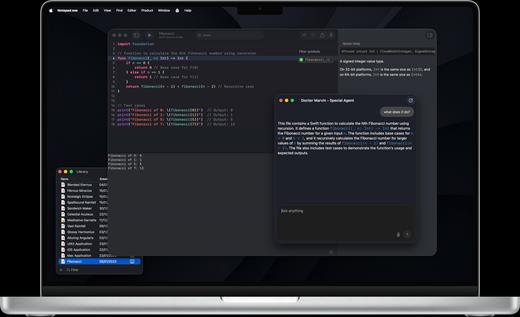
Notepad.exe is a native macOS application I’ve crafted with love to enhance your development experience. Built on a plug-and-play philosophy, it gets you coding instantly with zero setup, then scales with your needs. Whether you’re prototyping Swift apps, experimenting with Python scripts, building iOS apps with automatic simulator support, or exploring new ideas, Notepad.exe provides a streamlined environment that grows with your expertise – from simple snippets to complex projects.

Features

Built for how you actually work.
No New Project → Configure → Wait → Finally Code. Just code. Swift for iOS and Mac apps, Python for scripts and automation, JavaScript for web projects — all in one window that launches instantly.

Simple to start. Deep when you need it.
Open a file, hit run, see output — no project wizard, no indexing, no waiting. When the scratch turns serious, settings unlock the advanced setup: custom interpreters, build flags, targets.

AI completions that stay on your Mac.
Local AI processing, privacy-first. Your code never leaves your machine. Completions, refactors, and explanations from a model that runs on-device — not in someone else’s data center.

Run SwiftUI in the Simulator. No project file.
Prototype SwiftUI and UIKit screens. Test APIs. See your app on a real iPhone bezel without ever opening Xcode.

Edit SwiftPM packages. No Xcode required.
Run executables on macOS or Linux — the Linux subsystem installs itself. Recipe and oven, no kitchen remodel.

Add Swift packages without leaving the note.
Add and edit SwiftPM dependencies right in Notepad.exe, then run your project without dropping into Xcode.

Scripts and automation. Zero setup tax.
Run Python with custom interpreter settings and built-in documentation. Organize scripts in the Notes Library. Pip deps via a simple requirements panel.

Everything the big IDEs have. None of the weight.
Native performance, no splash screen, no indexing. Here’s what’s in the box.、

What’s New

Version 1.4.1849:


  • Release notes were unavailable when this listing was updated.
Compatibility

macOS 14.6 or alter


Release Name: Notepad.exe 1.4.1849
Size: 177 MB
Links: HOMEPAGE – NFO – Torrent Search

Download: RAPiDGATOR

7 Comments
May 7

OmniZip – Universal Extractor Pro 2.4.3

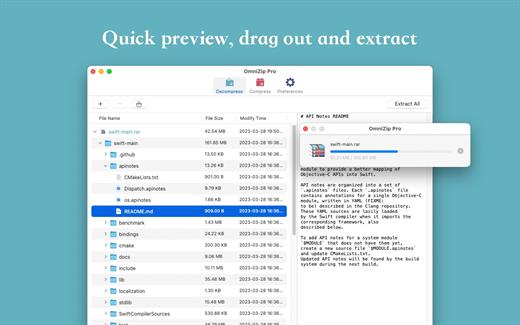
A super decompression tool, supports the decompression of RAR, 7Z, ZIP, TAR, GZIP and other more than 100 formats of files, as long as the compressed package, there is nothing OmniZip can not decompress.

Features


  • Double-click the compressed file to preview it or decompress it. You can customize the configuration.
  • Compressed package Select a file and then compress it.
  • Supports drag and unzip files directly.
  • Supports batch decompression.
  • Supports decompression of the decompressed volume package, ensuring that the compressed file of the volume is in the same directory.
  • Supports compression formats zip and 7z.
  • Supports encryption compression and volume separation compression.
  • Supports user-defined compression and decompression of filter files.
  • Supports recording previewed compressed files for next operation.
What’s New

Version 2.4.3:


  • Release notes were unavailable when this listing was updated.
Compatibility

macOS 10.13 or later


Release Name: OmniZip – Universal Extractor Pro 2.4.3
Size: 21.5 MB
Links: HOMEPAGE – NFO – Torrent Search

Download: RAPiDGATOR

4 Comments
May 6

AnyRec Video Converter 1.0.62

AnyRec Video Converter AI Supported is All-in-One Video Converter and Editor! Your smart video converter that converts 1000+ media formats and brings complete video toolbox! Convert, edit, process, and enhance media files in one stop.
Convert Video to Any Format and Device
AnyRec Video Converter is your superfast and reliable free video converting software. You can convert videos to and from 1000+ popular formats and devices, including the latest iPhone 13 (check iPhone 13 VS iPhone 12), MacBook Pro 13/14/16, etc. For example, you can convert M4A to MP3,MP4 to MP3, MP4 to WAV, MOV to GIF, MKV to MP4,M3U8 to MP4, and much more. Compared with other competitors, you can convert and upscale videos to 480p, 720p, 1080p, 4K UHD, 5K, and even 8K with high quality. AnyRec Video Converter supports keeping your original video quality during the conversion. Or you can use its video quality enhancer, metadata editor, and other tools to make more changes.

50x Faster Speed & No File Size Limit
→ 50x video converting speed
→ Batch conversion
→ No file size limit
→ Full GPU acceleration
Need to convert large video files in bulk? Thanks to the Blu-Hyper encoding technology, AnyRec Video Converter can accelerate the video converting speed from 30x to 50x dramatically. Regardless the condition of CPU, NVIDIA, and AMD graphics on your computer, you can batch convert video and audio files at 50x faster than before. Compared with online video converters, you can save a lot of time on endless waiting. AnyRec Video Converter is exactly the best batch video converter you are looking for. If you have fast Internet speed, you can run free online video converter as an alternative as well.

Improve Video Quality with AI
→ Upscale resolution
→ Optimize brightness & contrast
→ Remove video noise
→ Reduce video shaking
There is an advanced video enhancer based on the latest Artificial Intelligence technology. You can enhance video quality and make your video look better with easy clicks. Here you can quickly upscale low-quality video, auto-optimize video contrast & brightness, remove dirt-like video noise, and minimize the video shaky problem within the free video editing software. It is also supported to upscale 720p to 1080p, 1080p to 4K, and higher resolutions.

Create Your First MV with Movie Maker
To some degree, AnyRec Video Converter can be your best free video editor. If you want to quickly make a cool music video, you can use the built-in MV Maker. Considering many users have no technical background, AnyRec Video Converter has simplified the entire process into easy options. Just add video footage, apply a preset, and then add audio to video. Furthermore, you can choose from lots of pre-made themes, transitions, filters, and customizable background music. There is no steep learning curve. Moreover, you can find your favorite music video and upload it for further editing as well. By using the free video editing software for beginners, you can make your first MV with any video footage and pictures.

Make a Photo or Video Collage with Music
→ Various layouts & filters
→ Add any BGM
→ Adjust frame size
→ Manage output settings
Is it possible to put two, three, four, and more videos into one frame? Of course, the answer is Yes. You can make a split screen video within the free video editing software. Here you can get 44+ different split-screen templates and multiple editing filters. Each split-screen layout is adjustable. You can drag the split line or resize your video/picture freely within the free video collage maker. Later, follow the on-screen instruction to edit split-screen effects and add background music. Once you export the collage video, you can see those videos play in one frame simultaneously. Actually, you can create many interesting videos with AnyRec video editing software free.

Edit Your Video/Audio with Multiple Effects
→ Smart video editor
→ Add custom watermark
→ Multiple video effects
→ Adjust subtitles
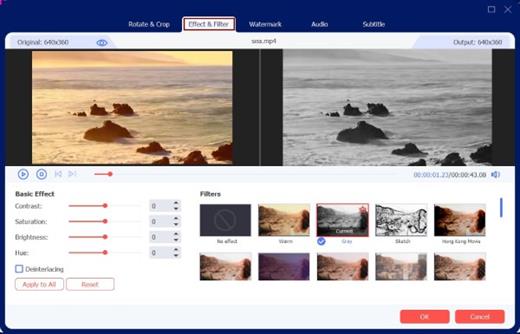
Don’t forget those powerful video editing filters within AnyRec Video Converter. It can be your best free video editing software on Windows and Mac. You can rotate, flip, crop video, trim, merge, add watermark, and apply other video effects. Each video editing filter is easy to use. You can edit videos before the conversions. In addition, you can also add subtitles and audio tracks to your video with customizable filters. The real-time preview window can show you everything in detail.

What’s New

Version 1.0.62:


  • Release notes were unavailable when this listing was updated.
Compatibility

macOS 10.12 or later
Apple Silicon or Intel Core processor

Release Name: AnyRec Video Converter 1.0.62
Size: 135 MB
Links: HOMEPAGE – NFO – Torrent Search

Download: RAPiDGATOR

6 Comments
May 6

Infuse Pro 8.4.4

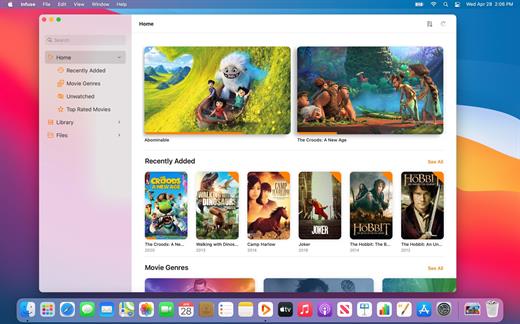
Ignite your video content with Infuse – the beautiful way to watch almost any video format on your iPhone, iPad, Apple TV, and Mac. No need to convert files! Infuse is optimized for macOS 12, with powerful streaming options, Trakt sync, and unmatched AirPlay & subtitle support. Gorgeous interface. Precise controls. And silky-smooth playback.

Play more video types

A powerful video player that plays just about anything, including the standard MP4, M4V and MOV – plus MKV, AVI, WMV, MTS, ISO, VIDEO_TS, FLV, OGM, OGV, ASF, 3GP, DVR-MS, WebM, and WTV. Includes fully certified Dolby® Digital Plus (AC3/E-AC3), DTS® and DTS-HD® audio.

Stream from other devices

Browse and play videos stored on your Mac, PC, NAS, Wi-Fi hard drive, apps like Plex, Emby, and Jellyfin, or from cloud services like Dropbox, Google Drive, OneDrive, Box, pCloud, Yandex.Disk, and Mega.nz – no syncing required!

Trakt 2-way sync

Connect with Trakt to sync watched history, submit ratings and post comments.

Optimized subtitles powered by opensubtitles

Bring your own subtitles, or download them on the fly (for free) in virtually any language.

The basics:


  • Silky-smooth video player (plays full 4K w/ HDR & Dolby Vision)
  • Stream from a Mac, PC, NAS or Wi-Fi enabled hard drive
  • Connect with Plex, Emby, Jellyfin, Kodi (XBMC), WMC and other media servers
  • Beautiful layout with quick access to video info
  • Artwork and metadata added automatically
  • Picture-in-Picture
  • Spatial audio
Supported formats:

  • Video: 3GP, AVI, ASF, BDMV, DIVX, DVDMEDIA, DVR-MS, FLV, ISO, M4V, MKV, MOV, MP4, M2TS, MTS, OGM, OGV, TP, TS, VIDEO_TS, WEBM, WMV, WTV
  • Audio: AAC, AC3/E-AC3, DOLBY TRUEHD, DTS, DTS-HD MA, FLAC, MP3, OGG, PCM, WMA
  • Subtitles: DVB, DVDSUB, MICRODVD, MPL2, PGS, SMI, SSA/ASS, SRT, SUB, TIMED TEXT, TMP, TXT, VOBSUB, VTT, XSUB
Player features:

  • Multiple audio tracks
  • Chapters
  • Gesture controls
  • 8 video zoom options
  • Continuous playback
  • Deinterlacing
Extras:

  • Library organization
  • Folders
  • One-click subtitle downloads from OpenSubtitles
  • Scrobble plays to Trakt
  • Download videos from networked devices
  • Drag and drop uploads via web browser
  • Get extra onboard storage by adding USB drives
Get more with infuse pro!

  • Play even more video formats
  • Enjoy Dolby® Digital Plus (AC3/E-AC3), DTS® and DTS-HD® mobile surround sound
  • Stream a wide variety of video types over AirPlay and Google Cast
  • Access videos stored in cloud services like Dropbox, Google Drive, Box, OneDrive, pCloud, Yandex.Disk, and Mega.nz
  • Sync libraries, settings, watched history, and playback progress between devices
What’s New

Version 8.4.4:


  • Release notes were unavailable when this listing was updated.
Compatibility

macOS 11.0 or later.
Apple Silicon or Intel Core processor

Release Name: Infuse Pro 8.4.4
Size: 107.7 MB
Links: HOMEPAGE – NFO – Torrent Search

Download: RAPiDGATOR

6 Comments
May 6

Microsoft Office 2024 v16.108.3

Office LTSC 2024 offers a locked-in-time version of familiar productivity tools, updated with a subset of the features that have been added to Microsoft 365 Apps for enterprise over the last three years. New features for this release include Dynamic Charts and more than a dozen new text and array functions in Excel, enhanced search and meeting creation options in Outlook, and improvements to performance, security, and accessibility.

That same Office, especially for Mac

The new, modern versions of Word, Excel, PowerPoint, Outlook, OneNote, and OneDrive for Mac feature a familiar interface and the unique, beloved features of a Mac, so you can get started quickly.

Microsoft Word

Word is a robust application that lets you create, edit, view, and share text documents (even email attachments). It’s ideal for anyone who works with documents: bloggers, writers, journalists, reviewers, students, or project managers.

Microsoft Excel

The powerful Excel application makes it quick and easy to create, view, edit, and share spreadsheet files. New charts and Ideas provide visualization of data and trends. No matter where you are, you can confidently use this application to collaborate in accounting, auditing, or finance.

Microsoft PowerPoint

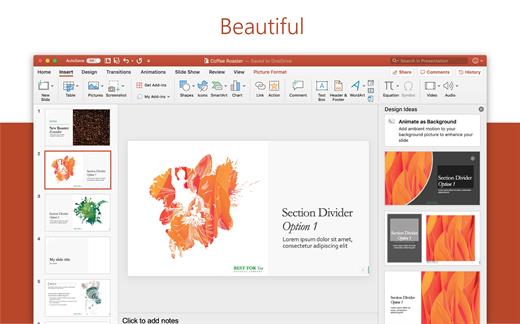
PowerPoint is the smart app you know and love that helps you communicate your ideas vividly and visually with beautiful layouts, animations, moving camera effects, 3D models, and icons. Save time and create engaging presentations that are up-to-date with the latest trends.

Microsoft Outlook

With Outlook, you have all your email accounts and calendars at your fingertips. Manage your messages and plan in detail—it has everything you need to organize your workflow efficiently.

Microsoft OneNote

Whether you need to streamline the tedious planning process or quickly jot down a brilliant idea, OneNote, your digital notebook, is your go-to. It’s indispensable when you need to prepare for a big event or when you need to make sure you don’t miss any important tasks that you can’t trust to someone else.

Microsoft OneDrive

OneDrive keeps all your Microsoft 365 files at your fingertips. Share and collaborate in real time across Word, Excel, and PowerPoint on your desktop, web, and mobile — all conveniently and securely

Note: If it doesn’t work, uninstall the old version of Office completely and reinstall it. For uninstallation method, please use Google search.

What’s New

Version 16.108.3:


  • Release notes were unavailable when this listing was updated.
Compatibility

macOS 12.0 or later

Release Name: Microsoft Office 2024 v16.108.3
Size: 2.7 GB
Links: HOMEPAGE – NFO – Torrent Search

Download: RAPiDGATOR
3 Comments
May 6

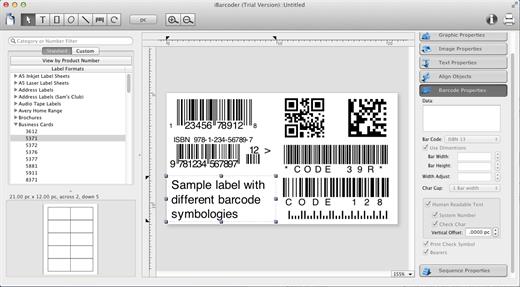
iBarcoder 3.17.10

iBarcoder allows you to design and print your own barcoded labels, stickers, and tags. Create barcode graphics for retail packages, books, stickers, and more. Mac QR code and Datamatrix generator. Add text boxes, image boxes, rectangles, ovals and lines to your labels. Type in the necessary text, insert the desired images, to create the professional barcode labels for commercial use. Create sequential barcodes for catalogs and retail operations. Specify the sequence in which barcodes are printed or exported.

Smart, Intuitive Barcode Software


  • Create professional barcoded labels with a few mouse clicks
  • Live preview feature
  • Modify your Mac barcodes by changing types, sizes, and other attributes intrinsic to a certain barcode type. Advanced tools make customizing your barcode easy
  • Print barcodes directly to your printer using standard Avery formats provided
  • Create and save your own custom label formats
  • Export barcodes as a high-resolution image files, or vector graphics:

    • PDF (vector)
    • EPS (vector)
    • BMP
    • TIFF
    • JPEG
    • PNG
    • PNTG
    • Photoshop
    • …and more…!
  • Make the desired font and color settings
  • Copy, then paste finished graphics right to Adobe Illustrator, InDesign, Photoshop, or other software from Mac clipboard
Supports the following barcode types:

  • Postnet
  • Japanpost customer barcode
  • FIM Codes
  • Horizontal bars
  • UPC A
  • UPCE
  • EAN 13
  • EAN 8
  • ISBN
  • ISSN
  • Code 128
  • Codabar
  • ITF14
  • Code 39
  • Code 11
  • Code 93
  • MSI
  • Interleaved 2 of 5
  • Datamatrix
  • Intelligent Mail Barcode
  • Pharmacode
  • QR Code
What’s New

Version 3.17.10:


  • Release notes were unavailable when this listing was updated.
Compatibility

macOS 10.10 or later

Release Name: iBarcoder 3.17.10
Size: 16.6 MB
Links: HOMEPAGE – NFO – Torrent Search

Download: RAPiDGATOR
5 Comments