Please REGISTER or RENEW your account on RAPiDGATOR.net and support us by doing through all RAPiDGATOR working download links on main posts...
May 5

Jettison 1.9.6

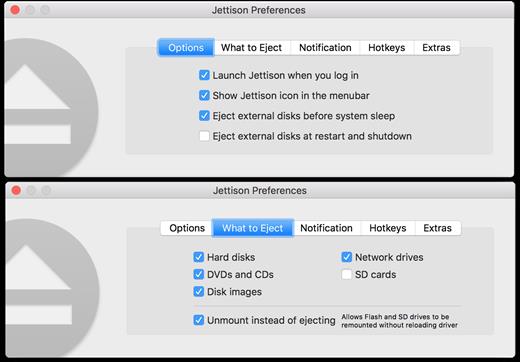
Jettison automatically ejects external disks from your Mac before your computer goes to sleep.

Simplify those last few seconds when you grab your MacBook and run out the door. Just close the lid and Jettison will automatically eject your backup drive, iPod, or whatever is connected so you can safely unplug it. Say goodbye to “disk was not ejected properly” errors and waking your computer back up because you forgot to eject everything.

Jettison even makes sure that Time Machine backups and file server volumes are properly shut down before they’re removed. Your backups and shared files are safe and sound.

And what if you decide not to leave, and open your MacBook back up? Jettison will check to see if your drives are still connected and will mount them back on the Desktop if they’re there.

What’s New

Version 1.9.6:


  • Release notes were unavailable when this listing was updated.
Compatibility

macOS 10.9 or late


Release Name: Jettison 1.9.6
Size: 7.4 MB
Links: HOMEPAGE – NFO – Torrent Search

Download: RAPiDGATOR

6 Comments
May 5

eBookBinder 1.13.0

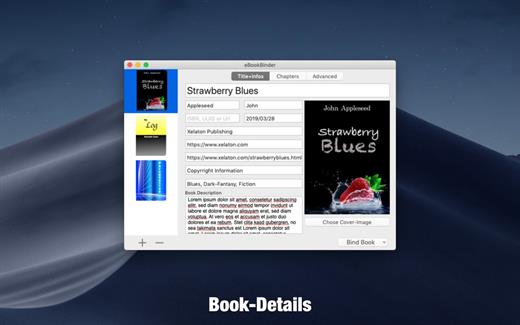
eBookBinder is the super-easy tool to create your own ebooks using your existing documents. When compiling your book project, eBookBinder creates an epub file. There are just three major steps to your very own eBook:


  1. Enter book details. Name of the book and its author, add an image for the book-cover, webpage of the publisher and other details can be entered. There is no need to fill all fields, at least you should enter a name for your book.
  2. Add text files as chapters to your book project. Every single text file you add to eBookBinder is treated as a single chapter. Give your chapters a name and order them per drag-and-drop to your desired sequence of chapters.
  3. Create your ebook. Just hit the “Bind Book” Button and eBookBinder will compile the ebook for you. That’s all!

What can be added to eBookBinder:


  • eBookBinder supports several different types of text files. Next to plain-text files also DOC, ODT, RTF, RTFD, HTML, Textbundle, Textpack and webarchive files are supported by eBookBinder.
  • Support of markup languages eBookBinder also accepts plain-text files written in Markdown, MultiMarkdown, Textile, Wikitext, and Smark as input. These will be converted on the fly when adding these as chapters to your book-process. Visit the preferences of eBookBinder to determine the file extensions which should be treated for conversion. All files with appropriate file extensions will be converted when imported.
Built-in editor – eBookBinder also features a built-in editor which offers some basic editing features like setting text bold, inverse, or underlined, and alignment of text. However, the best feature of the editor is the reduce feature: select the text you want to keep and hit the reduce button. Anything not selected will be removed. This is ideal for editing web articles to remove all the advertising and navigation stuff quickly.

What’s New

Version 1.13.0:


  • Release notes were unavailable when this listing was updated.
Compatibility

macOS 10.10 or later, 64-bit processor


Release Name: eBookBinder 1.13.0
Size: 6.1 MB
Links: HOMEPAGE – NFO – Torrent Search

Download: RAPiDGATOR

7 Comments
May 5

Fork 2.66.7

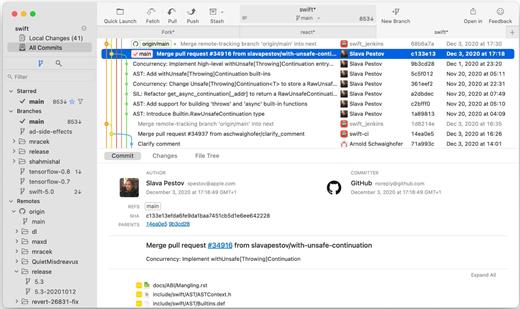
Fast and friendly git client. Fork is getting better and better day after day and we are happy to share our results with you. Commit List – Working Directory Changes – Side by Side Diff – Repository Manager Summary and Statistics

Basic features: Fetch, pull, push | Commit, amend | Create and delete branches and tags | Create and delete remote repos | Checkout branch or revision | Cherry-pick, revert | Merge, rebase | Stashes | Submodules

Work with repository: Create, clone or add existing repos | Open recent repository quickly

Commit view: Stage / unstage changes line-by-line | Access to recent commit messages

More features: Browse the repository file tree at any commit | Intuitive merge conflict resolving | See your stashes right in the commit list

What’s New

Version 2.66.7:


  • Release notes were unavailable when this listing was updated.
Compatibility

macOS 10.13 or later

Release Name: Fork 2.66.7
Size: 44.5 MB
Links: HOMEPAGE – NFO – Torrent Search

Download: RAPiDGATOR

6 Comments
May 5

SQLPro for SQLite 2026.90

SQLPro for SQLite is the top SQLite editor for OS X.

Features


  • Automatic data reloading when the database gets modified externally.
  • Backwards compatibility with SQLite 2.
  • Version integration. Mucked your database? Rollback to a previous version.
  • Semiautomatic dependency resolution.
  • Column reordering.
  • Import or export your data in CSV, mySQL, XML, or JSON formats.
  • Export custom result sets to CSV, XML, or JSON.
  • Full-screen support.
  • Inline filters allowing you to customize the way your data is displayed.
What’s New

Version 2026.90:


  • Release notes were unavailable when this listing was updated.
Compatibility

macOS 10.12 or later.


Release Name: SQLPro for SQLite 2026.90
Size: 24.8 MB
Links: HOMEPAGE – NFO – Torrent Search

Download: RAPiDGATOR

6 Comments
May 5

Topaz Photo 1.5.1

AI-powered photo editing tool that improves photos pixel by pixel.
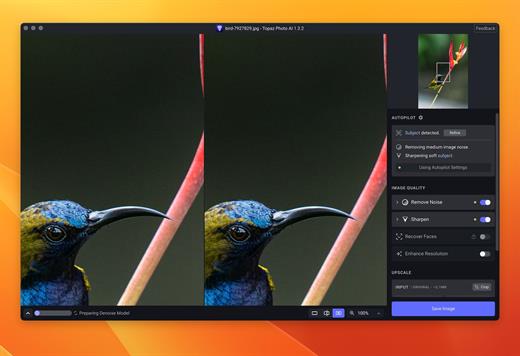
What is Topaz Photo AI? It is a new-generation photo editing tool that uses AI technology to perfect and denoise pictures pixel by pixel. Topaz Photo AI simplifies the editing process for photographers and designers. Its groundbreaking suite offers multiple tools to satisfy both amateurs and confident pros.

Topaz Photo AI allows editors to denoise, sharpen, upscale, preserve text, recover faces, remove objects, correct lighting, and balance color. Professional photo editors will be amazed at how much power Topaz Photo AI gives, and beginners will appreciate how easy and intuitive this tool is.

Topaz Photo AI helps you Sharpen, remove noise, and increase the resolution of your photos with tomorrow’s technology.

Maximize the potential of your photos.

Magically enhance image quality and resolution based on a deep understanding of the contents of your photo.

Enhance Quality

Maximize the visual quality of your images with best-in-the-world noise and blur reduction. Particularly useful in difficult settings with fast-moving subjects, low light, or atypical environments.

Crisp, clear, and noise-free.

It’s a magical feeling to see noise evaporate while sharp detail remains. Topaz Photo AI understands the contents of your image and accurately determines the difference between image detail and noise.

Tack-sharp subjects.

Unlike traditional sharpening, Topaz Photo AI’s Sharpen module naturally reverses root causes of blurriness (camera shake, motion blur, missed focus) to create more natural results. In the absence of blur, sharpness remains – crisp, clear detail that’s free of edge haloes or other artifacts.

Increase Resolution

Join hundreds of thousands of photographers and designers who use Topaz technology to generate real image detail for better printing, cropping, restoration, and more.

Magically add real detail.

Topaz Photo AI “remembers” real detail from millions of similar images, then fills in missing pixels based on that understanding. (It’s like how you can picture a friend’s face without being physically in front of them.) Add real image resolution to your photos for tighter crops or better prints.

Recover faces naturally.

Introduced in 2023, the breakthrough Face Recovery AI offers remarkable detail enhancement for low-resolution or blurry faces.

Intelligently improve lighting.

It’s a magical feeling to see noise evaporate while sharp detail remains. Topaz Photo AI understands the contents of your image and accurately determines the difference between image detail and noise.

Improve efficiency with Autopilot

Specify adjustments based on detected image attributes like subject, faces, noise, and blur levels. Autopilot allows you to mold Photo AI to your workflow and unique photographic style.

Easy workflow

Topaz Photo AI works directly on your Mac or PC. Use the standalone to batch process thousands of images in sequence, or use it as a Photoshop plugin for tight workflow integration. We’ve also partnered with major hardware manufacturers like Nvidia, AMD, and Intel to make Photo AI run as fast as possible for your computer.

What’s New

Version 1.5.1:


  • Release notes were unavailable when this listing was updated.
Compatibility

macOS 10.12 or later


Release Name: Topaz Photo 1.5.1
Size: 1.7 GB
Links: HOMEPAGE – NFO – Torrent Search

Download: RAPiDGATOR

5 Comments
May 5

coconutBattery Plus 4.3.0

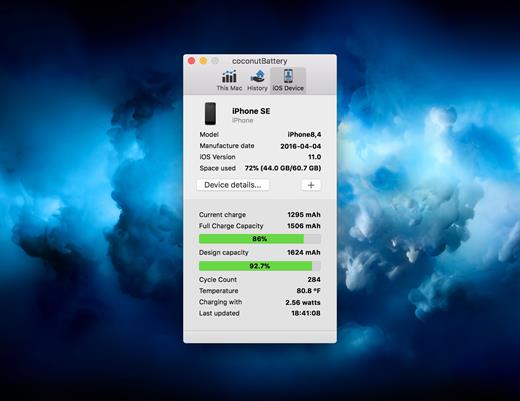
With coconutBattery you’re always aware of your current battery health. It shows you live information about your battery such as how often it was charged and how is the current maximum capacity in relation to the original capacity your battery had when it left the factory.

Of course, you are able to save the current maximum capacity of your battery. So you can see the changes in your battery health over time.

What’s New

Version 4.3.0:


  • Added support for macOS Tahoe and iOS/iPadOS 26
  • New: USB device connection details are now shown in Advanced Details
  • Fixed: Battery manufacturer information is now displayed correctly on Mac
Compatibility

macOS 10.12 or later.
Apple Silicon or Intel Core processor


Release Name: coconutBattery Plus 4.3.0
Size: 6.6 MB
Links: HOMEPAGE – NFO – Torrent Search

Download: RAPiDGATOR

6 Comments
May 3

iTubeGo YouTube Downloader 10.15.0

Download full HD/4K/8K videos from YouTube and more than 10,000+ websites at high speed

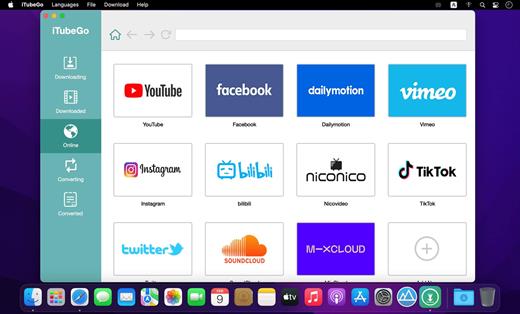
As a powerful HD video downloader for YouTube, Dailymotion, Facebook, and other streaming sites, iTubeGo HD Video Downloader provides 10X faster speed to download high-quality videos in bulk. Moreover, it provides a built-in browser to download video and music easily and cut Youtube to MP4, MP3, and more.

iTubeGo YouTube Downloader allows you to download videos from YouTube, Facebook, Instagram, Dailymotion, Vimeo, TikTok, Pornhub, Xvideos, SpankBang, xHamster and other websites. iTubeGo provides various SD and UHD video quality options, including 480p, 720, 1080p, 2K, 4K, 8K etc.
Besides downloading videos, iTubeGo can also extract audio from video and save it as high quality 320kbps MP3 format. It supports mp3 download from most music sites.

What’s New

Version 10.15.0:


  • Release notes were unavailable when this listing was updated.
Compatibility

macOS 10.10 or later
Apple Silicon or Intel Core processor


Release Name: iTubeGo YouTube Downloader 10.15.0
Size: 160.2 MB
Links: HOMEPAGE – NFO – Torrent Search

Download: RAPiDGATOR

8 Comments
May 3

iZotope RX 12 Audio Editor Advanced 12.0.0

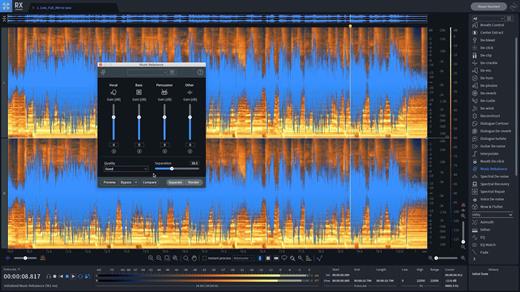
iZotope RX has long been the go-to audio repair and polishing suite for film, television, music, podcasts, video Welcome to RX 9! This version features new processing that makes generating complex ambiences, removing tricky hum and interference, and separating dialogue from background noise easier and faster than ever. We’ve delivered new modes to Ambience Match, Dialogue Isolate, and De-hum. And the History list is now expandable with the ability to restore a selection to previous processing steps.

What’s New

Version 12.0.0:


  • Release notes were unavailable when this listing was updated.
Compatibility

macOS 11.7 or later
Apple Silicon or Intel Core processor


Release Name: iZotope RX 12 Audio Editor Advanced 12.0.0
Size: 2.2 GB
Links: HOMEPAGE – NFO – Torrent Search

Download: RAPiDGATOR
3 Comments
May 3

Steinberg Dorico Pro 6.2.20

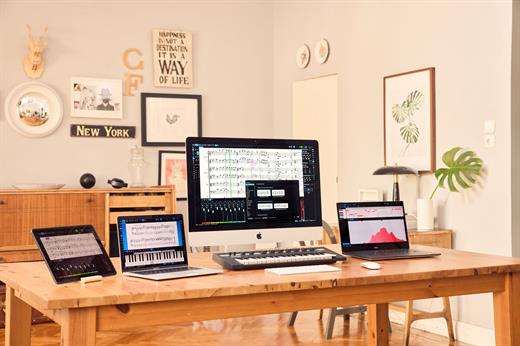
Dorico helps you to write music notation, automatically producing printed results of exceptional quality — and plays it back with breathtaking realism. It is easy enough for anyone to learn, yet has hundreds of advanced notations, features, options and sounds to satisfy even the most demanding professionals.

What you can do with Dorico?

Compose


  • Composing, arranging — or just writing and printing out music — is made much quicker and more efficient with Dorico. Thanks to its intelligent design, it automatically adjusts the notation as you write. With nearly 1,500 sounds included, arrangements can be played back with exceptional realism and, with no workarounds needed for advanced notation, Dorico produces excellent results much more quickly than has been possible before.
Learn

  • With its streamlined, natural user interface, students and those with less experience in scoring can compose and arrange straight into Dorico, making learning the language of music notation much faster and more intuitive. Editing and making changes — such as instrument, time signature or key — are straightforward, with the notation instantly and correctly adapting to include them, reinforcing the learning outcome. For teachers, producing teaching materials and hand-outs that mix music and text is easy, and it’s never been quicker to adapt arrangements for your band, orchestra or other school ensemble.
Publish

  • Dorico is the perfect tool for music engraving, publishing and copying. It automatically lays out pages of balance and beauty, with comprehensive collision avoidance and advanced algorithms that handle almost any musical context with ease. Music made with Dorico has the look of the finest traditionally engraved music, and the software provides tweaking tools to satisfy the most demanding professional. Producing high-quality, crystal-clear scores for selling or performance has never been faster or easier.
Benefits

  • Best automatic engraving of any software
  • Easy note input
  • Intelligently adjusts notation as you write
  • Any number of movements or pieces in a single project
  • Automatic layout of instrumental parts, including unique linked cues
  • Stunning playback — nearly 1,500 sounds included
  • Supports VST 3 virtual instruments and effects processors (30 included)
  • Sequencer-style piano roll MIDI editor
  • DTP page layout
  • Sophisticated chord symbols, unpitched percussion and drum set notation
  • Unbarred music, tuplets across barlines, microtonality, etc. all handled correctly — no workarounds
  • Transfer to and from other programs via MusicXML, MIDI, PDF, etc.
What’s New

Version 6.2.20:


  • Release notes were unavailable when this listing was updated.
Compatibility

macOS 10.10 or later


Release Name: Steinberg Dorico Pro 6.2.20
Size: 694.3 MB
Links: HOMEPAGE – NFO – Torrent Search

Download: RAPiDGATOR

6 Comments
May 3

Stringed 2.30

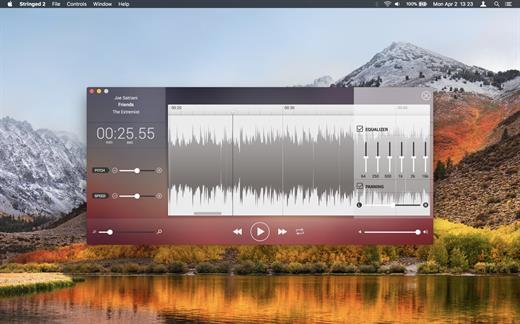
Stringed is the perfect tool for every musician. By allowing you to tweak any song’s speed and pitch, you will be able to learn any song in no time!


  • Pitch Shifting: You won’t need to retune your instrument anymore!. With Stringed, you will be able to change any song’s pitch up to 12 semitones (up or down!).
  • Tempo Tuning: Slow down any tricky solo!. Speed up slow sections. With Stringed’s tempo tunning feature, you will be able to tweak the tempo 50% faster or slower.
  • Loops: Select any region you wanna loop, toggle the Loop switch, and hit play. That’s all you’ll ever need to do. You can play over your favorite song’s solo, over and over again!
  • Supported Formats: Stringed will open audio files encoded in: AIFF, WAV, MP4, and MP3.
What’s New

Version 2.30:


  • Improved stability and internal enhancements
Compatibility

macOS 10.13.0 or later


Release Name: Stringed 2.30
Size: 8.8 MB
Links: HOMEPAGE – NFO – Torrent Search

Download: RAPiDGATOR
6 Comments