Please REGISTER or RENEW your account on RAPiDGATOR.net and support us by doing through all RAPiDGATOR working download links on main posts...
Apr 28

Rectangle Pro 3.77

Snap windows faster in this featureful Rectangle superset. Toss windows in the right places with cursor movement, move multiple windows with one command, create custom shortcuts, and more.

One simple key combo
• 16 window sizes & positions
• No need to remember a ton of keyboard shortcuts, but those are all here, too
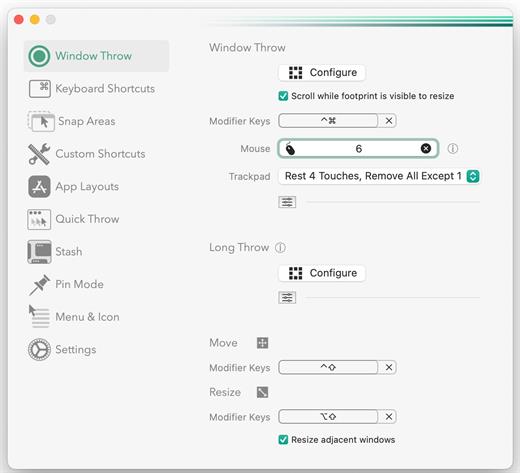
A Supercharged Rectangle Superset
• Keyboard shortcuts
• Drag windows to screen edges to snap

PRO
• Move and resize by holding a key and moving your cursor
• Snap windows under your cursor, even if not in focus
• Custom shortcuts for any size & position
• Sync your settings over iCloud

The Lightweight Gesture Champ
• Unlike touch gesture based window managers, Rectangle Pro only consumes CPU when configured modifier keys are pressed. Even then it’s minimal
• Rectangle Pro is a breeze to learn, and doesn’t conflict with any built-in macOS behavior
• Use it with any device that moves the cursor

Unmatched Customization and Actions
• Create keyboard shortcuts with any window size and location, and specify what happens on each repeated execution
• Fill left and right actions make it simple to maximize screen usage without overlap
• Match the keyboard shortcut window management of that other OS

Multiple Windows at Once
• Cascade windows
• Move all windows for an app to another display or screen half
• Tile top windows in a 2×2 or 2×3 grid

Additional Efficiency and Speed
• Each window action can be configured with a quick, simple cursor movement and modifier key combination
• Just press and release modifier keys while you move your cursor over the window you want to snap

What’s New

Version 3.77:


  • Release notes were unavailable when this listing was updated.
Compatibility

macOS 10.12 or later
Apple Silicon or Intel Core processor


Release Name: Rectangle Pro 3.77
Size: 8.3 MB
Links: HOMEPAGE – NFO – Torrent Search

Download: RAPiDGATOR

7 Comments
Apr 28

Haptyk 1.1.4

Haptyk for Mac is a unique keyboard sound enhancement app designed specifically for MacBook users. Unlike ordinary keyboard sound apps that simply play the same click repeatedly, Haptyk detects how hard you type and matches the sound in real time, creating a more natural and immersive mechanical keyboard experience on macOS. According to the official website, the app uses the built-in accelerometer on Apple Silicon MacBooks to measure typing impact and trigger responsive sound playback instantly.

Built with a fully native audio engine, Haptyk focuses on speed and responsiveness. The developer says the app is written in C and Objective-C for real-time performance, with claimed keystroke-to-sound latency of less than 1 millisecond. This makes it especially appealing to Mac users who want a satisfying mechanical keyboard feel without external hardware.

Haptyk for Mac includes velocity-sensitive sound playback, meaning soft typing produces lighter sounds while harder keystrokes generate deeper, stronger feedback. The app also supports multiple sound packs based on real mechanical keyboard recordings. The official site lists 16 switch-inspired sound packs, including tactile, linear, clicky, and classic keyboard styles, giving users a variety of typing sound profiles to choose from.

What’s New

Version 1.1.4:


  • Release notes were unavailable when this listing was updated.
Compatibility

macOS 14.0 or later
Apple Silicon only


Release Name: Haptyk 1.1.4
Size: 17.1 MB
Links: HOMEPAGE – NFO – Torrent Search

Download: RAPiDGATOR

7 Comments
Apr 28

Dupin 3.2.0

Dupin is your iTunes duplicates manager.

Dupin finds sets of duplicate tracks in iTunes based on the criteria you choose. It can then automatically select the “Keeper” tracks from among the duplicates using a variety of versatile filter options. Dupin is flexible, fast, and easy to use.

With Dupin you can:


  • Locate, sort, filter, and purge duplicate tracks
  • Remove duplicate tracks from iTunes and trash their files
  • Re-populate iTunes playlists
  • Preserve play history and ratings
  • Manage intentionally duplicated tracks
  • Copy tracks to new iTunes playlists
  • Audition tracks
What’s New

Version 3.2.0:


  • Fixes an ambiguous Filter Controls settings issue
  • Fixes secondary window resizing issue
  • Updates message text in some alerts regarding iCloud Music Library/iTunes Match
  • Removes some older code that accommodated pre-Intel machines
  • Other minor maintenance fixes
Compatibility

macOS 10.15 or later


Release Name: Dupin 3.2.0
Size: 5 MB
Links: HOMEPAGE – NFO – Torrent Search

Download: RAPiDGATOR

7 Comments
Apr 28

4K Video Downloader Plus Pro 26.1.1

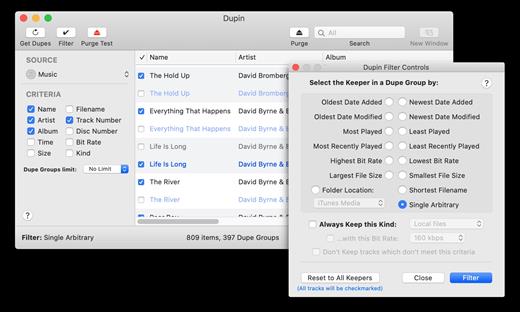
4K Video Downloader allows to download video, audio and subtitles from YouTube in high-quality and as fast as your computer and connection will allow. If you want that video on your iPad, iPhone or other device we’ve got you covered. Downloading is simple and straightforward: just copy the video link from your browser and click ‘Paste Url’. Done!

Proxy Connection for Unrestricted Access


  • Bypass restrictions set by your Internet service provider and get around your school or workplace firewall. Connect through an in-app proxy to access and download from YouTube and other sites.
All Popular Sites Support

  • Save video and audio from YouTube, Vimeo, TikTok, SoundCloud, Bilibili, Niconico, Flickr, Facebook, Instagram, DailyMotion, Naver TV, Likee and Tumblr. Download recorded streams from Twitch and YouTube Gaming.
New YouTube Video Auto-Download

  • Subscribe to the download of your favorite YouTube playlists and creators. Save whole channels and playlists in one go. Get new videos downloaded automatically as soon as they are uploaded to YouTube.
3D Video Download

  • Get a one of a kind experience by watching stereoscopic 3D videos on your computer or TV. Download 3D Youtube videos in MP4, MKV, FLV, 3GP and other formats
360° Video Download

  • Feel the action all around you with virtual reality videos. Download 360° videos to relive the mind-blowing VR experience as many times as you want.
Easy Downloads Management

  • Sort and filter downloads by type, name and date. Import and export all files as a single JSON file. Easily track and control the progress of both individual downloads and entire groups of downloading files.
What’s New

Version 26.1.1:


  • Release notes were unavailable when this listing was updated.
Compatibility

macOS 10.13 or later


Release Name: 4K Video Downloader Plus Pro 26.1.1
Size: 275.4 MB
Links: HOMEPAGE – NFO – Torrent Search

Download: RAPiDGATOR
8 Comments
Apr 28

Parallels Desktop 26.3.2-57398

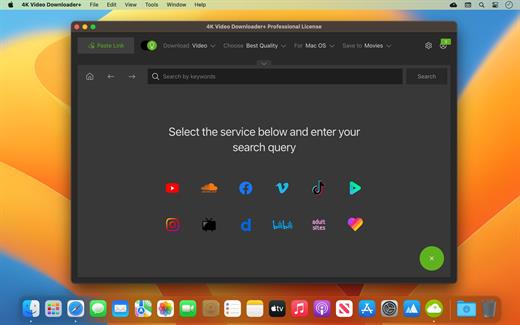
Parallels Desktop allows you to run Windows and Mac applications side by side. Choose your view to make Windows invisible while still using its applications, or keep the familiar Windows background and controls on your Mac.

Works with Boot Camp®


  • Reuse your existing Boot Camp installation. Converting a virtual machine from Boot Camp is now much easier and more intuitive than ever.
Not just for Windows

  • Run a wide array of operating systems including OS X, Windows 10, 8.1 & 7, Linux, and Google ChromeTM. You can run just about anything on your Mac!
One-click tuning

  • Select productivity, games, design, or development, and Parallels Desktop 11 for Mac will optimize your virtual machine settings and performance for you.
Robust Performance

  • Parallels Desktop Pro Edition gives your virtual machines more processing power. Up to 64 GB vRAM and 16 vCPUs per virtual machine lets you run even the most demanding applications with ease.
Business Class Software

  • Keep IT in control of end user licenses and Windows virtual machines with a Unified Volume License Key, centralized license management, and advanced security features available in Parallels Desktop Business Edition.
If the version you are using does not have bugs. No reinstallation is required.

Open Terminal and type xattr -cr  then drag the App/DMG into the Terminal window and press Enter, note that there is a space after -cr

What’s New

Version 26.3.2:


  • Release notes were unavailable when this listing was updated.
Compatibility

macOS 12 or later


Release Name: Parallels Desktop 26.3.2-57398
Size: 210.5 MB
Links: HOMEPAGE – NFO – Torrent Search

Download: RAPiDGATOR

7 Comments
Apr 26

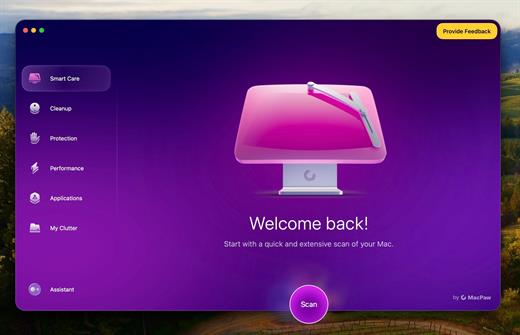
CleanMyMac 5.5.2

CleanMyMac is all-in-one package to awesomize your Mac. It cleans megatons of junk and makes your computer run faster. Just like it did on day one.

CleanMyMac makes space for the things you love. Sporting a range of ingenious new features, CleanMyMac lets you safely and intelligently scan and clean your entire system, delete large, unused files, reduce the size of your iPhoto library, uninstall unneeded apps or fix the ones that started to work improperly, manage all your extensions from one place and do much more – all from one newly designed and beautifully simple interface.

Note:

wait a second to let it activate itself

If prompted:”The application “CleanMyMac” can’t be opened.”

What’s New

Version 5.5.2:


  • Release notes were unavailable when this listing was updated.
Compatibility

macOS 14.0 or later


Release Name: CleanMyMac 5.5.2
Size: 152.7 MB
Links: HOMEPAGE – NFO – Torrent Search

Download: RAPiDGATOR
7 Comments
Apr 26

Wondershare PDFelement Pro 12.1.14 (OCR)

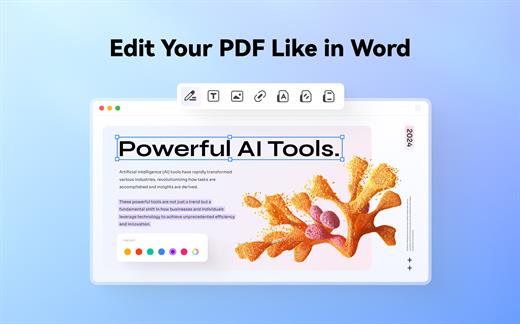
Wondershare PDFelement is a self-explanatory OS X application that makes it easier for your to preview, edit, join, split and convert PDF documents using a Mac.

The Wondershare PDFelement also features a simple, clean and intuitive interface that provide instantaneous access to all the tools and features you might need to complete your daily tasks.

Powerful and user-friendly PDF editor for everyday use

Moreover, with Wondershare PDFelement’s help, you can effortlessly edit PDF documents created using text files, web pages or scanned documents.

Consequently, you can add, remove or edit text, move and rearrange pages, insert or remove images and more.

Wondershare PDFelement’s top toolbar helps you hide, show and customize the sidebar in order to display the items and information you are interested in. In addition, you can browse through the loaded document, zoom in or out, print it or email it with just a couple of mouse clicks.

Advanced OCR capabilities make text editing a breeze

Furthermore, you can choose between the “Hand”, “Select” and “Edit” tool, use the advanced OCR feature and convert your source file into plain text or RTF document, ePUB, HTML, as well as file formats compatible with Microsoft Word, Excel, and PowerPoint.

The context menu also helps you switch between the “Move”, “Select” and “Touchup” tool, change the display mode and open the Inspector window to view detailed information about the loaded document.

As an added bonus, by accessing the Document menu, you have the option to add, update or remove an watermark, extract, insert and delete pages, split, merge or convert your document and crop or rotate a page with ease.

Full-featured tool designed to help you stamp, watermark, encrypt and decrypt PDF documents on a Mac

The complete list of all available editing tools, bookmark features, annotation tools and stamp options can be found under the Tools menu.

From here you can easily insert text boxes, add sticky notes, highlight, strike-through and underline text, insert various shapes and use the handy pencil or erase.

On the whole, Wondershare PDFelement comes with the right set of features to help you edit and annotate PDF documents using a Mac, as well as effortlessly add password protect and convert them other formats for easier sharing with your friends and colleagues.

What’s New

Version 12.1.14:


  • Release notes were unavailable when this listing was updated.
Compatibility

macOS 11.0 or later
Apple Silicon or Intel Core processor


Release Name: Wondershare PDFelement Pro 12.1.14 (OCR)
Size: 837.7 MB
Links: HOMEPAGE – NFO – Torrent Search

Download: RAPiDGATOR

7 Comments
Apr 26

Pixelstyle Photo Editor 4.5.0

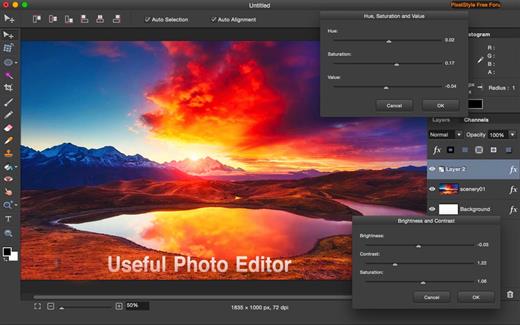
PixelStyle, full-featured graphic-design app, offers an alternative to PhotoShop. It includes all the essential tools you need for professional photo editing. It is painstakingly engineered for professionals with a large array of intuitive tools: filters, layers, special effects, editing, retouching, and photo enhancement. 100 brushes are built-in to offer an unparalleled drawing experience. With the state-of-art image-editing technology and fast, precise working capability, PixelStyle has become an indispensable tool for all photographic designers.

Features:


  • Professional Image Processing

    • Intuitive multifunction interface: A set of sophisticated but easy-to-use tools
    • Professional adjustments: Adjust exposure, hue, vibrance, white balance, shadows, highlights, brightness, contrast and much more
    • Photo retouching and correction tools: Immediately delete unwanted elements and retouch the images
    • Cutout tools: 1 min cut-out of an object from a photo and change its background
    • Precise Control: quickly and easily select any part of an image; edit and apply special effects to any portion of your pictures
    • Multi-panel: open multiple interfaces at the same time
    • Top Mac Drawing Tools: – More than 100 built-in drawing brushes (pencil, airbrush, watercolor brush, chalk, charcoal, neon pens…) for oil painting, sketch, texture painting… Create custom brushes and use different brush sizes, shapes, hardness, and blending modes
  • Support pixel-drawing

    • Fill in the object with texture and color – support for a variety of gradient modes including symmetrical, rotate, clockwise and counterclockwise
  • Powerful Layer Capabilities

    • Full support for unlimited layers and layer groups
    • Easily add non-destructive layer effects like shadows, fills, inner glow, outer glow, or strokes
    • Support over 50 different filter effects and blending mode options
    • Resize layers without any loss of quality–hide, duplicate, and merge layers easily
    • Select several layers at one time and freely align, flip, and transform (move, rotate, skew, affine) the layers
    • Support channel selection and alpha channel editing
    • Your file could be saved as a project – you can edit them next time
    • Work with all popular formats like TIFF, JPEG, PNG, GIF, BMP, etc.
  • Excellent Font Design Tools

    • Add text layer effects like shadows, strokes, inner glow, outer glow, or fills
    • Reshape the text to irregular shape such as fan-shaped
    • Freely transform the text, including moving, rotating, skewing, and affine
    • Convert type layers into raster layers
    • Enjoy a full set of advanced typography features like kerning, bold, italic, underline, strikethrough, and much more
  • Designed exclusively for Mac

    • Takes full advantage of the latest OS X technologies including OpenGL, Grand Central Dispatch, and Core Graphics
    • Use the Touch trackpad to paint with pressure sensitivity
    • Fully optimized for 64-bit and multi-core processors
    • Supports standard, Retina, and multi-monitor set ups
What’s New

Version 4.5.0:


  • Release notes were unavailable when this listing was updated.
Compatibility

macOS 10.9 or later.


Release Name: Pixelstyle Photo Editor 4.5.0
Size: 122.8 MB
Links: HOMEPAGE – NFO – Torrent Search

Download: RAPiDGATOR
5 Comments
Apr 26

MouseBoost Pro 4.3.1

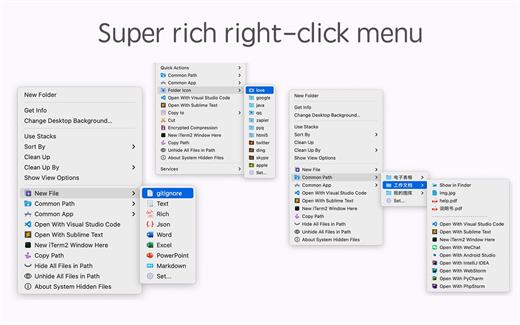
MouseBoost Pro integrates more than 30 kinds of small tools, and the operation way is very simple, as long as you click the right mouse button, you can activate all kinds of functions you want, so that your work efficiency is greatly improved.

You can create any file type you want, open any APP you want, self-sorting, fully customized!

*** Main Features ***
– All menus support custom sorting.
– Quickly create all kinds of commonly used files, and supports custom creation of various file types you want.
– Quickly open your terminal, iTerm2, and go to the directory you want.
– Quickly open VSCode, Sublime Text and Emacs, and customize the various apps you want to open.
– Quickly copy the current path power.
– Complete files deletion is supported.
– Supports files moving, copying and cutting.
– Supports files encrypted compression.
– Quickly open your favorite directory.
– Quickly get file MD5,SHA1,SHA256 and other information.
– Supports hiding and displaying of specified files.
– Supports modify folder icon.

What’s New

Version 4.3.1:


  • Release notes were unavailable when this listing was updated.
Compatibility

macOS 10.11 or later


Release Name: MouseBoost Pro 4.3.1
Size: 18.4 MB
Links: HOMEPAGE – NFO – Torrent Search

Download: RAPiDGATOR

4 Comments
Apr 26

Yate 9.1.0

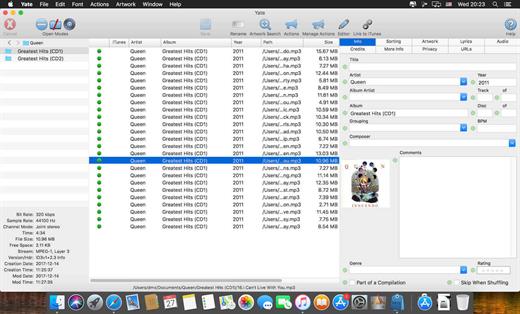
Yate was developed for people who want complete control over their tagging experience. Supports audio in AIFF, APE, DFF, DSF, FLAC, OGG OPUS, OGG VORBIS, M4A, M4B, MP3, MP2, MP4, STEM.MP4, WAV and WV files. Supports video in M4V and MP4.

Yate has a long list of features; most importantly, an innovative scripting system called actions. Actions can be used to update all of an album’s tags with a single operation. Yate also supports integration with AcouticBrainz, AcoustID, Beatport, Discogs, iTunes, MusicBrainz and TMDb. All changes can be easily reverted and individual changes can be undone in any order. Whether you want to automatically or manually tag your files, Yate can do it all!

What’s New

Version 9.1.0:


  • Release notes were unavailable when this listing was updated.
Compatibility

macOS 10.10 or later


Release Name: Yate 9.1.0
Size: 17 MB
Links: HOMEPAGE – NFO – Torrent Search

Download: RAPiDGATOR
5 Comments