Please REGISTER or RENEW your account on RAPiDGATOR.net and support us by doing through all RAPiDGATOR working download links on main posts...
Apr 17

SiteSucker 6.1.6

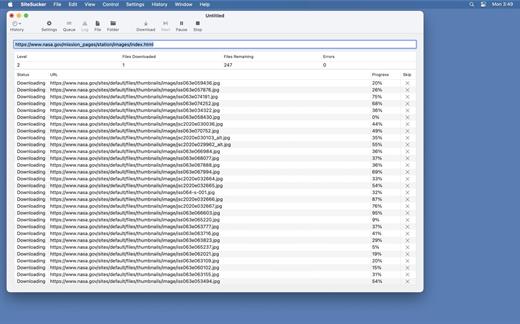
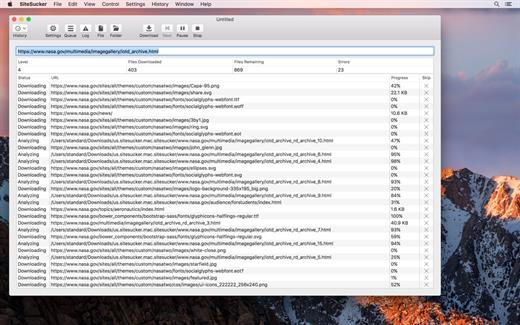
SiteSucker is an application that automatically downloads Web sites from the Internet. It does this by copying the site’s HTML documents, images, backgrounds, movies, and other files to your local hard drive. Just enter a URL and click a button and SiteSucker can download the entire site.

SiteSucker can be used to make local copies of your Web sites for easy maintenance. SiteSucker can download files unmodified, or it can “localize” the files it downloads, allowing you to browse a site off-line.

What’s New

Version 6.1.6:


  • Release notes were unavailable when this listing was updated.
Compatibility

macOS 11.0 or later


Release Name: SiteSucker 6.1.6
Size: 7 MB
Links: HOMEPAGE – NFO – Torrent Search

Download: RAPiDGATOR

6 Comments
Apr 17

Capture One Enterprise 16.7.7

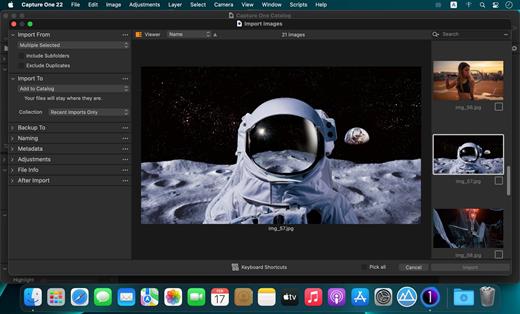
Capture One Enterprise – the photo editing solution for image production studios and e-commerce platforms. Its authentic true-to-life color processing, seamless editing experience, and fastest tethering in the industry gives you total creative control, making it a household name in studios across the world. Based in Copenhagen, Denmark, Capture One empowers photographers with cutting-edge features to keep your photography one step ahead

With an updated processing engine, market-leading performance, and powerful new features, Capture One is the professional choice in imaging software. You get the highly responsive precision tools you need to create stunning images from your camera’s RAW files in a time-saving workflow that can be customized to fit your needs.

What’s New

Version 16.7.7:


  • Release notes were unavailable when this listing was updated.
Compatibility

macOS 10.13 or later
Apple Silicon or Intel Core processor


Release Name: Capture One Enterprise 16.7.7
Size: 1.2 GB
Links: HOMEPAGE – NFO – Torrent Search

Download: RAPiDGATOR

4 Comments
Apr 17

Capture One Pro 16.7.7

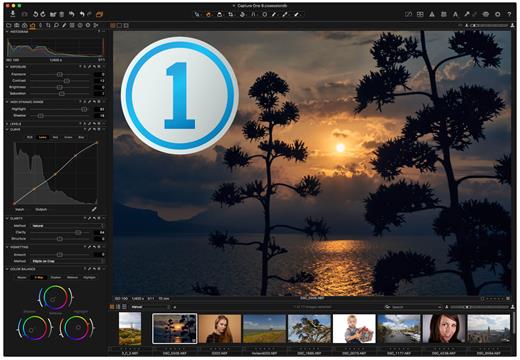
Capture One is a professional RAW converter offering you ultimate image quality with accurate colors and incredible detail from more than 400 high-end cameras – straight out of the box. It offers state-of-the-art tethered capture, powerful digital asset management, extensive adjustment tools, and a flexible workflow.

With an updated processing engine, market-leading performance, and powerful new features, Capture One is the professional choice in imaging software. You get the highly responsive precision tools you need to create stunning images from your camera’s RAW files in a time-saving workflow that can be customized to fit your needs.

What’s New

Version 16.7.7:


  • Release notes were unavailable when this listing was updated.
Compatibility

macOS 10.13.0 or later
Apple Silicon or Intel Core processor


Release Name: Capture One Pro 16.7.7
Size: 1.2 GB
Links: HOMEPAGE – NFO – Torrent Search

Download: RAPiDGATOR

4 Comments
Apr 17

Downie 4.12.3

A simple download manager that offers you the possibility to quickly save videos from different websites to your own disk drive.

If you are using a poor internet connection, trying to visualize videos streamlined online might not work properly since the content is loaded too slowly. Downie is a simple Mac app that can help you download those videos to your computer, and then watch them by using your default media player.

User friendly video downloader featuring support for drag and drop actions

Working with Downie is extremely straightforward: simply drop the video URL on top of the app’s main window or on the Dock icon. Downie adds the video to your downloads list, so all you have to do next is start the process by pressing the appropriate button. Of course, you can also remove items from the list.

By default, Downie downloads MP4 files and places them in your default Downloads folder, but you can easily change this via the Preferences window. The same area allows you to setup notifications, or post processing actions (convert to MP4 if necessary, or extract audio only).

Effortlessly download videos from a wide collection of hosting websites

Downie provides support for more than 400 different websites that host video content, among which there are the most popular choices, such as YouTube, Apple, LiveLeak, Vimeo, BBC, and so on. If a certain website is not included, within the app you can send a request email to the Downie developers.
Moreover, Downie also provides matching extensions for various popular web browsers, such as Firefox, Safari, Google Chrome or Chromium. The add-ons are not installed by default: open the Preferences window and install only the ones you plan to use.

Straightforward solution for downloading video content hosted online

Downie is a great tool for saving videos posted on various websites to your Mac for offline playback. The application is extremely useful especially if you have a slow internet connection.

What’s New

Downie 4.12.3:


  • New: Experimental feature to add wait period between download preparations.
  • Improved: apple.com, knowledge.ca, mujrozhlas.cz, nytimes.com, ok.ru, telequebec.tv, tiktok.com, youtube.com.
Compatibility

macOS 10.12 or later
Apple Silicon or Intel Core processor


Release Name: Downie 4.12.3
Size: 42.3 MB
Links: HOMEPAGE – NFO – Torrent Search

Download: RAPiDGATOR

5 Comments
Apr 17

Affinity 3.2.0

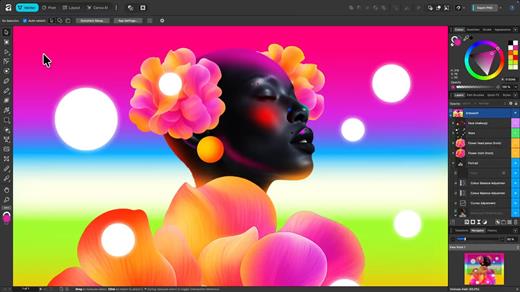
An app that adapts to you, not the other way around. Affinity comes with built-in Vector, Pixel, and Layout studios, but you’re not locked in. Rearrange panels and mix and match your favorite tools to build custom studios. You can save multiple setups, switch between them in a click, and even share with others or download theirs.

It’s customization that flexes to your workflow.

Powerful tools. Easy to learn.

Learn by doing with step-by-step lessons, templates, and real-world examples.

Enrich your designs with tailored content

Make your designs stand out with world-class photos, graphics, videos, audio, fonts, charts, and more. Explore our vast content libraries featuring top brands like Disney, Artlist, and pocstock.

Design with others

Canva makes collaboration easy. Tag teammates in comments and assign tasks on Docs, Presentations, Whiteboards, and more. Canva empowers businesses of all sizes to stay organized and reach your goals faster.

Design and print in one place

Turn your memories into photo albums, your designs into T-shirts, and your branding into business cards, flyers or invites. Get all your printing done right here with free delivery to your doorstep.

Plans that get down to business

Empower your whole team or business to design together with one of our workplace plans

AI-powered efficiency

Leverage AI to create on-brand copy, templates and video-editing.

Bring your brand in house

Set up Brand Kits and templates for your team to design with.

Beautiful approval flows

Easily control individual permissions, assign tasks and share your work.

What’s New

Version 3.2.0:


  • Release notes were unavailable when this listing was updated.
Compatibility

macOS 10.15 or later


Release Name: Affinity 3.2.0
Size: 970.3 MB
Links: HOMEPAGE – NFO – Torrent Search

Download: RAPiDGATOR

6 Comments
Apr 17

Parallels Desktop 26.3.1-57396

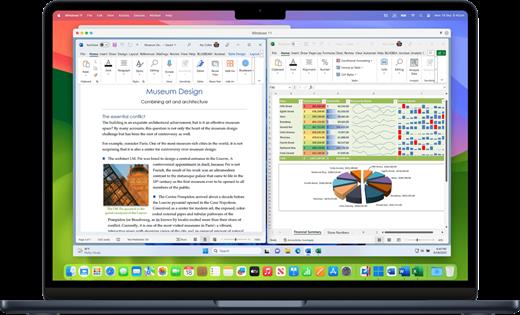
Parallels Desktop allows you to run Windows and Mac applications side by side. Choose your view to make Windows invisible while still using its applications, or keep the familiar Windows background and controls on your Mac.

Works with Boot Camp®


  • Reuse your existing Boot Camp installation. Converting a virtual machine from Boot Camp is now much easier and more intuitive than ever.
Not just for Windows

  • Run a wide array of operating systems including OS X, Windows 10, 8.1 & 7, Linux, and Google ChromeTM. You can run just about anything on your Mac!
One-click tuning

  • Select productivity, games, design, or development, and Parallels Desktop 11 for Mac will optimize your virtual machine settings and performance for you.
Robust Performance

  • Parallels Desktop Pro Edition gives your virtual machines more processing power. Up to 64 GB vRAM and 16 vCPUs per virtual machine lets you run even the most demanding applications with ease.
Business Class Software

  • Keep IT in control of end user licenses and Windows virtual machines with a Unified Volume License Key, centralized license management, and advanced security features available in Parallels Desktop Business Edition.
If the version you are using does not have bugs. No reinstallation is required.

What’s New

Version 26.3.1:


  • Release notes were unavailable when this listing was updated.
Compatibility

macOS 12 or later


Release Name: Parallels Desktop 26.3.1-57396
Size: 253.5 MB
Links: HOMEPAGE – NFO – Torrent Search

Download: RAPiDGATOR

5 Comments
Apr 17

Aiarty Image Enhancer 3.11

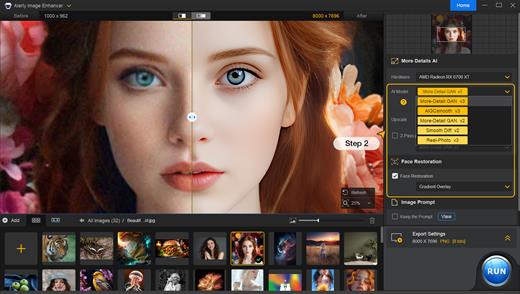
A generative AI-powered image enhancement software that deblurs, denoises, restores, and upscales images, generating realistic details for superior clarity and sharpness using new and advanced AI models. Enhance Your Images for Better Perceptual Quality
Deblur
- Make Blurry Images Clearer
Enhance blurry, grainy, pixelated, or soft images intelligently, while AI works its magic to generate crisp and lifelike details – idea for restoring clarity to AI-generated images and heavily compressed photos.

Denoise – Remove Noise from Photos
Employ deep learning algorithms to denoise and reconstruct photos. Tackle various noise types obtained during acquisition or post production. Effectively improve clarity, sharpness, and overall visual quality

Upscale – Enlarge Images to 4K/8K/32K without Losing Quality
Upscale AI-generated images and real photos by 2x, 4x, or 8x to achieve stunning 4K, 8K, or 32K resolution

More Details – 
Not Only Preserve But Also Generate
A specially trained AI model for preserving and generating image details. Adept at generating details for skin, hair, textures, lines, and the like. The lower the quality of the image is, the greater the potential for improvement.

Supported Input & Output Formats
Supported Input Formats
.jpg, .jpeg .jp2, .j2k, .jpf, .jpm, .jpg2, .j2c, .jpc, .jpx, .mj2, .png, .tif, .tiff, .webp, .bmp, .avif, and RAW formats (.dng, .cr3, .cr2, .crw, .nef, .nrw, .arq, .arw, .sr2, .srf, .raf, .rw2, .orf, .ori, .pef, .ptx, .3fr, .fff, .iiq, .cap, .eip, .rwl, .srw, .erf, .mos, .mef, .mrw, .mdc, .dcr, .kdc, .dcs, .drf, .k25, .bay, .pxn, .r3d, and .rwz)

Supported Output Formats
.jpg, .png (8-bit, 16-bit)

Supported Output DPIs

What’s New

Version 3.11:


  • Release notes were unavailable when this listing was updated.
Compatibility

macOS 10.15 or later


Release Name: Aiarty Image Enhancer 3.11
Size: 129.4 MB
Links: HOMEPAGE – NFO – Torrent Search

Download: RAPiDGATOR

4 Comments
Apr 17

SoundSource 6.0.6

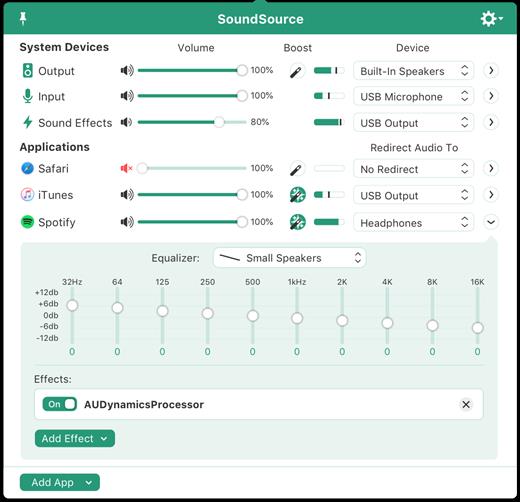
SounceSource lets you adjust your input, output, and sound-effects devices and volume settings in mere moments, right from the menu bar. Enable soft play-thru of input devices to your desired output, so you can hear sound coming in through any microphone or other source. With SoundSource, you get fast access to your Mac’s most important audio settings.


  • Instant Audio-Device Switching – With just two clicks, you can switch the audio devices your Mac is using for input, output, and even sound effects.
  • Fast Volume Control – SoundSource provides easy access to the volume controls for your audio devices as well.
  • Audio Play-Thru, Too – SoundSource’s Play-Thru window makes it easy to monitor the audio coming from any input device.
  • Comprehensive – SoundSource gives you one place to go for all Mac’s most important audio controls.
  • At Your Fingertips – With SoundSource running in your menu bar, your audio controls are always available.
  • Lightweight – When you don’t need SoundSource, it stays out of your way.
What’s New

Version 6.0.6:


  • Release notes were unavailable when this listing was updated.
Compatibility

macOS 10.14.0 or later
Apple Silicon or Intel Core processor


Release Name: SoundSource 6.0.6
Size: 45.9 MB
Links: HOMEPAGE – NFO – Torrent Search

Download: RAPiDGATOR

6 Comments
Apr 17

SiteSucker Pro 6.1.6

SiteSucker Pro is an application that automatically downloads Web sites from the Internet. It does this by copying the site’s HTML documents, images, backgrounds, movies, and other files to your local hard drive. Just enter a URL and click a button and SiteSucker can download the entire site.

SiteSucker can be used to make local copies of your Web sites for easy maintenance. SiteSucker can download files unmodified, or it can “localize” the files it downloads, allowing you to browse a site off-line.

What’s New

Version 6.1.6:


  • Release notes were unavailable when this listing was updated.
Compatibility

macOS 11.0 or later.


Release Name: SiteSucker Pro 6.1.6
Size: 7.3 MB
Links: HOMEPAGE – NFO – Torrent Search

Download: RAPiDGATOR

5 Comments
Apr 17

Octavo 1.0.4

Ever tried to print a booklet but don’t know what order to put the pages in? Or spent an afternoon fighting with your printer only to waste half a ream of paper? We’ve been there. That’s why we built Octavo.

Octavo: Imposition & Booklet Printing for Mac

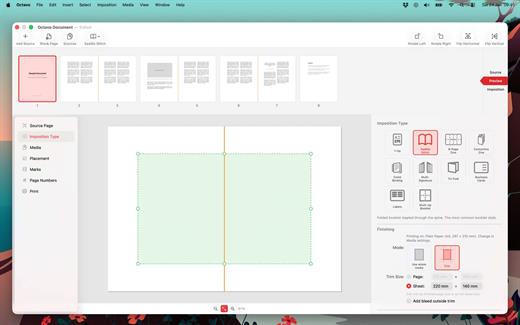
Octavo takes your PDF and arranges the pages so they come out right when you fold, staple, or bind them. It handles the fiddly maths so you don’t have to.

What Can Octavo Do?

Drop in a PDF or some images and Octavo gives you a complete workflow:


  • Print booklets: Octavo calculates the page order for duplex printing, adds fold and staple marks, and exports printer-ready sheets.
  • Clean up messy PDFs: Rotate, flip, straighten, adjust perspective, and crop — all with visual on-canvas editors.
  • Manage your margins: Position content with inside/outside margins so nothing gets clipped by binding. Multiple scaling modes with per-page fine-tuning.
Imposition Styles

  • Saddle-Stitch Booklet: The classic folded-and-stapled booklet.
  • Multi-Signature: For thicker books — divide pages into folded, gathered signatures.
  • Comb / Hole Punch Binding: Hole patterns, binding edge, and margins for punched or bound documents.
  • Tri-Fold Brochure: C-fold and Z-fold layouts for leaflets and pamphlets.
  • 1-Up: Single or double-sided output with full placement control.
  • Business Cards and Labels: Grid layout with configurable rows, columns, and gaps.
  • 8-Page Mini Zine: Fold and cut a single sheet into an eight-page booklet. Great for zine fairs or just for fun.
  • Concertina Zine: An accordion-fold strip from a single sheet.
Clean Up Your Source PDF

  • Rotate in 90° increments, flip horizontal or vertical.
  • Straighten crooked scans with the angle slider.
  • Correct perspective distortion with draggable corner handles.
  • Set your crop margins with a visual editor.
  • Adjust image filters: threshold, levels, and more.
  • Set bleed on source pages for edge-to-edge printing.
Placement & Margins

  • Set top, bottom, inside, and outside margins with draggable handles.
  • Scale to fit (per page or consistent), or set a manual scale.
  • Position content towards an edge or corner, accounting for facing pages.
  • Per-page overrides — link or unlink pages for individual adjustments.
  • Bleed settings for content extending beyond the margins.
  • Preview in both reader spreads and imposed sheets.
Marks & Page Numbers

  • Fold marks, staple guides, crop marks, and cut lines.
  • Hole punch guides for comb binding.
  • Customise mark weight, colour, and style.
  • Page numbers: Arabic, Roman, or alphabetic, with prefix/suffix, font, colour, and background shape.
  • Skip covers and blanks, or exclude individual pages.
Media & Paper Management

  • Create named media types with paper size, weight, and stock type.
  • Assign a printer and tray to each media type.
  • Assign media to individual pages — card stock for covers, lightweight paper for interiors.
  • Automatic blank sheet insertion to keep media aligned.
Print & Export

  • Export to PDF: a reader preview, or the fully imposed output.
  • Print directly with per-media printer and tray selection.
  • Automatic duplex detection and enforcement.
  • Manual duplex workflow for printers without auto-duplex.
  • Full access to printer-specific options.
Built for Mac

  • Full undo/redo. Save projects as documents, no ‘cloud lock-in’.
  • Drag-and-drop page reordering. Import PDFs and images.
  • Supports Dark Mode.
  • Makes Liquid Glass look good.
Ready to make something? Download Octavo and start folding.

What’s New

Version 1.0.4:


  • Release notes were unavailable when this listing was updated.
Compatibility

macOS 15.6 or later.


Release Name: Octavo 1.0.4
Size: 11.5 MB
Links: HOMEPAGE – NFO – Torrent Search

Download: RAPiDGATOR
6 Comments