Please REGISTER or RENEW your account on RAPiDGATOR.net and support us by doing through all RAPiDGATOR working download links on main posts...
Apr 16

Sublime Merge Build 2125

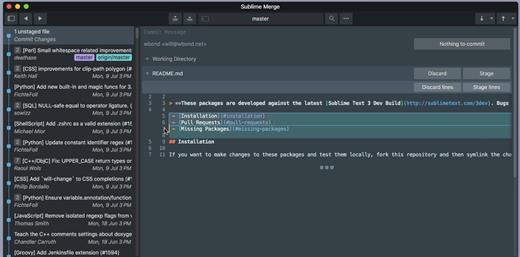
Sublime Merge is a Git client, from the makers of Sublime Text.

Feature Highlights:


  • Integrated Merge Tool
  • Powerful Search
  • Unmatched Performance
  • Blame
  • Advanced Diffs
  • File and Hunk History
  • Command Palette and Key Bindings
  • Light and Dark Themes
  • Extensibility
  • Syntax Highlighting
  • Command Line Integration
  • Real Git
What’s New

Version 2125:


  • Release notes were unavailable when this listing was updated.
Compatibility

macOS 10.15 or later


Release Name: Sublime Merge Build 2125
Size: 30.6 MB
Links: HOMEPAGE – NFO – Torrent Search

Download: RAPiDGATOR

3 Comments
Apr 16

Sketch 2026.1.1

Sketch is a complete design toolkit. With a native Mac app for design and prototyping, and web-based tools to share, get feedback and handoff.

A native macOS app for design and prototyping


  • Powerful tools built for designers, by designers
  • Nestable frames and flexible stack layouts
  • Fast, immersive prototyping to bring your ideas to life
  • Shared Libraries, styles and components to scale your work
  • Full control over color profiles, including P3 support
  • Variable and OpenType font support
  • Offline and local file support
  • Ready for real-time collaboration, or working solo
A flexible web app for feedback, sharing and handoff

  • Store, sync and share documents
  • Document and project permissions
  • Easy Workspace admin
  • Annotate documents with feedback
  • File version history
  • Share Libraries, components and templates
  • Developer handoff tools
  • Test prototypes in any browser
  • View, comment and handoff for free
What’s New

Version 2026.1.1:


  • Release notes were unavailable when this listing was updated.
Compatibility

macOS 14.0 or later


Release Name: Sketch 2026.1.1
Size: 111.4 MB
Links: HOMEPAGE – NFO – Torrent Search

Download: RAPiDGATOR

5 Comments
Apr 16

Keynote 15.2 fix

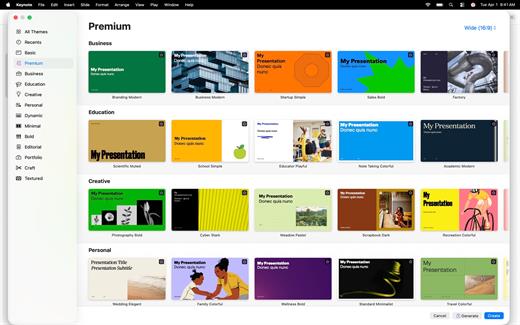
Create memorable presentations on iPhone, iPad, Mac, and Apple Vision Pro. Start with an Apple-designed theme and add text, images, charts, and shapes. Bring it all to life with cinematic animations and transitions. Confidently present from anywhere, in person or virtually, and take turns controlling a presentation in multi-presenter slideshows.

Get Started Quickly


  • Work from iPhone, iPad, Mac, Apple Vision Pro, or even a PC with iCloud.com
  • Select from a wide variety of Apple-designed themes
  • Import and edit Microsoft PowerPoint presentations
Create Stunning Presentations

  • Easily change slide layouts and backgrounds
  • Add recorded audio, live video, and image galleries
  • Use powerful graphics tools including background removal and masking
  • Draw or write with Apple Pencil on iPad
Cinema-Quality Animations

  • Beautiful cinematic slide transitions and impressive animations
  • Emphasis builds and Magic Move let you effortlessly add impact
  • See live on-canvas previews as you animate your slides
  • Draw a motion path with Apple Pencil on iPad
Present to Your Audience

  • Rehearse with a customizable presenter display
  • Practice in an immersive Conference Room or Theater environment on Apple Vision Pro
  • Highlight with Apple Pencil or with your finger while presenting on iPad
  • Control your slideshow from an iPhone, iPad, or Apple Watch
Share with Anyone

  • Share your presentation publicly or collaborate with specific people using iCloud or Box
  • Make changes from any device and see a list of changes from others in real-time
  • Export presentations to Microsoft PowerPoint, PDF, HTML, movies, and image files
Apple Intelligence

  • Use Writing Tools to proofread, rewrite, summarize, and compose text
  • Create your own fun images with Image Playground based on a description
What’s New

Version 15.2:


  • Release notes were unavailable when this listing was updated.
Compatibility

macOS 15.6 or later.


Release Name: Keynote 15.2 fix
Size: 358.1 MB
Links: HOMEPAGE – NFO – Torrent Search

Download: RAPiDGATOR

6 Comments
Apr 16

Haptyk 1.0.21

Haptyk for Mac is a unique keyboard sound enhancement app designed specifically for MacBook users. Unlike ordinary keyboard sound apps that simply play the same click repeatedly, Haptyk detects how hard you type and matches the sound in real time, creating a more natural and immersive mechanical keyboard experience on macOS. According to the official website, the app uses the built-in accelerometer on Apple Silicon MacBooks to measure typing impact and trigger responsive sound playback instantly.

Built with a fully native audio engine, Haptyk focuses on speed and responsiveness. The developer says the app is written in C and Objective-C for real-time performance, with claimed keystroke-to-sound latency of less than 1 millisecond. This makes it especially appealing to Mac users who want a satisfying mechanical keyboard feel without external hardware.

Haptyk for Mac includes velocity-sensitive sound playback, meaning soft typing produces lighter sounds while harder keystrokes generate deeper, stronger feedback. The app also supports multiple sound packs based on real mechanical keyboard recordings. The official site lists 16 switch-inspired sound packs, including tactile, linear, clicky, and classic keyboard styles, giving users a variety of typing sound profiles to choose from.

What’s New

Version 1.0.21:


  • Release notes were unavailable when this listing was updated.
Compatibility

macOS 14.0 or later
Apple Silicon only


Release Name: Haptyk 1.0.21
Size: 17.1 MB
Links: HOMEPAGE – NFO – Torrent Search

Download: RAPiDGATOR

5 Comments
Apr 16

SpamSieve 3.3.0

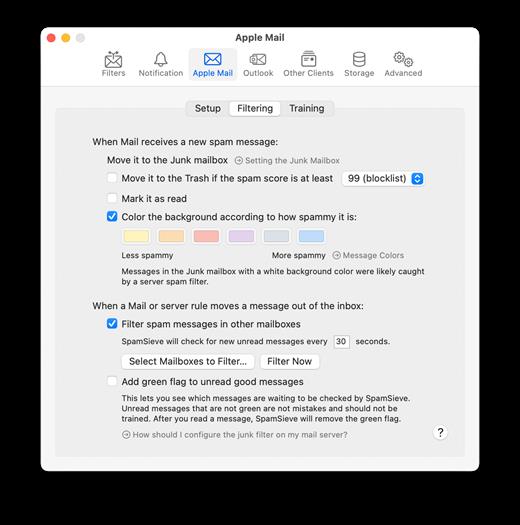
SpamSieve is a robust spam filter for major email clients that uses powerful Bayesian spam filtering.

SpamSieve understands what your spam looks like in order to block it all, but also learns what your legitimate messages look like to avoid confusion. SpamSieve only marks spam in your email client so you never lose any mail.

The following is a partial list of SpamSieve’s features, so that you can quickly see what it can do and how it’s unique:


  • Powerful Bayesian spam filtering results in high accuracy and almost no false positives. It adapts to the mail that you receive to get even better with time. Some other e-mail programs include Bayesian filters, but SpamSieve is more accurate.
  • Integrates with your e-mail program for a superior user experience. Plus, you get the same great filtering if you ever switch e-mail programs or use more than one at a time.
  • SpamSieve works with any mail provider/host. It filters all your mail accounts. There is no extra charge for additional addresses or devices.
  • SpamSieve running on your Mac can keep the spam off your iPhone/iPad, and you can even train SpamSieve from afar.
  • Colors show how spammy each message is, so you can quickly focus on the borderline ones if you want to check SpamSieve’s work.
  • Integrates with the macOS Contacts app (and also Eudora’s and Entourage’s address books) so that messages from friends and colleagues are never marked as spam.
  • Automatically maintains a blocklist so that it can instantly adapt to spam messages sent from particular addresses, and catch 100% of them.
  • Automatically maintains a whitelist to guarantee that messages from particular senders or mailing lists are never marked as spam, without cluttering your address book with these addresses.
  • You can customize the whitelist and blocklist, adding sophisticated rules that match various message headers, or the message body. The rules can match text in a variety of ways, including using regular expressions.
  • Can use the Habeas Safelist, which indicates messages that are not spam, as well as the “ADV” subject tag indicating that a message is spam.
  • Many spammers encode the contents of their messages so that filters cannot see the incriminating words they contain. SpamSieve can decode and look inside these messages. Optionally it can mark them all as spam, on the theory that legitimate senders do not try to obscure their messages.
  • SpamSieve keeps track of how accurate it is, how many good and spam messages you receive, and how these numbers change over time.
  • Turn off new-mail notification in your e-mail program, and let SpamSieve notify you only when you receive non-spam messages.
  • The corpus window and log let you see how each spam message was caught.
  • Unlike server-based spam filtering services, your mail data stays on your own Mac, so your privacy is preserved.
  • SpamSieve supports AppleScript, so you can connect it to additional apps and fully integrate it into a custom workflow.
What’s New

Version 3.3.0:


  • Release notes were unavailable when this listing was updated.
Compatibility

macOS 10.10 or later


Release Name: SpamSieve 3.3.0
Size: 62.5 MB
Links: HOMEPAGE – NFO – Torrent Search

Download: RAPiDGATOR

5 Comments
Apr 16

Money Pro – Personal Finance 2.11.27

Money Pro is the next generation of Money app (over 2 million downloads worldwide).

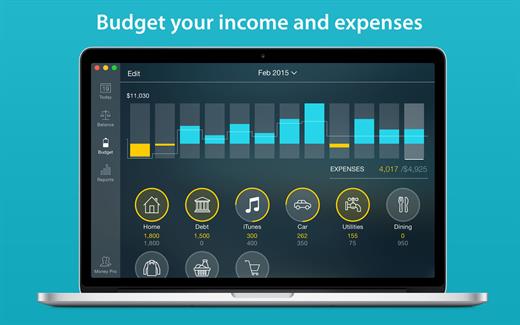
Money Pro is the one place for bill planning, budgeting and keeping track of your accounts. Easy sync with iPhone/iPad versions. Money Pro works great for home budgeting and even for business use.

Features:


  • Calendar
  • Today view
  • Bills due notifications
  • Budgets
  • Budget rollover
  • Checkbook register
  • Account reconciliation
  • Import of bank statements
  • Split transactions
  • Calculator and currency converter
  • Search
  • Detailed reports
  • Lots of options for customization
  • iCloud
  • Multiple profiles
  • Data export
  • Notification Center widget
What’s New

Version 2.11.27:


  • Bug fixes and performance improvements
Compatibility

macOS 10.12.0 or later
Apple Silicon or Intel Core processor


Release Name: Money Pro – Personal Finance 2.11.27
Size: 48 MB
Links: HOMEPAGE – NFO – Torrent Search

Download: RAPiDGATOR

5 Comments
Apr 16

Cookie 8.4.8

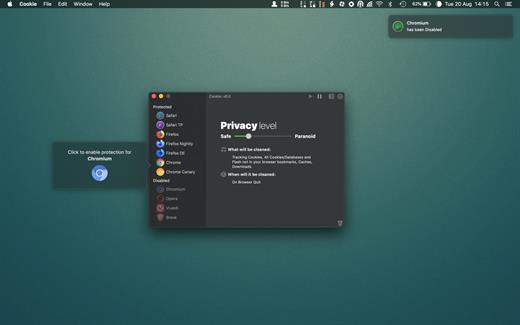
Cookie prevents third parties from hijacking your browsing experience. The sites you visit store “cookies” in your browser without your knowledge or consent. Some are helpful, but others are frustrating and invasive. Cookie can help.

Features:


  • Consolidate all your browser privacy settings
  • Simplified View that takes care of all the technical details for you
  • Advanced View which puts you in total control of all your privacy settings
  • Combined cookie view displaying all cookie/flash/localStorage data in one easy to manage view
  • Cookie’s can be favorited on a per domain, or per cookie basis. You decide
  • Individual Browser settings. It is possible to configure different automatic removal options for each browser. In the case of Chrome/Chromium/Canary/Brave you can even configure settings per user!
  • A number of removal schedules are possible: When quitting Cookie, when a Browser is Quit, on computer login, On computer waking from sleep, on a customizable time schedule, or entirely manually
  • Hotkey support, so you can remove all unwanted data quickly and easily
  • Customizable tracking cookie definitions
  • Whitelist individual tracking cookies
  • Clean, modern and Intuitive User Interface
  • Helpful setup window
  • Browser extension protection
  • Full Screen support
  • iCloud support
  • Dark/Regular theme
What’s New

Version 8.4.8:


  • Release notes were unavailable when this listing was updated.
Compatibility

macOS 10.14 or later, 64-bit processor


Release Name: Cookie 8.4.8
Size: 9.8 MB
Links: HOMEPAGE – NFO – Torrent Search

Download: RAPiDGATOR
5 Comments
Apr 16

Keep It 2.8.4

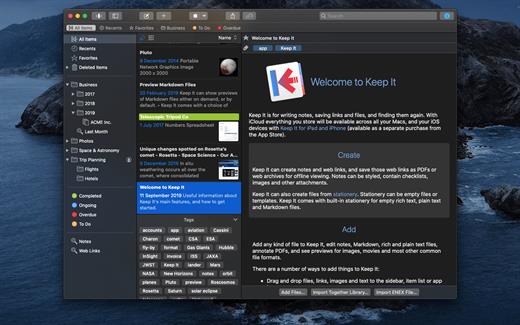
Keep It is for writing notes, saving web links, storing documents, and finding them again. Available on Mac, and as a separate app for iPhone and iPad, changes are automatically made available to all your devices with iCloud. Keep It is the destination for all those things you want to put somewhere, confident you will find them again later.

Features


  • Create, edit, view and save:

    • Notes with styles, checklists and attachments that look good and read well on all your devices
    • Web links with live previews, or saved as PDFs for offline viewing
    • Rich and plain text files, and Markdown documents
    • Add any other kind of file, and see previews for most images, documents, web pages, and more
    • See summaries and thumbnails in the list for most files
    • Use the Recents list to see things you’ve added or viewed lately
    • Share items with iCloud
  • Organize:

    • Folders let you organise things hierarchically – select a folder to see everything it and its subfolders contain
    • Use bundles to gather items into one place – items can be in more than one bundle at a time
    • Use labels to color-code items for quick visual recognition
    • Add searchable tags and comments
    • Make items favorites and drag lists to the Favorites Bar for quick access
  • Search and Filter:

    • Search everything in Keep It: names, tags, file contents, dates, kinds and more
    • Choose suggestions as you search to create complex searches with ease
    • Use keywords and natural language for dates while searching
    • Save searches for later reuse
    • Use the Tag Filter to see all items with a tag and any other relevant tags; choose another tag to drill down further
  • Use Keep It with other apps:

    • Compact Mode reduces the app to a single column, ideal for using alongside other apps
    • Drag pretty much anything to Keep It
    • Copy clickable links to items in Keep It
    • Share extension can add links, text, images and other files, and append text to notes from within other apps
    • Save files to Keep It’s folders to automatically add them to the library
    • Use a bookmarklet to add links from web browsers that don’t use Share extensions
*** You need to disable the System Integrity Protection (SIP) to perform the selected Application.

What’s New

Version 2.8.4:


  • Release notes were unavailable when this listing was updated.
Compatibility

macOS 11.3.0 or later


Release Name: Keep It 2.8.4
Size: 36.8 MB
Links: HOMEPAGE – NFO – Torrent Search

Download: RAPiDGATOR

6 Comments
Apr 16

KCNcrew Pack 1.8 (04-15-26)

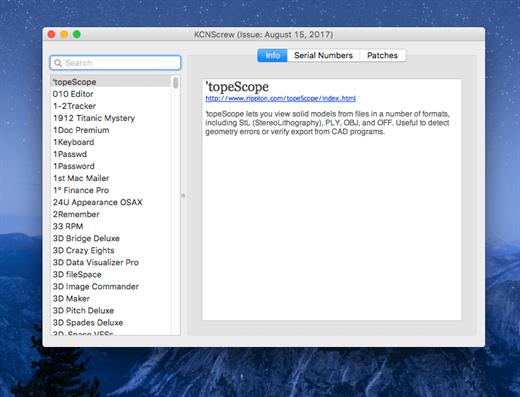
It’s like Serial Box, which has SN’s but KCN also has cracks and patches. It would be best to have both of these collections, as this often has serials you cannot find in Serial Box.

Unlike Serial Box, no readers are required. Just open the dmg file, drag and drop the application to where you like.

However, there is no way to view what serials, cracks and patches are new in this issue as compared to the previous like Serial Box.

Thanks to all contributors and supporters!

What’s New

Version 1.8 (03-15-26):


  • Release notes were unavailable when this listing was updated.
Compatibility

OS X 10.7 or later, 64-bit processor


Release Name: KCNcrew Pack 1.8 (04-15-26)
Size: 9.8 MB
Links: HOMEPAGE – NFO – Torrent Search

Download: RAPiDGATOR
6 Comments
Apr 16

Screens 5.8.5

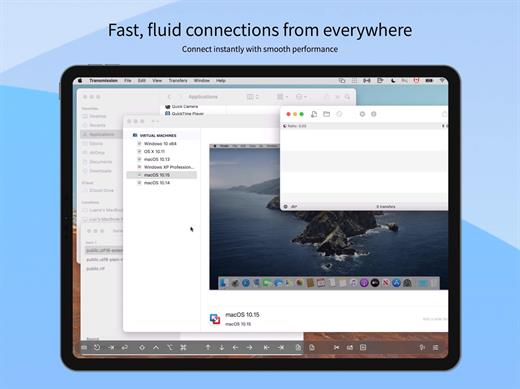
Streamlined and powerful VNC utility designed to provide you with all the tools you need to remotely connect to your devices from your Mac

Accessing your devices from anywhere in the world is surely great, especially if you need to perform some last minute modifications to a project or copy a certain file. This can be done from any computer that can access your device’s network using the VNC desktop sharing system.

Features


  • iCloud – Synchronize all your stored screens on all your iOS devices, including your Mac.
  • Use Screens in fullscreen mode to make it feel your remote computer is right there in front of you.
  • Easy to Use: Screens is an easy, user-friendly VNC client for Mac.
  • Secure: Screens can connect to your computer through an SSH tunnel so your session is encrypted and safe.
  • Multi-Touch: Screens supports many of the multi-touch features – such as pinch and navigation – you’re already used to on your trackpad.
  • Screens Connect: Make your computer available from anywhere with this optional helper app. Easy as flicking a switch. No messy router setup.
  • Works Anywhere: Through Wi-Fi or a 3G network.
What’s New

Version 5.8.5:


  • Release notes were unavailable when this listing was updated.
Compatibility

macOS 14.0 or later.


Release Name: Screens 5.8.5
Size: 39.1 MB
Links: HOMEPAGE – NFO – Torrent Search

Download: RAPiDGATOR

5 Comments