Please REGISTER or RENEW your account on RAPiDGATOR.net and support us by doing through all RAPiDGATOR working download links on main posts...
Apr 8

Prompt 3.5.2

Prompt is the terminal that goes where you do, whether you’re on the road or at your desk. With Panic Sync, your servers are available on your iPhone, iPad, and Mac. With Mosh and Eternal Terminal support, you can stay connected even on the most unstable networks. And with both local terminals and remote connections on the Mac, Prompt is the SSH app that does it all.
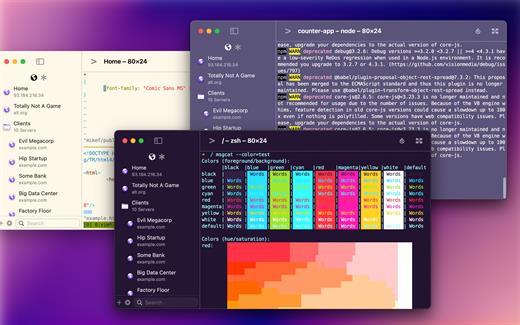
Welcome to Prompt 3. For over a decade, Prompt has been the best SSH terminal on iOS and iPadOS, and we’re excited to finally release a much-requested Mac version. But that’s not all. With two new connection types, port forwarding, and a faster terminal, Prompt is better than ever.

Superfast SSH

We retooled the text engine in Prompt 3 to be up to 10x faster, and with improved terminal emulation, you can run nvim inside tmux without breaking a sweat.

Clips

Put your most-used commands and text bits into clips and access them with a single tap via Prompt’s keyboard bar. Clips can be stored globally or per-server.

Secure Enclave

Authenticate with FaceID and TouchID. The keys will stay secure on your device.

Panic Sync

Sync your favorite servers, passwords, private keys, and clips, between Prompt on all of your iOS devices.

Customizable

Make Prompt perfect with new themes, fonts, and a very configurable iOS keyboard.

Jump Hosts and Agent Forwarding

Access corporate servers, even at the beach.

Mosh and Eternal Terminal

Keep your terminal open, even when you get disconnected. Mosh is optimized for high-latency, low-throughput networks. Eternal Terminal is great for when you need to keep your full terminal history on a flaky connection.

Mouse Support

Use your mouse to interact with TUI-based apps that run through the terminal.

What’s New

Version 3.5.2:


  • Release notes were unavailable when this listing was updated.
Compatibility

macOS 13.0 or later.


Release Name: Prompt 3.5.2
Size: 31.1 MB
Links: HOMEPAGE – NFO – Torrent Search

Download: RAPiDGATOR

3 Comments
Apr 8

Updatest 2.4.2

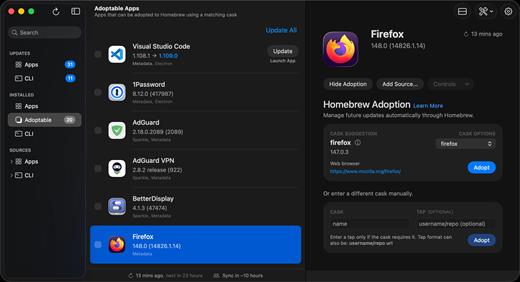
Updatest is a native macOS application designed to simplify how you manage software updates. It unifies updates from Homebrew, Mac App Store, Sparkle, Electron, and GitHub Releases into a single, fast, and intuitive interface.

Instead of checking multiple tools, terminals, and app updaters, Updatest provides a centralized dashboard where you can view, manage, and install updates across your entire system. It replaces fragmented workflows with a streamlined, visual experience.

Built with a local-first approach, Updatest processes everything directly on your Mac. No external databases, no tracking, and no data collection — ensuring both privacy and reliability.

What’s New

Version 2.4.2:


  • Release notes were unavailable when this listing was updated.
Compatibility

macOS 15.0 or later


Release Name: Updatest 2.4.2
Size: 8.8 MB
Links: HOMEPAGE – NFO – Torrent Search

Download: RAPiDGATOR
7 Comments
Apr 8

Infuse Pro 8.4.2

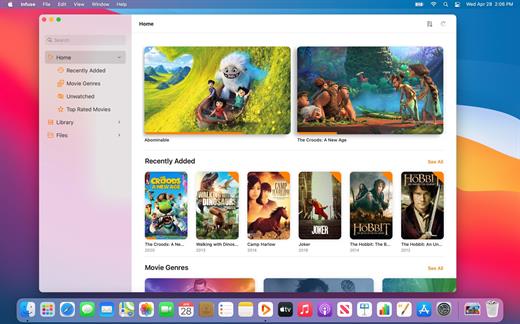
Ignite your video content with Infuse – the beautiful way to watch almost any video format on your iPhone, iPad, Apple TV, and Mac. No need to convert files! Infuse is optimized for macOS 12, with powerful streaming options, Trakt sync, and unmatched AirPlay & subtitle support. Gorgeous interface. Precise controls. And silky-smooth playback.

Play more video types

A powerful video player that plays just about anything, including the standard MP4, M4V and MOV – plus MKV, AVI, WMV, MTS, ISO, VIDEO_TS, FLV, OGM, OGV, ASF, 3GP, DVR-MS, WebM, and WTV. Includes fully certified Dolby® Digital Plus (AC3/E-AC3), DTS® and DTS-HD® audio.

Stream from other devices

Browse and play videos stored on your Mac, PC, NAS, Wi-Fi hard drive, apps like Plex, Emby, and Jellyfin, or from cloud services like Dropbox, Google Drive, OneDrive, Box, pCloud, Yandex.Disk, and Mega.nz – no syncing required!

Trakt 2-way sync

Connect with Trakt to sync watched history, submit ratings and post comments.

Optimized subtitles powered by opensubtitles

Bring your own subtitles, or download them on the fly (for free) in virtually any language.

The basics:


  • Silky-smooth video player (plays full 4K w/ HDR & Dolby Vision)
  • Stream from a Mac, PC, NAS or Wi-Fi enabled hard drive
  • Connect with Plex, Emby, Jellyfin, Kodi (XBMC), WMC and other media servers
  • Beautiful layout with quick access to video info
  • Artwork and metadata added automatically
  • Picture-in-Picture
  • Spatial audio
Supported formats:

  • Video: 3GP, AVI, ASF, BDMV, DIVX, DVDMEDIA, DVR-MS, FLV, ISO, M4V, MKV, MOV, MP4, M2TS, MTS, OGM, OGV, TP, TS, VIDEO_TS, WEBM, WMV, WTV
  • Audio: AAC, AC3/E-AC3, DOLBY TRUEHD, DTS, DTS-HD MA, FLAC, MP3, OGG, PCM, WMA
  • Subtitles: DVB, DVDSUB, MICRODVD, MPL2, PGS, SMI, SSA/ASS, SRT, SUB, TIMED TEXT, TMP, TXT, VOBSUB, VTT, XSUB
Player features:

  • Multiple audio tracks
  • Chapters
  • Gesture controls
  • 8 video zoom options
  • Continuous playback
  • Deinterlacing
Extras:

  • Library organization
  • Folders
  • One-click subtitle downloads from OpenSubtitles
  • Scrobble plays to Trakt
  • Download videos from networked devices
  • Drag and drop uploads via web browser
  • Get extra onboard storage by adding USB drives
Get more with infuse pro!

  • Play even more video formats
  • Enjoy Dolby® Digital Plus (AC3/E-AC3), DTS® and DTS-HD® mobile surround sound
  • Stream a wide variety of video types over AirPlay and Google Cast
  • Access videos stored in cloud services like Dropbox, Google Drive, Box, OneDrive, pCloud, Yandex.Disk, and Mega.nz
  • Sync libraries, settings, watched history, and playback progress between devices
What’s New

Version 8.4.2:


  • Release notes were unavailable when this listing was updated.
Compatibility

macOS 11.0 or later.
Apple Silicon or Intel Core processor


Release Name: Infuse Pro 8.4.2
Size: 108.3 MB
Links: HOMEPAGE – NFO – Torrent Search

Download: RAPiDGATOR

3 Comments
Apr 7

Boxy SVG 4.105

SVG is the standard format for storing vector graphics such as icons, banners, charts and illustrations.

Boxy SVG project goal is to create the best SVG editor for non-technical users as well as for professional designers and developers.

CORE FEATURES

• Clean and intuitive UI heavily inspired by Inkscape, Sketch and Adobe Illustrator
• Extensive support for on-canvas editing of object geometry, transform, paint and other properties
• Save to SVG and SVGZ formats, export to PNG, JPG, WebP, PDF and HTML5
• Open Clip Art Library integration with thousands of free stock vector arts
• Google Fonts integration with hundreds of free fonts
• Configurable keyboard shortcuts for over 100 commands
• Manual guides, smart guides and grid
• Path operations (unite, intersect, subtract, exclude, close, reverse, etc.)
• Arrangement operations (align to, rotate, flip, order, group, etc.)

FOR WEB DEVELOPERS

• Chromium-based rendering engine
• SVG and CSS code inspector similar to Chrome Dev Tools
• Clean SVG output that preserves IDs, classes, titles and other metadata
• SVG sprites editing support

What’s New

Version 4.105:


  • Release notes were unavailable when this listing was updated.
Compatibility

macOS 10.15 or later


Release Name: Boxy SVG 4.105
Size: 216.8 MB
Links: HOMEPAGE – NFO – Torrent Search

Download: RAPiDGATOR
8 Comments
Apr 7

JMP Pro 19.1.0

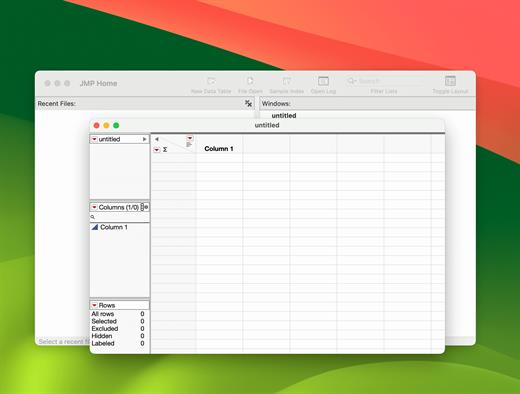
JMP is powerful statistical software designed with scientists and engineers in mind, but ideal for anyone solving problems with data. Packed with tools for data preparation, analysis, graphing, and so much more, JMP has everything you and your organization need to be truly unstoppable with data.

Statistics made visual, powerful, and approachable.

JMP makes it easy to take on the most complex data challenges. Its simple, interactive interface lets you take your productivity further, and with no code required, there are no obstacles between you and any analysis or graph you want to create.

Get insights faster. Get home earlier.

Your time matters. With JMP’s extensive suite of capabilities and code-free automation, you can quickly go from raw data to actionable insight—all within one streamlined, self-service platform.

Unlock efficiency gains to accelerate innovation.

Industries with high product and process innovation have complex problems to solve and often require statistics to solve them. With JMP, scientists and engineers in these industries can seamlessly apply statistical techniques that support engineering efficiency and help propel their organizations to the forefront of the market.

Maximize your potential.

Realizing potential requires the right support. With JMP, no matter where you are in your analytic journey, you have a partner in life-long learning. Our user community, support experts and learning resources are purpose-built to empower anyone looking to start, build, advance, or apply their skills with data.

What’s New

Version 19.1.0:


  • Release notes were unavailable when this listing was updated.
Compatibility

macOS 10.13.0 or later


Release Name: JMP Pro 19.1.0
Size: 390.9 MB
Links: HOMEPAGE – NFO – Torrent Search

Download: RAPiDGATOR

8 Comments
Apr 7

Pixea Plus 8.1.0

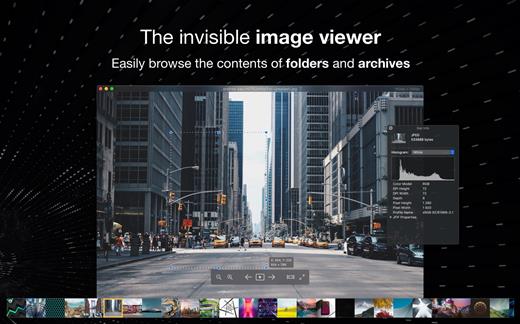
Pixea is an image viewer for macOS with a nice minimal modern user interface. Pixea works great with JPEG, HEIC, PSD, RAW, WEBP, PNG, GIF, and many other formats. Provides basic image processing, including flip and rotate, shows a color histogram, EXIF, and other information.

Supports keyboard shortcuts and trackpad gestures. Shows images inside archives, without extracting them.

Supported formats
JPEG, HEIC, GIF, PNG, TIFF, Photoshop (PSD), BMP, Fax images, macOS and Windows icons, Radiance images, Google’s WebP. RAW formats: Leica DNG and RAW, Sony ARW, Olympus ORF, Minolta MRW, Nikon NEF, Fuji RAF, Canon CR2 and CRW, Hasselblad 3FR. Sketch files (preview only). ZIP-archives.

Export formats
JPEG, JPEG-2000, PNG, TIFF, BMP.

What’s New

Version 8.1.0:


  • Release notes were unavailable when this listing was updated.
Compatibility

macOS 10.13 or later


Release Name: Pixea Plus 8.1.0
Size: 223.5 MB
Links: HOMEPAGE – NFO – Torrent Search

Download: RAPiDGATOR

8 Comments
Apr 7

Wondershare Recoverit 14.0.15.2

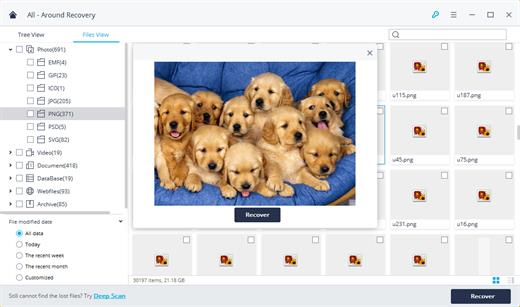
Wondershare Recoverit is a comprehensive data recovery suite to recover Mac data lost due to accidental deleting, formatting, virus infection, improper operation, unexpected power failure, and other unknown reasons.

It can recover Mac data from lost, deleted, logical corrupted and formatted Mac hard drive, iPod, USB drive, SD card, digital camera, mobile phone, MP3, and MP4 player. Compatible with HFS+, FAT16/32, and NTFS file system volumes, this non-destructive Mac file recovery software ensures safe Mac file recovery without modifying the original data saved on your Mac machine or any other storage media. Versatile preview lets you enjoy Mac data recovery in advance.

Features


  • Safety First:

    • Read-only and risk-free Mac data recovery program. No any writing operation to your original data.
  • Versatile Preview Ability:

    • For images, real-time and direct scan results is displayed during the scan process to let users stop scanning once the target images are found.
    • For other Mac files such as videos, audio files, archives and documents, they are displayed as a text in a Hex mode for preview to let users enjoy file recovery on Mac in advance.
  • Precise File Recovery for Mac:

    • Before data recovery on Mac, you can choose the target file types to scan, which saves you much time especially when there are tons of files on your Mac machine.
    • Restore deleted files for Mac with original file names, shooting date, and storage paths.
    • Support file names search for scanning results to provide you precise Mac file recovery.
  • Easy-to-use and Clean Interface:

    • Complete wizard and easy-to-use interface let you perform Mac data recovery in a breeze.
What’s New

Version 14.0.15.2:


  • Release notes were unavailable when this listing was updated.
Compatibility

macOS 10.10 or later

Release Name: Wondershare Recoverit 14.0.15.2
Size: 212 MB
Links: HOMEPAGE – NFO – Torrent Search

Download: RAPiDGATOR

8 Comments
Apr 7

Alcove 1.7.1

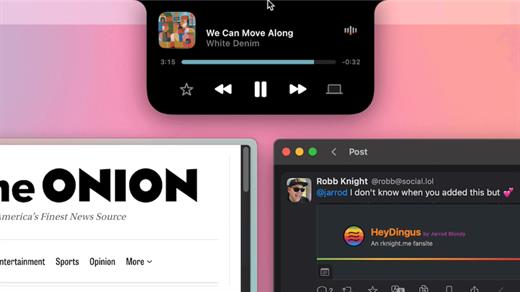
Alcove brings the elegant Dynamic Island experience to your Mac, transforming how you interact with notifications, live activities, and system events. Designed to feel native, it’s a polished way to stay informed without being interrupted.

Key Features


  • Fluid Transitions — Smooth animations and transitions that make alerts and interactions feel natural and integrated.
  • Instant Notifications — Alerts appear quickly and gracefully so you never miss important updates.
  • Live Activities Support — Keep track of ongoing tasks directly from the Dynamic Island interface.
  • Swipe Gestures — Use intuitive gestures to clear, interact with, or dismiss alerts.
  • Customizable HUDs — Tailor the look and feel of the heads-up displays to fit your style or workflow.
  • Lock Screen Presence — Alcove can show notifications or status even when your Mac is locked, ensuring you stay informed at a glance.
  • Lightweight, Native App — Built to run smoothly, Alcove is fast and performs well without draining resources.
xattr -cr /Applications/Alcove.app

What’s New

Version 1.7.1:


  • Release notes were unavailable when this listing was updated.
Compatibility

macOS 12.0 or later


Release Name: Alcove 1.7.1
Size: 13.5 MB
Links: HOMEPAGE – NFO – Torrent Search

Download: RAPiDGATOR
8 Comments
Apr 6

Alcove 1.7.0

Alcove brings the elegant Dynamic Island experience to your Mac, transforming how you interact with notifications, live activities, and system events. Designed to feel native, it’s a polished way to stay informed without being interrupted.

Key Features


  • Fluid Transitions — Smooth animations and transitions that make alerts and interactions feel natural and integrated.
  • Instant Notifications — Alerts appear quickly and gracefully so you never miss important updates.
  • Live Activities Support — Keep track of ongoing tasks directly from the Dynamic Island interface.
  • Swipe Gestures — Use intuitive gestures to clear, interact with, or dismiss alerts.
  • Customizable HUDs — Tailor the look and feel of the heads-up displays to fit your style or workflow.
  • Lock Screen Presence — Alcove can show notifications or status even when your Mac is locked, ensuring you stay informed at a glance.
  • Lightweight, Native App — Built to run smoothly, Alcove is fast and performs well without draining resources.
xattr -cr /Applications/Alcove.app

What’s New

Version 1.7.0:


  • Release notes were unavailable when this listing was updated.
Compatibility

macOS 12.0 or later


Release Name: Alcove 1.7.0
Size: 13.5 MB
Links: HOMEPAGE – NFO – Torrent Search

Download: RAPiDGATOR

7 Comments
Apr 6

CopyClip 2 v3.991

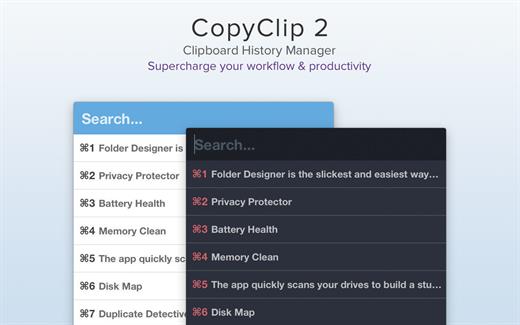
CopyClip is the slickest and most efficient premium clipboard manager for your Mac. Running discreetly from your menu bar, the app stores all that you have copied or cut in the past, allowing you to quickly find that snippet of text you’ve been looking for.

CopyClip Features


  • Ability to store up to 230 clippings
  • Option to paste clippings with the original formatting if desired
  • Ability to search through clippings using the embedded search bar
  • Keyboard shortcuts to paste clippings
  • Right-click option to ‘pin’ chosen clippings to the top of the list
  • You can exclude apps you wish not to copy clippings from
  • Option to edit and delete individual clippings, as well as delete all clippings at once
  • Toggle between Dark/Light user interface themes
  • Works on both the menu bar and the Dock
What’s New

Version 3.991:


  • Bug fixes
Compatibility

macOS 11.5 or later.


Release Name: CopyClip 2 v3.991
Size: 9.8 MB
Links: HOMEPAGE – NFO – Torrent Search

Download: RAPiDGATOR
7 Comments