Please REGISTER or RENEW your account on RAPiDGATOR.net and support us by doing through all RAPiDGATOR working download links on main posts...
Apr 5

Typora 1.13.2

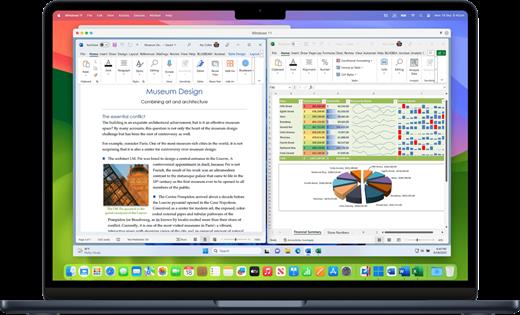
Typora gives you a seamless experience as both a reader and a writer. It removes the preview window, mode switcher, syntax symbols of markdown source code, and all other unnecessary distractions, replacing them with a real-time preview to help you concentrate on the content itself.

Features:


  • Markdown support including tables, code fences with syntax highlight, LaTeX, table of contents
  • Cross-platform
  • The real-time preview and WYSIWYG features
  • Beautiful interface and custom CSS theme support
  • Easy export
What’s New

Version 1.13.2:


  • Release notes were unavailable when this listing was updated.
Compatibility

macOS 10.13.0 or later, 64-bit processor


Release Name: Typora 1.13.2
Size: 19 MB
Links: HOMEPAGE – NFO – Torrent Search

Download: RAPiDGATOR

7 Comments
Apr 5

Cinemagraph Pro 2026.13.1

Cinemagraph Pro is the only professional tool specifically designed for the creation of living photos. With its unique “live-masking” technology, artists can preview their living images in real time and output HD (1080) and UHD (4k) quality hybrid photographs.

An intuitive interface enables swift navigation amongst a full suite of editing modes and with just a few clicks, your living photos are shared with the world. It’s never been easier to create beautiful professional-grade Cinemagraph images.

What’s New

Version 2026.13.1:


  • Release notes were unavailable when this listing was updated.
Compatibility

macOS 11.7 or later.


Release Name: Cinemagraph Pro 2026.13.1
Size: 74.2 MB
Links: HOMEPAGE – NFO – Torrent Search

Download: RAPiDGATOR

7 Comments
Apr 5

Bitwig Studio 6.0.1

Designed to provide music producers with a high level of control over every step of the music creation process, Bitwig Studio is a full-featured and cross-platform (works on macOS, Linux, Windows) sound and music designing tool.
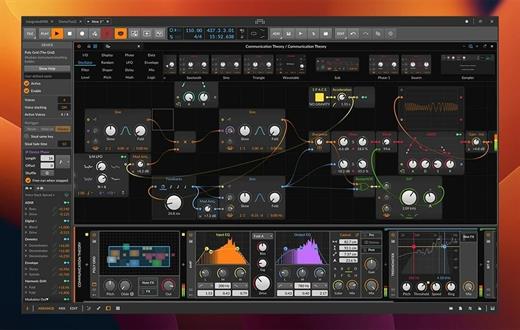
Besides its impressive collection of sound creation tools, which we will discuss further on, it must be pointed out that Bitwig Studio also comes with a set of in-built instruments, effects, and also offers support for VST plug-ins that makes it easy to design custom sounds with no more than a few mouse clicks.

Of course, if you have a very advanced understanding of music and the whole process behind its creation, Bitwig Studio will not disappoint, as audio and note expressions, histogram-based editing, smart controller integration, automatic slicing, layer editing, and advanced bounce-in-place functions are but a few treats on the table.

What’s more, Bitwig Studio enables you to work with multiple projects at the same time, as well as to link and interconnect many parameters between devices, thus making modulating seem like a walk in the park.

With the help of the “Detail Editor”, you can edit multiple tracks in the same view, as well as stretch, split, pitch, pan, copy, reverse, add, move, and arrange audio effects or parts of tracks as you wish.

With the help of the Bitwig Studio’s “Dynamic Object Inspector”, you have the possibility to select and edit multiple notes and events. Bitwig Studio also enables you to easily modify any of the built-in audio devices or build your very own.

Taking all things into consideration, Bitwig Studio is a comprehensive audio creation tools, which was designed from the ground up to meet the requirements of any music producer or musician. With the right amount of musical knowledge and skill, there really isn’t much you can’t do with this software in terms of music creation.

What’s New


Version 6.0.1:

  • Release notes were unavailable when this listing was updated.

Compatibility


macOS 10.14 or later

Release Name: Bitwig Studio 6.0.1
Size: 558.8 MB
Links: HOMEPAGE – NFO – Torrent Search

Download: RAPiDGATOR

9 Comments
Apr 5

Traktor Pro 4.4.2.158

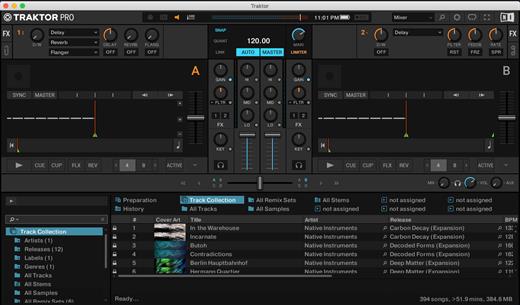
MADE FOR DVS
For the DVS enthusiasts out there, TRAKTOR PRO 3 sees TRAKTOR SCRATCH capability included as standard. Scratch DJs can now use our timecode vinyl with any sound card they like – just hook up your turntables or CD players to your sound card and spin away. So as well as playing your crate-digging finds, you can cut, scratch, and backspin your beats without wrecking your wax.

What’s New

Version 4.4.2.158:


  • Release notes were unavailable when this listing was updated.
Compatibility

macOS 10.15 or later
Apple Silicon or Intel Core processor


Release Name: Traktor Pro 4.4.2.158
Size: 382.9 MB
Links: HOMEPAGE – NFO – Torrent Search

Download: RAPiDGATOR

7 Comments
Apr 5

PhotoSweeper X 5.5.1

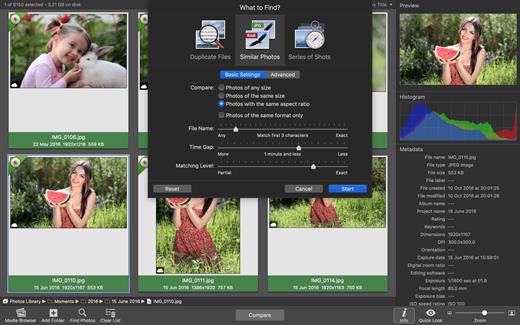
PhotoSweeper is a fast, precise & super efficient tool to eliminate similar or duplicate photos even in huge photo collections. It works with photos from iPhoto, Aperture and Adobe Lightroom libraries as well as photos from your hard drives and external storages.

PhotoSweeper will help you if:


  • You take a series of shots of the same scene trying to get the perfect one.
  • You edit photos with software like Photoshop, Pixelmator etc., and make backups just in case.
  • You have photos scattered on external hard drives and local disks, in iPhoto, Aperture or Lightroom libraries.
  • You have a mess in your photo collection or just want to free disk space by removing junk photos.
Features:

  • Easy search of photos – Just drag and drop folders from your Mac to allow PhotoSweeper to find all photos inside. Add more photos from your iPhoto, Aperture or Lightroom library via the Media Browser window.
  • Flexible comparison settings – Powerful multi-settings to easily find duplicates, similar photos, series of shots. The app finds duplicate photos, even those edited in external programs such Photoshop, regardless of image size or format.
  • High speed and quality – PhotoSweeper was developed as a tool for extremely fast comparison of a huge number of photos. Cutting-edge technologies and unique algorithms make searching duplicates incredibly fast and gives excellent comparison results.
  • Efficiency – You can regroup the results without re-comparing photos by changing matching level with a slider. Using caches makes the next comparison much faster.
  • Marking duplicates automatically – Mark photos you want to get rid of manually, or use the “Auto Mark” feature to mark duplicates automatically based on the list of rules you can adjust to your needs in the Preferences.
  • Comfortable viewing results – PhotoSweeper provides 3 modes for reviewing results: “One by One”, “Face-to-Face” – one or two large photos with an opportunity to mark a photo with just a click, “All in One” – all groups of duplicates in one list.
  • Great photo browsing – PhotoSweeper also serves as an up-to-date photo browser with a built-in search of photos by metadata, Quick Look preview, the “Info” panel with a detailed photo description, including histogram and image metadata (EXIF, IPTC etc.)
What’s New

Version 5.5.1:


  • Release notes were unavailable when this listing was updated.
Compatibility

macOS 10.12.2 or later.


Release Name: PhotoSweeper X 5.5.1
Size: 56 MB
Links: HOMEPAGE – NFO – Torrent Search

Download: RAPiDGATOR

8 Comments
Apr 5

File Cabinet Pro 8.8.1

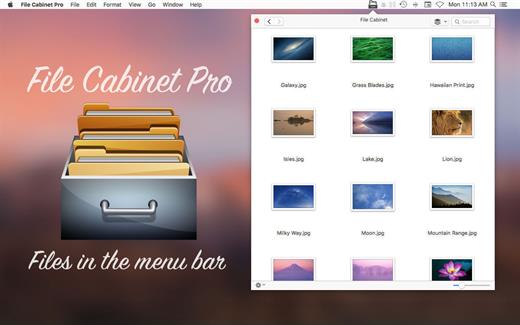
File Cabinet Pro is the file manager for the macOS menu bar. Quickly navigate to files without cluttering your desktop. Open, move, rename, compress, tag, trash, copy and paste files, all from the menu bar. You can open many file types natively in File Cabinet Pro or open files by launching other applications. It’s easy to click into directories in icon view, drill through directories in list view, or navigate the file tree in column view.

File Cabinet Pro is also a document-based application that ships with a built-in text editor, image viewer, pdf viewer, and media player. Some of the file types File Cabinet Pro can open for editing/viewing include::


  • Text documents: Plain text files (.txt), Rich Text Format (.rtf), Rich Text Format Directory (.rtfd), Portable Document Format (.pdf), Markdown (.md)
  • Image documents: Portable Network Graphics (.png), Joint Photographic Experts Group (.jpeg), Tagged Image File Format (.tiff, .tif), Bitmap image file (.bmp), Photoshop File Format (.psd) Import only., Scalable Vector Graphics (.svg) Import only
  • Video and audio documents: MOV, MP4, M4A, M4V, AVI, MP3, WAV, CAF, AIF
Features

  • Create subdirectories
  • Click into subdirectories and open documents
  • Set a “Primary” and “Secondary” directory button for the bottom bar to get an innovative drag and drop experience; drag files to these buttons in the bottom bar to bring up a popover window
  • Tag files easily. Select files in File Cabinet Pro, right click, and then simply add or remove file tags from the control in the context menu
  • Show selected files in Finder
  • Rename files
  • Copy and paste files
  • Compress files
  • Trash files
  • View items as icons, in a list, in columns, or in cover flow view
  • Launch the application at login. You can have File Cabinet Pro automatically launch when you login to your Mac (optional feature, disabled by default)
  • Create a list of all your favorite directories in the sidebar
  • Create and edit txt, rtf, and rtfd files using the built in lightweight text editor
  • Rotate images, crop images, and apply filters to images using the built in lightweight image editor
  • Watch video and play audio files using the built in media player
  • View PDF files using the built in PDF viewer
  • Revert document versions for supported editable document types
  • Set a Global Hotkey for showing and closing the File Cabinet Pro window (optional feature, disabled by default)
  • Preview selected files in Quicklook by pressing the spacebar
  • Share files in apps that support Sharing extensions like Mail and Messages
  • Create text documents from Finder using File Cabinet Pro’s Document Creator Finder extension (Note: To use this feature, you have to enable the Finder extension in System Preferences under the “Extensions” tab)
What’s New

Version 8.8.1:


  • Release notes were unavailable when this listing was updated.
Compatibility

macOS 10.13 or later


Release Name: File Cabinet Pro 8.8.1
Size: 20.2 MB
Links: HOMEPAGE – NFO – Torrent Search

Download: RAPiDGATOR
6 Comments
Apr 5

Alfred 5 Powerpack 5.7.3

Alfred is a productivity app for macOS that helps you get things done faster. It can be used to launch apps, find files, and control your Mac with hotkeys. Alfred also has a powerful workflow engine that can be used to automate tasks.

Features:


  • App Launcher: Alfred can be used to launch apps quickly and easily. You can type the name of the app you want to launch, or you can use a hotkey.
  • File Search: Alfred can be used to find files quickly and easily. You can type the name of the file you want to find, or you can use a hotkey.
  • System Control: Alfred can be used to control your Mac with hotkeys. You can use hotkeys to adjust the volume, put your Mac to sleep, and more.
  • Workflows: Alfred has a powerful workflow engine that can be used to automate tasks. You can use workflows to do things like send emails, create notes, and more.
What’s New

Version 5.7.3:


  • Release notes were unavailable when this listing was updated.
Compatibility

macOS 10.14 or later
Apple Silicon or Intel Core processor


Release Name: Alfred 5 Powerpack 5.7.3
Size: 7.3 MB
Links: HOMEPAGE – NFO – Torrent Search

Download: RAPiDGATOR

7 Comments
Apr 4

PCalc 4.11.4

PCalc 4 is a brand new version of my veteran calculator application.

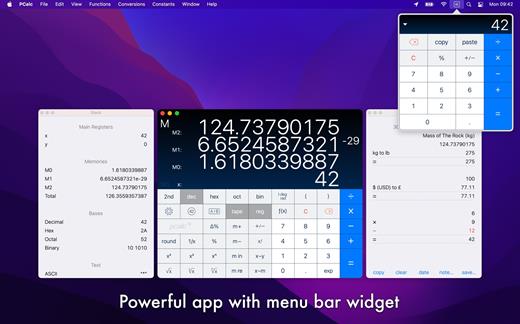
It is a fully featured scientific calculator for macOS with support for hexadecimal, octal and binary calculations, as well as an optional RPN mode, parentheses, programmable functions, and an extensive set of unit conversions.

Features include:


  • Switchable button layouts – choose from many different horizontal and vertical layouts to suit your needs. Includes all the layouts from the iPhone and iPad, as well as Mac-specific ones.
  • A powerful Notification Center widget, for quick access to PCalc.
  • Calculator themes – pick your look, all the way from minimalist to striking.
  • An RPN mode with one button access to the stack, and optional multiple-line display.
  • Editable user conversions, functions, and constants which are synced automatically across multiple devices.
  • Hexadecimal, octal and binary modes, complete with a variety of bitwise operators.
  • A simulated paper tape to keep track of your calculations with a “ticker tape” mode under the main display.
  • Smart searching of conversions, functions, and constants. Just search for “$ to £” for example.
  • Stylish, consistent user interface.
  • Support for Retina displays.
  • Full AppleScript support.
  • Multiple undo and redo.
  • Modern 64-bit application.
  • Handoff of in-progress calculations between PCalc on iOS, macOS, and watchOS.
  • Support for the Touch Bar on the MacBook Pro.
  • Support for macOS 10.15 Catalina, including Dark Mode.
What’s New

Version 4.11.4:


  • Fixed a problem with missing buttons in the tape window.
Compatibility

macOS 11.0 or later.


Release Name: PCalc 4.11.4
Size: 12.9 MB
Links: HOMEPAGE – NFO – Torrent Search

Download: RAPiDGATOR
8 Comments
Apr 4

CameraBag Pro 2026.1.0

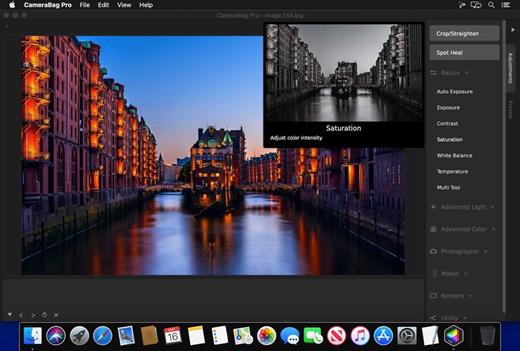
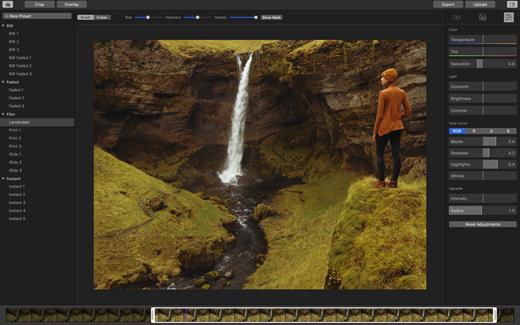
The best kept secret in photography (and videography) just got a whole lot better! CameraBag lets you instantly apply one of hundreds of beautiful presets to your photos and videos, and then dive deeper with ultra-intuitive professional adjustments and custom presets. CameraBag’s focus on intuitive tools and workflows isn’t about dumbing down image editing, it’s about making it work better.

With presets specifically designed for portraits, different landscape scenarios, faithful emulation of analog film stock from the past, popular modern photo styles, and more, CameraBag has you covered, even if you don’t yet know how to use all of its powerful tools.

CameraBag Pro is particularly great for anyone who needs to apply the same style to both photos and videos – especially with batch processing for large sets of media (including watermarks/branding, resizing, and cropping).

For those with professional needs, what really sets CameraBag apart from other photo editors is just how intuitive and powerful its advanced tools are.

Unique curve tools, adjustment re-ordering and layering, and large precise controls let you do things you simply can’t do in other popular software.
Following are some ways CameraBag is perfect for specific groups of users.

Wedding Photography


  • Easy batch filtering and watermarking
  • Use the exact same adjustments and filters on videos and photos
  • Quick comparison tools for large sets of photos
  • Tons of useful presets for wedding photography
*** CameraBag Pro includes all the same great features as CameraBag Photo, but also works on videos and includes LUT file support! ***

What’s New


Version 2026.1:

  • Release notes were unavailable when this listing was updated.
Release Name: CameraBag Pro 2026.1.0
Size: 70.8 MB
Links: HOMEPAGE – NFO – Torrent Search

Download: RAPiDGATOR

8 Comments