Please REGISTER or RENEW your account on RAPiDGATOR.net and support us by doing through all RAPiDGATOR working download links on main posts...
Apr 2

CleanShot X 4.8.8 fix

CleanShot is the ultimate screen recording app made for macOS. With its rich toolkit, CleanShot actually feels like 6 apps in one. You can use it to swiftly capture Mac’s screen without desktop icons, record and trim video, annotate, save screenshots to dedicated cloud, and more.
Features:

CleanShot Cloud

You can instantly save your screen captures to CleanShot Cloud, dedicated screenshots hosting integrated with the app. Right from the quick menu, upload your screenshot to the cloud, and get a link to it in a click.

Hide desktop icons

CleanShot hides desktop icons, so that you can capture your Mac’s screen on the spot, without wasting time on a cleanup. If you need a quick capture, toggle the icons and bring them back once you’re finished. You can even set a custom wallpaper like an image or plain color for your screenshots.

Record screen

CleanShots lets you choose between recording a video or a GIF, whether you capture a specific window, part of the screen, or fullscreen. Even set your custom dimensions before hitting the Record button. You can also disable desktop notifications for when you’re recording.

Quick Access Overlay

Right after taking a screenshot, you’ll see a small pop-up window appear on the screen. It’s the shortcut to viewing, annotating, or sharing whatever you’ve just captured. Essentially, Quick Access Overlay gives you an instant editing toolkit, plus saves you from searching and reopening screenshots.

Simple yet powerful

CleanShot teaches you to use simple actions while capturing the screen — yet provides tons of options to do it. You can grab the area, fullscreen, window, or even a scrolling window. Set a timer if you need a few seconds to capture the right moment. In your hands, it caters for your needs.

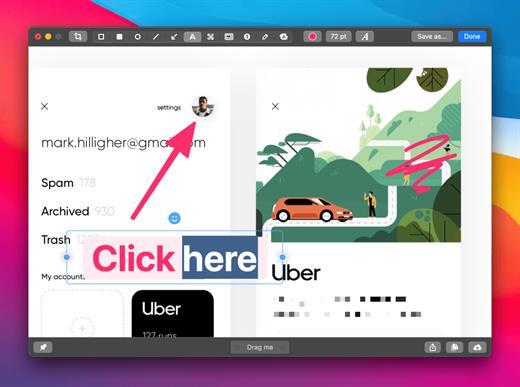
Annotate, highlight or blur

No screenshot is perfect. Using CleanShot’s built-in editor, you can highlight or hide specific parts of your screenshots as well as add annotations flexibly. Just click on the pencil icon in the Quick Access Overlay to edit screen captures in a flash.

What’s New

Version 4.8.8:


  • Fixed an issue that caused CleanShot to crash during screen recording
Compatibility

macOS 10.14.4 or later
Apple Silicon or Intel Core processor


Release Name: CleanShot X 4.8.8 fix
Size: 43.6 MB
Links: HOMEPAGE – NFO – Torrent Search

Download: RAPiDGATOR

11 Comments
Mar 29

Whisper Transcription 13.17

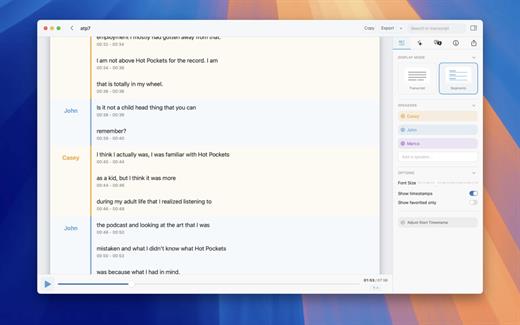
Whisper Transcription converts audio files into text using the Whisper machine learning model for speech recognition and transcription — making it easy to transcribe meetings, lectures, and other recordings.

Key Features


  • Easy Transcription: Drag and drop audio files for instant conversion.
  • On-Device Processing: 100% local transcription—no data leaves your machine.
  • Fast & Accurate: Get text multiple times faster than real-time with Metal & GPU acceleration (depending on the system).
  • Search & Edit: Highlight, edit, and delete transcript sections.
  • Audio Playback: Sync playback with the transcript for easy review.
  • Multi-Language Support: Transcribes in 100+ languages (fastest in English).
  • Subtitle Export: Save transcripts as .srt & .vtt files.
  • Batch Processing & System Audio Capture: Transcribe multiple files simultaneously and capture system audio (Zoom calls, podcasts, etc.).
  • Flexible Output: Export transcripts to Word, PDF, HTML, and subtitles.
  • Speaker Separation: Detect and split transcripts by speaker.
  • Reader Mode: Focused reading experience.
  • Advanced Model Support: Choose from various models for different accuracy and speed levels.
  • Supported Formats: Works with mp3, wav, m4a, mp4, mov, ogg, opus and more.
  • Pro Unlock: Upgrade for industry-leading transcription quality with Medium & Large models, batch processing, system audio recording, podcast transcription, and more.
What’s New

Version 13.17:


  • Release notes were unavailable when this listing was updated.
Compatibility

macOS 14.0 or later.


Release Name: Whisper Transcription 13.17
Size: 59.9 MB
Links: HOMEPAGE – NFO – Torrent Search

Download: RAPiDGATOR
10 Comments
Mar 29

Rectangle Pro 3.74

Additional Efficiency and Speed
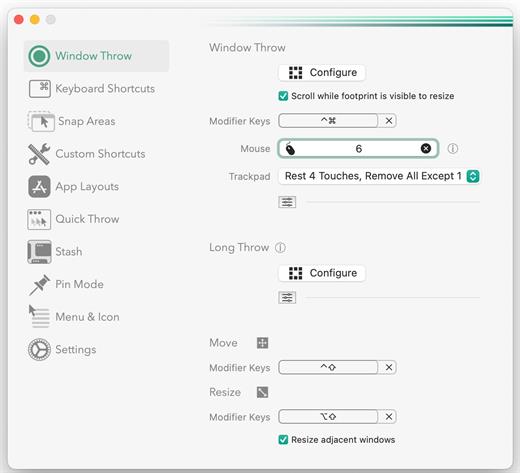
• Each window action can be configured with a quick, simple cursor movement and modifier key combination
• Just press and release modifier keys while you move your cursor over the window you want to snap

What’s New

Version 3.74:


  • Release notes were unavailable when this listing was updated.
Compatibility

macOS 10.12 or later
Apple Silicon or Intel Core processor


Release Name: Rectangle Pro 3.74
Size: 8.3 MB
Links: HOMEPAGE – NFO – Torrent Search

Download: RAPiDGATOR

10 Comments
Mar 29

Folder Preview Pro 2.9.1

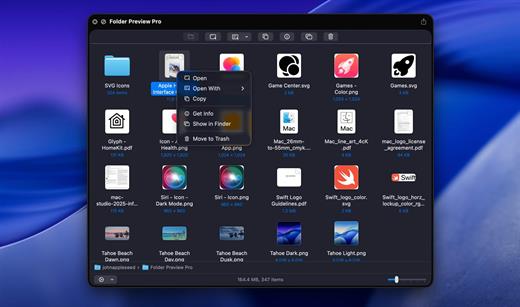
Folder Preview is a macOS Quick Look extension that enables users to preview the contents of folders directly in Finder without opening them. By selecting a folder and invoking Quick Look (e.g., pressing the spacebar), it displays a visual representation of the files and subfolders inside, leveraging the native Quick Look framework for seamless integration.

What’s New

Version 2.9.1:


  • Release notes were unavailable when this listing was updated.
Compatibility

macOS 13 or later


Release Name: Folder Preview Pro 2.9.1
Size: 8.9 MB
Links: HOMEPAGE – NFO – Torrent Search

Download: RAPiDGATOR

10 Comments
Mar 29

WhyFi 1.3.0

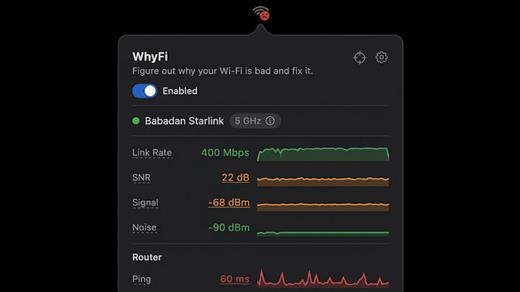
WhyFi is a lightweight macOS utility designed to diagnose and explain Wi-Fi performance issues in real time. Instead of guessing why your connection is slow, WhyFi continuously monitors your network and breaks down problems into clear categories such as Wi-Fi signal, router performance, ISP issues, and DNS delays.

By analyzing each layer of your connection, WhyFi helps you identify the exact cause of slow speeds, high latency, or unstable connections — and provides actionable insights to resolve them quickly.

Built as a menu bar app, it runs quietly in the background and gives you instant visibility into your network health without interrupting your workflow.

What’s New

Version 1.3.0:


  • Release notes were unavailable when this listing was updated.
Compatibility

macOS 13.0 or later


Release Name: WhyFi 1.3.0
Size: 4.9 MB
Links: HOMEPAGE – NFO – Torrent Search

Download: RAPiDGATOR
8 Comments
Mar 29

Hallmark Card Studio 23.0.0.32

Hallmark Card Studio is the #1 Greeting Card Software


  • 1,500+ Hallmark Cards & Projects
  • 1,800+ Graphics Library
  • Exclusive Hallmark Fonts
  • Integrated iLife Features

For more than 100 years, Hallmark has designed greeting cards for life’s special moments. Hallmark Card Studio Essentials extends this tradition, making it easy to create one-of-a-kind Hallmark cards as unique as the people you care about.

But cards are just the beginning. Bridge the miles between family and friends with customizable photo frames, calendars, announcements, postcards, stationery, invitations, e-cards and scrapbook pages. Keep track of birthdays and anniversaries using monthly and yearly calendars so that you never miss an important Hallmark card event again. Even import photos directly into your cards and projects from iPhoto or an iSight camera.

With exclusive Hallmark sentiments and the Hallmark Premium Graphics Collection, your cards and projects will be more creative and heart-felt than ever before.

It’s amazing what you and Hallmark can do together.

Create Personalized Cards in 3 Easy Steps!


  • Select from 1,500+ cards, invitations, stickers and more.
  • Add you own custom message or photos. Then change fonts, colors or graphics.
  • Print, email or create a PDF of your one-of-kind creation.
Spectacular Cards – and So Much More!

Commemorate events and bridge the miles between family and friends with invitations, photo frames, scrapbook pages, stationery, certificates, e-cards and much more!


  • 1,500+ Hallmark Greeting Cards and customizable projects
  • 1,800+ Graphic Images
  • Hallmark Graphics Collection
  • Easy to Use! A tutorial gets you started fast
  • Browse projects by design, theme or occasion
  • Import photographs from iPhoto and iSight cameras
  • Multi-touch Gesture Support
What’s New

Version 23.0.0.32:


  • Release notes were unavailable when this listing was updated.
Compatibility

macOS 10.14 or later


Release Name: Hallmark Card Studio 23.0.0.32
Size: 1.1 GB
Links: HOMEPAGE – NFO – Torrent Search

Download: RAPiDGATOR

9 Comments
Mar 29

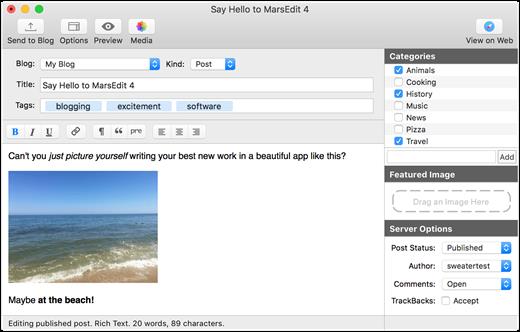
MarsEdit 5.4.3

Powerful blog editor that has all the right features, but could use a visual update
There is no denying that MarsEdit is a great app for the job it was designed for, but its interface has not changed a great deal for many years. Mind you, it is very easy to manage and has a simple, intuitive layout, but it is starting to show its age.

On the whole, however, MarsEdit is a great tool for any blogger who wants to get their work done more quickly and from any location, as it offers numerous helpful features and allows one to prepare blog posts even when no internet connection is available.

What’s New

Version 5.4.3:


  • Enabled the Excerpt field on Micro.blog blogs to edit “Summary” text
  • Fix a crash that could occur when editing long lines in the plain text editor
  • Fix a bug that prevented the JavaScript browser bookmarklet from working on some sites
  • Fix a bug that caused duplicated text when using dictation in rich text
  • Differentiate errors from Jetpack about IP address being flagged from regular login failures
  • Handle "Too Many Requests" responses more intelligently, retrying after the recommended delay if possible
  • Fix a bug that could cause the "New Blog" panel to get very tall and not shrink again
  • Fix a bug that prevented the non-Safari browser bookmarklet from working on some sites
  • Remove media assets from the list of "posts" returned by AppleScript
Compatibility

macOS 10.15.4 or later
Apple Silicon or Intel Core processor


Release Name: MarsEdit 5.4.3
Size: 25.5 MB
Links: HOMEPAGE – NFO – Torrent Search

Download: RAPiDGATOR
7 Comments
Mar 29

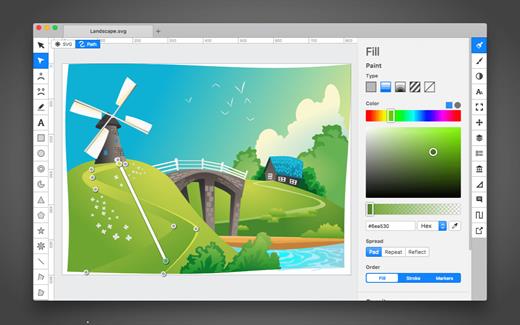
Boxy SVG 4.104.1

SVG is the standard format for storing vector graphics such as icons, banners, charts and illustrations.

Boxy SVG project goal is to create the best SVG editor for non-technical users as well as for professional designers and developers.

CORE FEATURES

• Clean and intuitive UI heavily inspired by Inkscape, Sketch and Adobe Illustrator
• Extensive support for on-canvas editing of object geometry, transform, paint and other properties
• Save to SVG and SVGZ formats, export to PNG, JPG, WebP, PDF and HTML5
• Open Clip Art Library integration with thousands of free stock vector arts
• Google Fonts integration with hundreds of free fonts
• Configurable keyboard shortcuts for over 100 commands
• Manual guides, smart guides and grid
• Path operations (unite, intersect, subtract, exclude, close, reverse, etc.)
• Arrangement operations (align to, rotate, flip, order, group, etc.)

FOR WEB DEVELOPERS

• Chromium-based rendering engine
• SVG and CSS code inspector similar to Chrome Dev Tools
• Clean SVG output that preserves IDs, classes, titles and other metadata
• SVG sprites editing support

What’s New

Version 4.104.1:


  • Release notes were unavailable when this listing was updated.
Compatibility

macOS 10.15 or later


Release Name: Boxy SVG 4.104.1
Size: 216.6 MB
Links: HOMEPAGE – NFO – Torrent Search

Download: RAPiDGATOR

8 Comments
Mar 29

Recadio 2.0

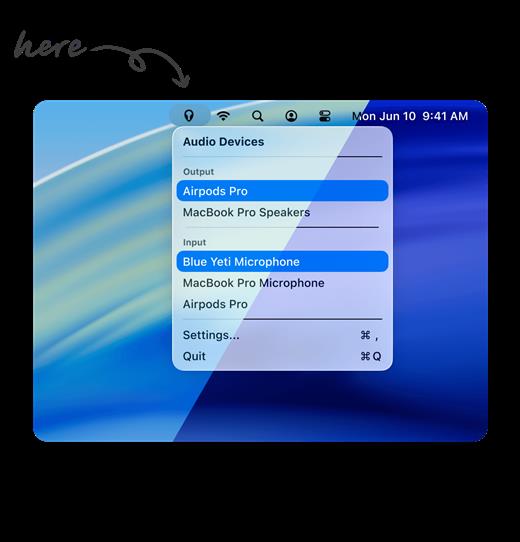
Recadio is a lightweight macOS menu bar app designed to solve one of the most frustrating issues on Mac: unpredictable audio device switching. When you connect headphones, microphones, or Bluetooth devices, macOS often switches both input and output automatically, leading to poor audio quality and constant manual adjustments.

Recadio fixes this by giving you full control over how your audio devices behave. You can define your preferred input and output devices, and the app will automatically select them based on your priorities — ensuring consistent, high-quality audio every time.

Built as a simple menu bar utility, Recadio runs quietly in the background and removes the need to constantly open system settings just to fix your audio setup.

What’s New

Version 2.0:


  • Release notes were unavailable when this listing was updated.
Compatibility

macOS 12.0 or later


Release Name: Recadio 2.0
Size: 8.3 MB
Links: HOMEPAGE – NFO – Torrent Search

Download: RAPiDGATOR
8 Comments
Mar 29

CleanClip 2.4.6

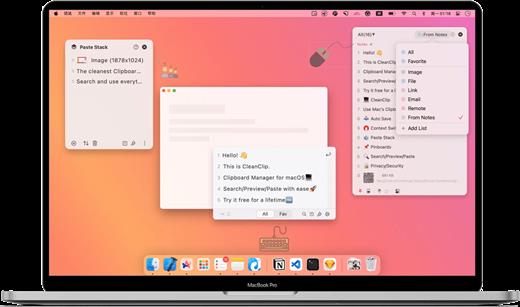
CleanClip is a lightweight and powerful clipboard manager designed to transform how you copy and paste on macOS. Instead of being limited to a single clipboard item, CleanClip automatically saves everything you copy — including text, images, links, and files — so you can access them anytime.

What makes CleanClip different is its immersive experience. With a simple shortcut, it opens directly at your cursor position, allowing you to search, preview, and paste clipboard history without switching apps or breaking focus.

Built for speed and simplicity, CleanClip combines a clean interface with powerful features like search, categorization, and batch operations — making everyday copy and paste dramatically more efficient.

What’s New

Version 2.4.6:


  • Release notes were unavailable when this listing was updated.
Compatibility

macOS 12.0 or later


Release Name: CleanClip 2.4.6
Size: 20.6 MB
Links: HOMEPAGE – NFO – Torrent Search

Download: RAPiDGATOR

8 Comments