Please REGISTER or RENEW your account on RAPiDGATOR.net and support us by doing through all RAPiDGATOR working download links on main posts...
Mar 26

Meta 2.3.7

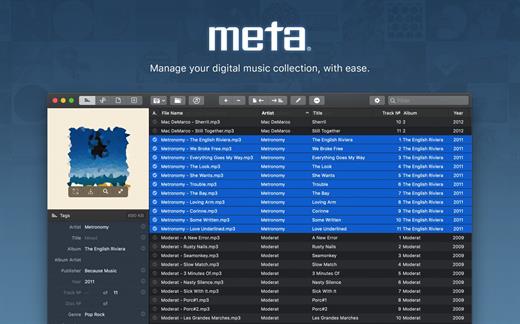
Meta helps you manage your ever-growing digital music collection. Use it to easily edit information such as a song’s artist, title, album, album cover, etc. It supports editing of most audio formats such as MP3, MP4, M4A, FLAC, Ogg, OGA, SPX, WAV, AIFF, and a variety of metadata formats including ID3v1, ID3v2.3, ID3v2.4, iTunes MP4, Vorbis comments, and APE tags.
Features


  • A polished, intuitive user interface that adopts OS X’s standards
  • Write metadata to multiple files at once (Batch Tag Editing)
  • Remove all metadata from files (Strip Tags)
  • Change typecase (capitalise, upper/lowercase, titlecase), strip underscores
  • Rename files based on their metadata or instead, convert filenames to metadata
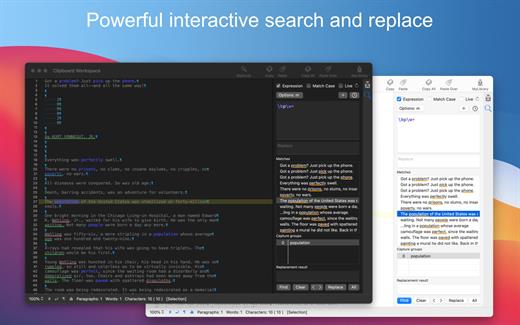
  • Find and Replace characters, words, or strings in metadata, with support for regular expressions (patterns)
  • Add selected tracks to iTunes, or refresh their metadata using a simple keyboard shortcut
  • Automatically generate track numbers
  • Benefit from built in file management operations (Move, Delete, Reveal in Finder)
  • Interface is compatible with Retina displays
Album covers can easily be set or exported via drag-and-drop, and it is possible to configure Meta so that it scales, crops, and compresses images each time a new image is set, so as to keep your audio files’ size to a minimum.

What’s New

Version 2.3.7:


  • Release notes were unavailable when this listing was updated.
Compatibility

macOS 10.11 or later.


Release Name: Meta 2.3.7
Size: 13.3 MB
Links: HOMEPAGE – NFO – Torrent Search

Download: RAPiDGATOR

6 Comments
Mar 26

Looq 1.2.1

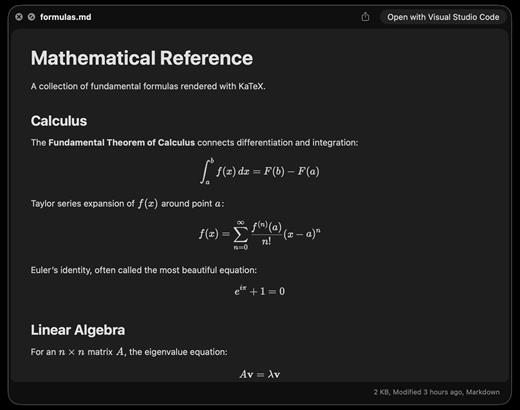
A better look at your files. Preview Markdown with KaTeX and Mermaid, highlight 190+ languages, view CSV and SQLite tables, browse archives and folders. All from Quick Look.
macOS 14 (Sonoma) or later

Markdown
Full GFM rendering with rich formatting support.


  • Live rendering on file save
  • KaTeX math (inline and block)
  • BeautifulMermaid diagrams
  • Syntax-highlighted code blocks
  • GitHub Alerts and emoji shortcodes
  • Auto table of contents sidebar
  • Remote image caching
  • Scroll position memory
Source Code
Syntax highlighting for 190+ languages.

  • Progressive rendering
  • Auto-format JSON, CSS, XML, SVG, plist
  • Configurable line numbers
  • Custom fonts, size, and weight
  • Tab width and word wrap
  • Independent light and dark themes
  • Shebang detection
Data Files
Native table views for structured data.

  • Resizable CSV and TSV columns
  • Alternating row colors
  • SQLite multi-table preview
  • Column type and constraint tooltips
  • Color-coded diff/patch
  • Multi-file tab switching
  • Large file truncation
Archives and Folders
Browse compressed files and directories.

  • ZIP and TAR directory tree
  • Pure Swift binary parsing
  • File size, date, and type columns
  • Sortable column headers
  • Folder preview with Spotlight metadata
  • Configurable display columns
  • Finder tag support
What’s New

Version 1.2.1:


  • Release notes were unavailable when this listing was updated.
Compatibility

macOS 14 (Sonoma) or later


Release Name: Looq 1.2.1
Size: 9.4 MB
Links: HOMEPAGE – NFO – Torrent Search

Download: RAPiDGATOR
7 Comments
Mar 26

Screen Tint 1.0.7

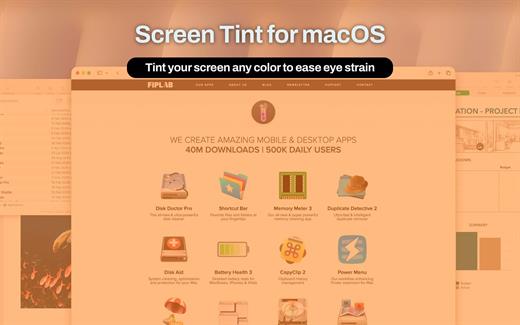
Screen Tint is a handy utility app that is designed to reduce the brightness of your Mac’s screen, proving particularly useful for users with sensitive eyes and for those that wish to use their Mac in a darker environment, but find that their screen’s brightness to be too harsh.

We recommend using a warm tint when working at night and a cool tint for working in artificial light.

KEY FEATURES:


  • Choose between 7 primary tint colors, with the ability to also configure any tint colour of your choice using the colour palette
  • Ability to toggle the intensity of the tint colour using the ‘color intensity’ slider
  • Enable the app to run between a specified time schedule automatically
  • Quickly be able to enable/disable the app from the menubar itself
  • Tint not only your Mac’s screen as the main display, but also attached external displays
BENEFITS:

  • Perfect for users wanting to use their Mac’s in the night/dark environments
  • Useful for users that have sensitive eyes and find the regular brightness levels of Macs to be too high
  • Give your screen a unique colored tint that’s both good for your eyes, as well as visually appealing
What’s New

Version 1.0.7:


  • Release notes were unavailable when this listing was updated.
Compatibility

macOS 11.5 or later.


Release Name: Screen Tint 1.0.7
Size: 10 MB
Links: HOMEPAGE – NFO – Torrent Search

Download: RAPiDGATOR

7 Comments
Mar 25

TextSoap 9.7.1

TextSoap can automatically remove unwanted characters, fix up messed up carriage returns, and do pretty much anything else that we can think of to text. Save time and effort. Be more productive.

Stop manually fixing text documents and emails. Let TextSoap help you automate away all that tediousness. And do it all from within your favorite app using TextSoap Menu. Enable it in preferences and access TextSoap in most apps that support standard copy and paste.

Easy to learn for casual users, TextSoap offers the flexibility that expert users need.

What’s New

Version 9.7.1:


  • Release notes were unavailable when this listing was updated.
Compatibility

macOS 11.0 or later


Release Name: TextSoap 9.7.1
Size: 27.8 MB
Links: HOMEPAGE – NFO – Torrent Search

Download: RAPiDGATOR
8 Comments
Mar 25

Aiarty Video Enhancer 3.6

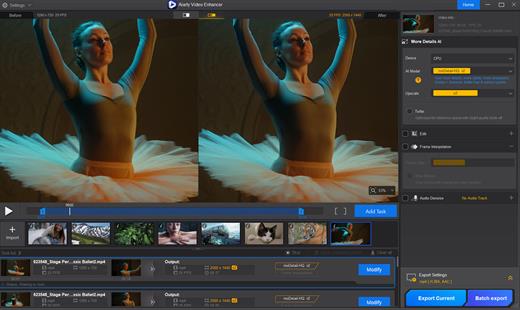
The state-of-the-art AI video enhancer software to generate more details, super denoise, deblur, upscale, and restore flawed videos to 4K clarity. With specialized AI models, it delivers superior visual quality at turbo speed, empowering content creators and video enthusiasts.

Restore to Clear Audio

Audio Denoise module to analyze and refine your audio tracks. 1-click background noise removal and vocal clarity boost.

Enhance to 4K Clarity with Details

Tailored AI Models to transform low quality, stuttering, or grainy videos to 4K. Enjoy cinemat

Silky Smooth Slow Motion

The frame interpolation module uses AI to generate new, high-quality frames, ready for fluid and smooth 8X/16X slow-motion.

Industry-leading Video Upscaling and Enhancement with AI

Leveraging the proprietary video and image training dataset, the tailored AI models in Aiarty Video Enhancer deliver best quality at GPU-optimized processing speed, with dedicated roles to generate more details for visual sharpness, restore flawed and degraded videos, or tackle low-light challenging footage.

What’s New

Version 3.6:


  • Release notes were unavailable when this listing was updated.
Compatibility

macOS 10.15 or later


Release Name: Aiarty Video Enhancer 3.6
Size: 207.2 MB
Links: HOMEPAGE – NFO – Torrent Search

Download: RAPiDGATOR

9 Comments
Mar 25

Alcove 1.6.15

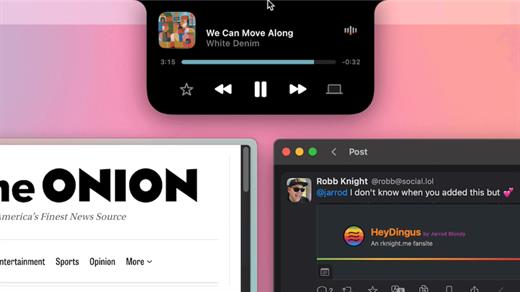
Alcove brings the elegant Dynamic Island experience to your Mac, transforming how you interact with notifications, live activities, and system events. Designed to feel native, it’s a polished way to stay informed without being interrupted.

Key Features


  • Fluid Transitions — Smooth animations and transitions that make alerts and interactions feel natural and integrated.
  • Instant Notifications — Alerts appear quickly and gracefully so you never miss important updates.
  • Live Activities Support — Keep track of ongoing tasks directly from the Dynamic Island interface.
  • Swipe Gestures — Use intuitive gestures to clear, interact with, or dismiss alerts.
  • Customizable HUDs — Tailor the look and feel of the heads-up displays to fit your style or workflow.
  • Lock Screen Presence — Alcove can show notifications or status even when your Mac is locked, ensuring you stay informed at a glance.
  • Lightweight, Native App — Built to run smoothly, Alcove is fast and performs well without draining resources.
xattr -cr /Applications/Alcove.app

What’s New

Version 1.6.15:


  • Release notes were unavailable when this listing was updated.
Compatibility

macOS 12.0 or later


Release Name: Alcove 1.6.15
Size: 12.5 MB
Links: HOMEPAGE – NFO – Torrent Search

Download: RAPiDGATOR
9 Comments
Mar 25

Backdrop 2.5.0

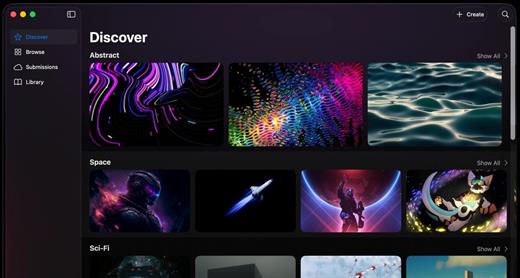
Backdrop brings video wallpapers to both your Mac Desktop and your Lock Screen. Smooth 4K playback with low CPU use. Browse 1,000+ scenes, or craft your perfect wallpaper with the built-in editor. Multi-display support, community platform.

What’s New

Version 2.5.0:


  • Release notes were unavailable when this listing was updated.
Compatibility

macOS 14.0 or later


Release Name: Backdrop 2.5.0
Size: 17.6 MB
Links: HOMEPAGE – NFO – Torrent Search

Download: RAPiDGATOR

8 Comments
Mar 25

Zipic 1.9.2

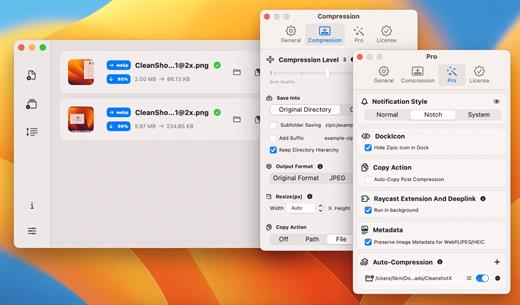
Zipic is a native macOS application designed for efficient, high-quality image compression. It lets users shrink image files locally, with no uploads or dependency on the cloud. All processing happens on your own device—so your privacy and speed stay intact.

Key Features and Highlights:


  • High Compression, Near-Lossless Quality: Zipic utilizes powerful compression algorithms to achieve a high compression ratio with minimal perceived quality loss, making the compressed image virtually indistinguishable from the original.
  • Fast & Local Processing: Being a native macOS application, all image processing occurs locally on your device. This ensures lightning-fast performance, efficient handling of massive batches, and high data privacy with no cloud uploads or network dependence.
  • Comprehensive Format Support: The tool supports a wide range of formats, including basic ones like JPEG, PNG, WebP, HEIC, and GIF, and Pro formats like AVIF, JXL, TIFF, and ICNS.
  • Effortless Workflow: It offers multiple simple compression methods, including drag-and-drop, folder monitoring, and Finder integration (right-click).
  • Custom Control: Users can create custom presets for different quality levels and scenarios, allowing for precise control over the compression outcome.
  • Pro Features for Automation: Advanced features include Clipboard auto-compress, Folder Watch for automated compression in specific directories, and integration options like Raycast Extension and Apple Shortcuts.
Zipic aims to be the seamless solution for developers, designers, bloggers, and photographers who need to optimize and compress images efficiently.

What’s New

Version 1.9.2:


  • Release notes were unavailable when this listing was updated.
Compatibility

macOS 13.0 or later


Release Name: Zipic 1.9.2
Size: 11.7 MB
Links: HOMEPAGE – NFO – Torrent Search

Download: RAPiDGATOR
7 Comments
Mar 25

Aiarty Image Matting 2.7

Blend Naturally and Creatively
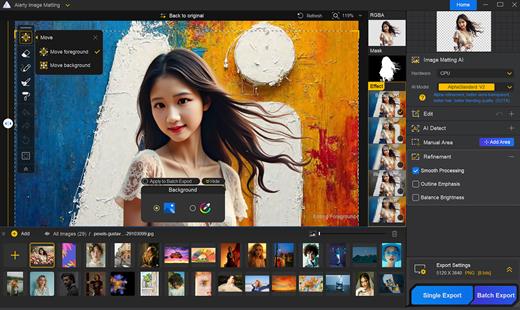
High-Precision Alpha Matting
Go a step further with dynamic transparency control and edge optimization even in complex edge cases. This ensures excellent detail preservation and makes background integration seamless.

Versatile Background Effects
Replace backgrounds with transparency, solid colors, custom effects like blur, or other images. Highlight the subject and create appealing compositions for e-commerce, personal projects, and more.

What’s New

Version 2.7:


  • Release notes were unavailable when this listing was updated.
Compatibility

macOS 10.15 or later


Release Name: Aiarty Image Matting 2.7
Size: 206.1 MB
Links: HOMEPAGE – NFO – Torrent Search

Download: RAPiDGATOR
7 Comments