Please REGISTER or RENEW your account on RAPiDGATOR.net and support us by doing through all RAPiDGATOR working download links on main posts...
Mar 20

Morpholder 1.0.5

Tired of manually converting images and videos? Let Morpholder do the heavy lifting. Just drop your folders, rename the extensions, and watch the magic happen!
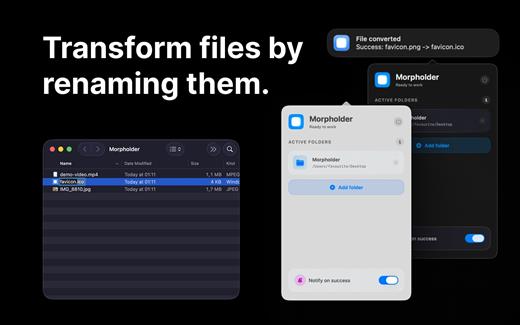
Morpholder is the ultimate native macOS utility for seamless, automatic file conversion. Designed for designers, developers, and power users, Morpholder runs quietly in your Menu Bar, monitoring your selected folders for any file extension changes.

HOW IT WORKS
Instead of opening clunky export menus or terminal scripts, simply rename a file’s extension right in Finder (for example, change image.jpg to image.png or video.mp4 to video.mov). Morpholder instantly intercepts this change and automatically transcodes the file into the new format in the background. It’s like magic!

KEY FEATURES


  • Instant Conversion via Rename: Just rename a file’s extension in Finder to trigger a high-quality format conversion.
  • Batch Folder Monitoring: Drop unlimited folders into the app. Morpholder will keep an eye on all of them simultaneously.
  • Broad Format Support: Convert between popular image formats (PNG, JPG, HEIC, TIFF, ICO, and more) and video formats (MP4, MOV, and more) instantly.
  • Native macOS Experience: Built exclusively for Mac, offering a beautiful, translucent Menu Bar interface with drag-and-drop support.
  • AI Background Removal, text extracts, compression, GIFs and more
  • Privacy First: All conversions happen locally on your Mac using Apple’s powerful CoreGraphics and AVFoundation engines. No internet connection is required, and your files never leave your computer.
  • Unobtrusive & Lightweight: Sits quietly in your Menu Bar, consuming minimal system resources. You can completely hide the window and just let it work in the background.
What’s New

Version 1.0.5:


  • New: Added support for converting SVG to any raster format
  • New: Added support for vectorization (converting any raster format to SVG)
  • New: Added support for archive conversion (.zip, .dmg, .7z, .tar, .gz, .bz2, .xz)
  • New: Added support for creating .dmg installers from any archives (not supported in MAS version)
  • Fix: Fixed WebP conversion
  • Improved: Video conversion speed increased by more than 4x
Compatibility

macOS 13.5 or later.


Release Name: Morpholder 1.0.5
Size: 45.4 MB
Links: HOMEPAGE – NFO – Torrent Search

Download: RAPiDGATOR

7 Comments
Mar 20

MarsEdit 5.4.1

Powerful blog editor that has all the right features, but could use a visual update
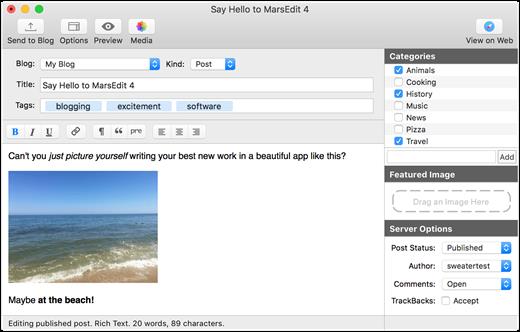
There is no denying that MarsEdit is a great app for the job it was designed for, but its interface has not changed a great deal for many years. Mind you, it is very easy to manage and has a simple, intuitive layout, but it is starting to show its age.

On the whole, however, MarsEdit is a great tool for any blogger who wants to get their work done more quickly and from any location, as it offers numerous helpful features and allows one to prepare blog posts even when no internet connection is available.

What’s New

Version 5.4.1:


  • Enabled the Excerpt field on Micro.blog blogs to edit “Summary” text
  • Fix a crash that could occur when editing long lines in the plain text editor
  • Fix a bug that prevented the JavaScript browser bookmarklet from working on some sites
  • Fix a bug that caused duplicated text when using dictation in rich text
  • Differentiate errors from Jetpack about IP address being flagged from regular login failures
  • Handle "Too Many Requests" responses more intelligently, retrying after the recommended delay if possible
  • Fix a bug that could cause the "New Blog" panel to get very tall and not shrink again
  • Fix a bug that prevented the non-Safari browser bookmarklet from working on some sites
  • Remove media assets from the list of "posts" returned by AppleScript
Compatibility

macOS 10.15.4 or later
Apple Silicon or Intel Core processor


Release Name: MarsEdit 5.4.1
Size: 25.7 MB
Links: HOMEPAGE – NFO – Torrent Search

Download: RAPiDGATOR
7 Comments
Mar 20

Wondershare PDFelement Pro 12.1.11 (OCR)

Wondershare PDFelement is a self-explanatory OS X application that makes it easier for your to preview, edit, join, split and convert PDF documents using a Mac.

The Wondershare PDFelement also features a simple, clean and intuitive interface that provide instantaneous access to all the tools and features you might need to complete your daily tasks.

Powerful and user-friendly PDF editor for everyday use

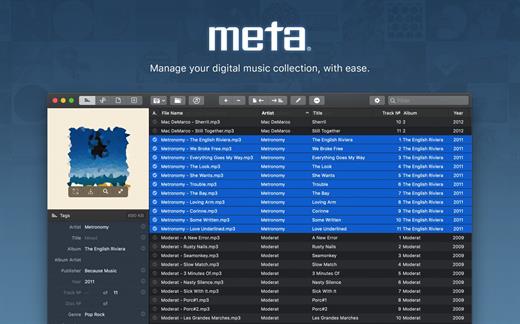
Moreover, with Wondershare PDFelement’s help, you can effortlessly edit PDF documents created using text files, web pages or scanned documents.

Consequently, you can add, remove or edit text, move and rearrange pages, insert or remove images and more.

Wondershare PDFelement’s top toolbar helps you hide, show and customize the sidebar in order to display the items and information you are interested in. In addition, you can browse through the loaded document, zoom in or out, print it or email it with just a couple of mouse clicks.

Advanced OCR capabilities make text editing a breeze

Furthermore, you can choose between the “Hand”, “Select” and “Edit” tool, use the advanced OCR feature and convert your source file into plain text or RTF document, ePUB, HTML, as well as file formats compatible with Microsoft Word, Excel, and PowerPoint.

The context menu also helps you switch between the “Move”, “Select” and “Touchup” tool, change the display mode and open the Inspector window to view detailed information about the loaded document.

As an added bonus, by accessing the Document menu, you have the option to add, update or remove an watermark, extract, insert and delete pages, split, merge or convert your document and crop or rotate a page with ease.

Full-featured tool designed to help you stamp, watermark, encrypt and decrypt PDF documents on a Mac

The complete list of all available editing tools, bookmark features, annotation tools and stamp options can be found under the Tools menu.

From here you can easily insert text boxes, add sticky notes, highlight, strike-through and underline text, insert various shapes and use the handy pencil or erase.

On the whole, Wondershare PDFelement comes with the right set of features to help you edit and annotate PDF documents using a Mac, as well as effortlessly add password protect and convert them other formats for easier sharing with your friends and colleagues.

What’s New

Version 12.1.11:


  • Release notes were unavailable when this listing was updated.
Compatibility

macOS 11.0 or later
Apple Silicon or Intel Core processor


Release Name: Wondershare PDFelement Pro 12.1.11 (OCR)
Size: 827.1 MB
Links: HOMEPAGE – NFO – Torrent Search

Download: RAPiDGATOR

9 Comments
Mar 20

Meta 2.3.6

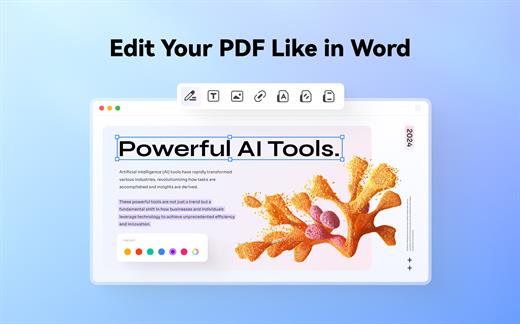
Meta helps you manage your ever-growing digital music collection. Use it to easily edit information such as a song’s artist, title, album, album cover, etc. It supports editing of most audio formats such as MP3, MP4, M4A, FLAC, Ogg, OGA, SPX, WAV, AIFF, and a variety of metadata formats including ID3v1, ID3v2.3, ID3v2.4, iTunes MP4, Vorbis comments, and APE tags.

Features


  • A polished, intuitive user interface that adopts OS X’s standards
  • Write metadata to multiple files at once (Batch Tag Editing)
  • Remove all metadata from files (Strip Tags)
  • Change typecase (capitalise, upper/lowercase, titlecase), strip underscores
  • Rename files based on their metadata or instead, convert filenames to metadata
  • Find and Replace characters, words, or strings in metadata, with support for regular expressions (patterns)
  • Add selected tracks to iTunes, or refresh their metadata using a simple keyboard shortcut
  • Automatically generate track numbers
  • Benefit from built in file management operations (Move, Delete, Reveal in Finder)
  • Interface is compatible with Retina displays
Album covers can easily be set or exported via drag-and-drop, and it is possible to configure Meta so that it scales, crops, and compresses images each time a new image is set, so as to keep your audio files’ size to a minimum.

What’s New

Version 2.3.6:


  • Release notes were unavailable when this listing was updated.
Compatibility

macOS 10.11 or later.


Release Name: Meta 2.3.6
Size: 11.9 MB
Links: HOMEPAGE – NFO – Torrent Search

Download: RAPiDGATOR
6 Comments
Mar 20

SoundSource 6.0.5

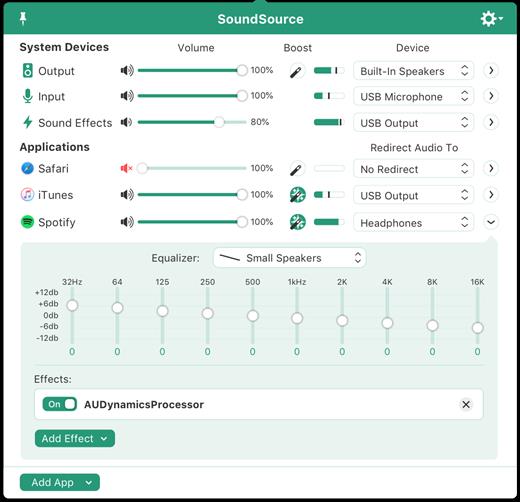
SounceSource lets you adjust your input, output, and sound-effects devices and volume settings in mere moments, right from the menu bar. Enable soft play-thru of input devices to your desired output, so you can hear sound coming in through any microphone or other source. With SoundSource, you get fast access to your Mac’s most important audio settings.


  • Instant Audio-Device Switching – With just two clicks, you can switch the audio devices your Mac is using for input, output, and even sound effects.
  • Fast Volume Control – SoundSource provides easy access to the volume controls for your audio devices as well.
  • Audio Play-Thru, Too – SoundSource’s Play-Thru window makes it easy to monitor the audio coming from any input device.
  • Comprehensive – SoundSource gives you one place to go for all Mac’s most important audio controls.
  • At Your Fingertips – With SoundSource running in your menu bar, your audio controls are always available.
  • Lightweight – When you don’t need SoundSource, it stays out of your way.
What’s New

Version 6.0.5:


  • Release notes were unavailable when this listing was updated.
Compatibility

macOS 10.14.0 or later
Apple Silicon or Intel Core processor


Release Name: SoundSource 6.0.5
Size: 45.5 MB
Links: HOMEPAGE – NFO – Torrent Search

Download: RAPiDGATOR

6 Comments
Mar 19

Canvas X Draw 26.0.0

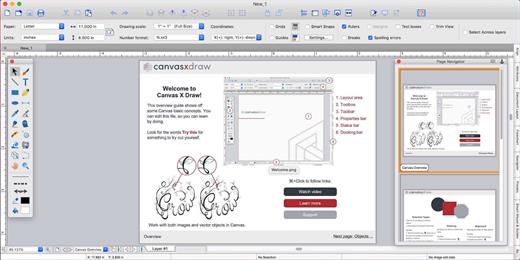
Canvas X Draw is a powerful software specifically designed to make it possible for small business owners, designers, illustrators, and professionals to advertise and communicate with confidence.

When your audience depends on pinpoint accuracy, minute detail, and high-impact data visualization, you need a special kind of illustration software.

With Canvas you can drive high impact visual communication right across your organization, putting powerful data in the hands of the people who need it.


  • Work with both raster and vector files
  • Import and visualize huge volumes of geospatial data
  • Manipulate and display intricate 3D models
What’s New

Version 26.0.0:


  • Release notes were unavailable when this listing was updated.
Compatibility

macOS 11.0 or later


Release Name: Canvas X Draw 26.0.0
Size: 273.9 MB
Links: HOMEPAGE – NFO – Torrent Search

Download: RAPiDGATOR
9 Comments
Mar 19

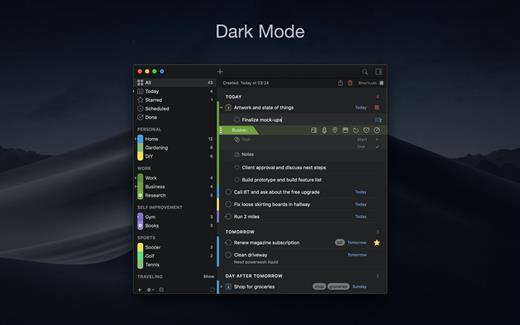
2Do 2.9.76

2Do lets you take a completely different approach to managing your tasks. With its extremely simple-to-use interface and a comprehensive and flexible set of powerful features, it lets you focus on what’s most important to you: your life. There is no wrong way of using 2Do, and unlike other to-do apps, it won’t force you to use a particular task management methodology. 2Do will simply amaze you, from start to finish.

Features:


  • Simple tasks, checklists, and projects
  • Lists and smart lists
  • Tags
  • Sync
  • Quick Look
  • Quick entry
  • Alarms and notifications
  • Password protection
  • Themes
  • Automatic backups
What’s New

Version 2.9.76:


  • Release notes were unavailable when this listing was updated.
Compatibility

macOS 10.12 or later.
Apple Silicon or Intel Core processor


Release Name: 2Do 2.9.76
Size: 62.4 MB
Links: HOMEPAGE – NFO – Torrent Search

Download: RAPiDGATOR
9 Comments
Mar 19

PullTube 1.8.6.27

Sharing videos via online hosting services, such as YouTube or Vimeo is a common practice, yet streaming the content might not work as expected if you have a slow internet connection.

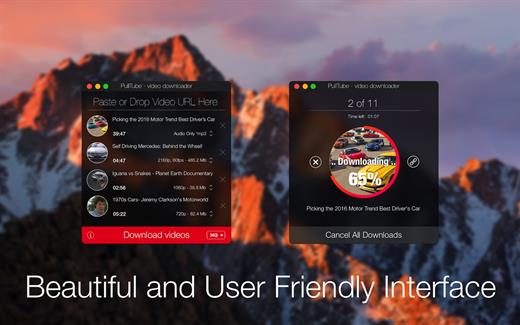
PullTube offers you the possibility to download videos from both sources (YouTube and Vimeo), while other platforms might be added at a later time. The app can handle playlists, allows you to select the output quality, and can even extract only the audio.

Video downloader that can import links with drag and drop and can detect playlists

The PullTube user interface is represented by a small window where you get to quickly paste the video URL. Note that you can also add a video by dropping the link on top of the PullTube window.

Worth mentioning is that, if PullTube detects that the video is part of a playlist, will offer to download the entire collection: will fetch the data for each entry and handle the downloads consecutively.

Download videos hosted on YouTube or Vimeo to different output sizes and formats

PullTube will start fetching the video data right away so you can see the video name, duration, and a small thumbnail. When configuring a download, you get to select the output quality (highest, 4K, HD or regular with different resolutions) or choose to export only the audio to an M4A or MP3 file.

Via the PullTube Settings panel, you can change the default download location and the default MP3 bitrate (320Kbps, 256Kbps, 128Kbps, 64Kbps). You can also add the quality info to the video’s name and choose to quit the app when all downloads are completed.

Get offline access to videos hosted online in just a few steps

PullTube proposes a streamlined workflow for quickly downloading videos from YouTube or Vimeo, provides control over the output quality, and enables you to extract the audio to MP3 or M4A files.

However, during our tests, we have noticed that PullTube has trouble completing the download when handling videos that are longer that 2 minutes. The process stops without any explanation, and you can eventually complete the task, but you need to add the link to download tool multiple times.

What’s New

Version 1.8.6.27:


  • Release notes were unavailable when this listing was updated.
Compatibility

macOS 10.12 or later


Release Name: PullTube 1.8.6.27
Size: 232.1 MB
Links: HOMEPAGE – NFO – Torrent Search

Download: RAPiDGATOR
10 Comments
Mar 19

Aiarty Image Enhancer 3.10

Supported Input & Output Formats
Supported Input Formats
.jpg, .jpeg .jp2, .j2k, .jpf, .jpm, .jpg2, .j2c, .jpc, .jpx, .mj2, .png, .tif, .tiff, .webp, .bmp, .avif, and RAW formats (.dng, .cr3, .cr2, .crw, .nef, .nrw, .arq, .arw, .sr2, .srf, .raf, .rw2, .orf, .ori, .pef, .ptx, .3fr, .fff, .iiq, .cap, .eip, .rwl, .srw, .erf, .mos, .mef, .mrw, .mdc, .dcr, .kdc, .dcs, .drf, .k25, .bay, .pxn, .r3d, and .rwz)

Supported Output Formats
.jpg, .png (8-bit, 16-bit)

Supported Output DPIs

What’s New

Version 3.10:


  • Release notes were unavailable when this listing was updated.
Compatibility

macOS 10.15 or later


Release Name: Aiarty Image Enhancer 3.10
Size: 129.4 MB
Links: HOMEPAGE – NFO – Torrent Search

Download: RAPiDGATOR

10 Comments
Mar 19

Steinberg WaveLab Pro 13.0.10

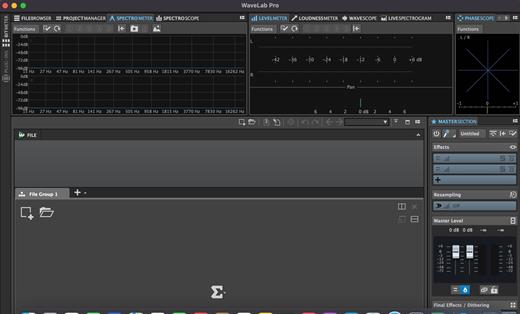
With significant new features for stem mastering, multitrack editing, plug-in parameter automation and podcast production, WaveLab 11 has the concept of “multi” running throughout it. With improved multi-channel file handling, multiple track sub-lanes and analysis meters, multi-core processing and more, WaveLab further enhances its status as the true art of mastering.

Multi-channel interleaved support

WaveLab 11 introduces extended support for multi-channel interleaved files and, for the first time, multi-channel interleaved editing in the Audio Editor. Supporting up to 22.2 surround layouts of WAV files (including Ambisonics files for pre-authoring purposes), a multi-channel file can be opened, edited and saved like any other set of mono/stereo files. Featuring comprehensive controls to make precise editing easier, it’s also possible for external editors to work on selected channels only. The detailed new selection options include highly flexible frequency-domain selection in the Spectrum Editor. In the Audio Montage, automatic splitting of multi-channel audio files into mono or stereo clusters makes it fast to import a large multi-channel file. This also allows plug-ins to process channel clusters independently of one another.

Track Groups for multitrack/stems workflows

Track Groups comprise audio tracks which are routed to a group bus, before the signal continues through the Montage output and then Master sections. This provides an additional summing stage with effects plug-ins, gain and pan controls. Track Groups are especially useful for stem mastering and, alongside Track Lanes, another way to apply a common track group effect chain to stem mastering projects.

Track Groups can be created by selecting tracks from a corresponding Group Channel. Using the Track Group Editor, tracks and track groups can be named/renamed, have colors assigned and moved per drag and drop.

Track Lanes for multitrack/stems workflows

Track Lanes is a flexible new feature that can divide an audio track into eight sub lanes, each lane hosting audio clips, a facility especially useful when working with mix stems inside the Montage. As well as clip effects, track effects can be applied to all clips, providing a final processing chain for all stems on the track. Track Lanes can also be used for sound design tasks like assembling, editing and processing sound effects from layered clips. Each Track Lane features comprehensive controls for selection, solo/mute, fold/unfold, lanes can be converted to tracks, selected tracks can be merged as lanes and more.

Parameter automation with clip envelopes

You can now use clip envelopes to automate the parameters of VST 3 plug-ins. Along with the volume, pan and effect wet/dry parameters, clip envelopes are managed from the new Automation Envelope panel in the Inspector window. Envelopes can be assigned to parameters by right-clicking on the parameter, single envelope points can be text edited, envelopes can be turned on/off and their visibility is easily managed, individually or globally.

What’s New

Version 13.0.10:


  • Release notes were unavailable when this listing was updated.
Compatibility

macOS 10.14 or later


Release Name: Steinberg WaveLab Pro 13.0.10
Size: 557.1 MB
Links: HOMEPAGE – NFO – Torrent Search

Download: RAPiDGATOR
11 Comments