Please REGISTER or RENEW your account on RAPiDGATOR.net and support us by doing through all RAPiDGATOR working download links on main posts...
Mar 19

Bitwig Studio 5.3.13

Designed to provide music producers with a high level of control over every step of the music creation process, Bitwig Studio is a full-featured and cross-platform (works on macOS, Linux, Windows) sound and music designing tool.
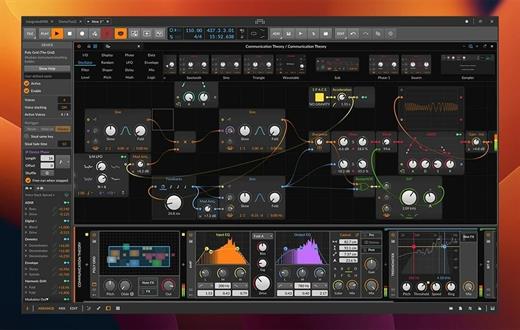
Besides its impressive collection of sound creation tools, which we will discuss further on, it must be pointed out that Bitwig Studio also comes with a set of in-built instruments, effects, and also offers support for VST plug-ins that makes it easy to design custom sounds with no more than a few mouse clicks.

Of course, if you have a very advanced understanding of music and the whole process behind its creation, Bitwig Studio will not disappoint, as audio and note expressions, histogram-based editing, smart controller integration, automatic slicing, layer editing, and advanced bounce-in-place functions are but a few treats on the table.

What’s more, Bitwig Studio enables you to work with multiple projects at the same time, as well as to link and interconnect many parameters between devices, thus making modulating seem like a walk in the park.

With the help of the “Detail Editor”, you can edit multiple tracks in the same view, as well as stretch, split, pitch, pan, copy, reverse, add, move, and arrange audio effects or parts of tracks as you wish.

With the help of the Bitwig Studio’s “Dynamic Object Inspector”, you have the possibility to select and edit multiple notes and events. Bitwig Studio also enables you to easily modify any of the built-in audio devices or build your very own.

Taking all things into consideration, Bitwig Studio is a comprehensive audio creation tools, which was designed from the ground up to meet the requirements of any music producer or musician. With the right amount of musical knowledge and skill, there really isn’t much you can’t do with this software in terms of music creation.

What’s New

Version 5.3.13:


  • Release notes were unavailable when this listing was updated.
Compatibility

macOS 10.14 or later


Release Name: Bitwig Studio 5.3.13
Size: 521.3 MB
Links: HOMEPAGE – NFO – Torrent Search

Download: RAPiDGATOR

10 Comments
Mar 19

LuLu 4.3.1

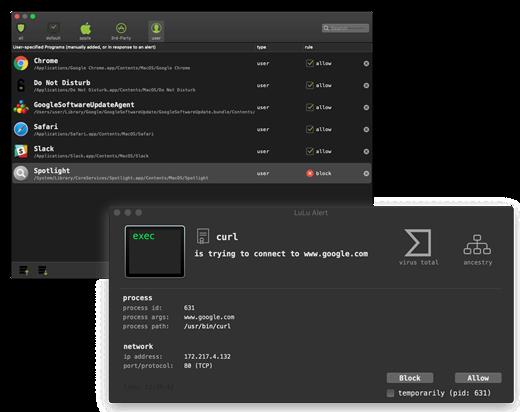
LuLu is the free, shared-source macOS firewall that aims to block unknown outgoing connections, unless explicitly approved by the user.

What’s to like about LuLu? Lots!

100% free

As in no ads, no time trials, no missing features. Because why not!?
And no, it doesn’t track, monitor, or spy on you – as that’d just be pure evil!

shared source

The full source code for LuLu is available on GitHub. Such transparency allows anybody to audit its code, or understand exactly what is going on.

protects

LuLu aims to alert you whenever an unauthorized network connection is attempted. As such, it can generically detect malware, or be used to block legitimate applications that may be transmitting private data to remote servers.

simple

“Do one thing, do it well!” LuLu is designed as simply as possible. Sure this means complex features may not be available, but it also means it’s easier to use and has a smaller attack surface!

enterprise friendly

Want to know what network events are being detected? Or rules your users have added? LuLu provides simple mechanisms to subscribe to such events, and stores data such as rules in an open, easily digestible manner.

Network Monitoring

By design, LuLu only monitors for outgoing network connections. Apple’s built in firewall does a great job blocking unauthorized incoming connections.

Rules

Currently, LuLu only supports rules at the ‘process level’, meaning a process (or application) is either allowed to connect to the network or not. As is the case with other firewalls, this also means that if a legitimate (allowed) process is abused by malicious code to perform network actions, this will be allowed.

Single User

For now, LuLu can only be installed for a single user. Future versions will likely allow it to be installed by multiple users on the same system.

Self-Defense

Legitimate attackers/security professionals know that any security tool can be trivially bypassed if specifically targeted – even if the tool employs advanced self-defense mechanisms. Such self-defense mechanisms are often complex to implement and in the end, almost always futile. As such, by design LuLu (currently) implements few self-defense mechanisms. For example, an attacker could enumerate all running processes to find the LuLu component responsible for displaying alerts and terminate it (via a sigkill).

What’s New

Version 4.3.1:


  • Fixed issue process related flows
  • Double click on Rule's row now brings up 'Edit Rule' window
Compatibility

macOS 10.15 or later


Release Name: LuLu 4.3.1
Size: 6.9 MB
Links: HOMEPAGE – NFO – Torrent Search

Download: RAPiDGATOR
9 Comments
Mar 19

Toontrack EZkeys 2.1.5

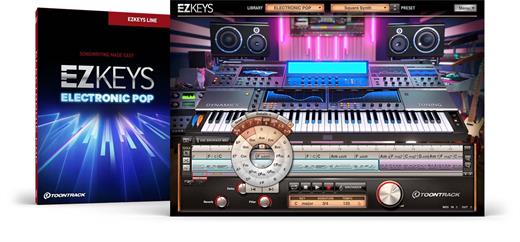
EZkeys Electronic Pop presents an awe-inspiring patchwork of sounds specifically suited for modern electronic music production. It features upwards of 200 individually crafted sonic textures engineered by Timofey Reznikov, DJ, producer and composer from Belgium with cuts on platinum-selling albums by the likes of David Guetta, Regi and Dimitri Vegas.

Covering anything from sounds based on hybrids of classic keyboards to creatively engineered effects, it was designed to offer a toolbox of the absolute go-to essentials. The library includes 11 main categories of sounds which all feature its own unique selection of ready-made presets. Expect a sonic palette of basses, leads, electronic pianos and textured pads as well as all the quintessential chord stabs, plucks, falls, risers and vocal chops you need.

Get ready for the ultimate must-have and one-stop-shop synth for your modern pop productions. Welcome to your new creative getaway.

FEATURE SPOTLIGHT.


  • A multi-instrument featuring a wide range of sounds
  • Based on hybrid textures of classic synths, electronic pianos, basses and more
  • Also includes effects like vocal chops, falls, risers and more
  • Ideal for anything from house, techno, pop and hip-hop to creative soundscapes and sound design
What’s New

Version 2.1.5:


  • Release notes were unavailable when this listing was updated.
Compatibility

macOS 10.10 or later


Release Name: Toontrack EZkeys 2.1.5
Size: 707.2 MB
Links: HOMEPAGE – NFO – Torrent Search

Download: RAPiDGATOR

9 Comments
Mar 19

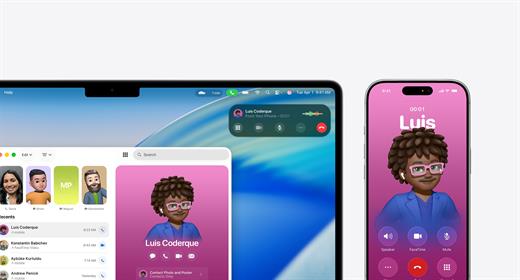
macOS Tahoe 26.3.2 (25D2140)

New numbering:


  • Apple switched to a unified numbering system where all operating systems (iOS, iPadOS, macOS, etc.) got version 26, which corresponds to the year after the announcement (2025-2026). macOS still retains its unique name, Tahoe.

What’s New

Version 26.3.2:


  • Release notes were unavailable when this listing was updated.
Compatibility

macOS 14.0 or later


Release Name: macOS Tahoe 26.3.2 (25D2140)
Size: 16.7 GB
Links: HOMEPAGE – NFO – Torrent Search

Download: RAPiDGATOR
1 Comments
Mar 19

BetterZip 5.4.1

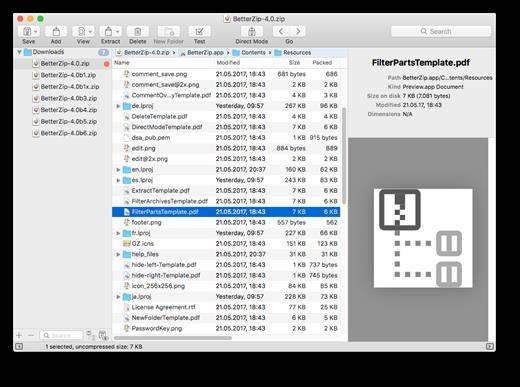
BetterZip lets you quickly inspect archives without first extracting their contents.


  • Extract Only Files You Really Need: If you only need a few files or folders from a larger archive, you don’t have to extract the whole thing. Simply drag the files you need from the BetterZip window to any Finder window or the desktop.
  • Open Archives Without Extracting: Not only can BetterZip open archives without first extracting them but you can also search for a file using the iTunes-like interface. BetterZip can open and extract archives with the most common formats: ZIP, SIT, TAR, XAR, XZ, GZip, BZip2, RAR, 7-Zip, CPIO, ARJ, LZH/LHA, JAR, WAR, CAB, ISO, CHM, RPM, DEB, NSIS, BIN, HQX, DMG, EPUB, and Winmail.dat.
  • Create Archives: Simply drag files and folders from your hard drives, disks, or network places into your new zip file. You no longer have to copy all the files into a temporary folder first. The supported formats are ZIP, TAR, GZip and BZip2 compressed TAR, XAR, 7-ZIP, and RAR (using the external RAR commandline tool). Large archives can also be split.
  • Protect Your Data: BetterZip can protect your data with a password and create AES-256 encrypted archives. 7-zip and rar archives can also be protected.
  • Update Archives: Add new or updated files to existing archives. Remove any file or folder from an archive, or even move files around inside the archive as if it were a normal folder.
  • Make Archives Compatible: Strip Mac-specific files and resource forks from archives for best compatibility with systems like Windows or Linux.

What’s New

Version 5.4.1:


  • Release notes were unavailable when this listing was updated.
Compatibility

macOS 10.13.0 or later


Release Name: BetterZip 5.4.1
Size: 26.7 MB
Links: HOMEPAGE – NFO – Torrent Search

Download: RAPiDGATOR

9 Comments
Mar 19

Affinity 3.1.0

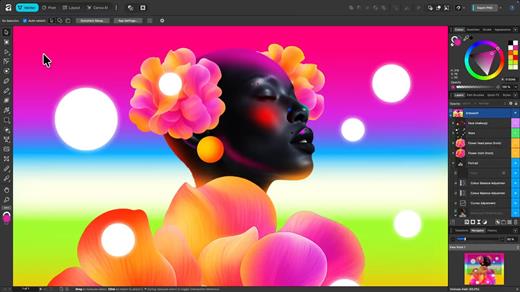
An app that adapts to you, not the other way around. Affinity comes with built-in Vector, Pixel, and Layout studios, but you’re not locked in. Rearrange panels and mix and match your favorite tools to build custom studios. You can save multiple setups, switch between them in a click, and even share with others or download theirs.


It’s customization that flexes to your workflow.

Powerful tools. Easy to learn.

Learn by doing with step-by-step lessons, templates, and real-world examples.

Enrich your designs with tailored content

Make your designs stand out with world-class photos, graphics, videos, audio, fonts, charts, and more. Explore our vast content libraries featuring top brands like Disney, Artlist, and pocstock.

Design with others

Canva makes collaboration easy. Tag teammates in comments and assign tasks on Docs, Presentations, Whiteboards, and more. Canva empowers businesses of all sizes to stay organized and reach your goals faster.

Design and print in one place

Turn your memories into photo albums, your designs into T-shirts, and your branding into business cards, flyers or invites. Get all your printing done right here with free delivery to your doorstep.

Plans that get down to business

Empower your whole team or business to design together with one of our workplace plans

AI-powered efficiency

Leverage AI to create on-brand copy, templates and video-editing.

Bring your brand in house

Set up Brand Kits and templates for your team to design with.

Beautiful approval flows

Easily control individual permissions, assign tasks and share your work.

What’s New

Version 3.1.0:


  • Release notes were unavailable when this listing was updated.
Compatibility

macOS 10.15 or later


Release Name: Affinity 3.1.0
Size: 951.9 MB
Links: HOMEPAGE – NFO – Torrent Search

Download: RAPiDGATOR
8 Comments
Mar 18

lire 3.3.9

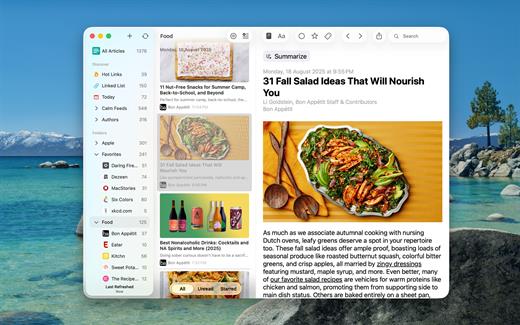
Love RSS feeds? So do we!!

RSS feeds are a great way to follow updates on your favorite website. However, some sites set up their feeds to only show a portion of each entry, you know, to get you to click through to their actual website. We find that really annoying, and we’re sure you do too.

Which is why, unlike other RSS feed readers, that either push you into a browser (in-app or otherwise), or depend on third party text parsing services and require you to be online to fetch the full text of one article at a time (which makes it no different from having to click/tap through to a website), in lire, you get your favorite RSS feeds as they should’ve been. You don’t need to click through to any website (though, you do still have the option to, if you really wanted). It takes your favorite partial feeds, does it’s magic, and converts them in to full feeds, so you don’t have to click/tap on those annoying ‘Read more’ or ‘Continue reading’ links.

Once they’re cached, you don’t even need to be connected to read your full-text feeds.

Use as a standalone feed reader, or,sync with any of the several services: Feedly, Feedbin, FeedHQ, The Old Reader, Inoreader, BazQux Reader, Newsblur, Feed Wrangler, FreshRSS, Miniflux, Nextcloud News, Tiny Tiny RSS.

What’s New

Version 3.3.9:

FIXED


  • A a bug the prevented Cut/Copy/Paste from working in certain text fields.
  • Other minor bug fixes.
Compatibility

macOS 11.0 or later.


Release Name: lire 3.3.9
Size: 26.7 MB
Links: HOMEPAGE – NFO – Torrent Search

Download: RAPiDGATOR

8 Comments
Mar 18

PDF Squeezer 4.7.0

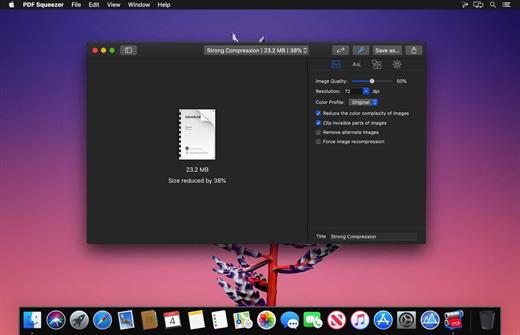
PDF Squeezer is an easy-to-use PDF compression tool.

It reduces the size of large PDF documents by compressing images and removing irrelevant information. This will help you obtain important savings in bandwidth costs, digital storage costs and network transmission times.

Features


  • Simply drag and drop your file into the application window
  • Choose from predefined compression filters or create your own
  • Compress all files in a folder and its subfolders
  • Batch compress multiple files
  • Finder, Safari and Preview ad-on available via the share menu
  • Support for password protected PDFs
  • Automatic compression and save with ‘One-Click-Compression’
What’s New

Version 4.7.0:


  • Release notes were unavailable when this listing was updated.
Compatibility

macOS 10.13.0 or later


Release Name: PDF Squeezer 4.7.0
Size: 48.7 MB
Links: HOMEPAGE – NFO – Torrent Search

Download: RAPiDGATOR
9 Comments
Mar 18

Octavo 1.0.1

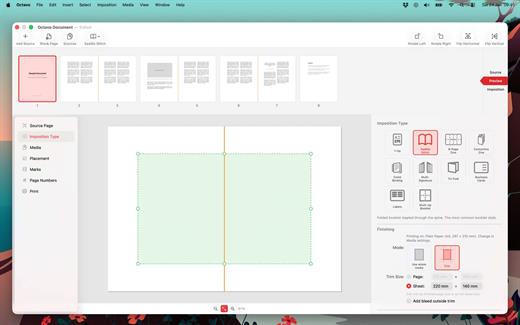
Ever tried to print a booklet but don’t know what order to put the pages in? Or spent an afternoon fighting with your printer only to waste half a ream of paper? We’ve been there. That’s why we built Octavo.

Octavo: Imposition & Booklet Printing for Mac

Octavo takes your PDF and arranges the pages so they come out right when you fold, staple, or bind them. It handles the fiddly maths so you don’t have to.

What Can Octavo Do?

Drop in a PDF or some images and Octavo gives you a complete workflow:


  • Print booklets: Octavo calculates the page order for duplex printing, adds fold and staple marks, and exports printer-ready sheets.
  • Clean up messy PDFs: Rotate, flip, straighten, adjust perspective, and crop — all with visual on-canvas editors.
  • Manage your margins: Position content with inside/outside margins so nothing gets clipped by binding. Multiple scaling modes with per-page fine-tuning.
Imposition Styles

  • Saddle-Stitch Booklet: The classic folded-and-stapled booklet.
  • Multi-Signature: For thicker books — divide pages into folded, gathered signatures.
  • Comb / Hole Punch Binding: Hole patterns, binding edge, and margins for punched or bound documents.
  • Tri-Fold Brochure: C-fold and Z-fold layouts for leaflets and pamphlets.
  • 1-Up: Single or double-sided output with full placement control.
  • Business Cards and Labels: Grid layout with configurable rows, columns, and gaps.
  • 8-Page Mini Zine: Fold and cut a single sheet into an eight-page booklet. Great for zine fairs or just for fun.
  • Concertina Zine: An accordion-fold strip from a single sheet.
Clean Up Your Source PDF

  • Rotate in 90° increments, flip horizontal or vertical.
  • Straighten crooked scans with the angle slider.
  • Correct perspective distortion with draggable corner handles.
  • Set your crop margins with a visual editor.
  • Adjust image filters: threshold, levels, and more.
  • Set bleed on source pages for edge-to-edge printing.
Placement & Margins

  • Set top, bottom, inside, and outside margins with draggable handles.
  • Scale to fit (per page or consistent), or set a manual scale.
  • Position content towards an edge or corner, accounting for facing pages.
  • Per-page overrides — link or unlink pages for individual adjustments.
  • Bleed settings for content extending beyond the margins.
  • Preview in both reader spreads and imposed sheets.
Marks & Page Numbers

  • Fold marks, staple guides, crop marks, and cut lines.
  • Hole punch guides for comb binding.
  • Customise mark weight, colour, and style.
  • Page numbers: Arabic, Roman, or alphabetic, with prefix/suffix, font, colour, and background shape.
  • Skip covers and blanks, or exclude individual pages.
Media & Paper Management

  • Create named media types with paper size, weight, and stock type.
  • Assign a printer and tray to each media type.
  • Assign media to individual pages — card stock for covers, lightweight paper for interiors.
  • Automatic blank sheet insertion to keep media aligned.
Print & Export

  • Export to PDF: a reader preview, or the fully imposed output.
  • Print directly with per-media printer and tray selection.
  • Automatic duplex detection and enforcement.
  • Manual duplex workflow for printers without auto-duplex.
  • Full access to printer-specific options.
Built for Mac

  • Full undo/redo. Save projects as documents, no ‘cloud lock-in’.
  • Drag-and-drop page reordering. Import PDFs and images.
  • Supports Dark Mode.
  • Makes Liquid Glass look good.
Ready to make something? Download Octavo and start folding.

What’s New

Version 1.0.1:


  • Release notes were unavailable when this listing was updated.
Compatibility

macOS 15.6 or later.


Release Name: Octavo 1.0.1
Size: 11.3 MB
Links: HOMEPAGE – NFO – Torrent Search

Download: RAPiDGATOR

8 Comments
Mar 18

iBarcoder 3.17.7

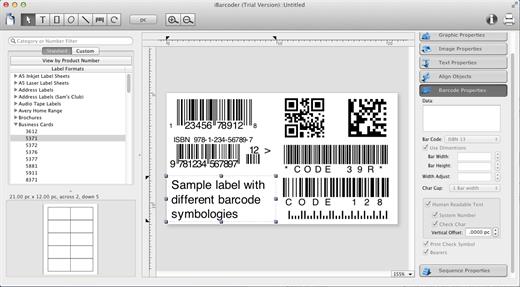
iBarcoder allows you to design and print your own barcoded labels, stickers, and tags. Create barcode graphics for retail packages, books, stickers, and more. Mac QR code and Datamatrix generator. Add text boxes, image boxes, rectangles, ovals and lines to your labels. Type in the necessary text, insert the desired images, to create the professional barcode labels for commercial use. Create sequential barcodes for catalogs and retail operations. Specify the sequence in which barcodes are printed or exported.

Smart, Intuitive Barcode Software


  • Create professional barcoded labels with a few mouse clicks
  • Live preview feature
  • Modify your Mac barcodes by changing types, sizes, and other attributes intrinsic to a certain barcode type. Advanced tools make customizing your barcode easy
  • Print barcodes directly to your printer using standard Avery formats provided
  • Create and save your own custom label formats
  • Export barcodes as a high-resolution image files, or vector graphics:

    • PDF (vector)
    • EPS (vector)
    • BMP
    • TIFF
    • JPEG
    • PNG
    • PNTG
    • Photoshop
    • …and more…!
  • Make the desired font and color settings
  • Copy, then paste finished graphics right to Adobe Illustrator, InDesign, Photoshop, or other software from Mac clipboard
Supports the following barcode types:

  • Postnet
  • Japanpost customer barcode
  • FIM Codes
  • Horizontal bars
  • UPC A
  • UPCE
  • EAN 13
  • EAN 8
  • ISBN
  • ISSN
  • Code 128
  • Codabar
  • ITF14
  • Code 39
  • Code 11
  • Code 93
  • MSI
  • Interleaved 2 of 5
  • Datamatrix
  • Intelligent Mail Barcode
  • Pharmacode
  • QR Code
What’s New

Version 3.17.7:


  • Release notes were unavailable when this listing was updated.
Compatibility

macOS 10.10 or later


Release Name: iBarcoder 3.17.7
Size: 16.6 MB
Links: HOMEPAGE – NFO – Torrent Search

Download: RAPiDGATOR
8 Comments