Please REGISTER or RENEW your account on RAPiDGATOR.net and support us by doing through all RAPiDGATOR working download links on main posts...
June 8

Proxyman 3.14.1

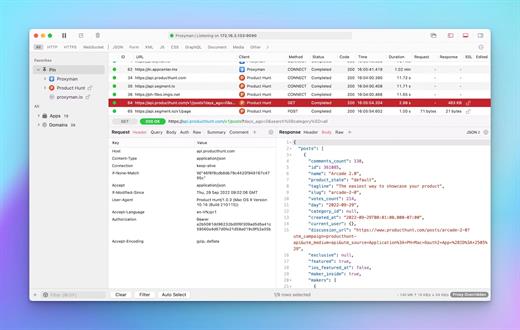
Description: Capture HTTP(s) in a few clicks. Best-in-class Windows app to capture, decrypt, and mock your HTTP(s) requests/ responses with powerful debugging tools.

Modern Windows app
Intuitive, thoughtful, built with meticulous attention to detail.

Complete suite of network debugging tools
Dive into the network level to diagnose and fix problems with reliable and powerful tools.

Capture HTTP/HTTPS Traffic
Proxyman acts as a man-in-the-middle server that capture the traffic between your applications and SSL Web Server. With built-in macOS setup, so you can inspect your HTTP/HTTPS Request and Responses in plain text with just one click.

Multiple Filters
Narrow down your search with Proxyman's Multiple Filters. You can combine complex filtered criteria like Protocol, Content-Type, URL, Request Header, Response Header, Body, etc that find exact what you're looking for.

GraphQL Debugging
Easily debug GraphQL Request by defining a matching rule with a particular GraphQL QueryName. Works with Breakpoint, Map Local, Map Remote, and Scripting Tool.

Breakpoint Tool
Breakpoint Tool helps you to modify Requests/Responses Data on the fly without changing any client code. Supports URL, Headers, Body, Status Code, Raw Message, etc.

Release Name: Proxyman 3.14.1
Size: 160.3 MB
Links: HOMEPAGE – NFO – Torrent Search

Download: RAPiDGATOR

6 Comments
June 8

TubeMate Downloader 6.4.1

Description: Windows TubeMate is a smart application that lets you snag any clip you want from the main video hosting sites and convert them while downloading or after that. If you need a simple and efficient video downloading tool, you can give it a try.

Online video downloader
TubeMate can download videos from YouTube, Facebook, Instagram, Dailymotion, and thousands of other video sites.

HD video downloader
TubeMate can download UHD 8K, 5K, 4K, QHD 2K, HD 1080p and 720p videos from YouTube.

YouTube to MP3 converter
TubeMate allows you to download only audio stream from YouTube, and save it as MP3. You don't need to download the entire video file.

Playlist downloader
TubeMate enables you to download entire or part of a playlist with just a few clicks.

Download accelerator
TubeMate features a multi-thread download acceleration engine that increases your download speeds by up to 500% or even more.

Download multiple videos at a time
TubeMate supports simultaneous downloads. It allows you to download more than one video at the same time.

Pause and resume downloads
You can pause and resume your downloads at any time.

Support drag-and-drop
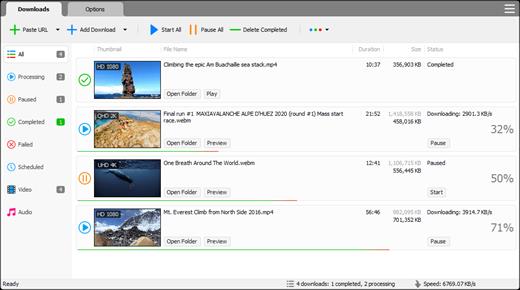
You may directly drag and drop video link from your browser to the drop box or app window to start a download. You don't even need to copy and paste video URL.

Preview video/audio while downloading
While downloading, you can click the 'Preview' button to view incomplete file and make sure the content is you want.

Video and audio converter
TubeMate can convert your disk video/audio files between MP4, FLV, AVI, WMV, MOV, MP3, AAC, and any other formats for any device.

Video optimizer
TubeMate automatically optimizes downloaded videos for popular mobile devices, so you can watch downloaded videos smoothly on your iPhone, iPad, Android phone, and other devices.

Video to MP3 converter
TubeMate allows you to extract audio stream from video and save it as MP3, WAV, AC3, or other audio format.

Ready-made presets
TubeMate provides ready-made presets for all video and audio formats. You can also customize your own video/audio formats.

iTunes compatible
Optionally, TubeMate can add downloaded video/music to your iTunes library automatically, so you can easily synchronize your videos and music to your iPhone, iPad, iPod.

Media player
TubeMate contains an easy-to-use media player for playing files that Windows Media Player cannot play.

Release Name: TubeMate Downloader 6.4.1
Size: 164.4 MB
Links: HOMEPAGE – NFO – Torrent Search

Download: RAPiDGATOR

5 Comments
June 8

Blackmagic Design DaVinci Resolve Studio 21.0.0.48

Description: DaVinci Resolve is the world’s only solution that combines editing, color correction, visual effects, motion graphics and audio post production all in one software tool! Its elegant, modern interface is fast to learn and easy for new users, yet powerful for professionals. DaVinci Resolve lets you work faster and at a higher quality because you don’t have to learn multiple apps or switch software for different tasks.

That means you can work with camera original quality images throughout the entire process. It’s like having your own post production studio in a single app! Best of all, by learning DaVinci Resolve, you’re learning how to use the exact same tools used by Hollywood professionals!

Hollywood's #1 Post Solution
High end professionals working on feature films and television shows use DaVinci Resolve more than any other solution! That’s because it’s known for incredible quality and creative tools that are light years beyond the competition. You get DaVinci’s Emmy™ award winning image technology with 32-bit float processing, patented YRGB color science and a massive wide gamut color space for the latest HDR workflows. You also get the legendary quality of Fairlight audio processing for the best sound in the industry! With DaVinci Resolve, you get the same tools professional colorists, editors, VFX artists and sound engineers use every day to finish your favorite films and streaming television shows!

What’s New in DaVinci Resolve 20
DaVinci Resolve 20 introduces more than 100 new features including powerful AI tools designed to assist you with all stages of your workflow. Use AI IntelliScript to create timelines based on a text script, AI Animated Subtitles to animate words as they are spoken, and AI Multicam SmartSwitch to assemble a timeline with camera angles based on speaker detection. The cut and edit pages introduce a dedicated keyframe editor and voiceover palettes, and AI Audio Assistant analyzes your audio and intelligently creates a professional audio mix. In Fusion, explore advanced multi layer compositing workflows. The Color Warper now includes Chroma Warp, plus Magic Mask and Depth Map have huge updates.

Multi User Collaboration
DaVinci Resolve is the only solution that lets you grow and build your own multi user post production studio! The project libraries are built for real time local and remote collaboration. While the Blackmagic Cloud website lets you host and access your projects and media from anywhere in the world. Now you can collaborate with editors, colorists, visual effects artists, and sound engineers all working together at the same time. Best of all, you no longer have to import and export files, translate projects, lose work, or conform and manage changes. DaVinci Resolve is the only application in the world that lets everyone work together in parallel on the same project and at the same time!

All In One Solution for Post Production
DaVinci Resolve is divided into "pages," each of which gives you a dedicated workspace and tools for a specific task. Editing is done on the cut and edit pages, visual effects and motion graphics on the Fusion page, color correction on the color page, audio on the Fairlight page, and media organization and output on the media and deliver pages. All it takes is a single click to switch between tasks!

Edit
The world's fastest and most advanced professional NLE
The edit page is the world’s most advanced professional non-linear editor. The familiar track layout, dual monitor design and traditional workflow makes it easy for new users to learn while still being powerful enough for professional editors. It’s perfect for larger projects such as feature films, television shows, streaming, commercials, documentaries and more. The edit page features drag and drop editing, context sensitive automatic trimming tools, fully customizable keyboard shortcuts so you can work faster, and a library full of hundreds of titles, transitions, and effects that you can add and animate. You also get complete media management, organization and timeline management tools.

Cut
Designed for editors to turn around work fast!
The cut page is perfect for projects with tight deadlines that you have to turn around quickly. The cut page has a streamlined interface that’s fast to learn and designed for speed. Features such as source tape, dual timelines, fast review, and smart editing tools help you work faster than ever. The sync bin and source overwrite tools let you quickly edit multicam programs. It’s also great for documentaries and now live broadcast editing and replay. Multi Source is the fastest way to see your cameras and edit to the timeline while the cameras are still recording! Everything on the cut page is action based so every click does something. That means you’ll spend more time editing and less time hunting for commands.

Color
Hollywood’s favorite color corrector!
The DaVinci Resolve color page is Hollywood’s most advanced color corrector and has been used to color and finish more high end feature films and television shows than any other system! It’s also approachable with features designed to make it easier for new users to get great results while they continue to learn the advanced tools. For example, primary control sliders will be familiar to anyone who’s used image editing software, making it easy to adjust contrast, temperature, midtone detail, saturation and more. The color page has an incredible range of primary and secondary color grading features including PowerWindows™, qualifiers, tracking, advanced HDR grading tools and more!

Fusion
Cinematic quality visual effects and motion graphics!
The Fusion page lets you create cinematic visual effects and broadcast quality motion graphics right inside of DaVinci Resolve! Fusion features a node based workflow that makes it faster and easier to create sophisticated effects and animations than you could ever create using a layer based approach. You get hundreds of 2D and 3D tools for visual effects and motion graphics, along with advanced animation curve and keyframe editors that allow you to create incredibly organic and realistic animations. Fusion has everything from point, planar and 3D camera tracking to rotoscope and keying tools for creating photorealistic composites, stunning animated titles, 3D particle systems and more!

Fairlight
Professional tools designed for audio post production
The Fairlight page features hundreds of pro tools for audio post production. It’s like having a professional digital audio workstation (DAW) built into your editing and color system! The Fairlight Audio Core lets you work with up to 2,000 tracks at a time with realtime effects, EQ, and dynamics processing! You get sample accurate editing tools, advanced ADR and Foley, and Fairlight FX such as reverb, de-esser, and hum remover, plus AI effects like Voice Isolation and Music Remixer and more. IntelliTrack AI tracking lets you use video to track the Fairlight audio panner and you can mix and master stereo, 5.1, 7.1, and even immersive 3D audio formats including 5th order ambisonics!

Media and Delivery
Incredibly wide format support, finishing and mastering!
The media and delivery pages have everything you need to import, manage and deliver final projects. The media page is a dedicated full screen workspace that lets you prepare footage, sync clips, organize media into bins and add metadata before you start editing. Use the clone palette to ensure every bit of data in the camera media cards is copied during backup. During edit or grading, stream video outputs to a remote client monitor via DeckLink. You can output and upload files to YouTube, Vimeo and X from anywhere page using the quick export tool. The deliver page gives you total control over all encoding options and formats, along with a render queue for exporting multiple jobs!

Resolve FX
DaVinci Resolve Studio 20 features over 100 GPU and CPU accelerated Resolve FX such as blurs, light effects, noise, image restoration, lens flair, stylize and more! Version 19 adds even more plugins such as background defocus for portrait shots and film look creator. Film look creator alters color shading, vibrance, hue and the luminance of an image so you can easily apply many film looks. You can even add film grain! There are improvements to the face refinement box and profile handling, additional controls for skin refinements, smoother sub pixel animation and finer control for directional blur. All Resolve FX effects can be applied and animated in the cut, edit, Fusion and color pages!

Release Name: Blackmagic Design DaVinci Resolve Studio 21.0.0.48
Size: 9.5 GB
Links: HOMEPAGE – NFO – Torrent Search

Download: RAPiDGATOR

2 Comments
June 8

Muziza YouTube Downloader Converter 9.5.1

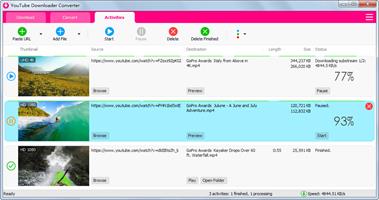
Description: YouTube Downloader Converter is a tool that facilitates an attractive interface and plenty of features to help you download video clips from YouTube, Facebook, Dailymotion, Instagram and other websites.

YouTube video downloader
The app can download videos from YouTube, Facebook, Instagram, Dailymotion, and thousands of other video sites.

YouTube to MP3 converter
The app allows you to download only audio from YouTube and save it as MP3. You don't need to download the entire video file.

Playlist downloader
The app enables you to download entire or part of a playlist with just a few clicks.

Download accelerator
The app increases your download speeds by up to 500% or even more.

Pause and resume downloads
The app allows you to pause and resume your downloads at anytime.

Video and audio converter
The app can convert your disk video/audio files between MP4, FLV, AVI, MP3, and any other formats for any device.

Release Name: Muziza YouTube Downloader Converter 9.5.1
Size: 164.4 MB
Links: HOMEPAGE – NFO – Torrent Search

Download: RAPiDGATOR

6 Comments
June 8

Photo Organizer AI Premium 4.5.11

Description: Organize Scattered Photos into Proper Event Albums. Tame the chaos in your directories. Photo Organizer AI automatically clusters random, unstructured files into clean, chronologically matched event albums while sorting out duplicates and low-quality photos.

Supercharged Culling & Organization
A high-performance workspace designed specifically for professional photographers and digital collectors.

AI Subject & Scene Classification
Automatically tag subjects and classify scenes like mountains, water, rain, document, and documents using embedded local ONNX classifiers.

Blur & Focus Inspection
Detect blurry, grainy, out-of-focus photos, and red eyes automatically. Slide to cull items beneath your customized quality threshold.

DirectML GPU Acceleration
Unchain the power of your graphics hardware. Runs all deep learning culling networks locally using DirectML with stunning frame speeds.

Virtual Event Albums
Group similar chronological events together dynamically. Split, merge, paste, and organize virtual albums without altering physical folders.

Identical & Near-Duplicates
Scan for files with identical image checksums or extremely high visual similarities, and group them so you can retain the best frame.

100% Local & Private
Zero cloud uploads. All analysis, photo scanning, duplicate detection, and file management happen entirely on your computer, keeping your photos secure.

Turn Scattered Photos into Proper Event Albums Today
Save hours of manual sorting and culling. Let local AI group your random scattered pictures into clean, beautifully structured event albums automatically.

Release Name: Photo Organizer AI Premium 4.5.11
Size: 425.2 MB
Links: HOMEPAGE – NFO – Torrent Search

Download: RAPiDGATOR

8 Comments
June 8

Boris FX Silhouette 2026.0.1

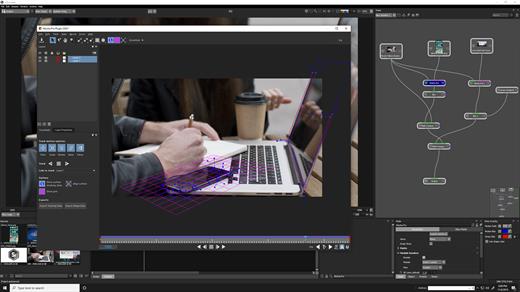
Description: Visual Effects & Compositing. The industry’s leading rotoscoping and paint tool is packed with major compositing features. Silhouette delivers 400+ VFX nodes, including Boris FX Sapphire, Mocha Pro, and Particle Illusion. Top artists have relied on Silhouette on Hollywood’s biggest titles for over fifteen years. The Academy and Emmy Award-winning toolkit created by visual effect artists recently made its mark on Deadpool & Wolverine, Rebel Moon, Barbie, Dune, and 3 Body Problem.

Why Silhouette?
Industry leading rotoscoping and paint tools
Auto paint for speed and reliability
Powerful tracking options
Node based compositing and image processing
Easy keying for green screens
Includes Sapphire, Mocha, Particle Illusion and Continuum effect tools
Warping and morphing tools
Work as a plugin in your favorite host or as a standalone application

New For 2025

3D Scene
Import Alembic or FBX files, place cards, track in 3D, and stabilize, paint, or composite directly in a 3D-aware environment.

Matte Refine ML
Transforms hard edge mattes into smooth, natural, semi-transparent transitions, preserving intricate details like hair, fur, and other fine textures.

Depth Map ML
Easily control blur, color correction, and create mattes according to depth levels using instant AI-driven depth map creation.

PowerMesh Morph
Use Mocha’s sub-planar mesh tracking to create realistic morphs between painted keyframes or individual frames.

Unproject/Reproject
Paint or composite on a locked-down 3D sequence, then restore the original motion.

Compound Nodes
Combine selected nodes into a single node with parameters grouped for easy access, and then share with other users.

Frame Fixer ML
Repair flash frames and corrupted footage using AI to generate clean replacements.

Updated 2025 Sapphire, Mocha Pro & Particle Illusion Nodes
Includes 2025 versions packed with new creative effects and presets.

Release Name: Boris FX Silhouette 2026.0.1
Size: 5.1 GB
Links: HOMEPAGE – NFO – Torrent Search

Download: RAPiDGATOR
1 Comments
June 8

ExpanDrive 2026.06.05

Description: The Smartest Way to Connect to the Cloud. Seamless access to cloud storage from any within any application. The Best Gets Even Better - Say Hello to ExpanDrive. ExpanDrive is a fast network drive and browser for cloud storage. Securely access the cloud from any application, including Finder and Explorer.

New Features

Built into Finder and Explorer
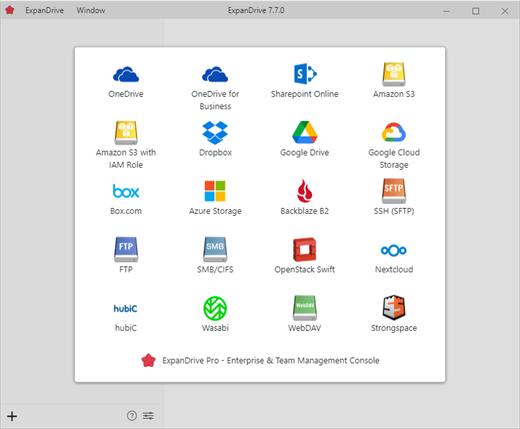
ExpanDrive adds cloud storage like Google Drive, Dropbox, Amazon S3, SFTP, Box, OneDrive and Sharepoint to Finder and Explorer. Don’t bother with an extra app just to move data around. ExpanDrive connects cloud storage to every application on your computer including Office 365, Photoshop, and VS Code.

Smart Offline Sync (New!)
Choose files for offline access and work without an internet connection. Synchronization to the cloud takes place automatically when you’re back online. Other files are accessed on-demand from the cloud, taking no disk space.

Hello, Linux (New!)
Major storage providers have left you behind and we’re here to help. ExpanDrive adds native cloud storage access into Linux for all major Linux distributions, including Ubuntu, Mint, CentOS, Redhat, and more.

Integrated Search (New!)
ExpanDrive hooks into Spotlight Search on Mac and Windows file search. Quickly search your remote storage for whatever you’re looking for. The integrated storage browser has additional support for blazing-fast server side search.

Multi-user file locking (New!)
ExpanDrive now propagates lock files in Microsoft Office documents across the cloud. If a user is editing an Office document, other users will only be able to open that document read-only until the editing user closes it.

File Version Management (New!)
Easily access older versions of files on cloud storage backends that support versioning, including Box, Dropbox, S3, Google Drive, OneDrive and Sharepoint.

Connect to any Cloud
Connect to all major cloud storage providers, or your own server. With a single app you can connect to

- Dropbox
- Google Drive and Google Team Drives
- Amazon Drive
- Box
- OneDrive and OneDrive for Business
- Sharepoint
- Nextcloud (New!)
- Wasabi (New!)
- Backblaze B2
- SFTP/FTP, WebDAV
- SMB/Windows File Sharing

Cloud storage in every application
Add cloud storage, like Google, Dropbox, Amazon S3, Sharepoint, and more to every application on your computer. ExpanDrive builds a secure connection from the filesystem to the cloud. Open, edit, and save files to remote computers from within your favorite programs — even when they are on a server half a world away.

Super-fast background uploads (New!)
ExpanDrive has multi-threaded connection engine that is up to 500% faster that previous version. ExpanDrive performs parallel transfers in the background so that you have a reliable transfer even in the face of unreliable internet. Keep working and stop waiting for transfers to complete.

System Requirements
- Windows 7 through Windows 11 including Windows Server
- Supports 32-bit and 64-bit installations
- Supports Windows Server editions, including terminal server
- Contact support for a multi-user MSI based installer
- Does not support Windows RT

Release Name: ExpanDrive 2026.06.05
Size: 269 MB
Links: HOMEPAGE – NFO – Torrent Search

Download: RAPiDGATOR

7 Comments
June 8

Tomabo MP4 Downloader Pro 6.4.1

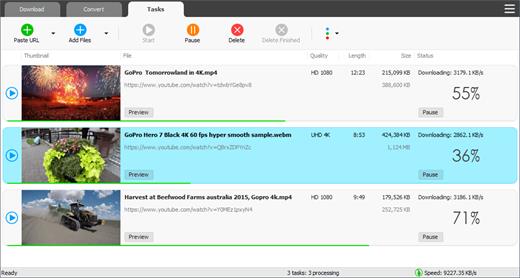
Description: MP4 Downloader Pro is a professional Windows application for downloading your favorite videos from hundreds of video sites.

Features:
Download your favorite videos from hundreds of video sharing sites.
Increase your download speeds by up to 500%, or even more.
Download HD 720p, 1080p, 2K, 4K, 8K videos.
Download only audio. You can choose to download only audio stream without downloading the entire video file.
Support playlist download.
Support subtitle download.
Download more than one video at the same time.
Pause and resume downloads.
Support scheduled downloads.
Preview video while downloading. You can click "Preview" button to play incomplete video and make sure it is really the video that you want.
Support drag-and-drop. To start a download, just drag and drop a video link/URL from your web browser into the Drop Box or program window.
Convert video/audio to different formats: MP4, WebM, FLV, MKV, AVI, MP3, AAC, and other formats and devices.
Convert video/audio for different devices: iPhone, iPad, iPod, Galaxy, Android, etc.
Extract audio from video and save in MP3, AAC, or other audio format.
Ready-made presets for all popular video and audio formats and devices.
Fully customizable video and audio format settings.

Release Name: Tomabo MP4 Downloader Pro 6.4.1
Size: 164.9 MB
Links: HOMEPAGE – NFO – Torrent Search

Download: RAPiDGATOR
6 Comments
June 8

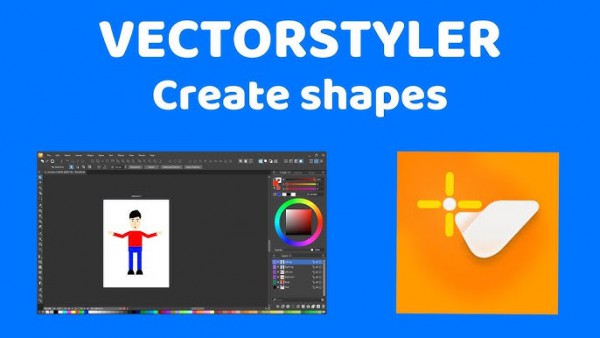
VectorStyler 1.3.020

Description: VectorStyler brings every advanced vector and illustration tool together — in one complete, independent package, with no subscriptions and no compromises. Packed with powerful, unique tools you won’t find anywhere else — VectorStyler redefines what’s possible in vector illustration.

Customizable User Experience
Customize all aspects of the user interface and workflow, including shortcuts, menus, toolboxes and toolbars. Create and save your own workspace profiles.

Native Illustrator Import
Open, import or paste artwork from Adobe Illustrator using the native Illustrator file format support, retaining all high-level editable attributes.

Extended Compatibility
Import artwork and export to various common file formats like AI, PDF, SVG, DWG, DXF, PSD, PNG and TIFF. Import and export PSD files while retaining layer hierarchy and keeping editable vectors.

Powerful Snapping Options
Use advanced snapping options for precision, including rotated grids and guidelines, collision and tangent to shape snapping. Turn any object shape into a guideline.

Real Vector Brushes
Paint with and use real vector brushes on any shape or outline. Brushes can be of artistic, pattern, scatter or bristle type. Create new brush styles or presets from any group or layer.

Select Objects by Attribute
Select objects by style or other attributes. Select objects with a similar style or attribute as the selected objects.

Magic Wand Tool
Use the magic wand selection mode and the Magic Wand panel to select objects similar to the pointed object. Select similar shapes by area or length.

Color Palettes
Work with document and global color palettes easily. Open multiple color palettes from external formats. Manage palettes seamlessly.

Advanced Halftones
Create complex vector halftones on layers or images. Work multiple halftones on one object using the Appearance panel

Align Object on Path
Create non-destructive object alignment on path. Align and distribute multiple objects on a path

Vector Drop Shadow
Create vector drop shadow effects on objects or groups. Adjust the drop shadow options using the Drop Shadow panel.

Parametric Shapes
Draw with a large collection of parametric shapes. Adjust shape properties using the Shape panel. Use the Node tool to edit parametric shapes.

System Requirements
- VectorStyler is (also) a native Windows (Intel) application, and requires a PC with Windows 10 installed to run. A minimum of 8GB of system memory is recommended. More memory helps when creating complex designs or illustrations.
- Only Windows 10 or newer versions are supported. An Intel Core i5 or i7 processor with 4 cores and hyper-threading is recommended as VectorStyler makes extensive use of multiple threads. GPU acceleration can be enabled in the Settings / Performance by selecting OpenCL (any GPU supported by Windows), or the NVIDIA mode for Nvidia GPUs.

Release Name: VectorStyler 1.3.020
Size: 116.1 MB
Links: HOMEPAGE – NFO – Torrent Search

Download: RAPiDGATOR

7 Comments
June 8

DBF Viewer 2000 v9.20

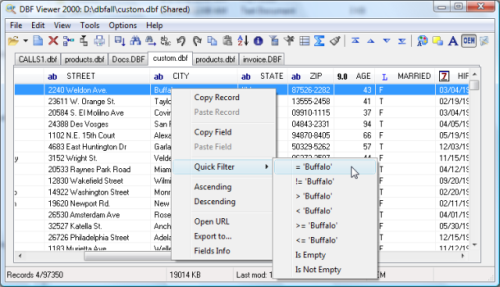
Description: If you're seeking a fast, effective solution for viewing and editing all sorts of DBF files, DBF Viewer 2000® is the answer. This feature-rich program can handle files from dBase, Visual dBase, Foxpro, Visual FoxPro and Clipper, to name just a few, with a performance that easily rivals costly professional database utilities.

Its optimised proprietary engine means that no matter what your file size, DBF Viewer 2000 is incredibly fast, performing any task you set it - from a simple query and duplicate clean-up to data export - at lightning speed.

With DBF Editor's simple, dynamically generated visual dialogues, you can easily see the structure of your DBF files and edit them exactly as you would with native database management tools. In addition to being able to view the contents and structure of DBF files, you can also view and edit dBase III, dBase IV, dBase Level 7, FoxPro and Visual FoxPro format memo fields.

Command line automation is fully supported, making it simple to repeat activities including data import, replacement and export and clean-up of duplicate records. Because DBF Viewer 2000 is completely independent of database engines, drivers and database management systems, you can simply install the program and start viewing and editing DBF files immediately.

Operating System: Windows from 2000 through XP, Windows 11, 10, 8, 7 and Server Editions

Release Name: DBF Viewer 2000 v9.20
Size: 4.8 MB
Links: HOMEPAGE – NFO – Torrent Search

Download: RAPiDGATOR
7 Comments