Please REGISTER or RENEW your account on RAPiDGATOR.net and support us by doing through all RAPiDGATOR working download links on main posts...
May 12

KS DB Merge Tools for SQLite 1.25.2

Description: KS DB Merge Tools for SQLite is an easy to use diff & merge tool for SQLite database files. It has native two-panel UI that is commonly used in industry-leading text-diff tools. This tool allows users to compare database object definitions and data, generate and execute SQL scripts to synchronize these changes.

Release Name: KS DB Merge Tools for SQLite 1.25.2
Size: 22.5 MB
Links: HOMEPAGE – NFO – Torrent Search

Download: RAPiDGATOR

5 Comments
May 12

Hard Disk Sentinel Pro 6.40.1 Beta

Description: Hard Disk Sentinel Professional (HDSentinel) is a hard disk monitoring software with highest possible support of HDD/SSD/SSHD (hybrid) drives. Its goal is to find, test, diagnose and repair hard disk drive problems, report and display SSD and HDD health, performance degradations and failures.
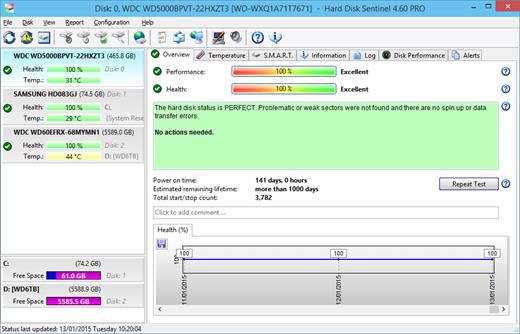
Hard Disk Sentinel gives complete textual description, tips and displays/reports the most comprehensive information about the hard disks and solid state disks inside the computer or in external enclosures (USB / e-SATA). Many different alerts and report options are available to ensure maximum safety of your valuable data.

The software monitors hard disk drive / HDD status, including health, temperature and all S.M.A.R.T. (Self-Monitoring, Analysis and Reporting Technology, built in most hard disks, solid state disks and hybrid drives (SSHD) today) values for each disks. Also it measures the disk transfer speed in real time which can be used as a benchmark or to detect possible hard disk failures, performance degradations,

HDSentinel is the perfect data protection solution: it can be effectively used to prevent HDD failure and SSD / HDD data loss because it has the most sensitive hard disk health rating system which is extremely sensitive to hard disk problems. This way even a small HDD problem can't be missed. The Professional version has scheduled and automatic (on-problem) hard disk backup options to prevent data loss caused by not only failure but by malware or accidental delete also.

Features of Hard Disk Sentinel Professional

Easy to use interface
All information are displayed in the main window of the application. Quick controls allow easy navigation to access all hard disks, partitions and different information. Intuitive user interface elements display information by using green/yellow/red color to indicate the level of problem. Detailed text description and context sensitive help guides the user thru the features and options.

1. Install > 2. Configure > 3. Stay protected
Just install, configure alerts and backup functions and your system is now safe. You'll be notified about the problems - but if everything is correct, Hard Disk Sentinel just sits on tray and displays current status. The data is protected 24 hours daily, 7 days a week.

Hard Disk Management
Control Advanced Power Management level and adjust Free Fall Control sensitivity of hard disks to maximise hard disk performance and data safety.

Backup
Wide range of automatic backup methods are available: to backup data to local computer, to a LAN server or to a remote server by transferring files via FTP (or even by e-mail). It is possible to use 3rd party tools to create archives or burn CD/DVD media. Hard Disk Sentinel Professional can manage power status of remote computers in the network, so it is possible to automatically power on and shut down remote computers, for example a backup server.

API Interface For Developers
With the API it is possible to query detected hard disk information from the software. This way 3rd party software can log, display or otherwise process detected hard disk drive information including temperature, health and so.

Remote Monitoring
Hard Disk Sentinel Professional offers extensive remote monitoring capabilities. Hard disk status can be checked remotely by a web browser, even by a mobile phone or a PDA.

Instant S.M.A.R.T. analysing
Hard Disk Sentinel can communicate with all IDE, Serial ATA, NVMe, SCSI, SAS and most USB hard disk drives, SSD and hybrid drives (SSHD) to detect their status and temperature. Hard disk status are displayed immediately as you launch the application, there is no need to analyse hard disks for a long period. It displays the current and maximum temperature for the hard disk. It reads all general and vendor-specific attributes and monitor their values. For advanced users, all raw data are displayed also including power-on time and number of read/write errors. Hard Disk Sentinel interprets the performance and fitness related S.M.A.R.T. values and displays the calculated Performance and Health percentage, total power on time and estimated lifetime remaining.

Hard Disk Hardware and Software Tests
By using Hard Disk Sentinel, it is possible to start hardware hard disk self tests. These tests can be used to effectively find all hard disk problems because built-in hardware methods are used to verify hard disk components (for example heads, servo, internal buffer in the Short self test). The Extended self test also verifies the complete hard disk surface, finds and repairs all weak areas and re-allocates the possible bad sectors. This is not possible with the software-based hard disk surface scan methods (for example, by using scandisk).

Seek Noise Test
Seek Test - to verify hard disk noise, seek time performance and temperature. Longer tests can be used as very deep and intensive stress-tests for the hard disk and verify if additional cooling is required.

Enhanced Hard Disk Tests
Surface Test - to verify hard disk surface with intensive hard disk testing methods to reveal and fix hard disk problems. Surface reinitialisation resets all sectors to factory default states. Different destructive and non-destructive tests are available to re-fresh the condition of any hard disk drives, solid state disks or even your pendrives or memory cards.

Logging
Hard Disk Sentinel logs all degradations in all SMART parameters and issues alerts in such cases to maximise data protection. For example, if a new bad sector is found on your hard disk, you will be notified.

Alerts
Hard Disk Sentinel has wide range of alerts upon different problems. It can send e-mail (with e-mail->SMS gateway it can be SMS warning to your mobile), network message, can play sound alerts and so.It can execute various tasks (automatic panic backup or any configured external applications) in case of a problem.There is an option to send daily emails about current status.

Shutdown
Offers option to shut down the computer on hard disk failure, HDD overheat or health degradation. This option can be used in combination of the alerts to prevent further data loss.

Hard Disk Details
Detects and displays every information about the hard disk, from the revision number and buffer size to all features it has. The maximum available and current transfer modes are also displayed.

HDD status in Windows Explorer
View the current health status and used space in Windows Explorer or in any other application, so you'll always know the amount of used space for each partitions and the hard disk drive condition.

Hard disk health and used space displayed on hard disk icons
Information on demand
Current hard disk temperatures and health are displyed on the system tray and can be displayed in a small status window, the desktop itself or in a sidebar gadget (under Windows Vista or newer operating system). Average and maximum temperatures are logged for all hard disks and these informations are displayed in graphs for statistical purposes.

Hard Disk Performance
Logs how much data were read from or written to the hard disk. Displays current transfer rates for both reading and writing and estimates the maximum available (theoretical) transfer rate for a particular hard disk.

Hard Disk Partitions
Displays partitions for each physical hard disks and type and usage informations about them so you cannot run out of space. Hard Disk Sentinel sends this information automatically in alert/status messages.

Acoustic Management
Offers option to control the acoustic level of IDE/S-ATA hard disk. It is possible to increase performance or make the hard disk drives more silent. Unique feature: control the acoustic level of your external USB hard disk (if your USB enclosure is equipped with one of the proper USB-ATA bridge chips which supports this feature).

Clock Synchronization
It offers option to synchronize the PC clock with an atomic clock via NTP (Network Time Protocol).

Release Name: Hard Disk Sentinel Pro 6.40.1 Beta
Size: 40.9 MB
Links: HOMEPAGE – NFO – Torrent Search

Download: RAPiDGATOR

5 Comments
May 12

DBF Recovery 4.71

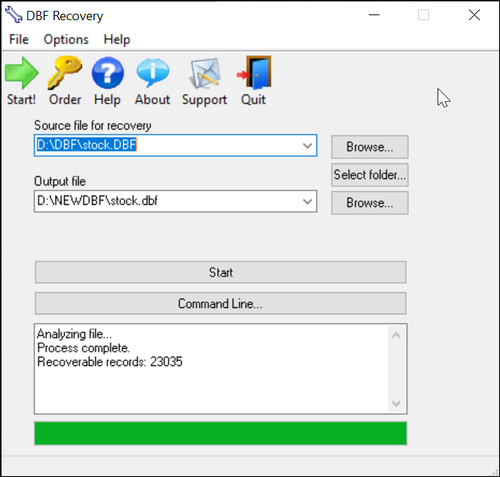
Description: DBF Recovery empowers its users with the ability to recover a damaged database back to its pristine condition without needing the expertise to accomplish such a task or requiring the additional expense of hired recovery services. When the program runs, you see a simple interface with two main fields. Select the file for recovery in the first field and the folder for the output in the second.

As an added option, you can choose to recover deleted records in the database. Once everything is set, you click on the Start button. DBF Repair Tool does the rest. It repairs the headers and data structures in an automatic process that involves no interaction with the user. After all you may not want to sit around and watch the process. With DBF Recovery, you'll truly have a lean, mean DBF repairing machine without functional fluff.

Bring your DBF files back from the dead
Have you ever tried to open the database only to discover that it won't let do so? Remember how you felt when several months of mind-numbingly tedious data entry turned into undecipherable mess of characters? So, wouldn't it be nice if you could bring your database back from the dead without the assistance of hired experts? Well, if you are in the interest of the state-of-the-art, affordable recovery technology, you're ready for DBF Recovery. Just run the DBF Repair, load the corrupt file and ta-da! The database is back to its original healthy condition!

Save your budget and even business from disaster
Too often a database is something that the company's action and the well-being of its employees depend on. A crush of a database is one of the worst nightmares not only for the system administrator but for the company in general. One study reports that a company that experiences a computer outage lasting for more than 10 days will never fully recover financially and 50 percent of such companies will be out of business in 5 years.

Repair most any DBF database
Unlike some other tools, DBF Recovery works with all popular DBF databases, including those made in Clipper, Foxbase, FoxPro, Visual Foxpro, dBASE III/IV, etc. Its Artificial Intelligence will determine the DBF format and choose the best recovery method on its own.

Run DBF Recovery in your native language
Another nice feature in DBF Repair sofware is multilingual support, letting you use the program even if English is not your native language. Currently, DBF Recovery is localized into English, German, Italian, Spanish and French with support for more languages on the way!

START USING DBF REPAIR TOOL TODAY!
Why wait? Add DBF Recovery to your software toolkit today. Because it's not "IF" the database will fail, it's "WHEN" this dreadful occurrence will take place. Sooner or later, it will get damaged due to a power failure or application error and heaven help you if you don't have a reliable DBF recovery tool. It's a hard lesson to learn. But with DBF Recovery, you get a fail-safe solution to repair databases without having to beat the brains to death for days trying to re-enter lost data or spending large amounts of dollars hiring a recovery service.

Release Name: DBF Recovery 4.71
Size: 1.7 MB
Links: HOMEPAGE – NFO – Torrent Search

Download: RAPiDGATOR

5 Comments
May 12

ViewCompanion Premium 17.01.0.1201

Description: ViewCompanion Premium is the most powerful member of the ViewCompanion family. ViewCompanion Premium can view, print and convert Adobe PDF, PDF/A, Autodesk DWF, PLT, CGM, TIFF, CALS, EDMICS and several other file formats.

With ViewCompanion Premium you can convert your files to many different output formats, please check the complete list of supported output formats below. Your PLT, CGM, Gerber and DWF files can be converted into Autodesk DXF format, which can be read by all popular CAD applications, for example Autodesk AutoCAD™.

With the built-in PDF to CAD tools, you can convert your PDF files into editable DXF, Gerber, CGM or SVG files. Both batch convert and batch print is included. The software can be configured to monitor a user defined folder, and all files copied to that folder will be automatically printed using your settings.

You can merge multiple files of different formats to a single multi-page PDF, DWF or TIFF file. ViewCompanion can split a multipage PDF, TIFF or DWF file into multiple files. You may split a PDF file either based on a maximum number of pages per file or based on the maximum file size for each output file. With ViewCompanion you can measure dimension lengths and areas. All measurements can be done using snap to drawing geometry to give the highest accuracy. Calibration of the measurement tools is available to make sure you get correct results even if your drawings are not scaled 1:1. The measurement results may be exported to either a Excel Workbook (XLSX) or to a CSV file which can be opened by any spreadsheet application.

Use ViewCompanion to compare files of different revisions and visualize the differences. You can compare all supported file formats, including PDF. Two multipage files can be compared page by page.
Annotate your files using markup elements like text, highlight, dimension line, area measurement, stamp, freehand, arrow, barcode, symbol, image and more.
ViewCompanion support symbol libraries that make it easy to add frequently used symbols as markups. You can create your own symbol libraries from any image file. You will also find a few libraries available for you to use after installation.
All markup elements will be stored in a separate file and the original file will be left unmodified. The markup elements can be included when the viewed file is printed or converted.

Key Features
View, markup, convert and print files of many different formats.
Convert to a large number of output formats, please see the complete list of formats below.
Use the PDF to CAD tool to convert your PDF files into editable DXF, DWF, PLT, SVG and CGM files.
Batch printing and conversion is included.
Color, Black & White or Grayscale printing and conversion.
Scaled print or fit to paper.
Poster mode for printing big format drawings on multiple sheets, e.g., print an A0 drawing in full size using multiple A4 sheets.
N-up printing mode, also known as multiple pages per paper sheet printing.
Hot folder printing. Monitor a folder and print all files that are copied to this folder.
Add footer and header containing date, scale, time, filename or custom text to the printed file.
Annotate your files by adding text, symbols, stamps, barcodes, images, measurements and more.
Include annotation during printing and conversion.
Precise measurement with snap to drawing geometry.
Use the measurement and annotation functionality to perform digital takeoffs.
Send the viewed file by e-Mail, either as a PDF, as a JPEG or in the original format.
Conform, or convert, any PDF file into PDF/A standard for archiving. Batch and single file supported.
Compare two files and visualize the differences.
Compare multi-page PDF files, page by page.
Merge multiple PDF files into a single multipage PDF file.
Split a multipage PDF file into individual files.
Digitally sign PDF files.
Optimize PDF files.
Scan documents and create a new file or append as a page to the active file.
Includes advanced raster processing tools to deskew, cleanup, remove foxing and more.
Create searchable PDF files from scanned documents using Optical Character Recognition (OCR).
Split a multipage TIFF file into individual files.
Overlay up to 10 files and print as one drawing.
Apply watermark using text or image to the printed file.
Use pen table for full control of colors, styles and widths.
Copy a selected region, or whole drawing, to clipboard, and paste into other applications.
Text search and extract.
Store commonly used files in projects.
Shell Extension for easy access to functions inside the Explorer Window and a full preview of the selected file.
Extensive set of command line parameters for conversion and printing.
Delete pages from multipage files (e.g., TIFF and PDF).

Release Name: ViewCompanion Premium 17.01.0.1201
Size: 119 MB
Links: HOMEPAGE – NFO – Torrent Search

Download: RAPiDGATOR

6 Comments
May 12

Chaos Enscape 4.18.0.1529

Description: The real-time technology visualizes your project as a fully rendered 3D walkthrough that can be navigated and explored from every angle. You can follow every update to your plan instantly thanks to the bi-directional geometry exchange between your CAD or BIM program and the renderer. Use NVIDIA Deep Learning Super Sampling support to improve performance in walkthroughs.

Virtual reality
Explore your design in the compelling realism of virtual reality. Connect a VR headset like the Meta Quest 3 or HTC Vive Pro 2, and get ready to walk or fly through your project. You won’t believe the extraordinary experience it will evoke.

NVIDIA Denoiser
Boost the quality of your walkthroughs and capture exports with the advanced denoising solution powered by NVIDIA ReLAX denoiser. Enjoy sharpness and clarity in enclosed interior spaces with minimal direct light, particularly on glossy or metallic surfaces.

V-Ray scene exporter
Transfer key data from Enscape to V-Ray and other design applications, including 3ds Max and Cinema 4D with .vrscene files. From early design to final production, avoid duplication of work and collaborate better with project stakeholders.

Chaos AI Enhancer
This functionality leverages AI to improve Enscape assets, specifically people and vegetation assets. Simply focus on designing and let AI elevate your visuals. Easily upload, enhance, and share images via Chaos Cloud while continuing to work in Enscape, saving time and maintaining productivity.
Get professional-level quality images without interruptions or performance loss to your Enscape workflow.
Share elevated visualizations to get your design intent across faster.

Integrated Graphics Support
Enscape can now be used on Windows computers with Intel and AMD iGPUs (integrated graphics processing units), as it is accessible to more than just computers with separate physical GPUs. This is great if you’re budget-constrained or can’t purchase a machine without a dedicated GPU.
Use Enscape while working on-site or while traveling
Enjoy a more flexible and cost-effective way of visualizing

Chaos Cloud
This integration lets you perform every step of the design review process on Chaos Cloud. Upload panoramas and renders, and make annotations directly on your visualizations with markup tools. You can also assign floor plans and use a mini-map to assist with tour navigation.
Easily collaborate with your team and peers in one place
Let clients explore designs with advanced virtual tours

Site context
Eliminate the lengthy processes of modeling topography and importing geometry with the Site Context mode. See what your building will look like on-site and make better decisions with real-world context added.

Material library
Access more than 425 predefined high-quality materials in the Enscape Material Library. Communicate your design aesthetic and improve the realism of any scene with little effort.

Asset library
Our ever-expanding Asset Library will help you to fill your scene with life and make it even more realistic. Browse through just a small selection of our collection, so you can get a feel for the available models. We’re always adding more.

Clouds
Get wind of Enscape’s cloud settings: adjust the cloud density and variety to perfect the ambiance and feel of your scene. Depending on your defined parameters, the rendering will appear brighter or darker, and the clouds thicker or thinner. Adjust the time of day to see the clouds travel across the dynamic Enscape sky.

White mode
Start with a clean slate: if you want your audience to focus on the architecture rather than materials or colors, switch on White Mode. All colors are set to white, while other parameters like glossiness and bump are maintained to preserve the natural appearance of the scene.

The Enscape plug-in is provided for the following host applications:
Revit 2022, 2023, 2024, and 2025
SketchUp 2022, 2023 and 2024
Rhino 7.0 and 8.3 (or later)
Archicad 25, 26, 27 and 28
Vectorworks 2022, 2023 (Service Pack 1 or later), 2024 and 2025

System Requirements:
Operating system: Windows 10 or higher
Graphics card: NVIDIA or AMD dedicated GPU with 4GB VRAM that supports Vulkan 1.1
NVIDIA GeForce GTX 900 series / Quadro M series and newer
AMD Radeon RX 400 series / equivalent Radeon Pro series and newer
VRAM: 4GB VRAM
Unsupported hardware: Radeon 6000 mobile GPU’s
Intel Integrated Graphics onboard GPU’s SLI

Release Name: Chaos Enscape 4.18.0.1529
Size: 766.4 MB
Links: HOMEPAGE – NFO – Torrent Search

Download: RAPiDGATOR
6 Comments
May 12

Syncovery Premium 11.15.5.205

Description: The ultimate sync, backup, copy and migration tool. Syncovery will copy your data the way you need it - and fast!

Multiple Platforms
Syncovery will easily fulfill your requirements: on Windows, macOS, Linux, FreeBSD, and NAS systems. Copy between local drives, network shares, mobile devices via MTP, or using FTP, SFTP, or WebDAV and many others.

Cloud Support
Includes support for many different cloud storages, such as Google Drive, Box, Amazon S3, Azure, DropBox, OneDrive, Rackspace, Sharepoint, Backblaze B2, Citrix Sharefile, and many others.

Create multiple Jobs
Create as many different jobs as you need. Run them manually (with Sync Preview), or let the scheduler run them automatically.

Handle complex Tasks
Syncovery is rich in features, including real-time sync, compression, encryption, email notifications, and much more. It can be extended via PascalScript.

Wizard Mode makes it easy to create your first profile.
Create your first sync or backup job step by step, with explanations of the main settings you need to make. Each job (or profile) works with two paths – source and destination, or just the left and right path (since profiles can be 2-way copy tasks also).

Extremely Fast Scanning
Syncovery’s multi-threaded folder listing algorithm provides an unparalleled speed, and easily handles millions of files and huge numbers of folders. Even more speed can be gained with our Destination File List Cache and Remote Service features.

Block Level Copying
This will help you save bandwidth as well as backup space. Syncovery can detect changed blocks in large files, and copy only these. The detection works by keeping checksums in a database, or with the help of the Syncovery Remote Service, or by using our revolutionary File System Monitoring Service (the File Sytem Monitoring Service is Windows only).

Real-Time Synchronization
Real-Time Synchronization will make sure that changes are synced quickly. Syncovery listens to file system events and quickly performs the appropriate actions. For cloud servers, it can use polling to detect changes. These features are available on Windows and macOS only.

SmartTracking
The SmartTracking sync mode is frequently used in two-way sync jobs. It can detect moved files, deleted files, and conflicts (files changed on both sides).

Versioning
Syncovery allows you to keep multiple versions of modified files, allowing you to restore your files from an earlier date. The restore date can be chosen for individual files or multiple files, in our Restore Wizard.

File Server Migration
Syncovery’s advanced NTFS copying features, high speed, and scaleability enable you to perform large-scale migrations. Read our new, comprehensive Server Migration Guide.

Release Name: Syncovery Premium 11.15.5.205
Size: 70 MB
Links: HOMEPAGE – NFO – Torrent Search

Download: RAPiDGATOR

5 Comments
May 12

JP Software CMDebug 36.00.44

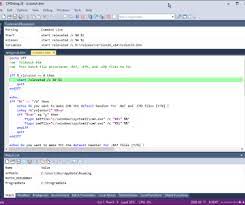
Description: CMDebug is a stand-alone version of the Take Command IDE and batch debugger. CMDebug is intended to help developers create a batch file to run in CMD (the Windows default command processor) or TCC-RT (the free runtime version of TCC). It provides a comprehensive set of batch debugging features specifically designed for batch file development.

CMDebug allows you to write and debug your CMD batch files with the integrated graphical IDE. CMDebug includes tabbed edit windows and a sophisticated debugger with single stepping, conditional breakpoints, syntax coloring tooltips, bookmarks, and tabbed breakpoint, call stack, variable, alias, and watch windows. Windows batch file programming has never been easier or more powerful!

You can use CMDebug to develop either CMD-compatible batch files (*.BAT or *.CMD), or faster (and far more capable) TCC-RT-compatible batch scripts (.BTM). If you select the "TCC Syntax" option, CMDebug supports the full TCC-RT command set. If you select the "CMD Syntax" option, CMDebug will disable TCC-only internal commands, variables, and functions, and use the limited Windows CMD batch file commands syntax. Some internal CMD / TCC commands will also behave slightly differently or modify their display output in order to match CMD's behavior (and bugs!) more closely.

Using CMDebug with the TCC-RT syntax option allows you to create and debug (and optionally encrypt) batch files using the TCC command language, and then distribute them with the free TCC-RT runtime on an unlimited number of target machines.

Release Name: JP Software CMDebug 36.00.44
Size: 42.9 MB
Links: HOMEPAGE – NFO – Torrent Search

Download: RAPiDGATOR
5 Comments
May 12

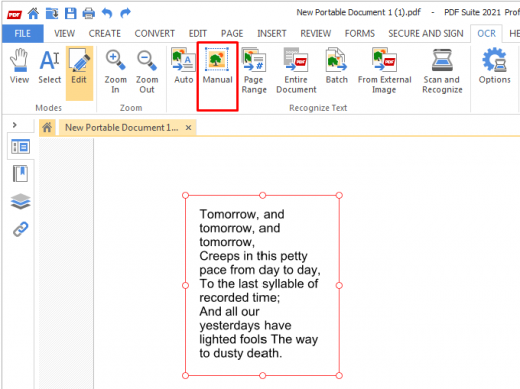
PDF Suite Pro+OCR 20.0.55.21555

Description: Experience Portability with PDF Suite. PDF Suite allows you to: read, create, convert, edit, review & secure PDFs, start managing electronic documents within minutes with the easy and intuitive interface, edit any PDF file by modifying the text or images, apply 256-bit passwords and restrictions to secure your documents.

Read & Markup
View & read your PDF files and other electronic documents with PDF Suite. Leave comments to your documents with the watermark, sticker notes and the markup tools.

Create & Convert
Convert any printable document into a fully readable PDF document. Convert Word, Excel, PowerPoint, and other MS Office documents into PDFs.

Edit & Secure
Edit texts & images of your PDF documents in just a few clicks. Secure your PDF documents with a 256-bit password.

Fill-in & Create PDF Forms
Fill out online forms and submit them back to the sender in a couple clicks. Enjoy a powerful and easy-to-use form creator to add text fields and much more to your PDF documents.

PDF Suite Pro+OCR
- Open and view all PDF files
- Create PDF from any PC application
- Convert your documents with accuracy and no loss of information
- Batch create multiple PDFs at once
- PDF files Editing: cut, copy, paste, move text, delete, etc.
- MS Office Conversion Plug-in
- Export PDF to Word/Excel
- Highlight, draw, and add watermarks
- Create personalized forms
- Insert & edit hyperlinks
- Transform scanned documents and images into editable PDFs.
- Recognize text in PDFs (OCR)

System Requirements
- OS: Windows 11, Windows 10, Windows 8 32 & 64, Windows 7 32 & 64
- Processor: Pentium III or equivalent
- RAM: 512 MB
- Disk Space: 100 MB or more

Release Name: PDF Suite Pro+OCR 20.0.55.21555
Size: 250.6 MB
Links: HOMEPAGE – NFO – Torrent Search

Download: RAPiDGATOR

6 Comments
May 12

JP Software TCC 36.00.44

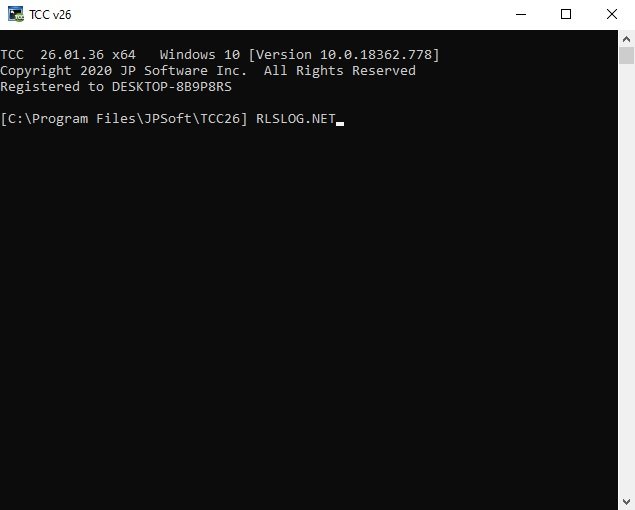
Description: TCC: Upgrading the Windows CMD Command Line Prompt. The command line is essential for developers, systems administrators and advanced users, offering many advantages to anyone wanting to save time, expand their control and/or to automate their tasks.

TCC is our console mode Windows command processor (formerly known as 4NT). TCC is a replacement for CMD.EXE, the default Windows command processor. TCC is compatible with your existing Windows console applications and batch files, but offers major improvements to the CMD prompt in command line editing, interactive file and system management, batch file programming and debugging.

TCC is a superset of CMD, with 275+ internal commands (CMD has about 42), 800+ internal variables and functions (CMD has 6), hundreds of additional options for existing CMD commands, and thousands of additional features.

Whether you're a seasoned CMD prompt user or just getting started, TCC is the tool that will take your command line prompt experience to the next level.

Why Switch From the CMD Shell to TCC?

Familiarity
TCC is a CMD replacement Windows command processor that is compatible with your existing CMD commands and batch files while adding hundreds of new commands, variables, and variable functions.

Productivity
TCC provides vastly improved line editing and tab file completion, and adds thousands of new features. You're immediately more productive, and you can learn TCC's new features at your own pace.

Batch Files
Create and debug your batch scripts in a fraction of the time with TCC's integrated editor and batch file debugger.

Comprehensive Help
The extensive help (including context-sensitive popup help for command and variable syntax) speeds your development time and reduces errors.

Syntax
TCC's internal commands share a consistent syntax, reducing your learning and development time.

Multilingual
The user interface is available in English, French, German, Italian, Russian, and Spanish. (Online help is available in English, French, German, and Spanish.)

Release Name: JP Software TCC 36.00.44
Size: 54.9 MB
Links: HOMEPAGE – NFO – Torrent Search

Download: RAPiDGATOR
5 Comments
May 12

WinToUSB 10.8.2

Description: WinToUSB (also called Windows To USB) is the best free Windows To Go (WTG) Creator which allows you to install and run a fully-functional Windows on external hard drive, USB flash drive or Thunderbolt drive. It is so easy and efficient, with just 3 steps and a few minutes, you can create your first portable Windows 11/10/8/7 or Windows Server directly from an ISO, WIM, ESD, SWM, VHD, VHDX file or CD/DVD drive, or you can clone existing Windows installation to USB or Thunderbolt drive as portable Windows.

Features:
- Creation of WTG from ISO, WIM, ESD, SWM, VHD(X) or DVD drive.
- Creation of WTG from system image file produced by Hasleo Backup Suite.Improved
- Clone Windows to USB/Thunderbolt drive as portable Windows.
- Creation of Windows To Go on Non-Certified Windows To Go USB drive.
- Encrypt Windows To Go with BitLocker to keep your data safe.
- Creation of Windows installation/WinPE USB drives with BIOS & UEFI support.Improved
- Download Official Windows 11/10 ISO file from Microsoft.
- Any version of Windows 11/10/8/7 (X64/X86/ARM64) & Server 2008 or later is supported.

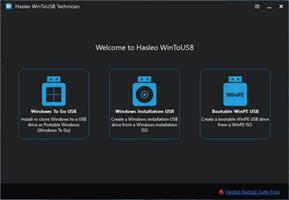
Windows To Go (Portable Windows) Creator
WinToUSB allows you to install & run fully-functional Windows on an external HDD/SSD, USB flash drive or Thunderbolt drive, which means you can carry the portable Windows drive to anywhere and use it on any computer.
- Use any version of Windows 11/10/8/7 and Windows Server to create Windows To Go Workspace
- Creation of Windows To Go from an ISO, WIM, ESD, SWM, VHD(X) image file or CD/DVD drive
- Clone existing Windows installation to USB drive or Thunderbolt drive as portable Windows
- Creation of Windows To Go on Non-Certified Windows To Go drive
- Hot clone Windows without restarting the source computer to be cloned
- Create BitLocker encrypted Windows To Go Workspace
- Support for creating VHD/VHDX-based Windows To Go Workspace

Windows Installation USB Creator
WinToUSB releases a feature called "Windows Installation USB Creator" which allows you to create a Windows installation USB flash drive from a Windows 11/10/8/7/vista/2019/2016/2012/2008 installation ISO file with a few simple steps, with this feature you can create a bootable Windows installation USB drive to install Windows on both Traditional BIOS and UEFI computers by using the same USB drive.

Windows PE Bootable USB Creator
WinToUSB also supports creating a bootable Windows PE USB drive, it can help you transfer the contents of a Windows PE image to a USB drive and make the USB drive bootable.

System Requirements:
Supported operating systems: Windows 7 or later
CPU: Intel® Pentium® processor 1GHz (32 bits or 64 bits) or above
RAM: 1024 MB or more of RAM (2048MB Recommended)
Disk Space: 1024 MB and above free space

Release Name: WinToUSB 10.8.2
Size: 110 MB
Links: HOMEPAGE – NFO – Torrent Search

Download: RAPiDGATOR

4 Comments