Please REGISTER or RENEW your account on RAPiDGATOR.net and support us by doing through all RAPiDGATOR working download links on main posts...
May 12

PDF Suite Pro+OCR 20.0.55.21555

Description: Experience Portability with PDF Suite. PDF Suite allows you to: read, create, convert, edit, review & secure PDFs, start managing electronic documents within minutes with the easy and intuitive interface, edit any PDF file by modifying the text or images, apply 256-bit passwords and restrictions to secure your documents.

Read & Markup
View & read your PDF files and other electronic documents with PDF Suite. Leave comments to your documents with the watermark, sticker notes and the markup tools.

Create & Convert
Convert any printable document into a fully readable PDF document. Convert Word, Excel, PowerPoint, and other MS Office documents into PDFs.

Edit & Secure
Edit texts & images of your PDF documents in just a few clicks. Secure your PDF documents with a 256-bit password.

Fill-in & Create PDF Forms
Fill out online forms and submit them back to the sender in a couple clicks. Enjoy a powerful and easy-to-use form creator to add text fields and much more to your PDF documents.

PDF Suite Pro+OCR
- Open and view all PDF files
- Create PDF from any PC application
- Convert your documents with accuracy and no loss of information
- Batch create multiple PDFs at once
- PDF files Editing: cut, copy, paste, move text, delete, etc.
- MS Office Conversion Plug-in
- Export PDF to Word/Excel
- Highlight, draw, and add watermarks
- Create personalized forms
- Insert & edit hyperlinks
- Transform scanned documents and images into editable PDFs.
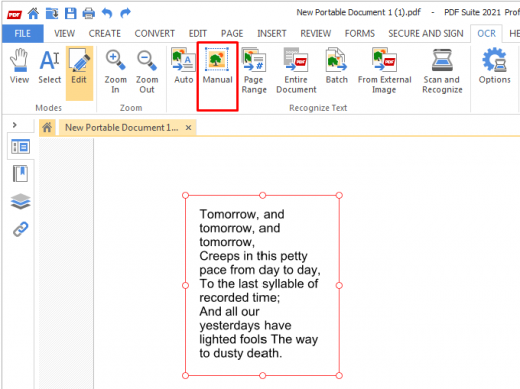
- Recognize text in PDFs (OCR)

System Requirements
- OS: Windows 11, Windows 10, Windows 8 32 & 64, Windows 7 32 & 64
- Processor: Pentium III or equivalent
- RAM: 512 MB
- Disk Space: 100 MB or more

Release Name: PDF Suite Pro+OCR 20.0.55.21555
Size: 250.6 MB
Links: HOMEPAGE – NFO – Torrent Search

Download: RAPiDGATOR

6 Comments
May 12

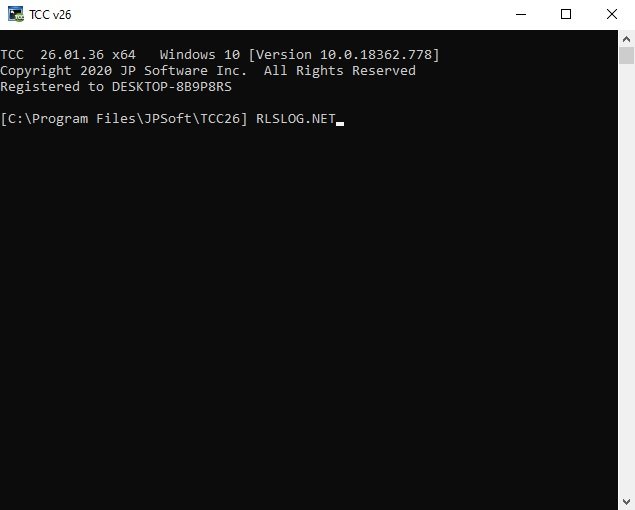
JP Software TCC 36.00.44

Description: TCC: Upgrading the Windows CMD Command Line Prompt. The command line is essential for developers, systems administrators and advanced users, offering many advantages to anyone wanting to save time, expand their control and/or to automate their tasks.

TCC is our console mode Windows command processor (formerly known as 4NT). TCC is a replacement for CMD.EXE, the default Windows command processor. TCC is compatible with your existing Windows console applications and batch files, but offers major improvements to the CMD prompt in command line editing, interactive file and system management, batch file programming and debugging.

TCC is a superset of CMD, with 275+ internal commands (CMD has about 42), 800+ internal variables and functions (CMD has 6), hundreds of additional options for existing CMD commands, and thousands of additional features.

Whether you're a seasoned CMD prompt user or just getting started, TCC is the tool that will take your command line prompt experience to the next level.

Why Switch From the CMD Shell to TCC?

Familiarity
TCC is a CMD replacement Windows command processor that is compatible with your existing CMD commands and batch files while adding hundreds of new commands, variables, and variable functions.

Productivity
TCC provides vastly improved line editing and tab file completion, and adds thousands of new features. You're immediately more productive, and you can learn TCC's new features at your own pace.

Batch Files
Create and debug your batch scripts in a fraction of the time with TCC's integrated editor and batch file debugger.

Comprehensive Help
The extensive help (including context-sensitive popup help for command and variable syntax) speeds your development time and reduces errors.

Syntax
TCC's internal commands share a consistent syntax, reducing your learning and development time.

Multilingual
The user interface is available in English, French, German, Italian, Russian, and Spanish. (Online help is available in English, French, German, and Spanish.)

Release Name: JP Software TCC 36.00.44
Size: 54.9 MB
Links: HOMEPAGE – NFO – Torrent Search

Download: RAPiDGATOR

5 Comments
May 12

WinToUSB 10.8.2

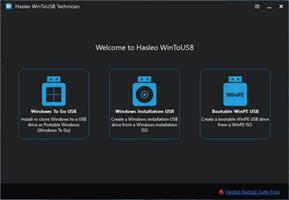
Description: WinToUSB (also called Windows To USB) is the best free Windows To Go (WTG) Creator which allows you to install and run a fully-functional Windows on external hard drive, USB flash drive or Thunderbolt drive. It is so easy and efficient, with just 3 steps and a few minutes, you can create your first portable Windows 11/10/8/7 or Windows Server directly from an ISO, WIM, ESD, SWM, VHD, VHDX file or CD/DVD drive, or you can clone existing Windows installation to USB or Thunderbolt drive as portable Windows.

Features:
- Creation of WTG from ISO, WIM, ESD, SWM, VHD(X) or DVD drive.
- Creation of WTG from system image file produced by Hasleo Backup Suite.Improved
- Clone Windows to USB/Thunderbolt drive as portable Windows.
- Creation of Windows To Go on Non-Certified Windows To Go USB drive.
- Encrypt Windows To Go with BitLocker to keep your data safe.
- Creation of Windows installation/WinPE USB drives with BIOS & UEFI support.Improved
- Download Official Windows 11/10 ISO file from Microsoft.
- Any version of Windows 11/10/8/7 (X64/X86/ARM64) & Server 2008 or later is supported.

Windows To Go (Portable Windows) Creator
WinToUSB allows you to install & run fully-functional Windows on an external HDD/SSD, USB flash drive or Thunderbolt drive, which means you can carry the portable Windows drive to anywhere and use it on any computer.
- Use any version of Windows 11/10/8/7 and Windows Server to create Windows To Go Workspace
- Creation of Windows To Go from an ISO, WIM, ESD, SWM, VHD(X) image file or CD/DVD drive
- Clone existing Windows installation to USB drive or Thunderbolt drive as portable Windows
- Creation of Windows To Go on Non-Certified Windows To Go drive
- Hot clone Windows without restarting the source computer to be cloned
- Create BitLocker encrypted Windows To Go Workspace
- Support for creating VHD/VHDX-based Windows To Go Workspace

Windows Installation USB Creator
WinToUSB releases a feature called "Windows Installation USB Creator" which allows you to create a Windows installation USB flash drive from a Windows 11/10/8/7/vista/2019/2016/2012/2008 installation ISO file with a few simple steps, with this feature you can create a bootable Windows installation USB drive to install Windows on both Traditional BIOS and UEFI computers by using the same USB drive.

Windows PE Bootable USB Creator
WinToUSB also supports creating a bootable Windows PE USB drive, it can help you transfer the contents of a Windows PE image to a USB drive and make the USB drive bootable.

System Requirements:
Supported operating systems: Windows 7 or later
CPU: Intel® Pentium® processor 1GHz (32 bits or 64 bits) or above
RAM: 1024 MB or more of RAM (2048MB Recommended)
Disk Space: 1024 MB and above free space

Release Name: WinToUSB 10.8.2
Size: 110 MB
Links: HOMEPAGE – NFO – Torrent Search

Download: RAPiDGATOR

4 Comments
May 12

JP Software Take Command 36.00.44

Description: Replace Your Windows Console and CMD Command Prompt Windows. The Windows Command Prompt shortcut is a Windows console (command line, or character mode) session that runs the default Windows command shell CMD.EXE.

The command line is essential for developers, systems administrators and advanced users. Unfortunately, CMD Windows commands and the Windows console UI have always been woefully lacking in ability compared to what is available in most other operating systems. Because of the limitations in CMD and the Windows console, users have been forced to use the GUI for inappropriate tasks, or even to write custom programs to perform simple tasks that CMD should have been able to handle.

Take Command is a comprehensive interactive GUI and Windows command line toolkit that makes your command prompt windows easier to use and far more powerful. Take Command includes optional Windows Explorer integration, tabbed console windows, and major enhancements to standard Windows CMD commands such as COPY, DEL, DIR, FOR, MOVE, REN, SET, and START And it and adds more than 235 new commands, command dialogs, command line syntax coloring, vastly improved command line editing, programmable filename and directory tab completion, and thousands of other features.

Take Command is also a powerful batch file programming tool, including an integrated IDE with a sophisticated editor and batch debugger. Take Command offers extensions such as DO loops, SWITCH statements, error and exception handling, system monitoring and event triggers, and more than 780 built-in variables and functions. And you can extend that with 3rd-party plugins and user-defined functions.

12 Reasons Why You Should Replace Your Windows Console
The Windows console is responsible for running character-mode applications, including CMD, PowerShell, WSL bash, etc. It was introduced in Windows NT 3.1 in 1993, and some major internal architectural improvements were made in Windows 10 and 11.

Unfortunately, the improvements to the user interface were relatively minor, and though some efforts were made to improve the CMD console UI in Windows Terminal, they fall far short of what Take Command has been providing for years.

So why replace it with Take Command?

The Windows console is slow, and even slower when using Windows Terminal. Take Command's tab windows typically display output between 20% and 300% faster.
Take Command (like Windows Terminal) offers tabbed windows to run your character-mode applications. But Take Command takes it to another level by including vertical or horizontal tab groups and splitter windows.
Tabbed windows can be reordered, detached, or torn off, and existing console windows can be attached as new Take Command tab windows.
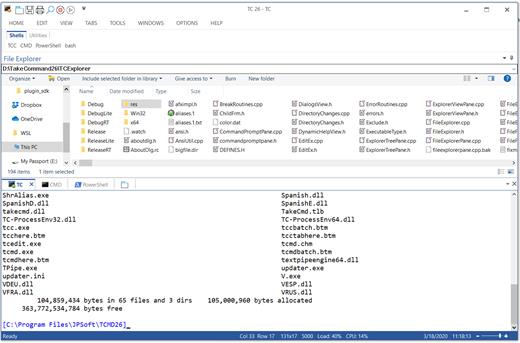
Take Command provides an optional embedded Windows File Explorer window that displays a tree view of the folders on your system and the contents of the selected folder (List View) on the right. You can drag folders and files from the Explorer window and drop them in a command prompt window.
Take Command can be easily configured for your preferences with its configuration dialogs.
Take Command has an optional tabbed tool bar that you can use to execute internal or external commands, aliases, or batch files with the click of a mouse (or an accelerator key). You can define up to 20 tabs, each with up to 50 toolbar buttons.
Take Command provides a configurable Status Bar that can display quick help for the current command, tooltips, and system information, including tab window size, CPU usage, memory usage, date & time, character values at the cursor location, and a slider control for window transparency.
Cut and Paste options are limited in the default CMD console or Windows Terminal. Take Command adds both line and column selection, double-click or triple-click selections, overwriting or appending to the Windows clipboard, and a variety of paste options.
Take Command windows can be styled with a choice of 18 themes.
Take Command and TCC offer a wide variety of colorization options, not just foreground and background colors.
Take Command includes invaluable tools, including a batch file debugging IDE, a regular expression creator / analyzer, search and replace in files, and a macro recorder / playback.
Extensive help (quick help, context sensitive help, and general help) is available in English, French, German, and Spanish at the touch of a button.

Release Name: JP Software Take Command 36.00.44
Size: 57.3 MB
Links: HOMEPAGE – NFO – Torrent Search

Download: RAPiDGATOR

3 Comments
May 12

Dup Scout 18.1.16

Description: Dup Scout is a duplicate files finder allowing one to search and cleanup duplicate files in local disks, network shares, NAS storage devices and enterprise storage systems. Users are provided with the ability to search duplicate files, save reports, replace duplicates with links, delete duplicate files or move duplicate files to another location.
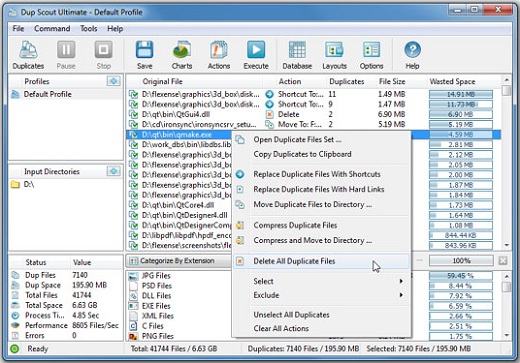
DupScout allows one to save HTML, PDF, Excel, text, CSV and XML reports. Advanced users are provided with the ability to export reports from multiple servers to a centralized SQL database and perform history trend analysis operations.

Searching Duplicate Files in Network Servers and NAS Storage Devices
DupScout allows one to scan the network, discover network servers and NAS storage devices, automatically detect all accessible network shares and search duplicate files in hundreds of network servers and NAS storage devices. In addition, the user is provided with the ability to export the list of detected servers and NAS storage devices (including lists of network shares for each server) into HTML, PDF, text and CSV reports.

In order to search duplicate files in one or more servers or NAS storage devices, press the 'Network' button located on the main toolbar and wait while DupScout will scan the network and show a list of detected network servers and NAS storage devices. On the network servers and NAS storage devices dialog, select the required servers and press the 'Duplicates' button.

DupScout will show all network shares hosted on the selected servers and NAS storage devices allowing one to search duplicate files and save various types of charts and reports. In addition, DupScout provides a large number of advanced duplicate files search options allowing one to tune and customize duplicate files search operations for user specific needs and hardware configurations.

DupScout Command Line Utility
In addition to the desktop application, DupScout Pro and DupScout Server provide a command line utility allowing one to perform automated duplicate files search and removal operations or control one or more DupScout Servers via the network. The DupScout command line utility provides a large number of command line options allowing one to search duplicate files, save HTML, PDF, Excel, text, CSV and XML reports, export duplicate files to an SQL database and execute duplicate files removal actions.

The DupScout command line utility may be used to execute duplicate file search profiles pre-configured in the DupScout GUI application. Power computer users and IT professionals are provided with the ability to fully-automate duplicate files search and removal operations by integrating the DupScout command line utility into custom shell scripts and batch files.

DupScout Server
In addition, to the desktop product versions, enterprises and IT professionals are provided with two server-based product versions, DupScout Server and DupScout Enterprise, which run in the background as a service and allow one to search duplicate files in servers and NAS storage devices over the network. Server-based product versions are especially optimized for multi-core and multi-CPU servers and can search duplicate files in tens of servers and/or NAS storage devices simultaneously.

The server product versions provide advanced duplicate files search, removal, reporting and history trend analysis capabilities and may be controlled using a full-scale client GUI application and the DupScout command line utility locally or via the network.

The DupScout Server client GUI application provides a full set of features available in the desktop product version and additional capabilities allowing one to perform multiple, parallel duplicate files search operations, schedule periodic duplicate files search operations and perform history trend analysis operations.

Finally, DupScout Enterprise provides a web-based management interface allowing one to control one or more servers using a regular web browser through the network and provides the ability to perform duplicate files search operations, save various types of reports, perform history trend analysis, remove duplicate files, schedule periodic duplicate files search operations, etc.

Batch Duplicate Files Search Operations
DupScout Server and DupScout Enterprise provide the ability to scan the network, detect all network servers and NAS storage devices, execute one or more pre-configured duplicate files search commands on hundreds of network servers and NAS storage devices and generate an individual duplicate files report for each server, NAS storage device or network share.

In the simplest case, just press the 'Network' button located on the main toolbar, search all network servers and NAS storage devices on the network, select one or more servers, press the right mouse button and select the 'Batch Duplicate Files Search' menu item. DupScout will show a list of pre-configured duplicate files search commands allowing one to select one or more commands to be executed on all selected network servers and NAS storage devices.

Depending on the selected configuration, DupScout will save in the built-in reports database an individual duplicate files report for each network server, NAS storage device or network share. Once the batch duplicate files search operation is completed, the user will be provided with the ability to open saved duplicate files reports, review results, generate various types of pie charts and export reports to a number of standard formats including HTML, PDF, Excel, text, CSV and XML.

Release Name: Dup Scout 18.1.16
Size: 83.7 MB
Links: HOMEPAGE – NFO – Torrent Search

Download: RAPiDGATOR

6 Comments
May 12

Chaos Envision 1.5.0

Description: Immersive architectural experiences. Real-time 3D assembly, photorealism, and animations.

Let your design speak for itself with Chaos Envision.
For architects and archviz specialists who want to elevate their design effortlessly.

Scene scaling
As a standalone tool, Envision goes beyond the common CAD limitations and makes it possible to create detail-heavy scenes without compromising on performance or quality.

Robust assembly
Combine scene elements from various 3D creation tools with no data prep or loss.

Real-time realism
Dive into intricate, high-complexity designs with fast performance and visual fidelity.

Creative flexibility
Adjust any aspect of your project without needing to pre-separate objects — data is imported at the object level of granularity.

Cinematic storytelling
Communicate architectural intent and captivate stakeholders with interactive, cinematic, and emotionally compelling visual stories that are intuitive, easy and fast to create.

Advanced animations
From moving objects on paths to showing construction phasing, design variations and cinematic flyovers.

Immersive environments
Adjusting time of day, cloud appearance and haze sets the mood, while animated vegetation and wind effects create a lively feel of the environment.

4D humans and crowds
Bring designs to life with crowds of animated humans - thanks to the direct integration of the Anima engine.

High-end visual realism
Powered by a high-fidelity ray tracing engine, Envision supports trillions of polygons in real-time, allowing users to populate their scenes with high-quality assets.

100% ray-tracing
High-end visual fidelity in both real-time and offline output.

Cosmos library
Render-ready assets, recognized for their rich geometry, advanced materials, dynamic lighting, and lifelike entourage.

AI enhancements
Enhance vegetation and human figures with AI-driven textures, lighting, and clarity.

Design exploration
Research lighting scenarios, materials, and entourage options and see them demonstrated through animated transitions between design variations.

Unlimited variations
Create variations of any adjustable object, material, light, or asset of your scene and explore design options.

Interactive walkthroughs
Seamlessly animate between variations to create immersive walkthroughs and over-the-shoulder presentations.

Intuitive visual presets
One-click effects like rounded corners, translucency, strands, and displacement elevate realism and enhance the natural look of your scenes.

Ecosystem
Seamlessly integrated with the Chaos ecosystem, Envision works with Enscape and V-Ray, offering a natural continuation to their workflows for fluid data exchange and streamlined collaboration.

Easy coordination (.vrscene)
Leveraging the .vrscene format, Envision loads scene data instantly and supports all assets and materials coming from the creation tools.

Non-destructive workflow
Design iterations do not restart the visualization process and minimize repetitive artist work.

Continuous design
Visualization stays up to date even as design evolves thanks to advanced file linking.

Release Name: Chaos Envision 1.5.0
Size: 1.4 GB
Links: HOMEPAGE – NFO – Torrent Search

Download: RAPiDGATOR

4 Comments
May 12

AI Aquarium Screensaver 1.4.1

Description: Relax & Explore: Interactive AI Aquarium Screensaver for Your Screen. AI Aquarium Screensaver is a 3D interactive aquarium screensaver that transports you into a vibrant underwater world. Imagine having an aquarium on your screen that features different styles of fish tank landscape background pictures, ranging from serene stone arch bridges to mystical stone forests.

Our tropical rain forest scenes bring the essence of nature into your digital space, while the rockery stone and Dutch style aquarium designs add a touch of elegance. It offers a diverse selection of environments such as coral water grass and nature style backdrops, as well as end world and cartoon styles for a more whimsical feel. For those who love futuristic aesthetics, the cyber mechanical style background image will captivate your imagination.

AI Aquarium screensaver is designed to feature auto feed options, ensuring that you never miss a moment of your aquatic adventure. With over 150 different types of fish, including goldfish, koi fish, clownfish, manta rays, amago, and even the fascinating angel shark, your virtual aquarium will never be dull. The AI fish bring this experience to life, allowing you to interact directly with these incredible creatur Whether you're looking to relax, inspire creativity, or simply enjoy the beauty of the ocean, AI Aquarium Screensaver is perfect for enhancing any digital environment.

10 Aquarium Background Styles
Stone Arch Bridge, Stone Forest, Tropical Rain Forest, Rockery Stone, Dutch Style Aquarium, Coral Water Grass, Nature Style, End World Style, Cartoon Style, and Cyber Mechanical Style.

150+ Fish Species
A diverse collection of freshwater and saltwater fish including goldfish, koi, clownfish, manta rays, neon tetra, betta fish, arowana, rainbowfish, catfish, sharks, and more.

Interactive Aquarium Experience
Select fish types and quantities, feed and tease fish, and create realistic ripple effects.

Automatic Feeding System
Runs in the background to keep your aquarium active at all times.

Customization Options
Support for custom aquarium background images and background music.

Multi-Monitor Support
Extend the immersive aquarium across multiple displays.

Advanced Lighting Effects
Rainbow Gradient, Pulse Gradient, and White Noise Gradient modes for natural and dynamic underwater lighting.

System Requirements
- OS: Windows 10 version 17763.0 or higher
- Memory: 2 GB (Minimum), 4 GB (Recommended)
- Graphics Processor: OpenGL 3.0 (Minimum), OpenGL 4.0 (Recommended)

Release Name: AI Aquarium Screensaver 1.4.1
Size: 275.3 MB
Links: HOMEPAGE – NFO – Torrent Search

Download: RAPiDGATOR

6 Comments
May 12

AccdbMerge 1.38.2

Description: AccdbMerge is a reliable program that enables you to quickly join the information and structured from multiple Microsoft Access database files, in two projects. The application can perform advanced data differencing, in order to avoid duplicate entries. Moreover, the program offers support for batch data differential comparison.

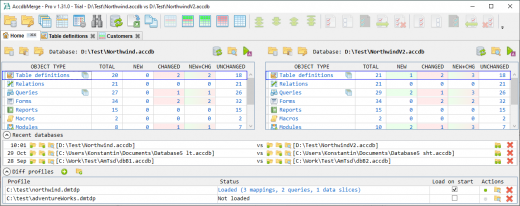
AccdbMerge features a user-friendly interface which offers a comprehensive view of the tables and the contained data. You can easily merge two files or compare numerous tables in Batch Data Diff. This function can provide you with additional information, since you can query data.

Alternatively, you can use the Custom Data Diff, in order to compare tables and queries, after mapping the fields. You need to specify a mapping type key and process at least one field. The software can open password-protected files and compare them in two parallel projects. You may save the settings, in case you often work with the same protected files.

AccdbMerge can process compiled .MDE and .ACCDE files, aside from the basic .MDB, .ACCDB formats. You can select which objects you wish to include in the differencing process, by checking/unchecking the box next to them. Tables, relations, queries, forms, reports, macros, modules and references can easily be compared, from each database. In the case of .MDE and .ACCDE files, however, the software does not support processing modules, forms and reports.

AccdbMerge features an individual function for comparing queries, which can be accessed from the toolbar at the top of the window. You may easily define the query key fields, in order to identify query rows, as well as new or changed records.

AccdbMerge also allows you to compare and merge indexes or relationships from table structure differencing window. Moreover, it offers support for operations performed via command line arguments. You can open AccdbMerge projects in a differencing viewer mode, which allows you to control system clients.

Release Name: AccdbMerge 1.38.2
Size: 24.1 MB
Links: HOMEPAGE – NFO – Torrent Search

Download: RAPiDGATOR
5 Comments
May 12

Chaos Vantage 3.2.1

Description: Explore your most complex 3D production scenes ray traced in real-time. With Chaos Vantage, there are no time-consuming conversions. Simply drag and drop your complete V-Ray scene into Vantage and start exploring. There’s also a direct live link available from 3ds Max, so you can use it just like a viewport.

Chaos Vantage requires an NVIDIA RTX series GPU.

Features

Zero setup
Drag and drop your V-Ray scene into Chaos Vantage and start exploring. Unlike other real-time solutions, there’s no geometry to optimize, UVs to unwrap, or lighting to bake.
a
Go big!

Chaos Vantage is built to handle huge scenes and billions of polygons. It’s the fastest way for you to see your most detailed V-Ray scenes in real-time.

Easy to navigate

Navigating your scene is easy. Use controls similar to your 3D app, or move around just like playing a game. Walk up stairs and avoid walking through walls with automatic collision detection.

100% ray-traced quality
With fully raytraced and real-time rendering, Chaos Vantage uses physically based cameras, lights, materials, and global illumination for the most realistic results.

Simple and fast animation

Perfect for previsualization, you can create, edit, and render animation right from Chaos Vantage. Easily animate between cameras, apply transitions, arrange your sequence in the Animation Editor.

Live link
Get a live raytraced view of your scene with a live link from 3ds Max. Changes you make in your 3ds Max scene will instantly appear in Chaos Vantage.

System Requirements:
OS: Microsoft® Windows® 10 RS5 (version 1809), update from October 2018, build 17763 or later
- DXR compatible GPU: NVIDIA RTX® series GPU with NVIDIA® driver 436.02 or newer; recommended version 457.09 or 452.57
- System memory should exceed GPU memory (minimum 8 GB RAM)

Release Name: Chaos Vantage 3.2.1
Size: 932.8 MB
Links: HOMEPAGE – NFO – Torrent Search

Download: RAPiDGATOR
5 Comments
May 12

Capture One 16.7.8.3529

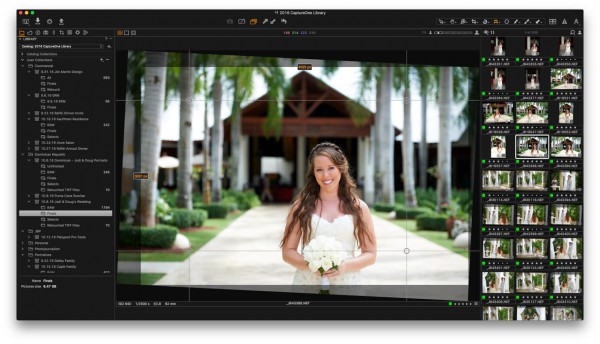
Description: Mind-blowing colors and quality. Get true-to-life colors and superb image quality right from the start of your photo process. Fine-tuned by our in-house experts, our RAW converter is customized for nearly 600 camera profiles and over 700 lenses. With true-to-life color processing, you can spend less time editing and reach your final look even faster.

Shoot tethered. Fast.
Connect your camera and shoot tethered into Capture One. Organize shots, make changes on the spot, auto-apply edits to incoming shots, and get the perfect image every time. See what your camera sees with Live View, and don’t miss out on some of our smart features like ReTether and Save to Card, which will make sure you stay flexible and never lose a shot.

Work together with anyone, anywhere
Collaborating with teams and clients – whether in the same room or on different continents – is made easy with Capture One Live. Share, view, comment, rate, tag, and get feedback. All in one place. No uploading, exporting, or downloading a single photo ever again.

Edit intelligently. Easily.
With assisted editing, you can start and finish your projects with just a few clicks.

With a single click, you can instantly match the style or edits of a reference image. Whether from a previous project, a film still, or a mood board, it automatically transfers the look to your current photo(s), giving you a strong starting point for editing and color grading.

Mask skin, hair, eyes, facial features, subjects, and backgrounds with extreme precision. Save time by creating complex masks quickly for multiple images. You can even combine them with other adjustments and save them as a Style.

You can now set your crop reference to a single image and apply it to a batch of photos or incoming shots. Capture One will detect whether to focus on a face or a subject and automatically make consistent crops for all your shots.

Finish most of your edits in seconds with Smart Adjustments by automatically adjusting Exposure and White Balance. Unlike copy and apply, Smart Adjustments makes our photos consistent, even under different lighting conditions.

Experience the speed as Capture One intelligently zooms and pans to the nearest eye in each shot, allowing you to quickly check for sharpness without manually zooming in.

A quick and easy way to take care of annoying dust spots in multiple photos and dramatically speed up your editing.

Release Name: Capture One 16.7.8.3529
Size: 1.2 GB
Links: HOMEPAGE – NFO – Torrent Search

Download: RAPiDGATOR
5 Comments