Please REGISTER or RENEW your account on RAPiDGATOR.net and support us by doing through all RAPiDGATOR working download links on main posts...
May 12

Refolder 1.0.9

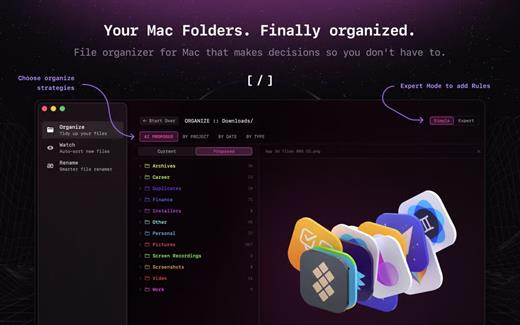
Refolder — file organizer for Mac. A calmer way to clean up busy folders without breaking your flow. It watches your folders, suggests where files belong, and keeps everything sorted in the background. Review changes when you want — or let it quietly do its thing.


  • Auto-sort any selected folder
  • Clean up folders without effort
  • Review moves before they happen
  • Batch rename files in seconds
What’s New

Version 1.0.9:


  • Release notes were unavailable when this listing was updated.
Compatibility

macOS 15 or later


Release Name: Refolder 1.0.9
Size: 10 MB
Links: HOMEPAGE – NFO – Torrent Search

Download: RAPiDGATOR

4 Comments
May 12

Yate 9.2.0

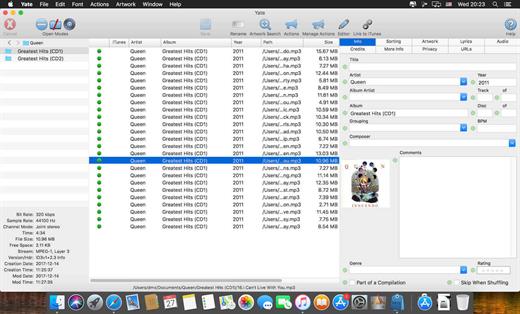
Yate was developed for people who want complete control over their tagging experience. Supports audio in AIFF, APE, DFF, DSF, FLAC, OGG OPUS, OGG VORBIS, M4A, M4B, MP3, MP2, MP4, STEM.MP4, WAV and WV files. Supports video in M4V and MP4.

Yate has a long list of features; most importantly, an innovative scripting system called actions. Actions can be used to update all of an album’s tags with a single operation. Yate also supports integration with AcouticBrainz, AcoustID, Beatport, Discogs, iTunes, MusicBrainz and TMDb. All changes can be easily reverted and individual changes can be undone in any order. Whether you want to automatically or manually tag your files, Yate can do it all!

What’s New

Version 9.2.0:


  • Release notes were unavailable when this listing was updated.
Compatibility

macOS 10.10 or later


Release Name: Yate 9.2.0
Size: 17.3 MB
Links: HOMEPAGE – NFO – Torrent Search

Download: RAPiDGATOR

5 Comments
May 12

Proxyman 6.10.0

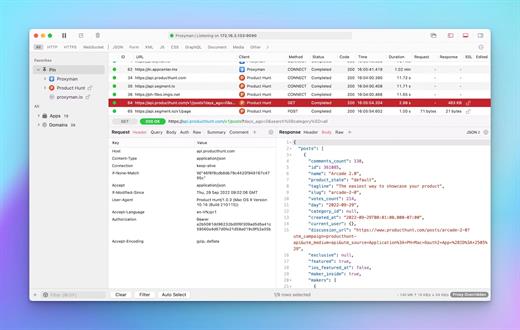
Proxyman is a high-performance macOS app, which enables developers to view HTTP/HTTPS requests from apps and domains.

Features


  • ? Native macOS app. Written by Swift, Objective-C. Powered by Apple SwiftNIO for the high-performance network application.
  • ? Fully support Apple Chip (e.g M1, M2, M1 Pro/Max).
  • ? Built for macOS Monterey & Ventura.
  • ✅ Hassle-free Intercept HTTP/HTTPS requests/response and WebSocket from Web Browsers, iOS, and Android devices.
  • ✅ Modern and intuitive UI
  • ? Multiple filters
  • Comprehensive Guideline to set up with iOS simulator and iOS and Android devices.
  • Basic debugging tools: Compose, Repeat, Wildcard/Regex Filter, Multiple Filters, Customize Columns, Toolbar…
  • Advanced Tools: Breakpoint, Map Local, Map Remote, Backlist, External Proxying, No Caching, Protobuf, Clear Cache, Custom Certificates, Scripting, Network Conditions, Reverse Proxy, Diff, Access Control etc
  • Automatic Setup for Backend Development: Auto capture HTTP(s) traffic from NodeJS, Ruby and Python.
  • macOS 10.15+
What’s New

Version 6.10.0:


  • Release notes were unavailable when this listing was updated.
Compatibility

macOS 10.15 or later


Release Name: Proxyman 6.10.0
Size: 36.3 MB
Links: HOMEPAGE – NFO – Torrent Search

Download: RAPiDGATOR

4 Comments
May 12

Dato 5.8.0

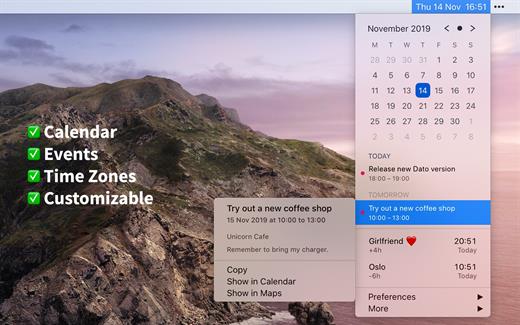
Dato is a replacement for the system menu bar clock.

By default, it looks exactly the same, but when you click it, you get a small calendar, calendar events for the next week, the current time in various time zones (even with custom names), week number, and more. You can customize what to show in the menu and the menu bar.

Dato supports all the locales and languages that macOS supports for dates, times, and the calendar, but the menus are English-only.

Features


  • Calendar, optionally with week numbers. Your upcoming events for the next week at a glance (customizable).Time zones, optionally with custom names.Search time zones by city (15K cities included).Customizable.Double-click a day in the calendar to open that day in the default calendar app.
  • (Supports: Calendar, Fantastical 2, BusyCal).Fully offline with no network entitlements, for your privacy benefit.Supports calendar events with HTML formatted notes.Lots of keyboard shortcuts for power users.”Join Zoom Meeting” button on Zoom meeting calendar invites.
What’s New

Version 5.8.0:


  • Release notes were unavailable when this listing was updated.
Compatibility

macOS 10.14.4 or later, 64-bit processor


Release Name: Dato 5.8.0
Size: 19.7 MB
Links: HOMEPAGE – NFO – Torrent Search

Download: RAPiDGATOR

6 Comments
May 12

Clop 2.11.6

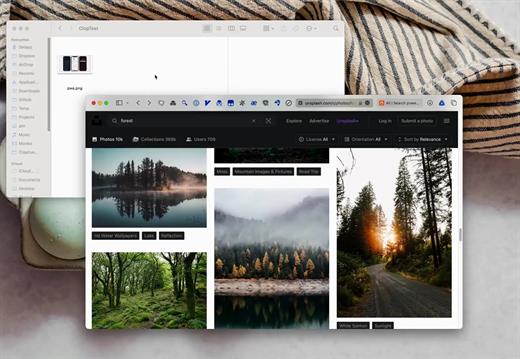
Clop is a powerful macOS utility designed to streamline your workflow by automatically optimizing images, videos, and PDFs. With its “copy large, paste small” philosophy, Clop ensures that every image you copy to your clipboard is instantly compressed to its smallest possible size without losing quality. Whether you are sending screen recordings or attaching heavy PDFs to an email, Clop makes file sharing faster and more efficient by handling the heavy lifting in the background.

What’s New

Version 2.11.6:


  • Release notes were unavailable when this listing was updated.
Compatibility

macOS 13.0 or later


Release Name: Clop 2.11.6
Size: 88.4 MB
Links: HOMEPAGE – NFO – Torrent Search

Download: RAPiDGATOR

6 Comments
May 12

TinkerTool System 9.89

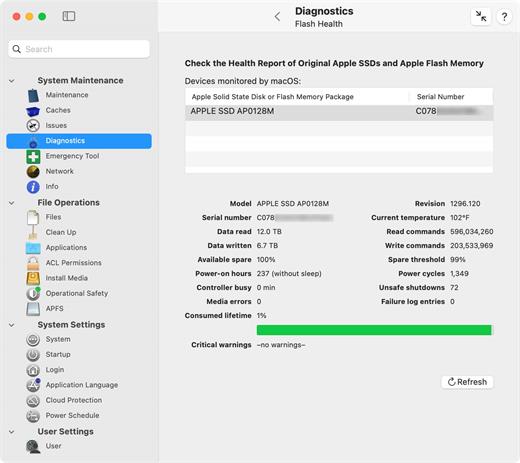
TinkerTool System is a collection of system utility features helping you in performing advanced administration tasks on Apple Macintosh computers. The application makes use of a self-adapting user interface which automatically adjusts to the computer model and to the version of macOS you are running. All options available in the current situation are accessible via “panes”, very similar to the techniques you already know from the System Preferences application. The features are controlled via a single window which allows you to use the application as a general toolbox and First Aid assistant. This includes:


  • Built-in maintenance features of macOS, usually not visible on the graphical user interface;
  • Extended file operations, not available in the macOS Finder;
  • The possibility to access advanced system settings which are not visible in System Preferences;
  • Genuine and unique features of TinkerTool System, designed to resolve typical real-world problems of administrators and to fix the effects of certain defects (“bugs”) in the operating system;
  • An emergency tool to troubleshoot and repair macOS in cases where the graphical user interface is no longer starting correctly or the user account of the system administrator has been damaged;
  • Features to protect your privacy, e.g., by reviewing and editing the list of Internet cookies stored for your user account;
  • Functions to collect advanced information about the hardware, operating system, and applications.
What’s New

Version 9.89:


  • Release notes were unavailable when this listing was updated.
Compatibility

macOS 15.0 or later


Release Name: TinkerTool System 9.89
Size: 30.1 MB
Links: HOMEPAGE – NFO – Torrent Search

Download: RAPiDGATOR

5 Comments
May 12

Juicy 1.2.1

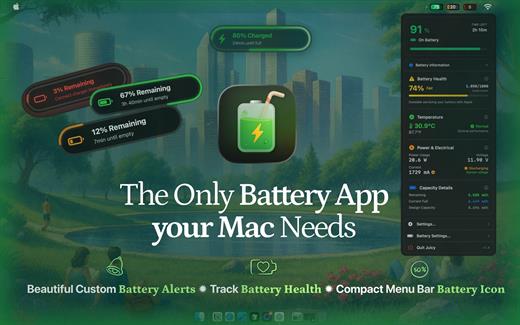
Juicy is a native macOS utility designed to give you total control over your MacBook’s battery life and health through highly customizable alerts and sleek monitoring tools.

Key Features


  • Custom Battery Alerts: Break free from the standard 10% notification. Set beautiful, native-style alerts at any percentage (e.g., 20%, 80%, or even 3%).
  • Health & Lifecycle Tracking: Monitor real-time health percentage, cycle counts, and temperature. Get notified when your battery hits 80% to help prolong its total lifespan.
  • All-in-One Dashboard: View battery levels for all connected devices—including AirPods, iPhones, iPads, and Magic Mice—in one organized list.
  • Sleek Menu Bar Icons: Replace the default battery icon with a compact, iPhone-style display that shows the percentage inside the icon to save space.
  • Smart Automation: Automatically dismisses annoying system battery pop-ups and provides “screen glow” effects to ensure you never miss a critical low-battery warning.
What’s New

Version 1.2.1:


  • Release notes were unavailable when this listing was updated.
Compatibility

macOS 15.6 or later.


Release Name: Juicy 1.2.1
Size: 19.2 MB
Links: HOMEPAGE – NFO – Torrent Search

Download: RAPiDGATOR

5 Comments
May 12

Magic Battery 9.5.2

The App Magic Battery shows the battery level of supported input devices and headphones that are connected via Bluetooth in the menu bar. Internal batteries are also supported.
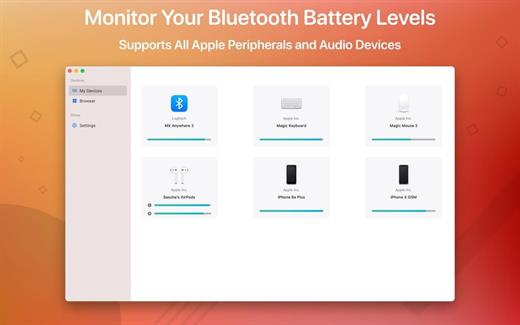
The following devices are supported:

Input devices:

• Apple Magic Mouse

• Apple Magic Mouse 2

• Apple Magic Trackpad 2

• Apple Wireless Keyboard

• Apple Wireless Trackpad

• Logitech mice like the MX3 Anywhere and Logitech Pebble

• Logitech keyboards (K series)

The app features:

• Modern GUI for displaying connected devices and their battery levels.

• You can choose between a detailed, a compact or an icon-only view. In the detailed view, the battery level is shown next to the device icon. In the icon-only view, the battery levels are shown once the menu of the app is opened. The compact view shows all the information in a way that very little space is used.

• Apple Silicon support.

• Connected or disconnected devices are detected automatically. The view is then adjusted accordingly.

• Support for auto-start: The app is started as soon as the user is logged in (optional).

What’s New

Version 9.5.2:


  • Release notes were unavailable when this listing was updated.
Compatibility

macOS 11.0 or later.


Release Name: Magic Battery 9.5.2
Size: 7 MB
Links: HOMEPAGE – NFO – Torrent Search

Download: RAPiDGATOR

4 Comments
May 12

Muse 3.5.2

Muse is no longer just for your iPad. Muse for Mac brings your nested boards and open-ended research to the desktop, optimized for the precision of a mouse and keyboard while maintaining the “lost in thought” feel of the original.

The Vision: From Thinking to Producing

While the iPad is for relaxed, informal sketching and manual interaction, the Mac is built for focused productivity, heavy research, and bulk editing. Muse for Mac acts as the bridge, allowing you to move seamlessly from the “Thinking” phase to the “Artifact” phase of your workflow.

What’s New

Version 3.5.2:


  • Release notes were unavailable when this listing was updated.
Compatibility

macOS 13.0 or later


Release Name: Muse 3.5.2
Size: 60.9 MB
Links: HOMEPAGE – NFO – Torrent Search

Download: RAPiDGATOR

5 Comments
May 12

SideNotes 1.6.0

Have you ever had a thought that came to your mind and all you wanted was to write it down quickly? Meet SideNotes! It’s an app for note-taking where you put all your buzzing thoughts in a neat, quick and organized way. Enjoy its non-distractive workflow. With SideNotes you can save your ideas, pictures, task lists and many more.

SideNotes keeps you from juggling with windows when searching for notes. The app always appears on top of other windows – you can easily hide it or pull it out from the side of your monitor with one click or with a keyboard shortcut. You can even use just your keyboard to work with your notes. Everything is in its place and you still have place for everything.

With SideNotes you can:


  • Smoothly pull out your notes from outside your monitor and easily hide them back
  • Mark notes with colors and group them into folders
  • Drag and drop pictures directly from your web browser
  • Save links, code snippets or even colors
  • Create task lists and mark items done
  • Create notes directly from the pasteboard
  • Drop text files or folders
  • Use 3 text formatting modes: Markdown, Plain Text and Code.
*** You need to disable the System Integrity Protection (SIP) to perform the selected Application.

What’s New

Version 1.6.0:


  • Release notes were unavailable when this listing was updated.
Compatibility

macOS 10.14 or later, 64-bit processor


Release Name: SideNotes 1.6.0
Size: 22.1 MB
Links: HOMEPAGE – NFO – Torrent Search

Download: RAPiDGATOR

5 Comments