Please REGISTER or RENEW your account on RAPiDGATOR.net and support us by doing through all RAPiDGATOR working download links on main posts...
May 5

Jettison 1.9.6

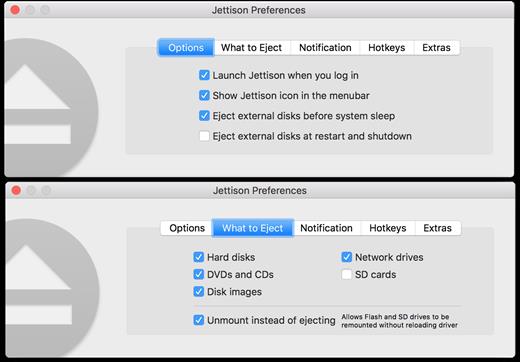
Jettison automatically ejects external disks from your Mac before your computer goes to sleep.

Simplify those last few seconds when you grab your MacBook and run out the door. Just close the lid and Jettison will automatically eject your backup drive, iPod, or whatever is connected so you can safely unplug it. Say goodbye to “disk was not ejected properly” errors and waking your computer back up because you forgot to eject everything.

Jettison even makes sure that Time Machine backups and file server volumes are properly shut down before they’re removed. Your backups and shared files are safe and sound.

And what if you decide not to leave, and open your MacBook back up? Jettison will check to see if your drives are still connected and will mount them back on the Desktop if they’re there.

What’s New

Version 1.9.6:


  • Release notes were unavailable when this listing was updated.
Compatibility

macOS 10.9 or late


Release Name: Jettison 1.9.6
Size: 7.4 MB
Links: HOMEPAGE – NFO – Torrent Search

Download: RAPiDGATOR

6 Comments
May 5

eBookBinder 1.13.0

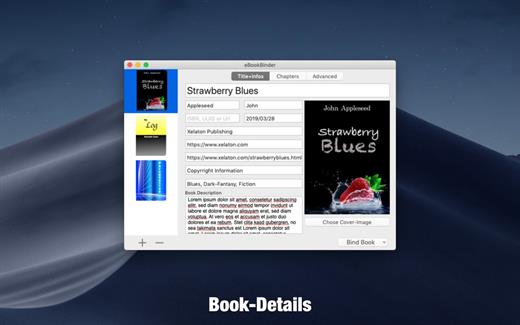
eBookBinder is the super-easy tool to create your own ebooks using your existing documents. When compiling your book project, eBookBinder creates an epub file. There are just three major steps to your very own eBook:


  1. Enter book details. Name of the book and its author, add an image for the book-cover, webpage of the publisher and other details can be entered. There is no need to fill all fields, at least you should enter a name for your book.
  2. Add text files as chapters to your book project. Every single text file you add to eBookBinder is treated as a single chapter. Give your chapters a name and order them per drag-and-drop to your desired sequence of chapters.
  3. Create your ebook. Just hit the “Bind Book” Button and eBookBinder will compile the ebook for you. That’s all!

What can be added to eBookBinder:


  • eBookBinder supports several different types of text files. Next to plain-text files also DOC, ODT, RTF, RTFD, HTML, Textbundle, Textpack and webarchive files are supported by eBookBinder.
  • Support of markup languages eBookBinder also accepts plain-text files written in Markdown, MultiMarkdown, Textile, Wikitext, and Smark as input. These will be converted on the fly when adding these as chapters to your book-process. Visit the preferences of eBookBinder to determine the file extensions which should be treated for conversion. All files with appropriate file extensions will be converted when imported.
Built-in editor – eBookBinder also features a built-in editor which offers some basic editing features like setting text bold, inverse, or underlined, and alignment of text. However, the best feature of the editor is the reduce feature: select the text you want to keep and hit the reduce button. Anything not selected will be removed. This is ideal for editing web articles to remove all the advertising and navigation stuff quickly.

What’s New

Version 1.13.0:


  • Release notes were unavailable when this listing was updated.
Compatibility

macOS 10.10 or later, 64-bit processor


Release Name: eBookBinder 1.13.0
Size: 6.1 MB
Links: HOMEPAGE – NFO – Torrent Search

Download: RAPiDGATOR

7 Comments
May 5

Fork 2.66.7

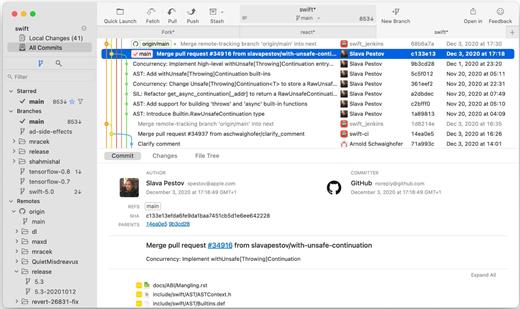
Fast and friendly git client. Fork is getting better and better day after day and we are happy to share our results with you. Commit List – Working Directory Changes – Side by Side Diff – Repository Manager Summary and Statistics

Basic features: Fetch, pull, push | Commit, amend | Create and delete branches and tags | Create and delete remote repos | Checkout branch or revision | Cherry-pick, revert | Merge, rebase | Stashes | Submodules

Work with repository: Create, clone or add existing repos | Open recent repository quickly

Commit view: Stage / unstage changes line-by-line | Access to recent commit messages

More features: Browse the repository file tree at any commit | Intuitive merge conflict resolving | See your stashes right in the commit list

What’s New

Version 2.66.7:


  • Release notes were unavailable when this listing was updated.
Compatibility

macOS 10.13 or later

Release Name: Fork 2.66.7
Size: 44.5 MB
Links: HOMEPAGE – NFO – Torrent Search

Download: RAPiDGATOR

6 Comments
May 5

SQLPro for SQLite 2026.90

SQLPro for SQLite is the top SQLite editor for OS X.

Features


  • Automatic data reloading when the database gets modified externally.
  • Backwards compatibility with SQLite 2.
  • Version integration. Mucked your database? Rollback to a previous version.
  • Semiautomatic dependency resolution.
  • Column reordering.
  • Import or export your data in CSV, mySQL, XML, or JSON formats.
  • Export custom result sets to CSV, XML, or JSON.
  • Full-screen support.
  • Inline filters allowing you to customize the way your data is displayed.
What’s New

Version 2026.90:


  • Release notes were unavailable when this listing was updated.
Compatibility

macOS 10.12 or later.


Release Name: SQLPro for SQLite 2026.90
Size: 24.8 MB
Links: HOMEPAGE – NFO – Torrent Search

Download: RAPiDGATOR

6 Comments
May 5

Topaz Photo 1.5.1

AI-powered photo editing tool that improves photos pixel by pixel.

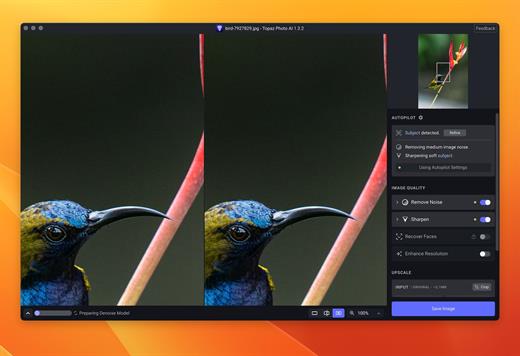
What is Topaz Photo AI? It is a new-generation photo editing tool that uses AI technology to perfect and denoise pictures pixel by pixel. Topaz Photo AI simplifies the editing process for photographers and designers. Its groundbreaking suite offers multiple tools to satisfy both amateurs and confident pros.

Topaz Photo AI allows editors to denoise, sharpen, upscale, preserve text, recover faces, remove objects, correct lighting, and balance color. Professional photo editors will be amazed at how much power Topaz Photo AI gives, and beginners will appreciate how easy and intuitive this tool is.

Topaz Photo AI helps you Sharpen, remove noise, and increase the resolution of your photos with tomorrow’s technology.

Maximize the potential of your photos.

Magically enhance image quality and resolution based on a deep understanding of the contents of your photo.

Enhance Quality

Maximize the visual quality of your images with best-in-the-world noise and blur reduction. Particularly useful in difficult settings with fast-moving subjects, low light, or atypical environments.

Crisp, clear, and noise-free.

It’s a magical feeling to see noise evaporate while sharp detail remains. Topaz Photo AI understands the contents of your image and accurately determines the difference between image detail and noise.

Tack-sharp subjects.

Unlike traditional sharpening, Topaz Photo AI’s Sharpen module naturally reverses root causes of blurriness (camera shake, motion blur, missed focus) to create more natural results. In the absence of blur, sharpness remains – crisp, clear detail that’s free of edge haloes or other artifacts.

Increase Resolution

Join hundreds of thousands of photographers and designers who use Topaz technology to generate real image detail for better printing, cropping, restoration, and more.

Magically add real detail.

Topaz Photo AI “remembers” real detail from millions of similar images, then fills in missing pixels based on that understanding. (It’s like how you can picture a friend’s face without being physically in front of them.) Add real image resolution to your photos for tighter crops or better prints.

Recover faces naturally.

Introduced in 2023, the breakthrough Face Recovery AI offers remarkable detail enhancement for low-resolution or blurry faces.

Intelligently improve lighting.

It’s a magical feeling to see noise evaporate while sharp detail remains. Topaz Photo AI understands the contents of your image and accurately determines the difference between image detail and noise.

Improve efficiency with Autopilot

Specify adjustments based on detected image attributes like subject, faces, noise, and blur levels. Autopilot allows you to mold Photo AI to your workflow and unique photographic style.

Easy workflow

Topaz Photo AI works directly on your Mac or PC. Use the standalone to batch process thousands of images in sequence, or use it as a Photoshop plugin for tight workflow integration. We’ve also partnered with major hardware manufacturers like Nvidia, AMD, and Intel to make Photo AI run as fast as possible for your computer.

What’s New

Version 1.5.1:


  • Release notes were unavailable when this listing was updated.
Compatibility

macOS 10.12 or later


Release Name: Topaz Photo 1.5.1
Size: 1.7 GB
Links: HOMEPAGE – NFO – Torrent Search

Download: RAPiDGATOR

5 Comments
May 5

coconutBattery Plus 4.3.0

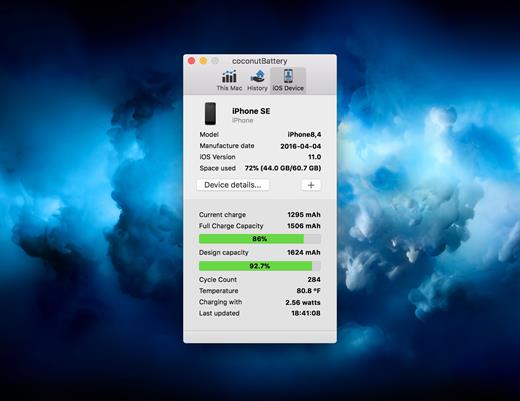
With coconutBattery you’re always aware of your current battery health. It shows you live information about your battery such as how often it was charged and how is the current maximum capacity in relation to the original capacity your battery had when it left the factory.

Of course, you are able to save the current maximum capacity of your battery. So you can see the changes in your battery health over time.

What’s New

Version 4.3.0:


  • Added support for macOS Tahoe and iOS/iPadOS 26
  • New: USB device connection details are now shown in Advanced Details
  • Fixed: Battery manufacturer information is now displayed correctly on Mac
Compatibility

macOS 10.12 or later.
Apple Silicon or Intel Core processor


Release Name: coconutBattery Plus 4.3.0
Size: 6.6 MB
Links: HOMEPAGE – NFO – Torrent Search

Download: RAPiDGATOR

6 Comments
May 5

QuarkXPress 2026 v22.0.1.58128

Description: QuarkXPress Desktop Publishing and Page Layout Software. QuarkXPress is the original and powerful desktop publishing software. It has been refined for over 40 years and trusted today by creative professionals for brilliant print and digital design.

Powerful QuarkXPress Features to Boost Your Creativity
Quark continuously gathers feedback to shape our product roadmap, giving customers new functionality to turn their ideas into visual realities. The latest version of QuarkXPress includes these features:

Simplify Advanced Mathematical Equations
Built-in support for LaTeX and MathML means you don’t need to rely on external tools or plugins for advanced mathematical equations. It’s perfect if you’re working in STEM or Academia, as you now have quick and accurate editing of math equations across print and digital formats right at your fingertips.

AI-Powered Text Editing with Quarky AI Assistant*
Say hello to Quarky! Level up your copy game with our new Quarky AI assistant. You can generate text, get title suggestions, summarize and paraphrase text, correct grammar and even translate it instantly with Quarky.

Have Precise Control and Creativity with the ‘Paste Into’ Feature
Create eye-catching layouts with precision and flexibility. Paste Into enables you to mask images or group items by placing them inside container shapes, showcasing your true creative vision.

Save Time with AI-Powered Font Pairing*
AI-powered Font Pairing in QuarkXPress lets you find font suggestions that look amazing together. So, you can transform your project’s appearance with perfectly harmonized fonts every time by pairing the font you select with complementary fonts from the Google Fonts library.

Paper Color Previews As You Work
Preview Paper Colors whilst working on your designs and check the color contrast at the layout stage – saving you a ton of time from printing out mockups. Be consistent with your branding and enhance your workflow with IDML imports and exports.

Release Name: QuarkXPress 2026 v22.0.1.58128
Size: 1.7 GB
Links: HOMEPAGE – NFO – Torrent Search

Download: RAPiDGATOR

5 Comments
May 5

CoolUtils Total Image Converter 8.2.0.298

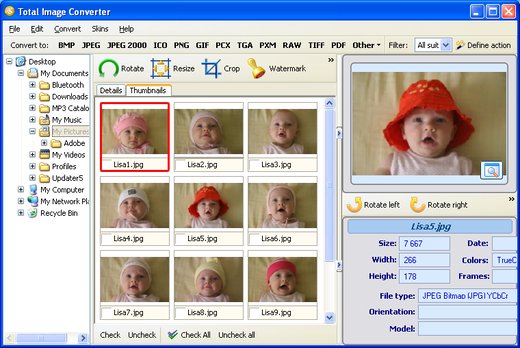
Description: Total Image Converter converts images to other formats, crops, resizes and rotates them. Convert large TIFFs into small JPEGs, make photos suitable for the web or recover old photos in unsupported formats - Total Image Converter will do everything you need.

Supports TIFF, JPEG, RAW, PNG, BMP, PSD, TGA, and many other image formats;
Works incredibly fast with new multi-threading feature;
Converts CMYK to RGB;
Handy resize and crop options to make your photos smaller;
Watermarking: add your comment, logo or date.

Unique options of Total Image Converter
/image converterTotal Image Converter supports TIFF, JPEG, JPEG2000, RAW, PNG, BMP, ICO, PSD, TGA, PCX, PCD and many other rare image file types files complete list).
rotate imageAlong with conversions you can rotate your images! All is done in batch so you save a lot of your valuable time.
resize cadWith Total Image Converter it's very easy to resize your photos or images.
colorWith Total Image Converter you can specify the color space for your output images.
combine foldersWhat to combine images within folders? No problem! Our powerful batch image converter can do that too.
frame jpegTotal Image Converter will also add a frame to your images in batch.
interfaceConvert TIFF, JPEG, PSD and many other files in seconds via our clear wizard-mode interface (thumbnails or file lists with details).
/image formatsThe widest list of output file types: PDF, TIFF, BMP, PNG, JPEG, JPEG2000, ICO, GIF, PCX, TGA, PXM, PS, PCL! Besides, it supports many rare formats like PALM, PICT, XPM, FIX, etc.
html converterTotal Image Converter supports almost all RAW camera photos (CRW, CR2, NEF, PEF, RAF, X3F, RAW, BAY, ORF, NRW, SRF, MRW).
previewThe built-in Preview panel helps you to view each file full-sized and learn the indo about it.
/image watermarkAdd text watermarks to the header or the footer of the output file to prevent unauthorized use.
dxf to pdfWhen you convert images to PDF you can set user permissions, password-protect your files or sign them with your digital signature.

Release Name: CoolUtils Total Image Converter 8.2.0.298
Size: 106.9 MB
Links: HOMEPAGE – NFO – Torrent Search

Download: RAPiDGATOR

7 Comments
May 5

High-Logic FontCreator Pro 16.0.0.3061

Description: The world's most popular font editor. With over 5 million downloads to date, FontCreator is considered the world's most popular and best font editor. Create and edit (variable) OpenType and web fonts. An advanced feature set makes it the tool of choice for professionals, and its intuitive interface is straightforward enough for users at any expertise level.
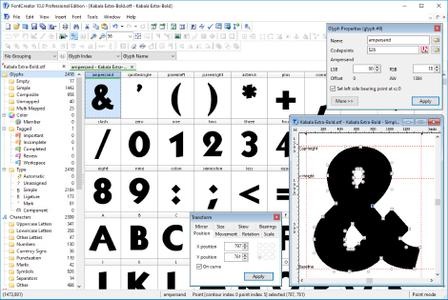
The newest release of FontCreator introduces hybrid glyph outlines, allowing designers to combine contours and components for greater creative flexibility. Now supporting the .glyphs file format, the software enhances collaboration by improving the interchangeability of font project resources. FontCreator provides a "what you see is what you get" (WYSIWYG) editing environment with real-time font proofing and testing during the design process. An upgraded shaping engine and interactive proofing tool further enhance your editing capabilities. Additionally, the join contours feature now supports cubic curves.

When you open or create a font in FontCreator, it displays all available characters in an overview. You can easily add missing characters or select and modify existing ones. The software enables you to import scanned images of signatures or company logos, and even create fonts from your own handwriting. You can adjust character code-points, font names, glyph names, and kerning pairs. At any point, you can preview your typefaces before installing them. FontCreator also allows you to create Variable Fonts by defining axes and outline layers. OpenType features are preserved when opening a font, and the OpenType Designer lets you visually edit these features and lookups. The OpenType proofing tool helps you quickly identify and fix text layout issues. Supporting both quadratic and cubic-based contours, this professional font editor includes smart features to ensure smooth connections where needed. Its validation tools assist in locating and resolving possible outline and interpolation issues.

As a fully native font editor, FontCreator doesn't require any additional purchases or installations of third-party tools or extensions.

Font Overview with Categories
The glyph and character category panel gives you quick and easy access to the glyphs, character subsets and Unicode ranges.

OpenType, TrueType and Web fonts
FontCreator supports all common font formats, including OpenType, TrueType, and Web Open Font Format (WOFF and WOFF2). These fonts are universally accessible across Windows, Mac OS X, Linux, and all modern web browsers.

Design High Quality Fonts
The standard and professional edition include font validation features which enable you to improve the quality of your fonts by locating and solving common glyph problems.

Optimize Contours
Optimizing glyph outlines will reduce the number of points that make up the contour(s). It supports both quadratic and cubic bezier curves.

Import Vector Images
High quality vector graphics can be easily imported. You can even copy and paste between FontCreator and your favorite vector editing software.

Import Raster (bitmap) Images
Effortlessly import scanned images of your handwriting or manuscript into fully-fledged glyph outlines.

Scalable Color Fonts
FontCreator is a versatile font editor that allows you to make scalable color fonts, supporting both COLR and SVG color extensions. This allows you to create multi-colored glyphs for systems that support it, while maintaining backwards compatibility for systems that do not.

Visual OpenType Designer
The intuitive OpenType Designer allows you to easily generate and modify OpenType layout features for both glyph substitutions and glyph positioning. The build-in anchor manager makes adding and editing mark to base and mark to mark positioning a breeze!

Kerning
Manually add kern pairs to your font supporting both individual glyphs and glyph classes. Alternatively let Autokerning take care of kerning for you in the standard and professional edition.

Powerful Transform Wizard
Both the standard and professional editions offer a robust transform wizard, simplifying the glyph transformation process with just a few clicks. Effortlessly add characters for other languages, small capitals, and beyond or transform your font to Italic or Bold.

OpenType Feature Proofing
Use FontCreator to debug OpenType layout features with the interactive proofing tool. It uses an advanced shaping engine which allows you to view, create, edit, and debug even the most complex fonts.

Optical Metrics
The optical metrics feature in the professional edition simplifies one of the most complex and time-consuming tasks in font design. It analyzes a set of the most common characters to find the best left and right side-bearings for each of these glyphs.

Complete Composites
The standard and professional edition allow intelligent generation of character outlines for more than 3000 (mostly accented) composite characters. It supports both composite data definitions and anchor based positioning .

Release Name: High-Logic FontCreator Pro 16.0.0.3061
Size: 29 MB
Links: HOMEPAGE – NFO – Torrent Search

Download: RAPiDGATOR

6 Comments
May 5

QuarkXPress CopyDesk 2025 v21.1.2.57597

Description: QuarkXPress CopyDesk is content collaboration software that enables copy and image editing without altering an established layout. Once a page design is set, headlines, subheads, copy blocks, photos and graphics can be designated as new or editable components for writers and editors to add or adjust.

Text can be amended; images placed, cropped or rotated; and additional copy written to a precise fit. A single workflow for designers and production managers plus writers, editors and subject-matter experts reduces errors and streamlines the publishing process to ensure deadlines are met.

Maintain Design
by enabling only certain components to be edited.

Edit Copy and Images
to fit precise QuarkXPress page layouts.

Improve Collaboration
between design and editorial teams to reduce review cycles.

Meet Deadlines
with a single, automated workflow that makes publishing processes more efficient.

Benefits of QuarkXPress CopyDesk
Enable your design and editorial teams to collaborate, reducing review-approval cycles to streamline your content production and publishing processes. QuarkXPress CopyDesk facilitates copy review, copy editing and basic photo editing while maintaining the integrity of your page designs. With the software, you can

- Develop a single, automated workflow for more efficient content production and publishing processes, eliminating numerous review-approval cycles.
- See an exact representation of the QuarkXPress layout but only enable edits to specific components as designated by the designer/design team.
- Maintain attributes such as style sheets, article geometry, hyphenation and justification
- Edit existing copy, change headlines, insert notes, place photos and make basic photo edits.
- Add headlines, subheads and images plus fit copy precisely to the final QuarkXPress layout.
- View notes, tracked changes and content additions within the context of layouts, improving communication and collaboration among team members.

Automated Workflow
Establish automated processes for accessing, reviewing and editing layouts.

Multiple Views
View content in galley, full screen or WYSIWYG view – or all three simultaneously using split view.

Word-Processor Compatibility
Work with Microsoft Word and other common word processors, all while preserving colors, styles and formatting.

Multi-Language Support
Choose such UI languages as Dutch, International English, U.S. English, French, German, Swiss-German, Italian, Japanese, Polish, Russian, Spanish and Swedish.

Precision Copy Fit
Add new copy to fit the layout with unmatched precision.

Notes
Place electronic notes directly within copy that can travel with the content.

Redlining
Use redlining to track revisions, providing team members with a record of changes.

Image Import
Import images in standards formats like native PSD and AI.

Photo Editing
Make basic edits to photos, including cropping, scaling and rotation.

Release Name: QuarkXPress CopyDesk 2025 v21.1.2.57597
Size: 1.4 GB
Links: HOMEPAGE – NFO – Torrent Search

Download: RAPiDGATOR

6 Comments