Please REGISTER or RENEW your account on RAPiDGATOR.net and support us by doing through all RAPiDGATOR working download links on main posts...
May 2

DartiGeo 1.0.0

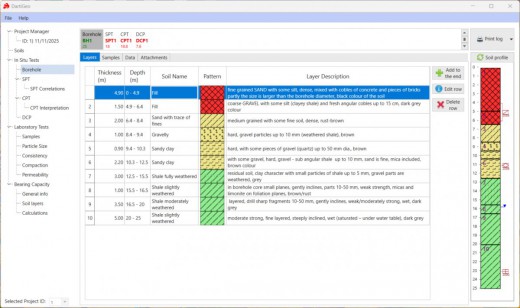
Description: DartiGeo: Comprehensive Geotechnical Engineering Software Suite. DartiGeo is a comprehensive geotechnical engineering software suite that integrates field data collection, laboratory testing, reporting, and design calculations — eliminating the need to juggle multiple standalone programs. As a leading geotechnical software solution, DartiGeo offers a streamlined approach to geotechnical data management and analysis.

Perfect for Streamlined Geotechnical Workflows
DartiGeo is designed to solve the common pain points of geotechnical engineering workflows: scattered data, manual calculations, and inconsistent reporting. Choosing DartiGeo means opting for an integrated, reliable process that enhances geotechnical modeling and analysis.

Release Name: DartiGeo 1.0.0
Size: 174.8 MB
Links: HOMEPAGE – NFO – Torrent Search

Download: RAPiDGATOR

7 Comments
May 2

LumaBooth 8.1.25

Description: The long-loved dslrBooth has been renamed to LumaBooth for Windows. It’s the same powerful features and rock-solid reliability that photo booth professionals have relied on for years. LumaBooth for Windows is now part of the LumaBooth platform, which brings the added ability to create and edit events using a web-based dashboard, including hundreds of pre-made layouts and overlays to make it even easier to set up your events.

Capture
Capture photos, GIFs, boomerangs, videos, and 360s with the LumaBooth for Windows photo booth app.

Customize
Shape your photo booth experience to fit your event or brand from start screen to theme color to video and print layout customization.

Share
Share using email, SMS, Instagram, QR code, AirDrop, WhatsApp, or physical paper prints of any size.

The easiest photo booth software
Running a photo booth shouldn't be complicated or expensive. Run LumaBooth for Windows PC photo booth software on your pc, hook up your Canon, Nikon, Sony, GoPro, or Webcam and you have a professional photo, 360, video, and GIF booth.

Release Name: LumaBooth 8.1.25
Size: 238.5 MB
Links: HOMEPAGE – NFO – Torrent Search

Download: RAPiDGATOR

5 Comments
May 2

Splunk Enterprise 10.2.3

Description: Search, analysis and visualization for actionable insights from all of your data. The Splunk platform enables end-to-end visibility from edge to cloud. Explore data of any type and value — no matter where it lives in your data ecosystem.

Analyze your data
Drive business resilience by monitoring, alerting and reporting on your operations.

Visualize your data
Create custom dashboards and data visualizations to unlock insights from anywhere — in your operations center, on the desktop, in the field and on the go.

Act on your data
Use data from anywhere across your entire organization so you can make meaningful decisions fast.

Access your data, no matter where you are
Leverage the Splunk platform from anywhere, whether you’re on-premises, at home, in your data center or a combination of them all with a unified hybrid experience.

Machine learning and AI
Predict and prevent, don’t just react. Improve security and business outcomes by bringing machine-level intelligence to your data.

Data streaming
Collect, process and distribute data to Splunk and other destinations in milliseconds with real-time stream processing.

Scalable index
Collect and ingest data from thousands of sources and counting, all at terabyte scale.

Collaborative tools
Interact and collaborate from anywhere with mobile, TV and augmented reality capabilities.

Analytics workspace
React instantly with visualization. Convert logs into metrics, boost search and monitoring performance, and streamline alerting functions.

Powerful dashboards
Easily communicate even your most complex data stories using our intuitive dashboard-building experience.

Release Name: Splunk Enterprise 10.2.3
Size: 1 GB
Links: HOMEPAGE – NFO – Torrent Search

Download: RAPiDGATOR

6 Comments
May 2

BackupAssist Desktop 15.0.3

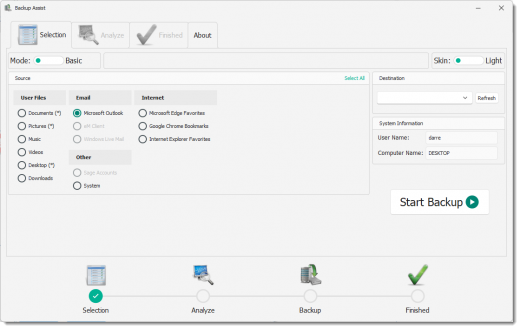
Description: Easy, business grade backup protection for work from home computers. With millions now working from home, valuable company data can go unprotected. Now you can protect WFH computers – system and data – easily with BackupAssist WFH.

Featuring easy configuration, central monitoring, and affordable per-user pricing, it’s easy to back up your employees’ home computers. That’s easy cyber-resilience for your business and your employees!

With BackupAssist WFH
- Both data and systems are backed up, mitigating risk of data loss.
- Get running again quickly. Employees do their own file restores and system recovery.
- Company data gets backed up to company storage. Recordkeeping is easy. Security is assured.
- Centralized monitoring, maintenance and protection of data

System and file protection
- Flexible system and file protection
- System image to local USB HDD for fast system recovery
- File backups to cloud
- File backups to local USB HDD

Separate work from personal
- Work data is backed up to work-provided storage.
- Personal data can be excluded from the work backups.

Handles many WFH scenarios
- Company provided laptops.
- Employee owned, work-only computers
- Employee owned, mixed work/personal computers.

Business-grade protection
All cloud backups feature data deduplication, encryption and compression.

BYO storage = complete control
- Cloud storage – use a company Azure or AWS S3 storage account. Satisfy data sovereignty and handling requirements.
- Local USB HDD storage – use inexpensive, company-owned media for fast recovery.

Friendly for I.T. administrators
- Pre-configuration makes it easy for non-technical staff to install and use.
- Central monitoring for easy visibility.

Benefits for your business
- Ensure business continuity
- Ensure legal compliance with data handling
- Data sovereignty – company cloud account (AWS/Azure), choose where to store data
- Data secured with business grade encryption
- Multiple restore points
- Consistency of data protection

Supported Platforms

Microsoft Server Operating Systems
- Microsoft Windows Server 2022 family - Supported from v11.1.0
- Microsoft Windows Server 2019 family - Supported from v10.4.5
- Microsoft Windows Server 2016 family - Supported from v9.5 (not Nano Server)
- Microsoft Windows Server 2012 R2 family
- Microsoft Windows Server 2012 family

Microsoft Client Operating Systems
- Microsoft Windows 11 (64-bit) - Supported from v11.1.0
- Microsoft Windows 10 (64-bit)
- Microsoft Windows 8.1 (64-bit) (Professional, Enterprise) Not supported in v11 or later

Microsoft Application Servers
- Microsoft Exchange Server 2019 - Supported from v10.5*
- Microsoft Exchange Server 2016 - Supported from v9.2
- Microsoft Exchange Server 2013
- Microsoft Exchange Server 2010 Service Pack 3
- Microsoft SQL Server 2017 - Supported from v10.5
- Microsoft SQL Server 2016 - Service Pack 2
- Microsoft SQL Server 2014 - Service Pack 3
- Microsoft SQL Server 2012 - Service Pack 4

Release Name: BackupAssist Desktop 15.0.3
Size: 63.5 MB
Links: HOMEPAGE – NFO – Torrent Search

Download: RAPiDGATOR

7 Comments
May 2

LibRaw FastRawViewer 2.0.11.2088

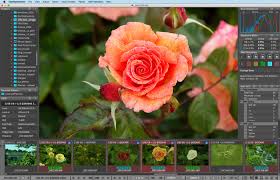
Description: FastRawViewer opens RAW files extremely quickly and renders them on-the-fly, instead of just displaying embedded JPEGs. It allows a photographer to see the RAW exactly as a converter will "see" it, without any delays or waiting time, guaranteeing the possibility to sort and cull RAW images lightning fast and based on the quality of the RAW itself, not JPEG previews.

FastRawViewer's RAW-based tools (unique ones such as RAW histogram, RAW statistics, Shadow Boost, Highlight Inspection, Focus Peaking, per-channel view, as well as familiar ones like Exposure Compensation, White Balance, Contrast Curves) allow one to estimate what a converter will be able to squeeze from the RAW image data and make preliminary adjustments to the RAW file, which will be read and applied by Adobe converters.

FastRawViewer provides tools for the rating, labeling and sorting photos, and filtering of any number of RAW images.

FastRawViewer supports a variety of RAW, JPEG, TIFF, and PNG formats.

FastRawViewer is very user-friendly and seamlessly integrates into any existing RAW workflow. It is extremely flexible; nearly all of its settings can be tuned and keyboard/mouse shortcuts can be changed according to individual habits and preferences.

Release Name: LibRaw FastRawViewer 2.0.11.2088
Size: 37.5 MB
Links: HOMEPAGE – NFO – Torrent Search

Download: RAPiDGATOR

7 Comments
May 2

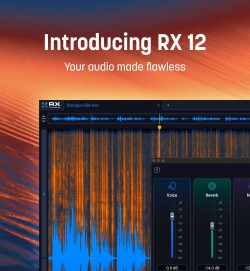
iZotope RX 12 Audio Editor Advanced 12.0.0

Description: Award-winning audio restoration software. Your audio, made flawless. For decades, RX has pushed what’s possible in audio editing and restoration – bringing out the magic in every scene, song, and story. Powered by pioneering machine learning tech, it’s the supporting star behind countless Oscars, GRAMMYs, and Emmys, the winner of technical Academy Awards, Engineering Emmys, and more.

All-in-one audio restoration
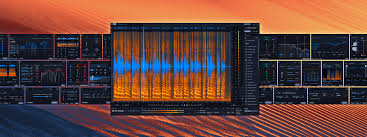
RX’s 50+ tool ecosystem is everything you need to rescue, refine, and enhance every project – blending surgical control with rapid results. Fully flexible, RX 12 includes a standalone audio editing application and a suite of software plugins to use in digital audio workstations.

RX 12 is here, ushering in a new era of machine learning technology designed to make the impossible possible. This latest generation of the industry-standard restoration suite introduces groundbreaking source separation tools and fix-it-fast workflows that work for everyone, from Oscar-winning post professionals to bedroom creators.

Whether you are fixing cross-signal leakage in a vocal booth or rebalancing a full mix without stems, RX 12 provides the surgical control you need to deliver flawless audio for every scene, song, and story.

New and improved features in RX 12:
Scene Rebalance
Intelligently separate dialogue, music, and effects from a single stereo render for independent leveling and editing.
Availability:NEW (Advanced)

Stems View
A track-based workflow that lets you apply the full RX toolkit to individual isolated stems.
Availability:NEW (Standard & Advanced)

Trim Silence
Automatically detect, adjust, and standardize regions of silence in long audio files to speed up editing.
Availability:NEW (Advanced)

De-bleed
Rebuilt to remove headphone or instrument bleed without needing a reference track. Includes a new real-time plugin.
Availability:REBUILT (Standard & Advanced)

Breath Control
Rebuilt with cutting-edge ML for significantly higher accuracy in detecting and removing breaths.
Availability:REBUILT (Standard & Advanced)

Music Rebalance & Dialogue Isolate
Upgraded neural nets for pinpoint stem isolation and cleaner, more transparent voice processing. Includes a new real-time plugin.
Availability:IMPROVED (Standard & Advanced)

Design Updates
Work faster with a larger spectrogram, new module search, and resizable history panel.
Availability:NEW (All versions)

Release Name: iZotope RX 12 Audio Editor Advanced 12.0.0
Size: 1.1 GB
Links: HOMEPAGE – NFO – Torrent Search

Download: RAPiDGATOR

5 Comments
May 2

Lazesoft Windows Recovery 5.1.1.1

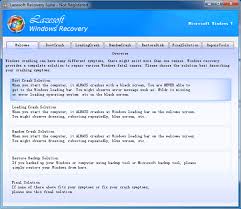
Description: Windows can't boot normally? Need to Correct the boot problems or retrieve your important files. Lazesoft Windows Recovery offers home users and businesses complete solutions to fix boot problem, retrieve valuable files, Undelete Partition, etc.

With easy to use interfaces, you can using Lazesoft Windows Recovery to correct boot problems by yourself avoided reinstall your Windows. No technical background is required. You can use Lazesoft Windows Recovery backuping your entire Windows system or disk before repair. The most fix operation just need one click and the operation is undoable. If you donot satisfied the fix result, you can just undo it.

The following are the new features in Lazesoft Windows Recovery:
Added Windows 11 Support
Minor GUI improvements
Minor bug fixes

Create Recovery CD (bootable) or USB Disk to load
Lazesoft Recovery Suite is capable of loading completely from a Lazesoft Recovery Suite Live CD, When your operating system is not able to boot, you can boot from it to run recovery tools.
One Button Click to Repair the crashed Windows system
Rebuild/Repair the Boot Menu
Added Lazesoft BCD Doctor
Support various brands of desktops PC, laptops.
With WinPE-based and linux-base bootable disk builder, Lazesoft Recovery Suite has best hardware compatibility.
Support WinPE USB boot disk.
Create PE Recovery Disk on 32 and 64 bit of Windows 7, 8.1, 10, 11

Fix boot problems with Lazesoft Recovery
Recover Windows from critical system errors when BSOD or it displayed a black screen.
Recover MBR even if when a boot virus has corrupted the MBR.
One Click Repair Windows System Partition Boot Sector
Recover missing or corrupted Windows system files such as 'ntldr is missing', 'bootmgr is missing', etc.
Recovery or edit corrupted registry, virus-infected registry key value.
Edit and Repair Windows boot file boot.ini or BCD
Rescue Windows 7, 8.1, 10, 11 32 and 64 bit.
Generate Report on Windows Recovery

Retrieve your critical data with Lazesoft File Manager
Access and copy files from computer even if Windows can't start.
Boot from Lazesoft Recovery Suite Recovery CD or USB Disk to copy files to another local disk.
Added Start Menu on boot disk

Registry Editor & Registry Recovery
View and modify settings of any Windows system registry in the offline mode.
Auto Recover corrupted registry to Previous Normal State
After Recovery, you even had an option to Undo the Registry Recovery Operation.

Undelete Partition
Recover partition after accidental deletion or partition table damage
Preview partition files before save it.
Support FAT, NTFS partition.

Release Name: Lazesoft Windows Recovery 5.1.1.1
Size: 239.3 MB
Links: HOMEPAGE – NFO – Torrent Search

Download: RAPiDGATOR

6 Comments
May 2

Soda PDF Desktop Pro 15.0.10.24664

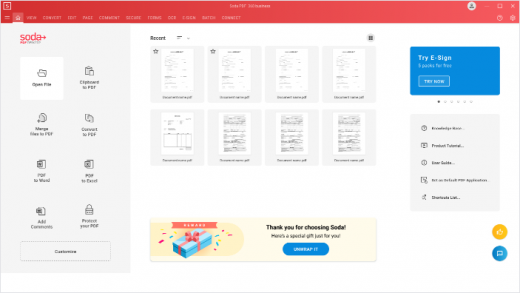
Description: Powerful PDF tools made simple. Say goodbye to complicated software & hello to easy-to-use PDF tools. Edit, merge, convert, compress, sign & secure your documents in just a few clicks.

Revising a document is hard, we make it easy
Create, modify or remove text in your PDF. Draw, stamp, whiteout & highlight paragraphs.

Work across multiple devices
Access your files online or offline on any platform. Start from your computer, save to Dropbox, Google Drive, SharePoint or Evernote & finish the job on your phone.

Prepare documents faster
Quickly convert multiple files with our batch tool. Avoid re-typing by transforming scanned documents or images into editable PDFs in just a few clicks.

Manage files smarter
Protect your information through cost-effective security measures. Whiteout or redact sensitive information, secure files with a password or set permissions, export PDFs to other file types or archive your data using the PDF/A format.

Made for Professionals
With advanced security and collaboration features, Soda PDF is easy to adopt and helps increase productivity. Access all Soda PDF functionalities in the cloud, from any mobile device. You can even prepare and send your contracts for e-signature directly through Soda PDF. With multiple deployment options, volume licensing discounts and a dedicated support team, businesses have it all.

Release Name: Soda PDF Desktop Pro 15.0.10.24664
Size: 472.9 MB
Links: HOMEPAGE – NFO – Torrent Search

Download: RAPiDGATOR

6 Comments
May 2

VectorStyler 1.3.015

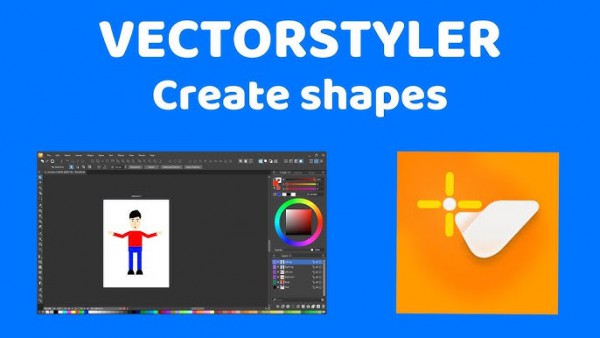
Description: VectorStyler brings every advanced vector and illustration tool together — in one complete, independent package, with no subscriptions and no compromises. Packed with powerful, unique tools you won’t find anywhere else — VectorStyler redefines what’s possible in vector illustration.

Customizable User Experience
Customize all aspects of the user interface and workflow, including shortcuts, menus, toolboxes and toolbars. Create and save your own workspace profiles.

Native Illustrator Import
Open, import or paste artwork from Adobe Illustrator using the native Illustrator file format support, retaining all high-level editable attributes.

Extended Compatibility
Import artwork and export to various common file formats like AI, PDF, SVG, DWG, DXF, PSD, PNG and TIFF. Import and export PSD files while retaining layer hierarchy and keeping editable vectors.

Powerful Snapping Options
Use advanced snapping options for precision, including rotated grids and guidelines, collision and tangent to shape snapping. Turn any object shape into a guideline.

Real Vector Brushes
Paint with and use real vector brushes on any shape or outline. Brushes can be of artistic, pattern, scatter or bristle type. Create new brush styles or presets from any group or layer.

Select Objects by Attribute
Select objects by style or other attributes. Select objects with a similar style or attribute as the selected objects.

Magic Wand Tool
Use the magic wand selection mode and the Magic Wand panel to select objects similar to the pointed object. Select similar shapes by area or length.

Color Palettes
Work with document and global color palettes easily. Open multiple color palettes from external formats. Manage palettes seamlessly.

Advanced Halftones
Create complex vector halftones on layers or images. Work multiple halftones on one object using the Appearance panel

Align Object on Path
Create non-destructive object alignment on path. Align and distribute multiple objects on a path

Vector Drop Shadow
Create vector drop shadow effects on objects or groups. Adjust the drop shadow options using the Drop Shadow panel.

Parametric Shapes
Draw with a large collection of parametric shapes. Adjust shape properties using the Shape panel. Use the Node tool to edit parametric shapes.

System Requirements
- VectorStyler is (also) a native Windows (Intel) application, and requires a PC with Windows 10 installed to run. A minimum of 8GB of system memory is recommended. More memory helps when creating complex designs or illustrations.
- Only Windows 10 or newer versions are supported. An Intel Core i5 or i7 processor with 4 cores and hyper-threading is recommended as VectorStyler makes extensive use of multiple threads. GPU acceleration can be enabled in the Settings / Performance by selecting OpenCL (any GPU supported by Windows), or the NVIDIA mode for Nvidia GPUs.

Release Name: VectorStyler 1.3.015
Size: 79.7 MB
Links: HOMEPAGE – NFO – Torrent Search

Download: RAPiDGATOR

5 Comments
May 2

Draftable Desktop 26.4.0

Description: Document Comparison Software for Desktop. Compare PDF, Word, PowerPoint & Excel documents side by side on your computer. Comparisons don't use the internet and your documents never leave your computer. For secure collaboration, export the comparison as a PDF, and share a password protected version of the output.
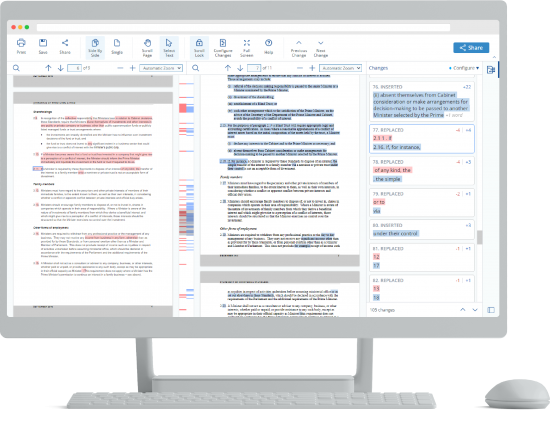
Compare anything to anything
Draftable compares any combination of files

- PDF (.pdf)
- Word (.doc, .docx, .docm, .rtf)
- PowerPoint (.ppt, .pptx, .pptm)
- Excel (.xls, .xlsx, .xlsxm, .csv)
- Text (.txt)

Confidential and private
- Comparisons don't use the internet and your documents never leave your computer.
- For secure collaboration, export the comparison as a PDF, and share a password protected version of the output

Secure collaboration with anyone
Use our powerful solution to enhance collaboration

- View comparisons in your native PDF viewer
- Built to enable secure internal and external collaboration
- Our export to PDF feature enables you to easily share comparisons
- Exported PDFs able to be password protected for increased security

Side by Side View
Our side-by-side view lets you track changes in seconds. As you scroll, both docs stay in sync.

Single Page View
Switch to a single page view to see all changes in a redline view.

Change List
See every change together in one list. Click on a change that interests you, and you’ll be taken to that point in the doc.

Export to PDF
Export comparisons to PDF format for easy sharing with others. Available with both single-page and side-by-side view.

Content & Text Style Changes
It’s not just about content. See changes to text styles like font, font size, bold and italics.

Minimum requirements
- Operating system: Windows 10
- Processor: 1.8 GHz Processor
- RAM: 2 GB
- Disk space: 1.5 GB (This excludes space required for document files or dependencies.)

Software requirements
- To compare Word, PowerPoint and Excel documents, Office 2007 or later is required (Both 32 & 64 bit versions supported).
- To use the 'Export to Track Changes' feature, Office 2013 Pro Plus or later (including Office 365) is required.

Recommended requirements
- Operating system: Windows 11
- Processor: Dual-core or better (>1.8 GHz) Processor
- RAM: 4 GB (Draftable Desktop will use as much RAM as needed. For larger documents, you may need more than 4 GB RAM)
- Disk space: 1.5 GB (This excludes space required for document files or dependencies.)

Software requirements
- To compare Word, PowerPoint and Excel documents, Office 2007 or later is required (Both 32 & 64 bit versions supported).
- To use the 'Export to Track Changes' feature, Office 2013 Pro Plus or later (including Office 365) is required.

Release Name: Draftable Desktop 26.4.0
Size: 482.7 MB
Links: HOMEPAGE – NFO – Torrent Search

Download: RAPiDGATOR

6 Comments