Please REGISTER or RENEW your account on RAPiDGATOR.net and support us by doing through all RAPiDGATOR working download links on main posts...
May 1

ChrisPC VideoTube Downloader Pro 15.26.0430

Description: A powerful software that allows you to download videos from BBC iPlayer, YouTube, Vimeo, Dailymotion, Metacafe, Viaplay & convert them to video formats compatible with iPad, iPhone, MPEG-4, MP3.
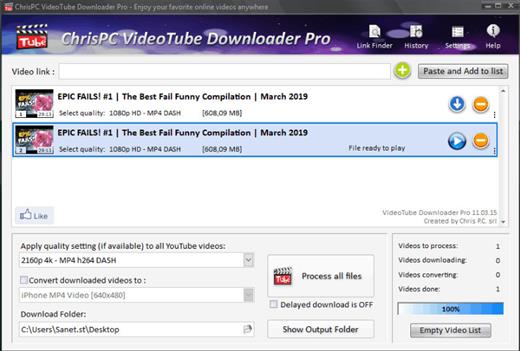
ChrisPC VideoTube Downloader is a powerful software with a friendly user interface that allows you to download videos and playlists from YouTube, videos from Dailymotion, BBC iPlayer, ITV Player, Viaplay, ABC, FOX, CBS.com, Vimeo, Prosieben, Metacafe, CBC.ca many more video websites. Once the videos are downloaded, you can convert them to formats compatible with iPad, iPhone, iPod, MPEG-4 H.264, MP3, AC3.

Version 14 comes with new features and improvements:
Added new advanced features Playlist Preview and Playlist History for YouTube videos, that lets you easily find the videos you want to download from a playlist.
The Playlist Preview loads all available videos from a playlist and lets you filter/search the list by name. You can also sort the list alphabetically, by duration or author.
Video selection can be made individually by clicking the checkboxes from 1st column or by batch using the SHIFT key and UP/DOWN arrow keys (or mouse) and pressing the SPACE key.
With Playlist History you can monitor new videos added to a playlist from previous versions or compare it with another list.
Added the option Set live recording end time (available for YouTube live streams and M3U8 streams, by pressing on the 3 dots menu of the video). It can be adjusted at any time during live recording.
Added the option Disable sleep mode while software is running, it will prevent your PC from entering in sleep mode (Settings->Advanced settings).
Link Finder Expert is a new powerful feature to be used when you can`t detect and download your video using copy/paste mode or with Link Finder engine.
Improved detection using Link Finder for videos from My5, Channel4, TVNow, TVNZ, threenow, UKTV Play, RTEPlayer, TG4, Atresplayer, NPOStart, 9Now, 7Plus, GlobalTV, CityTV, CTV, VirginPlayer, TF1, Prosieben, 6play, TVAPlus, VRai, MediasetPlay, Kijk, Zee5 and many more.
Added the Advanced Mode to Link Finder engine, which lets you choose the browser type from a list of 25+ browser configurations, like Safari on iPhone, Edge on iPad, Chrome on Android and many more. This way, you can find different video streams (like M3U8, MPD, MP4 or MP3) for the same video content depending on the platform it is played on.
Added advanced settings where you can choose how many parts to be downloaded at same time for M3U8 and MPD DASH streams. If your Internet connection is fast you can download up to 10 parts simultaneous.
Improved download speed by up to 15x times for M3U8, MPD and F4M streams.
Added segmented download option to improve YouTube video download by up to 12x times.
Improved Link Finder engine detection of HTML 5 videos, M3U8, F4M, MPD, MP4, M4A, M4V, MP3 video and audio streams.
Video Download History keeps a log of all your downloads, helps you find downloaded videos by title, author, day of download.
Added the option to automatically select subtitle language to download for YouTube, ITV, BBC, CBS, ABC, NBC, FOX and others.
You can download videos up to 3 GB with the free version from the popular video websites: YouTube, Vimeo, DailyMotion, Metacafe.
Record live streams from YouTube, Livestream, Ustream, M3U8 HLS and F4M HDS streams.

Release Name: ChrisPC VideoTube Downloader Pro 15.26.0430
Size: 51 MB
Links: HOMEPAGE – NFO – Torrent Search

Download: RAPiDGATOR

7 Comments
May 1

BeerSmith 4.0.19

Description: Find out how to design world class beers at home, improve your brewing experience and simplify your brewing day. Make mead, wine and cider as well with BeerSmith. As you gain in experience, BeerSmith grows with you.

Design Great Beer at Home
Design award winning beers with BeerSmith by matching the style and color of classic beers from around the world. Instantly search and access 10's of thousands of recipes on BeerSmithRecipes.com within BeerSmith.

Watch BeerSmith In Action!
Watch our BeerSmith 3 Video Tutorials - The world's most advanced beer brewing software used by hundreds of breweries worldwide.

Fun Fast and Easy to Use
Years in the Making - BeerSmith 3 has been redesigned from the ground up to give it a modern look and feel with ribbons, themes and tabbed browsing. Its designed to make your brewing as easy to use as possible.

Mead, Wine and Cider Support
BeerSmith 3 now includes support for mead, wine and cider recipe types as well as new native support for fruit, juice and honey to make it easier than ever to build and track your favorite beverages in one tool.

New BeerSmith 3 Water Profile and Mash pH Calcs in the Recipe
BeerSmith 3 is the only software with integrated water profile builder and mash pH estimation and adjustment built right in the recipe builder for all grain brewers. This lets you see the direct impact of a bit of gypsum on your water profile. The mash pH tool takes into account your mash water additions, grain bill and also acid adjustments. Eliminates the need for a separate water tool or spreadsheet.

Build Recipes Quickly
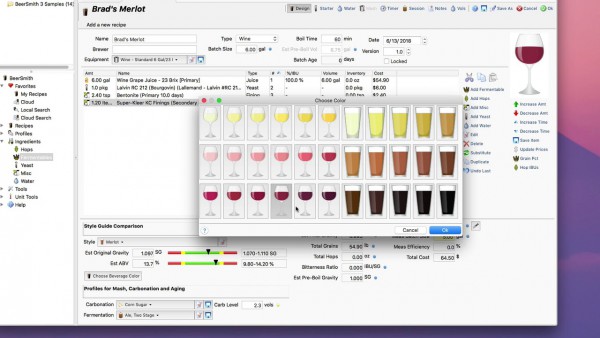
Building a recipe in BeerSmith is as easy as picking ingredients off a list. Hundreds of preloaded ingredients are available including grains, hops, yeasts, misc ingredients and waters. As you add ingredients, the color, gravity and bitterness are updated automatically.

Release Name: BeerSmith 4.0.19
Size: 21.2 MB
Links: HOMEPAGE – NFO – Torrent Search

Download: RAPiDGATOR
6 Comments
May 1

JP Software CMDebug 36.00.40

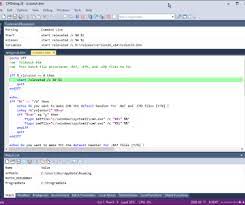
Description: CMDebug is a stand-alone version of the Take Command IDE and batch debugger. CMDebug is intended to help developers create a batch file to run in CMD (the Windows default command processor) or TCC-RT (the free runtime version of TCC). It provides a comprehensive set of batch debugging features specifically designed for batch file development.

CMDebug allows you to write and debug your CMD batch files with the integrated graphical IDE. CMDebug includes tabbed edit windows and a sophisticated debugger with single stepping, conditional breakpoints, syntax coloring tooltips, bookmarks, and tabbed breakpoint, call stack, variable, alias, and watch windows. Windows batch file programming has never been easier or more powerful!

You can use CMDebug to develop either CMD-compatible batch files (*.BAT or *.CMD), or faster (and far more capable) TCC-RT-compatible batch scripts (.BTM). If you select the "TCC Syntax" option, CMDebug supports the full TCC-RT command set. If you select the "CMD Syntax" option, CMDebug will disable TCC-only internal commands, variables, and functions, and use the limited Windows CMD batch file commands syntax. Some internal CMD / TCC commands will also behave slightly differently or modify their display output in order to match CMD's behavior (and bugs!) more closely.

Using CMDebug with the TCC-RT syntax option allows you to create and debug (and optionally encrypt) batch files using the TCC command language, and then distribute them with the free TCC-RT runtime on an unlimited number of target machines.

Release Name: JP Software CMDebug 36.00.40
Size: 42.9 MB
Links: HOMEPAGE – NFO – Torrent Search

Download: RAPiDGATOR

7 Comments
May 1

JP Software TCC 36.00.40

Description: TCC: Upgrading the Windows CMD Command Line Prompt. The command line is essential for developers, systems administrators and advanced users, offering many advantages to anyone wanting to save time, expand their control and/or to automate their tasks.

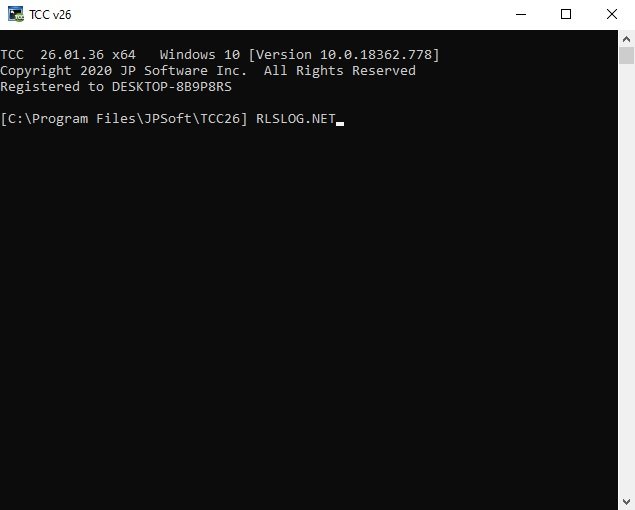
TCC is our console mode Windows command processor (formerly known as 4NT). TCC is a replacement for CMD.EXE, the default Windows command processor. TCC is compatible with your existing Windows console applications and batch files, but offers major improvements to the CMD prompt in command line editing, interactive file and system management, batch file programming and debugging.

TCC is a superset of CMD, with 275+ internal commands (CMD has about 42), 800+ internal variables and functions (CMD has 6), hundreds of additional options for existing CMD commands, and thousands of additional features.

Whether you're a seasoned CMD prompt user or just getting started, TCC is the tool that will take your command line prompt experience to the next level.

Why Switch From the CMD Shell to TCC?

Familiarity
TCC is a CMD replacement Windows command processor that is compatible with your existing CMD commands and batch files while adding hundreds of new commands, variables, and variable functions.

Productivity
TCC provides vastly improved line editing and tab file completion, and adds thousands of new features. You're immediately more productive, and you can learn TCC's new features at your own pace.

Batch Files
Create and debug your batch scripts in a fraction of the time with TCC's integrated editor and batch file debugger.

Comprehensive Help
The extensive help (including context-sensitive popup help for command and variable syntax) speeds your development time and reduces errors.

Syntax
TCC's internal commands share a consistent syntax, reducing your learning and development time.

Multilingual
The user interface is available in English, French, German, Italian, Russian, and Spanish. (Online help is available in English, French, German, and Spanish.)

Release Name: JP Software TCC 36.00.40
Size: 55 MB
Links: HOMEPAGE – NFO – Torrent Search

Download: RAPiDGATOR
6 Comments
May 1

JP Software Take Command 36.00.40

Description: Replace Your Windows Console and CMD Command Prompt Windows. The Windows Command Prompt shortcut is a Windows console (command line, or character mode) session that runs the default Windows command shell CMD.EXE.

The command line is essential for developers, systems administrators and advanced users. Unfortunately, CMD Windows commands and the Windows console UI have always been woefully lacking in ability compared to what is available in most other operating systems. Because of the limitations in CMD and the Windows console, users have been forced to use the GUI for inappropriate tasks, or even to write custom programs to perform simple tasks that CMD should have been able to handle.

Take Command is a comprehensive interactive GUI and Windows command line toolkit that makes your command prompt windows easier to use and far more powerful. Take Command includes optional Windows Explorer integration, tabbed console windows, and major enhancements to standard Windows CMD commands such as COPY, DEL, DIR, FOR, MOVE, REN, SET, and START And it and adds more than 235 new commands, command dialogs, command line syntax coloring, vastly improved command line editing, programmable filename and directory tab completion, and thousands of other features.

Take Command is also a powerful batch file programming tool, including an integrated IDE with a sophisticated editor and batch debugger. Take Command offers extensions such as DO loops, SWITCH statements, error and exception handling, system monitoring and event triggers, and more than 780 built-in variables and functions. And you can extend that with 3rd-party plugins and user-defined functions.

12 Reasons Why You Should Replace Your Windows Console
The Windows console is responsible for running character-mode applications, including CMD, PowerShell, WSL bash, etc. It was introduced in Windows NT 3.1 in 1993, and some major internal architectural improvements were made in Windows 10 and 11.

Unfortunately, the improvements to the user interface were relatively minor, and though some efforts were made to improve the CMD console UI in Windows Terminal, they fall far short of what Take Command has been providing for years.

So why replace it with Take Command?

The Windows console is slow, and even slower when using Windows Terminal. Take Command's tab windows typically display output between 20% and 300% faster.
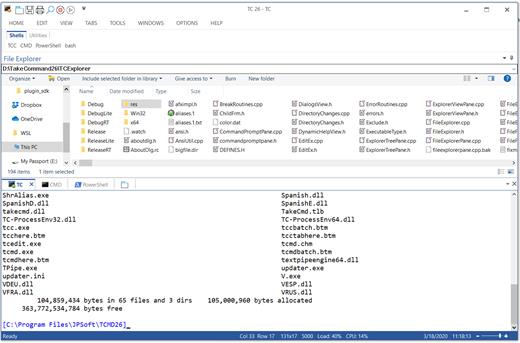
Take Command (like Windows Terminal) offers tabbed windows to run your character-mode applications. But Take Command takes it to another level by including vertical or horizontal tab groups and splitter windows.
Tabbed windows can be reordered, detached, or torn off, and existing console windows can be attached as new Take Command tab windows.
Take Command provides an optional embedded Windows File Explorer window that displays a tree view of the folders on your system and the contents of the selected folder (List View) on the right. You can drag folders and files from the Explorer window and drop them in a command prompt window.
Take Command can be easily configured for your preferences with its configuration dialogs.
Take Command has an optional tabbed tool bar that you can use to execute internal or external commands, aliases, or batch files with the click of a mouse (or an accelerator key). You can define up to 20 tabs, each with up to 50 toolbar buttons.
Take Command provides a configurable Status Bar that can display quick help for the current command, tooltips, and system information, including tab window size, CPU usage, memory usage, date & time, character values at the cursor location, and a slider control for window transparency.
Cut and Paste options are limited in the default CMD console or Windows Terminal. Take Command adds both line and column selection, double-click or triple-click selections, overwriting or appending to the Windows clipboard, and a variety of paste options.
Take Command windows can be styled with a choice of 18 themes.
Take Command and TCC offer a wide variety of colorization options, not just foreground and background colors.
Take Command includes invaluable tools, including a batch file debugging IDE, a regular expression creator / analyzer, search and replace in files, and a macro recorder / playback.
Extensive help (quick help, context sensitive help, and general help) is available in English, French, German, and Spanish at the touch of a button.

Release Name: JP Software Take Command 36.00.40
Size: 57.3 MB
Links: HOMEPAGE – NFO – Torrent Search

Download: RAPiDGATOR

6 Comments
May 1

Adobe Acrobat Reader DC 2026.001.21529

Description: Adobe Acrobat Reader DC is the completely reimagined desktop version of the world’s best PDF solution. And with Adobe Acrobat Reader DC, you can create, export, edit and track PDFs from anywhere - and stay connected to recent files across all your devices.

Clean feature lineup
The application allows you to write down comments and feedback using a separate frame in the right side of the window, while the reading space is not affected at all.

In fact, this is one of this tool's strong points: the interface is quite clean, but still manages to provide a lot of tools for zooming, selecting text, printing, adding bookmarks and many others.

Supported file formats and fast searches
A great thing about Adobe Reader XI is its ability to work with CAD designs and geospatial maps converted to Portable Document Format. Also, in case you need to locate any element within a PDF file, the application offers a comprehensive file searching engine that finds what you need in a matter of seconds.

Security tools
The security functions enable you to view and work with PDF documents without having to worry about malicious code being executed on your machine. The 'Protected Mode' and the 'Enhanced Security' features are designed to safeguard your computer and provide data protection and privacy.

Configuration settings
When it comes to customizing Adobe Reader XI, the Preferences area will give you the possibility to modify a wide range of settings. Comments, 3D and multimedia, measuring and reading options are available, as well as spelling or page units configurations.

In case you find Adobe Reader XI too difficult to use, the application includes a comprehensive help manual. Unfortunately you will need an Internet connection to access it, which means you won't be able to read the documentation in offline mode.

A top PDF viewer on the market
All things considered, with this software app you can't get it wrong simply because it still sets the standards insofar as PDF documents are concerned. Adobe Reader XI really works as advertised and is the leading tool for viewing Portable Document Format files.

Release Name: Adobe Acrobat Reader DC 2026.001.21529
Size: 1.2 GB
Links: HOMEPAGE – NFO – Torrent Search

Download: RAPiDGATOR
7 Comments
May 1

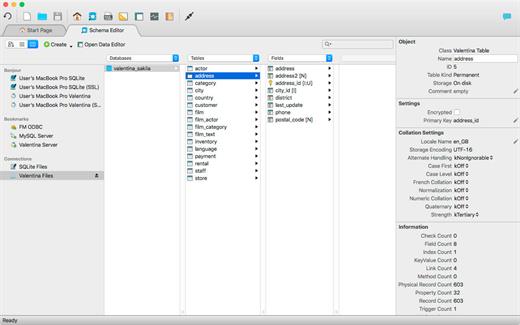
Valentina Studio Pro 17.3.1

Description: Create, administer, query and explore DuckDB, ValentinaDB, MongoDB, MySQL, MariaDB, PostgreSQL, MS SQL Server & SQLite databases for free.

Valentina Studio is your universal database management tool for working with DuckDB, MariaDB, MySQL, MongoDB, SQL Server, PostgreSQL, SQLite and Valentina DB databases. Valentina Studio lets you connect with all major databases, run queries and generate diagrams to better understand your mission critical business data - and that is the free version of Valentina Studio.

Schema Editor
Work with databases using diagrams, tree or column view.

Database Management
Universal database management tool for all major databases.

Virtual Links
Create virtual links where you need the functionality of foreign keys without creating foreign keys.

Database Query Builder
Build, test and execute SQL queries visually, drag-drop with Query Builder.

Data Editor
Clean data editor with high productivity tools for working with tables, records and fields.

Data Transfer
Specify mapping of source/target tables and fields and load records from db1 to db2.

Workspaces
Organize your tools, preferences, lists of recent datasources and more for individual projects.

SQL DIFF
Compare schemas of two databases and  transform the first schema into the second.

Valentina Forms
Create and add forms visually, and then your users can work with them in free Valentina Studio.

Report Designer
Transforms queries into visually stunning enterprise reports with full suite of design elements.

Continuous Integration
Continuous Integration (CI) tools for better software practices for databases.

SQL Editor
Full featured SQL Editor for writing, testing and executing queries with all supported databases.

Release Name: Valentina Studio Pro 17.3.1
Size: 147.7 MB
Links: HOMEPAGE – NFO – Torrent Search

Download: RAPiDGATOR

7 Comments
Apr 30

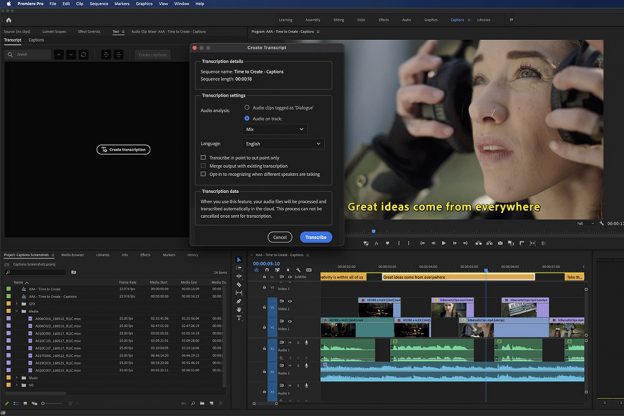
Adobe Speech to Text for Premiere Pro 2026 v2.2.5 Pre-Cracked

Description: With the Adobe Speech to Text add-in in Premiere Pro, you can automatically generate transcripts of your video dialogue and add captions to your video to increase accessibility and viewer engagement. As your video editing nears completion, use Adobe Speech to Text to create a transcription of your footage. Add speech-paced captions to your timeline using the machine learning capabilities of Adobe Sensei. Stylize your video captions and adjust their position using the editing tools in the Essential Graphics panel.

Features:


  • Caption to all videos. Captions make videos more accessible across platforms and increase viewer engagement, but their workflows were complex and time-consuming. With speech-to-text translation, Premiere Pro is making video captions the new standard.
  • Automated. Integrated. And completely creative. Speech-to-text translation automates transcription and subtitles while giving you full creative control over the results, including the full design power of the Essential Graphics panel.
  • Impressive accuracy in 13 languages. Speech-to-text translation is available to users worldwide, delivering accurate results and more opportunities to reach audiences wherever they are.
  • Built into Premiere Pro. Speech-to-text translation is included for free with your subscription, making it easy and efficient to add value to your video.
Release Name: Adobe Speech to Text for Premiere Pro 2026 v2.2.5 Pre-Cracked
Size: 13.8 GB
Links: HOMEPAGE – NFO – Torrent Search

Download: RAPiDGATOR
4 Comments
Apr 30

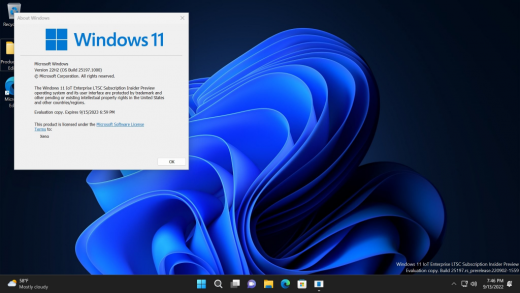
Windows 11 Enterprise/Iot Enterprise 25H2 Build 26200.8246 TPM Bypassed & Pre-Activated April 2026

Description: Windows 11, version 25H2 is an enablement update that builds on the features of 24H2 by enabling new, “continuous innovation” features, rather than introducing entirely new features itself. Key updates include a Braille Viewer for the Narrator, improvements to Click-to-Do (including a new “Convert to Table” feature), support for plug-in credential managers for passkeys, and enhancements to the mobile device companion experience. Microsoft is also implementing IT admin-focused features like the ability to remove pre-installed Store apps and a new Quick Machine Recovery system to reduce downtime.

Features


  1. Accessibility
    The Narrator now includes a Braille Viewer, allowing users to see the braille equivalent of on-screen text on a refreshable braille display.
  2. Passkeys
    Users can now utilize plug-in credential managers for setting up and using passkeys, offering improved security and management.
  3. Time & Language
    Ported settings from the Control Panel to the Settings app, including configuring additional clocks and changing the NTP time server.
  4. Mobile Experience
    The mobile device companion has a new, more accessible layout to view calls, messages, photos, and more from your phone.
  5. Click-to-Do
    New AI features for Click-to-Do are included, such as a new “Convert to Table” capability for converting text to an Excel table and more flexible selection methods.
  6. Quick Machine Recovery
    This new feature in the recovery system aims to reduce downtime and simplifies the process for recovering a system, according to PCMag.
  7. Removable Apps
    IT admins can now remove certain pre-installed Microsoft Store apps via Group Policy or MDM CSP on Enterprise/EDU devices.
  8. Feature Removals
    25H2 removes older components like PowerShell 2.0 and WMIC for greater security and efficiency.

Release Name: Windows 11 Enterprise/Iot Enterprise 25H2 Build 26200.8246 TPM Bypassed & Pre-Activated April 2026
Size: 6.7 GB
Links: HOMEPAGE – NFO – Torrent Search

Download: RAPiDGATOR

7 Comments
Apr 30

Roxio Easy VHS to DVD Plus v4.0.20 Pre-Cracked

Description: Technology changes and time passes, but you can keep your memories current. Imagine the excitement among your friends and family when they unwrap the gift of video! Now you can quickly convert old VHS tapes to DVD or digital, right at home! It’s easy.

You’ll find yourself equipped with all the tools you need to not only convert video, but to enhance it and even add titles. Then, when you’re ready, simply export your revived video to digital, or burn it to disc complete with chapters and menus. Keep the memories alive!

1. Connect
Connect your VHS player or camcorder to your PC with an RCA cable* and the Roxio capture device.

2. Capture & Edit
Import and capture video from your device. Organize media, trim video,and add titles or transitions.

3. Share
Burn to DVD with chapters and menus or save to popular formats to share online or to device.

Easy VHS to DVD 4 Plus - VHS to DVD Converter
- Convert VHS to DVD or digital
- Capture video from your camcorder
- Burn videos to disc with menus and chapters
- Make quick edits, trim video, enhance color
- Add transitions and titles

Capture and convert videos
- Give your old videos new life and convert legacy footage to digital
- Convert VHS to DVD in a few easy steps or import video from your camcorder
- With your capture device connected, play your video on your camcorder or VCR to capture and convert your video to digital
- You can even convert your analog LPs and cassettes to audio CDs or MP3s
- Easily convert video and audio to your preferred formats

Edit and enhance videos
- VHS to DVD Plus is more than just a video converter; edit and enhance your video before you export and share it
- Make quick video edits and trim and cut video clips
- Stabilize shaky video
- Improve color balance and lighting with easy-to-use controls
- Add titles or rolling credits
- Add quick transitions between your videos
- Give your old videos new life and convert VHS to digital--even enhancing color before you export it to share!

A video you’ll be proud to share
- Export video in your preferred format or burn it to disc
- Give your video the packaging it deserves and burn it to disc with chapters and customizable menus
- Choose from themed templates to build your disc menu
- Split movies across multiple discs
- Export video to digital files and share on social media
- Export videos to play back on popular mobile devices
- Revive old videos for family and new friends - give the gift of treasured stories!

The perfect gift - give your old videos new life
Videos bring back so many memories and remind us of long-forgotten treasured moments. From one-of-a-kind vacations to graduations, you can convert those VHS stories to DVD or digital, right at home! Imagine the faces of your parents, grandparents, siblings, and friends when you give them the gift of videos they haven't seen in years! Bring back those special memories, and give your old videos new life with Roxio Easy VHS to DVD - it’s easier than you think to get started!

What are you waiting for? Convert VHS to DVD or digital

Easier than you think
- Convert VHS to DVD or digital
- Convert camcorder to DVD or digital
- Convert LP or cassettes to digital

Preserve old videos
- No skill level required
- Start with a single VHS
- It makes the perfect gift

System Requirements
- Microsoft Windows 11, 10, Windows 8, Windows 7 SP1
- MyDVD requires a 64-bit operating system
- Processor and RAM, 1.6 GHz processor and 512 MB RAM or more, or the minimum system requirements of the OS, whichever is higher
- 2 GB free hard drive space for installation
- One available USB 2.0 port
- Minimum screen resolution 1024x768

Input Formats
- Video: MPEG2, AVC (H.264)
- Audio: WAV, mp3, ogg Vorbis, FLAC, WMA, AAC (m4a)

Output Formats
- Video: DVD, ISO, MPEG2, AVC (H.264)
- Audio: WAV, mp3, ogg Vorbis, FLAC, WMA, AAC
- Disc: DVD, Mini DVD

Supported Languages
English, French, Italian, German, Spanish, Dutch, Japanese

Release Name: Roxio Easy VHS to DVD Plus v4.0.20 Pre-Cracked
Size: 1.7 GB
Links: HOMEPAGE – NFO – Torrent Search

Download: RAPiDGATOR
1 Comments