Please REGISTER or RENEW your account on RAPiDGATOR.net and support us by doing through all RAPiDGATOR working download links on main posts...
Apr 30

MiniTool Power Data Recovery 12.9 Boot ISO

Description: Best data recovery software for Windows PC, Server. Recover any lost files from laptop, HDD, SSD, USB drive, memory card and more. Quick data recovery from Desktop, Recycle Bin and specific folder. For various data loss situations due to deletions, formatting errors, OS crashes, virus attacks, etc.

For Windows Users
MiniTool Power Data Recovery is the professional data recovery software for Windows users. You can use it to recover any deleted/lost files under various data loss situations. Supported devices include Windows computer, external drive like HDD, SSD, USB, SD card, memory card, and more. You can choose free edition or paid edition based on your own needs.

Operating System: Windows 7/8/10/11 and Windows Server OS

Release Name: MiniTool Power Data Recovery 12.9 Boot ISO
Size: 817.1 MB
Links: HOMEPAGE – NFO – Torrent Search

Download: RAPiDGATOR

7 Comments
Apr 30

CrawlRhino SEO Crawler Pro 1.1.28

Description: Ensuring that your website is correctly indexed and that it features optimal SEO aspects can be trickier than it sounds, but luckily, Web crawlers such as CrawlRhino SEO Crawler can provide a specialized helping hand.

This app will enable you to perform website crawling in order to analyze site structure, find broken links, duplicate entries, as well as perform specialized SEO audits and generate reports that can be used for improving performance and resolving impending issues.

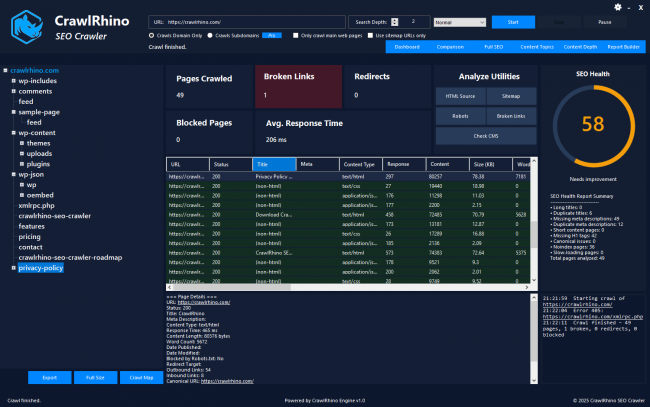
Multi-section layout, offering a good overview of the website data, and a detailed processing log
I enjoyed the design of CrawlRhino SEO Crawler right from the start, and I believe that it manages to provide a versatile take on previewing website analysis. In addition to inputting domains, it will also allow you to crawl subdomains and either use the main or sitemap URLs only.

A good preview of all the site’s structural elements is offered, including page statistics, broken links, blocked pages, as well as response times, and you’ll get an SEO score right away, which can point you in the right direction as far as optimizations that need to be performed go.

Joins a collection of crawling and SEO audit tools that can constitute a solid basis for website analysis
Overall, the series of tools offered by the app manages to encompass a good usability spectrum, and in addition to excellent website analysis tools, it also carries features for running website comparisons for pairs, which can provide insightful data into various health and metadata info.

Last but not least, the SEO analysis module provides a great overview of the health status of the analyzed website, and the additional content topic mapping, as well as content depth, together with the report builder, manage to complete the package in terms of analysis capabilities.

Viable website crawler app that features good functionality and addresses SEO audits and reports in a detailed manner
Give this app a try if you need to improve the characteristics of your websites through crawling and SEO analysis. It features a wide array of tools for website structure and element analysis, as well as a detailed SEO report module, coupled with other tools that tackle adjacent, yet relevant website aspects.

Release Name: CrawlRhino SEO Crawler Pro 1.1.28
Size: 37 MB
Links: HOMEPAGE – NFO – Torrent Search

Download: RAPiDGATOR

7 Comments
Apr 30

Easy File Shredder 2.0.2026.428

Description: Easy File Shredder removes files from your hard drive in a way that prevents them from ever being recovered. When you delete or Shift-delete a file, Windows doesn't actually erase it from the disk. The file name and its index are marked as free space, but the file is left behind until it's overwritten by new data. The worst bit is that there is no way of telling when Windows will overwrite the deleted file - it could happen next week or next year.

The file name and its index are marked as free space, but the file is left behind until it's overwritten by new data. The worst bit is that there is no way of telling when Windows will overwrite the deleted file - it could happen next week or next year.

Why Use Easy File Shredder?
Easy File Shredder is designed for fast and secure file removal. It's a secure file shredder that erases files with a special set of binary data multiple times. In other words, Easy File Shredder overwrites files several times with a set of different characters and numbers. This process is called data shredding and it ensures that no file recovery software can undelete any bits and pieces of the original deleted file.

Easy File Shredder uses the highest standard data removal algorithms that guarantee complete file removal. It leaves no traces whatsoever, which means that even the most advanced file recovery software won't be able to undelete the shredded files. It's up to you which shredding method to use. You can choose from more than ten different data deletion methods that provide different levels of security, or you can create your own unique algorithm to shred your files.

In addition to securely deleting files, Easy File Shredder can be used as a disk wiper utility to overwrite all free space on your hard drive with random data. Disk wiping is especially useful when you are selling or giving away your computer and need to make sure no sensitive data can be recovered from the drive. Just like the file removal module, the disk wiper supports over ten data deletion algorithms to overwrite free space in multiple passes. You can be sure that no files can be recovered from your PC once Easy File Shredder has finished its job!

Release Name: Easy File Shredder 2.0.2026.428
Size: 14.7 MB
Links: HOMEPAGE – NFO – Torrent Search

Download: RAPiDGATOR

6 Comments
Apr 30

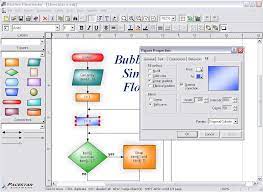
WizFlow Flowcharter Professional 7.52.2222

Description: WizFlow Flowcharter is the flowcharting software that enables you to draw professional quality flowcharts and similar diagrams with the absolute minimum effort. Thanks to hundreds of pre-defined flowchart symbols and shapes, it only takes minutes to create a flowchart to present ideas, document processes, design systems, or develop software. WizFlow does the hard part, you do the easy and fun parts. Flowcharting software has never been easier to use. WizFlow is all you'll need for creating flowcharts. It supports all popular flowcharting standards including classic IBM, Ansi R-54, FIPS, and more. WizFlow contains many of the features of our more comprehensive EDGE Diagrammer product but at a reduced price. Plus there's a Professional Edition available if you need additional power (like EDGE for just flowcharts).

Features
• Includes hundreds of pre-defined shapes and symbols organized in the Figure Symbol Gallery. (more)
• Includes several pre-defined diagram templates such as flowcharts, block diagrams, org charts, computer diagrams, network diagrams, and general purpose diagrams.
• Create your own styles combining the attributes, shapes, colors, and behaviors of your own figures.
• Create custom diagram templates to represent your own diagramming methodologies and to store your custom symbol libraries.
• Full zoom and scrolling capability with dozens of intuitive and convenient features for easy navigation around even the most complex diagrams.
• Connectors can have many different lines styles, colors, curves, patterns, end symbols (arrows), and designs. Plus you can select flow symbols that are drawn along the path of the line. (more)
• Connectors can have many possible terminators (arrowheads). Many are included in the End Symbol Gallery. (more)
• Snap grid for precise placement. The snap grid can be visible or invisible, enabled or disabled, or customized to different sizes for any diagram.
• Create large multi-page wall posters. Pages can be managed separately or cropped and attached to create a poster.
• Alignment and arrangement tools. In addition to the usual aligning, centering, and spacing features, the program also performs subtle behind-the-scenes steps to help you keep your diagram organized and looking good.
• Copy or export diagrams to other programs such as Microsoft Word with OLE. Simply copy and paste into most any other software, or link and embed into any OLE-enabled program for full control. Export formats include WMF, EMF, BMP, and JPG.
• Import external graphics and clip-art to use in your diagrams. Supports EMF, WMF, BMP, and JPG files.
• Auto-save and Auto-backup. Choose to save backup versions whenever you save a file, or have a backup file saved periodically. Fully programmable.
• Attach / detach figures in "flows". Drop a symbol onto a line and the symbol merges into the flow automatically. (more)
• New diagram wizard lets you select sizes, color schemes, and initial fonts with great convenience. (more)
• Enable "jogs" (also called jumps or crossovers) to clarify line routing. (more)
• Add freeform text labels anywhere on your diagram or add specialty labels described below. You can control text justification, color, point size, font, bold, italic, underline, subscript, superscript, and so on.
• Connector labels attach to a line and adjust when the line moves. (more)
• Flow labels attach to the point where a line meets a symbol and adjust automatically when either the symbol or the line moves. (more)
• Branch labels such as 'yes' and 'no' in flowcharts can be snapped into place in a single step and remain attached to their respective symbol/line. (more)
• Line spacing is programmable. Select from many line spacing options.
• Group objects to create larger objects. Features include Group, Ungroup, Ungroup All, and Regroup.
• Container symbols show divisions of larger diagrams by creating a "box around" a number of other symbols. The container also lets you work with the included symbols as a unit. (more)
• English (inches) or metric (millimeters) measurement units
• Full install/uninstall. Does not modify your operating system files!
• Complete online help plus optional PDF user guide.

Release Name: WizFlow Flowcharter Professional 7.52.2222
Size: 6.2 MB
Links: HOMEPAGE – NFO – Torrent Search

Download: RAPiDGATOR

6 Comments
Apr 30

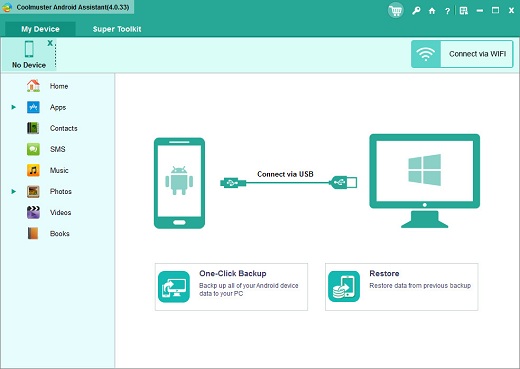
Coolmuster Android Assistant 6.0.129

Description: Back up and restore everything on Android device with 1 click. Selectively export and import contacts, SMS, call logs, music, videos, photos, books and etc. Add, transfer, delete and edit contacts on the computer. Send, resend, forward, delete and copy text messages directly on your computer. Manage music and video files on Android. Install and uninstall apps.

Why Should You Choose Coolmuster Android Assistant?

Want A Perfect Contacts & SMS & Call Logs Assistant? Here It Is.
Just end your life of group text messaging or adding contacts one by one manually on your Android phone with Coolmuster Android Assistant. Experience a new texting way here and better manage your contacts, SMS and call logs.
This Android managing tool enables you to send SMS on computer, perform group texting at once, back up SMS, import SMS from computer and delete messages from phone.
Import and export contacts from computer, add new contacts, delete contacts, back up and edit exsiting contacts on computer.
Back up Android call logs to computer, import call logs from computer to phone and delete unwanted call logs on computer smoothly.

Are You An App & Media Fancier? You Can Not Miss It.
If you are an app enthusiast and media fancier, Android Assistant will be your must-have tool because it features with all powerful functions that make you fully enjoy entertainment on the go.
Import installed apps from computer to your Android device with a click. Back up apps from Android to computer and uninstall useless apps on Android quickly from computer.
Android Assistant helps you transfer your wanted music, photos and videos from Android device to computer, add media files from computer and delete unwanted media files without any hassle. You can even manage albums, and move photos from one album to another.
Android Assistant allows you to take screenshot of your phone anytime as you like.

How to Back Up and Restore Android? 1 Click is Enough.
Hate to transfer data from your Android device to computer, or restore from your computer to the Android device one by one? The new features from Android Assistant allow you to back up and restore your Android phone/tablet with just 1 mouse click. Of course, you can also selectively back up and restore the data you want.
1-click to back up contacts, SMS, call logs, photos, videos, music, apps, etc. from Android phone or tablet to computer instantly.
1-click to restore Android data from the backup files to your Android phone without any data loss.
You can connect your Android device to the program via USB cable or WiFi. If you want to connect via WiFi, you need to install Android Assistant (Android version) on your Android device first.

Read-only and Compatible with All Android Brands. 100% Green.
After many times of testing, Android Assistant can be proved 100% secure and works well on almost all popular Android phones and tablets.
A wide range of Android brands are supported by this Android managing tool, including Samsung, Xiaomi, OPPO, Oneplus, TECNO, Infinix, Itel, vivo, Motorola, Honor and many more.
100% Safe application. Performs READ-ONLY operations to avoid causing any damage to the Android data and your computer.
Android Assistant is able to manage more than one Android device simultaneously at the same time.

Release Name: Coolmuster Android Assistant 6.0.129
Size: 24.1 MB
Links: HOMEPAGE – NFO – Torrent Search

Download: RAPiDGATOR

5 Comments
Apr 30

Ableton Live Suite 12.3.8

Description: Live is fast, fluid and flexible software for music creation and performance. It comes with effects, instruments, sounds and all kinds of creative features—everything you need to make any kind of music.
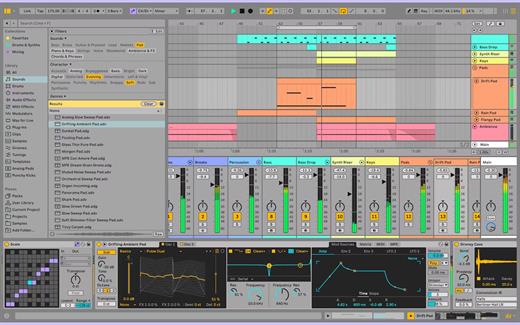
Create in a traditional linear arrangement, or improvise without the constraints of a timeline in Live’s Session View. Move freely between musical elements and play with ideas, without stopping the music and without breaking your flow.

New features and updates in Live 12
Play freely with ideas
MIDI Transformations
Create a variety of simple or complex variations to your MIDI clips: add ornaments and articulations, draw acceleration and deceleration curves, connect successive notes and chords, or simulate the strum of a guitar.

MIDI Generators
Conjure up melodies, chords and rhythms with new MIDI Generators. Give your chosen Generator custom constraints, watch it create playful and original patterns, and then turn the ideas it produces into your own.

Max for Live MIDI Tools
Max now facilitates even greater experimentation, letting you create new MIDI Transformations and Generators – either based on existing ones, or your own creations.

MIDI Editing Improvements
Arrange the order of a selection of notes by pitch, velocity or duration. Stretch, split, chop or join notes in new ways; shape the velocity of notes; transpose them into a scale; or add intervals chromatically or in key.

Keys and Scales
Set the selected clip’s scale in Live’s Control Bar to see its notes in any clip you create. Then edit the clip using scale highlighting as a guide, use the clip scale to transform and generate musical ideas, or sync the scale of MIDI devices and instruments to the clip being played. Any changes in Live will be reflected in Push, and vice versa.

Expanded probability
Assign a single probability rule to a group of notes so that the entire group of notes is played whenever the trigger is fired. Or select a chord and tell Live to randomly play one note from it whenever the probability trigger is fired.

Embrace and explore tunings
Follow your preferred tuning systems or try different ones more easily. Work outside the 12-tone equal temperament system, and access tunings with Live’s devices as well as any MPE-capable plugin.

Surprise yourself with the sounds you create
Meld
A bi-timbral, MPE-capable instrument designed for deep sound shaping that lets you create a wide array of textural and experimental tones with its two easy-to-use macro oscillators.

Granulator III
The latest iteration of Robert Henke’s granular instrument now has MPE capability, giving you expressive control over parameters like note bend, vibrato and glissando. Plus, you can now capture audio in real time and start manipulating it immediately.

Roar
Create everything from subtle and precise mastering-grade warmth to wild and unpredictable sound degradation with Live’s new coloring and saturation effect. Roar’s three saturation stages can be used in series, parallel, or even in mid/side and multiband configurations – and it comes equipped with a feedback generator and an extensive modulation matrix.

New Modulation Behavior
Modulation destinations are no longer taken over by the modulation source. This means you can still adjust the parameter being modulated, even after assigning an LFO or other modulation source to it, opening up faster workflows, more possibilities for performance and continuous real-time control of parameters.

New Packs
Lost and Found – A collection of sounds fashioned from unusual materials, percussive trinkets, unique foley recordings and expressive objects to infuse your productions with character and authenticity. Dig deep and create layers of decorative, expressive instruments, playful Drum Racks and rich sound effects.

Performance Pack – A set of innovative devices from Iftah that push the boundaries of performing with Live. Capture snapshots of your sets and deploy them later, control multiple parameters with layered macros and curves, extend performances with looping in Arrangement View and pre-arrange the structure of a performance before you have even recorded it.

Work more intuitively
Stacked Detail Views
View your devices and the Clip Editor, or automation and device parameters, at the same time – so you can work without the distraction of switching between views.

View styling
Live 12’s cleaner, more minimal look removes visual complexity and keeps the focus on your music.

Mixer in Arrangement
Live’s Mixer, previously available only in Session View, can now be used in Arrangement View. Toggle it on or off with Mixer View Control located in the bottom right corner or via the View menu, and configure it independently of the Arrangement Mixer.

Mixer improvements
Live’s Mixer also comes with visual improvements that make it more accurate for detailed mixing decisions, and easier to read and control.

Browser Tagging and Filtered Searches
Search for your sounds in the Browser without the constraints of Live's built-in categorization. That means when you search for bass sounds, you'll see all the bass sounds in your Ableton library, whether they're samples or instrument presets.

Live 12's sound content is also tagged using a new system that acts as a more flexible alternative or addition to Collections in the sidebar. Sounds now come with sensible labels to make them easier to find – but if you need more detail, or just want to use your own method of labeling, you can also add your own.

Aside from Live 12's built-in tags, you can create your own custom categories in the sidebar for easy access to all your favorite sounds and devices in the way that makes the most sense to your workflow.

Sound Similarity Search
Start with a sample and tell Live’s browser to find comparable sounds and instrument presets, with the help of a neural network.

Or swap all the samples in your Drum Rack for similar ones to quickly try out new percussive textures – like a drum machine with seemingly-infinite kits.

Browser History
Retrace your steps, and see and hear the sounds or categories you've previously searched for: Live's Browser now lets you backtrack through your search history as you would with a web browser.

Accessibility and navigation improvements
Control core workflows in Live 12 using assistive technologies like screen readers, and use new keyboard shortcuts to navigate to nearly every part of Live.

New Themes
Choose new themes and adjust them with cool, neutral or warm tones and even a high contrast mode.

Release Name: Ableton Live Suite 12.3.8
Size: 4 GB
Links: HOMEPAGE – NFO – Torrent Search

Download: RAPiDGATOR

2 Comments
Apr 30

ForkLift 4.6.1

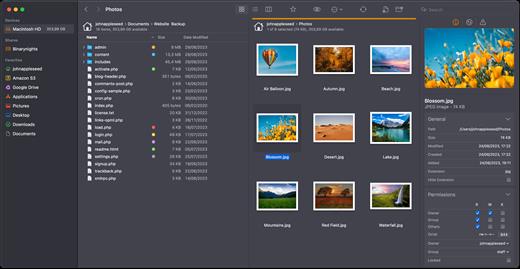
ForkLift is a powerful file manager and ferociously fast FTP client clothed in a clean and versatile UI that offers the combination of absolute simplicity and raw power expected from a well-executed Mac software.

ForkLift will connect to any remote server SFTP, FTP, WebDAV, Amazon S3, Backblaze B2, Google Drive, Rackspace CloudFiles, SMB, AFP and NFS shares on your local network,- pretty much anything you can plug into or hook up to a Mac. ForkLift also carries a complete toolbox for managing your files, including Folder Synchronization, Multi-Rename, Archive handling, Application deleter, editing files over remote connections and many more. All these power features are packaged into a Finder-like, dual-pane interface that delivers superior workflow while remaining absolutely familiar to use, along with Quick Look, Spotlight search and all.

Features


  • Completely rewritten entirely in Swift
  • ForkLift Mini
  • Two-way Sync
  • Preview
  • Quick Open
  • Multi Rename
  • Dark Mode
  • Dual Pane split vertically or horizontally
  • Favorite Sync via Dropbox
  • Dropbox Support
  • Transfer bandwidth throttling
  • Tags Support
  • Disklet
  • Sync Browsing
  • Tabs
  • Search by name, extention, kind, tags, or content
  • Quick Select
  • App Deleter
  • Remote Editing
  • Archive Management
  • Keyboard Control
  • Workspaces
  • FXP Copy
  • Tools
  • Git Support
  • Open in Terminal, iTerm, or Hyper
  • Hidden Files
  • Share
  • Possible to set as default file viewer
  • File Compare with FileMerge, Kaleidoscope, Beyond Compare, and Araxis Merge support
  • Multilingual: English, Chinese Simplified, Czech, French, German, Hungarian, Italian, Polish, Russian, Spanish and Ukrainian
What’s New

Version 4.6.1:


  • Release notes were unavailable when this listing was updated.
Compatibility

macOS 14.6 or later


Release Name: ForkLift 4.6.1
Size: 20.7 MB
Links: HOMEPAGE – NFO – Torrent Search

Download: RAPiDGATOR

6 Comments
Apr 30

Geekbench 6.7.1

Geekbench provides a comprehensive set of benchmarks engineered to quickly and accurately measure processor and memory performance. Designed to make benchmarks easy to run and easy to understand, Geekbench takes the guesswork out of producing robust and reliable benchmark results.

What’s New

Version 6.7.1:


  • Release notes were unavailable when this listing was updated.
Compatibility

macOS 11.0 or later


Release Name: Geekbench 6.7.1
Size: 280.4 MB
Links: HOMEPAGE – NFO – Torrent Search

Download: RAPiDGATOR
7 Comments
Apr 30

PowerPhotos 3.3.2

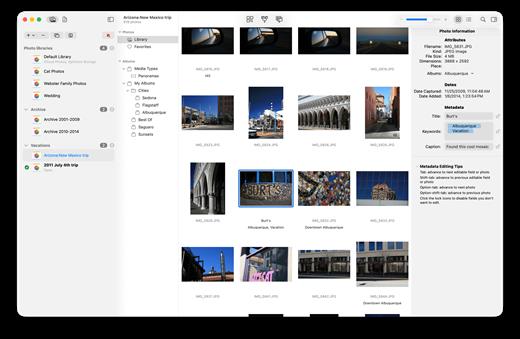
PowerPhotos allows you to break up your Photos.app images among multiple Photos libraries, rather than having to store all of them in one giant library. You can easily switch between libraries, or just browse the photos in your libraries directly from PowerPhotos, without having to open each library in Photos.

PowerPhotos also supports searching across all your libraries at once to help track down a particular photo. If you use iCloud Photo Library to sync photos with your other devices, splitting up your library can help save on iCloud storage costs. Use a single library to hold a smaller collection that you sync with iCloud, while keeping the bulk of your photos in separate libraries so they don’t take up space on iCloud. PowerPhotos can analyze your libraries for duplicate photos, showing them to you side-by-side and letting you get rid of extra copies of photos that you no longer need.

What’s New

Version 3.3.2:


  • Release notes were unavailable when this listing was updated.
Compatibility

macOS 11.0 or later


Release Name: PowerPhotos 3.3.2
Size: 39.4 MB
Links: HOMEPAGE – NFO – Torrent Search

Download: RAPiDGATOR
5 Comments
Apr 30

Ableton Live Suite 12.3.8

Ableton Live lets you create and record music on your Mac. Use digital instruments, pre-recorded sounds, and sampled loops to arrange, produce, and perform your music like never before. Ableton Live is an all-in-one production suite.

Find your sound


  • Start in Arrangement View. Create and edit multitrack recordings in a straightforward linear view.
  • Go further in Session View. Switch to this one-of-a-kind interface to improvise and experiment with countless sounds and loops.
  • Access an endless palette of sounds. With 5 built-in synths, 3 samplers, 390 drum kits, and 4000 loops, the possibilities are endless.
SIze: 5.1 GB

What’s New

Version 12.3.8:


  • Release notes were unavailable when this listing was updated.
Compatibility

macOS 11.0 or later
Apple Silicon or Intel Core processor


Release Name: Ableton Live Suite 12.3.8
Size: 5.1 GB
Links: HOMEPAGE – NFO – Torrent Search

Download: RAPiDGATOR

1 Comments