Please REGISTER or RENEW your account on RAPiDGATOR.net and support us by doing through all RAPiDGATOR working download links on main posts...
Apr 30

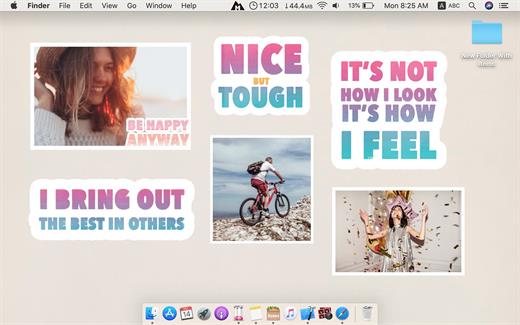
Desktop Stickers 2.91

Your thoughts are the source of your emotions and mood. The conversations you have with yourself can be destructive or beneficial. Most people need to learn how to cultivate positive thoughts and dispel the negative ones.

Self-talk can enhance your performance and general well-being. For example, research shows self-talk can help athletes with performance.
Self-talk is a huge part of our self-esteem.

Examples
1- Negative: I’m overweight.
Positive: “I am strong,
I am capable,
I want to get fit for me.”

2- Negative: “I’m lost the project.
Positive: I can reach my goal
step by step.”

3- Negative: “I don’t like what’s happening around here.”
Positive: “I accept the things that I can’t change,
I will change the things I can.”

Desktop Stickers helps you to repeat positive self-talk everyday.

How Desktop Stickers work?
1- Select a sticker
2- Click Done to add it to your desktop (So you can review daily)
3- Repeat out loud the words everyday.
4- You can add custom photos to be stickers on desktop also. Example: Happy and good moments that you love.

What’s New

Version 2.91:


  • Release notes were unavailable when this listing was updated.
Compatibility

macOS 10.15 or later
Apple Silicon or Intel Core processor


Release Name: Desktop Stickers 2.91
Size: 141 MB
Links: HOMEPAGE – NFO – Torrent Search

Download: RAPiDGATOR

5 Comments
Apr 30

Transmit 5.11.6

Transmit is a powerful and versatile Mac OS X application that makes it easy for you to manage and organize large files on various servers on clouds.

User-oriented interface with support for multiple tabs

With Transmit’s help you can quickly and effortlessly transfer files to SFTP or FTP server, as well as Amazon S3 or WevDAV from within a user-oriented interface.

Transmit comes a simple and reliable solution for users that need to maintain websites, upload numerous photos or perform backups.

Transmit comes with a “Twin-Turbo Engine”, multi-connection transfer and FXP support fact that makes it a fast, smooth-running and dependable client for most Mac users.

On top of that, Transmit enables you to limit the bandwidth, synchronize or compare files with ease.

Choose between a single or dual pane window

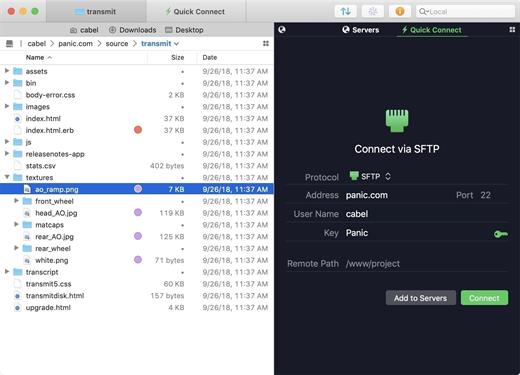
From Transmit’s two-panel window you can view the files stored locally and the ones saved on the server. At the same time, Transmit helps you create a list with favorite servers add a new FTP, SFTP, Amazon S3 or WebDAV server.

The top toolbar allows you to switch between the thumbnail, list, column and Cover Flow view mode and change from the a dual pane to a single pane window. In addition, Transmit seamlessly integrates Mac OS X’s Quick Look feature, a fact that helps you preview files before transferring them.

Handy synchronization features

By accessing the Action drop-down menu, you can open the Info window, copy the file path or URL address, move items to Trash or the desired location, create duplicates, compress or label files. On top of that, you have the option to create new folders or files, refresh the list and open a folder in a new tab or new window.

Thanks to the built-in search form, you can quickly and effortlessly filter the displayed items as soon as you start typing. The Preferences window enables you to change the default FTP client and configure Transmit to synchronize your favorite items via iCloud or Dropbox.

What’s New

Version 5.11.6:


  • Release notes were unavailable when this listing was updated.
Compatibility

macOS 12.0 or later
Apple Silicon or Intel Core processor


Release Name: Transmit 5.11.6
Size: 32.5 MB
Links: HOMEPAGE – NFO – Torrent Search

Download: RAPiDGATOR

7 Comments
Apr 30

OmniFocus Pro 4.8.10

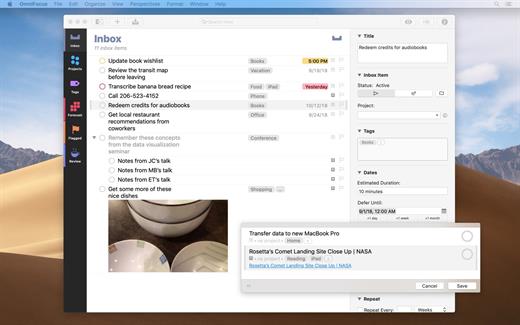
OmniFocus is an organizer app. It uses projects to organize tasks naturally, and then add tags to organize across projects. Easily enter tasks when you’re on the go, and process them when you have time. Tap the Forecast view – which shows both tasks and calendar events – to get a handle on your day. Use the Review perspective to keep your projects and tasks on track.

Use OmniFocus to accomplish more every day. Create projects and tasks, organize them with tags, focus on what you can do right now – and get stuff done. Then let our free syncing system make sure you data is the same on every Mac. (And on OmniFocus for iOS, available separately.) Because your data is encrypted, it’s safe in the cloud.

What’s New

Version 4.8.10:


  • Release notes were unavailable when this listing was updated.
Compatibility

macOS 11.0.0 or later
Apple Silicon or Intel Core processor


Release Name: OmniFocus Pro 4.8.10
Size: 49.6 MB
Links: HOMEPAGE – NFO – Torrent Search

Download: RAPiDGATOR

6 Comments
Apr 30

Audio Hijack 4.5.8

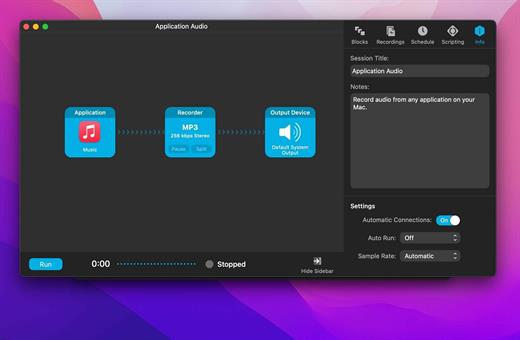
Audio Hijack (was Audio Hijack Pro) drastically changes the way you use audio on your computer, giving you the freedom to listen to audio when you want and how you want. Record and enhance any audio with Audio Hijack – it’s the cornerstone of your digital audio experience.

Audio Hijack will allow you to record any application’s audio, from Internet streams to DVD audio and everywhere in between. If your machine can play it, Audio Hijack can record it. And that’s not all – Audio Hijack will also enhance any audio, unsing industry-standard VST and AudioUnit audio effects to make your music sound incredible. Record. Enhance. Enjoy!

More Great Features

Record to All Major Formats
Record to the world’s most popular audio formats, including MP3 and AAC, or save in perfect-fidelity AIFF, WAV, ALAC or FLAC.

Reusable Sessions
Once you’ve configured a Session to your liking, you can re-use it over and over. With one click, you’ll be recording exactly as desired.

Easy File Organization
Find all of your recordings sorted by Session in the Recordings tab, where you can quickly pass files to an audio editor, add them to iTunes, or share them.

Timed Recordings
Use the Schedule tab to set up timed recordings for when you’re not around. Your audio will be waiting for you when you return.

Silence Monitoring
When silence is detected, Audio Hijack can automatically stop recording, split to a new file, or remove audio.

Bulletproof Recording
Bulletproof recording means that even if the power goes out or your computer crashes, you’ll never lose a recording.

A Thoughtful Interface
Audio Hijack’s intuitive audio grid provides a terrific pipeline-style view of exactly how your audio flows, so you can easily understand it.

Gorgeous Audio Effects
The included audio effects are easy to use and easy on the eyes. Their functionality is now accessible to all.

Time Shift Your Audio
Now you can pause, delay, and rewind live audio on your Mac. It’s perfect for transcribing audio and more!

What’s New

Version 4.5.8:


  • Release notes were unavailable when this listing was updated.
Compatibility

macOS 14.6 or later.


Release Name: Audio Hijack 4.5.8
Size: 28.9 MB
Links: HOMEPAGE – NFO – Torrent Search

Download: RAPiDGATOR

7 Comments
Apr 30

Microsoft Office Professional Plus 2021-2024 VL v2604 Build 19929.20106

Description: Microsoft has officially announced the availability of the final version of its Office 2024 release for Windows and Mac users. Following the release of the preview version in the first half of this year, the product has been refined and is now available to users. Office 2024 includes updated versions of apps from the suite, Word, Excel, PowerPoint, Outlook, Access, and Publisher.

Office 2024 includes virtually every change that has been added to the suite of programs in Office 365 over the past 3 years, although some features remain exclusive to subscribers. In addition to the main programs Word, Excel, PowerPoint, and Outlook, which are available for both Windows and macOS, the Access and Publisher versions are only available for Windows and are included, as usual, only in premiums. Visio and Project for Windows are also available, although they are not part of the ongoing release of Office.

Microsoft Office 2021-2024 includes
Microsoft Office 2021-2024 Professional Plus
Microsoft Access 2021-2024
Microsoft Excel 2021-2024
Microsoft Lync 2021-2024
Microsoft OneNote 2021-2024
Microsoft Outlook 2021-2024
Microsoft PowerPoint 2021-2024
Microsoft Publisher 2021-2024
Microsoft Visio Viewer 2021-2024
Microsoft Word 2021-2024
Microsoft Visio pro 2021-2024
Microsoft Project 2021-2024
Skype for business 2021-2024
OneDrive for Business 2021-2024
Office Shared Features
Profing Tools Only 2021-2024
And many more

Release Name: Microsoft Office Professional Plus 2021-2024 VL v2604 Build 19929.20106
Size: 6.7 GB
Links: HOMEPAGE – NFO – Torrent Search

Download: RAPiDGATOR

8 Comments
Apr 30

MiniTool Power Data Recovery 12.9

Description: Best data recovery software for Windows PC, Server. Recover any lost files from laptop, HDD, SSD, USB drive, memory card and more. Quick data recovery from Desktop, Recycle Bin and specific folder. For various data loss situations due to deletions, formatting errors, OS crashes, virus attacks, etc.

For Windows Users
MiniTool Power Data Recovery is the professional data recovery software for Windows users. You can use it to recover any deleted/lost files under various data loss situations. Supported devices include Windows computer, external drive like HDD, SSD, USB, SD card, memory card, and more. You can choose free edition or paid edition based on your own needs.

Operating System: Windows 7/8/10/11 and Windows Server OS

Release Name: MiniTool Power Data Recovery 12.9
Size: 201.3 MB
Links: HOMEPAGE – NFO – Torrent Search

Download: RAPiDGATOR

7 Comments
Apr 30

Directory Opus 13.22.11 Beta

Description: Are you frustrated by the limitations of Windows Explorer? Directory Opus is a complete replacement for Explorer, with far more functionality than any other file manager available today.

You're in control.
Not just a simple file manager; Directory Opus lets you make your computer yours.
With a flexible user interface and unbelievable configurability, you can tailor Opus to streamline your workflow.
Dual panes, dual trees, multiple tabs.
Filter, sort, group your folders. Label and rate your files.
Queued file copies. Powerful batch renaming. Full archive support.
Find your files. Locate duplicates. Synchronize backups.
Assign tags and descriptions. Convert images. Edit metadata.
Fully multi-threaded, native 64 bit high performance code.
Whatever you want to do - Opus can probably do it. And if it's not built-in, you can take advantage of the unrivalled configurability to extend Opus using external tools.

What makes Opus unique?

Built for speed
Opus is written in native C++ multi-threaded code; compiled for the latest 64 bit CPUs, with high performance our number one design principle.

Fully configurable
Change the colors. Change the fonts. Change the toolbars and menus. Set up hotkeys. Opus adapts to how you want to use it.

Makes file management a breeze
Powerful searching, sorting, grouping, labelling and tagging features let you take control of your files like never before.

Endlessly extensible
Work with third-party tools as easily as with the built-in features. A full scripting interface, including scriptable dialogs, means your imagination is really the only limit.

Replace Windows Explorer and don't look back
Our unique Explorer Replacement mode provides a full replacement for Windows Explorer.
Single or dual pane file display and folder trees
Tabbed interface let you keep multiple folders open and switch quickly between them
Integrated viewer, metadata editor and utility panel
Built-in tools including synchronize and duplicate file finder
Leverage indexed search engines like Windows Search and Everything

High performance file management features
Copy, move, rename, duplicate, archive, view, backup and delete your files with ease
Queue multiple file copies for improved performance
Batch renaming including easy-to-use keyboard macros
Support for FTP and archive formats like Zip, 7Zip and RAR
Quickly filter, sort, group and search your folders
Color-code your files, assign status icons, star ratings, tags and descriptions
View images, documents and more. Image marking lets you sort your photos quickly and easily
Calculate folder sizes and print or export folder listings

Unrivalled configurability
Why let the programmers decide for you? You can tailor Opus to look how you want it to look, and to work how you want it to work.
Choose from light mode, dark mode, or design your own theme
Over 600 configurable colors and fonts
All toolbars and menus can be edited, plus you can add your own
Floating toolbars can act as program launchers
Configure your own hotkeys that work everywhere or just in Opus
Full scripting interface lets you design your own dialogs and add your own commands

Release Name: Directory Opus 13.22.11 Beta
Size: 29.4 MB
Links: HOMEPAGE – NFO – Torrent Search

Download: RAPiDGATOR

8 Comments
Apr 30

Bulk Image Downloader 6.63

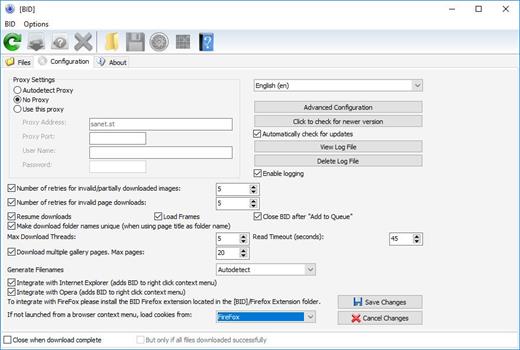
Description: Bulk Image Downloader is a specialized tool designed to automatically download and save images from thumbnailed image galleries, bypassing all annoying popups and adverts. It can also extract image information from regular text files (such as saved html pages or plain text files containing links) and web pages where image links are listed as plain text.

Release Name: Bulk Image Downloader 6.63
Size: 35.8 MB
Links: HOMEPAGE – NFO – Torrent Search

Download: RAPiDGATOR

6 Comments
Apr 30

WinRAR 7.21 Final

Description: WinRAR is a powerful archive manager. It can backup your data and reduce the size of email attachments, open and unpack RAR, ZIP and other files downloaded from Internet, create new archives in RAR and ZIP file format.

Features:
WinRAR provides complete support for RAR and ZIP archives and is able to unpack CAB, ARJ, LZH, TAR, GZ, UUE, BZ2, JAR, ISO, 7Z, XZ, Z archives.
WinRAR offers a graphic interactive interface utilizing mouse and menus as well as the command line interface.
When you purchase WinRAR license you are buying a license to the complete technology, no need to purchase add-ons to create self-extracting files, it's all included.
WinRAR is easier to use than many other archivers with the inclusion of a special "Wizard" mode which allows instant access to the basic archiving functions through a simple question and answer procedure. This avoids confusion in the early stages of use.
WinRAR offers you the benefit of industry strength archive encryption using AES (Advanced Encryption Standard) with a key of 256 bits.
WinRAR supports files and archives up to 8,589 billion gigabytes in size. The number of archived files is, for all practical purposes, unlimited.
WinRAR offers the ability to create self-extracting and multivolume archives.
Recovery record and recovery volumes allow to reconstruct even physically damaged archives.
WinRAR features are constantly being developed to keep WinRAR ahead of the pack.

Release Name: WinRAR 7.21 Final
Size: 3.8 MB
Links: HOMEPAGE – NFO – Torrent Search

Download: RAPiDGATOR

6 Comments
Apr 30

MediaMonkey Gold 2024.2.2.3221 RC4

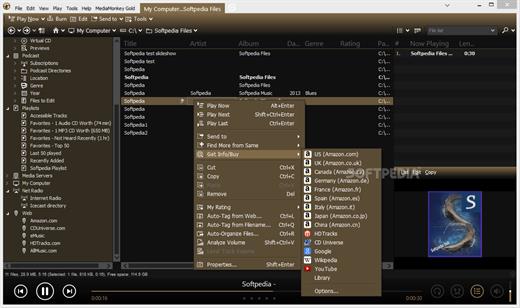
Description: The media manager for serious collectors. MediaMonkey is the award-winning media organizer and player for serious collectors. It cleans the mess in your music and video libraries, and lets you share and enjoy them across all your devices.
High Performance
Manage thousands of music tracks and videos without missing a beat.

Manage All Your Media
Create collections for Rock, Classical, Audiobooks, Podcasts, or Movies. Classify using standard tags, custom fields, and multiple attributes per field.

Quality Hi-Fi
Fine-tune audio via a 10-band equalizer, DSP effect addons, volume leveling, and use WASAPI drivers to interface with your high-end digital audio equipment.

Auto-tag
Automatically identify tracks and look up missing metadata, artwork, and lyrics. Or use the manual editor for fine-grained control.

Remove Duplicates
Quickly find and eliminate duplicate tracks to clean up your collection.

Organize
Reorganize and rename media files into logical folders and filenames based on artist, album, title, year, etc.

Record and Convert
Record CDs to your library** and convert audio/video files while preserving tag information***.

Online services
Listen to online radio, find related content on YouTube, or sync Spotify playlists.

Podcasts
Automatically download and manage your favorite podcasts.

Device Sync
Sync audio/video and playlists with iPhone, iPod, iPad, Android and other devices, including artwork, ratings, play history. Auto-convert formats to play on any device.

Wi-Fi Sync
Wirelessly sync with [MediaMonkey for Android] and manage your library from your phone or PC.

Cloud Storage
Sync, store or back up your library content to cloud services such as Dropbox, Google Drive, or OneDrive.

Share
Share your library with TVs and consoles via UPnP / DLNA; or access content from another DLNA server.

Cast
Stream audio/video to Google Cast or DLNA devices (includes Media Controller and Media Renderer functions).

Enjoy!
Listen to your media* with leveled volume (via ReplayGain and MP3Gain), as they’re shared over Last.fm, with beautiful visualizations.

Playlists
Drag and drop files to create the perfect audio/video playlist. Or create AutoPlaylists based on complex search criteria.

Party
Use jukebox mode to let users make requests while preventing your library from being modified.

Auto-DJ
When your chosen tracks run out, let the Auto-DJ automatically play tracks based on criteria that you define.

Extend
Use custom add-ons, skins, and Winamp plugins† to add new functionality. Download add-ons or write your own.

Create Reports
Generate statistics and other reports of your music collection.

Work With Other Apps
Save metadata using standardized tags readable by other apps. Update the library in response to changes by other apps to media folders.

Release Name: MediaMonkey Gold 2024.2.2.3221 RC4
Size: 121.5 MB
Links: HOMEPAGE – NFO – Torrent Search

Download: RAPiDGATOR

9 Comments