Please REGISTER or RENEW your account on RAPiDGATOR.net and support us by doing through all RAPiDGATOR working download links on main posts...
Apr 28

PDQ Inventory 20.0.5

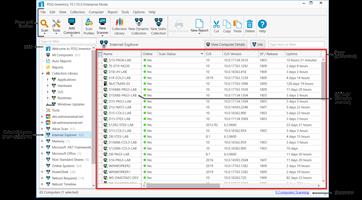
Description: PDQ Inventory: Streamline your systems management. Scan, collect, and organize your on-prem Windows machines so deployments go exactly where you need them to with PDQ Inventory.
The Swiss Army knife of sysadmin tools
Free yourself and your team from pesky, repetitive tasks by unlocking powerful automations so everyone can focus on the important things, like a spirited debate over what to order for lunch.

Efficiently organize your network inventory
Gain immediate, deep visibility into your environment so you can quickly spot and address machines that need attention. 20/20 vision into your environment, and no optometrist appointment necessary.

Collection Library
Save time with our prebuilt device groups, which provide a real-time display of which machines have old software versions installed or are low on disk space.

Custom collections
Create collections of devices to meet your specific needs. These groupings can either be static or set to dynamically include new computers that meet your defined criteria.

Auto sync with AD
Enable PDQ Inventory to automatically import computer records from your Active Directory domain for accurate, centralized visibility of your inventory data.

Get centralized, tailored inventory insights
Get specific on what matters most to you and save time in the long run by pulling in additional data and automating repeat tasks. Please let us do more of your work for you, we insist.

Custom scanners
Bring additional scanned data, like specific registry data or custom script results, into PDQ Inventory for more thorough monitoring and investigation of your environment.

Custom tools
Utilize prebuilt tools for reboots, remote assistance, and Wake-on-LAN, or create and save your own tool for any command that can be run with Windows.

Custom variables
Create and store custom values for repeated use, like the version number of a custom software application, or static fields like a computer’s department.

Integrate inventory workflows
Automate your workflow by leveraging both PDQ Inventory and Deploy together, and efficiently collaborate with teammates to ensure everyone sees what they need, in a pretty damn quick fashion.

Targeted deployments
Automate your patch management by targeting PDQ Inventory collections for recurring deployments on a set schedule with PDQ Deploy.

Central server
Multiple admins at a single company can centrally maintain packages, deployment histories, and schedules across multiple administrators with high visibility.

Reporting
Gather insights and metrics with our prebuilt and custom reports. Schedule them to automatically run on a chosen cadence and email results to colleagues.

Securely manage your Windows devices
PDQ Deploy & Inventory data is locally stored on your network, allowing you full control, offline operations, and more. We encrypt the password data we store for you as well as in-transit data.

Release Name: PDQ Inventory 20.0.5
Size: 106.2 MB
Links: HOMEPAGE – NFO – Torrent Search

Download: RAPiDGATOR

7 Comments
Apr 28

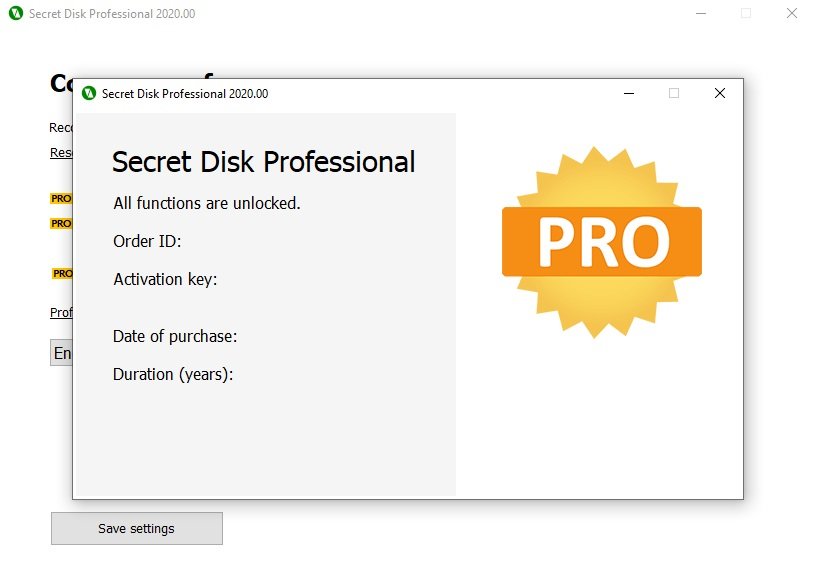
Secret Disk Professional 2026 v322

Description: Secret Disk can create additional disk on your PC, which can be invisible and locked with a password within one second. You can make your private files and folders invisible and protected. You don’t need to format your hard disk or make any changes to boot sector. Our program will create new disk automatically very quickly. You can make this disk invisible, including all contents, and protect it with a password. You can store any files and folders on the disk. Secret disk works as usual hard disk and compatible with any other programs which you have installed. You can have more than one secret disk and you can also choose disk letter.

In case of power outage or fatal error of OS Windows your secret disk will be locked and become invisible automatically. It happens automatically because information are stored in the virtual memory. Secret Disk does not encrypt any files, it just limits access to your files (you can use password). Software ties virtual disk to your files. This will provide you enough security to hide your files from any person.

Creates additional hidden disk protected with a password
Additional Secret Disk Secret Disk can create additional disk on your PC, which can be invisible and locked with a password within one second. You can make your private files and folders invisible and protected.

Additional Secret Disk
Secret Disk can create additional disk on your PC, which can be invisible and locked with a password within one second. You can make your private files and folders invisible and protected.

Easy And Fast Creation
You don’t need to format your hard disk or make any changes to boot sector. Our software will create new disk automatically very quickly. You can make this disk invisible, including all contents, and protect it with a password. You can store any files and folders on the disk. Secret disk works as usual hard disk and compatible with any other software which you have installed. You can have more than one secret disk and you can also choose disk letter.

Clever in Any Situation
In case of power outage or fatal error of OS Windows your secret disk will be locked and become invisible automatically. It happens automatically because information are stored in the virtual memory. Secret Disk does not encrypt any files, it just limits access to your files (you can use password). Software ties virtual disk to your files. This will provide you enough security to hide your files from any person.

Release Name: Secret Disk Professional 2026 v322
Size: 4.2 MB
Links: HOMEPAGE – NFO – Torrent Search

Download: RAPiDGATOR
5 Comments
Apr 28

Directory Opus 13.22.10 Beta

Description: Are you frustrated by the limitations of Windows Explorer? Directory Opus is a complete replacement for Explorer, with far more functionality than any other file manager available today.

You're in control.
Not just a simple file manager; Directory Opus lets you make your computer yours.
With a flexible user interface and unbelievable configurability, you can tailor Opus to streamline your workflow.
Dual panes, dual trees, multiple tabs.
Filter, sort, group your folders. Label and rate your files.
Queued file copies. Powerful batch renaming. Full archive support.
Find your files. Locate duplicates. Synchronize backups.
Assign tags and descriptions. Convert images. Edit metadata.
Fully multi-threaded, native 64 bit high performance code.
Whatever you want to do - Opus can probably do it. And if it's not built-in, you can take advantage of the unrivalled configurability to extend Opus using external tools.

What makes Opus unique?

Built for speed
Opus is written in native C++ multi-threaded code; compiled for the latest 64 bit CPUs, with high performance our number one design principle.

Fully configurable
Change the colors. Change the fonts. Change the toolbars and menus. Set up hotkeys. Opus adapts to how you want to use it.

Makes file management a breeze
Powerful searching, sorting, grouping, labelling and tagging features let you take control of your files like never before.

Endlessly extensible
Work with third-party tools as easily as with the built-in features. A full scripting interface, including scriptable dialogs, means your imagination is really the only limit.

Replace Windows Explorer and don't look back
Our unique Explorer Replacement mode provides a full replacement for Windows Explorer.
Single or dual pane file display and folder trees
Tabbed interface let you keep multiple folders open and switch quickly between them
Integrated viewer, metadata editor and utility panel
Built-in tools including synchronize and duplicate file finder
Leverage indexed search engines like Windows Search and Everything

High performance file management features
Copy, move, rename, duplicate, archive, view, backup and delete your files with ease
Queue multiple file copies for improved performance
Batch renaming including easy-to-use keyboard macros
Support for FTP and archive formats like Zip, 7Zip and RAR
Quickly filter, sort, group and search your folders
Color-code your files, assign status icons, star ratings, tags and descriptions
View images, documents and more. Image marking lets you sort your photos quickly and easily
Calculate folder sizes and print or export folder listings

Unrivalled configurability
Why let the programmers decide for you? You can tailor Opus to look how you want it to look, and to work how you want it to work.
Choose from light mode, dark mode, or design your own theme
Over 600 configurable colors and fonts
All toolbars and menus can be edited, plus you can add your own
Floating toolbars can act as program launchers
Configure your own hotkeys that work everywhere or just in Opus
Full scripting interface lets you design your own dialogs and add your own commands

Release Name: Directory Opus 13.22.10 Beta
Size: 29.4 MB
Links: HOMEPAGE – NFO – Torrent Search

Download: RAPiDGATOR

7 Comments
Apr 28

Stardock Fences 6.46

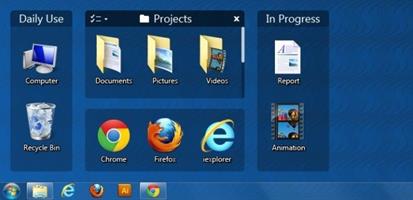
Description: The Best Way to Organize Your Workflow. Keep your desktop effortlessly organized. Organize your PC by intelligently placing your desktop content into shaded areas called fences.

Customized to your workflow
Automatically have files sorted into fences on your desktop with our extensive automation rules or manually add your own files and folders.

Personalized to your preferences
Easily change the size, colors, transparency, sorting, and more.

Enhance your productivity with unique features.
Powerful features like Peek and Folder Portals will enhance your productivity.

Folder Portals are essential
Folder Portals allow you to mirror any folder to your desktop for quick access to your most important content.

Your content is a Peek away
Instantly access your files, folders, and applications with Peek by pressing Winkey + Space to bring your fences on top of all your windows.

Create a workspace with no distractions.
Advanced Fences functionality makes it easy to quickly clean up your desktop.

Chameleon™
Desktop icons fade into the background but remain easily accessible to create a distraction-free desktop.

Desktop Quick-hide
Double-click any blank space on your desktop and your icons will fade away.

How Fences 5 is Used

Gaming
Steam, Epic, and more — every major publisher has its own platform and with some games even having multiple icons, your desktop can become a cluttered mess of gaming content. With Fences you can:
Organize all of your games into a single fence for quick access.
Keep all your game launchers in one location or roll-up the fence to keep them out of sight until needed.
Put all of your engagement apps into a single fence and when using Peek, easily access crucial apps while streaming.

School
Keeping your schoolwork organized can be a challenge but Fences makes the process easy. And with customization controls built into Fences, you can make it effortless to separate your content by topic.
Sort all of your schoolwork by class or topic so that you never misplace a document again.
Add a splash of color to a fence to make it easier to organize fences by topic.
Use quick-hide to create a distraction free desktop while working on a project.

Productivity
Keeping your desktop organized is at the heart of Fences. With the powerful built-in automation tools, you can create rules that will automatically organize your desktop by file type, name, time, and the target location.
Create a fence that automatically puts all screenshots into a single folder on your desktop.
Categorize icons into separate fences based on usage, such as research, assignments, or invoices.
Use a Folder Portal with your favorite cloud storage service to create a fence that syncs content across all of your desktops.

Accessibility
Fences not only makes it easy to keep your desktop organized but it can also improve the accessibility of Windows. By using Folder Portals, you can bring content buried in File Explorer neatly to the desktop.
Create a Folder Portal to bring the downloads folder directly to the desktop.
Change the size of icons and how they are displayed in a Folder Portal for easier viewing.
Use colored fences for easier organization and navigation of content on the desktop.

Release Name: Stardock Fences 6.46
Size: 23.4 MB
Links: HOMEPAGE – NFO – Torrent Search

Download: RAPiDGATOR

6 Comments
Apr 28

ActivePresenter Professional 10.1.2

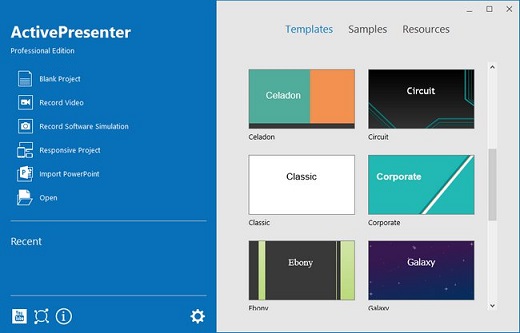
Description: ActivePresenter provides all the tools you need for multiple eLearning purposes such as creating interactive slide-based courses, software simulations, assessments, educational games, and training videos.

Create interactive courses in any scenario with a feature-rich editor
ActivePresenter authoring tool enables you to create professional-looking eLearning content with the user-friendly editor while making minimum effort. Once you get familiar with the tool, you can explore many features for creating advanced content.

Convert existing PowerPoint presentations to courses at blazing speed
Without additional software, ActivePresenter authoring tool straightly converts your PowerPoint presentations to HTML5 or eLearning packages (SCORM & xAPI). Unlike many other tools, you can do it on both PC & MAC.

Build an interactive simulation in minutes with smart screen capture technology
When recording interactive simulation, all steps you performed on screen are recorded as slides. Mouse clicks, keystrokes and their appropriate actions and values are generated automatically. You can create software tutorials or assessments with minimum time and effort.

Develop interactive assessments & educational games
This eLearning authoring tool supports 13 question types, slide pools, slide randomization, and flexible branching with events, actions, and conditions. You can easily create assessments and unique educational games without coding skills.

Create or record videos with screencasting and editing tools
Select multiple recording sources at once like screen, microphone, system audio, and webcam. Enhance further with common editing tools, effects, shapes, animations & transitions. HTML5 output enables you to add quizzes and make branched scenarios.

High-level responsive support. Perfect on any device.
You can define layouts for different screen sizes or use Flex Boxes to layout objects automatically.

Release Name: ActivePresenter Professional 10.1.2
Size: 167.8 MB
Links: HOMEPAGE – NFO – Torrent Search

Download: RAPiDGATOR

8 Comments
Apr 28

Geekbench Pro 6.7.1

Description: Geekbench 6 is a cross-platform benchmark that measures your system's performance with the press of a button. How will your mobile device or desktop computer perform when push comes to crunch? How will it compare to the newest devices on the market? Find out today with Geekbench 6.

CPU Benchmark
Geekbench 6 measures your processor's single-core and multi-core power, for everything from checking your email to taking a picture to playing music, or all of it at once. Geekbench 6's CPU benchmark measures performance in new application areas including Augmented Reality and Machine Learning, so you'll know how close your system is to the cutting-edge.

GPU Compute Benchmark
Test your system's potential for gaming, image processing, or video editing with the Compute Benchmark. Test your GPU's power with support for the OpenCL, Metal, and Vulkan APIs. New to Geekbench 6 is a new GPU API abstraction layer and new Machine Learning workloads.

Real-World Tests
Geekbench uses practical, everyday scenarios and datasets to measure performance. Each test is based on tasks found in popular real-world apps and uses realistic data sets, ensuring that your results are relevant and applicable.

Cross-Platform
Compare apples and oranges. Or Apples and Samsungs. Designed from the ground-up for cross-platform comparisons, Geekbench 6 allows you to compare system performance across devices, operating systems, and processor architectures. Geekbench 6 supports Android, iOS, macOS, Windows, and Linux.

Geekbench Browser
Upload your results to the Geekbench Browser to share them with others, or to let the world know how fast (or slow) your devices can go! You can track all your results in one place by creating an account, and find them easily from any of your devices.

Benchmark Charts
Verify device performance using the Geekbench Benchmark Charts. Available on the Geekbench Browser, these charts are based on data aggregated from real users in real-world environments. Whether you're considering a new purchase or are curious about a device's capabilities, use these charts to make informed decisions.

Release Name: Geekbench Pro 6.7.1
Size: 288.9 MB
Links: HOMEPAGE – NFO – Torrent Search

Download: RAPiDGATOR
7 Comments
Apr 28

Lyric Video Studio 1.5.32

Description: Turn your lyrics into stunning visuals — effortlessly. Lyric Video Studio is your go-to app for creating powerful, professional-looking lyric videos without the hassle. Whether you're a musician dropping a killer new track, a content creator, or just love playing with visuals, this app lets you sync lyrics to your music in just a few clicks. Import your lyrics, drag to sync, and you’re good to go. You know your lyrics — now show them off.

- Optimized for lyric videos, music videos and visualizers, but capable of anything.
- Non-linear video editing with AI image and video sources, 4K support.
- Easy and fast lyric import, text editing / subtitling made easy.
- Generate video content with 3rd party providers, Large language model support.
- Run image models locally, Keep your prompts organized.
- Fragment Shader support.
- Object detection and motions tracking for videos.

3rd party plugin support!
A1111 (localhost), SD3, OpenAi Dall-E 3, Black Forest labs, Luma Labs Dream Machine, Runway ML, MiniMax and KlingAi. Create a storyboard for your video! Or the whole video! Prompt images and videos using your service of choice and turn them easily to videos within the app. One app to rule your prompts!

Create start frames for video plugins to generate content. Create videos using text prompt. Or just import your video and add subtitles to it. Turn lyrics to video storyboard with just a few clicks!

Easy video editing
You don’t need to be professional video editor to use this app (but you can be :) ). DAW-like horizontally scrolling multi-track timeline, familiar from all digital audio workstations, is used to keep track of you items. Lyric, video, audio, primitive and generative AI tracks, as many as you want and need, keeping mind you PC performance. Includes integrated library for video import & export and also support using FFMPEG optionally. This is the video maker rethought from the scratch!

Effects and transitions
Apply effects on project and track level, affecting all ‘child’ items: fast and easy way of creating consistent transitions to your video very fast. Apply effects also to items to mix things up a little bit. Animate all the variables editable, like for example font color gradient offset or color. Mass edit multiple items! This video tool is designed with mindset to stop you from copy-pasting effects, transitions and font settings between items and make iteration of ideas faster. Also supports Fragment shaders, plenty as built in and you can add yours also.

Keep your prompts organized
Iteration is the key for getting the right results with generative AI. Lyric Video Studio keeps all your generations and results safe and you can swap between different variations easily. Create AI videos with help of multiple service providers.

Track objects, remove backgrounds
Latest addition adds motion and object tracking. Backgrounds can be removed from videos and images. You can attach items, including fragment shaders, to objects in video.

Add lyrics to your existing video
Import your lyrics from text file and app will add them in initial layout that is easy to sync with the song. Just ‘arm’ the track just like you do when recording fast keyboard solos, press rec and keep ‘Sync’ button pressed whenever a word or phrase is in the right place. Don’t worry if you missed a beat, you can continue where ever you want or just fix the timing manually. This lyric video creator was made to make adding text to videos easy and fast! Now also includes audio-to-text feature! Extract text from audio and automatically align with the video.

LLM’s, at your service
Large Language Models are supported to transfer your lyrics to video ideas and prompts. With just few clicks, you can export lyrics as image/video prompts. But which models to choose? Where do I get it? Don’t worry, the app has curated & tested list with download button option.

Optimized, to the last drop
Your rig does not need to be of a high end. Memory usage is optimized to enable even lower end computers to make videos. You do have a beast of a machine? Well, the app will certainly make use of your HW as much as possible :) Local Stable Diffusion support for machines with NVIDIA 30xx or better (40xx series recommended).

Traditional, but advanced
This music video maker offers traditional video editing controls and effect but also allows you to generate content from 3rd party services. So not just another AI video editor, but a hybrid! Gives you the control of the video. Edit your clips! Master your prompts! Create music videos. Create lyric videos. Create all kind of videos with ease!

Easy of use in mind
App is optimized to be fast and easy to use. Forget the pain of applying same effect to multiple items. Changed you mind? Need to do the exact same thing again to 100+ items? Not with Lyric Video Studio. This lyric video maker is built to reduce your clicks With presets for lots of features, you can store your favorite setups easily.

Alternative European
Lyric Video Studio is developed in Finland, EU. This video creator is the alternative to Adobe Premiere, DaVinci Resolve, Avid Media Composer etc.

AI Lyric Video Maker | Fast Subtitling for Musicians
Create stunning lyric videos easily! Lyric Video Studio helps musicians craft AI-powered, professional lyric videos with plugins, subtitles & full customization.

Bring Your Lyrics to Life | AI Lyric Videos Made Easy
Turn your songs into stunning visual stories! Lyric Video Studio blends AI magic with artistic control — perfect for indie musicians and creative souls.

System Requirements
Windows 10 version 17763.0 or higher (64-bit)

* Min requirements for Full HD video, no local AI: 2ghz processor, 8GB memory, SSD, windows 10. 3Ghz cpu, 16GB RAM, NVIDIA RTX 30xx recommended for local AI features

Release Name: Lyric Video Studio 1.5.32
Size: 279.5 MB
Links: HOMEPAGE – NFO – Torrent Search

Download: RAPiDGATOR

9 Comments
Apr 28

CoolUtils PDF Combine Pro 4.2.0.167/119

Description: PDF Combine Pro is a life saver for those who need to combine PDF, DOC, TXT, DOCX, HTML, XLS files, images (TIFF, JPEG, PNG) and emails into one PDF. Now you do not have to use several programs and converters to get one PDF. PDF Combine Pro does it in one go. Supported input formats include DOC, DOCX, RTF, TXT, XLS, XLSX, HTML, HTM, MHT, PS, EPS, PRN, PDF, TIFF, JPEG, PNG, PST, EML, MSG.

PDF Combine Pro can combine files within folders. For example, you have 3 folders with different file types inside each. The app can produce three combined PDF files.
It can easily create bookmarks that can be used as table of contents.
Users can add custom Cover pages to the combined PDF.
Legal users will appreciate the flexible bates stamping option.
Transparent user interface and full command line support.

Unique options of PDF Combine Pro
With PDF Combine Pro you can combine PDF files as well as DOC, TXT, XLS, HTML, TIFF, JPEG, PNG into one PDF. A unique all-in-one tool!
Combine PDF, Doc, TXT, TIFF files within folders. If you have 10 folders with multiple files in each, you can get 10 PDF files in one process.
Combine PDF files by common name part. The app can analyze the whole file name or any range of characters you set (i.e. analyzing the first 2 characters PEdouglas.pdf, PEmike.pdf, PEhelen.pdf will be combined into one file).
Want more order? Add pagination. Just tick the box, no additional steps are required.
It's easy to change the order of the docs you want to combine; just drag and drop them up or down.
PDF Combine Pro will also offer you to add your digital signature to the combined PDF file.
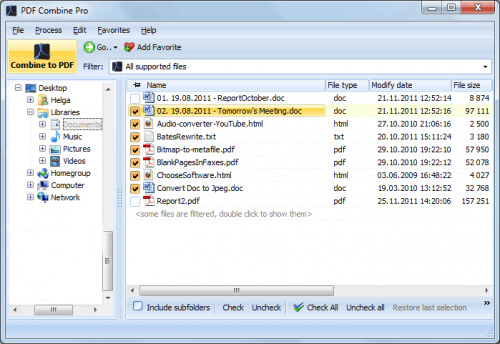
The interface is very clear. The wizard helps you to make all the settings.
You can also add bookmarks. Use file names, document titles or external file to create your table of contents.
When you combine files of different formatting, some files may not fit. Use fit-to-page option to properly locate all the files in the output PDF.
Use a duplex printer? PDF Combine solves the problem of printing PDF files double sided with an odd number of pages. It adds a blank page if the file has an odd number of pages, so the next file is not printed on the back side of the previous one.
The built-in Preview panel helps you to view each file either scaled or in actual size.
Our app can also function as PDF encrypter, setting user permissions or password protection.
We also offer a special server PDF Combine Pro (SDK). It has no GUI, no interrupting messages.
PDF Combine Pro can be run via command line (get the ready-to-use command line from GUI settings).

Release Name: CoolUtils PDF Combine Pro 4.2.0.167/119
Size: 409.4 MB
Links: HOMEPAGE – NFO – Torrent Search

Download: RAPiDGATOR
8 Comments
Apr 28

Face Sorter Pro Ultimate 3.0.8

Description: Sort thousands of photos by who's in them — automatically. Point it at your unsorted photo library, train it with a few photos per person, and let the AI handle the rest. Weddings, family reunions, years of phone photos — organized in minutes. Powered by Lemwil Vision — our proprietary computer vision engine, trained in-house from the ground up.

- 100% offline — your photos never leave your device
- GPU accelerated — NVIDIA RTX 30, 40, and 50 series
- CPU fallback — works on any Windows PC
- Handles 300,000+ photos without breaking a sweat
- 30+ formats — JPEG, HEIC, RAW, PNG, and more
- Smart features — Auto-Learn, Group Sorting, Duplicate Finder, AI Enhance

Our Story
Face Sorter Pro started with a simple problem — thousands of unsorted family photos and no good way to organize them. Every solution we found was either cloud-based, subscription-locked, or just not accurate enough. So we built our own. What started as a side project turned into a full AI-powered photo sorting engine, trained in-house on our own hardware. No shortcuts. No borrowed AI. Just software that works.

Our Technology
Face Sorter Pro Ultimate is powered by Lemwil Vision — our proprietary computer vision engine. We don't rely on third-party AI models. Every model is designed, trained, and optimized in-house on our own multi-GPU AI server. The result: faster, more accurate face detection built specifically for sorting real-world photo libraries.

SORT THOUSANDS OF PHOTOS IN MINUTES — GPU OR CPU.
Face Sorter Pro Ultimate is the high-performance photo organizer built for serious users, photographers, archivists, and professionals who manage massive libraries (50,000–300,000+ images) — and want results fast.

NOW WITH FULL CPU SUPPORT
No NVIDIA GPU? No problem. The new CPU edition delivers the same features, same accuracy, and same sorting power on any Windows PC. GPU owners get maximum speed with CUDA acceleration. Everyone gets pro-level results. Stress-tested on 304,000+ photos. Zero crashes. Near-zero false positives.

GPU ACCELERATION
Automatically detects and uses your NVIDIA GPU (RTX 3080+ recommended) to sort photos up to 10x faster than CPU tools. Tested and proven on 300,000+ image libraries across RTX 3080, 4090, and 5080 hardware.

CPU MODE
Runs on any Windows PC with no GPU required. Same features, same accuracy — just takes longer on large libraries. Perfect for laptops, office PCs, and non-NVIDIA systems.

TRIPLE VERIFICATION ENGINE — Three layers of AI matching eliminate false positives
- Layer 1: Neural network encoding match (finds candidates)
- Layer 2: Centroid verification (rejects strangers)
- Layer 3: Facial geometry check (catches family member lookalikes)
- This is why accuracy is near-perfect — even on 300K+ libraries.

SMART AUTO-GROUP SORTING (NEW!)
Automatically creates folders for every combination of people found. Alice + Bob photo → "Alice + Bob" folder. Alice alone → "Alice" folder. Your entire library organized in one pass — no duplicates, no manual work.

STRICT GROUP MODE
Find ONLY photos where specific people appear together. Check "Mom + Dad + Baby" → only saves photos with all three present. Perfect for events, holidays, and family albums.

INDIVIDUAL SORT
Each person gets their own complete folder with every photo they appear in.

ULTIMATE CNN + HYBRID DETECTION
The GPU-powered CNN engine finds faces others miss: side profiles, shadows, partial occlusions, and more. The Hybrid Engine blends CNN, HOG, and MediaPipe for superior results on difficult images.

INTELLIGENT AUTO-ROTATE SCAN
Sideways or upside-down photos? The app auto-rotates and re-scans until every face is detected — no manual fixes needed.

KING OF THE HILL (SMART DUPLICATE CLEANER)
When duplicates are found, it keeps the highest-resolution version and moves lower-quality copies to a "Duplicates" folder. Saves space without losing your best shots.

DUPLICATE FINDER MODE
Dedicated mode scans for near-identical images using perceptual hashing, keeps the best version, and organizes the rest.

COPY OR MOVE OPERATION
- Copy Mode: Safely duplicates to organized folders (originals untouched)
- Move Mode: Cleans source drives by relocating files

100% PRIVATE & FULLY LOCAL
No cloud. No uploads. No APIs. No tracking. No internet required. Everything processes on your hardware — your photos never leave your computer.

System Requirements
- GPU Version: NVIDIA GPU with CUDA support (RTX 3080+ recommended for best performance)
- CPU Version: Any Windows 10/11 PC — Intel or AMD, no GPU required
- RAM: 8 GB minimum, 16 GB+ recommended for large libraries

Release Name: Face Sorter Pro Ultimate 3.0.8
Size: 1.9 GB
Links: HOMEPAGE – NFO – Torrent Search

Download: RAPiDGATOR
4 Comments
Apr 28

CoolUtils PDF Combine 8.1.0.74/11

Description: To combine PDF, or PDF merging, is the process of joining multiple PDF files into one. This can be useful for organizing, sharing, or printing documents. CoolUtils PDF Combiner is software that allows you to merge PDFs offline without uploading your files to any third-party servers.

Our PDF merger tool allows you to:
Combine PDF files into one document
Append PDF files
Add a clickable Table of Contents
Use the PDF merger software to add a cover page
Delete blank pages from scanned files
Insert blank pages for double-sided printing.

Release Name: CoolUtils PDF Combine 8.1.0.74/11
Size: 314.3 MB
Links: HOMEPAGE – NFO – Torrent Search

Download: RAPiDGATOR
8 Comments