Please REGISTER or RENEW your account on RAPiDGATOR.net and support us by doing through all RAPiDGATOR working download links on main posts...
Apr 20

Adobe Bridge 2026 16.0.3

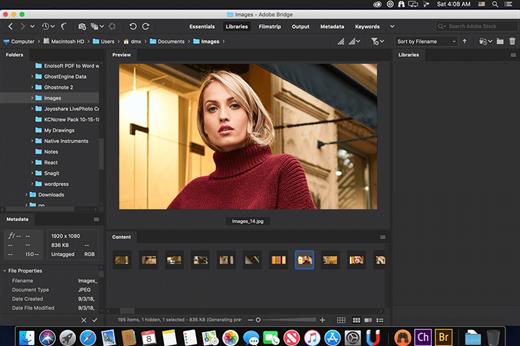
Description: Bridge gives you centralized access to all the files and assets you need for your creative projects. Organize personal and team assets, batch edit with ease, add watermarks, set centralized color preferences, and even upload your photos to Adobe Stock. Bridge simplifies your workflow and keeps you organized and now with CC Libraries.
Features
- Bulk import, export and preview CC Libraries assets
- Edit photo capture time
- Export/ Import network cache
- Native PDF Output Module
- Easy upload of images to Adobe Stock so you can get royalties for your work
- Support for Retina and HiDPI displays with the ability to scale
- Automated cache management
- Publishing to Adobe Portfolio to build your personalized website
- Quick organization and stacking of panoramic and HDR images
- On-demand thumbnail and metadata generation
- Option to import photos and videos from your mobile device or digital camera on macOS
- Support for CEP HTML5
- Flexible batch processing
- Drag-and-drop file flexibility
- Centralized color settings

Consistent user experience
Adobe Bridge now has an enhanced user interface to provide you a similar experience like other Creative Cloud applications. You can also change the default user interface appearance, text size, and scaling by setting the User Interface preferences in the Edit > Preferences > Interface dialog.

Enhanced Creative Cloud Libraries
The Libraries workspace in Bridge now displays a high-quality preview of library items. You can select multiple items to see their previews together.

Centralized cache management
You can now share a cache with other Bridge users and let them use the shared cache instead of creating a cache. Any Adobe Bridge user can export a cache to a shared folder, and other users can import a copy of the shared cache to their local systems. Given that the systems are in synchronization, managing the cache at a centralized location lets you reuse the exported cache, without the need to rebuild the cache on different user machines. You can create and manage the shared cache by using the Manage Cache dialog (Tools > Manage Cache), which has now been enhanced to provide options for building, importing, and purging cache. In addition, the cache preferences have been enhanced (Edit > Preferences > Cache and Edit > Preferences > Cache Management).

Edit capture time
Adobe Bridge now lets you change the capture time of the JPEG and RAW image files, just like the way it is done in Adobe Lightroom. This feature is helpful if you travel to a different time zone and do not change the date or time setting of your camera before you start photographing. With this feature, you can edit the capture time after capturing the image.

Support for XD file formats
Bridge now supports preview, thumbnail generation, metadata tagging, and keyword generation for Adobe XD files.

Media cache preferences
Bridge now processes and maintains a cache of all audio and video playback files. This capability improves the performance of playback files because the files are available for ready access whenever you want to view them later. It is recommended that you regularly clean the old and unused media cache files to optimize the performance. The preferences for media cache can be set by choosing Edit > Preferences > Media Cache.

Cut, copy, or move files and folders across Bridge and File Explorer or Finder

Bridge now lets you perform the following operations
- Cut, copy, or move files and folders from File Explorer (Windows) or Finder (macOS) and paste them in Bridge
- Cut, copy, or move files and folders from the Bridge workspace and paste them in File Explorer (Windows) or Finder (macOS)

Release Name: Adobe Bridge 2026 16.0.3
Size: 2.72 GB
Links: HOMEPAGE – NFO – Torrent Search

Download: RAPiDGATOR

2 Comments
Apr 20

Fig Player 1.3.34

Fig Player, is a media player for Mac that supports a wide variety of media files and allows you to listen to music, watch videos and movies.

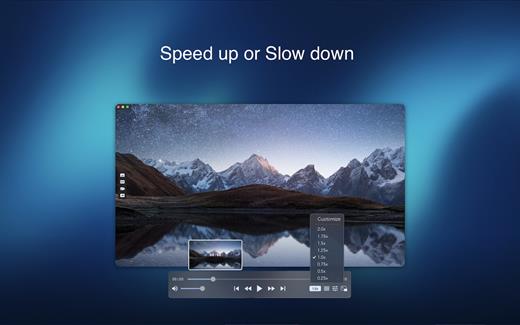
If you have an extensive media library but don’t have a good media player for Mac, here’s a good solution. Fig Player. It’s free to use and comes with a friendly interface. On the screen, you’ll be able to see all of the buttons that give you control over your experience, such as the play and stop button, playback options, volume slider, preview section, screenshot, and recording.

More Advanced Features


  • Smooth, seamless video play, support 4K.
  • Auto deinterlacing.
  • H/W-acceleration.
  • A-B loop.
  • Frame by Frame playback.
  • PIP mode.
  • Support various Subtitle formats(Text subtitles(SRT), Vobsub
    and ASS/SSA, etc.).
  • Choose which one when you have multiple sound output devices.
  • Create the scene poster with snapshots.
  • Playlist with upper-level folder name.
  • Support multiple windows and play multiple videos at the same time.
  • Support Wireless display to DLNA, Chromecast, Roku devices.
  • OCR Text Recognition(macOS 12+)
Supported Formats

Videos: mkv, rmvb, rm, avi, mov, wmv, flv, f4v, f4p, f4a, f4b, swf, mpg, mpeg, mpeg1, mpeg2, m1v, m2v, mpv, mp4, mpeg4, m4v, 3gp, 3gpp, 3g2, 3gp2, m2p, ps, ts, m2ts, mts, mt2s, ogm, ogv, divx, dv, asf, wtv, webm, etc.

Audios: flac, ape, m2a, mp1, mp2, mpa, mp3, mpg3, m4a, m4b, wma, wav, wv, xm, aiff, aif, ac3, a52, aac, opus, ogg, oga, mid, midi, mka, etc.

Subtitles: ASS, SSA, SRT, IDX&SUB

What’s New

Version 1.3.34:


  • Release notes were unavailable when this listing was updated.
Compatibility

macOS 10.13 or later


Release Name: Fig Player 1.3.34
Size: 74.2 MB
Links: HOMEPAGE – NFO – Torrent Search

Download: RAPiDGATOR
5 Comments
Apr 20

Stats 2.12.11

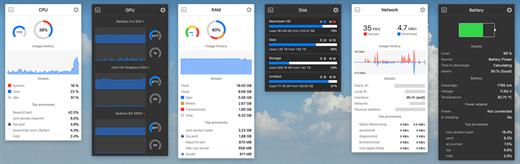
Stats is a application which allows you to monitor your macOS system.


  • CPU Usage
  • Memory Usage
  • Disk utilization
  • Sensors information (Temperature/Voltage/Power)
  • Battery level
  • Network usage
What’s New

Version 2.12.11:
Bug fixes


  • fix: fixed release version for v2.12.10
Compatibility

macOS 10.14 or later, 64-bit processor


Release Name: Stats 2.12.11
Size: 6.9 MB
Links: HOMEPAGE – NFO – Torrent Search

Download: RAPiDGATOR

6 Comments
Apr 20

FSNotes 7.1.3

FSNotes is a plain-text note manager for macOS, and is modern reinvention of notational velocity (nvALT) on steroids. Our application respects the following open formats: plain/text, Markdown, and RTF, and stores data in the file system. You can view, edit, and copy data in your favourite external editor, and see live results in FSNotes.

Features:


  • ICloud synchronization
  • Keyboard centric
  • Global shortcuts (clipboard save / search field)
  • Markdown and RTF markup (files stored on disk as plain/text and rich text)
  • Markdown preview mode
  • Elastic two pane view (vertical and horizontal layout)
  • Blazing fast and lightweight
  • Open files in finder / works with external editors (changes seamless live sync with UI)
  • Pin/unpin important notes in top
  • Multi folder storage
  • Markdown live highlighting with over 170 languages in code blocks
What’s New

Version 7.1.3:


  • Release notes were unavailable when this listing was updated.
Compatibility

macOS 10.14 or later


Release Name: FSNotes 7.1.3
Size: 19.7 MB
Links: HOMEPAGE – NFO – Torrent Search

Download: RAPiDGATOR
6 Comments
Apr 20

Aiseesoft Mac Blu-ray Player 6.6.66

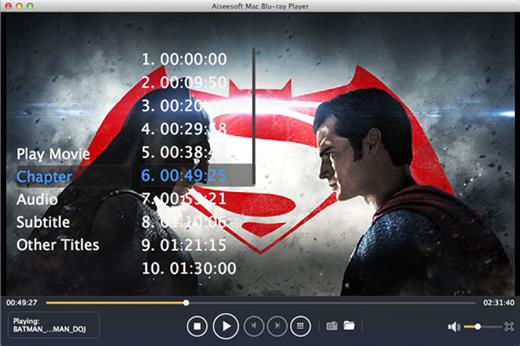
Aiseesoft Mac Blu-ray Player lets you enjoy any Blu-ray movie or video in disc/ISO file/folder on Mac with full HD 1080p and best sound quality.

Play Blu-ray disc/folder/ISO image file on Mac

This Blu-ray player for Mac users enables you to freely play any Blu-ray disc released in different regions on your Mac without limitation. Select specific title/chapter or the main movie of Blu-ray disc to experience the high-quality picture directly. Apart from playing Blu-ray movie disc, this strong Mac Blu-ray Player software can play or playback Blu-ray folder (BDMV folder) as well as Blu-ray ISO image files (with a virtual drive). Click Open File to load local Blu-ray folder or ISO file to start the Blu-ray experience of movie-watching on your Mac with the latest macOS High Sierra.

Play any video (4k/1080p/1080i included)

This Blu-ray player is powerful enough to ply 4K and 1080p/1080i/720p resolution video on your Mac. Only if your Mac is equipped with high definition to 4K/1080p/1080i/720p, you will play your 4K video easily with the upscaling visual effect directly, instead of taking a Samsung/Sony/Oppo 4k Blu- ray player to connect to your Mac. Besides HD video with superior picture and video quality, you will be allowed to play other Blu-ray videos with SD resolution (480p, 360p, 240p) with this powerful Blu-ray player on your iMac, Mac mini, Macbook Air, Macbook Pro, Macbook, Mac Pro, etc.

Play almost formats video with great audio effect

This Blu-ray player for Mac plays all popular Blu-ray videos including MP4, MKV, AVI, MOV, WMV, FLV, M4V, etc. Also it supports to play non-blu-ray videos, so that you get more pleasure, like ASF, VOB, DAT, MTS, M2TS encoded with AVCHD, etc. Moreover, it can be used to play audio files directly in FLAC, AAC, AC3, MP3, OGG, WAV, WMA and more. Compatible with AAC, Dolby Digital and DTS 5.1/7.1 channel audio, it brings you highest sound effect just like stay at the home theater, when you play video with the lossless audio with FLAC and APE format. Moreover, you could capture your favorite pictures during the process of previewing.

What’s New

Version 6.6.66:


  • Release notes were unavailable when this listing was updated.
Compatibility

macOS 10.10 or later


Release Name: Aiseesoft Mac Blu-ray Player 6.6.66
Size: 49.2 MB
Links: HOMEPAGE – NFO – Torrent Search

Download: RAPiDGATOR

5 Comments
Apr 20

NetWorker Pro 11.0.9

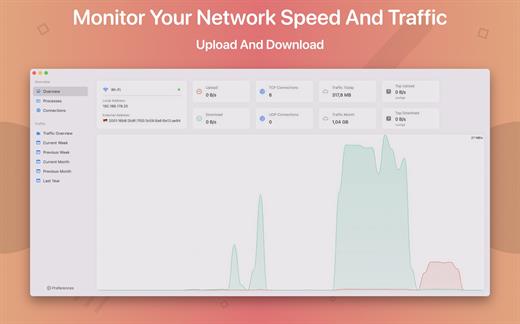
NetWorker is a lightweight and easy-to-use tool that shows either the current download and upload speed or the session traffic of your network adapter. The information is shown in a small view in your menu bar.

Features


  • You can switch between three modes: speed, traffic, or speed/traffic
  • You can choose the network adapter to observe, so both wired and wireless adapters are supported
  • Adjustable refresh interval
  • Support for auto-start
What’s New

Version 11.0.9:


  • Release notes were unavailable when this listing was updated.
Compatibility

macOS 11.0 or later


Release Name: NetWorker Pro 11.0.9
Size: 7.7 MB
Links: HOMEPAGE – NFO – Torrent Search

Download: RAPiDGATOR

6 Comments
Apr 20

DockDoor 1.35.1

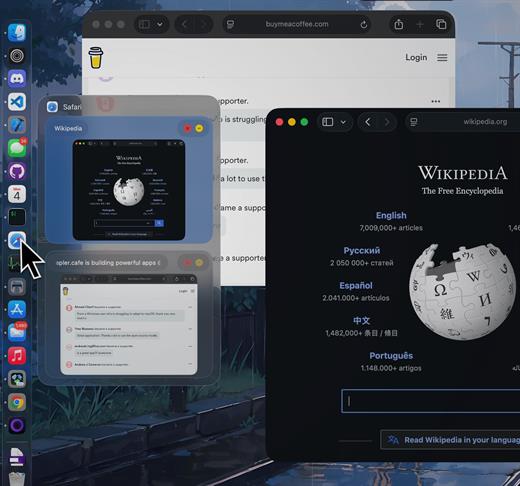
DockDoor enhances window management and interaction — it allows users to seamlessly switch between application windows, providing features such as window previews, easy navigation, and improved multitasking capabilities.

What’s New

Version 1.35.1:


  • Release notes were unavailable when this listing was updated.
Compatibility

macOS 13 or later


Release Name: DockDoor 1.35.1
Size: 20.5 MB
Links: HOMEPAGE – NFO – Torrent Search

Download: RAPiDGATOR

6 Comments
Apr 20

ACDSee Photo Studio 26.0.2

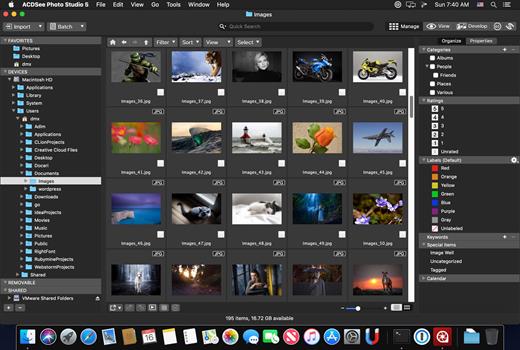
Known for best-in-class digital asset management and RAW processing power, ACDSee Photo Studio for Mac 5 gives you instant, import-free access to your photos. Flexible organizational tools to satisfy any workflow, lightning fast non-destructive adjustments, drag and drop searching, sleek customizable batch presets, and RAW support for over 450 camera models are just a few of the elements that make ACDSee Photo Studio for Mac 5 the must-have image editing software on the macOS.

Image Basket

Gather and hold images from different locations or folders in the Image Basket. Once you have your desired assortment, you can use any of the tools or features in ACDSee to view or edit these files.

Filter By

Quickly single out and display files by their metadata, such as ratings, color labels, tags, and categories. This essential component of digital asset management will also identify images by the metadata they don’t have, such as “no keywords”, “untagged”, and “uncategorized”.

Compare Images

Highlight the similarities and the differences in up to four images at once with the Compare Images tool. Use zooming and panning to identify which images to keep.

Auto Advance

Manage entire folders without ever moving your hands from the keyboard. With Auto Advance, adding metadata will move the focus to the next image in the File List pane, allowing you to seamlessly organize.

External Editors

Easily configure ACDSee to work with a variety of other image editors. Specify a default editor, and then promptly open images in other applications right from inside Manage or View mode.

Multiple Databases

Create as many ACDSee databases as you like, and swiftly and smoothly switch between them.

Batch Add Watermark

Claim your work by adding watermarks to your images. Adjust size, position, and opacity for the perfect signature, and save your settings as a preset. Apply it to one, many, or all.

Batch Add Border

Frame your favorite photos in batches with the Batch Add Border tool. Customize the color, texture, and thickness of your border, and choose from nearly 100 unique edges to complement your shots.

Import Database

Don’t lose hours of cataloging just because you want the latest software. Import your database from version 3 or 4 of ACDSee Photo Studio Mac and keep right on working.

What’s New

Version 26.0.2:


  • Release notes were unavailable when this listing was updated.
Compatibility

macOS 11.0 or later


Release Name: ACDSee Photo Studio 26.0.2
Size: 441.3 MB
Links: HOMEPAGE – NFO – Torrent Search

Download: RAPiDGATOR
6 Comments
Apr 20

IINA 1.4.2

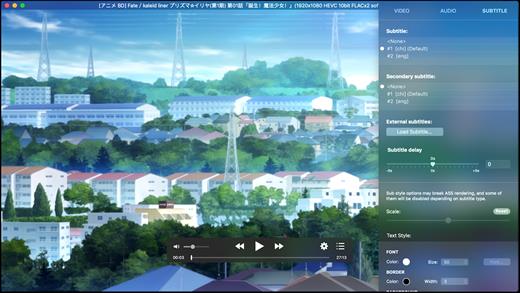
IINA is the modern video player for macOS.

Features


  • For and only for modern macOS – IINA is born to be a modern macOS application, from its framework to its user interface. It adopts the post-Yosemite design language, and keeps up the pace of new technologies such as Force Touch and Touch Bar.
  • Revolutionary user experience – IINA simplifies a lot of user interactions. In addition to traditional cascaded menus, it provides interactive UI components and gestures to give you intuitive, flexible, powerful control of the playback.
  • Powerful functionality – Based on MPV, one of the most powerful media player projects ever, IINA supports almost all common media types (even GIF) and stably outputs high-quality video that is optimized for Retina screen. MPV’s config file and script system are also integrated.
  • You are the target-user – IINA is made by a user like you, who (may be) also having been expected for a powerful and elegant media player on macOS for years. Whether you just got your first Mac or are already a professional MPV user, IINA will satisfy you for its customizability and expandability.
What’s New

Version 1.4.2:


  • Release notes were unavailable when this listing was updated.
Compatibility

macOS 10.15 or later
Apple Silicon or Intel Core processor


Release Name: IINA 1.4.2
Size: 104.2 MB
Links: HOMEPAGE – NFO – Torrent Search

Download: RAPiDGATOR

5 Comments
Apr 20

Tipard Mac Video Converter Ultimate 10.2.96

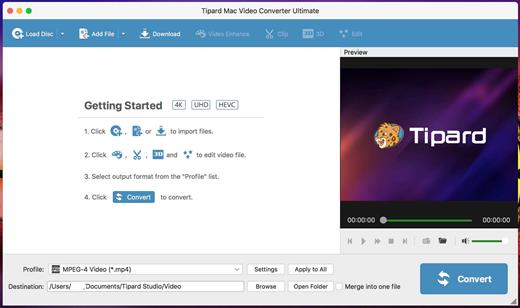
Tipard Video Converter Ultimate can convert any video to MP4, AVI, MOV, WMV, MP3, etc. It can meet your demands with powerful editing functions to crop, clip, set 3D mode, rotate video, etc. You can also enhance video quality before converting by removing video noise and reducing video shaking.


  • Convert between different audio formats or extract audio tracks from video files
  • Offer a wide range of output video/audio formats including MP4, WMV, AVI, MP3, etc.
  • Provide ready-to-use profiles for iPhone X, iPhone 8, iPhone 7, iPhone 6s, iPhone 6, iPhone SE, iPad Pro/mini 4, iPod, Samsung Galaxy S/Note series and other devices
What’s New

Version 10.2.96:


  • Release notes were unavailable when this listing was updated.
Compatibility

macOS 10.10 or later


Release Name: Tipard Mac Video Converter Ultimate 10.2.96
Size: 161.6 MB
Links: HOMEPAGE – NFO – Torrent Search

Download: RAPiDGATOR
5 Comments