Please REGISTER or RENEW your account on RAPiDGATOR.net and support us by doing through all RAPiDGATOR working download links on main posts...
Apr 19

Enolsoft PDF Converter with OCR 7.2.0

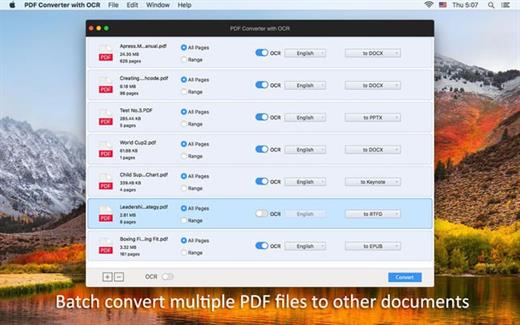
EnolsoftPDF Converter with OCR for Mac can help you easily convert native and scanned PDF to Word, Excel, PPT, Keynote, Pages, HTML, EPUB, Text, Rtfd, Images and etc. No matter you want to analyze data, report work to your boss, or have a meeting with your colleague, it can be your great partner.

With PDF converter OCR for Mac, you can batch add and convert PDFs to the format you want without quality loss, then you can copy the information freely. Put simply, PDF Converter OCR for Mac helps you work better, smarter, and faster.

Enolsoft PDF Converter OCR for Mac makes your edit be much easier. It can help to remove the PDFs’ restriction password automatically before converting, convert scanned PDFs or images to the editable formats with OCR technology.

What’s New

Version 7.2.0:


  • Release notes were unavailable when this listing was updated.
Compatibility

macOS 10.14 or later


Release Name: Enolsoft PDF Converter with OCR 7.2.0
Size: 519.1 MB
Links: HOMEPAGE – NFO – Torrent Search

Download: RAPiDGATOR

6 Comments
Apr 18

Cavalry Professional 2.7.0

Description: Created by animators, for animators — Cavalry makes 2d animation smarter, easier and faster to produce. Design in real-time for advertising, mobile, data visualisation, web, broadcast, ui, generative art, experiential, games and more.

Easy versioning
Powerful versioning capabilities make managing big projects a breeze. Leave data to do the hard work for you.

Design in real-time
Lightning fast viewport rendering means you can stay focused on being creative.

Creative playground
Mix procedural workflows with traditional techniques to iterate quickly and evolve concepts in a fun and playful environment.

End to end workflow
Move seamlessly from artworking to animation and build vector based creative from the ground up.

Native Features
Cavalry includes fundamental features that connect with each other directly in-app so you can spend less time and money managing third party plug-ins.
Rig Control
Rubber Hose
Connect Shapes
Color Palettes
Magic Easing
Text Animation
Duplicator
Data Import
Lottie Export PRO
Forge Dynamics PRO
Falloffs
Quad Tree

Release Name: Cavalry Professional 2.7.0
Size: 113.1 MB
Links: HOMEPAGE – NFO – Torrent Search

Download: RAPiDGATOR

5 Comments
Apr 18

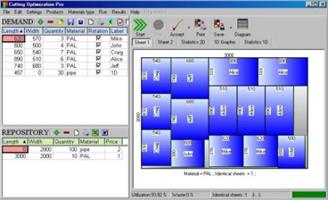
Cutting Optimization Pro 5.18.21.4

Description: Cutting Optimization Pro is a software application used to obtain optimal cutting layouts for one (1D) and two (2D) dimensional pieces. The software also lets you to define and handle complex products, such as table, desk, cupboard, locker, book shelf ... Cutting Optimization Pro can be used for cutting rectangular sheets made of glass, wood, woodworking, metal, furniture, or any other material used by industrial applications.

Features of Cutting Optimization pro ...
1D and 2D optimization in the same cutting program - you may use the program for both 2D and 1D optimization.
Guillotine optimization - The cuts are performed from one side to the other of the material. This feature is very useful for glass, wood, thermopan, ...
Non-guillotine (nested) optimization - The cutting machine can follow the shape of the material. In this case you need to have a complex machine based on laser or flame blade.
Multi-stage guillotine - all cuts in a stage are perpendicular to the cuts on the previous stage. The user may specify the number of stages and the direction of cuts for the first stage.
Any number of pieces in the INVENTORY and DEMAND - virtually no limit for the number of pieces that you want to optimize.
Any measurement metric- The way in which you introduce the data is a general one. You don't have to specify a metric. Just choose a metric in your mind and enter all data using that metric only.
Fractional input. Pieces can be introduced either as 100.5 or 100 1/2. More info about fractional input can be read here.
Adjustable cutting blade thickness- For glass cutting with diamond the cutting blade thickness is 0, but for wood, metal handling you need a saw with a greater thickness.
Adjustable optimization level- One may specify how many layouts to be generated before the solution is outputted. If you don't have too much time and you don't have a good computer you may set the Optimization Level to a low level. This feature helps you to run your program on any kind of computer (from 486 to the best processors available today).
Maximal cut length limit - You may specify how long a cut can be. This is useful when you perform the cuttings manually.
Adjustable useful waste - all wastes smaller than this size are garbage (will not be added to repository).
Adjustable limit for breakable parts - No waste will have a size lower than this parameter and no 2 parallel cuts will be closer than this. It is used in order to avoid the breaking of too small material. Useful in glass industry.
Reduces panel waste and costs - By using the latest achievements in the field of Artificial Intelligence you may obtain reduce the waste by 15%.
Grain direction control - useful for wood cutting optimisation. A parameter let the user to specify if the piece can be rotated or it should be kept fixed.
Automatic offcuts handling - the useful waste is automatically added to the Inventory of materials.
Vertical printing of the labels and edge bands - this will optimise and simplify your layout.
Graphical display black-white or colourful images and text mode of the obtained results - the results are displayed as images (black and white or colourful) or as text-tables.
Save images automatically - all the obtained 2D sheets can be saved as bmp images with 1 click. The programs automatically appends a number to an image.
Copy-paste from Excel. Just select some columns from Excel and paste them in Demand or Inventory grids.
Grouping similar layouts - this will reduce the number of printed sheets of paper. The number of repetitions for each sheet will be displayed.
Magnifying a sheet. This is useful if you have a long roll which you can visualize it by magnifying it.
Printing the obtained layouts - on any printer.
Printing multiple layouts on the same page - You may print 1, 2, 4 or 6 layouts on the same sheet of paper.
Printing the REPOSITORY and the DEMAND of the customer - you may print the pieces that you want to optimize.
The cuts are shown in text format in order to use them with a CNC machine.
Edge banding handling - the quantity and the type of material attached to the edges of the wood sheets is manipulated by the program.
Computes / Prints the total cutting length.
Displays diagrams - a table which contain the pieces cut for each sheet.
Possibility to define complex products such as table, desk, cupboard, locker, book shelf ...
Possibility to define types of materials (glass, wood, band) - for each material the user has a special table where it can introduce more information about the material.
Automatic tool for computing the size of the pieces based on the external sizes of the product.
Statistics related to the current cut / layout- At the end of the optimisation process you will have access to the: number of cuts, cuts definition (starting and ending point), number of waste rectangles, the waste rectangles (the coordinates of the top-left and bottom-right corners), number of utilized pieces, the placement of the utilized pieces, used surface, ...
Saves/loads results - All results can saved in txt files and loaded later.
Generates and prints adhesive labels -
Load data from xml, *.dbt (specific files), *.2d (Real Cut 2D files), *.xls (Excel files), *.csv (comma separated) and *.1d (Real Cut 1D files).
Automatically computing of the order price -
The REPOSITORY and the DEMAND can be sorted - by using various criteria: Length, Width, Quantity, Type, Rotation, Labels
Maximises productivity, saves time and money ....
Data can be exported into very popular formats: Word, Excel, HTML, CSV (comma separated) and XML files.
All panels and table's columns are resizable - You may customize the workspace. The new positions are automatically stored.
Very fast running time - Solutions are obtained within seconds.
Optimization engines provided by Optimal Programs Cut 2D X and Cut 1D X components.
Interface in multiple languages: Dutch, English, French, German, Italian, Portuguese, Romanian, Spanish and Swedish.

Release Name: Cutting Optimization Pro 5.18.21.4
Size: 2.2 MB
Links: HOMEPAGE – NFO – Torrent Search

Download: RAPiDGATOR

5 Comments
Apr 18

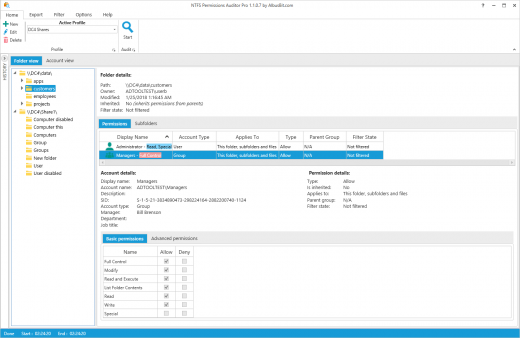
AlbusBit NTFS Permissions Auditor Pro 26.4.17

Description: Audit directory permissions in your Windows systems quickly and easily.

Quick and Simple Setup
Get Going in 3 Steps: Choose directories to audit, tweak settings if you want (or stick with the defaults), and hit ‘Audit’. It’s that easy to start scanning folder permissions.
One-Time Install: No fuss setup. Install once and you’re good to go—no extra configurations needed.

Powerful and Efficient Auditing
Speed and Precision: Fast scans deliver detailed insights into folder permissions accurately, helping you secure your data.
Flexible Filters: Customize audits with versatile filters. Whether it’s by department, job title, or access type, get exactly the info you need. Plus, our advanced caching speeds up the process, outperforming similar tools.

In-Depth Insights and Control
Comprehensive Visibility: The account view shows you everything - which users and groups have what rights in each directory.
Detailed Filters for Any Scenario: Whether during or after audits, use a wide array of filters (from basic to advanced permissions, account details, and more) to pinpoint specific data, enhancing security and compliance effortlessly.

Key features

Export
You can export audit results to a range of file formats including Excel (XLSX), CSV, XML, HTML and PDF. Exports can be performed in two ways – folder view export (categorized by folders) and principal view export (categorized by accounts).

Folder tree view
Hierarchical folder view providing all folder details such as path, owner, permissions, etc.

Account view
See all users, groups and computers, and all directories to which they have access.

Account data
See the main information about the account – display name, security identifier (SID), description and additional data such as department, manager, job title, etc. For group accounts, you can display information about direct and nested group members.

Powerful and diverse filters
The filter manager offers a wide range of options to filter audit results and can be applied in two ways – audit time filtering and post audit filtering, which enables you to filter data and change filter conditions without needing to redo the audit.

Exclude directories and accounts
Exclude unnecessary directories by specifying the exact path or just the directory name. You can also exclude system directories and reparse points from your audit results, limit audit depth by specifying directory depth limit and exclude disabled accounts and specific accounts from audit results.

Data storage
All data can be stored in the local, secure database. No additional setup is needed – it’s all included in the installation. You can access historical audit data at any time.

Don’t overload Your system
Fast and efficient, it uses RAM and CPU efficiently to generate results as quickly as possible without overloading PC resources. It uses various caching mechanisms to reduce Active Directory request counts to the minimum.

Change reports
You can compare two audit results and see what has changed. Change reports will show you which directories, directory permissions and group members have been removed, added or modified.

Release Name: AlbusBit NTFS Permissions Auditor Pro 26.4.17
Size: 14.9 MB
Links: HOMEPAGE – NFO – Torrent Search

Download: RAPiDGATOR

6 Comments
Apr 18

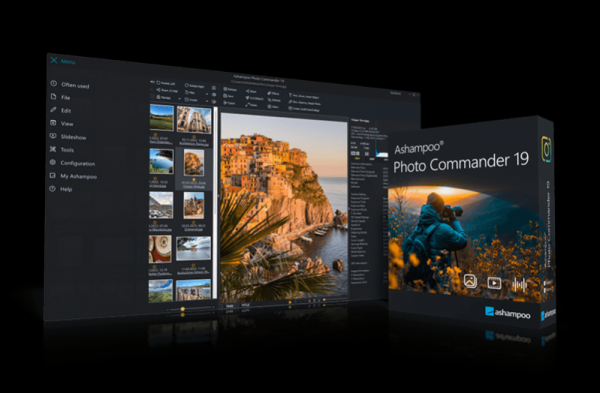
Ashampoo Photo Commander 19.0.5

Description: 20 years ago, beautiful photos were scarce. 10 years ago, memory was scarce. Today, we've got both–but we've also got a veritable file chaos, thanks to hundreds of files!

Ashampoo Photo Commander not only turns chaos into neat photo collections but it also turns good into great shots, and can even make collages, greetings cards, and slideshows. Convert your photos, even automatically and in batches, add watermarks, and sort your files by location for instant visual clarity. Photo Commander is the all-in-one solution for you!

A real feature beast for your photos
20 years in the making–and it shows!
Ashampoo Photo Commander includes over 200 photo-related functions and is rightly called "feature beast" by its fans. And it's true: You can click your way through he program and keep discovering new handy features and tools that other companies would gladly sell you as separate apps. Your fun journey into the world of photo editing begins today!

More performance, more protection, more comfort!
More privacy, convenience, and formats for your photos
Get the perfect upgrade with the new Ashampoo Photo Commander 19! Enjoy more privacy for your photos, smoother management with smart drive detection and the brand-new Where?/When? view. Photo Commander 19 delivers full support for modern formats like WEBP animations, RAW and optimized video codecs, plus numerous detail improvements to wizards, collages, and duplicate detection!

Automatic encryption of database, backups & Registry
Optional screenshot protection against third-party access
Crash safety with autosave & new crash reporter
Automatic drive detection for USB sticks & external hard disks
“Where?/When?” view with file counts for quick overview
WEBP animations with EXIF & XMP support
Updated RAW plugin for digital cameras
Optimized GIF decoder & new video codecs
Improved wizards with new design & faster duplicate search
ADF scanning for Canon Pro scanners
Find duplicates, edit metadata, smart-search for files
No more duplicate photos – with four-way fingerprint technology
Ashampoo Photo Commander is handy indeed! It scans your library for duplicates and helps you filter your photos by name, EXIF/IPTC data, or comments. Looking for a needle in a haystack has just become super-easy. You can even add missing metadata manually so you'll never lose track of your photos again!

Collages, cards and frames included
From birthdays to Christmas: Create just the right card in no time
Get creative: Photo Commander lets you create stylish collages and elegant cards with the help of numerous included templates. Add nifty frames to your photos and combine images and texts to create greeting cards for holidays, parties, and special occasions.

Create even better collages with improved background fitting, enjoy a fresh design across all wizards, and find duplicates faster than ever thanks to a new sorting method–even for massive lists with thousands of entries! Plus, automatic caching ensures your work remains safe, even in the event of a crash.

Crop and edit photos
Beginner or professional user: Make the most of your shots
Crop your photos with ease, straighten image horizons and accentuate colors. Cut out individual people and objects and modify image perspective at your convenience. Play with numerous great photo effects and go professional with gradation curves and tonal value correction! Whether quick fix or detailed post-processing: Ashampoo Photo Commander has got you covered!

The image viewer with the perfect overview
Smart-group and sort by capture date, time, or file name
With Ashampoo Photo Commander, you always stay on top of your photos. Clever filters and grouping options help you keep track no matter how large your photo collections are! Sort chronologically, thematically and by location or apply custom filters and instantly find every shot!

Effortless management and up-to-date organization
Connected USB sticks or external drives are now detected automatically, with folder lists updated instantly–no manual action required. The new Where?/When? view show you immediately how many files are in each section for a quick and clear overview.

Design slideshows with ease
Create high-res slideshows with music
Create high-resolution 4K slideshows with fitting transitions and underline your shots with music in various formats. Finished projects are instantly previewable with the new video playbar and can be burned to disc straightaway.

Auto-enhance your photos
Smart algorithms for better colors or contrasts and less noise
Even underwhelming shots turn into precious vacation memories thanks to image auto-correction. Remove scratches and eliminate image noise or red eyes instantly! Auto-correction does most of the heavy lifting for you–even in batch processing mode so you can polish your entire library in one go! Optimize colors or contrasts and get rid of compression artifacts at the click of a button!

Present your photos in style
Versatile presentation mode for every occasion
Whether you're enjoying your photos on your own or with friends and family, the new presentation mode is simply genius–especially in multi-display environments. You control the presentation on one display and your viewers get to enjoy the results on another, e.g. a video projector. You can even make live adjustments without leaving the presentation!

Apply geotags
No more confusion about shooting locations
Modern cameras and cellphones use geotagging to save location information along with each shot. Ashampoo Photo Commander not only uses these tags for sorting but can also edit and create them. You'll get precise information down to street level! Want to see all photos from Paris? No problem. You can even view each location in Google Maps instantly!

Salvage or create
Breathe new life into bad shots or create stunning panoramic pictures
Not every shot is a hit! Photo Commander includes a special auto-feature that fixes overexposed or washed out colors with great results. You can also apply effects individually to add more vibrancy and structure to your shots, or combine them into breathtaking panoramic views.

Batch-processing done right
Process entire photo libraries in one go
Convert multiple images into different formats at once and adjust image size and aspect ratio in the process. Add watermarks or frames to your photos and rotate or mirror them to your needs. Modify brightness and contrast settings or eliminate image noise. You can do all that with batch-processing and save loads of time and effort!

Fast multi-purpose image editing
A quick fix for common image issues
Discover tools that optimize your photos, add filters and polish contrasts and colors. Straighten image horizons, clone areas, and accentuate details with the focus or tilt-shift effect. Adjust image size and rotation or crop your photos perfectly. Why buy several programs when you can just get the one that does it all in a single interface?

Helpful wizards
Step-by-step guidance
Ashampoo Photo Commander comes with multiple wizards that offer step-by-step assistance for various tasks. Whether you're designing a calendar, creating a collage, or batch-processing hundreds of photos, there's a wizard that will guide you through the process, no previous knowledge required. Pick your photos, select an option, and you're good to go!

Release Name: Ashampoo Photo Commander 19.0.5
Size: 670.5 MB
Links: HOMEPAGE – NFO – Torrent Search

Download: RAPiDGATOR

6 Comments
Apr 18

Ashampoo Photo Optimizer Pro 26.0.3

Description: Photos constitute irreplaceable memories and capture special moments in our lives. But they do not always come out as expected, or leave room for improvement. Ashampoo Photo Optimizer Pro 26 helps you to make the most of your photos in a single click and achieve stunning results almost instantly and automatically–even with handy batch processing!

Efficient image compression with full control
With the new image compression feature, you can perfectly balance quality and file size. JPG, WebP, and PNG files can now be reduced quickly and precisely—including an interactive live before/after preview. As you adjust the settings, you’ll see the expected file size in real time and maintain full control over the final result. Save valuable storage space without visible quality loss—ideal for online use, archiving, or sharing Your images quickly.

Perfect image quality at optimal file size
New image compression with live preview and file size control
27 new LUTs for fresh one-click looks
New photo frames for additional image moods
Modernized user interface
Enhanced RAW support and optimized metadata handling
27 Brand-New LUTs Included!
LUTs (Look-Up Tables) adjust multiple image parameters such as hue, saturation, brightness, and contrast at once, giving photos a completely new look and atmosphere. In this new version, the LUT collection has been significantly expanded: Three new LUTs have been added to each of nine categories—Halloween, Christmas, Autumn, Summer, Vintage, Contrast, HighKey, LowKey, and FX. This means 27 new looks are now available for seasonal images, creative effects, or striking contrast styles.

New frames, new formats, new look
With targeted enhancements, Photo Optimizer has been further refined both visually and technically. New frames expand the existing design library and offer additional options for different image moods. At the same time, the redesigned interface provides a more modern, streamlined appearance without changing the familiar, easy-to-use workflow. In addition, RAW format support has been significantly enhanced and metadata handling optimized for clean and reliable processing.

Perfect results almost instantly
You can spend hours meticulously optimizing every aspect of your photos in search of the perfect look–or you can achieve the same in seconds using our lookup tables crafted by image editing experts. Dissatisfied with the lighting of a whole series of shots? Looking for that uniform exposure across your photo collection? LUTs will fix these issues and add the visual harmony and polish your shots deserve! From now on, visual excellence may always be just one click away!

Level up your vacation, wedding, and party shots!
Straighten misaligned shots, fix perspective errors, or apply a whole range of beautiful effects. Minor issues like red eyes, skin imperfections or stains are now easily fixable. Save time and nerves and achieve stunning results almost instantly with Photo Optimizer!

Important basics and creative freedom
Naturally, Ashampoo Photo Optimizer includes all the usual suspects like image cropping, rotating, watermarking, and softening. But it doesn't stop there. Feel free to get creative with artistic effects and elegant frame designs. Whether you're recovering failed shots, cranking up the image quality by another 5% or just having fun, this is the program for you!

The lifesaver for your vacation shots
Visual blemishes are detected and fixed through careful image analysis. Our carefully crafted algorithm fully automatically optimizes colors, contrasts, and exposure times for single shots or entire collections, turning underwhelming shots into brilliant photos!

A matter of perspective!
Taking shots of buildings often leads to unpleasant, and easily noticeable, perspective distortions, due to the position of the photographer. Buildings and other tall objects almost seem to fall over, putting an unintended comical spin on your photos. Other times, you forgot to bring your tripod and failed to keep your camera completely straight. Enter Photo Optimizer's new perspective correction! Fix horizontal or vertical distortions in just a few clicks and save shots that would have otherwise gone straight to the bin. Give your photos a second chance and get the right perspective, always!

More ease-of-use through favorites
We all have our favorite functions that we most frequently rely on. Now, you no longer have to navigate through various menus and categories to reach them. Ashampoo Photo Optimizer features a customizable "Favorites" menu so you can bundle all your favorite functions in a single instantly accessible location. Need to quickly straighten the horizon after auto-optimization, fix the perspective or do some cropping? Now you can. Genius, right?

Enhance white balance and intensify contrast spreads
White balance is pivotal to the color temperature of your images. Digital cameras are particularly prone to the dreaded bluish cast and dull colors. This leads to photos that seem lifeless and completely devoid of the magic of the moment. Low-contrast images, often due to poor lighting, are another common issue. With the help of custom white balance and contrast spread settings, Photo Optimizer can breathe new life into these otherwise ruined shots! Both features are part of auto-optimization and will auto-enable whenever appropriate!

Photo editing in just a few clicks
The user interface in Photo Optimizer is truly self-explanatory. Functions are arranged into intuitively named categories and never more than two clicks away. Where other photo editors have you wade through manuals, Photo Optimizer gives you results instantly! Everything is simple and logical, there's practically no learning curve. Whether you're a beginner or an advanced user, or maybe you just don't want to spend hours with image tweaking, Ashampoo Photo Optimizer is the program for you.

Versatile export features
Good photos deserve to be seen. That's why we're offering various ways in Photo Optimizer to share your photos with others. This includes email, the free Ashampoo Web and even just setting photos as your desktop background image. If you'd rather go the traditional route and print your photos, you'll love the feature-rich print dialog that not only creates high-quality but also space-efficient print outs, if needed.

Features for perfectionists and creatives
Many sophisticated features are available to those seeking to go beyond auto-optimization. Whether you need to sharpen or soften individual portions, Photo Optimizer offers well-designed tools for every use case. Reduce irritating image noise, adjust color temperatures or crop your images. And for the artist in you, we've also included multiple effects like waves, swirls, even implosion and explosion. There's ample room to experiment.

Naturally-looking portrait enhancements
Faces are the focus of many photos, yet they seldom come out perfect! Enhance your portraits automatically or manually with Photo Optimizer. Fix red eyes and whiten teeth for that dazzling smile. Fix minor glitches with the clone tool and remove stains and other impurities like a pro. Create perfect yet naturally looking portraits in just a few clicks!

Comfortable batch processing
Since Ashampoo Photo Optimizer does so much fully automatically, we've included batch processing to save you time and nerves while the program processes your entire photo library in one go. Select individual images from various sources or entire folders and have Photo Optimizer work its magic. Every image is meticulously analyzed and its quality optimized according to its specific characteristics. Batch-process an entire vacation in one go, polish your wedding or birthday shots and put the fun back into photography.

Release Name: Ashampoo Photo Optimizer Pro 26.0.3
Size: 265.7 MB
Links: HOMEPAGE – NFO – Torrent Search

Download: RAPiDGATOR

6 Comments
Apr 18

Gammadyne CSV Editor Pro 33.0

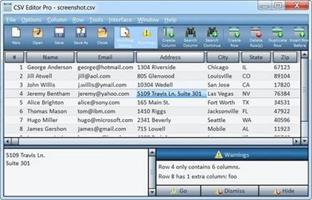
Description: CSV Editor Pro is the professional choice for working with CSV files on Windows.  Packed with an arsenal of features and tools, it can save you a tremendous amount of time and effort.  Gain analytic insight by generating a graph, histogram, or pie chart.

Features:
Full set of tools for manipulating columns and rows:  insert, delete, copy, paste, duplicate, rearrange, and shift.
Tabbed Document Interface allows you to open and edit multiple files.
Supports an optional "multiline editing mode" where you can edit multiple lines of text in a cell.
Supports "Undo" for most tools.
Warns if any line of data has too many or too few fields.  You can jump directly to a damaged line and fix it by shifting cells left or right.
"Filter Mode" will hide all rows that don't meet a specific criteria.  The filter can look for a simple phrase, a search engine style query, regular expression, or even a conditional such as "amount < 50".
Full set of text editing tools:  spell checking, keyboard macros, calculator, calendar, character map, and much more.
Search and replace on the entire table or a single column.  Regular expressions are supported.
Cut, copy, and paste rows from one CSV file to another, even if they have different column names.
The CSV data can be displayed as a graph, histogram, or pie chart.
Supports UTF-8 and UTF-16 encoded files and unicode characters.  For 8-bit files, you may choose a code page.
A file can be encrypted and password protected.
Exports to HTML.
Imports databases and Excel spreadsheets.
Deduplicate rows.
Split and combine columns.
Automatically creates a backup before overwriting a file.
Drag and drop of rows, columns, and text.
Multiple rows can be selected and deleted in one step.
Instantly zoom the interface with the F11/F12 keys.
A detailed help file is provided.  Press F1.

Release Name: Gammadyne CSV Editor Pro 33.0
Size: 32.5 MB
Links: HOMEPAGE – NFO – Torrent Search

Download: RAPiDGATOR

9 Comments
Apr 18

Directory Opus 13.22.6 Beta

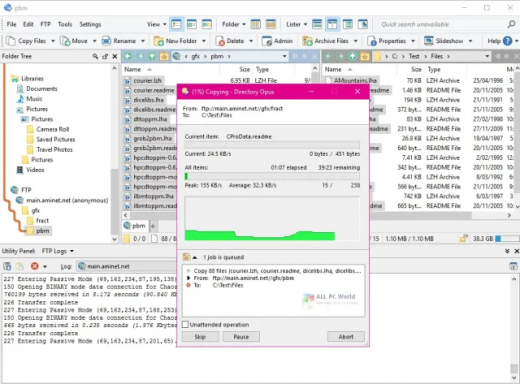
Description: Are you frustrated by the limitations of Windows Explorer? Directory Opus is a complete replacement for Explorer, with far more functionality than any other file manager available today.

You're in control.
Not just a simple file manager; Directory Opus lets you make your computer yours.
With a flexible user interface and unbelievable configurability, you can tailor Opus to streamline your workflow.
Dual panes, dual trees, multiple tabs.
Filter, sort, group your folders. Label and rate your files.
Queued file copies. Powerful batch renaming. Full archive support.
Find your files. Locate duplicates. Synchronize backups.
Assign tags and descriptions. Convert images. Edit metadata.
Fully multi-threaded, native 64 bit high performance code.
Whatever you want to do - Opus can probably do it. And if it's not built-in, you can take advantage of the unrivalled configurability to extend Opus using external tools.

What makes Opus unique?

Built for speed
Opus is written in native C++ multi-threaded code; compiled for the latest 64 bit CPUs, with high performance our number one design principle.

Fully configurable
Change the colors. Change the fonts. Change the toolbars and menus. Set up hotkeys. Opus adapts to how you want to use it.

Makes file management a breeze
Powerful searching, sorting, grouping, labelling and tagging features let you take control of your files like never before.

Endlessly extensible
Work with third-party tools as easily as with the built-in features. A full scripting interface, including scriptable dialogs, means your imagination is really the only limit.

Replace Windows Explorer and don't look back
Our unique Explorer Replacement mode provides a full replacement for Windows Explorer.
Single or dual pane file display and folder trees
Tabbed interface let you keep multiple folders open and switch quickly between them
Integrated viewer, metadata editor and utility panel
Built-in tools including synchronize and duplicate file finder
Leverage indexed search engines like Windows Search and Everything

High performance file management features
Copy, move, rename, duplicate, archive, view, backup and delete your files with ease
Queue multiple file copies for improved performance
Batch renaming including easy-to-use keyboard macros
Support for FTP and archive formats like Zip, 7Zip and RAR
Quickly filter, sort, group and search your folders
Color-code your files, assign status icons, star ratings, tags and descriptions
View images, documents and more. Image marking lets you sort your photos quickly and easily
Calculate folder sizes and print or export folder listings

Unrivalled configurability
Why let the programmers decide for you? You can tailor Opus to look how you want it to look, and to work how you want it to work.
Choose from light mode, dark mode, or design your own theme
Over 600 configurable colors and fonts
All toolbars and menus can be edited, plus you can add your own
Floating toolbars can act as program launchers
Configure your own hotkeys that work everywhere or just in Opus
Full scripting interface lets you design your own dialogs and add your own commands

Release Name: Directory Opus 13.22.6 Beta
Size: 29.4 MB
Links: HOMEPAGE – NFO – Torrent Search

Download: RAPiDGATOR

6 Comments
Apr 18

SmartFTP Enterprise 10.0.3319

Description: SmartFTP is an FTP (File Transfer Protocol), FTPS, SFTP, WebDAV, Amazon S3, Backblaze B2, Google Drive, OneDrive, SSH, Terminal client. It allows you to transfer files between your local computer and a server on the Internet. With its many basic and advanced Features SmartFTP also offers secure, reliable and efficient transfers that make it a powerful tool.

SmartFTP can be used for:
Web site publishing and maintenance
Upload and download of images, documents, movie and music files
Managed file transfers. Automate file transfer processes.
Backup and synchronize local and remote files

Features
Protocols:
- FTP and FTPS (Secure FTP)
- SFTP over SSH
- WebDAV
- Amazon S3 (Enterprise Edition)
- Google Drive (Ultimate Edition)
- Microsoft OneDrive (Ultimate Edition)
- Google Cloud Storage (Enterprise Edition)
- Backblaze B2 Cloud Storage (Enterprise Edition)
- Box (Enterprise Edition)
- Terminal Emulator (Ultimate Edition)
Integrated Editor
HIPAA 5010 compliant
FIPS 140-3, 140-2, 186-4 compliant
Modern Graphical User Interface (GUI):
- High DPI support
File/Folder Synchronization
Multilingual (more than 20 languages)
Thumbnails View and Preview
Source File Preview
Visual Compare
Advanced Schedule
IPv6
On-the-fly Compression (MODE Z)
UTF-8 Support
Support for KeePass, LastPass, Bitwarden and 1Password password manager
Multiple Connections
Auto reconnect and resume of broken transfers
Transfer Integrity
Verified Transfers (XCRC, XMD5, XSHA)
FXP (Server-To-Server Transfer) support
Remote Edit of files
Search for files and folders on the server
Local Browser
Bulk Rename
Enhanced NAT/UPnP Support
UPnP (Universal Plug and Play), ICS, ICF
Transfer Queue:
- Scheduling (Enterprise Edition)
- Uploads/Downloads/FXP
- Unlimited simultaneous threads
International Domain Names (IDN)
Proxy / Firewall support:
- SOCKS5, SOCKS4, SOCKS4A, HTTP Proxy
URL Watcher
FTP command line
Custom Commands
CHMOD (Properties)
Section 508 compliant
and much more …

Release Name: SmartFTP Enterprise 10.0.3319
Size: 10.7 MB
Links: HOMEPAGE – NFO – Torrent Search

Download: RAPiDGATOR
6 Comments
Apr 18

YT Downloader 10.3.6

Description: YT Downloader (ex YTD Youtube Downloader) is a simple and easy-to-use video download application. It helps you to download and convert videos from YouTube and hundreds of other video sites. YT Downloader increases your download speeds by up to 500%.

Features
YT Downloader is the easiest and the fastest way to download and convert videos from YouTube and other video sites.

Download videos from YouTube and hundreds of video sites
YT Downloader can download videos from YouTube, Facebook, Dailymotion, Vimeo, Metacafe, and hundreds of other video sites. After downloading your video files, you'll be able to watch them smoothly using any media player, even if you don't have internet access.

Accelerate your downloads
YT Downloader features an advanced download acceleration engine that lets you download videos 500% faster than normal speed.

Download 4K, 2K, HD 1080p and 720p videos from YouTube
You can also download 3D videos from YouTube if they are available.

YouTube to MP3
YT Downloader allows you to download only audio stream from YouTube, and save it as MP3. You don't need to download the entire video file. The audio stream is small, you can download it within seconds.

Download whole playlist from YouTube
Just enter a YouTube playlist ID, YT Downloader will download all or selected videos in the playlist from YouTube for you.

Support drag-and-drop
You can directly drag and drop video link from your browser to the drop box or program window to start a download. You don't even need to copy and paste video URL.

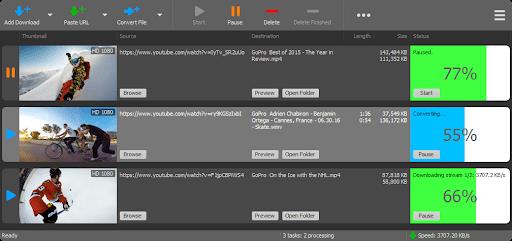
Download multiple videos at a time
YT Downloader supports simultaneous downloads. It allows you to download more than one video at same time and safe time.

Pause and resume downloads
You can pause, resume, or cancel your downloads if you need more connection to perform other important tasks.

Preview videos while downloading
While downloading, you can click the Preview button to play incomplete video and make sure the content you are downloading is really the content of your choice.

Video and audio converter
YT Downloader is also a powerful video/audio converter. It can convert local video/audio files to any format you wish so that they are playable everywhere.

Video to MP3
YT Downloader allows you to extract audio streams from videos and save them as mp3, wav, wma, ac3, ringtone, or other audio format.

Support all popular video and audio formats
YT Downloader allows you to save downloaded videos in any format for any device, so you can watch them smoothly on your PC, iPhone, iPad, Android phone, and other device.

Ready-made presets
YT Downloader provides ready-made presets for all video and audio formats. You can also custom output video/audio format settings.

iTunes compatible
Optionally, YT Downloader can add downloaded video/music to your iTunes library automatically, so you can easily synchronize your videos and music to your iPhone, iPad, iPod.

Media Player
YT Downloader includes a simple and easy-to-use media player. If your Windows Media Player cannot play your video/audio files, you may try our Media Player.

Release Name: YT Downloader 10.3.6
Size: 147.6 MB
Links: HOMEPAGE – NFO – Torrent Search

Download: RAPiDGATOR
4 Comments