Please REGISTER or RENEW your account on RAPiDGATOR.net and support us by doing through all RAPiDGATOR working download links on main posts...
Apr 18

JP Software Take Command 36.00.31

Description: Replace Your Windows Console and CMD Command Prompt Windows. The Windows Command Prompt shortcut is a Windows console (command line, or character mode) session that runs the default Windows command shell CMD.EXE.
The command line is essential for developers, systems administrators and advanced users. Unfortunately, CMD Windows commands and the Windows console UI have always been woefully lacking in ability compared to what is available in most other operating systems. Because of the limitations in CMD and the Windows console, users have been forced to use the GUI for inappropriate tasks, or even to write custom programs to perform simple tasks that CMD should have been able to handle.

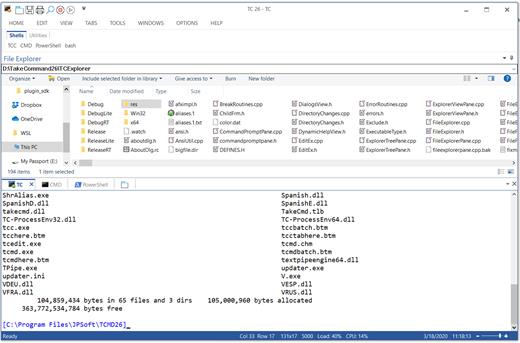
Take Command is a comprehensive interactive GUI and Windows command line toolkit that makes your command prompt windows easier to use and far more powerful. Take Command includes optional Windows Explorer integration, tabbed console windows, and major enhancements to standard Windows CMD commands such as COPY, DEL, DIR, FOR, MOVE, REN, SET, and START And it and adds more than 235 new commands, command dialogs, command line syntax coloring, vastly improved command line editing, programmable filename and directory tab completion, and thousands of other features.

Take Command is also a powerful batch file programming tool, including an integrated IDE with a sophisticated editor and batch debugger. Take Command offers extensions such as DO loops, SWITCH statements, error and exception handling, system monitoring and event triggers, and more than 780 built-in variables and functions. And you can extend that with 3rd-party plugins and user-defined functions.

12 Reasons Why You Should Replace Your Windows Console
The Windows console is responsible for running character-mode applications, including CMD, PowerShell, WSL bash, etc. It was introduced in Windows NT 3.1 in 1993, and some major internal architectural improvements were made in Windows 10 and 11.

Unfortunately, the improvements to the user interface were relatively minor, and though some efforts were made to improve the CMD console UI in Windows Terminal, they fall far short of what Take Command has been providing for years.

So why replace it with Take Command?

The Windows console is slow, and even slower when using Windows Terminal. Take Command's tab windows typically display output between 20% and 300% faster.
Take Command (like Windows Terminal) offers tabbed windows to run your character-mode applications. But Take Command takes it to another level by including vertical or horizontal tab groups and splitter windows.
Tabbed windows can be reordered, detached, or torn off, and existing console windows can be attached as new Take Command tab windows.
Take Command provides an optional embedded Windows File Explorer window that displays a tree view of the folders on your system and the contents of the selected folder (List View) on the right. You can drag folders and files from the Explorer window and drop them in a command prompt window.
Take Command can be easily configured for your preferences with its configuration dialogs.
Take Command has an optional tabbed tool bar that you can use to execute internal or external commands, aliases, or batch files with the click of a mouse (or an accelerator key). You can define up to 20 tabs, each with up to 50 toolbar buttons.
Take Command provides a configurable Status Bar that can display quick help for the current command, tooltips, and system information, including tab window size, CPU usage, memory usage, date & time, character values at the cursor location, and a slider control for window transparency.
Cut and Paste options are limited in the default CMD console or Windows Terminal. Take Command adds both line and column selection, double-click or triple-click selections, overwriting or appending to the Windows clipboard, and a variety of paste options.
Take Command windows can be styled with a choice of 18 themes.
Take Command and TCC offer a wide variety of colorization options, not just foreground and background colors.
Take Command includes invaluable tools, including a batch file debugging IDE, a regular expression creator / analyzer, search and replace in files, and a macro recorder / playback.
Extensive help (quick help, context sensitive help, and general help) is available in English, French, German, and Spanish at the touch of a button.

Release Name: JP Software Take Command 36.00.31
Size: 57.3 MB
Links: HOMEPAGE – NFO – Torrent Search

Download: RAPiDGATOR

4 Comments
Apr 18

TubeMate Downloader 6.3.5

Description: Windows TubeMate is a smart application that lets you snag any clip you want from the main video hosting sites and convert them while downloading or after that. If you need a simple and efficient video downloading tool, you can give it a try.

Online video downloader
TubeMate can download videos from YouTube, Facebook, Instagram, Dailymotion, and thousands of other video sites.

HD video downloader
TubeMate can download UHD 8K, 5K, 4K, QHD 2K, HD 1080p and 720p videos from YouTube.

YouTube to MP3 converter
TubeMate allows you to download only audio stream from YouTube, and save it as MP3. You don't need to download the entire video file.

Playlist downloader
TubeMate enables you to download entire or part of a playlist with just a few clicks.

Download accelerator
TubeMate features a multi-thread download acceleration engine that increases your download speeds by up to 500% or even more.

Download multiple videos at a time
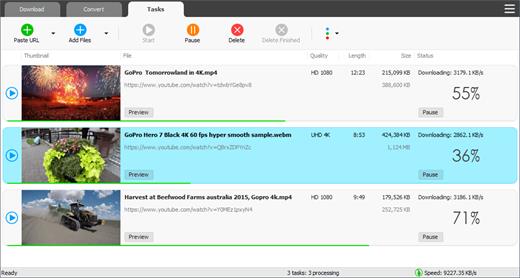
TubeMate supports simultaneous downloads. It allows you to download more than one video at the same time.

Pause and resume downloads
You can pause and resume your downloads at any time.

Support drag-and-drop
You may directly drag and drop video link from your browser to the drop box or app window to start a download. You don't even need to copy and paste video URL.

Preview video/audio while downloading
While downloading, you can click the 'Preview' button to view incomplete file and make sure the content is you want.

Video and audio converter
TubeMate can convert your disk video/audio files between MP4, FLV, AVI, WMV, MOV, MP3, AAC, and any other formats for any device.

Video optimizer
TubeMate automatically optimizes downloaded videos for popular mobile devices, so you can watch downloaded videos smoothly on your iPhone, iPad, Android phone, and other devices.

Video to MP3 converter
TubeMate allows you to extract audio stream from video and save it as MP3, WAV, AC3, or other audio format.

Ready-made presets
TubeMate provides ready-made presets for all video and audio formats. You can also customize your own video/audio formats.

iTunes compatible
Optionally, TubeMate can add downloaded video/music to your iTunes library automatically, so you can easily synchronize your videos and music to your iPhone, iPad, iPod.

Media player
TubeMate contains an easy-to-use media player for playing files that Windows Media Player cannot play.

Release Name: TubeMate Downloader 6.3.5
Size: 147.6 MB
Links: HOMEPAGE – NFO – Torrent Search

Download: RAPiDGATOR
5 Comments
Apr 18

Robin YouTube Video Downloader Pro 7.3.2

Description: The fastest way to download and convert videos from YouTube. YouTube Video Downloader Pro is a professional Windows app for downloading and converting videos from YouTube, Facebook, TikTok, and thousands of other video sharing sites. It accelerates your downloads by up to 5 times. YouTube Video Downloader Pro allows you to download multiple videos at a time. It also allows you to pause, resume, and cancel downloads at anytime.

Speed up your downloads 
YouTube Video Downloader Pro features an advanced download acceleration engine that lets you download videos up to 5 times faster than normal speed.
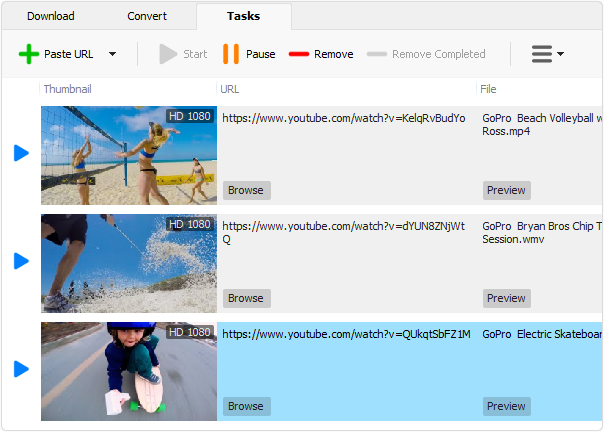
YouTube Video Downloader Pro allows you to download multiple videos at a time. It also allows you to pause, resume, and cancel downloads at anytime.
While downloading, you can click "Preview" button to play incomplete video and make sure it is really the video of your choice.

Convert to any format for any device
YouTube Video Downloader Pro can automatically convert downloaded file to any format for any device. It supports MP4, FLV, WMV, MOV, AVI, MPG, VOB, WEBM, DVD, VCD, and many other formats.
YouTube Video Downloader Pro can also extract audio stream from video file, and save it in WAV, WMA, AC3, AAC, OGG, FLAC, MP2, or any other audio format.

iTunes compatible
Optionally, YouTube Video Downloader Pro can automatically add downloaded video files to your iTunes library, so you can easily synchronize your videos to your iPhone, iPad, iPod, etc.

Release Name: Robin YouTube Video Downloader Pro 7.3.2
Size: 73.8 MB
Links: HOMEPAGE – NFO – Torrent Search

Download: RAPiDGATOR

6 Comments
Apr 18

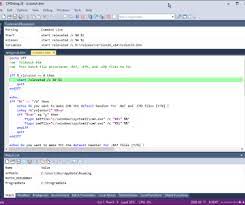
JP Software CMDebug 36.00.31

Description: CMDebug is a stand-alone version of the Take Command IDE and batch debugger. CMDebug is intended to help developers create a batch file to run in CMD (the Windows default command processor) or TCC-RT (the free runtime version of TCC). It provides a comprehensive set of batch debugging features specifically designed for batch file development.

CMDebug allows you to write and debug your CMD batch files with the integrated graphical IDE. CMDebug includes tabbed edit windows and a sophisticated debugger with single stepping, conditional breakpoints, syntax coloring tooltips, bookmarks, and tabbed breakpoint, call stack, variable, alias, and watch windows. Windows batch file programming has never been easier or more powerful!

You can use CMDebug to develop either CMD-compatible batch files (*.BAT or *.CMD), or faster (and far more capable) TCC-RT-compatible batch scripts (.BTM). If you select the "TCC Syntax" option, CMDebug supports the full TCC-RT command set. If you select the "CMD Syntax" option, CMDebug will disable TCC-only internal commands, variables, and functions, and use the limited Windows CMD batch file commands syntax. Some internal CMD / TCC commands will also behave slightly differently or modify their display output in order to match CMD's behavior (and bugs!) more closely.

Using CMDebug with the TCC-RT syntax option allows you to create and debug (and optionally encrypt) batch files using the TCC command language, and then distribute them with the free TCC-RT runtime on an unlimited number of target machines.

Release Name: JP Software CMDebug 36.00.31
Size: 42.8 MB
Links: HOMEPAGE – NFO – Torrent Search

Download: RAPiDGATOR
6 Comments
Apr 18

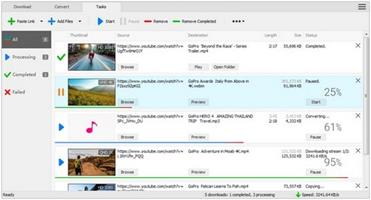
All Video Downloader Pro 10.3.3

Description: All Video Downloader Pro is a professional Windows app for downloading and converting your favorite videos from video sharing sites. It accelerates your downloads by up to 5 times!

Features:

Download videos from hundreds of video sharing sites.
All Video Downloader Pro can download videos from YouTube, Facebook, Dailymotion, and hundreds of other video sharing sites. After downloaded, you'll be able to play them smoothly on your PC or mobile devices, even if you don't have internet access.

Accelerate downloads by up to 5 times.
All Video Downloader Pro features a multithreading download acceleration engine that can boost and increase your download speeds by up to 500% faster.

Download 4K, 2K, HD 1080p, HD 720p, and 3D videos.
All Video Downloader Pro allows you to download videos in different resolutions, including 4K/2160p, 2K/1440p, HD 1080p, HD 720p, 480p, 360p, and 240p. You can download 1080p HD videos to enjoy quality graphics on your TV, you can also download 240p videos in order to save space on your mobile devices.

YouTube to MP3 downloader.
All Video Downloader Pro allows you to download only audio stream directly from YouTube and save it as MP3, without downloading the entire video file.

Download entire playlist from YouTube at one time.
All Video Downloader Pro enables you to download an entire YouTube playlist with just a few clicks. All videos in the playlist can be downloaded automatically at one time.

Download multiple videos at a time.
All Video Downloader Pro supports simultaneous downloads that allows you to download more than one video at the same time.

Download subtitles in selected language and format.

Pause and resume downloads.
You may pause your downloads at any time. All Video Downloader Pro can resume broken download from where it was interrupted. You don't need to start from the beginning again.

Preview incomplete video while downloading.
While downloading, you can click the Preview button to play incomplete video and make sure that the content you are downloading is really the video of your choice.

Convert downloaded videos to any format.
All Video Downloader Pro can automatically convert downloaded videos to the format you choose. It supports MP4, FLV, WMV, MOV, ASF, AVI, DV, M4V, MKV, MPG, OGV, SWF, TS, VOB, WEBM, DVD, VCD, SVCD, and many others.

Optimize downloaded videos for any device.
All Video Downloader Pro can automatically optimize downloaded videos for your mobile devices, so you can watch them on your iPhone, iPad, Android phone, Android tablet, Xbox, Windows phone, PSP/PS4/PS3, Samsung Galaxy, etc.

Video to MP3 converter.
All Video Downloader Pro is capable of extracting audio streams from videos and save them as MP3, WAV, WMA, AC3, AAC, OGG, M4A, FLAC, MP2, or any other audio format.

Video and audio converter.
All Video Downloader Pro is a powerful video and audio converter too. It allows you to convert any video/audio files on your disk to the format you wish so that they are playable on your media player or mobile devices.

Ready-made video/audio format presets.
All Video Downloader Pro provides ready-made presets for all popular video and audio formats. You can also custom output video/audio format settings.

Schedule downloads.
All Video Downloader Pro can automatically start downloads at a set time, and shut down your computer when all done. You will no longer have to wait for your long list of videos to finish downloading.

Support drag-and-drop.
You may simply drag and drop a video link/URL from your web browser to All Video Downloader Pro's Drop Box to start a download. You don't even need to copy and paste video link/URL manually.

All Video Player.
All Video Downloader Pro includes a simple and easy-to-use media player - All Video Player, for playing MP4, WebM, FLV, MP3, AAC, and any other format video/audio files that Windows Media Player cannot play.

Release Name: All Video Downloader Pro 10.3.3
Size: 148.2 MB
Links: HOMEPAGE – NFO – Torrent Search

Download: RAPiDGATOR

6 Comments
Apr 18

YT Geek YTDL 12.3.2

Description: YTDL is a little program for downloading videos from YouTube and other video sites.

Key Features
- Download videos from YouTube and other video sites.
- Increase download speeds by up to 400%.
- Download multiple videos at the same time.
- Pause and resume downloads at any time.
- Preview video content while downloading.

Release Name: YT Geek YTDL 12.3.2
Size: 73.8 MB
Links: HOMEPAGE – NFO – Torrent Search

Download: RAPiDGATOR
6 Comments
Apr 18

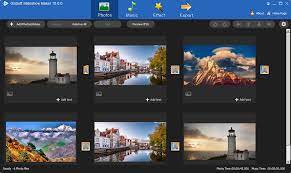
GiliSoft SlideShow Maker 14.8

Description: Slideshow maker software are applications used to develop presentations or videos with different types of customizable tools like effects, shapes, templates, text, etc. These programs support many file output formats including, AVI, MOV, WEBM, and MP4. Many such software allows you to share your slideshow to YouTube, Facebook, Google Drive, and more.

Convert Photos Video to Slideshow
You can create HD slideshow with photos and videos, export slideshow to 720P & 1080P HD videos, generate video slideshow in commom video formats such as WMV,MOV, MP4, AVI to meet different requirements.

Support All Image Formats
Digital cameras and web pages normally use JPG files, the most important for cameras, printing, scanning, and internet use, are JPG, TIF, PNG. But we support more formats: jpg, jpeg, bmp, png, tif, tiff, webp, tga, wdp, hdp, jxr, pef, dng, crw, nef, cr2, mrw, rw2, orf, x3f, arw, kdc, nrw, dcr, sr2, raf.

Many 2D/3D Transition Effect
Support more than 300 different 2D/3D video transition effects. Choose a stylish transition, then fine-tune the settings as needed.With Slideshow Movie Creator, you can apply different transitions between individual photos as well - just check the Use randomtransitions box. Finally, get a full screen preview of your creation and accept the transitions or go back and generate another random set.

Support Various Audio Formats
This application allows you to add MP3, WMA, WAV ,OGG, FLAC, M4A, AAC, AU files formats as background music. It also allows you to grab tracks from video files as background music. And If you want to add narrations to slideshows, you can use the record feature - recording micphone and computer sounds is so easy!

Create Gorgeous Slideshows with effects and album
Slideshow Movie Creator offers a lot of pre-designed themes to make your slideshow video and supports designing the beginning Titles and frames, filters, watermarks. Create a Stunning Video Slideshow Now! Easy& Interesting

Easy to make Slideshow length match Music length
No worry about the slideshow and music file length not matching. If music length is longer than slideshow length, you can cut music or repeat slideshow to fit to music length. If slideshow length is longer than music length, you can repeat music or append silence music to fit to slideshow, you also can let this tool automatically adjust slideshow to fit music length.

tunning Photo Transitions and Effects
Choose from a wide range of transitions; Panning and zoom effects add extra dimension; Fade transitions give your slideshow a professional touch; Preview the effects in real time; Customize the duration of the effect

Complete Photo Optimization
Fine tune brightness, color and saturation; Crop, rotate and flip photos easily; Add text captions to individual slides; Add video clips for a complete slideshow presentation; Preview your changes in real time. (Some functions come soon)

Convert photo to video for YouTube, Facebook, MySpace
With this software, converting photos to video is easy and fun: choose your photos, add music and titles, and you're done! Whip up beautiful slideshows of weddings and other special occasions, now you can share happy moment with your family member or social media friends.

Prepare for playback on mobile devices or DVD
Gilisoft Slideshow Movie Creator offers a wide selection of video formats in which to save your masterpiece. Use ready-made presets for all popular mobile devices – just choose your device and click Save! Burn your slideshow video to DVD, or upload it to the web.

Release Name: GiliSoft SlideShow Maker 14.8
Size: 220.3 MB
Links: HOMEPAGE – NFO – Torrent Search

Download: RAPiDGATOR

6 Comments
Apr 18

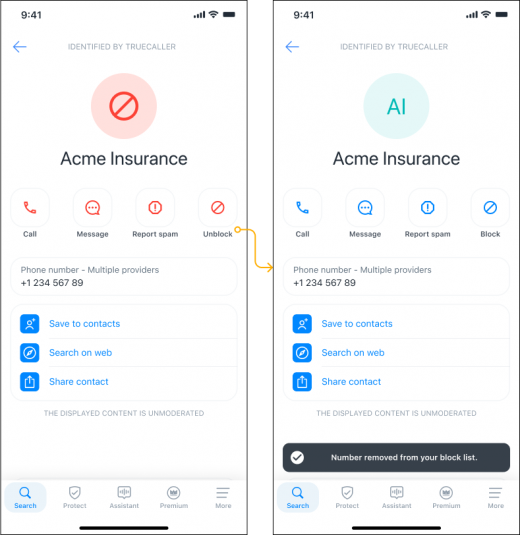
Truecaller: Phone Call Blocker v26.13.7 Build 2613007 Final

Description: Stay protected from spam and scams - Truecaller’s Caller ID will identify and block robocallers, fraudsters, telemarketers and other unwanted or unknown phone numbers. The advanced spam detector will automatically block and protect you from fraudulent calls and SMS, and the phone numbers on this spam list are updated in real time by millions of users worldwide.

Powerful Dialer & Caller ID
- The leading caller identification app that automatically shows who is calling, even if the phone number is not in your contacts
- Know who is calling before you answer
- Video Caller ID - record a short video that plays automatically when you call friends and family. Apart from recording a selfie video, you can also set a Video Caller ID using one of the built-in templates, aiming to create a more personalized and unique calling experience
- Use Voice calling (VoIP) to talk to your friends on Truecaller for free
- Backup call history, contacts, messages, blacklist and settings to Google Drive
Detection & Blocking of Spam
- Block spam + scam calls and SMS - Identify and auto-block telemarketers, robocallers, scammers, fraud, sales, and more
- The phone numbers on the spam list are updated by millions of people across the world in real time, helping you avoid robocalls and fraud
- Advanced spam blocking options for blocking countries, similar phone number sequences, robocallers, unknown numbers, telemarketers and more!
- Automatically identify + block every unknown, spam, scam or telemarketing SMS.
Automatic Call Recorder (ACR)
- Improved call recorder with support for both automatic and manual recording of calls
- Record important phone calls and save them to your phone
- Before recording a call, make sure to follow laws in your country
Smart Messaging
- Automatically identify unknown SMS
- Automatically block spam and telemarketing SMS
- Organize your SMS into Personal, Other and Spam
- Chat for free with your friends and family in Group Chat
- Use Flash messaging for urgent messages
- Blacklist unwanted SMS senders

Release Name: Truecaller: Phone Call Blocker v26.13.7 Build 2613007 Final
Size: 194.4 MB
Links: HOMEPAGE – NFO – Torrent Search

Download: RAPiDGATOR
6 Comments
Apr 18

Valentina Studio Pro 17.3.0

Description: Create, administer, query and explore DuckDB, ValentinaDB, MongoDB, MySQL, MariaDB, PostgreSQL, MS SQL Server & SQLite databases for free.

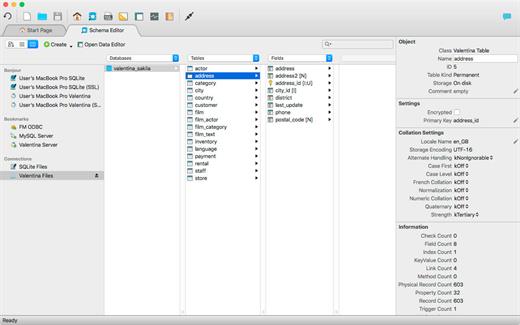
Valentina Studio is your universal database management tool for working with DuckDB, MariaDB, MySQL, MongoDB, SQL Server, PostgreSQL, SQLite and Valentina DB databases. Valentina Studio lets you connect with all major databases, run queries and generate diagrams to better understand your mission critical business data - and that is the free version of Valentina Studio.

Schema Editor
Work with databases using diagrams, tree or column view.

Database Management
Universal database management tool for all major databases.

Virtual Links
Create virtual links where you need the functionality of foreign keys without creating foreign keys.

Database Query Builder
Build, test and execute SQL queries visually, drag-drop with Query Builder.

Data Editor
Clean data editor with high productivity tools for working with tables, records and fields.

Data Transfer
Specify mapping of source/target tables and fields and load records from db1 to db2.

Workspaces
Organize your tools, preferences, lists of recent datasources and more for individual projects.

SQL DIFF
Compare schemas of two databases and  transform the first schema into the second.

Valentina Forms
Create and add forms visually, and then your users can work with them in free Valentina Studio.

Report Designer
Transforms queries into visually stunning enterprise reports with full suite of design elements.

Continuous Integration
Continuous Integration (CI) tools for better software practices for databases.

SQL Editor
Full featured SQL Editor for writing, testing and executing queries with all supported databases.

Release Name: Valentina Studio Pro 17.3.0
Size: 147.4 MB
Links: HOMEPAGE – NFO – Torrent Search

Download: RAPiDGATOR
6 Comments
Apr 18

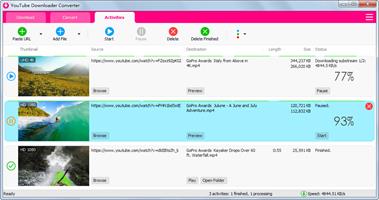
Muziza YouTube Downloader Converter 9.3.3

Description: YouTube Downloader Converter is a tool that facilitates an attractive interface and plenty of features to help you download video clips from YouTube, Facebook, Dailymotion, Instagram and other websites.

YouTube video downloader
The app can download videos from YouTube, Facebook, Instagram, Dailymotion, and thousands of other video sites.

YouTube to MP3 converter
The app allows you to download only audio from YouTube and save it as MP3. You don't need to download the entire video file.

Playlist downloader
The app enables you to download entire or part of a playlist with just a few clicks.

Download accelerator
The app increases your download speeds by up to 500% or even more.

Pause and resume downloads
The app allows you to pause and resume your downloads at anytime.

Video and audio converter
The app can convert your disk video/audio files between MP4, FLV, AVI, MP3, and any other formats for any device.

Release Name: Muziza YouTube Downloader Converter 9.3.3
Size: 147.5 MB
Links: HOMEPAGE – NFO – Torrent Search

Download: RAPiDGATOR
5 Comments