Please REGISTER or RENEW your account on RAPiDGATOR.net and support us by doing through all RAPiDGATOR working download links on main posts...
Apr 16

Screens 5.8.5

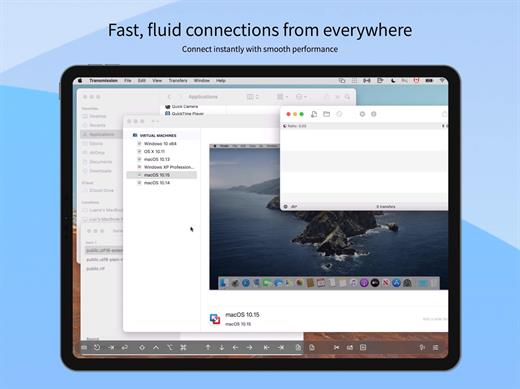
Streamlined and powerful VNC utility designed to provide you with all the tools you need to remotely connect to your devices from your Mac

Accessing your devices from anywhere in the world is surely great, especially if you need to perform some last minute modifications to a project or copy a certain file. This can be done from any computer that can access your device’s network using the VNC desktop sharing system.

Features


  • iCloud – Synchronize all your stored screens on all your iOS devices, including your Mac.
  • Use Screens in fullscreen mode to make it feel your remote computer is right there in front of you.
  • Easy to Use: Screens is an easy, user-friendly VNC client for Mac.
  • Secure: Screens can connect to your computer through an SSH tunnel so your session is encrypted and safe.
  • Multi-Touch: Screens supports many of the multi-touch features – such as pinch and navigation – you’re already used to on your trackpad.
  • Screens Connect: Make your computer available from anywhere with this optional helper app. Easy as flicking a switch. No messy router setup.
  • Works Anywhere: Through Wi-Fi or a 3G network.
What’s New

Version 5.8.5:


  • Release notes were unavailable when this listing was updated.
Compatibility

macOS 14.0 or later.


Release Name: Screens 5.8.5
Size: 39.1 MB
Links: HOMEPAGE – NFO – Torrent Search

Download: RAPiDGATOR

5 Comments
Apr 16

Rhinoceros 8.30.26103.11002

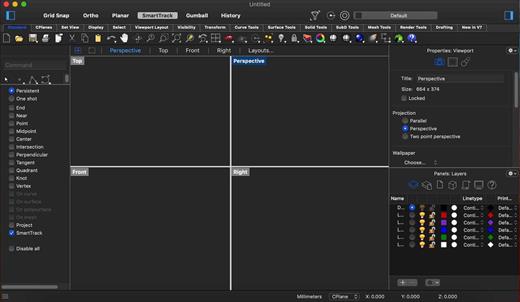
Rhino – Versatile 3D modeler. Rhinoceros can create, edit, analyze, document, render, animate, and translate NURBS* curves, surfaces, and solids, point clouds, and polygon meshes. There are no limits on complexity, degree, or size beyond those of your hardware.

Special features include:


  • Uninhibited free-form 3-D modeling tools like those found only in products costing 20 to 50 times more. Model any shape you can imagine.
  • Accuracy needed to design, prototype, engineer, analyze, and manufacture anything from an airplane to jewelry.
  • Compatibility with all your other design, drafting, CAM, engineering, analysis, rendering, animation, and illustration software.
  • Read and repair meshes and extremely challenging IGES files.
  • Accessible. So easy to learn and use that you can focus on design and visualization without being distracted by the software.
  • Fast, even on an ordinary laptop computer. No special hardware is needed.
  • Affordable. Ordinary hardware. Short learning curve. Affordable purchase price. No maintenance fees.
What’s New

Version 8.30.26103.11002:


  • Release notes were unavailable when this listing was updated.
Compatibility

macOS 10.14 or later 64-bit


Release Name: Rhinoceros 8.30.26103.11002
Size: 761.2 MB
Links: HOMEPAGE – NFO – Torrent Search

Download: RAPiDGATOR

7 Comments
Apr 16

Virtual ][ 13.1.1

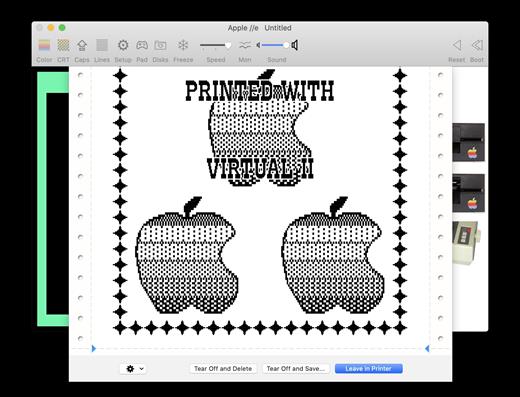
Virtual ][ is a program that emulates the Apple ][, Apple ][+ and Apple IIe computers. Virtual ][ requires a Mac with macOS 10.13 (“High Sierra”) or better. It runs natively on both the Apple silicon Mac and Intel Mac.


  • The program emulates several machines: Apple ][, ][+, //e, and //c
  • Supports USB or Bluetooth game pad / joystick, so you can play the old games. When you need a break, or are a critical junction, just save a snapshot of the virtual machine. You can continue from that point later on.
  • Full support for popular disk image formats, such as dsk, 2mg, and woz.
  • Printer emulation of the Epson FX-80 and Imagewriter II; the printed output is saved as pdf
  • Full-screen mode
  • Nostalgic sound effects
  • Automatically indexes your disk images, allowing you to search for Apple II files using Spotlight
  • Run the emulation at different speeds
  • Configure your own virtual machine using emulated peripheral cards and devices, such as a mouse, hard disk, serial port, Mockingboard sound card, Z80 card for running CP/M, and even cassette tape
  • Debug Apple II programs
  • If you have original diskettes and a working Apple II, Virtual ][ can help you convert the diskettes to the Mac via a serial interface cable.
What’s New

Version 13.1.1:


  • Release notes were unavailable when this listing was updated.
Compatibility

macOS 10.13 or later
Apple Silicon or Intel Core processor


Release Name: Virtual ][ 13.1.1
Size: 34.4 MB
Links: HOMEPAGE – NFO – Torrent Search

Download: RAPiDGATOR

5 Comments
Apr 16

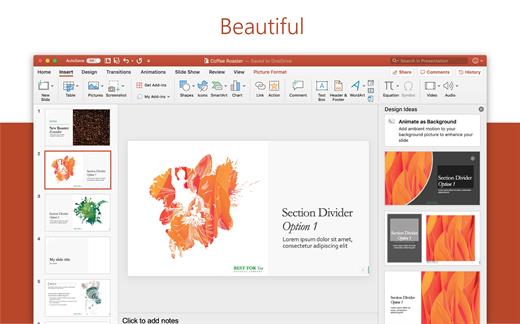
Microsoft Office 2024 v16.108

Office LTSC 2024 offers a locked-in-time version of familiar productivity tools, updated with a subset of the features that have been added to Microsoft 365 Apps for enterprise over the last three years. New features for this release include Dynamic Charts and more than a dozen new text and array functions in Excel, enhanced search and meeting creation options in Outlook, and improvements to performance, security, and accessibility.

That same Office, especially for Mac

The new, modern versions of Word, Excel, PowerPoint, Outlook, OneNote, and OneDrive for Mac feature a familiar interface and the unique, beloved features of a Mac, so you can get started quickly.

Microsoft Word

Word is a robust application that lets you create, edit, view, and share text documents (even email attachments). It’s ideal for anyone who works with documents: bloggers, writers, journalists, reviewers, students, or project managers.

Microsoft Excel

The powerful Excel application makes it quick and easy to create, view, edit, and share spreadsheet files. New charts and Ideas provide visualization of data and trends. No matter where you are, you can confidently use this application to collaborate in accounting, auditing, or finance.

Microsoft PowerPoint

PowerPoint is the smart app you know and love that helps you communicate your ideas vividly and visually with beautiful layouts, animations, moving camera effects, 3D models, and icons. Save time and create engaging presentations that are up-to-date with the latest trends.

Microsoft Outlook

With Outlook, you have all your email accounts and calendars at your fingertips. Manage your messages and plan in detail—it has everything you need to organize your workflow efficiently.

Microsoft OneNote

Whether you need to streamline the tedious planning process or quickly jot down a brilliant idea, OneNote, your digital notebook, is your go-to. It’s indispensable when you need to prepare for a big event or when you need to make sure you don’t miss any important tasks that you can’t trust to someone else.

Microsoft OneDrive

OneDrive keeps all your Microsoft 365 files at your fingertips. Share and collaborate in real time across Word, Excel, and PowerPoint on your desktop, web, and mobile — all conveniently and securely

Note: If it doesn’t work, uninstall the old version of Office completely and reinstall it. For uninstallation method, please use Google search.

What’s New

Version 16.108:


  • Release notes were unavailable when this listing was updated.
Compatibility

macOS 12.0 or later


Release Name: Microsoft Office 2024 v16.108
Size: 3 GB
Links: HOMEPAGE – NFO – Torrent Search

Download: RAPiDGATOR

3 Comments
Apr 16

Zipic 1.9.3

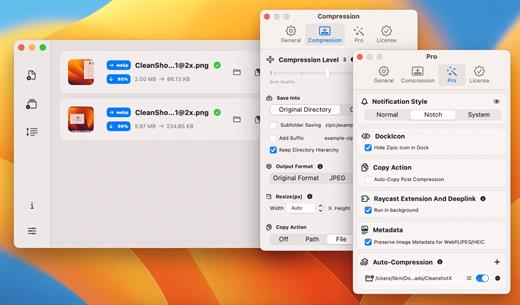
Zipic is a native macOS application designed for efficient, high-quality image compression. It lets users shrink image files locally, with no uploads or dependency on the cloud. All processing happens on your own device—so your privacy and speed stay intact.

Key Features and Highlights:


  • High Compression, Near-Lossless Quality: Zipic utilizes powerful compression algorithms to achieve a high compression ratio with minimal perceived quality loss, making the compressed image virtually indistinguishable from the original.
  • Fast & Local Processing: Being a native macOS application, all image processing occurs locally on your device. This ensures lightning-fast performance, efficient handling of massive batches, and high data privacy with no cloud uploads or network dependence.
  • Comprehensive Format Support: The tool supports a wide range of formats, including basic ones like JPEG, PNG, WebP, HEIC, and GIF, and Pro formats like AVIF, JXL, TIFF, and ICNS.
  • Effortless Workflow: It offers multiple simple compression methods, including drag-and-drop, folder monitoring, and Finder integration (right-click).
  • Custom Control: Users can create custom presets for different quality levels and scenarios, allowing for precise control over the compression outcome.
  • Pro Features for Automation: Advanced features include Clipboard auto-compress, Folder Watch for automated compression in specific directories, and integration options like Raycast Extension and Apple Shortcuts.
Zipic aims to be the seamless solution for developers, designers, bloggers, and photographers who need to optimize and compress images efficiently.

What’s New

Version 1.9.3:


  • Release notes were unavailable when this listing was updated.
Compatibility

macOS 13.0 or later


Release Name: Zipic 1.9.3
Size: 15.2 MB
Links: HOMEPAGE – NFO – Torrent Search

Download: RAPiDGATOR

6 Comments
Apr 16

Final Cut Pro 12.2 fix

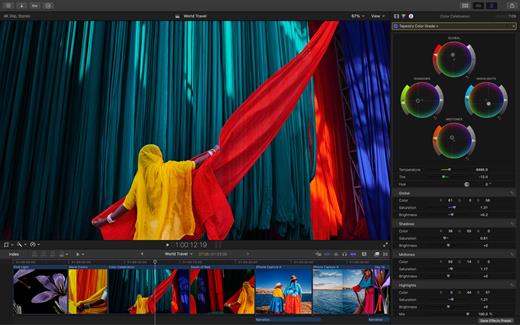
Redesigned from the ground up, Final Cut Pro combines revolutionary video editing with a powerful media organization and incredible performance to let you create at the speed of thought.

Revolutionary Video Editing


  • The Magnetic Timeline uses advanced metadata for faster, easier editing
  • Enhanced Timeline Index lets you drag and drop audio roles to rearrange the layout of your timeline
  • Use Clip Connections to attach B-roll, sound effects, and music to the timeline
  • Reduce clutter by grouping clips into a Compound Clip
  • Edit multicamera projects with automatic syncing and support for up to 64 camera angles
  • Automatically transform projects for square or vertical delivery with Smart Conform
  • Import and edit 360° equirectangular video in a wide range of formats and frame sizes
  • Create, edit, and deliver closed captions from within Final Cut Pro
  • Extend the capabilities of Final Cut Pro with third-party workflow extensions
Powerful Media Organization

  • Organize your work within libraries for efficient media management and collaboration
  • Create proxy copies of your media for portability and performance
  • Content Auto-Analysis captures camera metadata and analyzes shots in the background
  • Create and apply custom keywords or favorites on the fly as you select clip ranges
  • Smart Collections dynamically organize content for you to quickly find any shot in a few clicks
Incredible Performance

  • Improved performance and efficiency on Mac computers with Apple silicon
  • Harness the power of the Mac Pro and Afterburner for realtime 8K editing
  • Modern Metal engine improves playback, rendering, and compositing on all Macs
  • Final Cut Pro uses all the GPUs in your Mac for superior real-time playback performance and fast background rendering
  • Work with a broad range of formats including ProRes, RED, XAVC, AVCHD, Avid DNxHR®, Avid DNxHD®, H.264, HEVC, and more
Compelling, Customizable Effects

  • Beautifully animated, easily customizable 2D and 3D titles
  • Change the look of titles, transitions, and effects using intuitive controls
  • Choose from an ecosystem of third-party FxPlug plug-ins with custom interfaces
Integrated Audio Editing

  • Assign roles – including dialogue, music, effects, and custom choices – during import to easily track and organize your project
  • Expand and edit multichannel audio files directly in the timeline
  • Sync video with separate audio in a single step with instant audio waveform matching
Intuitive Color Grading

  • Import, edit, and deliver video in standard color spaces, or in wide Rec. 2020 color space
  • Use Pro Display XDR to accurately view HDR video
  • Powerful color wheels and curves for precise adjustments with keying and masks
One-Step, Optimized Output

  • Incredibly fast export for playback on Apple devices and upload to websites such as Vimeo and YouTube
  • Export audio stems and multiple versions of a finished video using roles metadata
  • Import and export XML for third-party workflows like color grading and sound mixing
What’s New

Version 12.2:


  • Powerful Intelligence
  • Use Transcript Search to quickly find spoken words or phrases in your footage by searching for exact matches or using natural language descriptions*
  • Discover Visual Search, a fast and easy way to locate moments in your footage, including objects and actions, using natural language*
  • Let Beat Detection analyze any song to reveal its bars and beats, enabling you to easily align your video edits to the music’s rhythm
  • Get Started Fast
  • Dive into editing with a special demo project featuring the talented singer-songwriter Allie Sherlock, and explore the exciting new features of Final Cut Pro firsthand
  • Accelerate your next edit with in-app guides on how to create a new library, import media, and add clips to a new timeline
  • Requires a Mac with Apple silicon
Compatibility

macOS 15.6 or later.


Release Name: Final Cut Pro 12.2 fix
Size: 5.5 GB
Links: HOMEPAGE – NFO – Torrent Search

Download: RAPiDGATOR

2 Comments
Apr 15

Sync Breeze 18.0.24

All Editions

Description: SyncBreeze is a fast, powerful and reliable file synchronization solution for local disks, network shares, NAS storage devices and enterprise storage systems. Users are provided with multiple one-way and two-way file synchronization modes, periodic file synchronization, real-time file synchronization, bit-level file synchronization, multi-stream file synchronization, background file synchronization and much more.

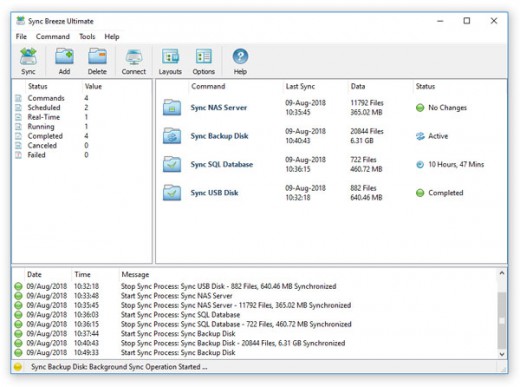
SyncBreeze Main GUI Application
The SyncBreeze main GUI application allows one to configure and control file sync operations. The user is provided with multiple file synchronization modes, performance tuning options, periodic file synchronization operations, real-time file synchronization operations, bit-level file synchronization, file synchronization logs and error notifications.

File Synchronization Modes
SyncBreeze provides a number of one-way and two-way file synchronization modes optimized for different usage scenarios. Users can setup a number of file synchronization commands with each one pre-configured to synchronize files according to user-specific needs and requirements.

File Synchronization Preview Dialog
The file synchronization preview dialog shows all sync actions that should be performed and allows one to select/unselect specific actions. The preview dialog is displayed in the 'Preview' file synchronization mode and it may be effectively used for small-sized to medium-sized file systems. For large file systems containing millions of files, SyncBreeze provides the 'Stream' file synchronization mode, which synchronizes files on-the-fly, without showing the preview dialog.

File Synchronization Schedule Options
The file synchronization schedule tab allows one to configure periodic file synchronization operations, scheduled file synchronization operations, real-time file synchronization operations and control the file synchronization timeout.

Advanced File Synchronization Options
The advanced file synchronization options tab allows one to control the file copy mode, file copy verification mode, file synchronization performance mode, the number of parallel file synchronization streams and configure recoverable file copy operations.

Supported Operating Systems:
Windows XP, Vista, 7, 8, 8.1, 10, 11 and Server 2003, 2008, 2008 R2, 2012, 2012 R2, 2016, 2019, 2022, 2025

Release Name: Sync Breeze 18.0.24
Size: 70.2 MB
Links: HOMEPAGE – NFO – Torrent Search

Download: RAPiDGATOR

8 Comments
Apr 15

Directory Opus 13.22.4 Beta

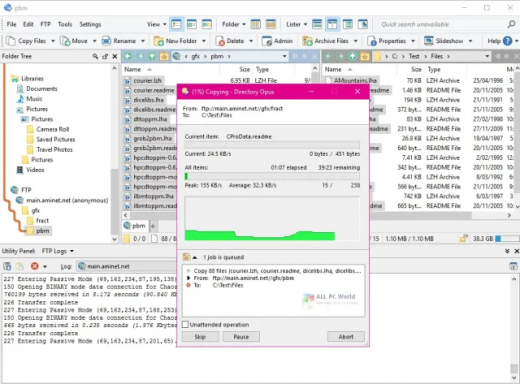
Description: Are you frustrated by the limitations of Windows Explorer? Directory Opus is a complete replacement for Explorer, with far more functionality than any other file manager available today.

You're in control.
Not just a simple file manager; Directory Opus lets you make your computer yours.
With a flexible user interface and unbelievable configurability, you can tailor Opus to streamline your workflow.
Dual panes, dual trees, multiple tabs.
Filter, sort, group your folders. Label and rate your files.
Queued file copies. Powerful batch renaming. Full archive support.
Find your files. Locate duplicates. Synchronize backups.
Assign tags and descriptions. Convert images. Edit metadata.
Fully multi-threaded, native 64 bit high performance code.
Whatever you want to do - Opus can probably do it. And if it's not built-in, you can take advantage of the unrivalled configurability to extend Opus using external tools.

What makes Opus unique?

Built for speed
Opus is written in native C++ multi-threaded code; compiled for the latest 64 bit CPUs, with high performance our number one design principle.

Fully configurable
Change the colors. Change the fonts. Change the toolbars and menus. Set up hotkeys. Opus adapts to how you want to use it.

Makes file management a breeze
Powerful searching, sorting, grouping, labelling and tagging features let you take control of your files like never before.

Endlessly extensible
Work with third-party tools as easily as with the built-in features. A full scripting interface, including scriptable dialogs, means your imagination is really the only limit.

Replace Windows Explorer and don't look back
Our unique Explorer Replacement mode provides a full replacement for Windows Explorer.
Single or dual pane file display and folder trees
Tabbed interface let you keep multiple folders open and switch quickly between them
Integrated viewer, metadata editor and utility panel
Built-in tools including synchronize and duplicate file finder
Leverage indexed search engines like Windows Search and Everything

High performance file management features
Copy, move, rename, duplicate, archive, view, backup and delete your files with ease
Queue multiple file copies for improved performance
Batch renaming including easy-to-use keyboard macros
Support for FTP and archive formats like Zip, 7Zip and RAR
Quickly filter, sort, group and search your folders
Color-code your files, assign status icons, star ratings, tags and descriptions
View images, documents and more. Image marking lets you sort your photos quickly and easily
Calculate folder sizes and print or export folder listings

Unrivalled configurability
Why let the programmers decide for you? You can tailor Opus to look how you want it to look, and to work how you want it to work.
Choose from light mode, dark mode, or design your own theme
Over 600 configurable colors and fonts
All toolbars and menus can be edited, plus you can add your own
Floating toolbars can act as program launchers
Configure your own hotkeys that work everywhere or just in Opus
Full scripting interface lets you design your own dialogs and add your own commands

Release Name: Directory Opus 13.22.4 Beta
Size: 29.4 MB
Links: HOMEPAGE – NFO – Torrent Search

Download: RAPiDGATOR

6 Comments
Apr 15

Syncovery Premium 11.14.4.185

Description: The ultimate sync, backup, copy and migration tool. Syncovery will copy your data the way you need it - and fast!
Multiple Platforms
Syncovery will easily fulfill your requirements: on Windows, macOS, Linux, FreeBSD, and NAS systems. Copy between local drives, network shares, mobile devices via MTP, or using FTP, SFTP, or WebDAV and many others.

Cloud Support
Includes support for many different cloud storages, such as Google Drive, Box, Amazon S3, Azure, DropBox, OneDrive, Rackspace, Sharepoint, Backblaze B2, Citrix Sharefile, and many others.

Create multiple Jobs
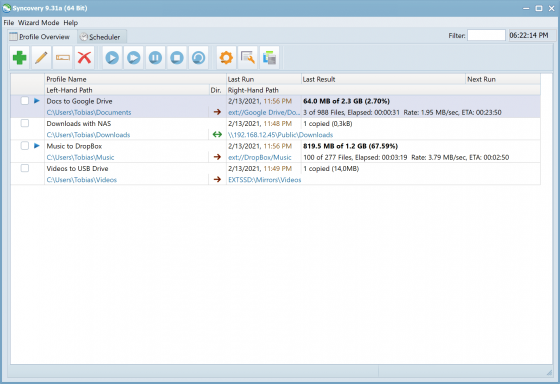
Create as many different jobs as you need. Run them manually (with Sync Preview), or let the scheduler run them automatically.

Handle complex Tasks
Syncovery is rich in features, including real-time sync, compression, encryption, email notifications, and much more. It can be extended via PascalScript.

Wizard Mode makes it easy to create your first profile.
Create your first sync or backup job step by step, with explanations of the main settings you need to make. Each job (or profile) works with two paths – source and destination, or just the left and right path (since profiles can be 2-way copy tasks also).

Extremely Fast Scanning
Syncovery’s multi-threaded folder listing algorithm provides an unparalleled speed, and easily handles millions of files and huge numbers of folders. Even more speed can be gained with our Destination File List Cache and Remote Service features.

Block Level Copying
This will help you save bandwidth as well as backup space. Syncovery can detect changed blocks in large files, and copy only these. The detection works by keeping checksums in a database, or with the help of the Syncovery Remote Service, or by using our revolutionary File System Monitoring Service (the File Sytem Monitoring Service is Windows only).

Real-Time Synchronization
Real-Time Synchronization will make sure that changes are synced quickly. Syncovery listens to file system events and quickly performs the appropriate actions. For cloud servers, it can use polling to detect changes. These features are available on Windows and macOS only.

SmartTracking
The SmartTracking sync mode is frequently used in two-way sync jobs. It can detect moved files, deleted files, and conflicts (files changed on both sides).

Versioning
Syncovery allows you to keep multiple versions of modified files, allowing you to restore your files from an earlier date. The restore date can be chosen for individual files or multiple files, in our Restore Wizard.

File Server Migration
Syncovery’s advanced NTFS copying features, high speed, and scaleability enable you to perform large-scale migrations. Read our new, comprehensive Server Migration Guide.

Release Name: Syncovery Premium 11.14.4.185
Size: 69.9 MB
Links: HOMEPAGE – NFO – Torrent Search

Download: RAPiDGATOR

6 Comments
Apr 15

Maxon CINEMA 4D 2026.2.0

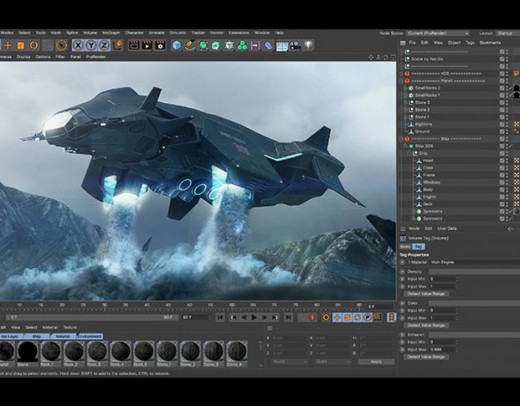
Description: Cinema 4D is a professional 3D animation, modeling, simulation and rendering software solution. Fast, powerful, flexible, and stable, this powerful toolset makes 3D workflows more accessible and efficient for design, motion graphics, VFX, AR/MR/VR, game development, and all types of visualization.

What's New
Cinema 4D 2025.1 delivers enhanced performance and reliability with an all-new Booleans system for precisely combining and subtracting shapes, allowing you to create unique and intricate models that defy cookie cutter conventions. The new Booleans produce clean geometry, ensuring final results are both visually appealing and technically sound. Multiple shapes can be combined in a single hierarchy, which makes it easy to animate cuts with Cinema 4D’s MoGraph toolset. Advancements in particle and rigid body dynamics allow for precise control over particle behavior, seamlessly integrating across various modifiers and emitters. Leverage the versatile Particle Node Modifier to craft intricate particle simulations using Scene Nodes, offering greater flexibility and creativity. Simulations benefit from enhanced collision detection in Rigid Body dynamics, ensuring realistic interactions. Improvements to USD Import and Export offer support for skeletal animation as well as camera and light properties. The modernized XRef system handles complex scenes with ease, allowing for easier team collaboration and better interoperability. Additionally, Cinema 4D introduces new training tools designed to help new users kickstart their journey into the 3D world.

Powerful 3D Modeling
Cinema 4D offers robust tools for creating intricate 3D models with ease and precision.

Animation Workflow
Cinema 4D provides a smooth and intuitive animation workflow, allowing users to bring their creations to life seamlessly.

Extensive MoGraph Tools
Cinema 4D’s comprehensive MoGraph toolkit empowers users to create complex motion graphics and procedural animations effortlessly.

Dynamic Simulation
Cinema 4D excels in dynamic simulations, enabling realistic 3D animations of fluids, cloth, rigid bodies, particles, and more.

Rendering
The integrated GPU-accelerated Redshift render engine is ready meet the challenging demands of creative individuals and studios of every size.

Transition seamlessly between 3D animation and rendering!
Now with Redshift, the powerful GPU-accelerated renderer in Cinema 4D, you can achieve professional-looking results faster with powerful tools and optimized workflows! Tailored to meet the specific demands of contemporary high-end production rendering, Redshift supports complex, advanced shading networks and texturing capabilities, ensuring production-quality rendering.

Release Name: Maxon CINEMA 4D 2026.2.0
Size: 1.2 GB
Links: HOMEPAGE – NFO – Torrent Search

Download: RAPiDGATOR

10 Comments