Please REGISTER or RENEW your account on RAPiDGATOR.net and support us by doing through all RAPiDGATOR working download links on main posts...
June 3

URL Manager Pro 6.4.9

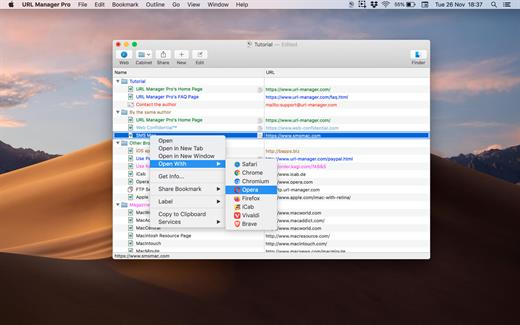
URL Manager Pro is the professional bookmark manager for Safari, Chrome, Chromium, Vivaldi, Opera, iCab, and Firefox browsers, making it easier to manage bookmarks.

This is a classic available since 1996, but now rewritten as a 64-bit application.

Features:

  • System-Wide Access: You can access your bookmarks in any application through a system menu.
  • Integration: You have access to your bookmarks from your browser’s menu bar and from the macOS Dock.
  • Document Storage: Your bookmarks are stored in URL Manager Pro bookmark documents, which you can store and manipulate in the normal Mac way. No need to hunt for your bookmarks in preferences folders of browsers. You can make automatic periodic saves and make copies of bookmark documents on backup devices on each save.
  • History: You can surf the Web using several different browsers while URL Manager Pro will keep recording the History of each.
  • Importing and exporting bookmarks: The File menu gives you a list of all of the browsers that URL Manager Pro can import from and export to. It lets you ‘harvest’ bookmarks by scanning HTML and text files for bookmarks and URLs.
  • It lets you edit and organize bookmarks fast: You can use inline editing, label and colour your bookmarks.
What’s New

Version 6.4.9:


  • Release notes were unavailable when this listing was updated.
Compatibility

macOS 10.13 or later, 64-bit processor


Release Name: URL Manager Pro 6.4.9
Size: 27.5 MB
Links: HOMEPAGE – NFO – Torrent Search

Download: RAPiDGATOR

4 Comments
June 3

iBarcoder 3.17.12

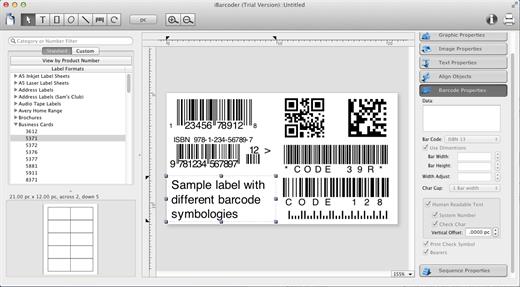
iBarcoder allows you to design and print your own barcoded labels, stickers, and tags. Create barcode graphics for retail packages, books, stickers, and more. Mac QR code and Datamatrix generator. Add text boxes, image boxes, rectangles, ovals and lines to your labels. Type in the necessary text, insert the desired images, to create the professional barcode labels for commercial use. Create sequential barcodes for catalogs and retail operations. Specify the sequence in which barcodes are printed or exported.

Smart, Intuitive Barcode Software


  • Create professional barcoded labels with a few mouse clicks
  • Live preview feature
  • Modify your Mac barcodes by changing types, sizes, and other attributes intrinsic to a certain barcode type. Advanced tools make customizing your barcode easy
  • Print barcodes directly to your printer using standard Avery formats provided
  • Create and save your own custom label formats
  • Export barcodes as a high-resolution image files, or vector graphics:

    • PDF (vector)
    • EPS (vector)
    • BMP
    • TIFF
    • JPEG
    • PNG
    • PNTG
    • Photoshop
    • …and more…!
  • Make the desired font and color settings
  • Copy, then paste finished graphics right to Adobe Illustrator, InDesign, Photoshop, or other software from Mac clipboard

Supports the following barcode types:


  • Postnet
  • Japanpost customer barcode
  • FIM Codes
  • Horizontal bars
  • UPC A
  • UPCE
  • EAN 13
  • EAN 8
  • ISBN
  • ISSN
  • Code 128
  • Codabar
  • ITF14
  • Code 39
  • Code 11
  • Code 93
  • MSI
  • Interleaved 2 of 5
  • Datamatrix
  • Intelligent Mail Barcode
  • Pharmacode
  • QR Code
What’s New

Version 3.17.12:


  • Release notes were unavailable when this listing was updated.
Compatibility

macOS 10.10 or later


Release Name: iBarcoder 3.17.12
Size: 16.6 MB
Links: HOMEPAGE – NFO – Torrent Search

Download: RAPiDGATOR

4 Comments
June 3

Rectangle Pro 3.80

Snap windows faster in this featureful Rectangle superset. Toss windows in the right places with cursor movement, move multiple windows with one command, create custom shortcuts, and more.

One simple key combo
• 16 window sizes & positions
• No need to remember a ton of keyboard shortcuts, but those are all here, too

A Supercharged Rectangle Superset
• Keyboard shortcuts
• Drag windows to screen edges to snap

PRO
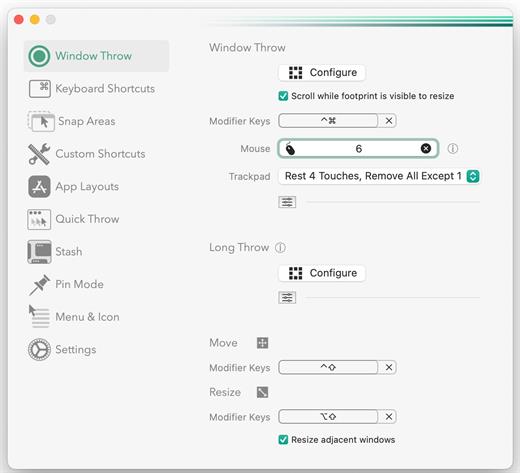
• Move and resize by holding a key and moving your cursor
• Snap windows under your cursor, even if not in focus
• Custom shortcuts for any size & position
• Sync your settings over iCloud

The Lightweight Gesture Champ
• Unlike touch gesture based window managers, Rectangle Pro only consumes CPU when configured modifier keys are pressed. Even then it’s minimal
• Rectangle Pro is a breeze to learn, and doesn’t conflict with any built-in macOS behavior
• Use it with any device that moves the cursor

Unmatched Customization and Actions
• Create keyboard shortcuts with any window size and location, and specify what happens on each repeated execution
• Fill left and right actions make it simple to maximize screen usage without overlap
• Match the keyboard shortcut window management of that other OS

Multiple Windows at Once
• Cascade windows
• Move all windows for an app to another display or screen half
• Tile top windows in a 2×2 or 2×3 grid

Additional Efficiency and Speed
• Each window action can be configured with a quick, simple cursor movement and modifier key combination
• Just press and release modifier keys while you move your cursor over the window you want to snap

What’s New

Version 3.80:


  • Release notes were unavailable when this listing was updated.
Compatibility

macOS 10.12 or later
Apple Silicon or Intel Core processor


Release Name: Rectangle Pro 3.80
Size: 8.9 MB
Links: HOMEPAGE – NFO – Torrent Search

Download: RAPiDGATOR

4 Comments
June 3

HelpNDoc Personal 10.6.0.365

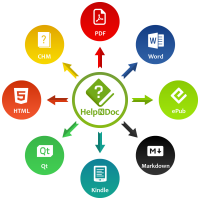
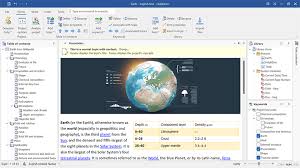
Description: HelpNDoc is a modern help authoring tool with an intuitive user interface. Write or import your content and produce more than 8 documentation formats including help files, web sites, user manuals, documents, Markdown, eBooks…

Stunning user interface
Benefit from a thoroughly thought-out, clean and simple user interface to speed-up the complex task of help and documentation authoring.

Generate multiple documentation formats
HelpNDoc projects can be exported to help files, web sites, documents and eBooks. It supports batch export, conditional generation as well as advanced customization options.

Responsive multi-devices, multi-screen size, cross-platform web sites. Create stunning online help and manuals compatibles with all devices and screen sizes. The HTML5 documentation generated by HelpNDoc can adapt itself to any device and screen size without additional work. Android and iPhone specific templates are also included and can be edited to customize any part of the generated HTML documentation.

Release Name: HelpNDoc Personal 10.6.0.365
Size: 95.5 MB
Links: HOMEPAGE – NFO – Torrent Search

Download: RAPiDGATOR

4 Comments
June 3

Video Downloader Ultimate 1.0.1.249

Description: Save your favorite videos from the internet to your hard drive before they are no longer available on the website. Choose from the live offerings of ARD, ZDF and many more a program that will be downloaded at the right time.

15,000+ Video Sites Supported
YouTube, Instagram, Facebook, Twitch, Dailymotion, Twitter, and more.
Download videos from from virtually any site.

Convert Downloaded and Local Videos
Convert downloaded or local videos to MP4, MP3 and MPEG files.

Download 3D, VR 180 and VR 360 videos
Download 3D and VR videos from platforms like e.g. YouTube.

Batch Download Videos
Save channels and full playlists from YouTube in high quality and various video or audio formats.

Download 4K Videos
Download videos in 8K, 4K, HD 1080p and HD 720p resolution. Enjoy them in high definition on your TV or mobile devices.

Download Live Streams
Video Downloader Ultimate supports recording live streams on YouTube, Twitch and many other platforms.

YouTube Subtitle Support
Download annotations and subtitles along with YouTube videos.

Private Content Download
Download private videos and playlists from e.g. YouTube. If you can access them in your browser, the will be detected and can be saved.

Convert Music Videos to MP3
Directly download or convert Music Videos to MP3.

Release Name: Video Downloader Ultimate 1.0.1.249
Size: 17.4 MB
Links: HOMEPAGE – NFO – Torrent Search

Download: RAPiDGATOR

5 Comments
June 3

Markdown Monster 4.4.1

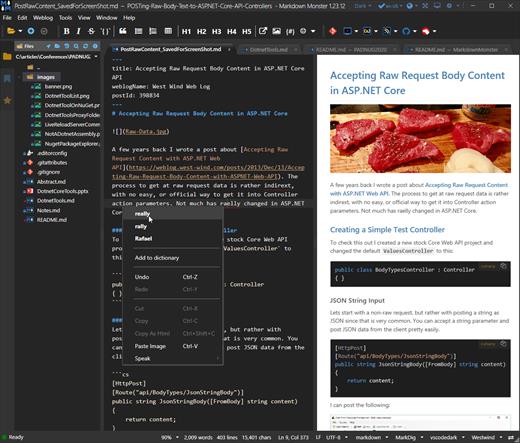
Description: Markdown Monster is a powerful, yet easy to use, dedicated Markdown editor with syntax highlighting and sophisticated and fast edit features. A collapsible, synced, live preview lets you see your output as you type and scroll. Easily embed or paste images, links, tables and code using raw markup or our smart UI helpers to simplify many operations with a few keystrokes or a click or two. Paste images from the clipboard or drag and drop from Explorer or our built-in file browser. Inline spell-checking and word counts keep your content streamlined.

You can export Markdown to PDF or HTML on disk or copy Markdown selections as HTML to the clipboard. The HTML preview can display syntax colored code snippets for most coding languages.

Choose from light or dark app themes and individually selectable and customizable preview and editor themes. Use the built-in folder browser to open, manage and drag files into content, the document outline to quickly jump through your open document, or the shell integration to shell out to Explorer, Terminal, Image Editor, Diff tool or your favorite Git client. Git support is also built-in to see local Git status and to commit to and update your repositories.

Everything is at your finger tips, but out of your way until you need it. .

Weblog Publishing
Markdown Monster can also publish your Markdown directly to your Weblog Service. If your blog supports WordPress, MetaWeblog, Jekyll or Medium, you can publish your documents with one click. You can also edit and republish, or download existing posts and even convert existing posts from HTML to Markdown.

Extensible via .NET
We also wanted to make sure the editor is highly extensible, so you can add custom features of your own. Markdown Monster includes an addin model that makes it easy to build extensions that let you hook into the UI, the editor behavior, markdown rendering and the publishing process. We also provide useful Scripting and Text Templating addins that let you automate many tasks without creating an addin. Find out more about creating an addin with .NET.

Features:
Easy and fast Markdown editing
Syntax colored Markdown text
Live Preview while you type
Inline spell checking
Easy image and link embedding
Paste images from Clipboard
Gentle toolbar support
File and Folder Browser
Favorites Manager
Document Outline
Git Integration
Built in screen capture
Two-way Table Editor
Import Html to Markdown
Export Markdown to Html
Dark and Light UI Themes
Customizable Preview Themes
High DPI Support
Weblog Publishing and Editing
Yaml Meta Data Support
Snippet Expansion Templates
Swappable Markdown Parsers
Extensible with .NET Add-ins

System Requirements:
Microsoft Windows 10 or later
.NET 7.0 (pre-installed)
WebView2 Runtime (pre-installed)

Release Name: Markdown Monster 4.4.1
Size: 19.9 MB
Links: HOMEPAGE – NFO – Torrent Search

Download: RAPiDGATOR

4 Comments
June 3

High-Logic FontCreator Pro 16.0.0.3068

Description: The world's most popular font editor. With over 5 million downloads to date, FontCreator is considered the world's most popular and best font editor. Create and edit (variable) OpenType and web fonts. An advanced feature set makes it the tool of choice for professionals, and its intuitive interface is straightforward enough for users at any expertise level.
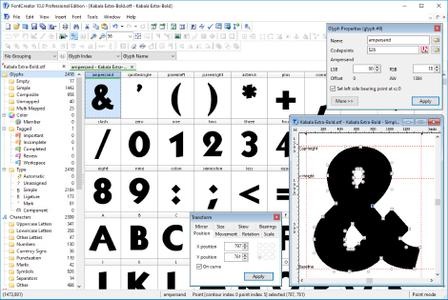
The newest release of FontCreator introduces hybrid glyph outlines, allowing designers to combine contours and components for greater creative flexibility. Now supporting the .glyphs file format, the software enhances collaboration by improving the interchangeability of font project resources. FontCreator provides a "what you see is what you get" (WYSIWYG) editing environment with real-time font proofing and testing during the design process. An upgraded shaping engine and interactive proofing tool further enhance your editing capabilities. Additionally, the join contours feature now supports cubic curves.

When you open or create a font in FontCreator, it displays all available characters in an overview. You can easily add missing characters or select and modify existing ones. The software enables you to import scanned images of signatures or company logos, and even create fonts from your own handwriting. You can adjust character code-points, font names, glyph names, and kerning pairs. At any point, you can preview your typefaces before installing them. FontCreator also allows you to create Variable Fonts by defining axes and outline layers. OpenType features are preserved when opening a font, and the OpenType Designer lets you visually edit these features and lookups. The OpenType proofing tool helps you quickly identify and fix text layout issues. Supporting both quadratic and cubic-based contours, this professional font editor includes smart features to ensure smooth connections where needed. Its validation tools assist in locating and resolving possible outline and interpolation issues.

As a fully native font editor, FontCreator doesn't require any additional purchases or installations of third-party tools or extensions.

Font Overview with Categories
The glyph and character category panel gives you quick and easy access to the glyphs, character subsets and Unicode ranges.

OpenType, TrueType and Web fonts
FontCreator supports all common font formats, including OpenType, TrueType, and Web Open Font Format (WOFF and WOFF2). These fonts are universally accessible across Windows, Mac OS X, Linux, and all modern web browsers.

Design High Quality Fonts
The standard and professional edition include font validation features which enable you to improve the quality of your fonts by locating and solving common glyph problems.

Optimize Contours
Optimizing glyph outlines will reduce the number of points that make up the contour(s). It supports both quadratic and cubic bezier curves.

Import Vector Images
High quality vector graphics can be easily imported. You can even copy and paste between FontCreator and your favorite vector editing software.

Import Raster (bitmap) Images
Effortlessly import scanned images of your handwriting or manuscript into fully-fledged glyph outlines.

Scalable Color Fonts
FontCreator is a versatile font editor that allows you to make scalable color fonts, supporting both COLR and SVG color extensions. This allows you to create multi-colored glyphs for systems that support it, while maintaining backwards compatibility for systems that do not.

Visual OpenType Designer
The intuitive OpenType Designer allows you to easily generate and modify OpenType layout features for both glyph substitutions and glyph positioning. The build-in anchor manager makes adding and editing mark to base and mark to mark positioning a breeze!

Kerning
Manually add kern pairs to your font supporting both individual glyphs and glyph classes. Alternatively let Autokerning take care of kerning for you in the standard and professional edition.

Powerful Transform Wizard
Both the standard and professional editions offer a robust transform wizard, simplifying the glyph transformation process with just a few clicks. Effortlessly add characters for other languages, small capitals, and beyond or transform your font to Italic or Bold.

OpenType Feature Proofing
Use FontCreator to debug OpenType layout features with the interactive proofing tool. It uses an advanced shaping engine which allows you to view, create, edit, and debug even the most complex fonts.

Optical Metrics
The optical metrics feature in the professional edition simplifies one of the most complex and time-consuming tasks in font design. It analyzes a set of the most common characters to find the best left and right side-bearings for each of these glyphs.

Complete Composites
The standard and professional edition allow intelligent generation of character outlines for more than 3000 (mostly accented) composite characters. It supports both composite data definitions and anchor based positioning .

Release Name: High-Logic FontCreator Pro 16.0.0.3068
Size: 29.4 MB
Links: HOMEPAGE – NFO – Torrent Search

Download: RAPiDGATOR

5 Comments
June 3

Metasequoia 4.9.1

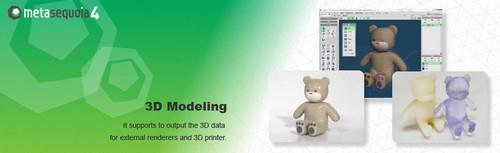
Description: Metasequoia 4 is the 3DCG modeling software for Windows. You can use it in much the same way on different platforms. All GUI components are displayed by vector drawings. Buttons and icons are displayed beautifully, in high resolution monitors (like as IGZO or Retina display).

Powerful modeling functions
Metasequoia has basic polygon editing functions. And it also has functions to assist in the finer processing.
The following features have been added and improved, in ver.4.0 or later.
Fill up a hole - It automatically fills in the holes on the surface.
Bridge - It creates a pipe-shaped polygon in between holes.
Bevel - creating a fillet surface (a rounded corner) is added
...etc.

N-gon (5 or more points in a face)
You can make a polygon with 5 or more points. And you can easily add edges (divide a face) or erase edges (merge faces).

Armature
By [Armature], you can create an object shape along the center line.
You can create an object by specifying only the center line and the line width. This feature will reduce the time to create the object. And you can edit the generated object in more detail by modeling capabilities.

Bone and Morph
Setting the [Bone], the object can be linked to the deformation of bones.
And [Morph] is a function to slide the vertex. You can create such as facial expressions.
Bone and Morph settings can be exported to the corresponding file format, FBX or PMD.

Measure (Metasequoia 4 EX only)
You can measure the size of the object. This function is for business use or 3D printer output.

View Unit
You can display units such as millimeters or inches on the screen. And, it is possible to make the input of numerical value with the unit.

Measure a length, an angle and a thickness
You can measure the distance, angle, thickness of any position. Changes in the numerical values associated with the movement or deformation of the object are displayed immediately.

Release Name: Metasequoia 4.9.1
Size: 163.3 MB
Links: HOMEPAGE – NFO – Torrent Search

Download: RAPiDGATOR

4 Comments
June 2

Directory Opus 13.23.5 Beta

Description: Are you frustrated by the limitations of Windows Explorer? Directory Opus is a complete replacement for Explorer, with far more functionality than any other file manager available today.

You're in control.
Not just a simple file manager; Directory Opus lets you make your computer yours.
With a flexible user interface and unbelievable configurability, you can tailor Opus to streamline your workflow.
Dual panes, dual trees, multiple tabs.
Filter, sort, group your folders. Label and rate your files.
Queued file copies. Powerful batch renaming. Full archive support.
Find your files. Locate duplicates. Synchronize backups.
Assign tags and descriptions. Convert images. Edit metadata.
Fully multi-threaded, native 64 bit high performance code.
Whatever you want to do - Opus can probably do it. And if it's not built-in, you can take advantage of the unrivalled configurability to extend Opus using external tools.

What makes Opus unique?

Built for speed
Opus is written in native C++ multi-threaded code; compiled for the latest 64 bit CPUs, with high performance our number one design principle.

Fully configurable
Change the colors. Change the fonts. Change the toolbars and menus. Set up hotkeys. Opus adapts to how you want to use it.

Makes file management a breeze
Powerful searching, sorting, grouping, labelling and tagging features let you take control of your files like never before.

Endlessly extensible
Work with third-party tools as easily as with the built-in features. A full scripting interface, including scriptable dialogs, means your imagination is really the only limit.

Replace Windows Explorer and don't look back
Our unique Explorer Replacement mode provides a full replacement for Windows Explorer.
Single or dual pane file display and folder trees
Tabbed interface let you keep multiple folders open and switch quickly between them
Integrated viewer, metadata editor and utility panel
Built-in tools including synchronize and duplicate file finder
Leverage indexed search engines like Windows Search and Everything

High performance file management features
Copy, move, rename, duplicate, archive, view, backup and delete your files with ease
Queue multiple file copies for improved performance
Batch renaming including easy-to-use keyboard macros
Support for FTP and archive formats like Zip, 7Zip and RAR
Quickly filter, sort, group and search your folders
Color-code your files, assign status icons, star ratings, tags and descriptions
View images, documents and more. Image marking lets you sort your photos quickly and easily
Calculate folder sizes and print or export folder listings

Unrivalled configurability
Why let the programmers decide for you? You can tailor Opus to look how you want it to look, and to work how you want it to work.
Choose from light mode, dark mode, or design your own theme
Over 600 configurable colors and fonts
All toolbars and menus can be edited, plus you can add your own
Floating toolbars can act as program launchers
Configure your own hotkeys that work everywhere or just in Opus
Full scripting interface lets you design your own dialogs and add your own commands

Release Name: Directory Opus 13.23.5 Beta
Size: 29.6 MB
Links: HOMEPAGE – NFO – Torrent Search

Download: RAPiDGATOR
7 Comments
June 2

QR-Code Creator 7.6.2.1

Description: Create QR codes in no time on your PC. The best part is that the codes are generated without an internet connection. The software calculates the codes directly on your local computer, so you don't have to worry about your data being read by third parties.

You can easily paste the generated QR codes into almost any application using the clipboard.

The software is constantly being developed and now includes a built-in prompt generator in addition to numerous canvases for visual enhancement.

Release Name: QR-Code Creator 7.6.2.1
Size: 34.3 MB
Links: HOMEPAGE – NFO – Torrent Search

Download: RAPiDGATOR
6 Comments