Please REGISTER or RENEW your account on RAPiDGATOR.net and support us by doing through all RAPiDGATOR working download links on main posts...
May 19

Folder-Factory 7.13.0

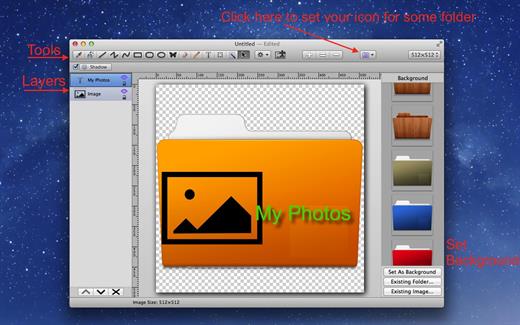
Folder-Factory is a basic icon tool for OS X which help you to customize, design and enhance your folder icons. With it you can combine folder icon with images, text, sketch, and shape. This will improve your system’s appearance, keep your Mac organized and improve your working productivity. You’ll no longer need to read folder names as you can now easily identify them. And at last, it has a friendly and clean UI and it’s really easy to use.

Key features:


  • Support retina display.
  • Customize, design and enhance your folder icons.
  • Support all kinds of tools. For example eyedropper, fill, line, rectangle, ellipse, pen, eraser, text, image, round rectangle and so on.
  • Config line width, pen color and fill color and so on.
  • Full support for transparency.
  • Add text on image.
  • Full support for undo/redo, cut/copy/paste.
  • Support drag and drop any files and folders.
What’s New

Version 7.13.0:


  • Release notes were unavailable when this listing was updated.
Compatibility

macOS 10.10 or later


Release Name: Folder-Factory 7.13.0
Size: 17.6 MB
Links: HOMEPAGE – NFO – Torrent Search

Download: RAPiDGATOR

4 Comments
May 19

NetShred X 6.1.0

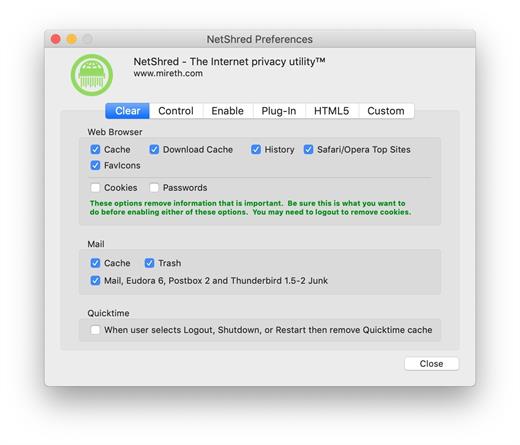
NetShred X is the easy-to-use Internet cache eraser for Mac that securely erases cache files your browser and email programs leave behind. NetShred X is the Internet privacy software that is easy, fast, and cleaner. Easy because it runs automatically – you don’t have to remember to use it. Fast because it runs in the background – you don’t have to wait for it. Cleaner because it will erase, not just delete all Internet tracks for almost every browser and email program on Mac.

Your Web browser stores copies of the images and text that you see when on the internet. This information can be recovered by anyone with access to your computer. These Internet tracks – browser cache, history, download cache, quicktime cache, favicons, cookies and email cache, trash, spam and junk mail – not only potentially compromise your privacy, they also take up a lot of disk space. Clearing your cache, throwing these files in the trash, or deleting them will not remove the file contents from the hard drive – it just removes the file name from the directory, leaving the data intact and recoverable. To dispose of these Internet tracks, you need an Internet eraser to erase them so they can’t be recovered.

What’s New

Version 6.1.0:


  • Release notes were unavailable when this listing was updated.
Compatibility

macOS 10.14 or later, 64-bit processor


Release Name: NetShred X 6.1.0
Size: 5.4 MB
Links: HOMEPAGE – NFO – Torrent Search

Download: RAPiDGATOR

4 Comments
May 19

Lyn 2.4.8

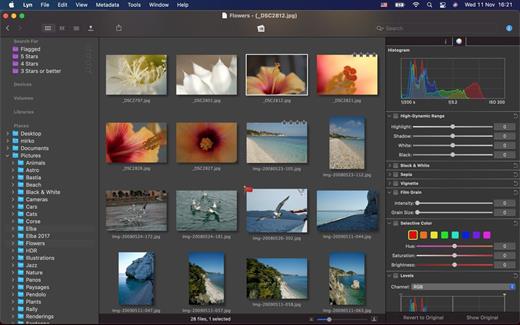
Lyn for macOS is a lightweight, and fast media browser and viewer for designed for Photographers, Graphic Artists and Web Designers.

Featuring an extremely versatile and aesthetically pleasing interface, Lyn delivers an easy to use geotagging technology, image editing and a complete solution for sharing your photographs.

Lyn natively supports all popular image formats from standard formats to HDR and RAW plus any other image format supported by macOS. It also integrates a movie player to watch camera recordings and a simple PDF viewer.

The new editing inspector gives you everything to turn your shots into great photos. Adjust exposure, color temperature, brightness, contrast or reveal image details with highlight and shadow. You change the individual curves and levels, or you can alter colors selectively. You can experiment and convert your color photos to black and white, try a classic sepia tone or add a vignette border or film grain.

Features:


  • Progressive display, on single- or multiple-monitor configurations, of images of virtually any size.
  • Multi-threading to take advantage of multicore CPUs.
  • Display color-corrected images and soft-proofing function.
  • Compatible with High Dynamic-Range images like TIFF float as well as Radiance and OpenEXR.
  • Common metadata parser: EXIF, Camera’s makernote, GPS, GeoTIFF, IPCT.
  • Image navigation with Apple Remote Control or Magic Trackpad.
  • User-switchable thumbnails cache.
  • Filtering by tags and metadata.
  • Fullscreen and slideshow with music.
  • Full IPTC editing with user-defined presets.
  • Batch operations: convert and rename.
  • User-defined places.
  • Non-destructive editing.
  • Editing inspector with filters and effects: temperature and tint, exposure, brightness, contrast, highlight, and shadow. Black and white, sepia tone, and vignette.
  • Easily browse your iPhoto, Aperture, and Lightroom libraries!
  • Facebook, Flickr, Dropbox, SmugMug, 500px, and Picasa Web Albums sharing!
  • Maps layout: geotag your photographs and edit locations with a simple drag and drop.
  • Integrated QuickTime video player
What’s New

Version 2.4.8:


  • Release notes were unavailable when this listing was updated.
Compatibility

macOS 10.11 or later


Release Name: Lyn 2.4.8
Size: 38.7 MB
Links: HOMEPAGE – NFO – Torrent Search

Download: RAPiDGATOR

4 Comments
May 19

Path Finder 26.1.1

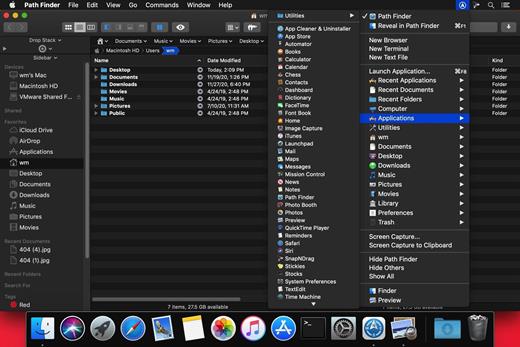
Path Finder makes you a master of file management. Take full control over your file system. Save your time: compare and synchronize folders, view hidden files, use Dual Pane and full keyboard navigation to browse your file system. Work how you want: extreme customization allows you to access most tools in many different ways to suit your workflow. Work seamlessly with other platforms: don’t leave any hidden .DS_Store files on non-Mac volumes, delete files securely and completely with the powerful delete feature from any volume type, search any network volume.

Features


  • View and manipulate hidden files
  • Dual Pane View
  • Full keyboard navigation
  • Folder comparison and synchronization
  • Folder merging
  • Batch renaming
  • Powerful file filtering
  • One-click dual-pane copy
  • Bookmarks and Tab Presets
  • ACL editor
  • File tagging
  • Editable Path Navigator
  • Powerful low-level search
  • Smart sorting
  • Advanced selection
  • Integrated terminal
  • Integrated text and image editors
What’s New

Version 26.1.1:


  • Release notes were unavailable when this listing was updated.
Compatibility

macOS 10.12 or later
Apple Silicon or Intel Core processor


Release Name: Path Finder 26.1.1
Size: 27.3 MB
Links: HOMEPAGE – NFO – Torrent Search

Download: RAPiDGATOR

4 Comments
May 19

Ghost Buster Pro 5.0.2

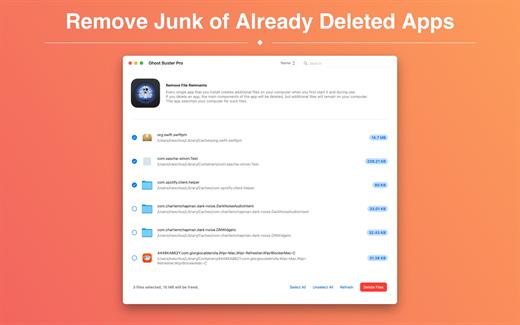
Ghost Buster Pro finds and deletes files from apps you’ve already uninstalled. The app is lightning fast and frees memory in no time.

Many apps are installed on a computer, but they usually only stay on your computer for a short time. Each app creates files, but deleting the app does not remove them.
This leads to a large number of files accumulating over time, which take up valuable storage space.
Ghost Buster Pro searches your computer for exactly such files and can also delete them directly if you wish.

Ghost Buster Pro offers the following features:

Fast Search

Ghost Buster Pro quickly scans your computer for data from previously deleted apps. You can have them deleted with one click.

Extremely easy handling

Ghost Buster Pro couldn’t be simpler. The search is started immediately after the app is started. You can now delete files with just one click.

No automatic deletion

Ghost Buster Pro does not delete any data without your consent. Choose for yourself which data is deleted and which you want to keep.

What’s New

Version 5.0.2:


  • Release notes were unavailable when this listing was updated.
Compatibility

macOS 11.5 or later
Apple Silicon or Intel Core processor


Release Name: Ghost Buster Pro 5.0.2
Size: 7.8 MB
Links: HOMEPAGE – NFO – Torrent Search

Download: RAPiDGATOR

3 Comments
May 19

QueueExplorer Professional 5.0.80

Description: Explorer-like management for queues. Works with multiple queuing systems. QueueExplorer supports multiple systems from the same installation, without need for additional licensing: MSMQ, Azure Service Bus, RabbitMQ, and ActiveMQ. With QueueExplorer you can do much more than with built-in management console - copy, move or delete messages, save and load, stress test, view and edit full message bodies (with support for XML, JSON, .Net objects...), and much more. QueueExplorer is a fast, native Windows application.

The indispensable tool for working with queues and messages:
understand and manage your system
figure out what went wrong
fix it

Find out all about your messages
With QueueExplorer you can dig into your queues and see which message went where, whether they were correctly formatted, with correct headers and settings, etc. Multiple viewers are at your disposal: JSON, XML, WCF, Hex, text with different encodings...

Develop and test producers and consumers separately
With QueueExplorer you can test individual pieces of your solution, or even simulate third party messages going in or out. You can create and edit test messages, send one by one or bunch of them together.

Test performance and load handling of your app
Send thousands of messages for performance testing to see how system handles that load.

Troubleshoot, fix, and resend problematic messages
If something is wrong, QueueExplorer is the fastest and easiest way to investigate and fix incorrect, poison, or failed/deadletter messages.

See status of your system at glance
Check if some of queues are growing too large, if there are messages in deadletter queues, etc. With autorefresh functionality see how entire system works in near real time.

Filter and sort messages to quickly find important data
QueueExplorer allows you to quickly find messages you're interested in. Professional edition allows you to even extract your business data from within messages using XPath, JSON, or Regex, and to immediately see e.g. invoice totals, etc.

Backup and restore messages
Backup messages to files, or move/copy them to another queue.

Copy, compare and sync queues, topics and other schema (metadata) objects
This can be used to migrate queues (and other objects) to another server, e.g. to propagate from development to production. Or just to compare and see which changes were made. Or to backup schema before changes are made. You can also duplicate queues with all their settings on the same server (Professional).

Release Name: QueueExplorer Professional 5.0.80
Size: 36 MB
Links: HOMEPAGE – NFO – Torrent Search

Download: RAPiDGATOR

4 Comments
May 19

Apowersoft Screen Capture Pro 1.5.6

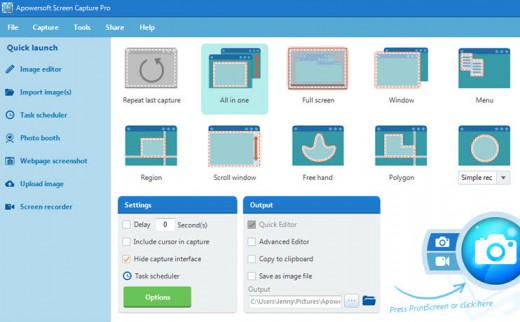
Description: Capture Anything on Screen. Thanks to the user-friendly interface, you are able to quickly access the features included in this program. Be it quick snapshot or easy screen recording, Apowersoft Screen Capture Pro allows you to utilize all of these through the stunning and reliable interface.

Multiple capture modes
From fixed region to window, full-screen, there's a wide range of capture modes that you can take full advantage of. The captured images can be saved in various formats such as PNG, JPG, BMP, PDF, etc. While, videos can be saved in MP4, WMV, AVI, FLV and many other formats.

Different scenarios
There are different situations in which you want to take screenshots or make video recording. For example, you may want to capture a single window, web pages, webcams, or select the capture area on your own. This screen capture software provides you with the unique opportunity to do all of these and much more.

Simple and Advanced Image Editors
Upon creating a snapshot, this professional screenshot tool will help you do everything no matter you need to perform multiple modifications, add annotations or just bring some effects. Thanks to the instant editing sidebars and advanced editing panel, all edits can be done quickly without any hassle.

Annotate screenshot instantly
By using the quick editor of this screenshot software, you can annotate the snapshot with editing options on the horizontal toolbar. It can help you quickly add lines, text, arrows, highlight, blur and others to the captured image.

Professional image editor
This application is also equipped with a professional image editor with which users can do all the annotations that simple editor provides, and make other advanced edits such as cropping, resizing, rotating, or even adding effects like shadow, torn edge, etc.

Create schedule tasks
The screenshot scheduler gives you the best option in this regard. Just take a short while to configure the time for activating the snapshot, and then you can rest assured and leave the other things for the program. It can also be used to surveil your computer in the background.

Flexible settings for scheduler
Users won't find it hard to create scheduled screenshots as it provides flexible settings for customizing the specific time, internal, region and the output folder for taking snapshots automatically.

Schedule screenshots daily/weekly
For those who need to make scheduled snapshots on daily/weekly basis, you can also make use of this screenshot tool to do this trick. You can access this feature simply by enabling the daily trigger for making screenshots.

Upload and share images
Apowersoft Screen Capture Pro also comes with an integrated image uploading and social sharing function, so if you want to upload images to cloud space or share the images with friends, you will be able to work it out within a few clicks. The whole uploading and sharing process comes seamlessly in this screen capture software.

Release Name: Apowersoft Screen Capture Pro 1.5.6
Size: 33.8 MB
Links: HOMEPAGE – NFO – Torrent Search

Download: RAPiDGATOR

3 Comments
May 19

Adobe XD 61.0.12

REPACK by monkrus

Description: With the help of Adobe XD CC anyone can create frames, high fidelity interactive prototypes and design applications and web sites. Once you will have a prototype, you can import visuals into Visual Studio or IDE of your choice to start creating the final application.

Interactive prototypes
Go to Prototyping with a click of Design. Combine drawing surfaces with each other to visualize navigation within large apps. Link design elements across the drawing area, B. Cells from repetition screens. Add interactions using visual controls to test and validate the experience.

Publish prototypes and get feedback
Generate weblinks to your designs that you can share with others to get feedback. Or embed it into a web page, For example on Behance. Comments can be attached directly to the prototype or to specific components of your design. You will be notified as soon as a comment has been added. To see your changes, checkers simply need to reload the link in the browser.

Liquid working with drawing surfaces
Whether you work with one or hundreds of workspaces, it does not matter: You can rely on the performance of XD. Create any number of designs for different screens and devices within a project. Pan and zoom without jerking or stuttering. Choose a template or define your own drawing area. Copy design elements between drawing faces while the layout is preserved.

repeating grid
Select an item in your design, Such as a contact list or a photo gallery, and duplicate it as often in the horizontal or vertical direction. All styles and distances are preserved. When you edit the item, the changes are applied to the entire design.
Platform-wide support

Control panel "Elements"
Colors and character formats are handy and reusable when you add them to the "Elements" panel (formerly "Symbols"). This panel also contains the icons. When you edit a color or format in the panel, the change is automatically performed throughout the document.

Next generation symbols
Work with time-saving symbols. The ready-to-use design components make it unnecessary to search for and edit each instance of an item in a document. When you edit an instance, all other instances are automatically updated. Overwriting certain entities is also possible. The symbols can be vector graphics, raster images or text objects, which you can also use as objects within repeating screens.

Creative Cloud libraries
With integration with Creative Cloud libraries, Adobe XD CC lets you access colors and character formats created in Photoshop CC, Illustrator CC, or any other Creative Cloud application, and use them in your design.

Release Name: Adobe XD 61.0.12
Size: 622.9 MB
Links: HOMEPAGE – NFO – Torrent Search

Download: RAPiDGATOR

3 Comments
May 19

IDimager Photo Supreme 2026.3.0.9093

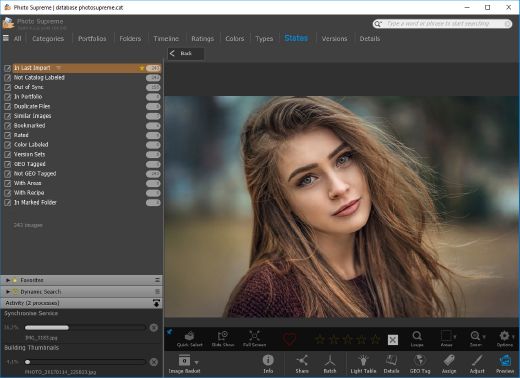
Description: Photo Supreme v2026 is a thoughtful and forward-looking release. This update has focused on smarter discovery, faster performance, and modern workflow expectations, especially around large catalogs, mobile integration, searches, and team environments.
Import and Select
One of the standout additions in Photo Supreme v2026 is the new multi-pass Import and Select workflow. This allows users to review and refine image selections in multiple stages instead of making all decisions in one pass. It’s especially useful for large shoots, letting photographers cull images more deliberately and with less pressure. In addition, the Import and Select feature now loads images faster than ever. Mac users will also appreciate direct iOS device importing, which makes it possible to bring photos straight from an iPhone or iPad into the catalog without relying on intermediary software. This significantly streamlines mobile-first workflows.

Powerful Searches
Photo Supreme now supports natural language searching, allowing users to find images using plain, conversational phrases rather than rigid metadata queries. This feature is powered by AI services such as OpenAI, Google Gemini, or local models with Ollama. This gives users flexibility in how advanced features are enabled. In addition, a new classification system enhances search accuracy by grouping images into meaningful categories upon import, making it easier to surface relevant results in large or complex catalogs.

Video & Media Handling
For users working with video, Photo Supreme v2026 introduces hover-based video previews. Simply hovering over a video thumbnail now reveals a short animated preview, making it much faster to identify clips without opening them individually. Support for modern formats has also been expanded, ensuring the software keeps pace with current media standards.

Sharing with ZIP
Exporting images is more flexible in v2026 thanks to ZIP output support in transfer profiles. This makes it easy to bundle images into a single archive for delivery, backup, or client sharing, all directly from within Photo Supreme. These enhancements simplify distribution workflows and reduce the need for external tools.

GEO Maps
GEOgraphic-Mapping features can now generate maps using not only Google Maps, but also OpenFreeMap with OpenStreetMaps. This removes the need for API keys while still delivering rich, interactive map displays. This update makes location-based browsing easier to configure and more accessible for all users.

Performance and Refinements
Photo Supreme v2026 delivers notable performance enhancements, resulting in faster browsing and a more responsive overall experience. Response times are improved by up to 10%, with especially noticeable gains for large libraries containing many catalog labels.
Catalogs with numerous stacks also see significant performance improvements, particularly when displayed in stacked views.
v2026 includes a wide range of refinements, such as: "Visually similar" stack detection, numerous stability fixes and workflow enhancements, polished UI behavior in collections, searches, and metadata handling

Wait, there's more, a lot more…
New "RAW Files" and "Video Files" catalog states
Added support for Google Gemini as an AI service
Added support for OpenAI GPT-5.2 as an AI Service
Added support for Ministral3 model with Ollama
Added file management support for ACR sidecar files
Update HTTP Server with Photo Supreme Online (Server Edition)
Faster face recognition
Added "AI-Estimated GEO Location" to the AI Panel
Faster result display in the Collection Viewer
"Cascade Metadata" from image to Stack or Version Set is now a background process
A highlighted stroke has been added to the active tabs, improving navigation
Now you can display metadata charts and graphs across multiple tabs
Added support for Ctrl/Cmd+Z functionality in text and memo fields
Defined the new Affinity v3 .AF and .AVIF file format as a supported "other file format"
Switching the collection viewer's view style is faster (eg from Basic to Grid to Clean to Custom Thumb Info)
Advanced Search now has an option to search by "File Size" and "File Size MB"
Finetuned the check for "need to compact" on PostgreSQL (Server Edition)
Bookmark keyboard shortcuts are now a "toggle", similar to ratings and color labels
Expanding nodes in the Catalog Tree is ~25% faster
When using the "Dump Full to Catalog File" feature, there's now the option to create either a "catalog dump" file, or a "catalog with thumbs" dump files
Added a XMP Storage Location for "original file AND non-standard sidecar file"
In "Stacked View", you can now select a specific item from the stack to show
Support for PostgreSQL 18.
And more…

Highlights for v2026
Multi-Pass "Import and Select": Seamlessly transition through passes with a fast-culling system that optimizes your workflow.
Direct iOS Image Import on macOS: Import images directly from your iOS devices with ease.
Video Thumbnail Preview: Hover over a video thumbnail or open the Quick View to view a live video preview.
Natural Language Search Powered by AI: Search your content using plain language, with smart integration through OpenAI, Google Gemini, or Ollama models.
Transfer Profiles can now create ZIP output files: Copy or send sets of images as a single ZIP file for easier sharing.
Maps with OpenFreeMap: Display images on interactive maps using OpenFreeMap/OpenStreetMaps with no API key needed.
Server Edition Thumbnail Caching: Enjoy faster performance with local thumbnail caching, automatic cleanup, and customizable settings for retention and cache size.
Classifications: Enhance search accuracy with an automatic image classification mechanism on import.

Release Name: IDimager Photo Supreme 2026.3.0.9093
Size: 162.1 MB
Links: HOMEPAGE – NFO – Torrent Search

Download: RAPiDGATOR

7 Comments
May 19

Ambiera Diagram Painter Professional 2.1

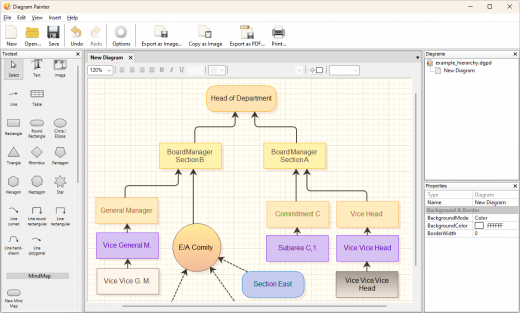
Description: Diagram Painter is an app which lets you quickly draw flowchart diagrams, mind maps, organization charts, and more. With a few clicks, you can then integrate the diagram in your favourite program, by copying it to the clipboard as image, or saving it as file. It exports diagrams as .png, .jpg, and .bmp image files, and even has an integrated fast .pdf exporter supporting shadows and transparencies.

Built-In Mind Maps
DiagramPainter has a built-in Mind Map editor. Automaticly layouted, customizable, style them however you want.

Lots of advanced features
The editor supports multiple diagrams per document, includes several intelligent line docking algorithms with free attaching to any point on any item, seemless and fast diagram zooming, lots of nice and different line modes (direct, polygon, round, hand-drawn), compressed undo management for a huge amount of undo steps, support for tables, and lots of predefined selectable styles.

Rich text everywhere
Diagram Painter supports instant full rich text editing in the diagram, everywhere. That means you can directly type your text into the diagram, and format it as you like, on all elements: Be it different font faces, sizes, alighment, text colors and more.

Release Name: Ambiera Diagram Painter Professional 2.1
Size: 11.9 MB
Links: HOMEPAGE – NFO – Torrent Search

Download: RAPiDGATOR

5 Comments